


 Chuyển đổi video Ultimate
 Trình ghi màn hình
 Sửa chữa video
Các phương pháp tuyệt vời để công nhận trong việc chuyển đổi TRP sang AVI [2021]
Các tệp video độ nét cao được lưu trong định dạng truyền tải MPEG-2 Phần 1 được gọi là tệp TRP. Phần mềm này thực hiện việc ghép kênh (multiplex) các luồng video và âm thanh số, đồng bộ hóa đầu ra. Nó cũng tích hợp các chức năng sửa lỗi. TRP là một thuật ngữ thường xuyên được nhắc đến trong phát sóng video số. Tệp TRP thường chứa dữ liệu video và âm thanh ở định dạng H.264 và AC3. Chúng có thể được xem và phát lại bằng nhiều ứng dụng phát video khác nhau. Với định dạng video mới này, có thể nghe khá lạ với một số người dùng, bạn có thể băn khoăn làm thế nào để chuyển đổi tệp mới này sang định dạng khác như TRP sang AVI? Hãy tiếp tục đọc bài viết này vì chúng tôi sẽ giới thiệu giải pháp khả thi có thể giúp bạn giải quyết vấn đề đang gặp phải.

Phần 1. Giới thiệu chi tiết về các định dạng video TRP và AVI
Định dạng tệp TRP là loại tệp video kỹ thuật số tuân theo các yêu cầu mã hóa video MPEG-2. Phần mở rộng tệp .trp được sử dụng cho các tệp TRP. Ngoài ra, các tệp TRP này được gọi là tệp video độ phân giải cao MPEG-2. Ngoài ra, tệp TRP chứa âm thanh kỹ thuật số được mã hóa A3C. Các tệp .trp này bao gồm các giao thức truyền tải độ phân giải cao cho các luồng DVD (phát video kỹ thuật số). Các thiết bị truyền hình đầu thu cụ thể và máy ghi video kỹ thuật số sử dụng các tệp TRP này để phát nội dung DVD. Các tệp .trp này có thể được xem và phát với sự trợ giúp của trình phát video và các công cụ đa phương tiện như trình phát phương tiện VLC của Nhóm Dự án Video LAN. Các công cụ chỉnh sửa và chuyển đổi video kỹ thuật số bổ sung có thể tạo, mở, chỉnh sửa và chuyển đổi các tệp TRP sang các định dạng video kỹ thuật số tiêu chuẩn khác.
Tuy nhiên, dữ liệu Audio and Video Interleaved (AVI) có thể được lưu trữ kỹ thuật số trong định dạng tệp AVI để phát lại. Tất cả các nền tảng Windows của Microsoft đều hỗ trợ sẵn định dạng AVI. Phần mở rộng tệp .avi được dùng để nhận diện các tệp AVI. Định dạng AVI được hầu hết các hệ điều hành lớn hỗ trợ, không chỉ riêng Windows. Các tệp video và âm thanh được tạo bằng nhiều codec khác nhau, như DivX hoặc XviD, có thể được lưu trong “container” tệp AVI. Tại đây, chúng tôi đã trình bày ưu và nhược điểm của định dạng tệp AVI, cùng với lược sử, cấu trúc và cách chuyển đổi định dạng này.
Phần 2. Làm thế nào để chuyển đổi TRP sang AVI ngoại tuyến
Bắt đầu với việc chuyển đổi TRP sang AVI ngoại tuyến, công cụ tốt nhất này đáng tin cậy trong việc khôi phục và xử lý nhiều định dạng khác nhau. Video Converter Ultimate có thể chuyển đổi TRP sang AVI với tốc độ nhanh nhất có thể. Thêm vào đó, bạn có thể thay đổi chất lượng đầu ra của video trước khi tải tệp lên. Trình chuyển đổi này cũng có nhiều công cụ khác giúp bạn nâng cấp tệp video lên một tầm cao mới. Vì nó hỗ trợ rất nhiều định dạng video, bạn sẽ không phải lo lắng về việc chuyển đổi những định dạng video lạ sang định dạng mong muốn. Giờ bạn đã biết về trình chuyển đổi tốt nhất này, hãy tìm hiểu các bước được hướng dẫn dưới đây:
Bước 1. Để bắt đầu, nhấp vào nút Free Download bên dưới để bắt đầu quá trình tải. Sau khi tải xong, bạn có thể chọn phiên bản phần mềm cho Windows hoặc Mac tùy ý. Trước khi chạy chương trình, bạn cần cài đặt nó lên máy tính để bàn của mình, rồi nhấp Start Now để bắt đầu.
Tải xuống miễn phí cho Windows 7 trở lên. Tải xuống an toàn.
Tải xuống miễn phí cho MacOS 10.7 trở lên. Tải xuống an toàn.
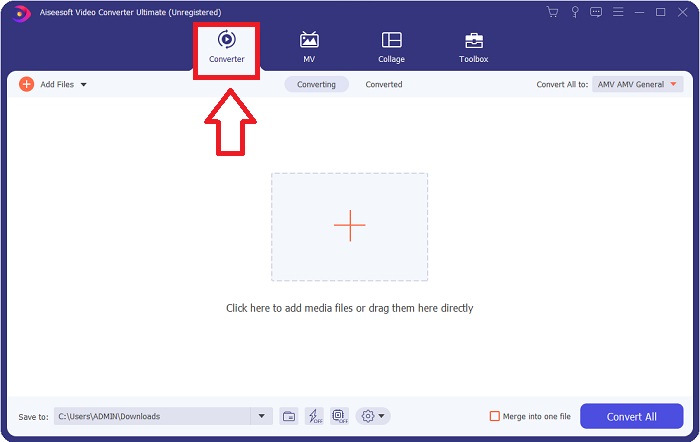
Bước 2. Khởi chạy ứng dụng vừa tải. Khi mở chương trình lần đầu, một cửa sổ với giao diện Converter sẽ xuất hiện. Đây là nơi bạn nhập tệp video và bắt đầu chuyển đổi.
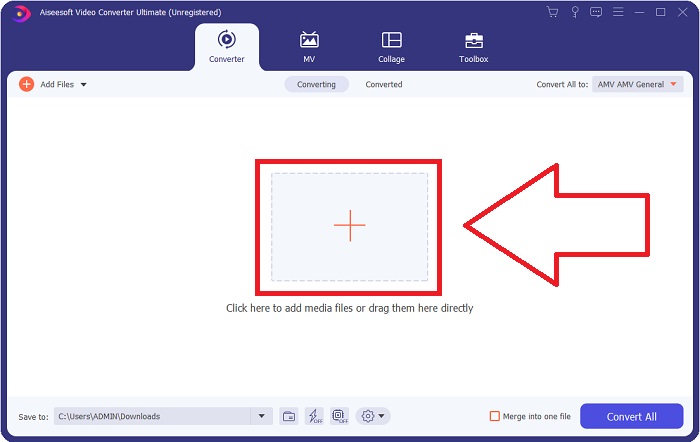
Bước 3. Nhập tệp của bạn vào phần mềm bằng cách kéo thả tệp video hoặc nhấp vào biểu tượng dấu +.
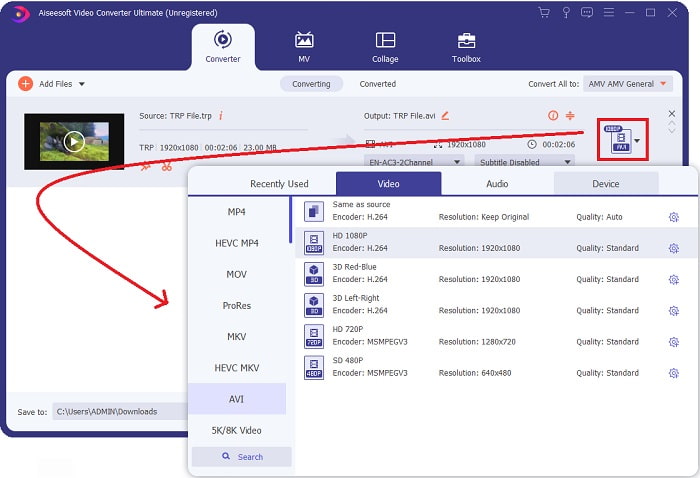
Bước 4: Ở góc trên bên phải, nhấp vào biểu tượng mũi tên xuống bên cạnh tùy chọn Convert All to để mở bảng. Sau đó, vào danh mục Video và chọn định dạng video AVI. Tuy nhiên, nếu định dạng đầu ra video bạn muốn không có trong danh sách, bạn có thể thay đổi cài đặt chất lượng cho phù hợp với nhu cầu. Bạn có thể điều chỉnh độ phân giải màn hình, tốc độ khung hình và thậm chí chất lượng âm thanh bằng cách nhấp vào biểu tượng bánh răng. Để lưu các thay đổi, nhấp vào nút Create New.
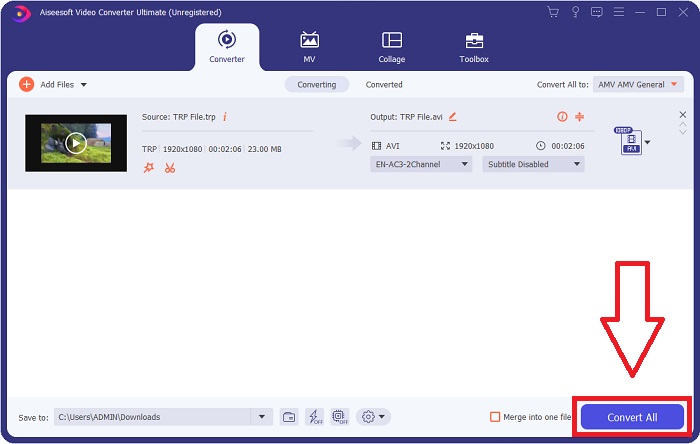
Bước 5. Khi bạn đã chỉnh sửa xong video và nó đã sẵn sàng để chuyển đổi, hãy nhấp Convert All để bắt đầu quá trình xuất video về máy tính của bạn.
Phần 3. Làm thế nào để chuyển đổi TRP sang AVI trực tuyến
Nếu bạn không có thời gian tải Video Converter Ultimate về máy, bạn cũng có thể dùng phiên bản trực tuyến của phần mềm này. Free Video Converter Online là công cụ web trực tuyến tốt nhất mà bạn có thể truy cập trên internet để chuyển đổi nhiều định dạng với tốc độ nhanh. Khác với một số trình chuyển đổi trực tuyến khác, công cụ này không giới hạn các định dạng có thể hỗ trợ; đó là lý do nó được khuyến nghị cho người dùng mới bắt đầu. Để biết thêm về công cụ web trực tuyến này, dưới đây là các bước hướng dẫn:.
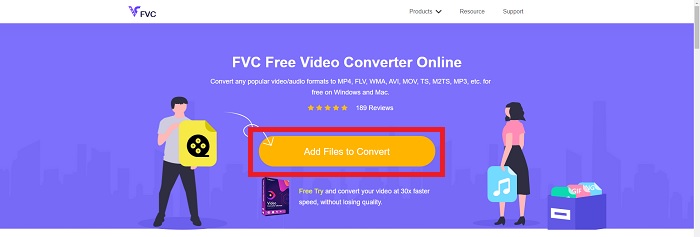
Bước 1. Truy cập trang web chính của trình chuyển đổi FVC bằng cách nhấp vào liên kết này.
Bước 2. Nếu đây là lần đầu bạn sử dụng, hãy nhấp vào nút Add Files to Convert để tải trình khởi chạy về máy tính. Sau khi tải xong, nó sẽ tự động khởi chạy. Chọn tệp từ thư mục của bạn và nhấp Open sau khi tệp được tải xuống xong lần nữa.
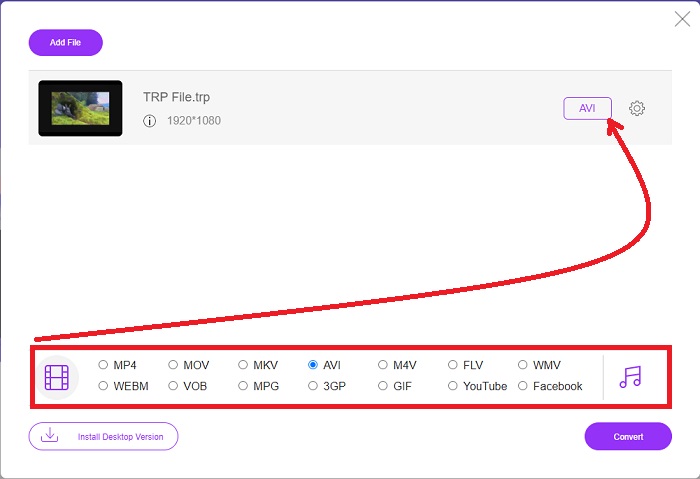
Bước 3. Trước khi quá trình chuyển đổi bắt đầu, hãy chọn định dạng AVI từ menu thả xuống bên dưới bằng cách nhấp vào đó.
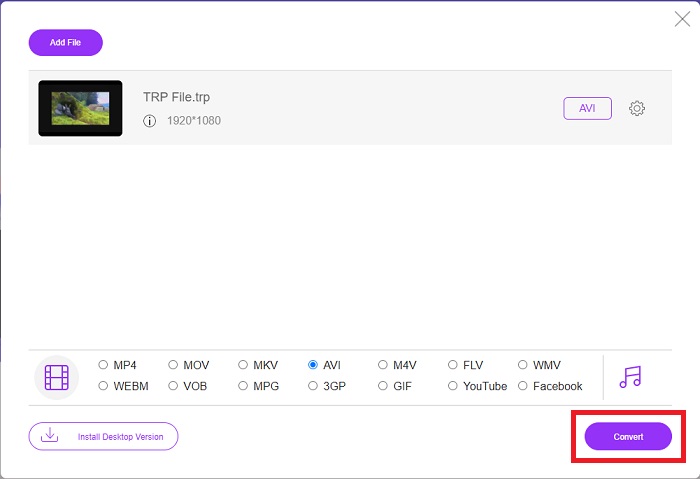
Bước 4. Sau khi chọn định dạng, nhấp Convert để bắt đầu quá trình chuyển đổi sang định dạng khác.
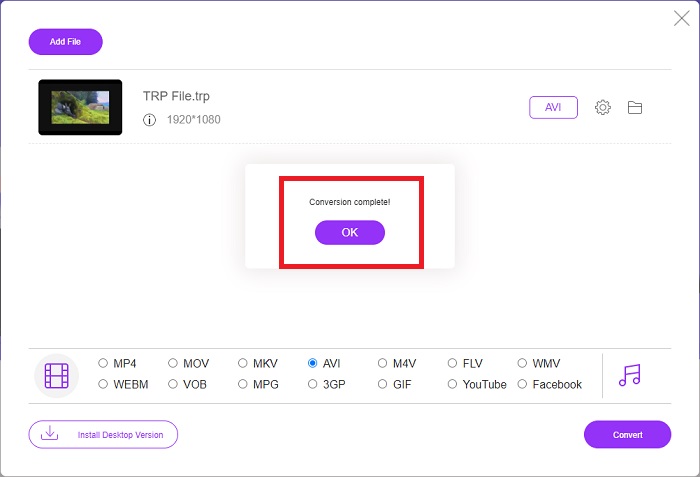
Bước 5. Sau vài phút, một cửa sổ thư mục chứa tệp đã được chuyển đổi sẽ xuất hiện; chỉ cần nhấp vào đó để bắt đầu xem.
Phần 4. So sánh giữa TRP và AVI
| Tính năng / s của | FVC Video Converter Ultimate | FVC Free Video Converter |
| Chuyển đổi hàng loạt |  |  |
| Phần cứng & Tăng tốc chuyển đổi | | |
| Kết nối mạng Internet | | |
| Cải tiến hoặc chỉnh sửa video | | |
| Chương trình được hỗ trợ | Công cụ dựa trên web | Công cụ dựa trên máy tính để bàn |
Phần 5. Câu hỏi thường gặp về Chuyển đổi TRP sang AVI
Công dụng của AVI là gì?
AVI là từ viết tắt của Audio Video Interleaved. AVI là một định dạng tệp video và âm thanh dùng để lưu trữ thông tin âm thanh và hình ảnh kỹ thuật số phục vụ việc phát lại. Nó cũng được dùng để lưu trữ thông tin video. Định dạng AVI được hỗ trợ mặc định trong tất cả các phiên bản hệ điều hành Windows của Microsoft. Phần mở rộng tệp cho các tệp AVI là .avi.
Nhược điểm của AVI là gì?
Khả năng nén kém và hiện tượng mất tỷ lệ khung hình khi cửa sổ trình phát media được phóng to là những vấn đề phổ biến nhất mà người dùng định dạng tệp AVI gặp phải. Có thể chuyển đổi tệp AVI sang tệp MP4. Do đó, nếu bạn đang làm việc với các tệp AVI, bạn nên hiểu tầm quan trọng của việc chuyển đổi này.
Lợi ích của TRP là gì?
Mức độ phổ biến của TRP của một kênh cho phép các doanh nghiệp nhắm mục tiêu đến khán giả dựa trên mức độ phổ biến của họ và đo lường lợi tức đầu tư của họ. Sử dụng phương pháp này, các công ty phát thanh truyền hình có thể tính phí các nhà quảng cáo mức giá tuyệt vời hơn khi các chương trình nổi tiếng hơn được phát sóng.
Phần kết luận
Từ những điểm trên, chúng ta thấy rằng Video Converter Ultimate là trình chuyển đổi tốt nhất mà bạn nên cân nhắc sử dụng trong số các công cụ trực tuyến khác. Vì có tốc độ chuyển đổi nhanh và hỗ trợ nhiều định dạng, nó được xem là công cụ/phần mềm được khuyến nghị để chuyển đổi những định dạng video lạ như TRP.
-
 Cách chuyển đổi TS sang AVI / MKV / MOV / WMV Trực tuyến & Miễn phí trên Win / Mac
 Bạn muốn chuyển đổi các tập tin TS sang AVI / MKV / MOV / WMV một cách nhanh chóng? Bài viết này hiển thị các trình chuyển đổi video trực tuyến và ngoại tuyến với hướng dẫn đầy đủ. Có lẽ bạn có thể nhận được trình chuyển đổi TS miễn phí tốt nhất tại đây.
-
 [Miễn phí & Trực tuyến] 7 cách chuyển đổi MTS sang AVI trên máy tính Mac / Windows
 Làm thế nào để chuyển đổi MTS sang AVI một cách dễ dàng? Trong hướng dẫn này, bạn sẽ tìm thấy 7 cách miễn phí và dễ dàng để chuyển đổi tệp MTS sang AVI trên Windows hoặc Mac mà không làm giảm chất lượng.
-
 Hướng dẫn chuyển đổi tệp MP4 sang AVI với 7 trình chuyển đổi video miễn phí
 Bạn muốn nhận tất cả các cách miễn phí để chuyển đổi video AVI sang MP4? Bạn không nên bỏ lỡ bài viết này. Dưới đây là 7 cách để chuyển đổi tệp AVI sang MP4 miễn phí trên Windows, Mac, iPhone, Android và trực tuyến.
