


 Chuyển đổi video Ultimate
 Trình ghi màn hình
 Sửa chữa video
Cách cắt ảnh GIF nhanh chóng với 4 bộ cắt ảnh GIF
Thay đổi kích thước GIF là một việc đơn giản nếu bạn dùng giải pháp tốt nhất để cắt GIF. Tuy nhiên, không phải trình chỉnh sửa GIF nào cũng cung cấp cách cắt ảnh chuyên nghiệp và thực tế. Tất cả những gì bạn cần biết về các trình cắt GIF đều có trong bài viết này. Để có đầy đủ những lựa chọn tốt nhất mà bạn có thể dùng, hãy xem chi tiết bên dưới và khám phá bốn công cụ cắt tuyệt vời giúp bạn thay đổi kích thước GIF của mình.

Phần 1. Cách cắt ảnh GIF trên Windows & Mac
Cách 1. Sử dụng Video Converter Ultimate - Trình cắt GIF tốt nhất
Đây là một công cụ chuyên nghiệp, luôn mang lại hiệu quả xuất sắc cho người dùng với mọi vấn đề họ gặp phải. FVC Video Converter Ultimate đã tham gia vào việc chỉnh sửa GIF bằng cách cắt, tỉa, crop hoặc thậm chí tạo GIF cá nhân. Công cụ này không chỉ mạnh về GIF, mà bạn còn có thể chuyển đổi GIF sang MOV, AVI, MP4, MKV, WMV và hơn 200 định dạng khác. Ngoài ra, quy trình mà công cụ này cung cấp hoàn toàn khác so với các công cụ khác vì nó hỗ trợ tốc độ xử lý cực nhanh để nhập và xuất file nhanh chóng. Hơn nữa, công cụ này đã giải quyết nhiều vấn đề liên quan đến chỉnh sửa GIF. Vì vậy, giao cho nó nhiệm vụ crop ảnh là rất đơn giản. Muốn học cách crop GIF? Trong trường hợp đó, các thông tin sau sẽ cho bạn một hướng dẫn nhanh để thực hiện thật dễ dàng.

FVC Video Converter Ultimate
5.689.200+ lượt tải xuống- Trình cắt ảnh GIF chuyên nghiệp và rất đáng tin cậy có sẵn trên Windows và Mac.
- Nó hỗ trợ chuyển đổi GIF sang các định dạng MP4, MOV, WMV, MKV, và hơn 200 định dạng.
- Các tính năng nâng cao bổ sung có sẵn để giúp bạn tạo GIF, tăng tốc hoặc làm chậm, v.v.
- Nó an toàn trước bất kỳ loại vi rút nào.
- Quá trình xuất cực nhanh để giúp bạn chuẩn bị sẵn ảnh GIF đã cắt ngay lập tức.
Tải xuống miễn phí cho Windows 7 trở lên. Tải xuống an toàn.
Tải xuống miễn phí cho MacOS 10.7 trở lên. Tải xuống an toàn.
Bước 1. Tải trình crop về máy bằng cách nhấp nút tải xuống bên dưới. Sau đó cài đặt phần mềm và nhấn Start Now để sang bước tiếp theo.
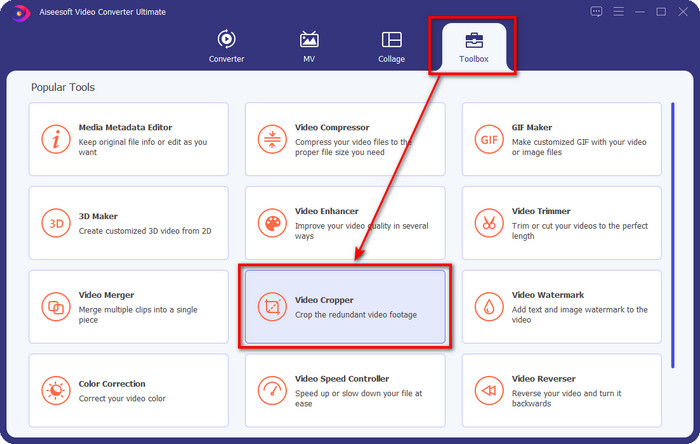
Bước 2. Khi phần mềm đã mở, nhấp vào Toolbox và tìm Video Cropper ở phía trên giao diện.
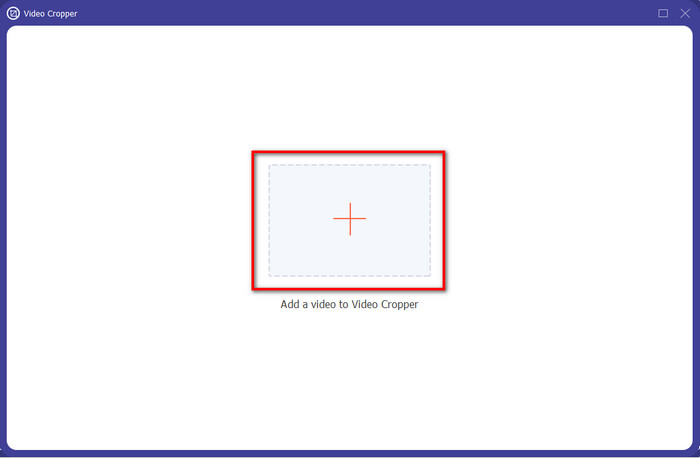
Bước 3. Một giao diện mới sẽ xuất hiện, hãy nhấp nút +; một thư mục sẽ hiện ra để bạn duyệt tìm GIF, nhấp chọn và ấn Open để tiếp tục.
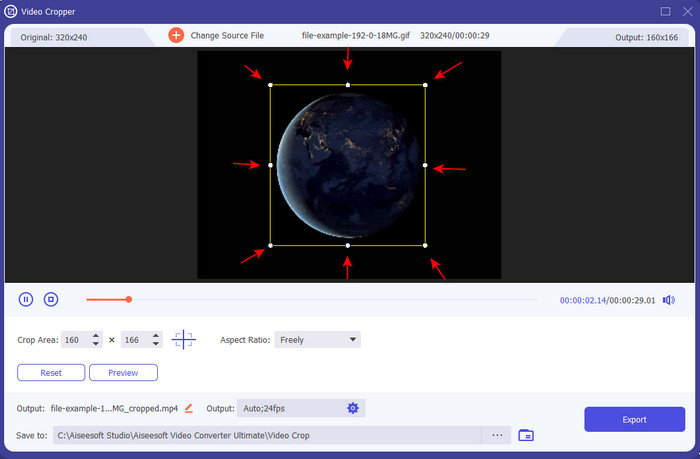
Bước 4. Nhấp vào tùy chọn Cut (biểu tượng chiếc kéo), sau đó một giao diện mới sẽ hiển thị trên màn hình, nơi bạn có thể crop GIF và điều chỉnh tỷ lệ khung hình (aspect ratio) theo ý bằng cách kéo thả các chấm nhỏ tự do.
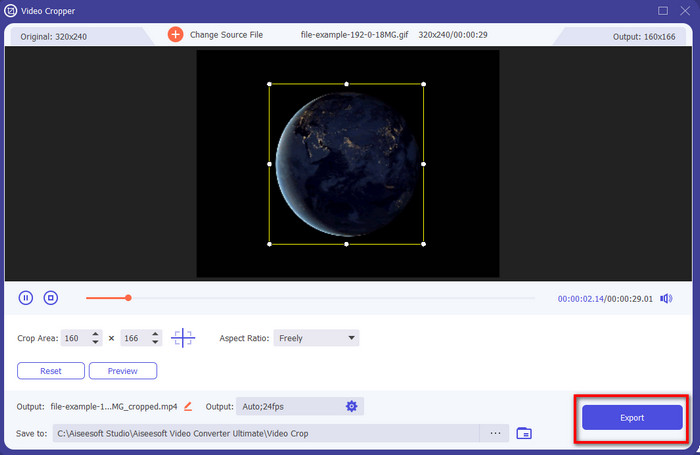
Bước 5. Sau khi điều chỉnh, bạn có thể nhấn Export để lưu và tải GIF đã crop về máy; xong, đơn giản như vậy là bạn đã crop xong GIF của mình.
Cách 2. Sử dụng Photoshop
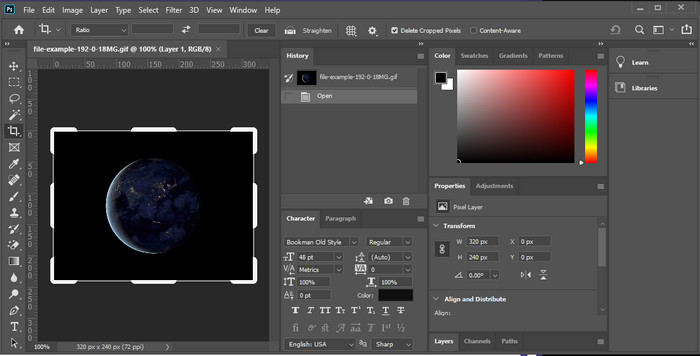
Photoshop là một công cụ chuyên nghiệp hỗ trợ chỉnh sửa nâng cao cho mọi hình ảnh bạn chèn vào, bao gồm cả GIF. Công cụ này đã giúp hàng triệu người dùng có kinh nghiệm thực hiện các thao tác chỉnh sửa phức tạp trên ảnh. Tuy nhiên, vì hỗ trợ quá nhiều tính năng chỉnh sửa nâng cao nên nó trở nên khá kỹ thuật với người mới, đặc biệt nếu bạn chưa có kinh nghiệm chỉnh sửa. Mặc dù có thể dùng làm trình crop, nhưng nó lại hơi “dư thừa” cho một tác vụ đơn giản. Tuy vậy, nếu bạn đang tìm cách crop GIF trong Photoshop, hãy làm theo các bước dưới đây.
Bước 1. Tải và khởi chạy Photoshop trên máy tính của bạn.
Bước 2. Nhấp File, tìm file GIF và ấn Open. Nhấn phím C trên bàn phím, sau đó điều chỉnh kích thước, nhấn Enter để tiếp tục.
Bước 3. Xuất file thành phẩm bằng cách nhấp Save trong menu File.
Phần 2. Cách cắt ảnh GIF trực tuyến
Cách 1. Sử dụng Ezgif
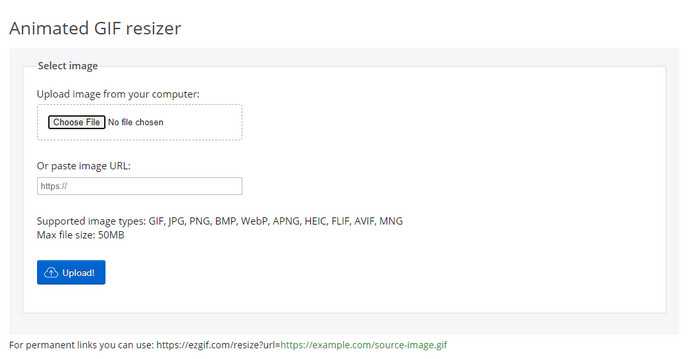
Nếu bạn cần trình crop GIF online, chắc hẳn bạn đã biết đến Ezgif. Không có gì lạ khi trình chỉnh sửa GIF trực tuyến này nằm trong danh sách vì nó nổi tiếng với khả năng chỉnh sửa. Không giống như các công cụ crop đã đề cập, nó miễn phí và bạn không cần tải về. Trải nghiệm tổng thể khá ổn, nhưng không phải tốt nhất vì các quảng cáo khiến công cụ online này trở nên khó chịu. Ngoài ra, nếu bạn crop GIF động tại đây, hãy chuẩn bị kiên nhẫn vì quá trình tải lên và tải xuống GIF sẽ tốn thời gian.
Bước 1. Mở trình duyệt và tìm Ezgif.
Bước 2. Vào mục Crop, nhấn Choose File, tìm file trong thư mục của bạn và nhấn Upload.
Bước 3. Kéo các frame dots theo ý bạn và nhấn Crop Image để tiếp tục.
Cách 2. iLoveIMG
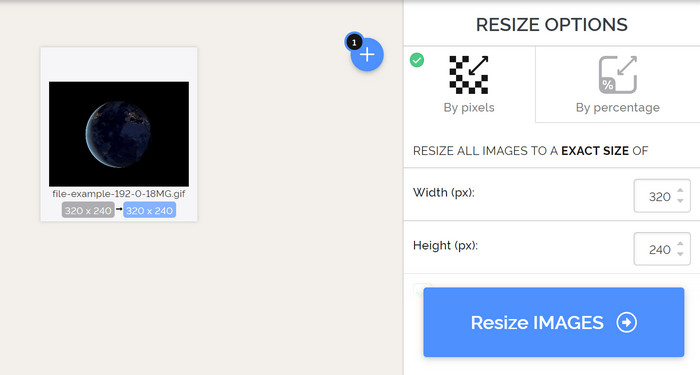
Hãy học cách crop GIF online với iLoveIMG. Công cụ này cung cấp các tính năng hỗ trợ bạn crop, thay đổi kích thước, nén và nhiều thao tác khác với hình ảnh. Hơn nữa, tốc độ tải lên và tải xuống ở đây tốt hơn Ezgif vì không mất quá nhiều thời gian để tải. Giả sử bạn không muốn tải trình crop về máy tính, thì công cụ này là một lựa chọn, giống như công cụ online đầu tiên đã đề cập. Nhưng hãy chấp nhận rằng một số quảng cáo trên giao diện có thể hơi gây khó chịu.
Bước 1. Mở công cụ tìm kiếm và tìm iLoveIMG rồi nhấp Crop Image.
Bước 2. Nhấn Select Image và duyệt chọn file GIF. Điều chỉnh tỷ lệ khung hình (frame ratio) theo nhu cầu và nhấn Crop Image.
Bước 3. Chờ quá trình crop kết thúc rồi tải file về.
Phần 3. FAQS về Cắt ảnh GIF
Tôi nên tìm kiếm những bằng cấp nào trong trình cắt ảnh GIF?
Có rất nhiều tiêu chuẩn bạn sẽ cần phải xem xét khi chọn trình cắt ảnh GIF và điều đầu tiên trong số đó là khả năng tương thích của công cụ trên nền tảng của bạn. Hãy nhớ đọc bài đánh giá về các công cụ để biết liệu chúng có khả dụng trên thiết bị của bạn hay không. Tiếp theo, nó an toàn với phần mềm độc hại, đặc biệt là trực tuyến hoặc có thể tải xuống; Cắt xén là một nhiệm vụ dễ dàng, nhưng hãy đảm bảo rằng người cắt xén của bạn là đáng tin cậy. Cuối cùng, cropper phải có một số tính năng mà bạn sẽ cần để xác định xem kích thước được cắt có phải là kích thước phù hợp hay không. Chúng bao gồm khung cắt xén, tùy chọn xem trước, chiều dài và chiều cao, v.v.
Sử dụng trình cắt ảnh GIF trực tuyến có an toàn không?
Hầu hết các trình crop GIF online đều an toàn, nhưng không phải tất cả. Vì vậy, trước khi truy cập, hãy đảm bảo công cụ online đó an toàn để tránh gây hư hại không thể khắc phục cho thiết bị của bạn.
Làm thế nào để đặt GIF làm nền?
Có rất nhiều cách để đặt GIF làm hình nền trên điện thoại và máy tính. Ngoài ra, chúng tôi còn cung cấp một công cụ bonus để giúp bạn tạo GIF bằng cách ghép nhiều hình ảnh hoặc video. Còn chần chừ gì nữa? Hãy nhấp vào liên kết này để tìm hiểu cách đặt GIF làm hình nền trên thiết bị của bạn.
Phần kết luận
Tất cả các cách có thể để crop GIF online hoặc offline đều có ở đây. Những công cụ chúng tôi đưa vào bài viết này đã chứng minh rằng việc thay đổi kích thước trở nên dễ dàng với sự hỗ trợ của chúng. Nhưng nếu bạn cần thành phẩm chuyên nghiệp và một công cụ tiện lợi, không rườm rà, thì FVC Video Converter Ultimate là lựa chọn tuyệt vời. Công cụ này tạo nên khoảng cách giữa một trình crop tốt và một trình crop xuất sắc. Vì vậy, nếu bạn cần crop như dân chuyên nghiệp, nút tải xuống bên dưới luôn sẵn sàng để bạn tải công cụ này.
Tải xuống miễn phí cho Windows 7 trở lên. Tải xuống an toàn.
Tải xuống miễn phí cho MacOS 10.7 trở lên. Tải xuống an toàn.
-
 Cách cắt tệp MP4 mà không làm giảm chất lượng video [2021]
 Tìm hiểu cách Cắt MP4 với các bước đơn giản chỉ dành riêng cho bạn. Vì vậy, hãy bắt kịp tốc độ vì chúng tôi giới thiệu cho bạn những công cụ cắt xén tốt nhất mà bạn có thể sử dụng.
-
 Tạo GIF động đẹp nhất của bạn thông qua Trình tạo GIF trực tuyến [2021]
 Một bài đánh giá nhiều thông tin, về cách tạo ảnh GIF bằng cách sử dụng các nhà tạo ảnh GIF trực tuyến đơn giản này mà bạn đã gặp hoặc chưa tìm thấy trên web.
-
 [Cập nhật năm 2021] 9 trình chỉnh sửa GIF tốt nhất cho PC, Mac, iOS và Android
 Bạn cần thêm dấu ấn cá nhân vào ảnh GIF của mình để ảnh có thể trở nên biểu cảm hơn? Tiếp tục đọc bài viết này để biết cách chỉnh sửa và công cụ tốt nhất cho công việc.
