


 Chuyển đổi video Ultimate
 Trình ghi màn hình
 Sửa chữa video
Cách chuyển đổi AVI sang WMV bằng bộ chuyển đổi miễn phí [Các bước nhanh]
Các tệp AVI (Audio Video Interleave), được Microsoft Corporation phát triển đầu tiên, là một định dạng video cao cấp. Định dạng này có độ phân giải chất lượng cao nhưng kích thước tệp lại rất lớn. Một cách phổ biến để phát video hoặc sử dụng tệp của bạn trên mọi nền tảng là chuyển đổi tệp AVI sang tệp WMV. Vì vậy, nếu bạn muốn biết thêm về cách chuyển đổi AVI sang WMV, hãy tiếp tục đọc, chúng tôi sẽ giới thiệu các trình chuyển đổi khác nhau kèm theo từng bước thực hiện.

Phần 1. Chuyển đổi AVI của bạn sang WMV trên Windows 10/11
Hệ điều hành Windows 10 hỗ trợ nhiều loại tệp mà bạn có thể tìm thấy trên mạng. Các tệp như AVI và WMV đều được Windows 10 hỗ trợ. Do đó, việc chuyển đổi tệp AVI sang tệp WMV sẽ trở nên dễ dàng, đặc biệt nếu bạn dùng trình chuyển đổi siêu nhanh FVC Video Converter Ultimate. Đây là một trong những trình chuyển đổi đáng tin cậy đang rất phổ biến hiện nay. Ngoài ra, phần mềm này còn cho phép bạn chỉnh sửa, nâng cao chất lượng và nén tệp. Nó cũng rất dễ sử dụng và có thể nhanh chóng chuyển đổi tệp AVI sang WMV trên Windows 10.

FVC Video Converter Ultimate
5.689.200+ lượt tải xuống- Cho phép bạn chuyển đổi các định dạng tệp khác nhau bao gồm AVI sang WMV, MP4, MOV, VOB, v.v.
- Có các tính năng cho phép bạn hợp nhất nhiều tệp thành một.
- Bạn có thể chỉnh sửa, nâng cao và nén tệp của mình.
Tải xuống miễn phí cho Windows 7 trở lên. Tải xuống an toàn.
Tải xuống miễn phí cho MacOS 10.7 trở lên. Tải xuống an toàn.
Dưới đây là các bước về cách chuyển đổi tệp AVI của bạn sang định dạng tệp WMV:
Bước 1. Để cài đặt FVC Video Converter Ultimate trên Windows 10, hãy nhấp vào nút Tải xuống bên dưới. Sau đó làm theo các bước cài đặt và chạy ứng dụng.
Tải xuống miễn phí cho Windows 7 trở lên. Tải xuống an toàn.
Tải xuống miễn phí cho MacOS 10.7 trở lên. Tải xuống an toàn.
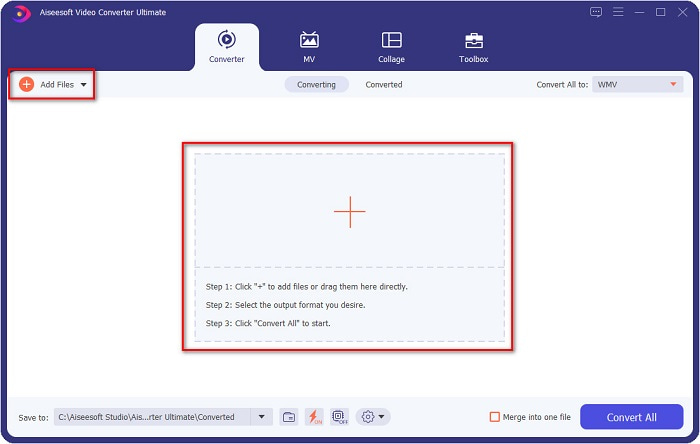
Bước 2. Sau khi mở ứng dụng, nhấp nút Add files ở góc trên bên trái màn hình, hoặc nút +, để thêm các tệp AVI vào giao diện chính của phần mềm. Cửa sổ chọn tệp trên máy tính sẽ xuất hiện, sau đó hãy chọn tệp AVI mà bạn muốn chuyển sang WMV. Nhấn nút Open để tải tệp lên.
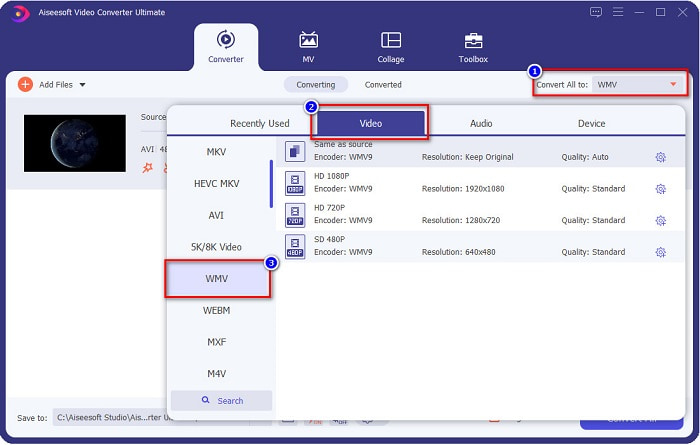
Bước 3. Để thay đổi định dạng tệp, nhấp nút Convert All to ở góc trên bên phải giao diện phần mềm. Danh sách các định dạng tệp sẽ xuất hiện, sau đó hãy chọn WMV trong mục Video.
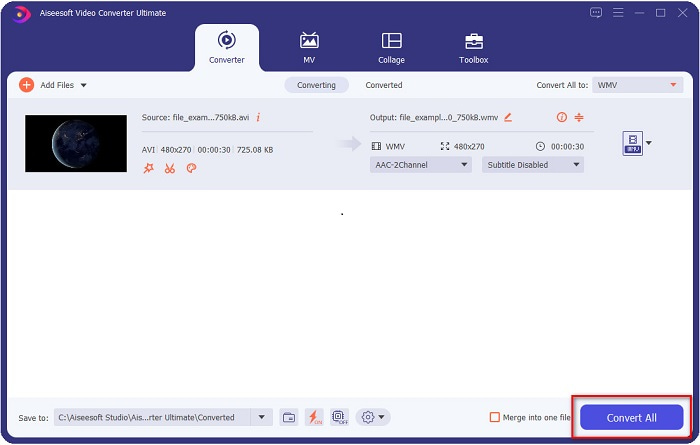
Bước 4. Sau khi chọn định dạng tệp WMV, nhấp nút Convert All để chuyển đổi tệp AVI của bạn sang tệp WMV. Chờ vài giây, và xong! Đơn giản như vậy, bạn có thể dễ dàng chuyển đổi tệp AVI sang WMV.
Phần 2. Cách chuyển đổi AVI sang WMV miễn phí
Khi chuyển đổi tệp AVI sang WMV, bạn cũng có thể sử dụng các công cụ chuyển đổi miễn phí có thể tải về. Một trình chuyển đổi nổi tiếng là Freemake Video Converter. Trình chuyển đổi ngoại tuyến này cho phép bạn chuyển đổi hơn 500+ định dạng như AVI sang WMV, MP3, MP4, DVD và nhiều hơn nữa. Tuy nhiên, giao diện đồ họa (GUI) không được đẹp và cũng không dễ dùng. Dù vậy, nó vẫn được nhiều người sử dụng để chuyển đổi tệp.
Hướng dẫn nhanh về cách chuyển đổi tệp AVI của bạn sang tệp WMV bằng Freemake Video Converter:
Bước 1. Tải ứng dụng bằng cách tìm Freemake Video Converter trên trình duyệt của bạn. Sau khi tải xong, hãy mở ứng dụng.
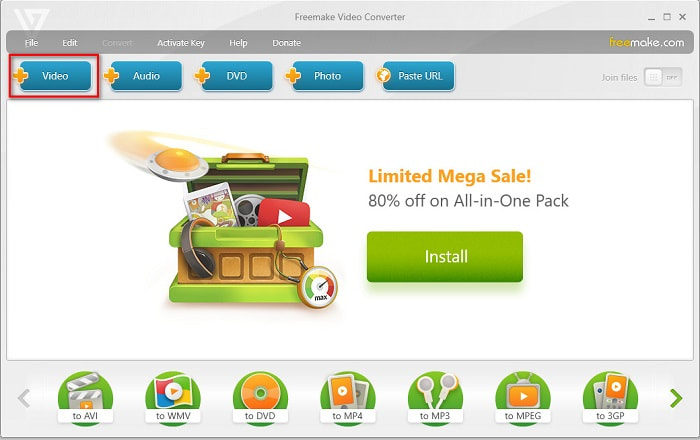
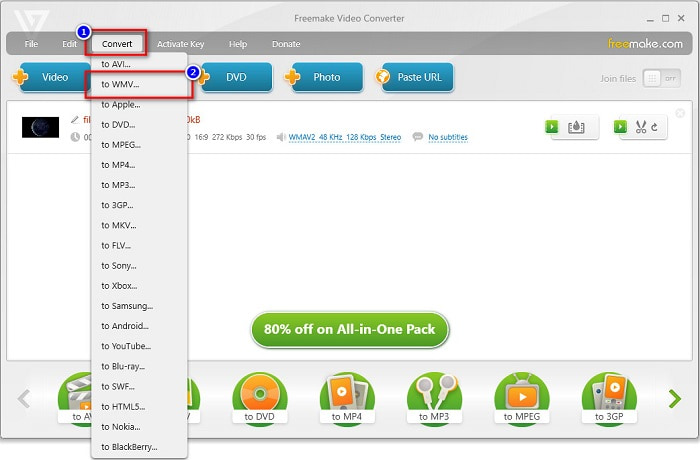
Bước 2. Sau khi mở ứng dụng, nhấp nút Video; khi cửa sổ tệp trên máy tính xuất hiện, hãy chọn tệp AVI của bạn. Nhấn Open để thêm tệp AVI vào hàng chờ.
Bước 3. Sau khi chọn tệp AVI, nhấp tùy chọn Convert ở phía trên giao diện phần mềm. Danh sách các định dạng tệp sẽ xuất hiện, sau đó hãy chọn WMV.
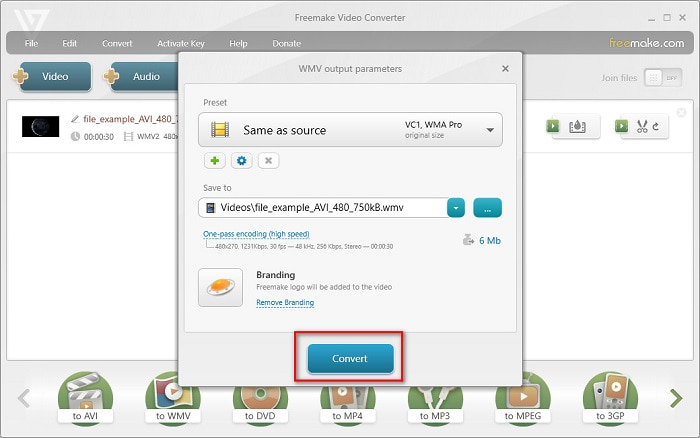
Bước 4. Một giao diện mới sẽ hiện ra, nơi bạn sẽ tiến hành chuyển đổi tệp. Nhấp nút Convert để bắt đầu chuyển đổi tệp AVI sang WMV.
Phần 3. Chuyển đổi tệp AVI sang tệp WMV trực tuyến
Không thể phủ nhận rằng chuyển đổi tệp trực tuyến tiện lợi hơn. Vì thế, chúng tôi đã thử một số trình chuyển đổi trực tuyến để chuyển AVI sang WMV online và chọn FVC Free Video Converter Online là công cụ đáng khuyên dùng nhất. Trình chuyển đổi này cho phép bạn chuyển đổi các tệp lớn mà không bị giới hạn. Tuy nhiên, bạn có thể gặp tình trạng chuyển đổi chậm vì công cụ này phụ thuộc vào Internet. Điều đó có nghĩa là tốc độ chuyển đổi nhanh hay chậm tùy thuộc vào kết nối mạng. Dẫu vậy, FVC Free Video Converter Online đã được rất nhiều người sử dụng và chứng minh là một trong những trình chuyển đổi trực tuyến tốt nhất.
Các bước chuyển đổi tệp AVI sang WMV bằng FVC Free Video Converter
Bước 1. Trên trình duyệt, hãy tìm kiếm FVC Free Video Converter Online.
Bước 2. Khi đã ở trên trang web, nhấp nút Add Files to Convert. Sau đó tải về trình khởi chạy xuất hiện khi bạn nhấp nút Add Files to Convert. Rồi chọn tệp AVI của bạn.
Tải xuống phiên bản dành cho máy tính để bàn để chuyển đổi tập tin hàng loạt.
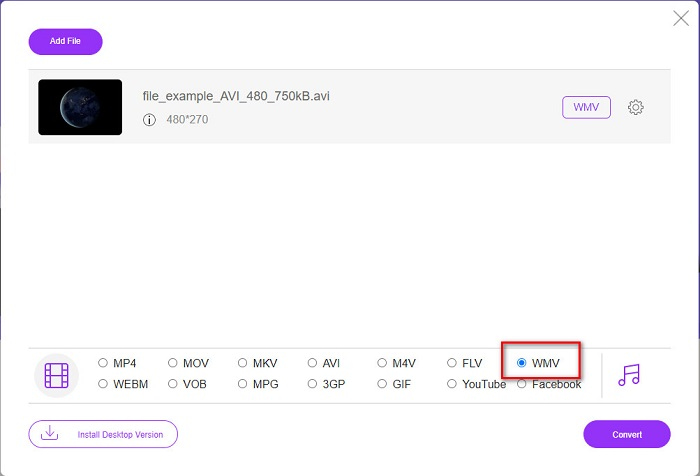
Bước 3. Sau khi chọn tệp, ở giao diện thứ hai của phần mềm, bạn sẽ thấy danh sách các định dạng tệp, sau đó hãy nhấp WMV.
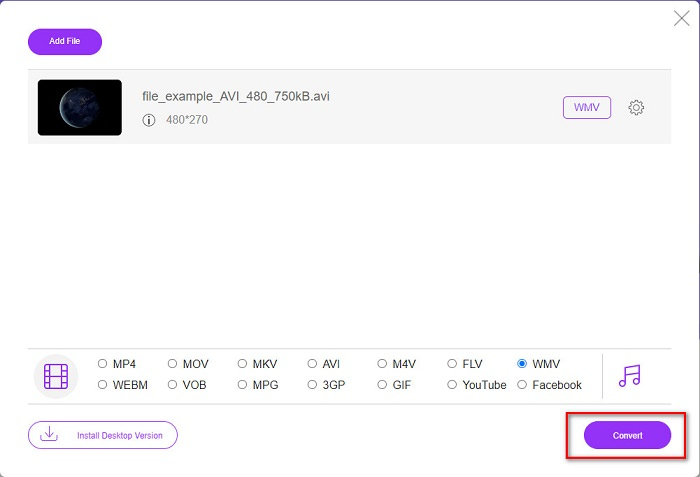
Bước 4. Cuối cùng, nhấp nút Convert ở góc dưới bên phải giao diện phần mềm. Cửa sổ tệp trên máy tính sẽ hiện ra, nơi bạn có thể chọn thư mục lưu tệp đã chuyển đổi. Sau đó quá trình chuyển đổi tệp AVI sang WMV sẽ bắt đầu.
Phần 4. Tìm hiểu thêm về AVI và WMV
Các tệp AVI hay Audio Video Interleave là định dạng video chuẩn cho máy tính Windows. Những tệp này chứa cả âm thanh và hình ảnh, sử dụng nhiều bộ giải mã (codec) khác nhau như DivX và XviD. Tuy nhiên, định dạng tệp này được nén rất ít, vì vậy kích thước tệp khá lớn. Ngược lại, WMV hay Windows Media Video được nhiều phần mềm và thiết bị hỗ trợ, và các tệp loại này được Windows Media Player nén lại. Hơn nữa, Hệ thống Windows thường phát tốt kiểu tệp này. Hãy đọc thêm Best WMV Players nếu bạn muốn phát các tệp WMV một cách dễ dàng.
AVI so với WMV
Dựa trên Định dạng Tệp Trao đổi Tài nguyên (RIFF), định dạng AVI được Microsoft giới thiệu vào năm 1992. Nó có thể lưu video / âm thanh chất lượng cao vì nó sử dụng ít nén hơn. Nhưng điều đó cũng gây ra kích thước tệp lớn của tệp AVI, có thể là một vấn đề khi có dung lượng hạn chế.
Được sản xuất bởi Microsoft, WMV là một trong những định dạng video phổ biến nhất vào những năm 2000. Nó có thể được nhìn thấy trên web và được phát bởi nhiều trình phát đa phương tiện trên Windows. Và nó cũng là định dạng tệp video mặc định của Windows Media Player. Nhưng nó đã được tiếp quản bởi các định dạng khác gần đây.
Phần 5. Câu hỏi thường gặp về Chuyển đổi định dạng tệp AVI sang WMV
Việc thay đổi AVI thành WMV có làm hỏng chất lượng của tệp không?
Khi bạn chuyển đổi AVI sang WMV, chất lượng tệp của bạn sẽ không bị ảnh hưởng. Tuy nhiên, một số bộ chuyển đổi không hỗ trợ video pixel chất lượng cao, khiến chất lượng giảm xuống.
Bạn có thể nén các tệp AVI không?
Có. Bạn có thể sử dụng các trình nén video trực tuyến. Bạn cũng có thể chuyển đổi tệp AVI sang định dạng WMV để giảm kích thước tệp. Ngoài ra, bạn có thể dùng FVC Video Converter Ultimate để nén các tệp AVI của mình.
Kích thước tệp của tệp AVI của tôi có thay đổi sau khi chuyển đổi không?
Có một số trường hợp kích thước tệp của tệp AVI của bạn có thể khác với kích thước tệp gốc. Bởi vì khi các tập tin được chuyển đổi, các tập tin nén sẽ không được nén, dẫn đến kích thước tập tin thay đổi một chút.
Phần kết luận
Tóm lại, các công cụ trực tuyến và ngoại tuyến được trình bày ở trên cho thấy các tính năng chuyển đổi đầy hứa hẹn có thể đáp ứng nhu cầu của bạn khi chuyển đổi tệp AVI sang WMV. Nhưng nếu bạn đang tìm kiếm một bộ chuyển đổi có nhiều tính năng sẽ giúp bạn đáp ứng nhu cầu của mình, chúng tôi khuyên bạn nên sử dụng FVC Video Converter Ultimate — bạn vẫn còn nghi ngờ về nó? Hãy thử ngay bây giờ và tận dụng tốt nhất các tệp của bạn!
-
 Hướng dẫn cụ thể giúp bạn chuyển đổi AVI sang FLV miễn phí
 Để chuyển đổi AVI sang FLV, bạn cần một công cụ chuyển đổi video mạnh mẽ. May mắn thay, bạn có thể học hai và hướng dẫn từng bước của chúng từ bài viết này.
-
 Cách chuyển đổi video AVI thành tệp GIF động trên Windows / Mac
 Bạn muốn chọn các đoạn AVI thú vị để tạo các meme GIF? Bài viết này sẽ cho bạn biết 2 phương pháp tốt nhất để cắt video AVI và chuyển đổi AVI sang tệp GIF động miễn phí.
-
 Quyết định phần mềm chuyển đổi AVI sang MP3 lý tưởng nào [PC & Mac]
 Bạn có muốn biết cách chuyển đổi AVI thành định dạng âm thanh MP3? Trong danh sách dưới đây, bạn sẽ gặp các công cụ và bước khác nhau cũng sẽ phù hợp với nhu cầu của bạn.

