


 Chuyển đổi video Ultimate
 Trình ghi màn hình
 Sửa chữa video
 Tải xuống an toàn
Chuyển đổi DIVX sang 3GP bằng các thủ tục hiệu quả nhất
Bạn không thể phát video DIVX trên thiết bị vì nó không được hỗ trợ? Rất nhiều người gặp cùng vấn đề. Nhưng bạn thật may mắn vì chúng tôi sẽ giới thiệu phương pháp hiệu quả và dễ dàng nhất để chuyển đổi DIVX sang 3GP. Đừng bỏ lỡ cơ hội này và tìm hiểu thêm về cách chuyển đổi nhiều loại tệp khác nhau bằng các ứng dụng uy tín, đã được kiểm chứng mà chúng tôi sẽ giới thiệu.

Phần 1: Phần mềm tốt nhất để chuyển đổi DIVX sang 3GP
Bạn muốn chuyển đổi DIVX sang 3GP trên các thiết bị như máy tính Windows và Mac? Vậy là vấn đề của bạn đã được giải quyết. Để chuyển đổi tệp DIVX, bạn có thể sử dụng Video Converter Ultimate. Ngay từ tên gọi, đây là một ứng dụng “tất cả trong một”, cho phép bạn chuyển đổi hơn 1000 định dạng video, bao gồm DIVX, 3GP, MP4, MOV, MTS, WEBM và nhiều định dạng khác. Bạn cũng có thể chuyển đổi đồng thời hai hoặc nhiều tệp vì công cụ này hỗ trợ chuyển đổi hàng loạt. Ngoài ra, Video Converter Ultimate còn có tốc độ chuyển đổi nhanh, rất hữu ích nếu bạn dự định chuyển đổi nhiều định dạng tệp.
Hơn nữa, bạn vẫn có thể sử dụng ứng dụng ngoại tuyến này nếu muốn chỉnh sửa tệp DIVX của mình trước khi chuyển đổi. Giả sử bạn muốn sửa màu cho video của mình, bạn có thể chuyển tới bảng Hộp công cụ và chọn công cụ Chỉnh màu để điều chỉnh độ sáng, độ tương phản và độ bão hòa của video. Hơn nữa, giả sử bạn muốn đồng bộ hóa âm thanh trong tệp video DIVX của mình trước khi chuyển đổi nó. Trong trường hợp đó, bạn có thể làm như vậy vì nó cung cấp chức năng Đồng bộ hóa âm thanh, vì vậy việc đồng bộ hóa âm thanh với video trở nên dễ dàng đối với bạn.
Tính năng:
◆ Chuyển đổi các định dạng tệp video, bao gồm MP4, M4V, FLV, AVI, v.v.
◆ Có thể tạo các Video Ca nhạc với nhiều chủ đề khác nhau.
◆ Hộp công cụ chứa công cụ cải tiến video, công cụ xóa hình mờ, máy nén, v.v.
◆ Có khả năng tạo ảnh ghép.
Ưu điểm
- Nó hỗ trợ nhiều định dạng tệp khác nhau, chẳng hạn như MP4, AVI, FLV, MOV, MTS, DIVX, 3GP, v.v.
- Có giao diện người dùng thân thiện phù hợp cho người mới bắt đầu.
- Có quá trình chuyển đổi nhanh hơn 30 lần
- Có thể truy cập trên cả Windows và Mac.
- Nó có thể chuyển đổi nhiều video trong một lần.
Nhược điểm
- Mua Video Converter Ultimate để tận hưởng nhiều tính năng độc đáo hơn.
Để chuyển đổi DIVX sang 3GP một cách dễ dàng, bạn phải làm theo các hướng dẫn đơn giản dưới đây.
Bước 1: Trước hết, bạn chỉ cần tải Video Converter Ultimate về thiết bị của mình, chẳng hạn như máy tính Windows hoặc Mac. Sau đó tiến hành cài đặt và mở ứng dụng.
Tải xuống miễn phí cho Windows 7 trở lên. Tải xuống an toàn.
Tải xuống miễn phí cho MacOS 10.7 trở lên. Tải xuống an toàn.
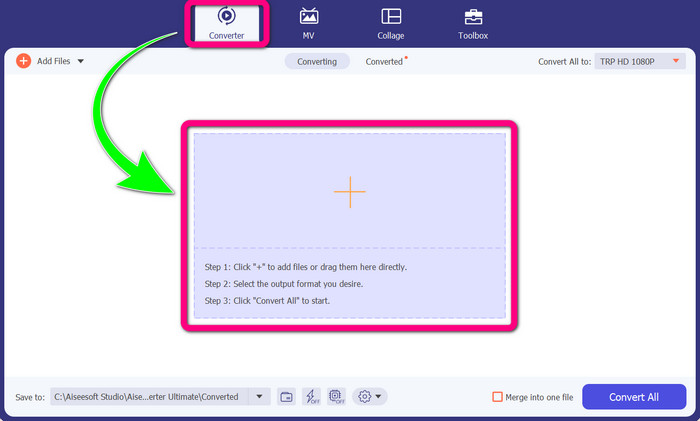
Bước 2: Khi đã mở Video Converter Ultimate trên thiết bị, hãy chọn bảng Converter. Sau đó nhấp vào biểu tượng dấu + để thêm tệp video DIVX của bạn.
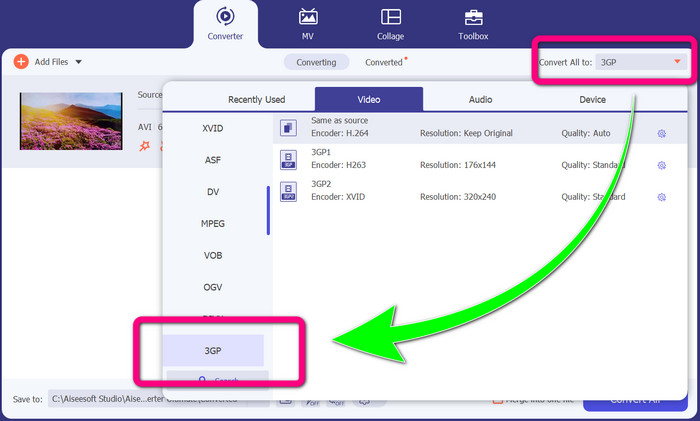
Bước 3: Sau khi thêm tệp video, nhấp vào tùy chọn Convert all to, tìm định dạng tệp 3GP và chọn nó.
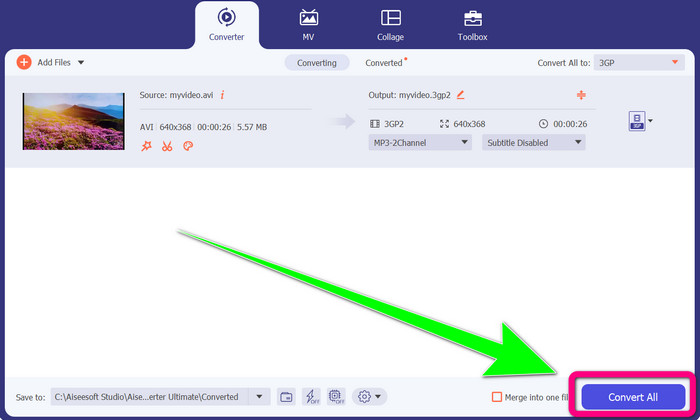
Bước 4: Khi đã chọn xong định dạng tệp 3GP, hãy nhấp vào Convert All button. Chờ quá trình chuyển đổi hoàn tất và lưu video cuối cùng về thiết bị của bạn.
Phần 2: Bộ chuyển đổi trực tuyến xuất sắc để chuyển đổi DIVX sang 3GP
Sử dụng Trình chuyển đổi video miễn phí FVC trực tuyến
Một trong những công cụ trực tuyến tốt nhất để chuyển DIVX sang 3GP là FVC Free Video Converter Online. Công cụ này có thể giúp bạn chuyển đổi các định dạng tệp khác nhau chỉ với vài cú nhấp chuột. Nó hỗ trợ hầu hết các định dạng video và audio phổ biến sang MP4, MOV, MKV, FLV, VOB, MP3, AAC và nhiều định dạng khác. FVC Free Video Converter Online rất đơn giản và dễ sử dụng. Ngay cả người mới bắt đầu cũng có thể thao tác được. Ngoài ra, dù bạn dùng Windows hay Mac, bạn đều có thể dựa vào công cụ này vì nó hỗ trợ cả hai hệ điều hành. Hãy làm theo các bước đơn giản dưới đây để chuyển DIVX sang 3GP.
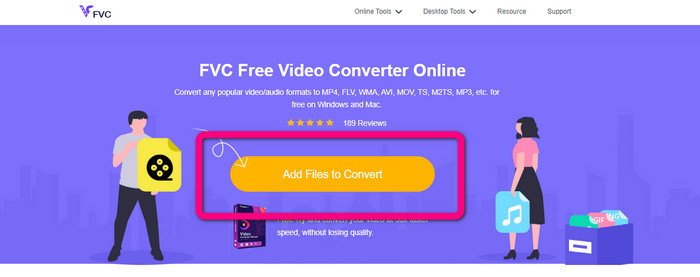
Bước 1: Truy cập FVC Free Video Converter Online. Sau đó, chọn nút Add Files to Convert để nhập tệp DIVX mà bạn muốn chuyển đổi.
Bước 2: Sau khi thêm tệp DIVX, hãy nhấp vào định dạng tệp 3GP trong các tùy chọn định dạng bên dưới.
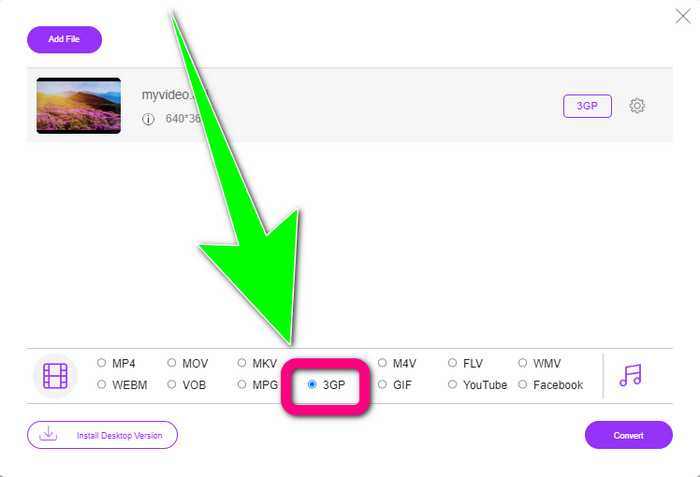
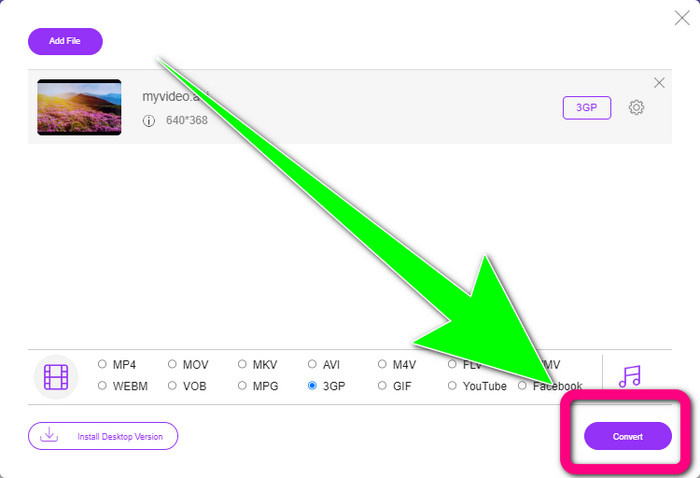
Bước 3: Tiếp tục bằng cách nhấp vào nút Convert. Chờ quá trình chuyển đổi và lưu video đã chuyển đổi của bạn.
Sử dụng Convertio
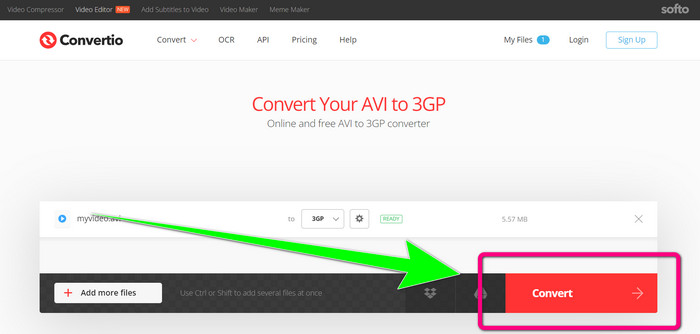
Nếu bạn muốn chuyển DIVX sang 3GP trực tuyến, Convertio là một trong những công cụ bạn có thể sử dụng. Nó hỗ trợ nhiều định dạng như 3GP, DIVX, XVID, AVID, MP4, M4V, ASF, HEVC và nhiều định dạng khác. Ngoài việc chuyển đổi tệp video, bạn còn có thể chuyển đổi hình ảnh, âm thanh, tài liệu, tệp nén và các loại tệp khác. Convertio cũng là một công cụ đơn giản vì bạn có thể chuyển đổi chỉ trong vài bước, nên bạn sẽ không phải vất vả khi chuyển tệp DIVX sang tệp 3GP. Tuy nhiên, giống như các công cụ trực tuyến khác, bạn không thể sử dụng phần mềm này nếu không có kết nối Internet. Thêm vào đó, đôi khi công cụ trực tuyến này hoạt động không được ổn định. Phiên bản miễn phí của Convertio có giới hạn: bạn chỉ có thể chuyển đổi tệp tối đa 100Mb. Bạn phải mua gói trả phí để tăng dung lượng tối đa và có được hiệu năng tốt hơn. Hãy làm theo các bước dưới đây để chuyển tệp DIVX sang định dạng tệp 3GP.
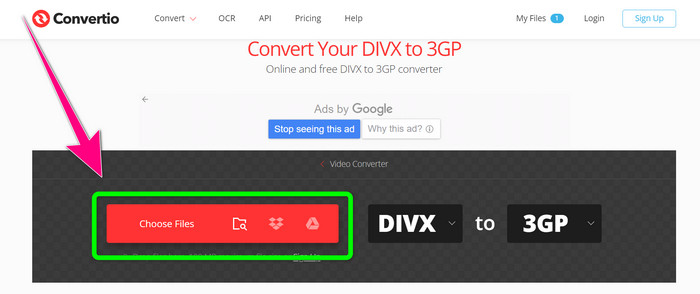
Bước 1: Truy cập trang web Convertio. Nhấp vào nút Choose Files và thêm video có định dạng tệp DIVX của bạn.
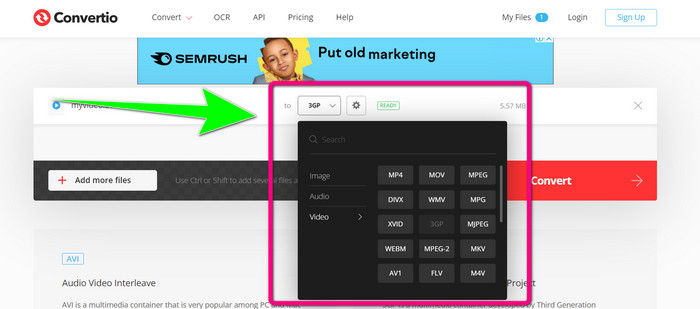
Bước 2: Sau khi thêm video, hãy vào các tùy chọn định dạng và chọn định dạng tệp 3GP.
Bước 3: Khi đã chọn định dạng tệp 3GP, hãy nhấp vào nút Convert, chờ quá trình chuyển đổi và lưu tệp video 3GP của bạn.
Phần 3: Tổng quan về Định dạng tệp DIVX và 3GP
DIVX
DIVX là phần mềm nén video có khả năng nén tệp video xuống còn khoảng một phần mười hai so với video gốc với mức suy giảm chất lượng tối thiểu. Định dạng video này thường được các hãng phim lớn như Disney, DreamWorks SKG, Universal và Paramount sử dụng.
3GP
3GP là một dạng vùng chứa đa phương tiện. Nó được Third Generation Partnership Project phát triển vào năm 1998 cho các điện thoại dùng GSM (Global System for Mobile Communications – Hệ thống Thông tin Di động Toàn cầu). Vùng chứa 3GP chỉ cần dung lượng lưu trữ, mức sử dụng dữ liệu và băng thông rất nhỏ, nên rất phù hợp cho điện thoại di động.
Đọc thêm
Dễ dàng chuyển đổi MTV sang MKV bằng những trình chuyển đổi mạnh mẽ này
Cách chuyển đổi TRP sang MKV mà không làm giảm chất lượng
Phần 4: Các câu hỏi thường gặp về Chuyển đổi DIVX sang 3GP
Bộ chuyển đổi DIVX là gì?
Đây là một công cụ tuyệt vời, có khả năng chuyển đổi nhiều loại tệp khác nhau sang vô số định dạng khác, gồm AVI, MP4, MPEG, MOV, FLV và nhiều định dạng khác. Sau khi chuyển đổi xong, bạn có thể phát video trên bất kỳ trình phát đa phương tiện nào hỗ trợ định dạng tương ứng. FVC Free Video Converter Online là một trong những bộ chuyển đổi tốt nhất mà bạn có thể sử dụng.
Định dạng tệp DIVX có giống với AVI không?
Định dạng tệp DIVX dựa trên bộ chứa AVI, nhưng nó có thể chứa các tính năng tuyệt vời như chương và phụ đề. Ngoài ra, cả định dạng tệp AVI và DIVX đều có thể phát được trên các thiết bị được chứng nhận DIVX.
Tôi có thể chuyển đổi tệp DIVX sang 3GP mà không làm giảm chất lượng không?
Có, tất nhiên là được. Với Video Converter Ultimate, bạn có thể chuyển tệp DIVX sang 3GP mà không phải lo lắng về việc chất lượng bị thay đổi. Trình chuyển đổi tuyệt vời này có thể chuyển nhiều loại tệp khác nhau mà không làm giảm chất lượng video của bạn.
Phần kết luận
Như bạn thấy, có nhiều phương pháp hiệu quả để chuyển đổi DIVX sang 3GP bằng cả công cụ ngoại tuyến và trực tuyến. Nhưng đôi khi, một số công cụ trực tuyến lại gây bất tiện, đặc biệt nếu bạn có kết nối Internet yếu, nên bạn có thể sử dụng ứng dụng có thể tải về máy. Nếu bạn đang tìm một công cụ ngoại tuyến nổi bật, bạn có thể thử Video Converter Ultimate.
-
 4 trong số các bộ chuyển đổi MKV sang 3GP tốt nhất cho Windows và Mac
 Nếu bạn đang tìm kiếm bộ chuyển đổi MKV sang 3GP dễ sử dụng, thì bạn là người may mắn! Chúng tôi đã tìm thấy các bộ chuyển đổi MKV sang 3GP miễn phí và tốt nhất mà bạn phải thử.
-
 5 công cụ chuyển đổi MOV sang 3GP tốt nhất mà bạn không nên bỏ lỡ
 Nếu bạn đang tìm kiếm bộ chuyển đổi MOV sang 3GP trực tuyến và ngoại tuyến tốt nhất, thì bạn đang đi đúng hướng. Đọc bài viết này để chuyển đổi MOV của bạn thành tệp 3GP.
-
 3 cách chuyển đổi MPG sang 3GP trên Windows và Mac [Miễn phí]
 Nếu bạn đang tìm cách chuyển đổi MPG sang 3GP, hãy đọc bài viết này để biết những cách tốt nhất để chuyển đổi MPG sang 3GP trên Windows và Mac.
