


 Trình ghi màn hình
 Sửa chữa video
 Tải xuống an toàn
Cách xóa nền khỏi ảnh GIF bằng các chương trình hiệu quả
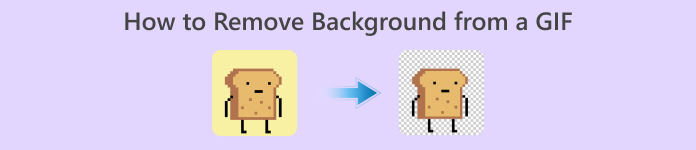
GIF is the short term for Graphics Interchange Format and is used widely in online communications, such as messaging someone or even commenting on a post. Removing background from GIFs or images can be hard unless you have software programs that are made to do that kind of task! Due to its popularity, more users are intrigued by how to edit and create their own GIFs. Luckily, we have gathered reliable and easy-to-use online software that could help users remove background from GIFs.
Khuyến nghị: Công cụ xóa nền miễn phí FVC
FVC Free Background Remover is a useful utility when it comes to removing background from your pictures. It uses AI to trace out and recognize the person within the photo. Moreover, the tool is available on Windows/Mac. Overall, it is a convenient and reliable tool that you can use anytime and anywhere.
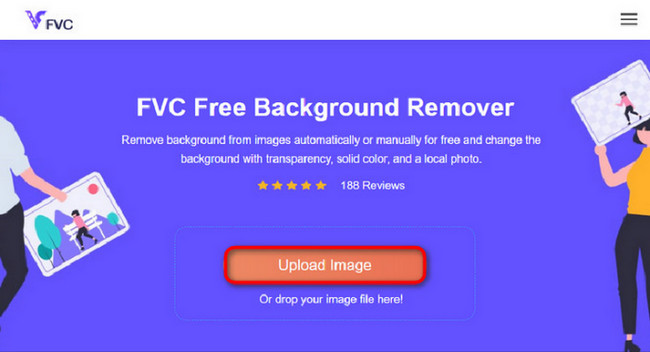
Step 1. Upload Image/GIF
The first step is to open the browser on your computer. Upon opening the online program, you are met with the option to upload your image. Click Upload Image to add the GIF you wish to remove the background from.
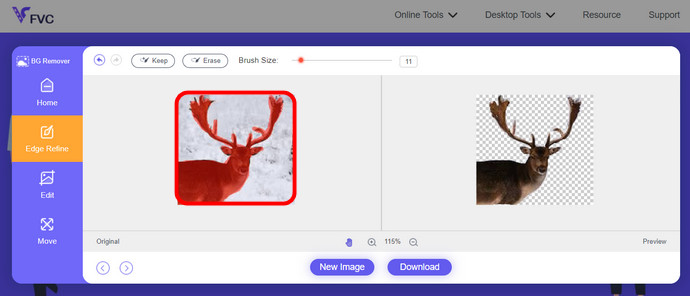
Step 2. Edit Image
Sau khi tải lên, giờ đây bạn được phép xóa mọi phần xóa điểm nổi bật không chính xác khỏi nhận dạng AI. Chỉ cần nhấp và kéo chuột và làm theo ý thích của bạn.
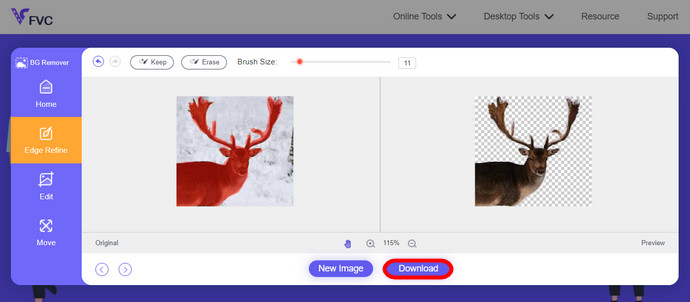
Step 3. Download Edited Image
Then finally, click the Download button. You now have successfully removed the background from your picture.
Phần 1. Xóa nền GIF bằng EZGIF.com
Phần mềm trực tuyến này là phần mềm chuyển đổi và chỉnh sửa ảnh/gif. Nó có thể chỉnh sửa và chuyển đổi GIF, PNG, WEBP, IMG và nhiều định dạng khác. Tại đây, bạn có thể chỉnh sửa GIF của mình bằng phần mềm chỉnh sửa đi kèm với phần mềm.
Step 1. Enter Site
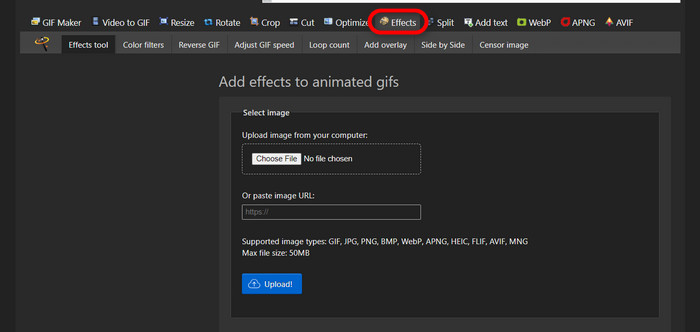
To use this online tool, launch your browser and enter the link. You are instantly given choices according to your needs. This site gives you the possibility of removing background from your GIF. Click Effects to start.
Step 2. Choose and Upload an Image/GIF
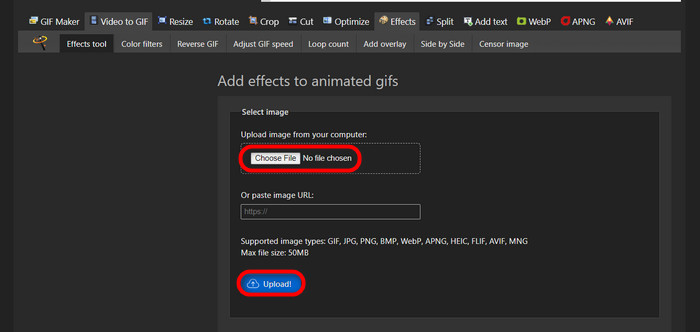
Now, choose your file of choice to upload. Click Choose Files, find it in your designated directory, and hit Upload to upload your chosen file.
Step 3. Edit Image
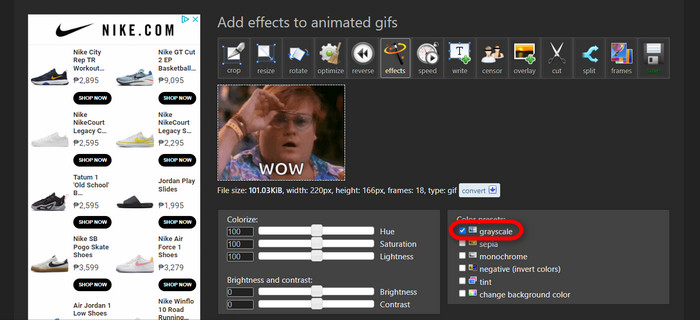
After uploading, you are nearing the process of removing the background from your GIF or making the background from your GIF black. Now, click grayscale to make your background dark.
Step 4. Preview and Convert Image/GIF
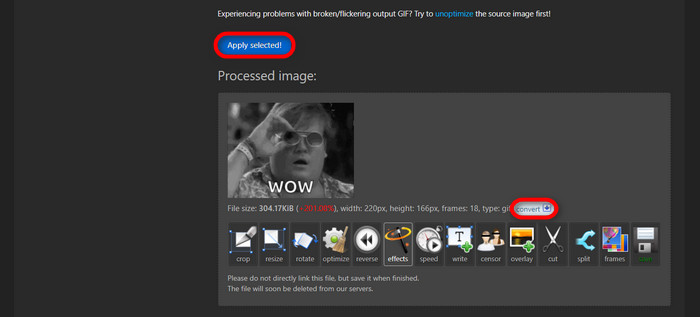
After putting effect, resizing, and cropping your new GIF, click Apply Selected, and it will show you a preview of your edited GIF. Then, click the convert button to download your file.
Phần 2. Tạo ảnh GIF không có nền trong Remove.bg
Trang web này cũng được thiết kế để xóa bất kỳ nền nào khỏi bất kỳ bức ảnh nào. Tại đây, nó cung cấp cho bạn tùy chọn vẫn chỉnh sửa ảnh nền bị xóa tự động. Nó được trang bị một AI khéo léo có thể nhận dạng chủ thể chính và loại bỏ hậu cảnh một cách hoàn hảo.
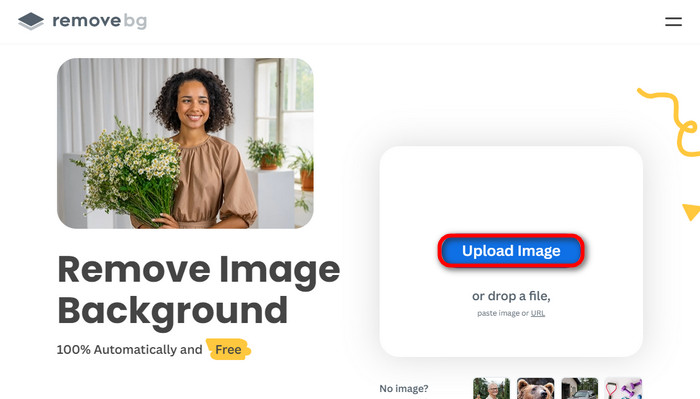
Step 1. Upload Image/GIF
Let's start by uploading our image. Open the online software on your browser when you are on the page. Then, click Upload Image.
Step 2. Review and Edit Image
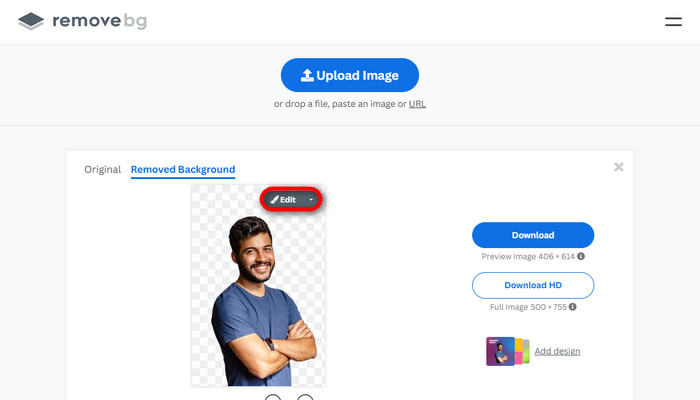
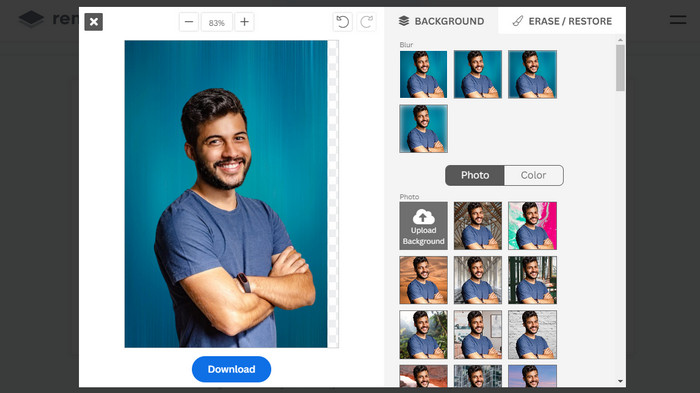
Once your image is uploaded, your photo should already have its background removed automatically, but you can still edit your photo. You can see the original photo by clicking the Original button next to the Removed Background button. Users can put a black background into their image seamlessly using this software.
Step 3. Download Edited Image
In this part, you are now done with the editing, and you can now download your image photo. Just click the Download button below your photo.
Phần 3. Sử dụng GIFMagic trong Xóa nền GIF
Trong GIFMagic, các hiệu ứng đặc biệt, thêm văn bản, hoạt ảnh và nhiều hơn nữa! Tất cả đều có thể thực hiện được bằng cách sử dụng chương trình trực tuyến này. GIF rất dễ sử dụng khi chỉnh sửa trong phần mềm này!
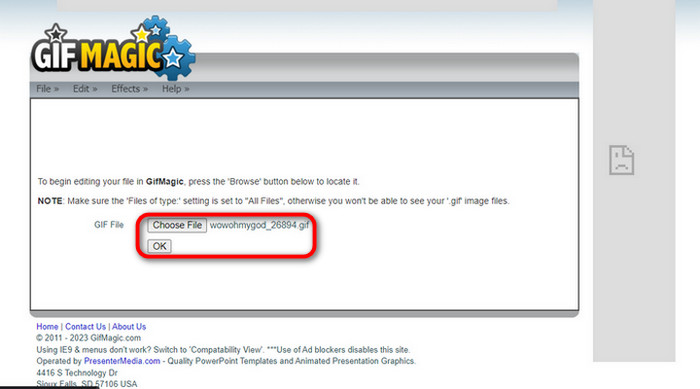
Step 1. Upload Image/GIF
Upon logging in, the site allows you to upload your chosen file into the software. You can upload .gif or .img files that are useful to other users. To choose your file, click Upload, and after you have chosen your file, click the OK button.
Step 2. Edit Image
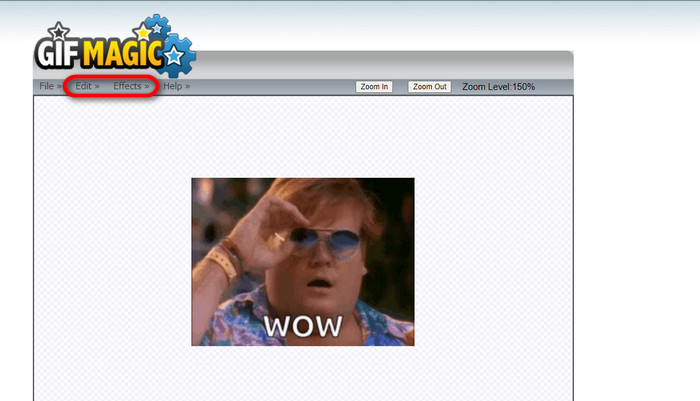
Once you land on the page, you will see the Edit and Effects buttons next to the File button. Your file can be edited in this section, so do your magic and enjoy editing.
Step 3. Download Edited GIF
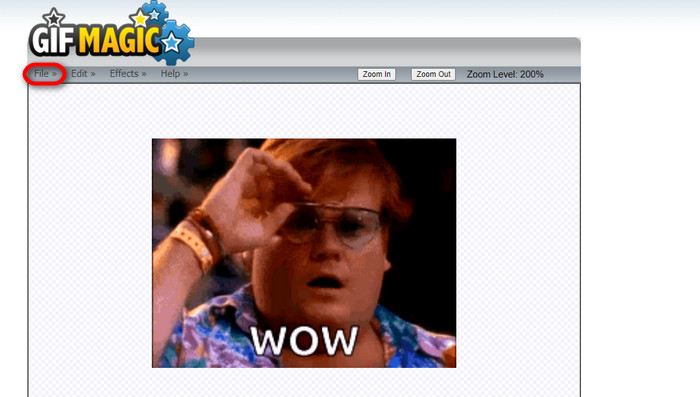
After you have made your GIF a transparent background, just click the File button and click Save. Voila! Done and downloaded.
Phần 4. Tạo nền GIF trong suốt bằng LunaPic
LunaPic là một công cụ trực tuyến miễn phí có khả năng xóa ảnh GIF nền trực tuyến. Nó có thể đánh giá và chỉnh sửa PNG, GIF, JPG, JPEG và nhiều loại hình ảnh khác. Nó là một phần mềm có nền tảng tốt được sử dụng để chỉnh sửa trên nhiều nền tảng.
Step 1. Upload Image/GIF
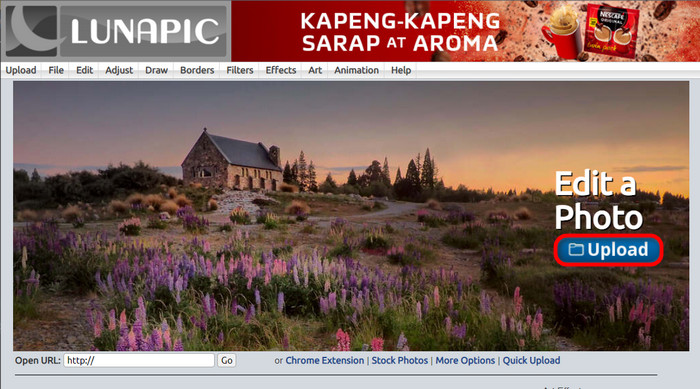
After entering the site in your default browser or any browser of your choice, upload your .img or .gif file to the site. Just click the Upload button.
Step 2. Edit Image/GIF
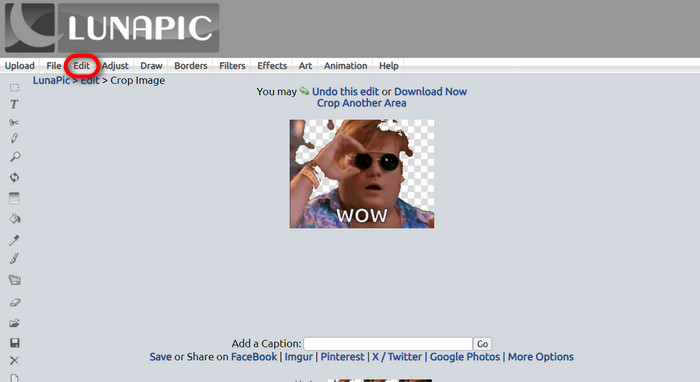
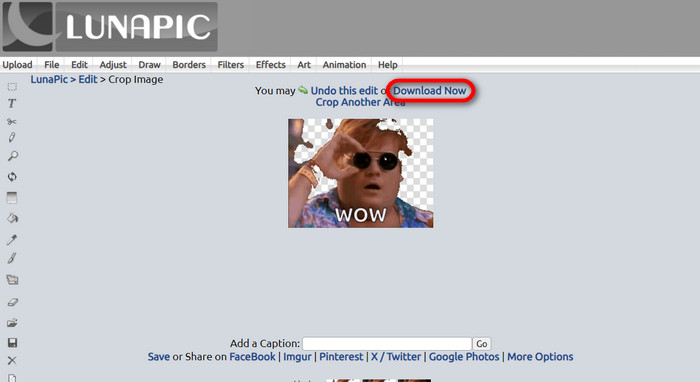
Then, you can edit your file and make the GIF background transparent by clicking the Edit then Crop Image tool button. Start cropping the background image.
Step 3. Download Edited GIF
After cropping the background or if you tried to put a white background GIF, you can now click the Download now! button to save your edited file!
Đọc thêm:
4 Greatest Ways to Remove the Watermark from GIF [Online & Offline]
Unveiling Top Tools for Desktop, Online, and Mobile Delights

Chuyển đổi video Ultimate
Hơn 345 lượt tải xuống- Tận hưởng việc xem video mà không có hình mờ khó chịu chặn nội dung của bạn.
- Sản xuất video chất lượng tốt có độ phân giải cao để xem tốt hơn.
- Cho phép bạn xóa mọi hình mờ khỏi bất kỳ loại video nào.
- Cung cấp cho bạn vô số định dạng để chuyển đổi tập tin của bạn thành.
Tải Miễn PhíDành cho Windows 7 trở lênTải xuống an toàn
Tải miễn phíDành cho MacOS 10.7 trở lênTải xuống an toàn
Phần 5. Câu hỏi thường gặp về Xóa nền
Tôi có thể chuyển đổi ảnh PNG động sang ảnh GIF không?
Có, có thể chuyển đổi PNG sang GIF. Tuy nhiên, có một số loại dữ liệu có thể được chuyển đổi thành nhiều định dạng miễn là bạn có chương trình phù hợp.
Tôi có thể thay đổi màu nền GIF sau khi xóa nó không?
Absolutely, there are a lot of programs that offer that kind of work. Try FVC Background Remover for easy background removal.
Tôi có thể tạo nền GIF trong suốt bằng sơn không?
Không, sơn không có khả năng đó. Nhưng bạn có thể tìm kiếm các chương trình khác cung cấp loại công việc đó.
GIF động có độ trong suốt là gì?
GIF động có độ trong suốt là hình ảnh chỉ hiển thị một phần nhất định của hình ảnh khi được đặt trên một trang web nhất định. Nó có thể hiển thị nhiều hình ảnh nếu đưa vào một trang web khác.
GIF có cho phép minh bạch không?
Có, nhưng không hoàn toàn minh bạch. Nó chỉ hỗ trợ độ trong suốt 1 bit.
Phần kết luận
There is now a big importance and demand for programs that can edit GIFs, such as the ones mentioned above. Cropping, editing, layering, and deleting are all possible with just a few clicks nowadays. Users are now innovating and thinking of things that nobody has ever done, like making a white background GIF. These kinds of users are why powerful programs such as these are created, like FVC Background Remover.
-
 Chọn Trình cắt ảnh GIF trực tuyến và ngoại tuyến tốt nhất để cắt ảnh GIF [2023]
 Chọn công cụ cắt ảnh tốt nhất là điều bắt buộc khi tính năng này có sẵn trên các nhà sản xuất GIF. Vậy lựa chọn tốt nhất của bạn để cắt tập tin là gì và cách sử dụng nó?
-
 Tìm hiểu 4 cách về cách tạo GIF từ hình ảnh [Trực tuyến và Ngoại tuyến]
 Bạn có muốn biết cách tạo ảnh GIF từ việc tổng hợp các hình ảnh của mình không? Sau đó nhấp vào liên kết này và đọc các ví dụ sau
-
 Loop GIF với Trình lặp ảnh GIF động tốt nhất trên Windows và Mac
 Bạn muốn biết bí mật để tạo ảnh GIF vòng lặp tốt nhất và tạo một ảnh? Nếu vậy, bạn đang ở đúng nơi. Tìm hiểu cách tạo vòng lặp với looper tốt nhất hiện có.
