


 Chuyển đổi video Ultimate
 Trình ghi màn hình
 Sửa chữa video
 Tải xuống an toàn
FLV to WMA Converter - Cách trích xuất âm thanh WMA từ video FLV miễn phí
Khi bạn đã tải xuống các tệp video Flash từ trang web YouTube, bạn có thể chuyển đổi âm thanh không mất FLV sang WMA. WMA (Windows Media Audio) là một loạt các codec âm thanh và các định dạng mã hóa âm thanh tương ứng do Microsoft phát triển. Âm thanh WMA hỗ trợ âm thanh đa kênh và độ phân giải cao. Từ bài viết này, bạn sẽ tìm hiểu 2 phương pháp để chuyển đổi video FLV sang âm thanh WMA trên Windows và Mac.

Phần 1. Cách tốt nhất để trích xuất âm thanh WMA từ FLV miễn phí
FVC Free FLV Converter là phần mềm chuyển đổi FLV sang WMA miễn phí, dễ sử dụng và nhanh chóng, hỗ trợ chuyển đổi hàng loạt file FLV sang WMA trên Windows và Mac. Đồng thời, bạn còn có thể chuyển các video FLV sang những định dạng video và âm thanh khác như HD MP4, AVI, WMV, MKV, 3GP, MP3, AAC, AC3, v.v. Với tính năng chỉnh sửa tích hợp, bạn có thể chỉnh sửa siêu dữ liệu trong file WMA miễn phí.

FVC Công cụ chuyển đổi FLV miễn phí
145000+ tải- Chuyển đổi FLV sang WMA trên Windows 10/8/7 / Vista / XP và Mac OS X.
- Nén, hợp nhất, thêm chủ đề và chỉnh sửa siêu dữ liệu của tệp WMA.
- Thêm các chủ đề đặc biệt vào các tệp FLV của bạn, như kỳ nghỉ, gia đình, sinh nhật.
- Chuyển đổi hàng loạt FLV sang WMA, MP3, AAC, FLAC, M4R, OGG, WAV.
Tải Miễn PhíDành cho Windows 7 hoặc mới hơnTải xuống An toàn
Tải Miễn PhíDành cho MacOS 10.7 hoặc mới hơnTải xuống An toàn
Bước 1. Thêm tệp FLV
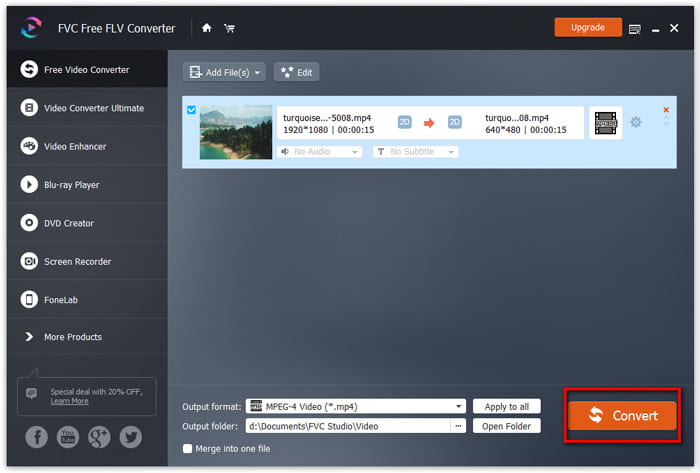
Sau khi tải miễn phí FVC Free FLV Converter, bạn có thể cài đặt và chạy chương trình trên máy tính. Nhấp nút Add File(s) để nhập file video Flash. Bạn cũng có thể kéo và thả nhiều file FLV vào chương trình cùng một lúc.

Bước 2. Chỉnh sửa tệp FLV
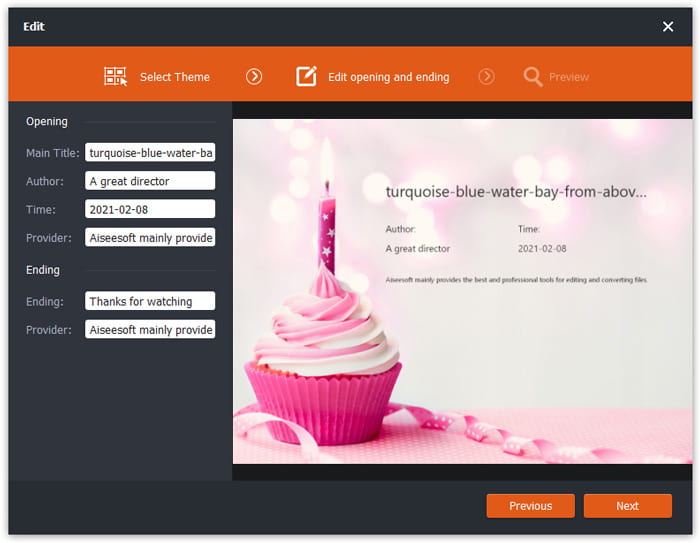
Nhấp nút Edit để bắt đầu chỉnh sửa file FLV của bạn. Bạn có thể chọn một chủ đề nhất định, chỉnh sửa thông tin dữ liệu như tiêu đề, tác giả, thời gian ở phần mở đầu và kết thúc.
Bước 3. Đặt WMA làm đầu ra
Sau đó, chuyển đến khu vực Output format và nhập WMA vào ô tìm kiếm. Tại đây bạn có thể chọn WMA - Windows Media Audio (*.wma) làm định dạng đầu ra.

Bước 4. Chuyển đổi FLV sang WMA
Chuyển đến khu vực Output folder và chọn thư mục đích nơi file WMA sẽ được lưu. Bạn có thể nhấp nút Convert để bắt đầu chuyển đổi FLV sang file âm thanh WMA miễn phí.
Phần 2. Làm thế nào để chuyển đổi FLV sang WMA trực tuyến miễn phí
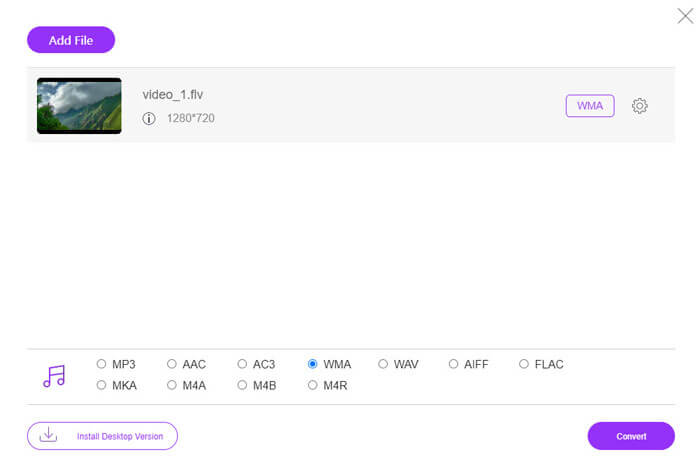
Nếu bạn thấy phiền khi phải tải bất kỳ gói phần mềm nào, bạn có thể thử FVC Free Audio Converter. Đây là công cụ chuyển đổi FLV sang WMA trực tuyến mạnh mẽ, giúp chuyển đổi mọi file video/âm thanh phổ biến sang WMA, MP3, AAC, FLAC, WAV, v.v. Bạn có thể tìm hiểu chi tiết cách chuyển FLV sang WMA với FVC Free Audio Converter.
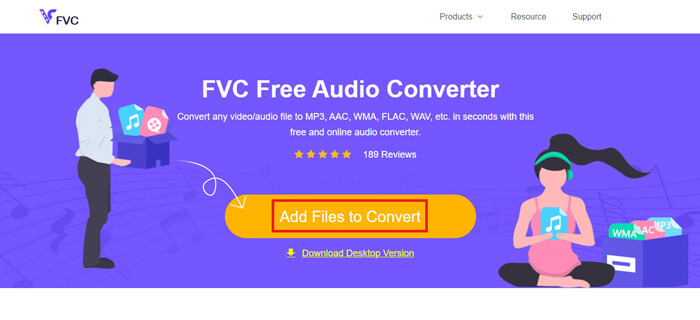
Bước 1. Truy cập trang web chính thức của FVC Free Audio Converter (https://www.free-videoconverter.net/free-audio-converter/). Nhấp nút Add Files to Convert để tải xuống và cài đặt trình khởi chạy. Sau đó bạn có thể tải lên các file FLV từ máy tính.
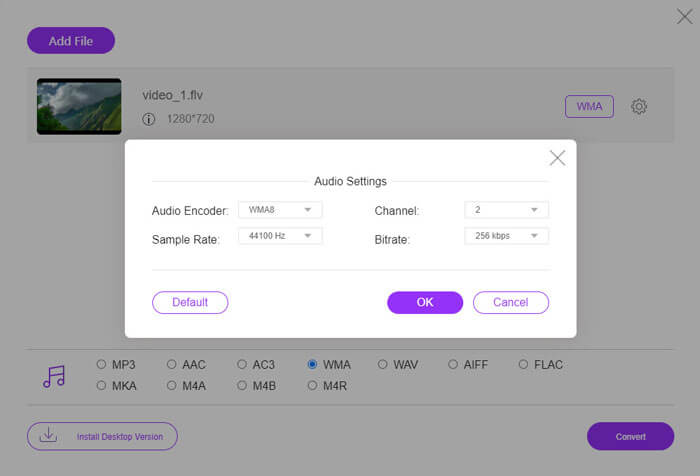
Bước 2. Đánh dấu chọn WMA ở phía dưới và đặt nó làm định dạng đầu ra. Nếu muốn điều chỉnh thêm cài đặt, bạn có thể nhấp vào biểu tượng bánh răng để thiết lập bộ mã hóa âm thanh, kênh, tần số lấy mẫu và bitrate. Nhấp nút OK để lưu thay đổi.
Bước 3. Cuối cùng, bạn có thể nhấp nút Convert để bắt đầu chuyển đổi FLV sang file WMA trực tuyến miễn phí.
Phần 3. Câu hỏi thường gặp về Chuyển đổi FLV sang WMA
Tệp FLV là gì và tôi có thể phát tệp đó như thế nào?
FLV là định dạng tệp video flash được phát triển bởi Adobe. Nó có thể lưu trữ video, âm thanh, văn bản, chỉ số phụ và hơn thế nữa. Cả Windows Media Player và QuickTime đều không hỗ trợ FLV, vì vậy bạn phải sử dụng trình phát đa phương tiện của bên thứ ba để mở FLV, như VLC.
Định dạng WMA được sử dụng để làm gì?
WMA là một định dạng âm thanh mất dữ liệu do Microsoft tạo ra để cạnh tranh với MP3. WMA chủ yếu được sử dụng để phát nhạc trực tuyến. Tệp WMA có phần mở rộng .wma là Windows Media Audio. Nó có thể được hỗ trợ hoàn hảo bởi Windows Media Player.
Có trình phát nhạc WMA nào không?
Có. Có nhiều trình phát nhạc WMA để bạn lựa chọn, như FVC Free Video Player, KMPlayer, Elmedia Video Player, Macgo Free Mac Media Player, VOX Music Player, VLC Media Player, GOM Media Player, foobar2000, AIMP, Samsung Music, v.v.
Phần kết luận
Trong bài viết này, chúng tôi chủ yếu nói về 2 cách miễn phí để chuyển đổi video FLV sang WMA trên Windows 10 PC và Mac. Hy vọng tất cả các giải pháp này giúp bạn giải quyết vấn đề của bạn. Lần tới khi bạn tải xuống video flash từ trang web, bạn có thể thử FVC Free FLV Converter để chuyển đổi FLV Video sang WMA, MP3, AAC, MP4, AVI, VOB, v.v.
-
 FLV sang WAV - Chuyển đổi FLV sang WAV Trực tuyến miễn phí và trên Mac / PC
 Làm cách nào để chuyển đổi tệp FLV? VLC có thể chuyển đổi YouTube FLV sang WAV không? Bài đăng này cho biết 3 cách miễn phí để chuyển đổi FLV sang WAV mà không làm giảm chất lượng.
-
 2 cách dễ dàng để chuyển đổi tệp MOV sang FLV trên Windows / Mac
 Làm thế nào để chuyển đổi MOV sang FLV miễn phí? Dưới đây là các trình chuyển đổi video tốt nhất trên máy tính để bàn và trực tuyến để chuyển đổi tệp MOV của bạn sang FLV trong vài giây mà không phải trả một xu nào.
-
 Cách chuyển WMA sang MP3 trên Mac / Windows / Trực tuyến
 Có thể chuyển đổi WMA sang MP3 bằng Windows Media Player không? Làm thế nào để chuyển đổi WMA sang MP3 miễn phí? Bài đăng này chia sẻ 4 phương pháp đơn giản giúp bạn chuyển đổi âm thanh từ WMA sang MP3 trên Mac, Windows PC và trực tuyến.
