


 Chuyển đổi video Ultimate
 Trình ghi màn hình
 Sửa chữa video
Tìm ra Bộ chuyển đổi Video sang MP3 Tốt nhất trên Web, Máy tính để bàn và Điện thoại Di động
Âm nhạc là một trong những hình thức giải trí tuyệt vời nhất mà thế giới dành tặng cho chúng ta. Để nuôi dưỡng tình yêu âm nhạc, đặc biệt là với những nghệ sĩ mà chúng ta nghe hằng ngày. Sẽ có những lúc bạn rất muốn nghe bài hát yêu thích nhưng lại không có Internet. Đừng lo, bạn có thể “cứu nguy” bằng cách tải video nhạc về. Tuy nhiên, dung lượng tệp video nhạc tải về thường lớn hơn rất nhiều so với chỉ tệp âm thanh. Để giải quyết trường hợp này, hãy cùng tìm hiểu những công cụ khác nhau mà bạn có thể dùng để chuyển video sang định dạng MP3 nhằm tiết kiệm dung lượng. Bạn cũng có thể yên tâm dựa vào bài viết này vì nó cung cấp các dẫn chứng rõ ràng để giải quyết vấn đề, vậy nên hãy đọc tiếp và chúng ta bắt đầu nhé.

Phần 1. Công cụ chuyển đổi video sang MP3 tốt nhất cho Windows & Mac với biểu đồ so sánh
FVC Free MP3 Converter
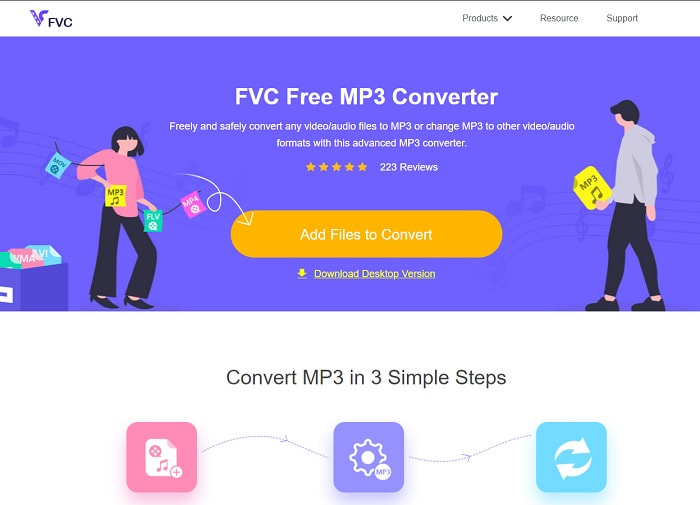
Nếu bạn đang tìm một trình chuyển đổi video sang MP3 miễn phí thì FVC Free MP3 Converter chính là lựa chọn đó. Mặc dù công cụ này cung cấp rất nhiều tính năng tương tự như các trình chuyển đổi trên di động hay trên web khác, nó vẫn được xem là “vua” trong số các trình chuyển đổi trực tuyến nhờ tốc độ nhanh và khả năng chuyển đổi chính xác. Tuy nhiên, công cụ này chỉ hỗ trợ một số lượng định dạng hạn chế, có thể khiến bạn bị giới hạn khi muốn chuyển đổi linh hoạt. Dù vậy, đây vẫn là một trình chuyển đổi tốt. Để hiểu rõ hơn về công cụ này, hãy tiếp tục đọc các bước dưới đây để biết cách sử dụng.
Bước 1. Nhấp vào siêu liên kết ở trên dẫn đến trang web chính của công cụ.
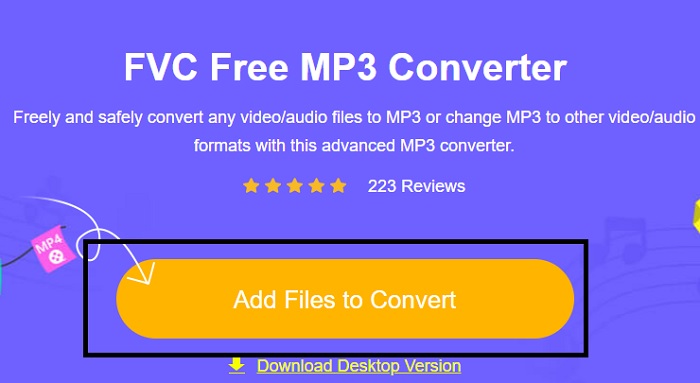
Bước 2. Sau đó, nhấp vào Add Files to Convert để mở và khởi chạy công cụ.
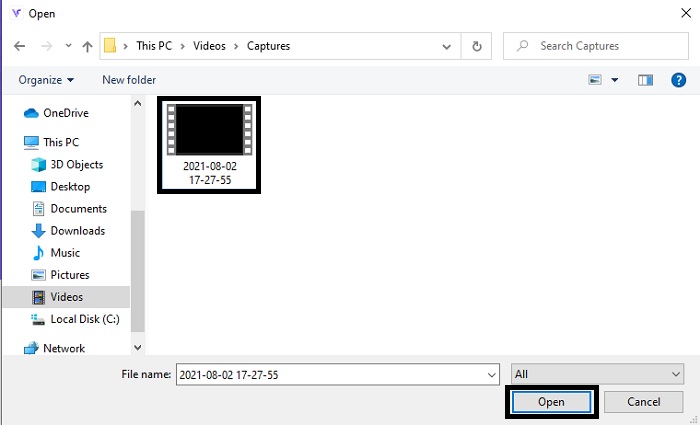
Bước 3. Tìm tệp video bạn muốn chuyển đổi và nhấp Open để chèn tệp.
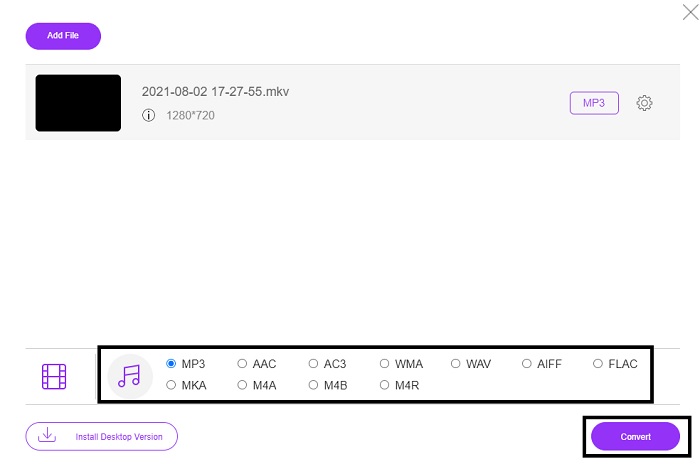
Bước 4. Tại đây hãy chọn định dạng âm thanh mà bạn muốn. Khi đã sẵn sàng bắt đầu quá trình chuyển đổi, hãy nhấp vào Convert.
Bước 5. Nếu bạn muốn nghe tệp đã chuyển đổi, hãy nhấp vào biểu tượng folder để hiển thị thư mục chứa tệp.
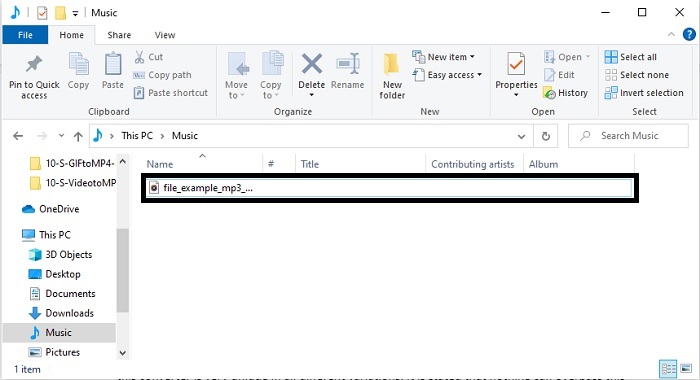
FVC Video Converter Ultimate
Nếu công cụ đầu tiên không cho bạn kết quả chuyển đổi như ý, thì bạn có thể dùng FVC Video Converter Ultimate, một trình chuyển đổi “ruột” của rất nhiều người. Không giống với bất kỳ trình chuyển đổi nào mà bạn đã dùng hay chưa dùng, công cụ này rất độc đáo ở nhiều khía cạnh. Người ta cho rằng không công cụ nào có thể vượt qua nó về khả năng chuyển đổi, chỉnh sửa, tạo, nâng cấp chất lượng, v.v. Nhưng có thể bạn nghĩ rằng công cụ này khó dùng, và suy đoán đó là sai. Nó cực kỳ dễ sử dụng, ngay cả khi bạn không phải dân chuyên về chuyển đổi, bạn vẫn có thể tạo ra những bản xuất tuyệt vời. Vì vậy, như đã nói, hãy cùng tìm hiểu cách chuyển video sang MP3 với sự trợ giúp của trình chuyển đổi tốt nhất mà bạn đang tìm kiếm.
Bước 1. Trước hết, hãy tải công cụ dùng trên máy tính này về ổ đĩa của bạn. Thay đổi phần cài đặt nếu muốn rồi nhấp Finish để lưu thay đổi.
Tải xuống miễn phí cho Windows 7 trở lên. Tải xuống an toàn.
Tải xuống miễn phí cho MacOS 10.7 trở lên. Tải xuống an toàn.
Bước 2. Giao diện như thế này sẽ xuất hiện trên màn hình. Nhấn Add Files hoặc dấu cộng để chèn tệp vào giao diện.
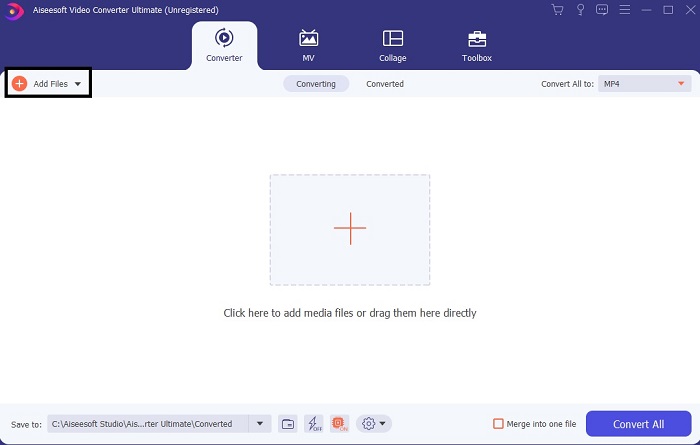
Bước 3. Sau khi chọn tệp cần chuyển đổi, hãy nhấp vào menu drop-down bên cạnh tùy chọn Convert All và chọn một trong hơn 500 định dạng hỗ trợ.
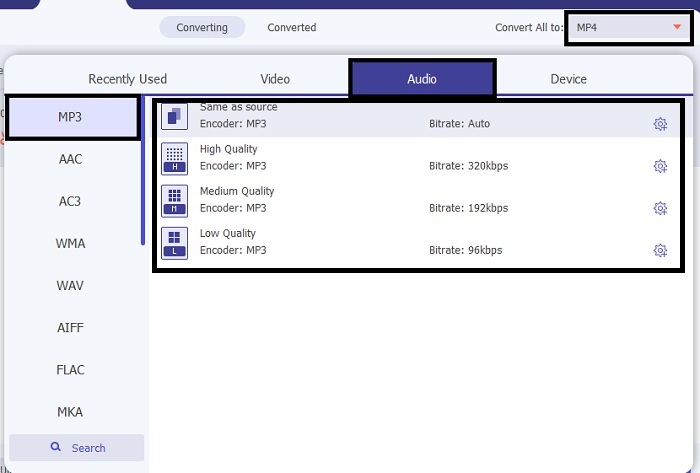
Bước 4. Sau đó nhấp Convert All để bắt đầu quá trình chuyển đổi video sang MP3.
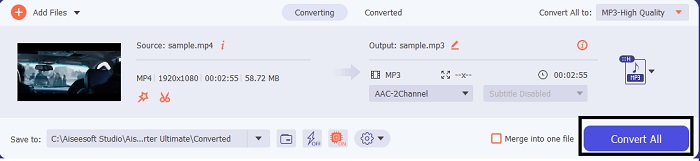
Bước 5. Khi mọi thứ hoàn tất, trình quản lý tệp sẽ hiện lên trên màn hình. Nhấp vào tệp bạn đã chuyển đổi để nghe và thưởng thức.
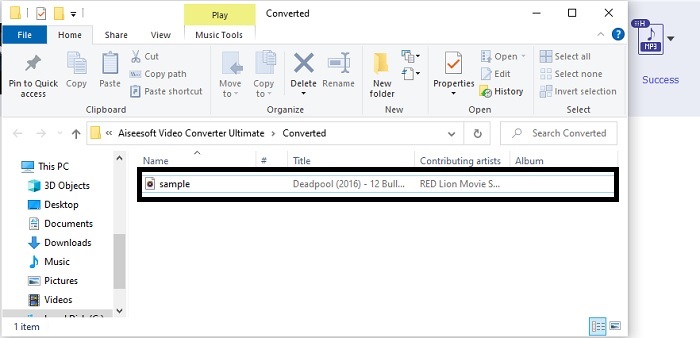
Các bước bổ sung để tăng cường âm thanh của bạn trước khi chuyển đổi với sự trợ giúp của FVC Video Converter Ultimate
Hãy chỉnh sửa âm thanh bằng một trong các tính năng của FVC Video Converter Ultimate. Trước khi chuyển đổi tệp video, tốt hơn hết bạn nên nâng chất lượng âm thanh để sau này nghe sẽ hay hơn. Để biết cách thực hiện, bạn cần làm theo hướng dẫn từng bước dưới đây để tăng âm lượng bằng Volume Booster.
Bước 1. Nếu bạn đã cài đặt công cụ, hãy đi tới Toolbar rồi nhấp vào Volume Booster.
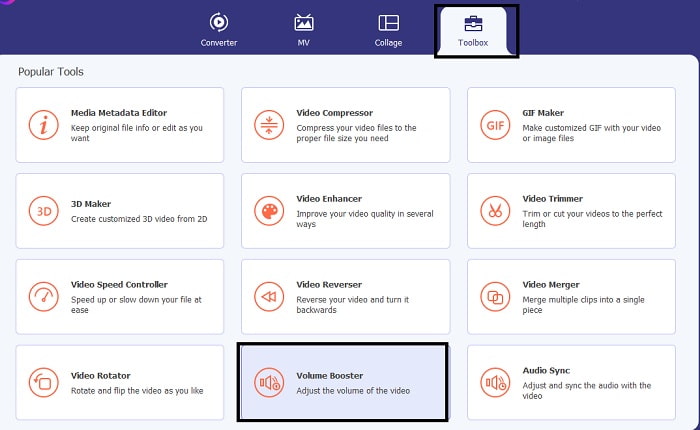
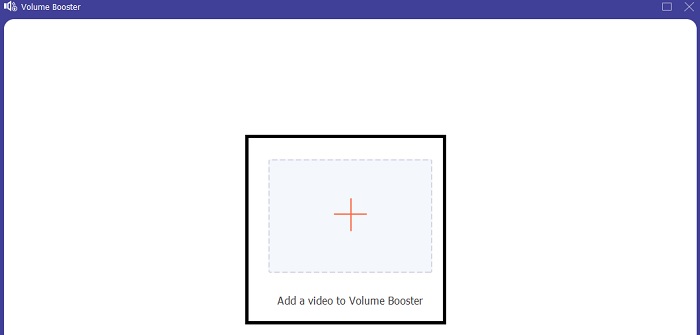
Bước 2. Chọn tệp video bạn muốn cải thiện chất lượng âm thanh và nhấp Open để chèn vào.
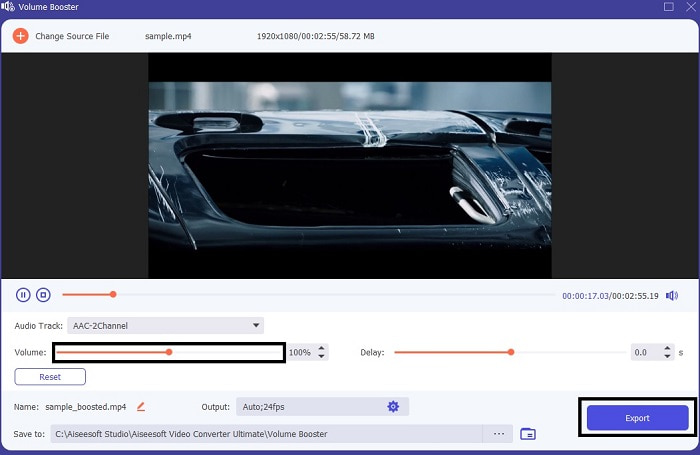
Bước 3. Điều chỉnh các volume slides theo ý bạn. Sau đó nhấp vào biểu tượng cog và thay đổi cài đặt đầu ra, khi xong thì nhấp OK để lưu thay đổi. Nhấp Export để lưu bản xuất cuối cùng và thưởng thức.
So sánh giữa FVC Free Video Converter và Video Converter Ultimate
Mặc dù cả hai công cụ đều cung cấp những gì bạn cần vì chúng là tốt nhất trong chuyên ngành của riêng chúng. Quyết định những gì sẽ sử dụng có thể khiến bạn gặp khó khăn. Nhưng để giải quyết trường hợp này, đây là biểu đồ so sánh giữa hai công cụ. Hãy điều tra điểm yếu và điểm mạnh của họ dưới dạng các công cụ riêng lẻ.
| Đặc trưng | FVC Free MP3 Converter | Chuyển đổi video Ultimate |
| Chuyển đổi âm thanh |  | |
| Các tính năng chỉnh sửa |  | |
| Dễ dàng tải xuống hoặc truy cập | | |
| Thân thiện với người dùng | | |
| Chương trình được hỗ trợ | Công cụ dựa trên web | Công cụ dựa trên máy tính để bàn |
| Phần mềm có sẵn | Trong tất cả các phần mềm | Trong tất cả các phần mềm |
| Phạm vi giá | Công cụ trực tuyến miễn phí của nó | Trong 1 tháng: $25,00 Trong một năm: $31.20 Đối với giấy phép trọn đời: $55.20 |
Phần 2. Ứng dụng Video sang MP3 cho iPhone và Thiết bị Android
1. Chuyển đổi Video sang MP3
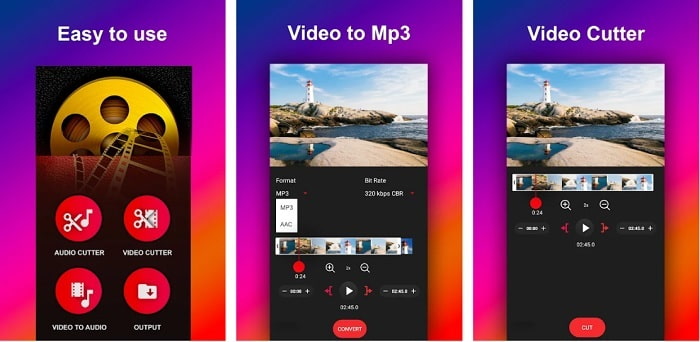
Nếu bạn đang tìm một trình chuyển đổi video sang MP3 trên Android, bạn có thể thử Video to MP3 Converter. Công cụ này được thiết kế đặc biệt để chuyển bất kỳ tệp đa phương tiện nào sang định dạng MP3 hoặc AAC. Ngoài ra, bạn còn có thể thay đổi bitrate và cắt file ngay trong ứng dụng. Tuy cho chất lượng đầu ra cao, nhưng tệp sau khi chuyển đổi lại không được lưu trực tiếp vào thư mục nhạc, điều này hơi bất tiện vì thay vì nghe ngay lập tức, bạn phải tự đi tìm tệp sau khi quá trình chuyển đổi hoàn tất.
2. MP4 sang MP3 - Chuyển đổi video thành âm thanh, cắt nhạc chuông
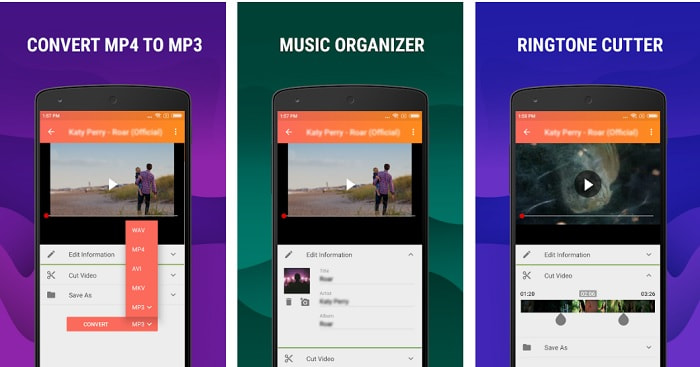
Mặc dù công cụ đầu tiên trong danh sách đã cung cấp tính năng chuyển sang MP3 như bạn muốn, nhưng MP4 to MP3 - Convert Video to Audio, Cut Ringtones vẫn có thể vượt trội hơn ở một số điểm. Đây cũng là công cụ chỉ dành cho người dùng Android, nên nếu bạn dùng iOS thì không thể sử dụng. Ứng dụng này được đánh giá 4,0 sao trên Play Store nhưng số lượng người dùng không nhiều. Hầu hết đều có chung một thắc mắc là sau khi chuyển đổi trong ứng dụng, tệp lại không biết nằm ở đâu, giống như ứng dụng đầu tiên. Tuy vậy, vẫn có một số người dùng tin tưởng sử dụng nó như công cụ chuyển MP3 cá nhân vì bạn có thể chuyển đổi nhiều tệp cùng lúc.
Có liên quan:
3. Bộ chuyển đổi âm thanh
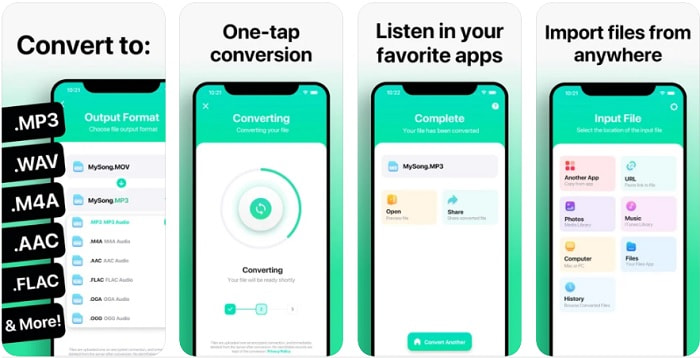
Nếu bạn là người dùng iOS và nghĩ rằng mình không thể thực hiện chuyển đổi âm thanh trên điện thoại với chất lượng cao, thì bạn đã nhầm, vì The Audio Converter mang đến khả năng chuyển đổi rất tốt và hơn thế nữa. Chuyển video sang MP3 trên iPhone khá dễ dàng với sự trợ giúp của công cụ này. Tuy nhiên, điểm trừ là bản miễn phí bị giới hạn kích thước tệp. Vì vậy, nếu muốn chuyển tệp lớn hơn, bạn phải trả phí để đăng ký. Trong một số trường hợp, nếu bạn muốn hủy đăng ký thì lại không có nút hủy, hãy cẩn trọng vì có thể phát sinh các khoản trừ tiền không mong muốn trên thẻ của bạn nếu sử dụng phương thức thanh toán này.
Phần 3. Biểu đồ so sánh
| Đặc trưng | FVC Free MP3 Converter | FVC Video Converter Ultimate | Chuyển đổi Video sang MP3 | MP4 sang MP3 - Chuyển đổi video thành âm thanh, cắt nhạc chuông | Bộ chuyển đổi âm thanh |
| Bộ chuyển đổi âm thanh | | | | | |
| Hỗ trợ định dạng | MP3, AAC, AC3, WMA, WAV, AIFF, FLAC, MKA, M4A, M4B, M4R | Hơn 500 định dạng phương tiện có sẵn | MP3 & AAC | MP3 | MP3 & AAC |
| Khả năng tiếp cận của công cụ | Công cụ dựa trên web | Công cụ dựa trên máy tính để bàn | Ứng dụng dựa trên điện thoại Android | Ứng dụng dựa trên điện thoại Android | ứng dụng dựa trên điện thoại iOS |
| Phạm vi giá | Công cụ trực tuyến miễn phí của nó | Trong 1 tháng: $25,00 Trong một năm: $31.20 Đối với giấy phép trọn đời: $55.20 | Ứng dụng Android có thể tải xuống miễn phí | $6.49 - $19.99 mỗi mặt hàng | Thẻ cao cấp$3.99 Thẻ trọn đời$6.99 |
Phần 4. Câu hỏi thường gặp về Video to MP3
Tại sao video của tôi không thể phát trên máy tính của tôi?
Có khả năng định dạng video của bạn không được trình phát media mặc định hỗ trợ. Trong trường hợp đó, bạn có thể dùng FVC Free Video Player để phát video. Công cụ này hỗ trợ hơn 200 định dạng phổ biến nên bạn có thể xem hầu hết mọi tệp video mà không lo bị lỗi không phát được.
MP3 có phải là định dạng âm thanh tốt nhất?
Mặc dù MP3 được biết đến như định dạng âm thanh 'phổ thông' vì được dùng khắp nơi để phát, ghi và lưu trữ tệp âm thanh, nhưng vẫn có một định dạng tốt hơn MP3 là AAC. Dù chất lượng tốt hơn, AAC có dung lượng lớn hơn MP3, nhưng vẫn không quá nặng như AVI. Để chuyển đổi các tệp MP3, bạn có thể dùng trình chuyển đổi MP3 sang AAC trực tuyến này thay vì những công cụ thiếu an toàn và có khả năng nén kém.
Nhược điểm của âm thanh là gì?
Tệp âm thanh thường nhẹ hơn rất nhiều so với tệp video, nhưng lại kém tương tác hơn vì không mang lại hình ảnh cho người nghe. Vì vậy, nếu bạn làm podcast, tốt hơn hết hãy chọn một trình ghi âm chất lượng, đó là FVC Screen Recorder. Công cụ này hỗ trợ chỉnh sửa bản ghi rất tốt và hỗ trợ nhiều định dạng âm thanh hơn hầu hết các công cụ khác mà bạn có thể tải về hoặc dùng trực tuyến. Nếu việc ghi âm là vấn đề với bạn, thì chỉ có một giải pháp, đó là FVC Screen Recorder. Nhấp vào đây để tìm thêm các trình ghi MP3 chuyên nghiệp.
Phần kết luận
Bây giờ khi chúng ta đã đi đến cuối bài viết, vấn đề ban đầu coi như đã được giải quyết. Dù giờ đây mỗi người sẽ tự lựa chọn hướng đi riêng, bạn đã có thể tự mình xử lý trường hợp này. Cuộc tìm kiếm sẽ chấm dứt khi bạn chọn được công cụ hoàn hảo mà bạn có thể tin cậy, chẳng hạn như FVC Video Converter Ultimate. Mỗi lần sử dụng, bạn luôn có thể kỳ vọng vào một quá trình chuyển đổi nhanh chóng, đáng tin cậy và an toàn. Nếu bạn gặp vấn đề với âm thanh và muốn nâng cấp chất lượng, công cụ này cũng có thể giúp bạn làm điều đó. Hơn nữa, chúng tôi hy vọng bạn sẽ tiếp tục khám phá FVC Video Converter Ultimate vì đây là công cụ mang đến chất lượng chuyển đổi xuất sắc. Với những bằng chứng chính xác mà chúng tôi đã trình bày dành riêng cho bạn, nếu giờ bạn đã hài lòng thì hãy cùng tuyên bố rằng “vụ án” đã khép lại.
-
 [2021] 6 cách trực tuyến và miễn phí hàng đầu để chuyển M2TS sang MP3
 Tập tin M2TS có thể được chuyển đổi thành MP3 không? Trong bài đăng này, chúng tôi đã liệt kê 6 cách trực tuyến và miễn phí hàng đầu để giúp bạn chuyển đổi M2TS sang MP3, AAC, AIFF và nhiều định dạng âm thanh khác.
-
 4 Phương pháp làm việc 100% để chuyển đổi tệp video FLV sang định dạng MP3
 Làm thế nào để chuyển đổi một FLV sang một tập tin MP3? Tất cả những gì bạn cần làm là đọc kỹ bài viết này, tìm phương pháp yêu thích của bạn và làm theo hướng dẫn từng bước của chúng tôi để đạt được điều bạn muốn.
-
 4 phương pháp hàng đầu để chuyển đổi OGG sang MP3 mà không làm giảm chất lượng
 Làm thế nào để chuyển đổi các tệp OGG của bạn sang định dạng MP3 để nghe trên máy tính hoặc thiết bị di động? Ở đây chúng tôi chia sẻ 5 cách dễ nhất để làm điều đó trên máy tính để bàn hoặc trực tuyến.
