


 Chuyển đổi video Ultimate
 Trình ghi màn hình
 Sửa chữa video
 Tải xuống an toàn
Cách chuyển đổi M2TS sang các định dạng tương thích iPad trên Windows / Mac / Trực tuyến
Bạn có thể phát trực tiếp M2TS trên iPad không? Tiếc là câu trả lời là Không. M2TS không tương thích với iPad. Nếu muốn phát M2TS trên iPad, bạn cần cài một ứng dụng trình phát M2TS trên iPad, hoặc bạn có thể chuyển M2TS sang định dạng iPad. Rõ ràng, bài viết này chọn giải pháp thứ hai. Hãy đọc và tìm hiểu cách đổi định dạng video trên iPad từ M2TS.

Phần 1: Làm thế nào để chuyển đổi M2TS sang iPad trên Windows và Mac
IPad hỗ trợ những định dạng nào? Trên thực tế, iPad chấp nhận các định dạng video phổ biến H.264, MP4, M4V, MOV, MPEG-4 và M-JPEG. Để đưa M2TS lên iPad, trước tiên bạn cần chuyển đổi định dạng video M2TS sang iPad.
Cách chuyển đổi M2TS sang iPad trên Windows miễn phí
FVC Free M2TS Converter là một trình chuyển đổi M2TS sang iPad theo lô hoàn toàn miễn phí. Bạn có thể chuyển đổi hàng loạt tập tin M2TS sang iPad với tốc độ nhanh hơn gấp 50 lần so với các trình chuyển đổi M2TS thông thường. Vì vậy, dù bạn cần chuyển nhiều tập tin video M2TS dung lượng lớn sang iPad theo lô thì cũng không thành vấn đề. Trình chuyển đổi M2TS sang iPad miễn phí này có thể xử lý hoàn hảo.
Ngoài ra, bạn có thể nối các tập tin M2TS và thêm chủ đề trước khi chuyển M2TS sang iPad. Cửa sổ xem trước thời gian thực có thể hiển thị hiệu ứng video ngay lập tức. Nói ngắn gọn, bạn có thể chỉnh sửa và chuyển đổi AVCHD M2TS sang iPad trên Windows miễn phí chỉ trong một nơi.

Công cụ chuyển đổi M2TS miễn phí
113.456+ tải- Chuyển đổi M2TS sang iPad H.264, MP4, MOV, MPEG-4 và các định dạng tương thích khác.
- Tốc độ nhanh hơn 50 lần với hỗ trợ chuyển đổi hàng loạt.
- Duy trì chất lượng cao trong khi chuyển đổi sang iPad từ tất cả các máy quay HD.
- Bộ chuyển đổi M2TS sang iPad hoạt động với máy tính Windows 10/8/7.
Tải miễn phíDành cho Windows 7 hoặc mới hơnTải xuống an toàn
Tải miễn phíDành cho MacOS 10.7 hoặc mới hơnTải xuống an toàn
Bước 1: Tải miễn phí, cài đặt và khởi chạy FVC Free M2TS Converter. Kéo và thả các tập tin M2TS vào giao diện chính.

Bước 2: Mở danh sách Định dạng đầu ra (Output format) gần phía dưới. Để chuyển M2TS sang iPad trên Windows, bạn có thể đặt định dạng đầu ra trực tiếp từ mục Apple iPad.

Bước 3: Nhấp vào biểu tượng bánh răng Settings để điều chỉnh bộ mã hóa video, tốc độ khung hình và nhiều thông số khác. Cuối cùng, nhấp Convert để chuyển video từ M2TS sang định dạng iPad.
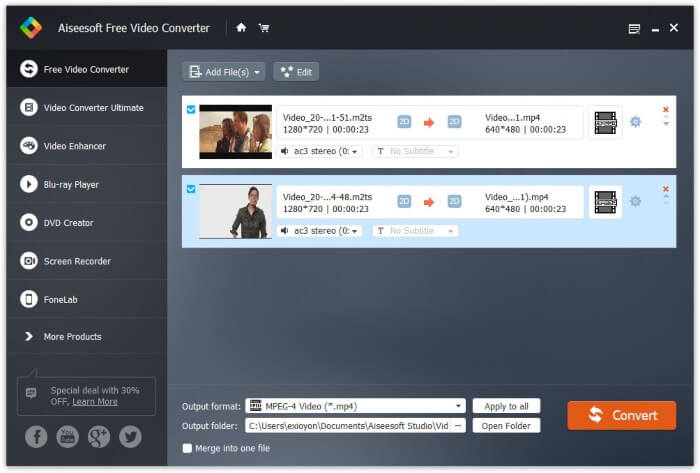
Cách chuyển đổi M2TS sang iPad trên máy Mac miễn phí
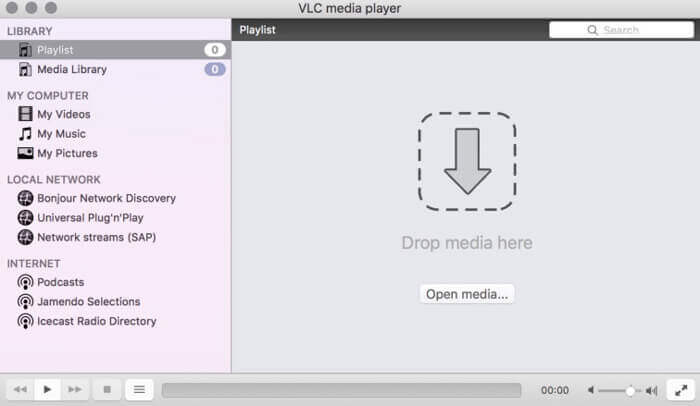
Nếu bạn muốn chuyển đổi video M2TS sang iPad trên máy Mac miễn phí, VLC Media Player có thể là lựa chọn tốt của bạn. Nó là một trình phát và chuyển đổi M2TS mã nguồn mở miễn phí cho đa nền tảng.
Bước 1: Mở VLC Media Player trên Mac. Chọn Convert/Save từ danh sách thả xuống Media.
Bước 2: Nhấp Add để nhập một tập tin M2TS. Sau đó chọn tập tin và nhấp Open bên dưới để tiếp tục quá trình.
Bước 3: Nhấp Convert/Save ở phía dưới để chuyển sang cửa sổ tiếp theo.
Bước 4: Chọn định dạng iPad từ danh sách thả xuống Profile. Bạn có thể nhấp vào biểu tượng Tools bên cạnh để điều chỉnh cài đặt video.
Bước 5: Nhấp Start để bắt đầu chuyển tập tin M2TS sang iPad trên Mac bằng VLC.
Phần 2: Làm thế nào để chuyển đổi M2TS sang iPad trực tuyến
Đối với người dùng di động, sử dụng công cụ chuyển đổi M2TS sang iPad trực tuyến cũng là một lựa chọn tốt. Bạn có thể chuyển đổi tệp M2TS sang iPad miễn phí mà không cần tải xuống, cài đặt hoặc đăng ký.
Bước 1: Mở một trình chuyển đổi M2TS sang iPad online, chẳng hạn như FVC Free Online Video Converter.

Bước 2: Tải FVC launcher bằng cách nhấp Add Files to Convert và cài đặt.

Bước 3: Tìm tập tin M2TS trong máy tính của bạn để chuyển đổi. Và đừng quên chọn định dạng.

Bước 4: Nhấp Start Converting để chuyển M2TS sang iPad miễn phí online.
Phần 3: Những câu hỏi thường gặp về chuyển đổi M2TS sang iPad
Điều gì xảy ra mà đột nhiên không có âm thanh trong các tệp M2TS trong iMovie?
M2TS không được hỗ trợ bởi các thiết bị của Apple. Bạn cần chuyển đổi định dạng M2TS sang Mac để giải quyết vấn đề.
Làm cách nào để mở tệp M2TS trên iPhone và iPad?
AVCHD M2TS không tương thích với các thiết bị iOS. Nếu bạn muốn phát video M2TS trên iPad, bạn có thể sử dụng ứng dụng VLC Media Player để phát lại video.
Có ứng dụng trình phát video nào tốt cho iPad không?
Bạn có thể nhận được một màn hình hiển thị lớn hơn trong iPad so với iPhone. Vì vậy, trải nghiệm xem video cũng sẽ tốt hơn. Các trình phát video được đề xuất bao gồm PlayerXtreme Media Player, KMPlayer, VLC, AirPlayer và hơn thế nữa. Bạn có thể chọn bất kỳ cái nào để điều khiển video một cách linh hoạt.
Đó là tất cả về cách chuyển M2TS sang iPad với các công cụ online và offline. Những trình chuyển đổi video M2TS này miễn phí và an toàn để sử dụng. Bất kể bạn muốn chuyển bao nhiêu tập tin M2TS sang các định dạng tương thích với iPad, bạn đều có thể nhận được tốc độ nhanh nhất tại đây.
-
 Cách chuyển M2TS thành MP4 mà không làm giảm chất lượng
 Bạn muốn chuyển đổi video từ máy quay HD sang MP4 thông thường? Dưới đây là 4 cách đơn giản và miễn phí để thay đổi tệp M2TS thành MP4 trên Windows và Mac.
-
 Làm thế nào để chuyển đổi M2TS sang MKV mà không làm giảm chất lượng
 Bạn muốn chuyển đổi M2TS sang MKV mà vẫn giữ nguyên chất lượng ban đầu? Bài đăng này chỉ cho bạn các phương pháp trực tuyến và miễn phí để thay đổi M2TS sang MKV một cách dễ dàng.
-
 Sự khác biệt giữa MTS và M2TS là gì
 Tệp MTS hoặc M2TS là gì? Sự khác biệt giữa M2TS và MTS là gì? Tôi có thể xem tệp MTS hoặc M2TS của máy quay bằng cách nào? Tìm tất cả các câu trả lời trong bài đăng này.
