


 Chuyển đổi video Ultimate
 Trình ghi màn hình
 Sửa chữa video
 Tải xuống an toàn
2 cách đơn giản để chuyển đổi miễn phí MTS sang MP3
Đối với các nhu cầu khác nhau, bạn muốn trích xuất bản âm thanh từ video. Ví dụ, bạn có thể muốn chuyển đổi video sang MP3 để giảm kích thước tệp. Trong một số trường hợp, tất cả những gì bạn cần là nhạc nền của phim và bạn có thể chọn trích xuất âm thanh từ đó.

MTS là định dạng video độ nét cao hỗ trợ HD 720p và 1080i. Đây là phần mở rộng tệp của AVCHD (Advanced Video Coding High Definition - Mã hóa Video Nâng cao Độ nét cao). Khi bạn có một tệp MTS, bạn không thể phát trực tiếp bằng trình phát media, phần mềm chỉnh sửa video hoặc các thiết bị iOS/Android di động. Vì vậy, rất cần thiết phải chuyển MTS sang MP3 hoặc MP4 để phát lại hoặc chỉnh sửa tốt hơn. Trong bài viết này, chúng tôi sẽ hướng dẫn bạn cách chuyển MTS sang MP3 miễn phí.
Phần 1. Làm thế nào để chuyển đổi miễn phí MTS sang MP3 mà không làm giảm chất lượng
Có rất nhiều công cụ chuyển đổi MTS sang MP3 được cung cấp trên internet có thể giúp bạn trích xuất âm thanh MP3 từ video MTS hoặc M2TS. Nhưng bạn có thể nhận thấy rằng, nhiều người trong số họ, đặc biệt là một số bản miễn phí, có nhiều khả năng xuất ra tệp MP3 chất lượng thấp.
Xét đến điều đó, ở phần đầu tiên này, chúng tôi muốn giới thiệu đến bạn phần mềm chuyển MTS sang MP3 miễn phí tốt nhất, Free Video Converter. Phần mềm này có khả năng chuyển tệp AVHCD sang MP3 mà vẫn giữ nguyên chất lượng âm thanh gốc. Giờ đây bạn có thể tải miễn phí và làm theo hướng dẫn sau để trích xuất track âm thanh MP3 từ video MTS/M2TS của mình.
Tải Miễn PhíDành cho Windows 7 trở lênTải Xuống An Toàn
Tải Miễn PhíDành cho MacOS 10.7 trở lênTải Xuống An Toàn
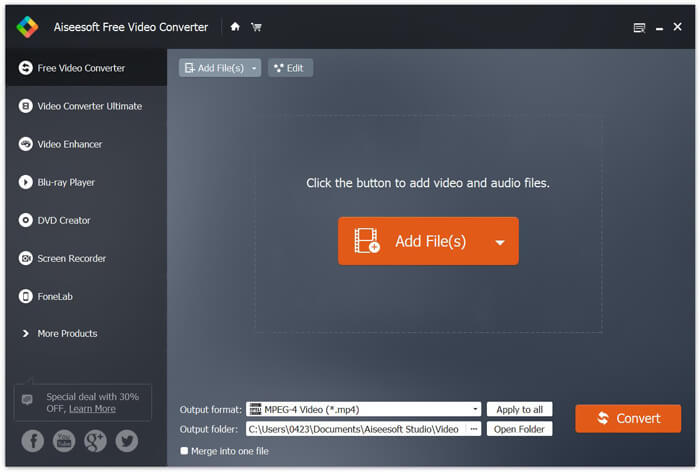
Bước 1. Trước tiên, bạn cần cài đặt trình chuyển đổi MTS sang MP3 miễn phí này trên máy tính bằng cách nhấp đúp vào nút tải xuống ở trên. Khi vào giao diện chính, hãy nhấp vào Add File(s) để nhập tệp MTS bạn muốn chuyển đổi.
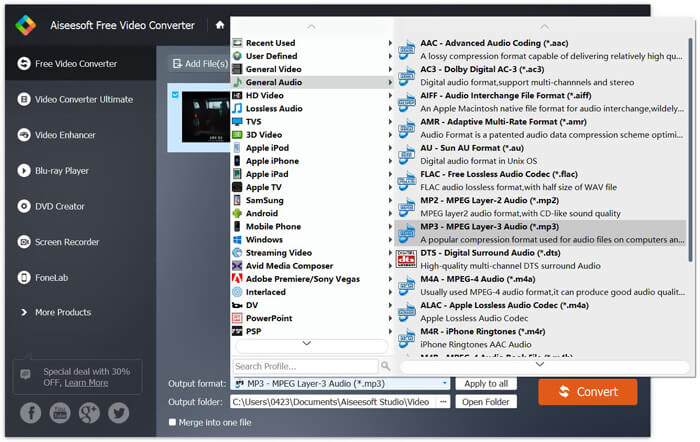
Bước 2. Nhấp vào định dạng Output rồi chọn MP3 làm định dạng đầu ra. Trong bước này, bạn cũng có thể chọn thư mục lưu thích hợp cho tệp âm thanh MP3 đã chuyển đổi. Sau đó bạn có thể nhấp vào nút Convert để bắt đầu chuyển tệp AVHCD sang MP3.
Với việc áp dụng công nghệ tăng tốc tiên tiến, nó có thể cung cấp cho bạn tốc độ chuyển đổi MTS sang MP3 thực sự nhanh chóng. Quan trọng hơn, tính năng chuyển đổi MTS sang MP3 miễn phí này đảm bảo cho bạn rằng không có bất kỳ sự giảm chất lượng âm thanh nào trong quá trình chuyển đổi. Nó cũng được thiết kế với các chức năng chỉnh sửa để giúp bạn chỉnh sửa tệp âm thanh video và điều chỉnh các hiệu ứng đầu ra.
Phần 2. Làm thế nào để chuyển đổi miễn phí MTS sang MP3 với Trình chuyển đổi trực tuyến
Nếu bạn có một tệp AVHCD dung lượng nhỏ và muốn trích xuất track âm thanh MP3 từ đó, bạn có thể dùng trình chuyển đổi trực tuyến miễn phí. Như đã đề cập ở trên, có rất nhiều công cụ chuyển đổi trực tuyến có thể giúp bạn chuyển MTS sang MP3. Trong trường hợp bạn không biết nên dùng công cụ nào, tại đây chúng tôi giới thiệu với bạn một trình chuyển đổi MTS sang MP3 trực tuyến phổ biến, FVC Free Online Video Converter.
FVC Free Online Video Converter là một trong những công cụ chuyển đổi video và âm thanh phổ biến nhất có thể giúp bạn chuyển đổi miễn phí MTS sang MP3 một cách dễ dàng. Bên cạnh việc chuyển đổi tệp AVCHD, nó cũng cho phép bạn thực hiện các chuyển đổi tệp phương tiện khác. Các bước tiếp theo sẽ hướng dẫn bạn cách chuyển MTS sang MP3 trực tuyến bằng công cụ chuyển đổi video trực tuyến này.
Bước 1. Mở trình duyệt và truy cập trang web chính thức của FVC Free Online Video Converter. Công cụ này cung cấp một trang chuyển đổi MTS sang MP3 riêng, https://www.free-videoconverter.net/free-online-video-converter/. Bạn có thể truy cập trang này để thực hiện chuyển đổi.
Bước 2. Tìm và nhấp vào nút Add Files to Convert để tải xuống và cài đặt trình khởi chạy (launcher). Sau khi kích hoạt trình khởi chạy, hãy tải lên tệp MTS bạn muốn chuyển đổi.

Bước 3. Đảm bảo định dạng đầu ra là MP3 rồi nhấp nút Convert để bắt đầu trích xuất âm thanh MP3 từ tệp AVCHD của bạn. Sau đó, chương trình sẽ tự động bắt đầu quá trình chuyển đổi MTS sang MP3.

Sau khi đọc xong trang này, bạn có thể nắm được 2 cách đơn giản và miễn phí để chuyển MTS sang MP3. Nếu bạn muốn chuyển một tệp AVCHD dung lượng lớn sang MP3 mà không bị giảm chất lượng âm thanh, bạn có thể dựa vào Free Video Converter. Hoặc bạn có thể dùng FVC Free Online Video Converter để xử lý video MTS/M2TS dung lượng nhỏ dưới 100MB. Hãy để lại tin nhắn cho chúng tôi nếu bạn vẫn còn bất kỳ thắc mắc nào.
-
 Cách chuyển đổi WMV sang MP3 trên Máy tính để bàn và Trực tuyến
 Bạn có thể tìm thấy bất kỳ phần mềm chuyển đổi video miễn phí nào từ FVC studio. Mọi định dạng video / âm thanh đều được hỗ trợ, bao gồm MP4, MOV, TS, AVI, WMV, FLAC, MP3, v.v.
-
 4 cách tốt nhất để chuyển đổi M4A sang MP3 mà không làm giảm chất lượng âm thanh
 Không thể chơi M4A và cần chuyển đổi nó sang MP3? Có cách nào miễn phí để chuyển đổi M4A sang MP3 trực tuyến không? Bài đăng này chia sẻ 4 cách miễn phí giúp bạn chuyển đổi M4A sang MP3 bằng iTunes, trình chuyển đổi âm thanh trực tuyến và chuyên nghiệp.
-
 Cách chuyển đổi tệp M2TS sang MP3 miễn phí
 Tập tin M2TS có thể được chuyển đổi thành MP3 không? Trong bài đăng này, chúng tôi đã liệt kê 6 cách trực tuyến và miễn phí hàng đầu để giúp bạn chuyển đổi M2TS sang MP3, AAC, AIFF và nhiều định dạng âm thanh khác.
