


 Chuyển đổi video Ultimate
 Trình ghi màn hình
 Sửa chữa video
Làm thế nào để chuyển đổi AMV sang FLV theo các cách đáng tin cậy và đáng tin cậy
Đối với những ai chưa quen, AMV là viết tắt của Anime Music Video. Phần mở rộng tệp .amv dùng các tệp video đã nén. Các máy nghe nhạc di động được sản xuất tại Trung Quốc là những thiết bị có khả năng cao nhất sử dụng tệp AMV. Các tệp video độ phân giải thấp sẽ vừa với màn hình của máy nghe nhạc, nhờ đó có thể xem được khi phát. Tuy nhiên, Adobe Systems tạo ra định dạng tệp FLV (Flash Video File), bao gồm phần đầu (header) ngắn, các gói âm thanh, video, siêu dữ liệu được xen kẽ, và dữ liệu âm thanh, video được lưu trong các tệp SWF. Luồng video có thể được nhúng bằng Flash Video trong các ứng dụng Adobe và các plug‑in Flash. Giờ bạn đã biết đôi chút giới thiệu về hai định dạng này, hãy chuẩn bị tìm hiểu sâu hơn về các trình chuyển đổi. Bạn nên cân nhắc việc chuyển đổi AMV sang FLV.

Phần 1. Công cụ chuyển đổi tuyệt vời nhất để sử dụng trong việc chuyển đổi AMV sang FLV
Video Converter Ultimate là một chương trình chuyên nghiệp có thể xử lý việc chuyển đổi video của bạn. Phần mềm hỗ trợ chuyển đổi FLV sang MOV một cách dễ dàng, không suy giảm chất lượng trên cả máy tính Windows và Mac, và có sẵn miễn phí. Ngoài ra, công cụ này có thể chuyển đổi giữa hơn 100 định dạng khác nhau, bao gồm cả các tệp độ phân giải cao. Một trình biên tập video hoàn chỉnh cũng được cung cấp, cho phép bạn cắt khung hình, cắt ngắn, chia đoạn, thêm watermark và sử dụng các hiệu ứng đặc biệt. Bên cạnh chuyển đổi video, Video Converter Ultimate còn hỗ trợ tải video, truyền video và nhiều chức năng khác. Để học cách sử dụng phần mềm này, bạn cần làm quen với những hướng dẫn được đưa ra trong mục này.
Bước 1: Để truy cập phần mềm, trước tiên bạn cần tải nó về máy tính. Để làm điều này, chỉ cần nhấp vào nút Free Download nằm ở phía dưới của bước này. Như bạn thấy, bạn có hai lựa chọn khi tải phần mềm, hoặc cho Windows hoặc cho Mac. Cài đặt phần mềm lên máy tính sau khi tải xuống, rồi khởi chạy phần mềm.
Tải xuống miễn phí cho Windows 7 trở lên. Tải xuống an toàn.
Tải xuống miễn phí cho MacOS 10.7 trở lên. Tải xuống an toàn.
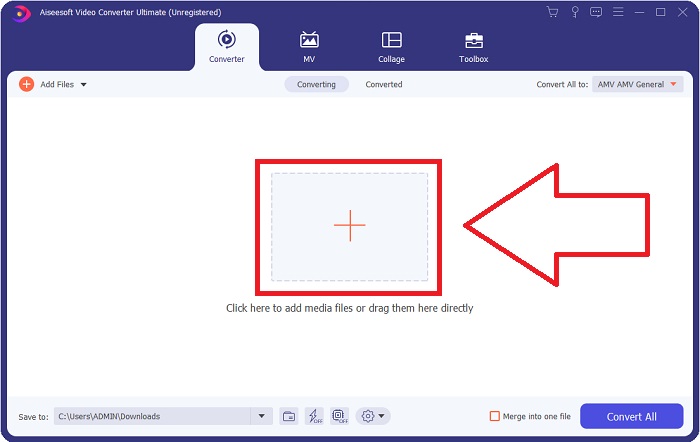
Bước 2: Sau khi khởi động phần mềm, bạn sẽ thấy một cửa sổ bật lên. Giao diện Converter sẽ hiển thị trên màn hình kèm với khu vực tải tệp lên. Nhấn nút + hoặc kéo bất kỳ tệp video nào từ desktop của bạn vào để tiếp tục.
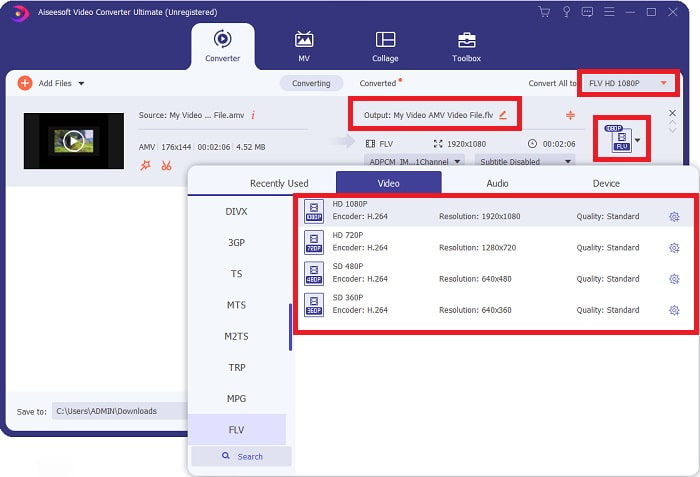
Bước 3: Để chuyển đổi định dạng video AMV sang FLV, sau khi tải tệp lên phần mềm, bạn cần tìm đến mục chọn định dạng và chọn định dạng FLV. Sau đó, bạn cũng có thể tùy ý chọn bất kỳ chất lượng video nào.
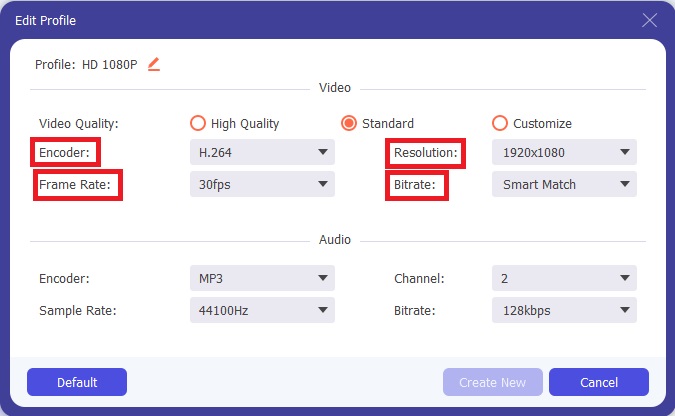
Bước 4: Nếu bạn cần tùy chỉnh hoặc tạo một thiết lập chất lượng video mới theo ý muốn, hãy nhấp vào biểu tượng bánh răng bên cạnh phần lựa chọn chất lượng video.
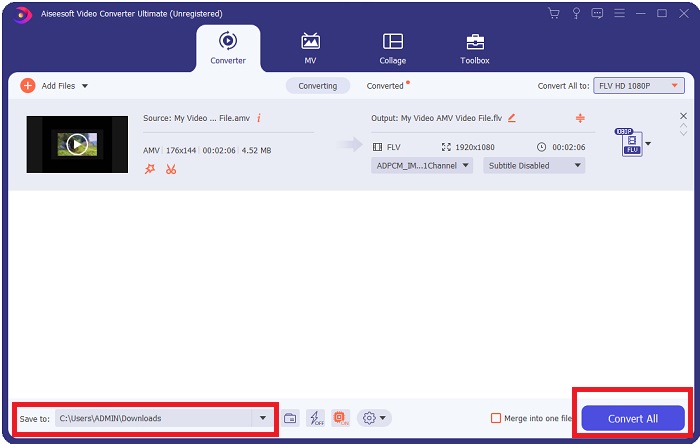
Bước 5: Bạn sắp hoàn tất rồi! Sau khi đã thiết lập xong tất cả thông số và điều chỉnh theo ý, bạn có thể chọn vị trí lưu tệp đã chuyển đổi bằng cách nhấp vào biểu tượng thư mục bên cạnh trường Save to ở góc dưới cùng của cửa sổ. Bây giờ, bạn có thể chuyển đổi tệp video của mình bằng cách nhấp vào nút Convert All.
Phần 2. Công cụ trực tuyến cần xem xét để sử dụng trong việc chuyển đổi AMV sang FLV
Trình chuyển đổi trực tuyến rất dễ sử dụng vì bạn không cần tải xuống hay cài đặt bất kỳ phần mềm nào. Free Video Converter Online là một ví dụ tuyệt vời về chương trình có thể chuyển đổi AMV sang FLV nhanh chóng và dễ dàng. Bạn có thể chuyển đổi nhiều định dạng âm thanh và video khác nhau bằng chương trình này, và nó hoàn toàn miễn phí. Bạn có thể tải lên hai tệp để chuyển đổi, và sau khi quá trình hoàn tất, tệp đã chuyển đổi sẽ tự động được lưu vào ổ cứng của bạn. Hãy để tôi giới thiệu cho bạn tất cả các bước bạn cần biết để sử dụng công cụ trực tuyến tuyệt vời này.
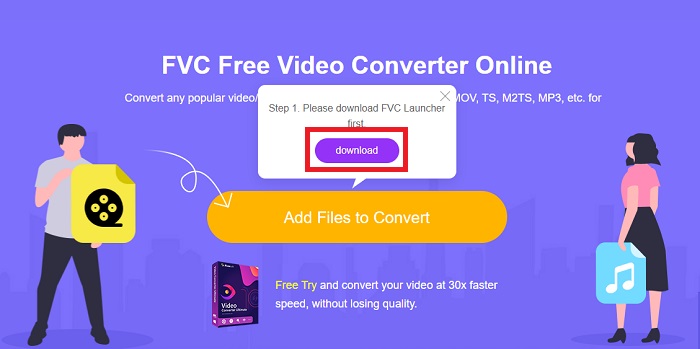
Bước 1: Nhấp vào liên kết này để truy cập trang chính của công cụ trực tuyến. Sau khi truy cập, hãy bắt đầu chuyển đổi tệp bằng cách nhấp vào Add Files to Convert. Nút tải xuống sẽ xuất hiện ở góc trên màn hình của bạn sau đó. Sau khi trình khởi chạy cài đặt xong, bạn có thể bắt đầu tải tệp từ máy tính lên công cụ này.
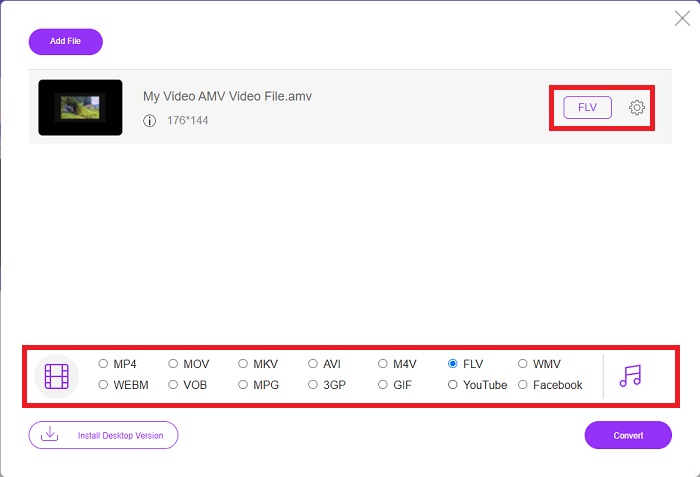
Bước 2: Bây giờ tệp đã được nhập sẵn sàng, hãy nhấp vào định dạng video FLV nằm bên dưới. Tương tự như phần mềm, bạn cũng có thể điều chỉnh tất cả các thông số của video đầu ra bằng cách nhấp vào biểu tượng bánh răng.
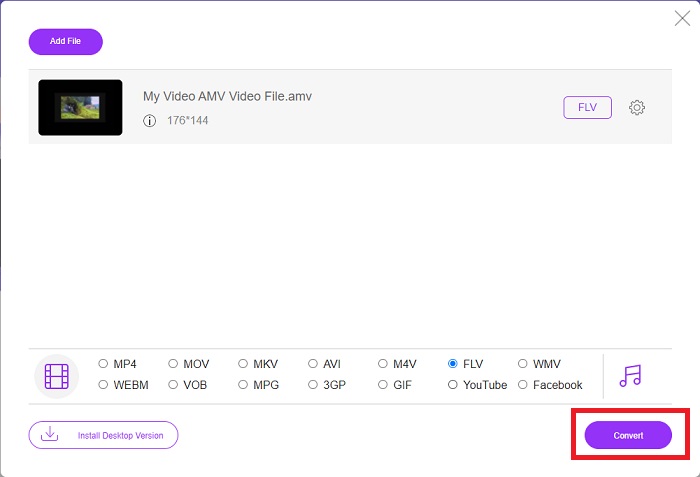
Bước 3: Cuối cùng, nhấp vào nút Convert để chuyển các tệp AMV của bạn sang định dạng FLV.
Có liên quan:
Phần 3. Kiến thức mở rộng về AMV & FLV
AMV tối ưu hóa trình phát đa phương tiện thấp với CPU chậm và màn hình nhỏ, như máy nghe nhạc MP3 S1. Bộ giải mã video là Motion JPEG với các bảng lượng tử hóa cố định. Bộ giải mã âm thanh là IMA ADPCM, trong đó 8 byte đầu tiên của mỗi khung là nguồn (16 bit), chỉ mục (16 bit) và lượng mẫu 16 bit được mã hóa (32 bit). Chi phí giải mã cho các codec đơn giản này là không đáng kể. Độ nén video thấp (4 pixel / byte so với hơn 10 pixel / byte đối với MPEG-2), nhưng kích thước tệp nhỏ do độ phân giải giảm (96x96 cao hơn hoặc bằng 208x176) và fps (10, 12, hoặc 16 khung hình / s). Một video dài 30 phút được nén thành 128x96 pixel và 12 khung hình / s sẽ có dung lượng 80 MB.
Tuy nhiên, một tệp video có đuôi.flv mà bạn có thể sử dụng phần mở rộng tệp FLV nếu bạn muốn truyền video hoặc âm thanh từ Adobe Flash Player hoặc Adobe Air qua internet. Trong một thời gian dài, Flash Video là định dạng video mặc định cho gần như tất cả các video trực tuyến, bao gồm cả những video trên các trang như YouTube, Hulu và vô số video khác. Vì lý do này, các dịch vụ phát trực tuyến và nhà phát triển phần mềm không còn sử dụng định dạng Flash độc quyền của Adobe nữa. Với tất cả những gì so sánh đã nêu, đây là một chút trợ giúp cho bạn, bài viết này cung cấp cho bạn một biểu đồ so sánh:
| Phần mở rộng tệp | AMV | FLV |
| Tên tệp | Video âm nhạc anime | Tệp video Flash |
| Được phát triển bởi | Jim Kaposztas | Adobe System Incorporated |
| Ưu điểm | ◆ AMV là một trong những video ca nhạc anime do người hâm mộ thực hiện phổ biến nhất cho đến nay. ◆ Kích thước tệp nhỏ. | Adobe Flash cho các trang web động và tương tác có thể là một lợi thế lớn. Mặc dù đây là một quá trình đơn giản, nhưng kết quả có thể rất đáng kể. Flash đã từng là một lựa chọn phổ biến cho các trò chơi điện tử đơn giản. |
| Nhược điểm | ◆ Không tương thích với hầu hết các thiết bị và trình phát đa phương tiện; chất lượng thấp. | Sự suy giảm phổ biến của FLV là một nhược điểm. Tạo nội dung FLV có thể tốn nhiều thời gian và tốn kém. Việc không hỗ trợ Flash trên các thiết bị iOS đã hạn chế nghiêm trọng khả năng thu hút người dùng mới của nó. |
| Các chương trình hỗ trợ tệp | ◆ VLC Media Player ◆ iOrgsoft AMV Converter | ◆ RealPlayer ◆ Apple QuickTime Player ◆ VLC Media Player ◆ MPlayer |
Phần 4. Câu hỏi thường gặp về Chuyển đổi AMV sang FLV
Mục đích của AMV là gì?
Đồng bộ hóa và thống nhất trong AMV có thể đạt được nhiều kiểu chỉnh sửa video khác nhau. Có thể chỉnh sửa thô với 'hiệu ứng' phóng to và thu nhỏ đơn giản và chuyển tiếp chuyển tiếp đơn giản. Trong số rất nhiều ví dụ như sau.
AMV được tạo ra như thế nào?
Để một AMV thành công, nó phải sử dụng một bài hát có liên quan chặt chẽ đến chủ đề và mô tả gần như hoàn hảo về chủ đề đó. Bất kỳ ai đọc nó đều có thể phản hồi bằng cách nói, 'Chà, thật là tuyệt vời! Bài hát này là bài hát chủ đề của anh ấy, của cô ấy. Vì điều này, bạn đã chọn được một tác phẩm tốt.
FLV có chất lượng tốt hơn không?
Định dạng FLV và MP4 có khả năng lưu trữ mã hóa kỹ thuật số video và âm thanh chất lượng cao. Chất lượng của các tệp FLV là một vấn đề tranh luận, nhưng lợi ích và hạn chế của FLV có thể thảo luận về định dạng tệp. Tỷ lệ nén cao hơn trong MP4 dẫn đến giảm chất lượng ít hơn.
Phần kết luận
Để kết luận, bạn sẽ biết tầm quan trọng của việc chọn công cụ chuyển đổi tốt nhất trong việc chuyển đổi AMV sang FLV. Những người khác sẽ tạo ra video chất lượng thấp và không đồng bộ sau khi video đó được chuyển đổi. Nhưng hai bộ chuyển đổi mà bài viết này đề xuất là bộ chuyển đổi hàng đầu mà bạn không phải lo lắng về chất lượng mà nó sẽ cung cấp.
-
 Phương pháp tốt nhất để sử dụng trong việc chuyển đổi AMV sang AVI [Đã được phê duyệt]
 Bạn đang gặp khó khăn khi chuyển đổi tệp video định dạng AMV của mình sang AVI? Dưới đây là một số mẹo được cung cấp mà bạn chỉ có thể tìm thấy trong bài viết này.
-
 3 bộ chuyển đổi AMV mới nhất hiện có để chuyển đổi AMV sang định dạng MOV [2022]
 Bạn không biết cách chuyển đổi các tệp AMV của mình sang định dạng MOV? Sau đó, bài viết này nói về 3 bộ chuyển đổi AMV sang MOV bạn có thể sử dụng trực tuyến hoặc ngoại tuyến.
-
 4 phương pháp đã xác minh để chuyển đổi TS sang FLV trên Máy tính để bàn / Trực tuyến
 Bạn không thể mở TS trên máy tính hoặc thiết bị di động của mình theo mặc định. Cách duy nhất để xem các tệp video là chuyển đổi TS sang FLV hoặc các định dạng khác với hướng dẫn cụ thể của chúng tôi.
