


 Chuyển đổi video Ultimate
 Trình ghi màn hình
 Sửa chữa video
 Tải xuống an toàn
Cách chuyển đổi miễn phí VOB sang FLV với các giải pháp Máy tính để bàn và Trực tuyến vào năm 2022
Các tệp có định dạng VOB thường được lưu trong thư mục VIDEO_TS ở thư mục gốc của DVD. Video VOB chứa phần lớn dữ liệu được lưu trên đĩa, bao gồm hình ảnh, âm thanh, phụ đề, menu DVD và các nội dung điều hướng khác. Tuy nhiên, nếu bạn muốn tải tệp VOB lên các mạng xã hội như YouTube, bạn phải chuyển định dạng tệp VOB sang các định dạng phát trực tuyến được hỗ trợ như FLV – tiêu chuẩn cho phương tiện truyền phát trên Internet. Vì vậy, trong bài viết này, chúng tôi sẽ giải thích cách chuyển đổi VOB sang FLV trực tuyến hoặc bằng phần mềm chuyển đổi tệp VOB sang FLV miễn phí để phát trực tuyến tốt hơn.

Phần 1. Làm thế nào để chuyển đổi VOB sang FLV bằng phần mềm máy tính để bàn miễn phí
Để thay đổi nhanh định dạng tệp VOB của bạn sang FLV, hãy thử FVC Free FLV Converter. Với phần mềm miễn phí này, bạn có thể chuyển đổi video từ VOB sang FLV, MP4, AVI, WMV, MOV và nhiều định dạng khác. Hơn nữa, chương trình còn có thể thực hiện các tác vụ chỉnh sửa video cơ bản khi cần. Chỉ cần tải trình chuyển đổi tệp VOB sang FLV và làm theo các bước đơn giản dưới đây.
Tải Miễn PhíDành cho Windows 7 hoặc mới hơnTải xuống An toàn
Tải Miễn PhíDành cho MacOS 10.7 hoặc mới hơnTải xuống An toàn
Bước 1. Khởi chạy FVC Free FLV Converter
Trước tiên, hãy tải xuống trình chuyển đổi VOB sang FLV cho Windows hoặc Mac của bạn. Sau khi tệp cài đặt đã được tải xuống, hãy nhấp đúp vào tệp đó và làm theo hướng dẫn trên màn hình. Sau đó, khởi chạy nó trên máy tính của bạn và bạn sẽ thấy giao diện của nó như bên dưới.

Bước 2. Thêm tệp VOB vào chương trình
Nhấn nút Add File(s), chọn các tệp VOB của bạn và nhấp Next để tiếp tục.

Bước 3. Chọn FLV làm định dạng xuất
Sau đó, chọn định dạng tệp FLV trong trường Output format.
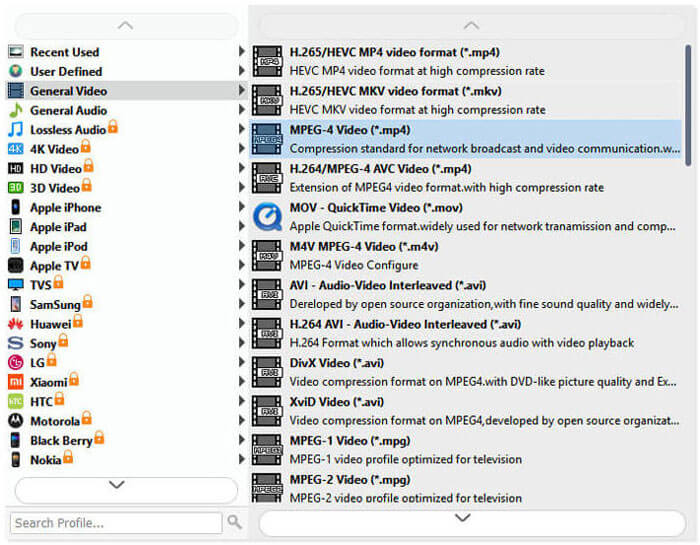
Bước 4. Chuyển đổi VOB sang FLV
Nhấp nút Open Folder và chọn thư mục nơi bạn muốn lưu các tệp đã chuyển đổi. Để bắt đầu chuyển đổi tệp VOB sang FLV, hãy nhấp nút Convert. Khi quá trình chuyển đổi hoàn tất, thư mục chứa các tệp đã chuyển đổi sẽ tự động mở.
Phần 2. Làm thế nào để chuyển đổi VOB sang FLV trực tuyến
Sử dụng các dịch vụ trực tuyến để biến VOB thành FLV cũng là một lựa chọn tốt. Chúng tôi đã chọn hai bộ chuyển đổi VOB sang FLV trực tuyến để bạn lựa chọn. Tất cả các công cụ trực tuyến này đều miễn phí và được nhiều người sử dụng thường xuyên. Đọc tiếp để tìm hiểu cách bạn có thể chuyển đổi VOB sang FLV trên máy tính của mình bằng các công cụ trực tuyến.
FVC Free Online Video Converter
FVC Free Online Video Converter là một công cụ trực tuyến đầy đủ tính năng, hỗ trợ hầu hết các định dạng video và âm thanh phổ biến. Việc chuyển đổi tệp bằng dịch vụ trực tuyến này rất an toàn, và các tệp đã chuyển đổi của bạn sẽ được xóa khỏi máy chủ ngay sau khi bạn tải kết quả về. Bạn không cần cài đặt phần mềm và toàn bộ quá trình chuyển đổi rất đơn giản.
Bạn có thể làm theo các bước bên dưới để thay đổi tệp VOB của mình thành FLV.
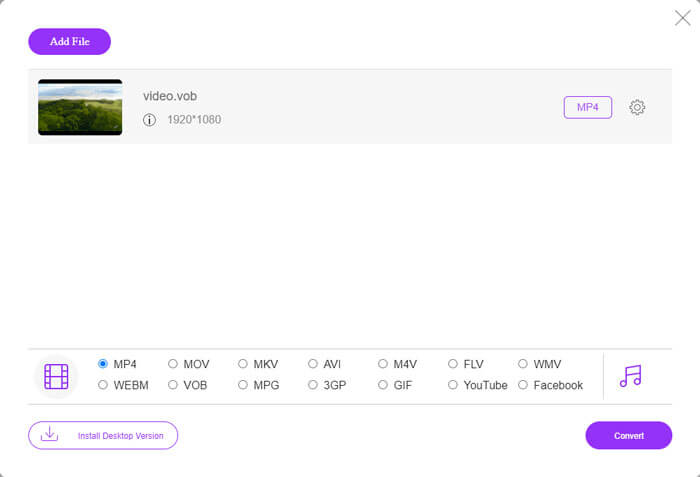
Bước 1. Trên trang web FVC Free Online Video Converter, nhấp nút Add Files to Convert để thêm các tệp VOB của bạn. Lần đầu tiên sử dụng công cụ này, bạn sẽ cần tải về và cài đặt trình khởi chạy trước.
Bước 2. Đảm bảo rằng FLV được chọn làm định dạng xuất trong mục Video ở góc dưới cùng của cửa sổ.
Bước 3. Nhấn nút Convert, sau đó chọn thư mục đích. Sau khi quá trình chuyển đổi hoàn tất, tệp đã chuyển đổi của bạn sẽ được tải xuống tự động và thư mục lưu trữ các tệp đã chuyển đổi sẽ được mở.
Chuyển đổi tệp tin
ConvertFiles là một công cụ chuyển đổi tệp VOB sang FLV trực tuyến miễn phí khác. Dịch vụ này có thể chuyển đổi các loại tệp khác nhau miễn phí trong vòng vài phút. Dịch vụ này có thể gửi liên kết tải xuống tệp đã chuyển đổi tới địa chỉ email của bạn nếu bạn cần. Việc chuyển đổi không cần cài đặt phần mềm và toàn bộ quá trình chuyển đổi rất đơn giản. Nhưng lưu ý rằng công cụ trực tuyến này có thể chuyển đổi các tệp lớn tới 250 MB.
Đây là cách bạn có thể sử dụng công cụ chuyển đổi VOB-to-FLV trực tuyến này.
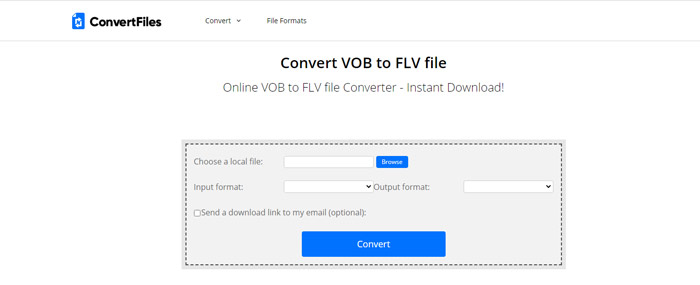
Bước 1. Truy cập trang web ConvertFiles, nhấp Browse và thêm các tệp VOB của bạn vào chương trình.
Bước 2. Sau đó, chọn Flash Video File (.flv) từ danh sách thả xuống Output format.
Bước 3. Nhấp nút Convert để bắt đầu chuyển đổi tệp VOB sang FLV. Khi tệp được chuyển đổi thành công, bạn sẽ thấy đường dẫn liên kết và có thể nhấp vào đó để đến trang tải xuống và tải các tệp đã chuyển đổi của mình.
Phần 3. So sánh giữa các định dạng VOB và FLV
| Thông số so sánh | VOB | FLV |
| Phần mở rộng tệp | .vob | .flv |
| Được phát triển bởi | Diễn đàn DVD | Hệ thống Adobe |
| Video 00codec | MPEG-1, MPEG-2 | On2 VP6, Sorenson Spark, Video màn hình, Video màn hình 2, H.264 |
| Bộ giải mã âm thanh | MP1, MP2, PCM, AC-3, DTS | MP3, ADPCM, Nellymoser, Speex, AAC |
| Các chương trình mở tệp VOB / FLV | Windows Media PlayerVLC Media Player | VLC Media PlayerAdobe Flash Player |
Phần 4. Câu hỏi thường gặp về Chuyển đổi VOB sang FLV
VOB là gì?
VOB (viết tắt của video object) là định dạng gói (container) trong phương tiện DVD-Video. VOB có thể chứa video, âm thanh, phụ đề, menu DVD với chức năng điều hướng qua các chương trên đĩa DVD. Định dạng VOB thường được mã hóa theo chuẩn MPEG-2 và có thể được mở bằng hầu hết mọi trình phát đa phương tiện. Đọc thêm Top 5 Trình phát VOB cho PC Windows 10/8/7 và Mac để tìm hiểu thêm về các trình phát VOB.
FLV là gì?
FLV là định dạng gói âm thanh–hình ảnh dùng để truyền phát nội dung video kỹ thuật số qua Internet bằng Adobe Flash Player 6 trở lên. Bạn có thể phát FLV bằng Windows Media Player, VLC, Adobe Media Player, Winamp, RealPlayer hoặc các trình phát FLV khác.
Các tệp VOB có chứa âm thanh không?
Đúng. Tệp VOB bao gồm các menu video, âm thanh, phụ đề và DVD.
Phần kết luận
Như bạn thấy, bạn có thể chuyển đổi MP4 sang FLV trong khi vẫn giữ được chất lượng cao của video gốc bằng công cụ chuyển đổi tệp VOB miễn phí một cách dễ dàng. Bên cạnh đó, bạn cũng có thể thực hiện chuyển đổi VOB-to-FLV trực tuyến. Các bộ chuyển đổi VOB sang FLV trên máy tính để bàn và trực tuyến nói trên đều miễn phí. Chúng tôi hy vọng bạn có thể tìm thấy một giải pháp thỏa đáng và đáp ứng tốt nhất nhu cầu của bạn.
-
 Tệp VOB là gì và cách biến tệp VOB thành GIF miễn phí
 Bạn có muốn biết thêm về các tập tin VOB và cách chia sẻ nó sau khi bị tách? hoặc Tại sao bạn cần chuyển đổi VOB sang GIF? Sau đó đọc kỹ bài viết này.
-
 VOB sang MP4 - 3 cách chuyển đổi tệp VOB sang MP4 miễn phí hàng loạt
 Bài viết này giới thiệu 3 bộ chuyển đổi VOB sang MP4 miễn phí và các hướng dẫn liên quan. Bạn có thể chuyển đổi miễn phí các tệp VOB sang MP4 miễn phí trên Windows / Mac / trực tuyến một cách dễ dàng.
-
 Cách nén tệp VOB trực tuyến và miễn phí
 Bạn đang tìm kiếm các phương pháp để nén các tập tin VOB? Tìm hiểu cách tốt nhất để làm cho kích thước tệp VOB nhỏ hơn trong bài viết này.
