


 Chuyển đổi video Ultimate
 Trình ghi màn hình
 Sửa chữa video
Cách chuyển đổi GIF sang WebM với các bước và công cụ chi tiết [Miễn phí và tốn kém]
GIF trở nên phổ biến vì những nội dung hài hước mà nó mang lại cho chúng ta. Thay vì chỉ dùng hình ảnh tĩnh để làm sinh động thêm cho các tin nhắn văn bản, chúng ta dùng GIF vì nó mang lại chuyển động và giúp phóng đại cảm xúc. Tuy nhiên, không phải nền tảng nào cũng hỗ trợ GIF vì định dạng này đã hơn 30 năm tuổi. Trong một số trường hợp, khi bạn thêm tệp GIF vào trang web, chất lượng của nó cũng không được hỗ trợ tốt. Vì vậy, cách tốt nhất để chia sẻ GIF là chuyển nó sang định dạng WebM. Định dạng WebM có mức nén và dung lượng nhỏ hơn nhiều, nhưng vẫn cho chất lượng cao, rất phù hợp với mọi người. Kiểu định dạng này là lựa chọn thay thế tốt nhất cho GIF về lâu dài vì cũng giống GIF, nó có thể lưu trữ cả hình ảnh tĩnh và ảnh động. Để biết những trình chuyển GIF sang WebM tốt nhất, hãy tiếp tục đọc bên dưới và chọn công cụ phù hợp nhất với bạn.

Phần 1. Làm thế nào để chuyển đổi GIF sang WebM cho Web và Máy tính để bàn miễn phí
1. FVC Free Video to GIF Maker
Để hoàn thành công việc hiệu quả, bạn phải cân nhắc chọn đúng công cụ. Và nếu công việc là chuyển GIF sang WebM thì bạn có thể muốn thử FVC Free Video to GIF Maker. Tạo GIF trở nên rất dễ nếu bạn dùng phần mềm này, và việc chuyển đổi GIF cũng vậy. Do đó, quá trình làm quen cách sử dụng công cụ này khá đơn giản, tất cả là nhờ hướng dẫn chi tiết do FVC cung cấp. Vì thế, người mới hay người dùng chuyên nghiệp đều có thể dễ dàng sử dụng và vẫn có được chất lượng đầu ra tốt nhất. Để biết cách sử dụng công cụ, bạn hãy làm theo các bước dưới đây được chuẩn bị riêng cho bạn.
Bước 1. Cài đặt công cụ miễn phí này vào ổ đĩa của bạn. Chọn đúng hệ điều hành của máy.
Tải miễn phíDành cho Windows 7 hoặc mới hơnTải xuống an toàn
Tải miễn phíDành cho MacOS 10.7 hoặc mới hơnTải xuống an toàn
Bước 2. Nhấp vào biểu tượng của công cụ vừa được tải xuống để khởi chạy. Nếu công cụ đã chạy ở chế độ nền, giao diện sẽ hiển thị giống như thế này.
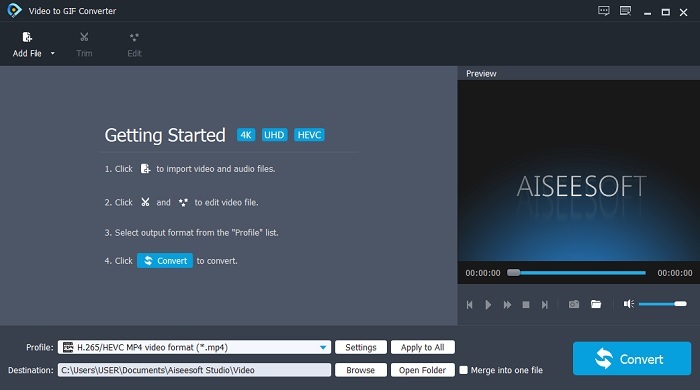
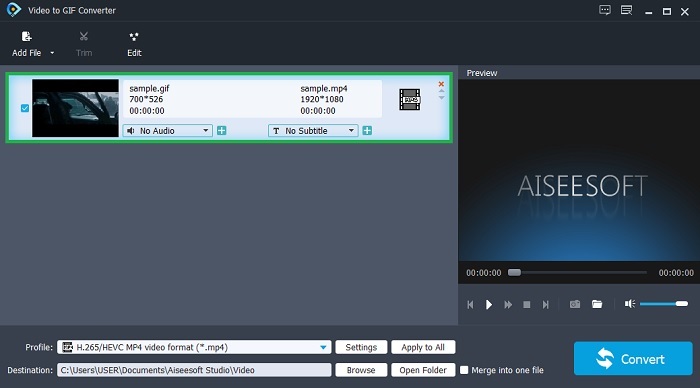
Bước 3. Nhấp vào Add File và chọn GIF bạn muốn chuyển đổi. Ngay trên giao diện, bạn có thể chỉnh sửa hoặc cắt video.
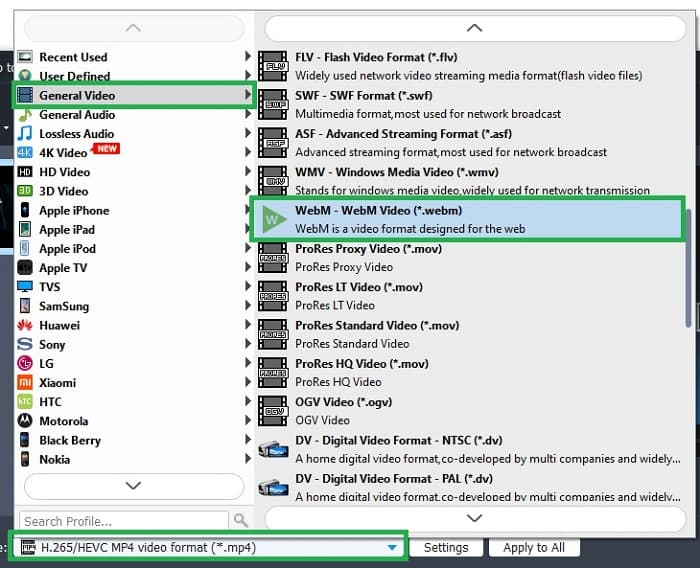
Bước 4. Ở nút drop-down, chọn tệp WebM hoặc bất kỳ định dạng nào bạn muốn chuyển sang. Khi đã sẵn sàng bắt đầu quá trình chuyển đổi, hãy nhấn Convert.
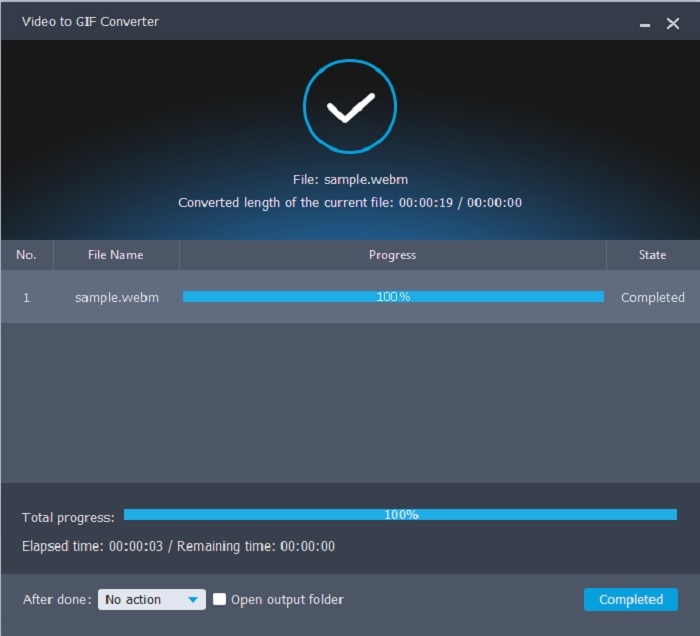
Bước 5. Quá trình chuyển đổi chỉ mất chưa đến một phút. Khi chuyển đổi xong, bạn có thể kiểm tra tệp cuối cùng trong trình quản lý tệp.
Ưu điểm
- Nó rất tốt trong việc tạo và chuyển đổi GIF.
- Công cụ tại chỗ nên quá trình học cách sử dụng công cụ này rất dễ dàng ở mọi lứa tuổi.
- Không cần internet để sử dụng công cụ này.
Nhược điểm
- Hầu hết các tính năng chính trong công cụ cuối cùng không có sẵn ở đây.
- Nó cần được cài đặt trên máy tính để bàn của bạn.
2. OnlineConverter.com
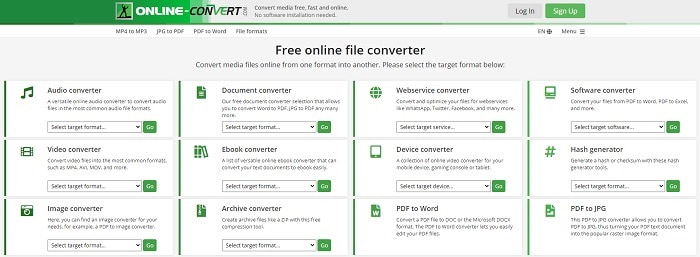
Hãy chuyển .webm sang .gif với sự trợ giúp của OnlineConverter.com. Nếu bạn muốn một công cụ chuyên dùng cho việc chuyển đổi thì nên thử công cụ này. Công cụ hỗ trợ nhiều kiểu chuyển đổi khác nhau như tài liệu, eBook và tệp nén. Nhưng nhược điểm là nó không hỗ trợ tính năng chỉnh sửa, ngay cả những tính năng cơ bản. Nếu bạn muốn biết cách dùng công cụ này thì hãy làm theo các bước dưới đây.
Bước 1. Tìm trang chủ của công cụ bằng công cụ tìm kiếm ưa thích của bạn.
Bước 2. Nhấp vào trình chuyển đổi video và tải tệp lên.
Bước 3. Để bắt đầu chuyển đổi, nhấp vào nút bắt đầu chuyển đổi và chờ cho đến khi hoàn tất.
Ưu điểm
- Dễ dàng truy cập có thể được sử dụng bởi bất kỳ ai trực tuyến.
- Không cần tệp bổ sung để sử dụng.
- Nó cũng hỗ trợ các chuyển đổi khác nhau.
Nhược điểm
- Quá trình chuyển đổi thông qua trực tuyến mất nhiều thời gian hơn so với các công cụ dựa trên máy tính để bàn.
- Nó có một vài quảng cáo và giao diện web nhàm chán.
3. Convertio
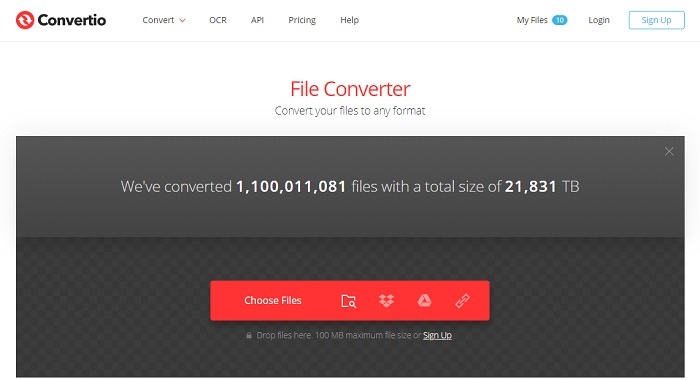
Nếu bạn muốn biết cách chuyển WebM sang GIF hoặc ngược lại, chỉ cần dùng công cụ trực tuyến Convertio là bạn có thể chuyển đổi mọi thứ. Nếu việc chuyển định dạng khiến bạn đau đầu thì đây chính là giải pháp. Tuy công cụ trực tuyến này có quảng cáo và không cung cấp tính năng chỉnh sửa, nó vẫn là một trong những trình chuyển đổi tốt nhất trên mạng mà bạn có thể tìm thấy. Nếu bạn muốn thử công cụ này, hãy làm theo các bước dưới đây.
Bước 1. Tìm trang chủ Convertio trực tuyến rồi nhấp vào liên kết.
Bước 2. Khi đã vào giao diện chính, hãy chọn tệp GIF bạn muốn chuyển đổi.
Bước 3. Để bắt đầu quá trình, nhấp vào nút convert.
Ưu điểm
- Dễ dàng sử dụng vì cách sử dụng nó tại chỗ.
- Nó cũng hỗ trợ các nền tảng khác nhau.
- Có thể dễ dàng truy cập qua internet.
Nhược điểm
- Rất có thể bị mất dữ liệu trong khi chuyển đổi nếu internet bị gián đoạn.
- Quảng cáo trên chính trang web có thể hơi khó chịu.
Phần 2. Cách tốt nhất để chuyển GIF sang WebM với sự trợ giúp của Công cụ Ultimate
Chuyển đổi video Ultimate
Nhưng bạn có thể cân nhắc sử dụng Video Converter Ultimate này do FVC phát triển. Nếu phiên bản miễn phí của công cụ này cung cấp cho bạn kết quả tốt nhất thì công cụ này còn hơn thế nữa. Nó có thể nâng cao chất lượng video và cũng có thể thêm các hiệu ứng vào đó. Nếu bạn muốn cải thiện chất lượng âm thanh, bạn cũng có thể sử dụng công cụ này để cải thiện nó. Vì vậy, nếu bạn muốn chuyển đổi của mình lên cấp độ tiếp theo, bạn phải sử dụng công cụ này làm lựa chọn cá nhân của mình. Bởi vì nó là công cụ phù hợp cung cấp kết quả cuối cùng để gây ấn tượng với bạn bè, gia đình hoặc bất kỳ ai của bạn. Đọc các bước chi tiết bên dưới để biết cách sử dụng công cụ cuối cùng này để tạo ra kết quả cuối cùng.
Bước 1. Để bắt đầu sử dụng công cụ, bạn phải tải đúng chương trình về máy tính. Nhấp nút tải xuống và làm theo các bước cài đặt, thay đổi nếu cần. Nhấp Hoàn tất để khởi chạy công cụ.
Tải xuống miễn phí cho Windows 7 trở lên. Tải xuống an toàn.
Tải xuống miễn phí cho MacOS 10.7 trở lên. Tải xuống an toàn.
Bước 2. Một cửa sổ giao diện nhỏ như thế này sẽ xuất hiện trên màn hình.
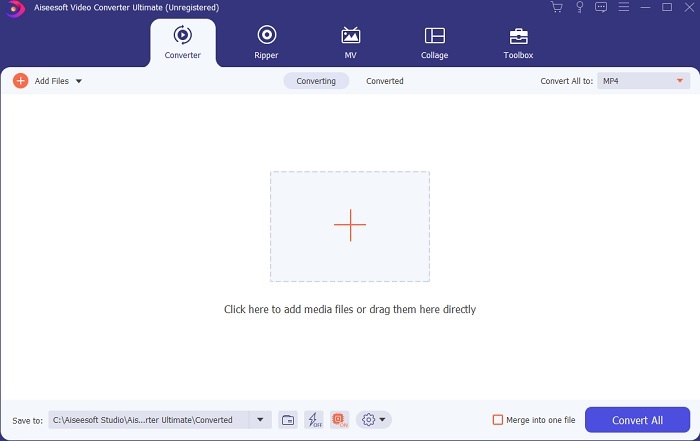
Bước 3. Nhấp vào dấu cộng ở giữa giao diện để thêm tệp. Nếu bạn muốn chuyển đổi nhiều tệp GIF cùng lúc thì tốt hơn nên kéo‑thả tệp vào giao diện.
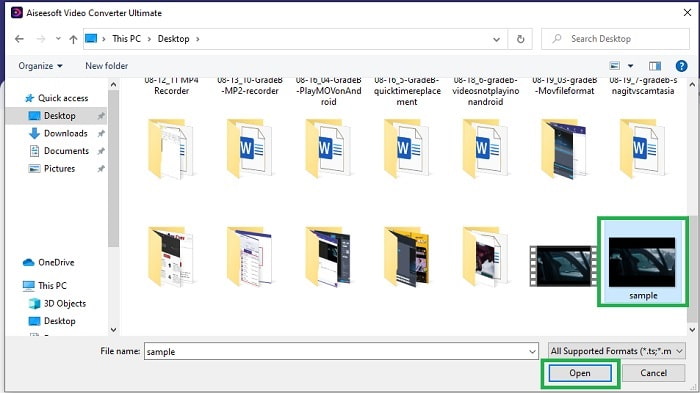
Bước 4. Chọn định dạng bạn muốn sau khi mở rộng menu Convert All to. Khi đã sẵn sàng, hãy nhấp Convert All để bắt đầu quá trình chuyển đổi.
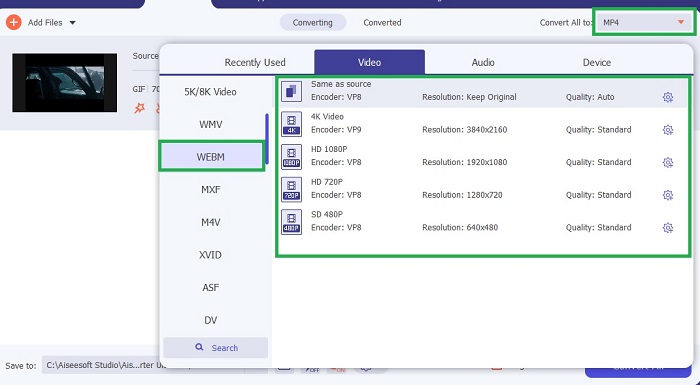
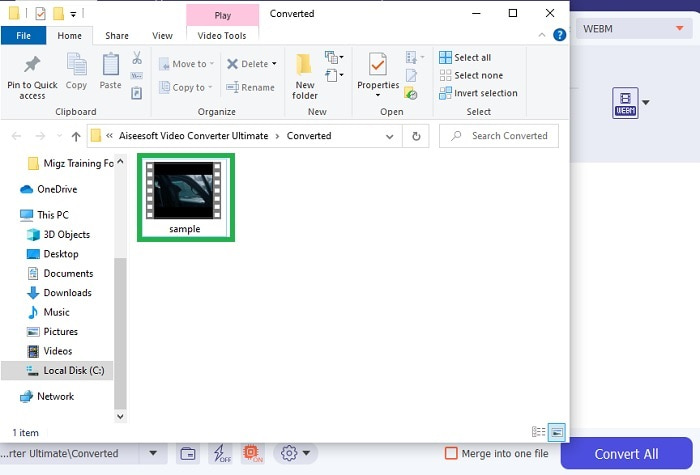
Bước 5. Quá trình chuyển đổi sẽ không tốn nhiều thời gian vì nó nhanh hơn công cụ miễn phí 30 lần và nhanh hơn các công cụ khác 100 lần. Khi quá trình hoàn tất, một cửa sổ quản lý tệp sẽ bật lên trên màn hình, hãy nhấp vào video để xem. Bạn cũng có thể chỉnh sửa, nâng cao chất lượng đầu ra sau đó trên thanh công cụ nếu muốn.
Ưu điểm
- Cung cấp nhiều tính năng hơn để cải thiện video được chuyển đổi của bạn.
- Nó cung cấp tất cả các định dạng mà bạn đã biết hoặc chưa biết.
- Quá trình chuyển đổi diễn ra siêu nhanh so với bất kỳ công cụ chuyển đổi nào có sẵn ở đây.
Nhược điểm
- Bạn cần tải xuống các tệp bổ sung trước khi khởi chạy công cụ, nếu không nó sẽ không khởi chạy.
- Nó là công cụ trả trước khi sử dụng.
Phần 3. Câu hỏi thường gặp về GIF to WebM
Tại sao WebM của tôi không thể chơi được trên web?
Lý do rất đơn giản là công cụ tìm kiếm hoặc trình duyệt của bạn đã quá lỗi thời. Không thể phát WebM trên các phiên bản web cũ, ví dụ như Internet Explorer. Nhấp vào đây để tìm hiểu thêm về các trình phát WebM hiện có.
Cái nào tốt hơn, GIF hay WebM?
Nếu bạn muốn chứa video với âm thanh WebM là một định dạng tốt hơn nhiều. Nhưng nếu hình ảnh tĩnh, định dạng GIF là lựa chọn của bạn.
Ai đã phát triển định dạng WebM?
Đầu tiên là On2, Xiph và Matroska và sau đó Google phát triển nó.
Phần kết luận
Giờ đây chúng ta có thể thấy rõ rằng việc chuyển GIF sang WebM là rất cần thiết, đặc biệt nếu bạn muốn có tệp dung lượng nhỏ nhưng chất lượng video vẫn cao. Và công cụ tốt nhất cho việc chuyển đổi chính là Video Converter Ultimate. Quan trọng hơn, nó còn hỗ trợ chuyển WebM sang GIF một cách dễ dàng và nhanh chóng. Nếu bạn còn nghi ngờ về công cụ miễn phí thì tốt hơn nên dùng công cụ cao cấp này. Bên cạnh việc an toàn, nó còn mang lại tỉ lệ thành công gấp 100 lần trong khâu chuyển đổi và chỉnh sửa. Công cụ này chính là lựa chọn hàng đầu của bạn, đơn giản là vậy. Hãy dùng trình chuyển đổi tốt nhất để có được kết quả chuyển đổi tuyệt vời.
-
 Chọn Trình cắt GIF Trực tuyến và Ngoại tuyến tốt nhất để Cắt GIF [2021]
 Chọn công cụ cắt ảnh tốt nhất là điều bắt buộc và một số nhà sản xuất ảnh GIF đã không cung cấp tính năng này. Nhưng công cụ cắt ảnh GIF tốt nhất để sử dụng là gì và làm thế nào để sử dụng nó?
-
 5 Tùy chọn Tốt nhất để Ghi Định dạng GIF với Máy ghi GIF cho PC & Mac
 Trình ghi GIF tốt nhất mà bạn nên sử dụng để ghi GIF là gì? Danh sách dưới đây cung cấp bằng chứng về cái nào là máy quay màn hình tốt nhất.
-
 Cách chuyển đổi MPG sang định dạng GIF [Trực tuyến và Ngoại tuyến]
 Bạn muốn thể hiện một cảm xúc tốt hơn? Sau đó, bạn phải sử dụng GIF để thay thế. Bài viết này sẽ hướng dẫn bạn cách chuyển đổi tệp MPG sang GIF để thể hiện cảm xúc của bạn tốt hơn nhiều.
