


 Chuyển đổi video Ultimate
 Trình ghi màn hình
 Sửa chữa video
 Tải xuống an toàn
3 cách miễn phí để chuyển đổi WebM thành GIF động
Các ảnh GIF gần đây đã trở nên cực kỳ phổ biến trên nhiều ứng dụng mạng xã hội. Bạn đang tìm cách chuyển đổi video như WebM sang GIF phải không?
Thực ra, việc tự tạo GIF từ vài đoạn video ngắn khá đơn giản, miễn là bạn có một trình chuyển đổi GIF dạng động hoặc trình tạo GIF tốt. Rất nhiều công cụ chuyển đổi video sang GIF, bao gồm cả công cụ miễn phí trực tuyến, đều khẳng định có thể giúp bạn chuyển WebM sang GIF một cách dễ dàng. Tuy nhiên, với quá nhiều công cụ trên thị trường, bạn có thể không biết nên dùng cái nào.

Xét đến nhu cầu của bạn, bài viết này muốn chia sẻ 3 cách miễn phí để chuyển WebM sang GIF. 3 trình chuyển đổi video sang GIF hữu ích được đề xuất để bạn tạo ảnh GIF động. Bên cạnh WebM, chúng còn hỗ trợ các định dạng video thông dụng khác như MP4, MOV, AVI, FLV và nhiều hơn nữa. Bạn sẽ có hướng dẫn chi tiết về cách chuyển WebM sang GIF bằng các công cụ này.
Phần 1. Chuyển đổi WebM sang GIF với Free Online Converter
Trong phần đầu tiên, chúng tôi muốn giới thiệu đến bạn một trình chuyển đổi video sang GIF trực tuyến phổ biến, Free Online Video Converter. Nó có thể hoạt động như một trình chuyển đổi video sang GIF để giúp bạn biến video WebM thành GIF trực tuyến.
Ngoài định dạng WebM, nó còn hỗ trợ hầu hết các định dạng video phổ biến như MP4, MOV, MKV, AVI, FLV, WMV, M4V và nhiều định dạng khác. Điều đó có nghĩa là bạn có thể dễ dàng tải bất kỳ video nào lên trình chuyển đổi GIF trực tuyến này và chuyển đổi thành tệp GIF. Giờ bạn có thể làm theo hướng dẫn sau để chuyển WebM sang GIF trực tuyến miễn phí.
Bước 1. Mở trình duyệt web như Google Chrome, Microsoft IE, Safari, Yahoo hoặc Firefox rồi truy cập trang web trình chuyển đổi WebM sang GIF miễn phí này. Khi truy cập, hãy nhấp vào nút Add Files to Convert để nhanh chóng cài đặt trình khởi chạy phục vụ việc chuyển đổi GIF. Chỉ lần đầu tiên mới cần cài đặt.
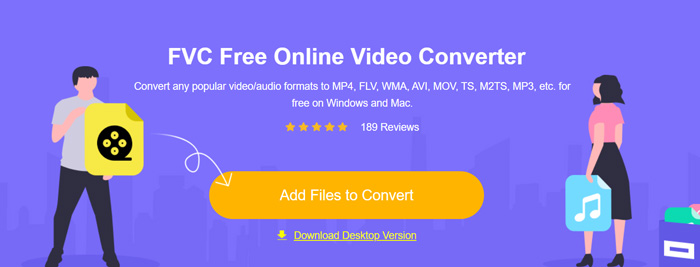
Bước 2. Sau đó, bạn có thể duyệt và chọn video WebM của mình trong cửa sổ bật lên. Trong một số trường hợp, bạn cần nhấp lại vào nút Add Files to Convert để tải tệp lên thủ công. Sau đó bạn sẽ được chuyển đến cửa sổ chuyển đổi.
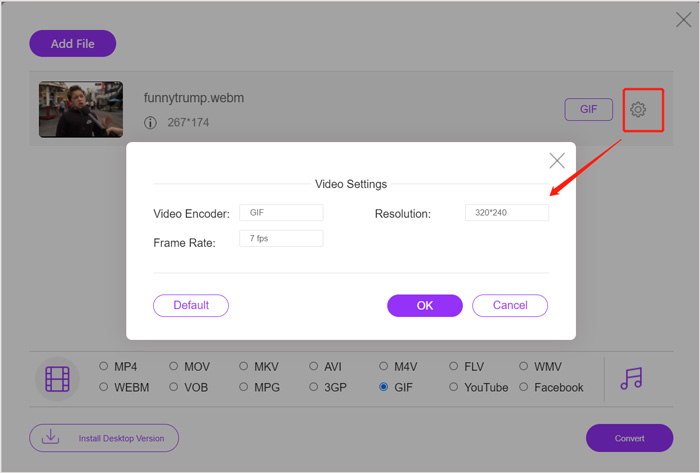
Bước 3. Nhiều định dạng video thông dụng sẽ được liệt kê ở đó. Tại đây bạn cần chọn GIF làm định dạng đầu ra. Nhấp vào biểu tượng cài đặt bên cạnh định dạng GIF đầu ra, bạn có thể tùy chỉnh bộ mã hóa video, độ phân giải và tốc độ khung hình. Nhấp OK để lưu các thay đổi. Sau tất cả các thao tác này, bạn chỉ cần nhấp vào nút Convert để bắt đầu quá trình chuyển đổi WebM sang GIF. Như đã đề cập ở trên, công cụ này cũng cho phép bạn chuyển MP4 sang GIF rất dễ dàng.
Phần 2. Cách miễn phí để chuyển đổi WebM sang GIF mà không làm giảm chất lượng
Ngoài trình chuyển đổi WebM sang GIF trực tuyến, cũng có những trình chuyển đổi GIF miễn phí khác giúp bạn chuyển WebM sang GIF. Ở đây chúng tôi đặc biệt giới thiệu Free Video to GIF Maker cho bạn. Phần mềm này được thiết kế chuyên để xử lý nhiều loại chuyển đổi video và âm thanh. Nó cho phép bạn chuyển WebM sang GIF mà không làm giảm chất lượng.
Tải miễn phíDành cho Windows 7 hoặc mới hơnTải xuống an toàn
Tải miễn phíDành cho MacOS 10.7 hoặc mới hơnTải xuống an toàn
Bước 1. Trình chuyển đổi WebM sang GIF này cho phép bạn tự tạo GIF trên máy tính Windows 10/8/7 hoặc Mac. Hãy chọn đúng phiên bản phù hợp với hệ điều hành rồi cài đặt miễn phí trên máy.
Khởi chạy chương trình và nhấp vào More Products ở bên trái để hiển thị thêm các công cụ khác. Tìm Video to GIF Converter và nhấp vào biểu tượng của nó để cài đặt.
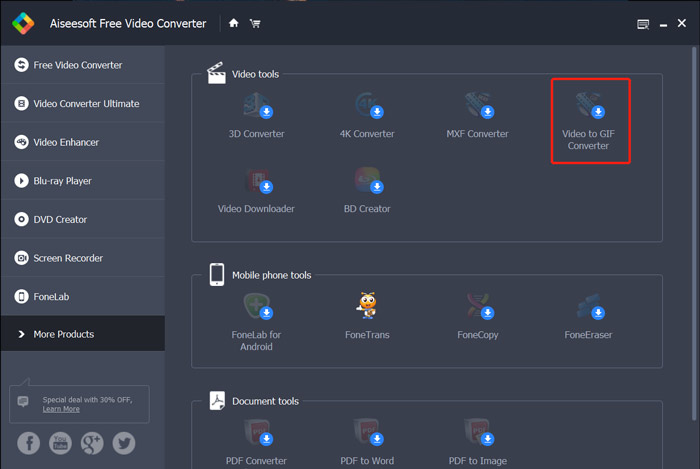
Bước 2. Sau khi cài đặt xong, bạn sẽ được đưa đến giao diện Video to GIF Converter. Ở đây, bạn có thể nhấp vào Add File để tải tệp WebM của mình.
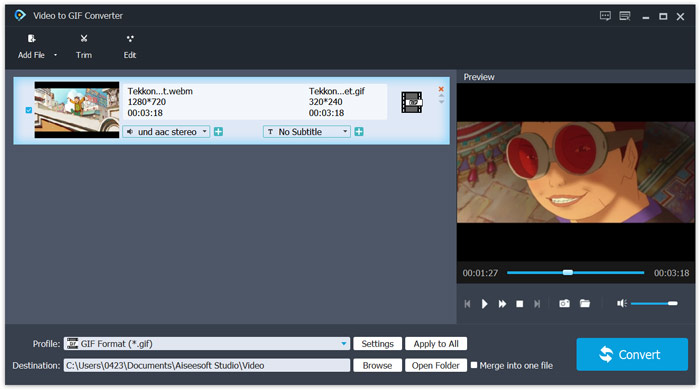
Bước 3. Trình chuyển đổi WebM sang GIF miễn phí này được trang bị nhiều tính năng chỉnh sửa như cắt, ghép, xoay, hiệu ứng, watermark và nhiều hơn nữa. Trước khi chuyển sang GIF, bạn có thể dùng các chức năng này để chỉnh sửa tệp và điều chỉnh hiệu ứng đầu ra.
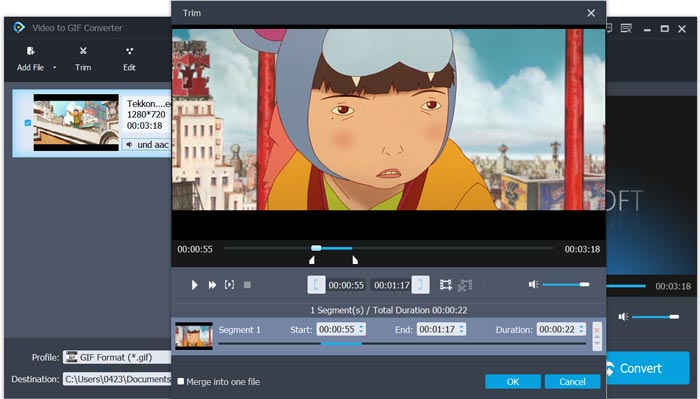
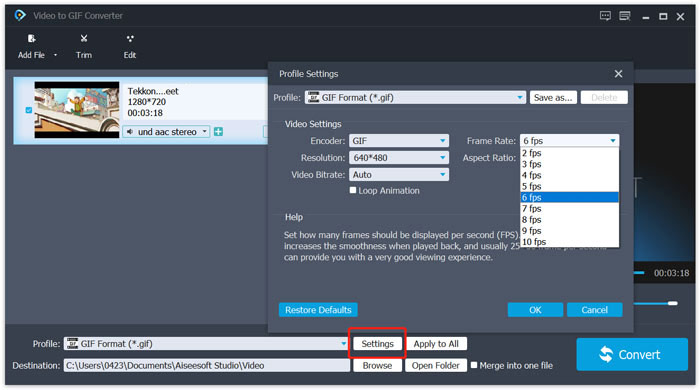
Bước 4. Định dạng đích sẽ được tự động đặt là GIF. Bạn có thể nhấp vào nút Settings bên cạnh Profile để tùy chỉnh thêm các tùy chọn. Sau đó, nhấp vào nút Convert để bắt đầu chuyển WebM sang GIF động.
Phần 3. Cách thay đổi WebM thành GIF với ZAMZAR
Zamzar là một trình chuyển đổi tệp trực tuyến đa năng, có thể giúp bạn chuyển WebM sang GIF động rất dễ dàng. Nó cung cấp nhiều dịch vụ chuyển đổi khác nhau để người dùng chuyển đổi video, âm thanh, tài liệu, sách điện tử và nhiều tệp khác. Zamzar có một trang WEBM to GIF riêng để bạn trực tiếp thực hiện việc chuyển đổi từ WebM sang GIF.
Bước 1. Mở trang trình chuyển đổi WebM sang GIF trực tuyến miễn phí này trên trình duyệt của bạn.
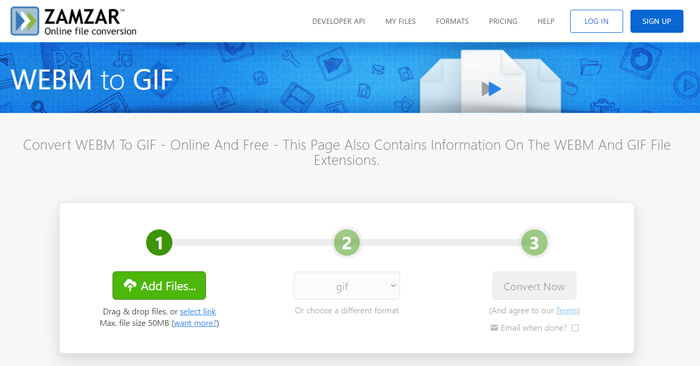
Bước 2. Nhấp vào nút Add Files để tải tệp WebM lên. Dung lượng tệp tải lên bị giới hạn ở mức 50MB.
Bước 3. Hãy đảm bảo định dạng đầu ra là GIF, sau đó nhấp vào nút Convert Now. Trình chuyển đổi GIF trực tuyến miễn phí này sẽ bắt đầu quá trình tải và chuyển đổi tệp.
Bước 4. Khi quá trình chuyển đổi hoàn tất, bạn có thể nhấp vào Download để lưu tệp GIF đã chuyển trên máy tính. Tệp đã chuyển sẽ được lưu trữ trên dịch vụ của họ trong 24 giờ.
Phần 4. Câu hỏi thường gặp về Chuyển đổi WebM sang GIF
Câu hỏi 1. WebM có phải là GIF không?
Không. WebM là một loại thay thế cho định dạng GIF. So với GIF, WebM có chất lượng cao hơn nhiều và kích thước tệp nhỏ hơn. Hơn nữa, WebM cho phép bạn kiểm soát quá trình phát của nó như dừng, bắt đầu, tự động phát và lặp lại. GIF không yêu cầu bất kỳ ai nhấn phát.
Câu hỏi 2. Tôi có thể thay đổi phần mở rộng tệp để biến WebM thành GIF không?
Bạn có thể dễ dàng thay đổi phần mở rộng tệp WebM thành .gif để thực hiện chuyển đổi WebM sang GIF. Với phương pháp này, cuối cùng bạn có thể nhận được tệp GIF. Tuy nhiên, trong hầu hết các trường hợp, tệp GIF sẽ bị hỏng và bạn không thể mở hoặc phát nó bình thường.
Câu hỏi 3. Tại sao ảnh GIF có chất lượng rất thấp?
Hầu hết các ảnh GIF được tạo ra với độ phân giải thấp và kích thước nhỏ. So với hình ảnh tĩnh, thật khó để giữ một loạt hình ảnh chuyển động ở cùng một kích thước tệp. Vì vậy, hầu hết các ảnh GIF trông có chất lượng rất thấp. Mặt khác, các tệp GIF có thể được chia sẻ thường xuyên. Vì vậy, tệp nguồn sẽ bị nén và trông tệ hơn mỗi khi nó được lưu hoặc tải lên lại. Nhưng vẫn có nhiều trình chuyển đổi video sang GIF và những người tạo GIF có thể dễ dàng xuất GIF chất lượng cao.
Phần kết luận
Việc tạo GIF từ video WebM rất dễ dàng. Trong bài viết này, bạn có 3 cách miễn phí để chuyển WebM sang GIF trên máy tính hoặc trực tuyến. Với các trình chuyển đổi được khuyến nghị trong bài, bạn cũng có thể chuyển FLV sang GIF. Khi muốn biến một đoạn video thành GIF động, bạn chỉ cần chọn công cụ ưa thích để thực hiện.
-
 Top 5 máy ghi âm bàn phím và chuột tốt nhất cho Windows và Mac
 Dưới đây là năm chương trình ghi bàn phím và chuột tốt nhất có thể lưu chuyển động chuột và nhấp bàn phím của bạn, đồng thời lặp lại các sự kiện.
-
 Hướng dẫn nén GIF và giảm kích thước tệp với chất lượng cao
 Đây là 2 cách đơn giản để nén GIF trên máy tính hoặc điện thoại di động của bạn. Bạn có thể sử dụng FVC Free Online Video Compressor và Photoshop để giảm kích thước tệp GIF theo các khía cạnh khác nhau.
-
 Trình phát GIF - 5 Trình phát GIF tốt nhất cho Windows PC, Mac, Android và iPhone
 Chương trình nào mở tệp GIF? Làm cách nào để xem ảnh GIF trên Android? IPhone có trình phát GIF để mở ảnh GIF không? Bài đăng này chia sẻ 5 trình phát GIF tốt nhất cho bạn.
