


 Chuyển đổi video Ultimate
 Trình ghi màn hình
 Sửa chữa video
 Tải xuống an toàn
Tìm hiểu các phương pháp hoàn hảo về cách tạo URL từ hình ảnh
Nowadays, image file formats have become popular. These formats are one of the best ways to share and open images in different browsers and programs. However, there are some instances when you can’t share your images, no matter what extension you use. This situation might be troublesome for other people. But little did we know there was a solution to this type of struggle. If you want to share your photos everywhere and anywhere, the best way is to transcode the image into the URL. This way, you can share the photo to others without the help of any extensions. Fortunately, the article has an exceptional solution for you. Please read this post as we give you the best tutorials on how to turn your images into a link.

Phần 1. Phương pháp hiệu quả để biến hình ảnh thành liên kết
Chuyển đổi hình ảnh thành liên kết bằng i-Converter
Some image to URL converters online are not working well, so we want to introduce you to i-Converter. It is an online converter you can rely upon to change your image files into a URL link. You can access the online tool on different browsers. It includes Firefox, Chrome, Edge, Explorer, and more. It also has a simple process of converting files. This way, the tool is suitable for you whether you are a skilled user or a beginner. Additionally, it supports various image file formats. You can convert your images to JPEG, BMP, TIFF, PNG, GIF, DOC, and more. Moreover, the i-Converter is free. It means that you can convert your images without purchasing a subscription plan. However, the i-Converter is only exclusive to JPG image files. If your image doesn't have a .jpg file extension, you can't upload it on this online tool. Also, there are times when the tool is not performing well. Since it is an online tool, an internet connection is highly recommended.
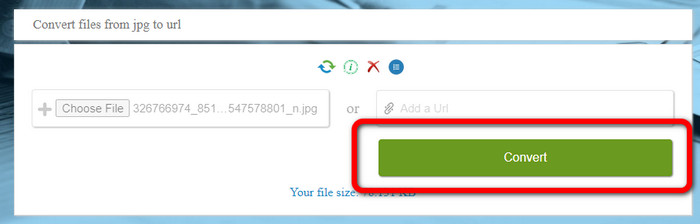
Step 1. Open any browser from your desktop and visit the i-Converter website. When you are already on the main webpage, click the Choose File button. When the computer file appears on the screen, open the image you want to turn into a URL.
Step 2. After uploading the image file you want to convert, click the Convert button. Then, wait for the conversion process. After a few seconds, the tool will give you the link. You can copy the link to the browser to open the image by clicking the Copy Code button.
Cách tạo hình ảnh thành liên kết bằng cách sử dụng hình ảnh để liên kết
Another online tool you can utilize to convert images to HTML is Image to Link. Compared to the first tool above, the tool supports various input formats like JPG, PNG, and GIF. Also, it offers straightforward methods. After uploading the image, the tool will convert the image automatically. The conversion process is fast so you can get the link quickly. Additionally, Image to Link is available on various web browsers. You can use it on Google, Mozilla, Explorer, and more. All users are capable of operating this tool because of its understandable options. The best thing is that you can convert multiple images at once. This way, converting more files is perfect when using the tool. However, when using the converter, some ads appear on the screen, making it frustrating for users. Also, when converting multiple files, you can only upload up to five images. You also need internet access to use the online image converter.
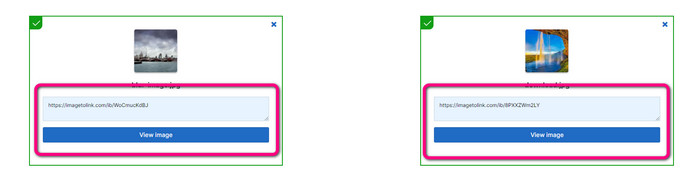
Step 1. Navigate to the Image to Link website from your browser. On the webpage, click the Start Uploading button. Then open the image file you want to convert from your computer file. You can upload up to five images when doing a batch conversion process.
Step 2. After uploading, the tool will automatically turn the image into a link. Afterward, the tool will provide a link that you can use to open the image. To open the image, copy the given link and paste it into your browser.
Phần 2. Cách thay đổi hình ảnh thành JPG, PNG và GIF
Chuyển đổi hình ảnh sang JPG, PNG và GIF trên FVC Free Image Converter
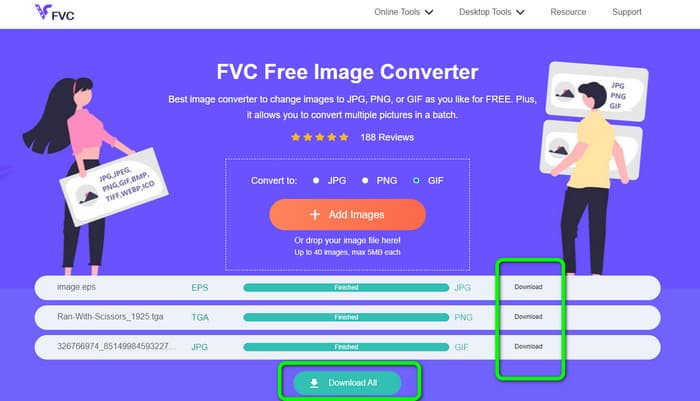
One of the leading online image converters you can use is the FVC Free Image Converter. The tool can transcode your image into various formats like JPG, PNG, and GIF. Also, it supports various input formats, including BMP, SVG, ICO, WebP, and more. You can convert images in just a simple method, which is perfect for users. Additionally, The image converter has great features you can enjoy. It is the batch conversion feature. It allows you to upload multiple images and convert them in a single click. Note that you can convert up to 40 image files. It also offers a fast conversion process wherein you can convert images in a few seconds.
Hơn nữa, FVC Free Image Converter trong tất cả các trình duyệt, vì vậy bạn có thể vận hành nó ở mọi nơi miễn là bạn có kết nối internet. Công cụ này cũng đảm bảo quyền riêng tư của bạn. Trong quá trình chuyển đổi, bạn sẽ không bao giờ gặp phải bất kỳ quảng cáo gây phiền nhiễu nào trên màn hình của mình. Sau khi lưu hình ảnh đã chuyển đổi của bạn, công cụ sẽ xóa dữ liệu của bạn để không ai có thể xem ảnh đã tải lên và chuyển đổi của bạn. Sử dụng các phương pháp được liệt kê bên dưới để dễ dàng chuyển đổi hình ảnh sang định dạng JPG, PNG hoặc GIF.
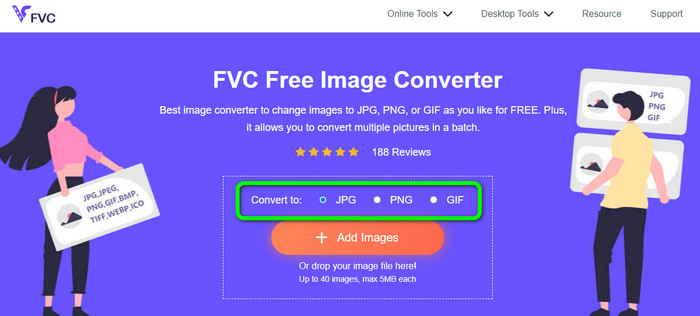
Step 1. Navigate to the official website of FVC Free Image Converter. You can access this online image converter on all browsers. After that, you can click the JPG, PNG, or GIF format from the format option.
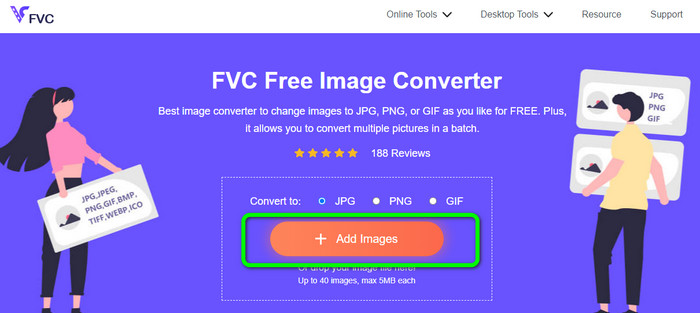
Step 2. Click the Add Images to upload the image file from your computer. You can also drop and drag the file into the box. Since the tool offers a batch conversion process, you can upload multiple files simultaneously.
Step 3. You will see that the image converter will convert the images automatically after the uploading process. When the conversion process is done, click the Download All button to save them in one click. But, if you prefer to save the image manually, click the Download button on the right.
Phần 3. Các câu hỏi thường gặp về chuyển đổi hình ảnh thành liên kết
1. Tại sao phải biến một hình ảnh thành một liên kết?
Bạn có thể sử dụng hình ảnh làm nút nếu bạn có trang web hoặc blog. Bằng cách này, người dùng có thể truy cập trang chủ của bạn hoặc một trang cụ thể. Ngoài ra, có thể liên kết ảnh trong các bài đăng trên mạng xã hội hoặc chữ ký email. Ngoài ra, đó là một cách tuyệt vời để quảng cáo trang web hoặc blog của bạn và tăng lưu lượng truy cập. Đây chỉ là một vài lý do quan trọng nhất để chuyển đổi URL từ một hình ảnh.
2. Lợi ích của việc biến một hình ảnh thành một liên kết là gì?
Người dùng có thể nhấp vào liên kết của bạn sẽ đơn giản hơn nếu bạn chuyển đổi ảnh thành liên kết. Nếu bạn muốn khách truy cập nhấp vào một hình ảnh nhỏ, hãy biến hình ảnh đó thành một URL sẽ cung cấp cho họ một khu vực rộng lớn hơn để nhấp vào. Chia sẻ tài liệu của bạn với người khác có thể giúp việc khám phá hàng hóa hoặc dịch vụ mới trở nên đơn giản hơn nhiều.
3. Làm cách nào để tìm URL của hình ảnh trên trang web?
Nhấp chuột phải vào hình ảnh và chọn Sao chép liên kết hình ảnh để lấy URL của hình ảnh trên trang web. Sau đó, bạn có thể mở URL trong tab mới để lưu hình ảnh hoặc chia sẻ URL qua email, mạng xã hội và các kênh khác.
Phần kết luận
There you go! Now you have learned the best methods to convert images to links. In addition to that, you discovered the most straightforward ways of converting images to JPG, PNG, and GIF formats. Thus, if you want to change your images to URL links, see the effective methods above. On the other hand, if you want an outstanding image converter to convert images to other formats, use FVC Free Image Converter.
-
 Các phương pháp về Cách chuyển đổi hình ảnh sang JPG trực tuyến và ngoại tuyến
 Bạn có muốn chuyển đổi tệp sang định dạng JPG vì lý do nào đó không? Sau đó bài viết này là dành cho bạn. Chúng tôi sẽ hướng dẫn bạn phương pháp tốt nhất để chuyển đổi hình ảnh của bạn sang JPG
-
 Các phương pháp hữu ích để dễ dàng chuyển đổi hình ảnh sang định dạng PNG
 Bạn đang tìm cách tốt nhất để lưu hình ảnh của mình dưới dạng PNG? Hướng dẫn này cung cấp các giải pháp tuyệt vời để bạn chuyển đổi hình ảnh sang PNG trực tuyến và ngoại tuyến
-
 JPEG/JPG là gì: Chuyển đổi hình ảnh của bạn sang JPG một cách dễ dàng
 Bạn có tò mò về ý nghĩa của JPEG không? Chúng tôi có một câu trả lời cho bạn. Ngoài ra, bạn sẽ học cách chuyển đổi các định dạng hình ảnh khác nhau thành tệp JPG. Đọc bài viết bây giờ.
