


 Chuyển đổi video Ultimate
 Trình ghi màn hình
 Sửa chữa video
 Tải xuống an toàn
Hướng dẫn đầy đủ về cách chuyển đổi hình ảnh sang đen trắng
Sự ra đời của ảnh màu dường như đã khiến ảnh đen trắng trở nên vô dụng. Nhưng điều đó có thật sự đúng không? Rõ ràng là các sắc độ đen trắng vẫn chưa hoàn toàn biến mất khỏi cuộc sống của chúng ta. Khi nhìn thấy ảnh đen trắng, người ta có xu hướng tập trung nhiều hơn vào những đường nét cơ bản của con người và cảm giác về chất liệu của các vật thể. Các nghệ sĩ thường dùng tông đen trắng để nhấn mạnh hiệu ứng hoài cổ trong những bộ phim tài liệu lịch sử. Một số nhà thiết kế cũng chọn chuyển đổi ảnh sang đen trắng trước rồi mới thêm một màu sáng nổi bật để làm nổi rõ một phần cụ thể của bức ảnh. Nếu bạn cũng muốn khiến ảnh của mình trông như vượt thời gian hoặc kịch tính hơn, bạn có thể thử những phương pháp mà chúng tôi gợi ý trong bài viết này để biến ảnh thành đen trắng. Chúng tôi sẽ cung cấp cả lựa chọn trên máy tính và trực tuyến để người dùng ở các nền tảng khác nhau có thể thử.

Phần 1. Cách tạo ảnh đen trắng trong Photoshop
Khi chúng ta cần thực hiện một số chỉnh sửa cho một hình ảnh, công cụ đầu tiên xuất hiện trong đầu là Adobe Photoshop, một chương trình đã trở nên phổ biến đến mức trở thành tiêu chuẩn trong ngành công nghiệp ảnh. Chương trình này đã trở thành tiêu chuẩn trong ngành công nghiệp đồ họa và nó có thể giúp chúng ta làm cho hình ảnh của mình trông giống bất kỳ thứ gì, bao gồm cả đen trắng, tất nhiên rồi. Không quan trọng bạn có hệ thống nào trên máy tính của mình. Bạn có thể cài đặt Photoshop trên máy tính của mình và bắt đầu sử dụng nó. Bên cạnh việc thay đổi tông màu, chúng ta có thể sử dụng nó để thêm nhiều hiệu ứng hơn vào hình ảnh, chẳng hạn như cắt, chọn, tăng cường chất lượng, loại bỏ tạp chất, v.v.
Ở đây chúng tôi sẽ hướng dẫn cách chuyển đổi hình ảnh sang đen trắng trong Photoshop. Thực hiện theo các bước dưới đây.
Bước 1. Cài đặt Adobe Photoshop trên máy tính của bạn. Lưu ý rằng nếu bạn là người dùng mới, bạn có thể dùng thử miễn phí 7 ngày trước. Tuy nhiên, Photoshop là một chương trình trả phí, và bạn sẽ phải nâng cấp tài khoản nếu muốn tiếp tục sử dụng đầy đủ các dịch vụ.
Bước 2. Sau khi khởi chạy, nhấp File > Open và chọn bức ảnh màu mà bạn muốn chuyển đổi.
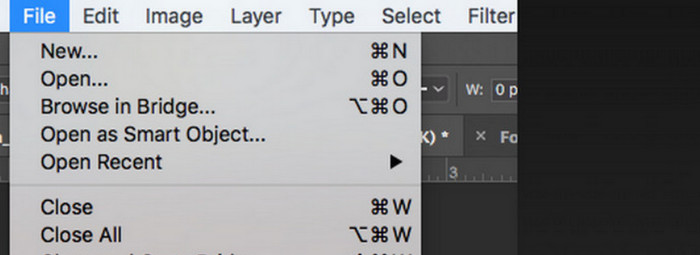
Bước 3. Khi ảnh đã được tải, hãy vào menu Window và nhấp Adjustments. Ở đây bạn sẽ thấy biểu tượng black-and-white. Nhấn vào đó.
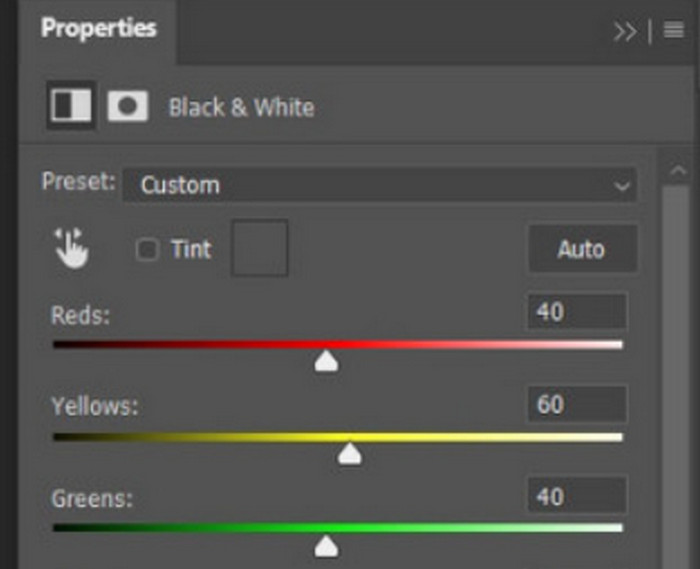
Bước 4. Bảng Properties sẽ mở ra. Chọn Color Slider, sau đó di chuyển thanh trượt để điều chỉnh các tông xám của bức ảnh. Hãy dành thời gian tinh chỉnh cho đến khi bạn hài lòng với hiệu ứng đen trắng của bức hình.
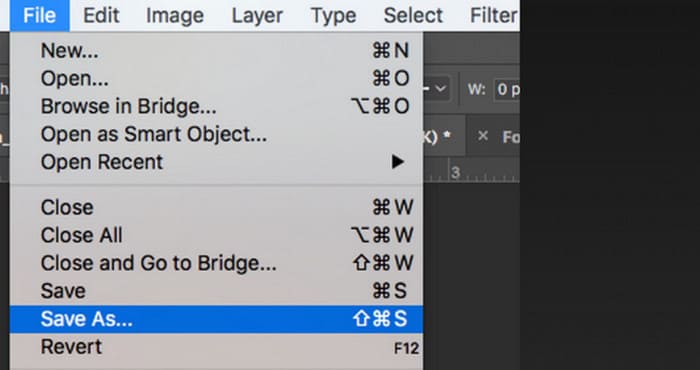
Bước 5. Tiếp theo, nhấp File ở góc trên bên trái và chọn Save As trong danh sách thả xuống. Sau đó, chọn đường dẫn lưu cho bức ảnh đã được chuyển đổi.
Sau khi hoàn thành các bước trên, chúng ta đã chuyển ảnh thành đen trắng thành công. Tuy nhiên, trong quá trình thực hiện, người dùng có thể thấy giao diện của Photoshop thực sự phức tạp, một số nút không dễ tìm. Mặc dù có đầy đủ tính năng, nhưng người mới bắt đầu hầu như không thể sử dụng Photoshop; chúng ta thường cần nhiều thời gian để tìm hiểu và thực hành để làm quen với cách phần mềm hoạt động chậm. Nếu bạn không muốn vòng vo và muốn đi thẳng vào vấn đề và bắt đầu chuyển ảnh thành đen trắng ngay lập tức, hãy đọc tiếp để tìm giải pháp đơn giản hơn.
Phần 2. Chuyển đổi hình ảnh sang đen trắng trực tuyến
Một số công cụ trực tuyến chắc chắn là lựa chọn tốt hơn để chuyển đổi ảnh màu sang đen trắng so với Adobe Photoshop hơi cồng kềnh. Chúng không yêu cầu chúng ta thực hiện các bước cài đặt và tải xuống và có thể sử dụng trực tiếp trong trình duyệt. Ở đây, chúng tôi khuyên bạn nên dùng thử Pixelied Photo Editor, có thể điều chỉnh tông màu thành đen trắng và hiện hỗ trợ tải ảnh lên ở các định dạng như JPG, PNG, SVG, v.v. Trợ lý trực tuyến này cũng có một số phần cắt và chỉnh sửa ảnh tốt có thể giúp chúng ta làm cho tác phẩm của mình đẹp hơn.
Sau đây là cách tạo ảnh đen trắng bằng Pixelied Photo Editor.
Bước 1. Truy cập trang web của công cụ Pixelied Image to Black and White Converter. Nhấp Upload Your Image và thêm tệp bạn muốn chuyển đổi.
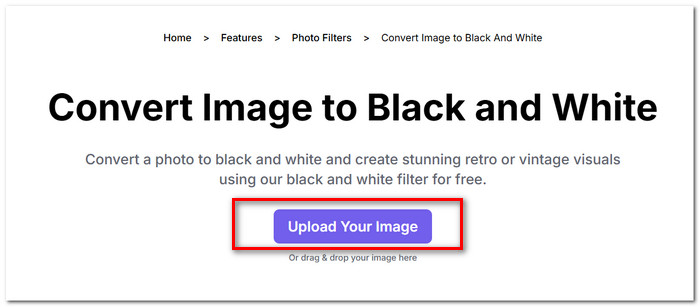
Bước 2. Khi ảnh đã được tải lên, vào Edit Image > Filters. Tìm bộ lọc Black and White và áp dụng cho ảnh của bạn.
Bước 3. Sau khi chuyển đổi xong, nhấp Download để lưu ảnh về máy tính.
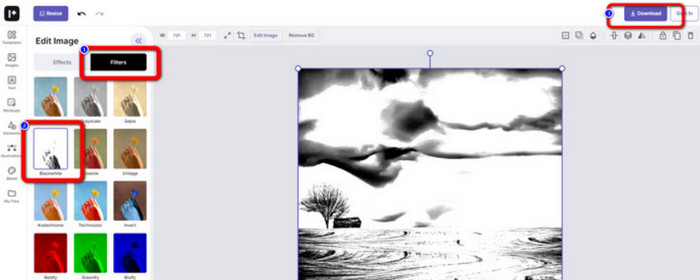
Việc chuyển đổi ảnh sang đen trắng bằng Pixelied diễn ra gần như tức thời, và giao diện của nền tảng này gọn gàng, dễ nhìn hơn Adobe Photoshop. Tuy nhiên, để áp dụng bộ lọc đen trắng một cách đầy đủ, người dùng phải trả phí để nâng cấp tài khoản. Phiên bản miễn phí của trình tăng cường màu ảnh này chỉ cung cấp 2GB dung lượng lưu trữ. Đây là những điểm chúng ta cần lưu ý khi sử dụng.
Phần 3. Mẹo thưởng - Làm cho hình ảnh đen trắng trở lại màu sắc
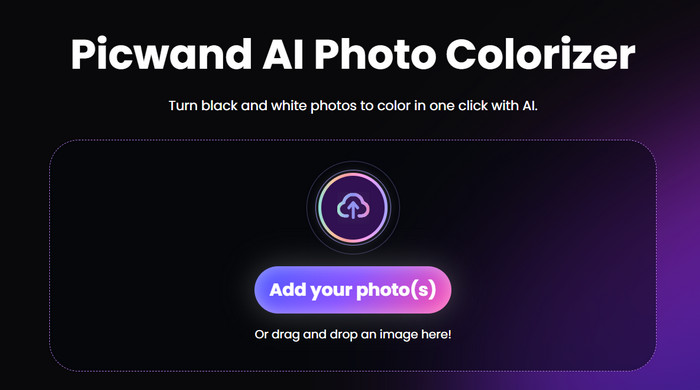
Picwand Image Colorizer
Giờ đây chúng ta đã biết chính xác cách biến một bức ảnh thành đen trắng. Vậy ngược lại, có công cụ nào có thể xử lý một bức ảnh gốc là đen trắng và khôi phục màu sắc cho những người trong ảnh không? Điều này đưa chúng ta đến một trình chỉnh sửa ảnh trực tuyến có tên là Picwand Image Colorizer. Được hỗ trợ bởi công nghệ AI mới nhất, nó có thể sử dụng các thuật toán tiên tiến để tô màu cho những bức ảnh cũ. Chúng ta không cần thực hiện nhiều thao tác tinh chỉnh phức tạp; chỉ với một cú nhấp chuột, Picwand Image Colorizer có thể biến những bức ảnh đen trắng trở lại đầy màu sắc.
Phần 4. Các câu hỏi thường gặp khi chuyển đổi hình ảnh sang đen trắng
Có thể chuyển đổi trực tiếp hình ảnh màu sang đen trắng không?
Chắc chắn rồi. Chúng ta có thể sử dụng một số công cụ thông minh không yêu cầu điều chỉnh màu thủ công. Những công cụ này sẽ phủ một bộ lọc đen trắng lên hình ảnh gốc.
Những bức ảnh nào chuyển sang đen trắng đẹp nhất?
Một hình ảnh có đường nét, hình khối và đường viền rõ ràng sẽ hoạt động tốt nhất khi được chuyển đổi sang đen trắng. Bộ lọc đen trắng cho phép bỏ qua các tạp chất trong hình ảnh và chỉ tập trung vào các đường nét nguyên bản nhất.
Định dạng nào là tốt nhất cho ảnh đen trắng?
Dĩ nhiên, lựa chọn tốt nhất là JPG, định dạng linh hoạt nhất và đạt được sự cân bằng giữa dung lượng và chất lượng ảnh, giúp tệp không quá nặng mà cũng không làm giảm quá nhiều chất lượng hình ảnh. Nếu ảnh của bạn đang ở định dạng khác, bạn cũng có thể dùng một công cụ để chuyển nó sang tệp JPG trước khi chỉnh sửa và xử lý.
Phần kết luận
Trong bài viết này, chúng tôi đề cập đến hai cách để biến ảnh thành đen trắng, bao gồm sử dụng phần mềm chỉnh sửa ảnh kinh điển là Photoshop và thử một trình chỉnh sửa trực tuyến. Adobe Photoshop hoàn thành công việc một cách tinh tế nhất, nhưng gói thuê bao lại đắt và cách sử dụng khá phức tạp. Người dùng ít kinh nghiệm có thể chọn Pixelied, vốn sở hữu giao diện thân thiện hơn với người mới.
-
 Cách thay đổi màu sắc trong Photoshop | Hướng dẫn toàn diện năm 2025
 Bạn muốn nâng khả năng sáng tạo của mình lên một tầm cao mới bằng cách học cách thay đổi màu nền trong Photoshop? Bài viết này có mọi thứ bạn cần biết. Đọc nó ngay bây giờ!
-
 Cách xóa nền khỏi hình ảnh bằng GIMP
 Bắt đầu với GIMP và quy trình từng bước xóa nền khỏi hình ảnh. Khám phá những cách hiệu quả để tạo hình ảnh trong suốt bằng GIMP ngay hôm nay!
-
 Cách xóa nền khỏi hình ảnh: Công cụ đơn giản
 Khám phá sáu công cụ để xóa nền khỏi bất kỳ hình ảnh nào một cách dễ dàng. Nói lời tạm biệt với việc chỉnh sửa phức tạp và xóa nền hình ảnh một cách dễ dàng ngay hôm nay!
