


 Chuyển đổi video Ultimate
 Trình ghi màn hình
 Sửa chữa video
 Tải xuống an toàn
Các kỹ thuật tốt nhất để xóa hình mờ Alamy khỏi hình ảnh trực tuyến và ngoại tuyến
Alamy là một trang web bán ảnh stock, video và các nội dung trực quan khác. Hình ảnh của họ được chụp bởi cộng tác viên tự do và các công ty đại diện, hoặc được tổng hợp từ kho lưu trữ quốc gia, bảo tàng và các tài liệu thuộc phạm vi công cộng được lấy từ Wikimedia Commons. Tuy nhiên, một số ảnh có đóng dấu mờ (watermark) Alamy, gây khó chịu cho người xem. Trong trường hợp đó, chúng tôi sẽ hướng dẫn bạn cách tốt nhất để xóa watermark Alamy cả online lẫn offline. Hãy đọc bài viết để biết thêm chi tiết.

Phần 1: Cách xóa Hình mờ Alamy khỏi Ảnh trực tuyến
Sử dụng Công cụ xóa hình mờ miễn phí FVC
Nếu bạn muốn loại bỏ watermark Alamy khỏi ảnh, bạn có thể dùng FVC Free Watermark Remover. Đây là ứng dụng trực tuyến tối ưu mà bạn có thể sử dụng. Watermark Alamy rất gây phiền, vì nó xuất hiện rải rác khắp ảnh. Nhưng với công cụ online này, việc xóa watermark Alamy trở nên dễ dàng. Ngay cả học sinh tiểu học cũng có thể thao tác được vì ứng dụng có hướng dẫn chi tiết để bạn làm theo. Ngoài ra, FVC Free Watermark Remover cung cấp hai cách để xóa watermark Alamy. Cách thứ nhất là dùng các công cụ Watermark Remover, bao gồm Đa giác (Polygonal), Cọ (Brush) và Dây thừng (Lasso). Với những công cụ này, bạn có thể xóa bất kỳ đối tượng không mong muốn nào khỏi ảnh. Cách thứ hai là dùng công cụ Cắt (Crop). Nếu watermark Alamy nằm ở góc hoặc mép ảnh, bạn có thể cắt bỏ phần đó dễ dàng. Bên cạnh đó, công cụ online này hỗ trợ các định dạng ảnh phổ biến như PNG, JPG và BMP, vì vậy bạn có thể nhập ảnh của mình vào đây. Hãy cùng xóa những watermark này bằng trình xóa watermark Alamy này. Làm theo các hướng dẫn đơn giản dưới đây.
Sử dụng các công cụ Xóa Watermark
Bước 1: Trước tiên, truy cập trang web FVC Free Watermark Remover. Nhấp nút Upload Image. Thư mục trên máy sẽ mở ra, hãy chọn bức ảnh có watermark Alamy mà bạn muốn xóa.

Bước 2: Trong khung màu vàng, bạn có thể dùng các công cụ khác nhau để tô chọn các watermark Alamy trên ảnh. Bạn có thể dùng các công cụ Lasso, Polygonal và Brush. Bạn có thể nhấp vào biểu tượng + và - trong khung màu đỏ để phóng to hoặc thu nhỏ ảnh.
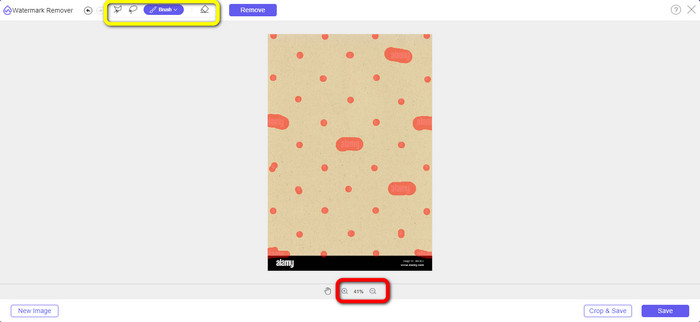
Bước 3: Sau khi đã tô chọn toàn bộ watermark Alamy trên ảnh, hãy nhấp nút Remove. Chờ quá trình xóa hoàn tất.
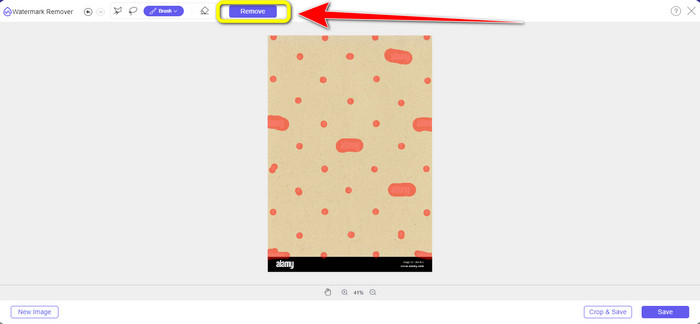
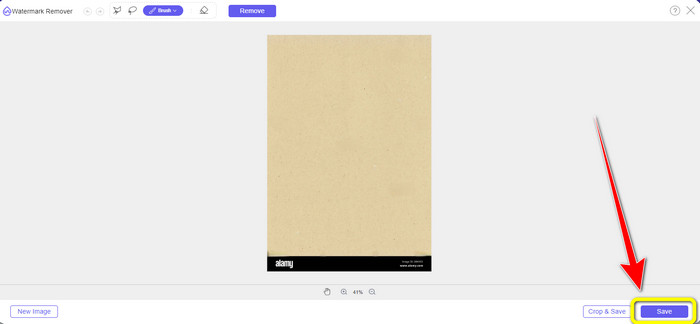
Bước 4: Khi tất cả watermark Alamy đã biến mất, hãy nhấp nút Save để lưu và tải về ảnh của bạn mà không còn watermark Alamy.
Sử dụng công cụ Cắt (Cropping Tool)
Trong phần này, chúng tôi sẽ xóa hình mờ Alamy khỏi ảnh bằng cách cắt xén. Thực hiện theo các bước đơn giản dưới đây.
Bước 1: Chèn ảnh có watermark Alamy bằng cách nhấp nút Upload Image.

Bước 2: Sau khi thêm ảnh, nhấn nút Crop ở góc dưới bên phải giao diện.
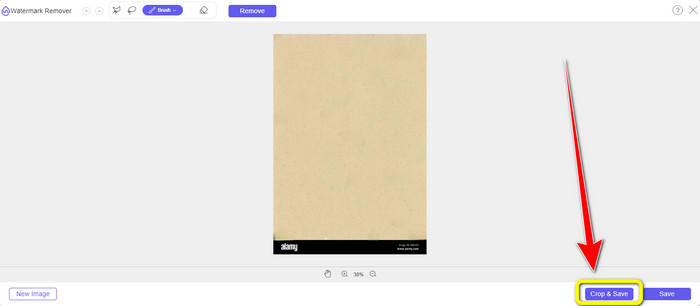
Bước 3: Sau khi nhấp nút Crop, bạn có thể di chuyển chuột để cắt phần rìa của ảnh, đặc biệt là khu vực có watermark Alamy. Trong khung màu đỏ, bạn sẽ thấy nhiều tùy chọn về kích thước ảnh, bạn cũng có thể chọn một trong số đó.
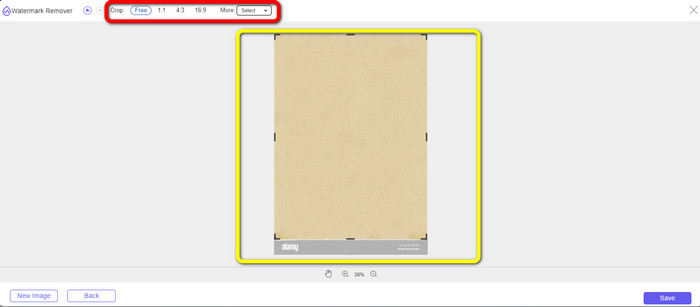
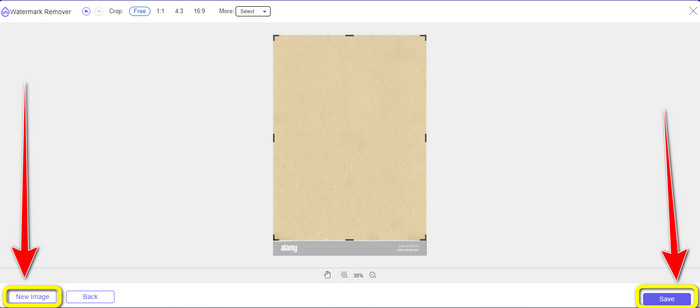
Bước 4: Khi cắt ảnh xong, bạn có thể nhấp nút Save ở góc dưới bên phải giao diện để lưu. Ngoài ra, nếu muốn cắt một ảnh khác, hãy nhấp nút New Image ở góc dưới bên trái giao diện.
Sử dụng Apowersoft Online Watermark Remover
Apowersoft Online Watermark Remover cũng có thể xóa watermark Alamy khỏi ảnh của bạn. Công cụ này có thể loại bỏ mọi đối tượng gây khó chịu trên ảnh, như watermark, logo, chữ, v.v. Thêm vào đó, nó hỗ trợ nhiều định dạng tệp như JPG, TIFF, PNG, BMP, v.v. Nhờ vậy, bạn gần như có thể tải lên mọi bức ảnh vào công cụ này. Hơn nữa, Apowersoft Online Watermark Remover còn có thể xóa watermark khỏi video, rất tiện lợi cho mọi người dùng. Cách sử dụng ứng dụng này khá dễ. Bạn có thể xóa watermark Alamy chỉ trong vài bước. Tệp của bạn ở đây cũng an toàn vì tệp sẽ được xóa sau khi bạn xóa watermark khỏi ảnh. Ứng dụng này đảm bảo tính bảo mật cho tệp của bạn. Tuy nhiên, khi dùng công cụ trực tuyến này, bạn có thể gặp một số khó khăn. Đôi khi ứng dụng không đọc hoặc không nhận diện được ảnh bạn tải lên. Ngoài ra, quá trình xóa watermark khỏi ảnh khá tốn thời gian. Và bạn phải có kết nối internet nhanh; nếu không, công cụ sẽ hoạt động không hiệu quả.
Để xóa hình mờ Alamy khỏi ảnh của bạn, hãy làm theo các hướng dẫn đơn giản bên dưới.
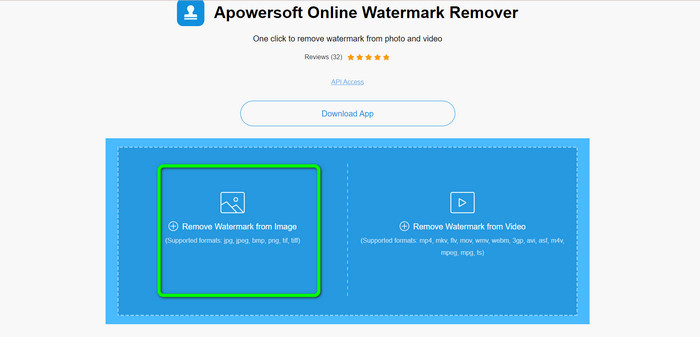
Bước 1: Truy cập trang web của Apowersoft Online Watermark Remover. Nhấp vào biểu tượng Gallery để thêm tệp ảnh có watermark Alamy.
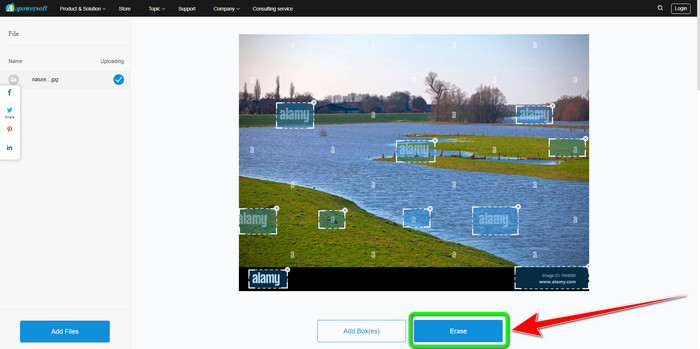
Bước 2: Sau khi thêm ảnh, nhấp nút Add Boxes. Bạn có thể thêm bao nhiêu ô tùy ý. Sau đó, dùng các ô này để che toàn bộ watermark Alamy.
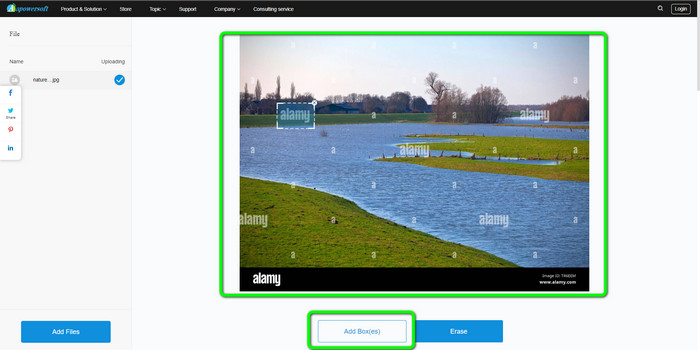
Bước 3: Khi đã che hết watermark Alamy trên ảnh, bạn có thể nhấp nút Erase. Chờ quá trình xóa hoàn tất, rồi tải ảnh về máy tính.
Phần 2: Cách xóa hình mờ Alamy bằng Photoshop
Adobe Photoshop là một trong những công cụ bạn có thể dùng để xóa watermark Alamy khỏi ảnh khi làm việc offline. Phần mềm này cho tốc độ xóa nhanh và chất lượng ảnh cuối cùng mượt mà. Với phần mềm chỉnh sửa này, bạn có thể xóa mọi chi tiết không mong muốn trên ảnh, bao gồm watermark Alamy. Adobe Photoshop cũng làm được nhiều việc khác ngoài xóa watermark. Bạn có thể dùng nó để retouch ảnh, như xóa vết thâm, mụn và nhiều khuyết điểm khác. Bạn cũng có thể dùng để tăng chất lượng, chỉnh sửa, làm đẹp ảnh. Tuy nhiên, việc sử dụng Photoshop không phù hợp với người mới bắt đầu. Đây là phần mềm chỉnh sửa nâng cao, thích hợp cho người dùng có kinh nghiệm. Nếu bạn không chuyên nhưng vẫn muốn dùng ứng dụng này để xóa watermark Alamy, bạn cần tìm các bài hướng dẫn hoặc nhờ người chuyên nghiệp hỗ trợ. Ngoài ra, Adobe Photoshop khá đắt. Bạn phải mua bản quyền nếu muốn dùng lâu dài; phần mềm chỉ cho phép dùng thử miễn phí 7 ngày.
Sử dụng các bước dưới đây để xóa hình mờ Alamy khỏi ảnh của bạn.
Bước 1: Tải Adobe Photoshop và tiến hành cài đặt. Sau đó, khởi chạy ứng dụng trên máy tính.
Bước 2: Để thêm ảnh có watermark Alamy, vào mục File, rồi nhấp Open.
Bước 3: Sau khi chèn tệp, chọn Clone Stamp Tool. Sau đó, vừa giữ phím Alt vừa dùng chuột nhấp vào từng watermark trên ảnh. Bạn sẽ thấy watermark dần dần biến mất.
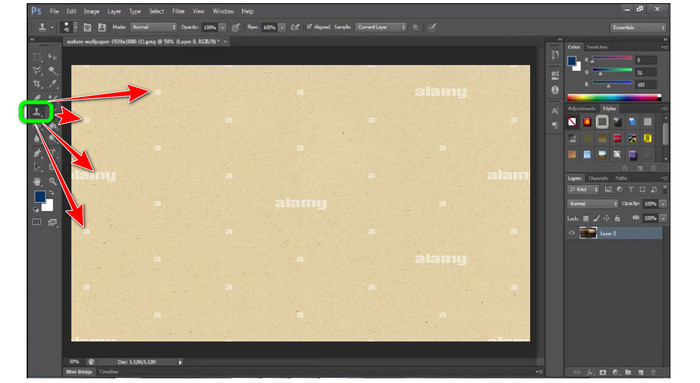
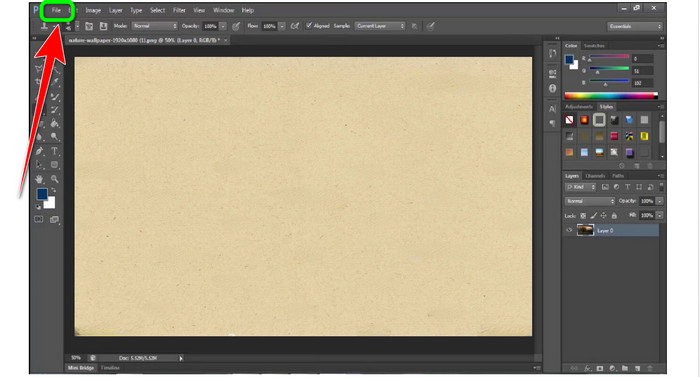
Bước 4: Khi tất cả watermark Alamy đã được xóa, hãy vào mục File, rồi nhấp nút Save as để lưu ảnh cuối cùng không còn watermark Alamy.
Phần 3: Các câu hỏi thường gặp về Xóa Hình mờ Alamy
Tại sao có hình mờ từ hình ảnh bạn lưu trên Alamy?
Đó là vì trang web muốn bảo vệ chúng và vì chúng không được cấp bằng sáng chế nên các tài liệu hình ảnh được tải lên có hình mờ. Vì vậy, nếu bạn muốn một hình ảnh không có hình mờ từ Alamy, bạn phải mua nó.
Xuất trình số thẻ của tôi để mua ảnh từ Alamy có an toàn không?
Vâng, đúng vậy. Trang web sẽ không tiết lộ thông tin của bạn, vì vậy bạn không phải lo lắng về thông tin trên thẻ của mình.
Tôi có thể hoàn trả khoản thanh toán từ Alamy không?
Tiếc là không có. Alamy không cho phép hoàn lại tiền. Vì vậy, bạn phải suy nghĩ kỹ nếu bạn muốn tiêu tiền của mình hay không.
Phần kết luận
Giờ đây bạn đã biết cách tốt nhất để xóa watermark Alamy khỏi ảnh bằng các công cụ online và bằng Photoshop. Tuy nhiên, chúng tôi hiểu rằng Photoshop khó sử dụng. Trong trường hợp đó, bạn có thể dùng FVC Free Watermark Remover. Công cụ này có giao diện dễ dùng, rất phù hợp cho người mới bắt đầu.
-
 Hướng dẫn đầy đủ để dễ dàng xóa hình mờ iFunny
 Khám phá công cụ xóa hình mờ iFunny đặc biệt nhất dành cho bạn. Ngoài ra, hãy tìm hiểu các phương pháp đơn giản này để xóa hình mờ iFunny khỏi ảnh của bạn.
-
 Cách xóa hình mờ trong Lightroom Mobile [Đã giải quyết]
 Bạn có muốn tìm hiểu cách xóa hình mờ khỏi ảnh trong lightroom không? Dưới đây là những phương pháp đơn giản nhất mà bạn có thể thử sử dụng điện thoại di động và máy tính của mình.
-
 Đánh giá trung thực về Inpaint Watermark Remover và Alternative
 Bạn có muốn biết cách sử dụng Inpaint để xóa hình mờ không? Đọc bài viết này là sự lựa chọn đúng đắn. Bạn cũng sẽ tìm hiểu các lựa chọn thay thế tốt nhất mà bạn có thể sử dụng.
