


 Chuyển đổi video Ultimate
 Trình ghi màn hình
 Sửa chữa video
 Tải xuống an toàn
Làm thế nào để nhanh chóng hủy phân bổ một hình ảnh với 3 giải pháp tốt nhất để sử dụng
Khử vỡ hình ảnh là giải pháp bạn cần khi muốn “tút” lại những bức ảnh bị vỡ hình (pixelated) hoặc bị hiển thị dạng ảnh bitmap với các ô vuông li ti. Nhiều người dùng nghĩ rằng việc chỉnh sửa, điều chỉnh, thay đổi và cải thiện hình ảnh rất rắc rối; thành thật mà nói, trước đây đúng là như vậy. Nhưng với công nghệ tiên tiến mà chúng ta có thể sử dụng hiện nay, nhiệm vụ này đã trở nên cực kỳ dễ dàng nếu bạn dùng đúng công cụ.
Không có công cụ phù hợp để loại bỏ pixel trên ảnh của bạn? May mắn thay, bài viết này sẽ cung cấp cho bạn ba phần mềm tốt nhất mà chúng tôi tìm thấy có thể giúp bạn chỉnh sửa pixel của ảnh và hướng dẫn về từng phần mềm để giải quyết vấn đề.

Phần 1. Làm thế nào để hủy bỏ liên kết một hình ảnh trực tuyến với Trình chỉnh sửa ảnh lựa chọn tốt nhất [Được khuyến nghị]
FVC Free Image Upscaler là một công cụ trực tuyến hoàn toàn tự động, cho phép bạn khử vỡ hình ảnh online miễn phí. Bạn có thể mở nó trên bất kỳ trình duyệt web nào bạn đang có – không cần tải thêm trình khởi chạy để chạy, nên bạn có thể dùng ngay công cụ này ngay khi truy cập. Mặc dù là phần mềm chạy trên web, nhưng sức mạnh và hiệu suất khử vỡ (depixelate) ảnh của nó sánh ngang với các trình chỉnh sửa ảnh chuyên nghiệp nhất, dù là online hay offline. Có thể bạn nghĩ rằng mình sẽ gặp khó khăn khi sử dụng công cụ này, nhưng thực tế là không. Vẫn chưa bị thuyết phục? Nếu vậy, bạn có thể đọc hoặc làm theo hướng dẫn dưới đây để nắm rõ từng bước sử dụng công cụ này một cách dễ dàng.
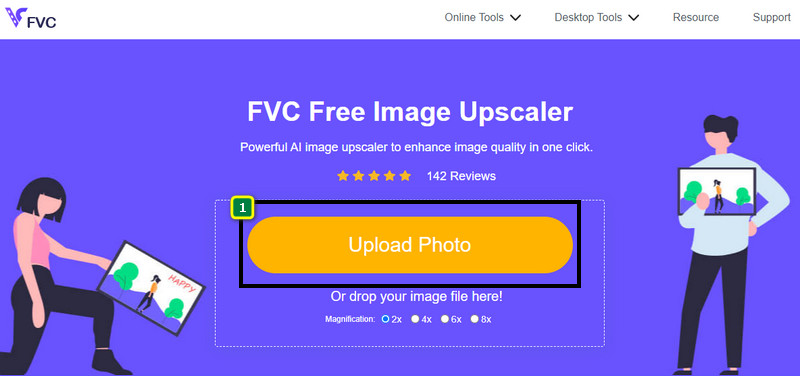
Bước 1. Bạn có thể truy cập công cụ web này trên bất kỳ trình duyệt nào trên thiết bị của mình bằng cách tìm theo tên hoặc nhấp vào liên kết này để mở trang web chính.
Bước 2. Khi đã vào giao diện web, nhấp vào Add Image để tải lên ảnh bị vỡ. Một cửa sổ thư mục sẽ hiện ra trên màn hình; bạn hãy tìm đến ảnh được lưu trong ổ đĩa cục bộ, sau đó nhấn Open để tải ảnh lên.
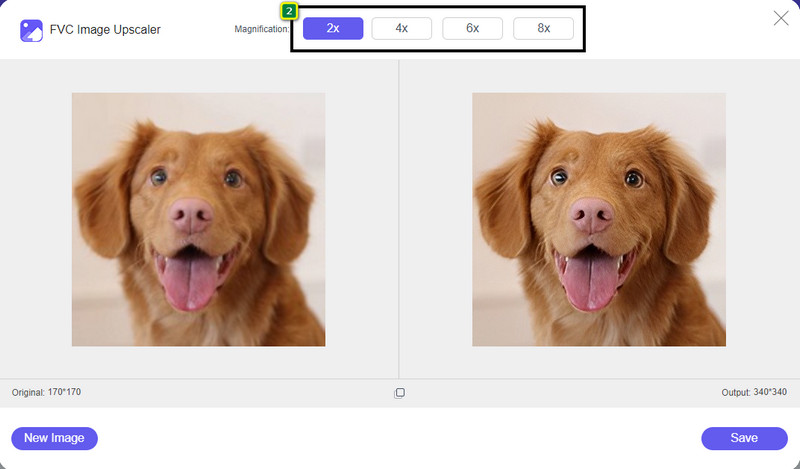
Bước 3. Tiếp theo, chọn mức phóng to (magnification) mà bạn muốn áp dụng cho ảnh để làm mượt lại, giúp hình ảnh không còn trông như bitmap với những ô vuông li ti nữa.
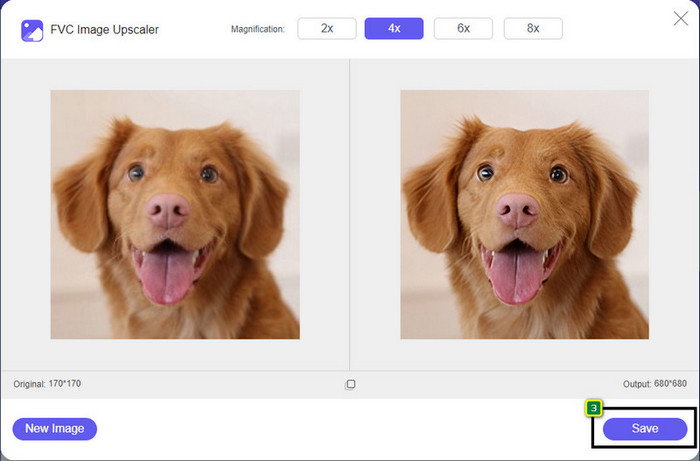
Bước 4. Đơn giản như vậy, hãy nhấp Save để tải phiên bản đã được khử vỡ về máy của bạn.
Phần 2. Làm thế nào để hủy bỏ liên kết một hình ảnh ngoại tuyến bằng 2 cách trên Windows và Mac [Dễ dàng]
Pixbim - Unpixelate Photos trên Windows
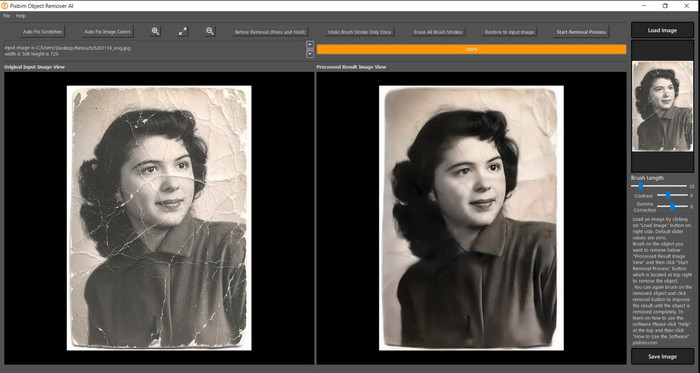
Pixbim là một trong những phần mềm khử vỡ ảnh mạnh mẽ nhất, được hỗ trợ AI mà bạn có thể tải về máy Windows để xử lý vấn đề này. Trình chỉnh sửa này xứng đáng được nhắc đến trong bài viết vì nó xử lý ảnh bị vỡ một cách nhanh chóng và hiệu quả. Với AI, các thông số sẽ được tự động điều chỉnh cho bạn nên bạn sẽ không gặp rắc rối khi sử dụng phần mềm. Do những tính năng và công dụng đó, bạn cần mua key bản quyền để tiếp tục sử dụng sau khi hết thời gian dùng thử miễn phí. Điều này có thể hơi tốn kém với nhiều người muốn cài nó trên PC.
Bước 1. Sau khi tải xong phần mềm, bạn cần khởi chạy để có thể tiếp tục sang bước tiếp theo.
Bước 2. Nhấn Load Image để thêm ảnh bị vỡ mà bạn muốn cải thiện vào đây.
Bước 3. Sau đó, điều chỉnh các thông số bằng cách kéo thanh trượt (sliders) theo giá trị mà bạn muốn đạt được.
Bước 4. Sau khi chỉnh sửa hình ảnh xong, hãy lưu kết quả để xuất file.
Movavi Photo Editor [Windows và Mac]
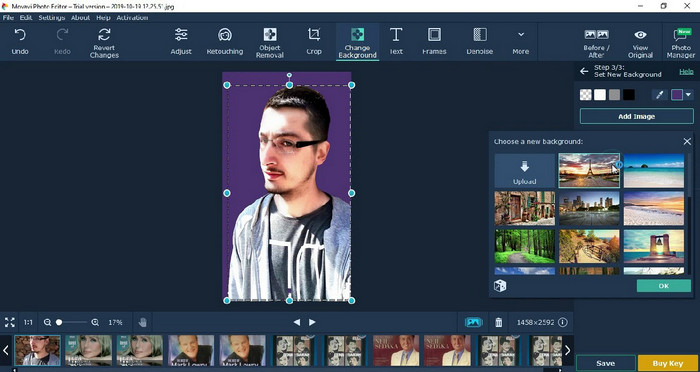
Rất nhiều người dùng đã thử Movavi Photo Editor vì khả năng linh hoạt trong việc chỉnh sửa ảnh. Tương tự như Pixbim, nó có thể khôi phục lại các điểm ảnh đã mất nhờ mạng nơ-ron của AI. Với trình chỉnh sửa này trong tay, bạn có thể thực hiện cả chỉnh sửa cơ bản lẫn nâng cao về mặt hiển thị, như cắt, xoay, thêm bộ lọc, sửa lỗi vỡ hình, và nhiều hơn nữa. Tuy nhiên, bạn sẽ không thể sử dụng đầy đủ tất cả các tính năng nếu không mua phiên bản cao cấp cài trên máy tính.
Nó có giá gần như tương đương với Pixbim, khá đắt đối với nhiều người. Nhưng nếu bạn có ngân sách để mua một trình chỉnh sửa, đây có thể là thứ bạn cần. Tìm hiểu cách tách ảnh bằng ứng dụng này bằng cách làm theo các bước.
Bước 1. Tải ứng dụng về Windows hoặc Mac OS.
Bước 2. Khởi chạy phần mềm, sau đó tải lên bức ảnh bạn muốn khử vỡ tại đây.
Bước 3. Sau khi đã tải ảnh lên, hãy nhấp Magic Enhance để AI tự động chỉnh sửa, cải thiện hình ảnh.
Bước 4. Xuất ảnh và thưởng thức thành quả.
Phần 3. Câu hỏi thường gặp về Cách nâng cấp hình ảnh
Tại sao lại có hình mờ trên hình ảnh không có độ phân giải đã xuất?
Khi bạn đang sử dụng phiên bản dùng thử miễn phí của ứng dụng, có khả năng nó để lại hình mờ khi xuất. Vì vậy, nếu bạn muốn xuất một hình ảnh mà không có hình mờ, bạn có thể mua giấy phép của ứng dụng hoặc sử dụng FVC Free Image Upscaler, vì nó sẽ không để lại hình mờ trên hình ảnh đã xuất.
Sự khác biệt giữa mờ và pixelated là gì?
Nhiều bài báo đã chứng minh rằng độ mờ và điểm ảnh không giống nhau do một số yếu tố. Hình ảnh bị mờ là lý do tại sao bạn chụp chuyển động tốc độ cao hoặc chụp ảnh bằng máy ảnh bị rung. Trong khi được tạo pixel, khi bạn phóng to một ảnh chụp nhanh, nó sẽ bắt đầu tạo pixel và bạn sẽ thấy một ảnh bitmap với một hình vuông nhỏ.
Yếu tố làm cho ảnh có pixel là gì?
Một số lý do biến hình ảnh thành pixel; nguyên nhân phổ biến là khi bạn phóng to hình ảnh raster. Các định dạng raaster, chẳng hạn như PNG, JPG, GIF, v.v., bao gồm các hình vuông nhỏ tạo nên diện mạo của đối tượng được lưu trữ trong các vùng chứa này. Thông thường, khi bạn phóng to hình ảnh, bạn sẽ thấy có các ô vuông, được gọi là pixel, chứa dữ liệu màu được trình bày trực quan. Nó có thể là một vấn đề đối với nhiều người chỉnh sửa, đặc biệt là khi pixelation xảy ra.
Làm cách nào để sửa lỗi hình ảnh?
Đây là một vấn đề phổ biến khác mà bạn có thể gặp với những bức ảnh mình chụp, và giải pháp bạn cần có thể nằm ngay trong bài viết này. Nhấp vào liên kết này để dễ dàng đọc, xử lý và tìm hiểu cách khử nhiễu ảnh.
Phần kết luận
Chỉ đơn giản như vậy, giờ đây bạn đã có thể dễ dàng khử vỡ ảnh với sự hỗ trợ của những trình chỉnh sửa ảnh tốt nhất mà bạn có thể tải về hoặc sử dụng trực tuyến. Trường hợp này đã được giải quyết! Vì vậy, nếu sau này bạn gặp vấn đề với hiện tượng vỡ hình, bạn có thể dựa vào bài viết này để được hỗ trợ. Công cụ tốt nhất mà bạn cần đang ở đây và sẵn sàng hỗ trợ bạn, chẳng hạn như FVC Free Image Upscaler. Tốt nhất là bạn nên xử lý lỗi vỡ hình ở phần hiển thị để nó không còn đập vào mắt mọi người nữa. Hãy nói lời tạm biệt với hiện tượng vỡ hình khi bạn sử dụng trình chỉnh sửa ảnh online này.
-
 7 công cụ nâng cấp hình ảnh bạn có thể sử dụng để nâng cao và cải thiện mọi hình ảnh [2022]
 Bạn đang cần bộ nâng cấp hình ảnh? May mắn thay, bài viết này đề cập đến phần mềm tốt nhất mà bạn có thể truy cập và tải xuống trên máy tính để bàn của mình.
-
 5 công cụ nâng cao độ phân giải hình ảnh bạn phải sử dụng năm 2022 này [Lựa chọn mới nhất]
 Không biết bạn nên sử dụng công cụ nâng cao độ phân giải hình ảnh nào? Đọc bài viết này khi chúng tôi xem xét năm công cụ để sử dụng và nâng cao độ phân giải của hình ảnh.
-
 4 ứng dụng để tăng độ phân giải hình ảnh trên thiết bị di động của bạn [Lựa chọn tốt nhất]
 Bạn sẽ cần các ứng dụng để tăng độ phân giải ảnh của mình nếu bạn muốn đạt được 1080p, 4k hoặc tương tự. Với danh sách dưới đây bạn có thể làm điều đó một cách dễ dàng!
