


 Chuyển đổi video Ultimate
 Trình ghi màn hình
 Sửa chữa video
 Tải xuống an toàn
3 Trình ghi cuộc gọi Facebook tốt nhất - Cách ghi lại cuộc gọi video trên Facebook
Làm thế nào để ghi lại các cuộc gọi video Facebook để lưu giữ những khoảnh khắc quý giá giữa bạn và bạn bè, gia đình? Sau khi Facebook trang bị tính năng gọi video, ngày càng nhiều người dùng có xu hướng liên lạc với nhau qua cuộc gọi trên Facebook thay vì gọi điện thoại thông thường. Nhưng với tư cách là một chức năng liên lạc bổ sung của một nền tảng mạng xã hội, nó không có tính năng ghi âm như cuộc gọi điện thoại. Hơn nữa, ứng dụng độc lập đi kèm – Facebook Messenger – cũng không có trình ghi tích hợp. Trong trường hợp này, bạn có thể tìm hiểu 3 phần mềm ghi cuộc gọi Facebook dễ dùng cho máy tính, thiết bị iOS và điện thoại Android cùng hướng dẫn chi tiết trong bài viết này.

Phần 1: Trình ghi cuộc gọi Facebook trực tuyến tốt nhất cho Windows / Mac
Không cần tải bất kỳ phần mềm bên thứ ba nào, bạn có thể dùng FVC Free Screen Recorder để ghi cuộc gọi video Facebook trực tuyến miễn phí. Đây là một trình ghi cuộc gọi Facebook thân thiện với người dùng, có giao diện đơn giản nhưng tích hợp nhiều tính năng cần thiết.
- 1. Ghi lại cuộc gọi và video Facebook trực tuyến miễn phí với các bước đơn giản.
- 2. Ghi âm thanh và video không mất dữ liệu để giữ video chất lượng cao.
- 3. Không có hình mờ để bảo vệ quyền sở hữu của bạn.
- 4. Các bản ghi sẽ tự động được lưu trong thư viện phương tiện và bạn có thể chọn xóa, tải xuống và chia sẻ trên SNS một cách tự do.
Bước 1: Mở trang web của FVC Free Screen Recorder trên bất kỳ trình duyệt nào. Nhấp nút Start Recording để cài đặt trình khởi chạy trong vài giây, sau đó nhấp lại nút Start Recording để mở trình ghi.

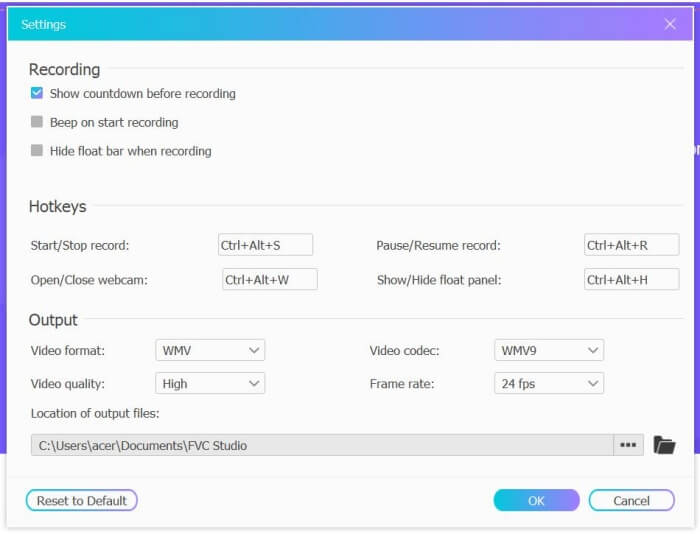
Bước 2: Nhấp menu Recording Area để chọn ghi toàn màn hình hoặc tự do chọn vùng. Sau đó bật âm thanh Microphone và Speaker. Để điều chỉnh cài đặt video, bạn có thể nhấp biểu tượng Setting. Bạn có thể chọn định dạng MP4, chất lượng High và 24 fps để giữ chất lượng cao cho bản ghi. Sau đó nhấp nút REC để bắt đầu ghi cuộc gọi Facebook.
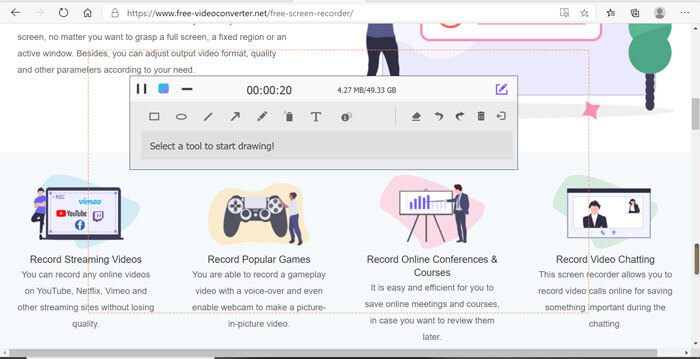
Bước 3: Một hộp công cụ với nhiều công cụ chỉnh sửa sẽ hiện lên. Bạn có thể thêm hình dạng, chữ và đường kẻ theo nhu cầu. Sau đó nhấp biểu tượng Stop để lưu bản ghi lên đám mây. Bạn có thể nhấp chuột phải để chọn tải nó về máy tính.
Sử dụng trình ghi cuộc gọi video Facebook trực tuyến miễn phí này là cách tốt nhất để người dùng máy tính ghi lại cuộc gọi điện video Facebook trực tuyến. Bằng cách điều chỉnh cài đặt ghi âm trước, nó có thể lưu các cuộc gọi Facebook ở định dạng MP4 với kích thước nhỏ và chất lượng cao. Nếu bạn đã quen với việc gọi Facebook trên điện thoại di động, hãy tiếp tục đọc bài viết này.
Phần 2: Cách ghi lại cuộc gọi Facebook cho iOS thông qua trình ghi âm mặc định
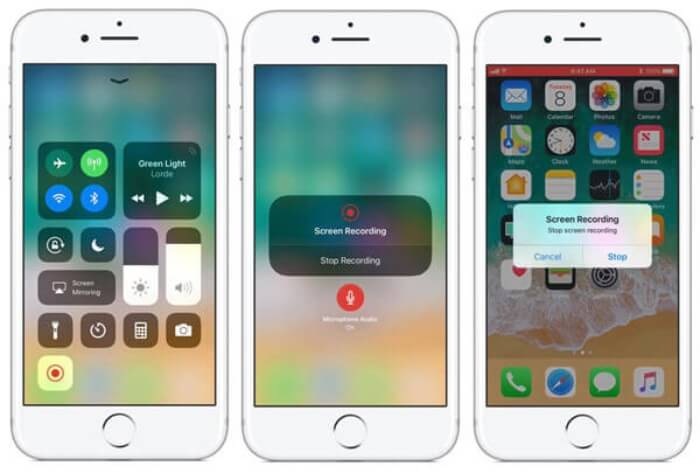
Phiên bản cập nhật iOS 11 trở lên có trình ghi âm mặc định mới trên iPhone và iPad của bạn, đây là lựa chọn tốt nhất để ghi lại cuộc gọi điện video Facebook mà không cần tải xuống bất kỳ ứng dụng nào. Tại đây bạn có thể tìm hiểu cách thêm trình ghi cuộc gọi Facebook vào các phím tắt trong trung tâm điều khiển và cách sử dụng nó.
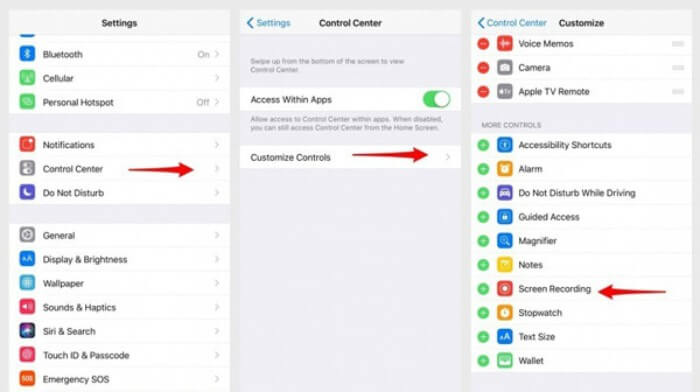
Bước 1: Mở ứng dụng Cài đặt (Settings) trên iPhone/iPad và cuộn xuống chọn mục Trung tâm điều khiển (Control Center). Sau đó nhấn tab Tùy chỉnh điều khiển (Customize Controls) và tìm chức năng Ghi màn hình (Screen Recording). Nhấn biểu tượng Dấu cộng (Plus) để thêm tính năng này vào Trung tâm điều khiển.
Bước 2: Vuốt từ phía trên màn hình xuống để mở Trung tâm điều khiển và bạn sẽ thấy ứng dụng ghi màn hình ở phía dưới. Nhấn biểu tượng Screen Recording để bắt đầu ghi; bạn có thể chọn ghi cả video hoặc chỉ ghi âm thanh. Nếu muốn kết thúc, hãy chạm vào Thanh trạng thái màu đỏ ở phía trên rồi nhấn tùy chọn Stop trong cửa sổ bật lên.
Phần 3: Trình ghi Facebook Messenger dễ dàng cho Android
Một số điện thoại Android không có trình ghi âm tích hợp và có quá nhiều trình ghi âm cuộc gọi điện video trên Facebook dành cho Android để bạn lựa chọn. Vì vậy, bạn có thể tìm hiểu một trong những trình ghi âm tốt nhất cho điện thoại di động Android với các bước chi tiết trong phần sau.
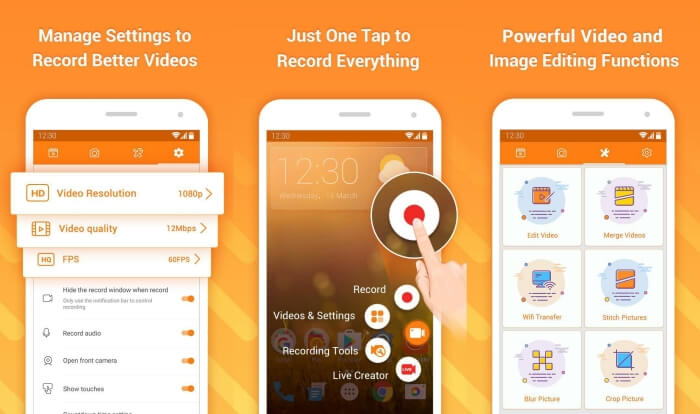
DU Recorder là một trình ghi cuộc gọi Facebook dễ sử dụng cho Android và nổi tiếng vì khả năng ghi hình mượt mà. Không cần root máy, ai cũng có thể dùng ứng dụng này để ghi lại cuộc gọi trên Facebook Messenger chỉ với một lần chạm.
Bước 1: Mở ứng dụng ghi màn hình, bạn sẽ thấy bốn menu gồm bản ghi, ảnh chụp màn hình, công cụ chỉnh sửa và cài đặt. Trước tiên, hãy nhấn menu Settings để điều chỉnh các thông số video. Để giữ chất lượng cao, bạn có thể chọn độ phân giải 1080p và tốc độ khung hình 30 fps.
Bước 2: Đừng tắt ứng dụng ghi màn hình mà hãy mở Facebook Messenger. Khi đó bạn sẽ thấy biểu tượng trình ghi. Nhấn vào biểu tượng này và chọn biểu tượng Recording để bắt đầu ghi lại màn hình và âm thanh. Bạn có thể nhấn lại để dừng ghi. Sau đó, hãy nhấn biểu tượng Editing để cắt video ghi lại và thêm nhạc nếu muốn.
Có thể bạn sẽ thích:
Đánh giá Action Screen Recorder
Phần 4: Những câu hỏi thường gặp về Facebook Call Recorder
1. Facebook có máy ghi âm mặc định để ghi lại cuộc gọi video trên PC không?
Không, nó không. Vì vậy, bạn phải dựa vào các máy ghi âm cuộc gọi Facebook chuyên nghiệp khác. Nếu bạn không muốn tải xuống các phần mềm khác sẽ chiếm dung lượng lưu trữ trên máy tính của mình, FVC Free Screen Recorder là lựa chọn tốt nhất của bạn.
2. Làm thế nào để bắt đầu trò chuyện với bạn bè trên Ứng dụng Facebook Messager?
Trước tiên, mở Facebook Messenger trên điện thoại di động của bạn, sau đó chọn hộp trò chuyện của người bạn mà bạn muốn gọi điện qua Facebook. Và bây giờ bạn có thể thấy biểu tượng Video, vì vậy bạn có thể nhấp vào biểu tượng đó để bắt đầu cuộc gọi điện video.
3. Tôi nên chọn định dạng nào để lưu bản ghi khi sử dụng trình ghi âm của Facebook Messenger?
Cho dù bạn đang sử dụng trình ghi cuộc gọi Facebook trên máy tính hay thiết bị di động, định dạng tốt nhất để lưu cuộc gọi video Facebook là MP4. Nó có thể tiết kiệm thêm không gian lưu trữ và nó tương thích với tất cả các thiết bị.
Phần kết luận
Bài viết trên đã giới thiệu 3 phần mềm ghi cuộc gọi video Facebook. Với iPhone, iPad và một số điện thoại Android, bạn có thể dễ dàng dùng trình ghi màn hình tích hợp sẵn trên máy. Nếu không, bạn có thể chọn bất kỳ ứng dụng ghi hình nào, bao gồm DU Recorder trên Google Play. Đối với PC, FVC Free Screen Recorder là lựa chọn tốt nhất để ghi lại cuộc gọi Facebook. Nếu bạn gặp vấn đề khác khi sử dụng các trình ghi cuộc gọi Facebook, hãy để lại bình luận bên dưới.
-
 Đánh giá Snagit 2021 - Ưu, nhược điểm và giải pháp thay thế tốt nhất
 Giải pháp thay thế tốt nhất cho Snagit là gì? Có công cụ chụp ảnh màn hình như Snagit không? Bài đăng này sẽ đánh giá Snagit và chia sẻ giải pháp thay thế tốt nhất cho Snagit để chụp màn hình.
-
 6 máy ghi WAV tốt nhất bạn không nên bỏ lỡ trên máy tính để bàn và trực tuyến
 Phần mềm ghi âm WAV tốt nhất mà chúng tôi chia sẻ trong bài viết này có một loạt các tính năng hữu ích, giúp bạn ghi lại âm thanh và giọng nói như các chuyên gia.
-
 4 máy ghi âm AIFF miễn phí hàng đầu tạo ra âm thanh chất lượng cao
 Bài viết này nói về AIFF và một số công cụ phổ biến nhất mà bạn có thể sử dụng để tạo định dạng AIFF chất lượng cao.
