


 Chuyển đổi video Ultimate
 Trình ghi màn hình
 Sửa chữa video
 Tải xuống an toàn
Mọi thứ bạn có thể tìm hiểu về Tệp PNG là gì
Ngày nay, định dạng tệp PNG là một trong những định dạng hình ảnh tiêu chuẩn. Bạn có thể thấy nó trên internet, trên máy tính, trên điện thoại di động, v.v. Tuy nhiên, một số người dùng vẫn chưa hiểu về định dạng này. May mắn là bài viết này sẽ cung cấp cho bạn đầy đủ thông tin cần thiết. Bạn sẽ khám phá tệp PNG là gì. Ngoài ra, bài viết này còn đưa ra những phương pháp tuyệt vời để chuyển đổi hình ảnh sang định dạng tệp PNG.

Phần 1. Thông tin chi tiết về tệp PNG
Phần mở rộng Đồ họa mạng di động (PNG) của gia đình raster thực hiện nén hình ảnh không mất dữ liệu. Nó không được cấp bằng sáng chế và được tạo ra để thay thế cho GIF, Định dạng trao đổi đồ họa. Ngoài các hình ảnh thang độ xám tiêu chuẩn cung cấp độ trong suốt, chúng có thể dựa trên bảng màu. PNG không hỗ trợ các loại màu bổ sung như CMYK. Đó là bởi vì một trong những mục đích chính của nó là gửi hình ảnh qua Internet. Ngoài ra, nó không tính đến bất kỳ công việc in ấn chuyên nghiệp nào. Hình ảnh trong tệp được chia thành các phần có thông tin. Nó bao gồm pixel hoặc nhận xét văn bản được mã hóa và xác minh tính toàn vẹn được thực hiện theo RFC 2083. Nhiều người dùng bắt gặp định dạng PNG. Đó là bởi vì nó là một trong những định dạng phổ biến hiện nay. Nó có thể là một tệp đính kèm trong email hoặc một bức ảnh bạn lấy được từ một trang web. Đôi khi, ảnh chụp màn hình cũng có độ phân giải này. Nó hữu ích hơn cho các chuyên gia có thể sử dụng nó.
Về mặt lịch sử, định dạng hình ảnh PNG bắt đầu từ năm 1995. Oliver Fromme, một chuyên gia CNTT, đã đưa ra định dạng PING. Nhưng sau đó, nó đã trở thành PNG. Định dạng tệp này là sự phát triển tiếp theo của định dạng GIF. Định dạng GIF cũ hơn PNG tám năm. GIF có nhiều nhược điểm. Nó cần giấy phép bằng sáng chế và phạm vi giới hạn 256 màu. Hạn chế này có thể ảnh hưởng đến hình ảnh khi mở trên màn hình máy tính. Do đó, tạo tệp PNG là lựa chọn tốt nhất. Nó không có bằng sáng chế và có bảng màu lớn hơn.
Phần 2. Cách mở tệp PNG
Vì bạn đã biết tệp .png là gì nên phần này sẽ cho bạn biết cách mở định dạng này trên thiết bị và các trình duyệt khác nhau của bạn. Bạn có thể mở ảnh PNG của mình trong bất kỳ trình duyệt web phổ biến nào. Nó bao gồm Firefox, Chrome, Explorer, v.v. Phương pháp này không gặp sự cố.
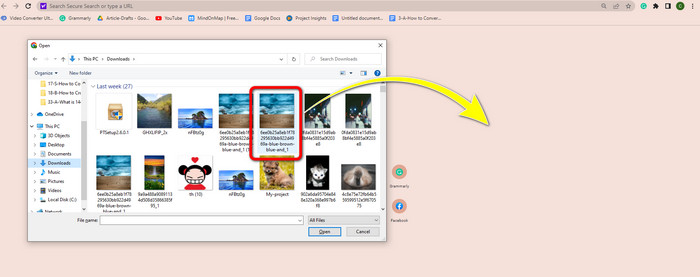
Nếu bạn đang dùng trình duyệt, bạn có thể mở ảnh PNG bằng cách nhấn ctrl + O trên bàn phím. Chọn ảnh PNG bạn muốn mở. Sau đó nhấp nút Open trong thư mục tệp của bạn.
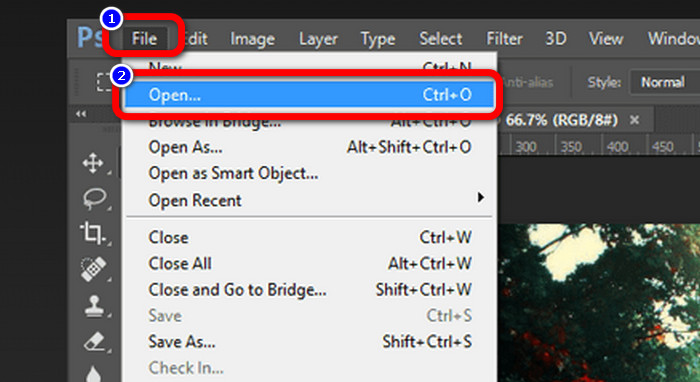
Cũng có những cách khác để mở ảnh PNG bằng Photoshop, Drive hoặc các ứng dụng khác. Bạn có thể truy cập vào File > Open > rồi chọn ảnh. Sau đó nhấn Enter. Bằng cách này, bạn có thể xem ảnh PNG của mình trong ứng dụng.
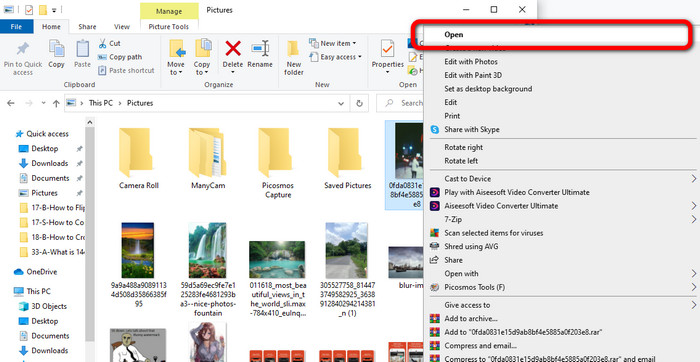
Trên máy tính Windows, việc mở tệp PNG rất dễ dàng. Nhấp vào File folder trên thanh tác vụ để mở. Vào thẻ Quick access để xem ảnh PNG. Khi thấy ảnh, hãy nhấp chuột phải và chọn tùy chọn Open. Như vậy, bạn có thể xem ảnh ở chế độ toàn màn hình.
Phần 3. Cách hiệu quả để chuyển đổi hình ảnh sang định dạng PNG
Chuyển đổi hình ảnh sang PNG bằng FVC Free Image Converter
Bạn có thể dùng nhiều trình chuyển đổi trực tuyến khác nhau để chuyển ảnh sang định dạng PNG. Tuy nhiên, một số trong chúng không an toàn. Bên cạnh đó, có những trình chuyển đổi khá tốn kém. Nếu bạn muốn một công cụ chuyển đổi ảnh an toàn và miễn phí, hãy dùng FVC Free Image Converter. Đây là một trong những ứng dụng hàng đầu để chuyển đổi hình ảnh trực tuyến. Bạn có thể sử dụng miễn phí, nhờ đó mọi người dùng đều có thể truy cập. Bạn cũng có thể tải lên hình ảnh với nhiều định dạng khác nhau như TIFF, JPG, PNG, GIF và nhiều hơn nữa. Ngoài ra, việc chuyển đổi hình ảnh rất đơn giản. Công cụ chỉ có ba bước để chuyển ảnh của bạn sang định dạng PNG. Bạn cũng có thể chuyển đổi nhiều ảnh cùng lúc. Trình chuyển đổi này hỗ trợ xử lý hàng loạt, giúp bạn tiết kiệm thời gian. Hơn nữa, nó đảm bảo quyền riêng tư bằng cách xóa dữ liệu của bạn sau khi quá trình chuyển đổi hoàn tất. Thêm vào đó, bạn không cần đăng ký hoặc tạo tài khoản trong ứng dụng. Bạn có thể sử dụng ngay sau khi mở trang web.
Bước 1: Trước tiên, truy cập trang web FVC Free Image Converter. Khi ở trang chính, hãy đi tới tùy chọn định dạng và chọn tệp PNG làm định dạng đầu ra mong muốn.
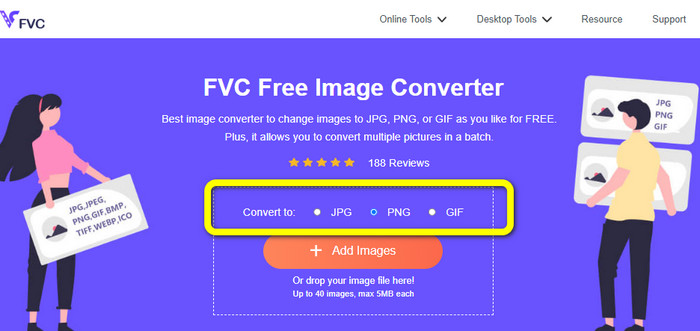
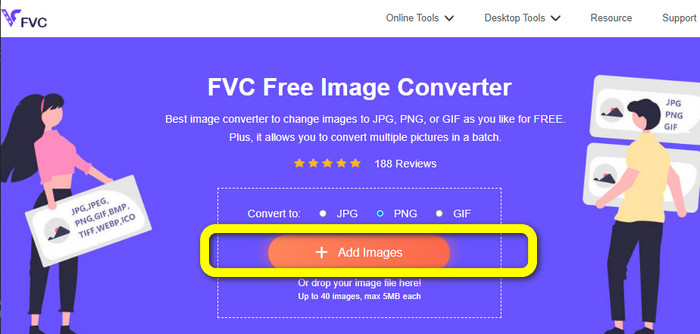
Bước 2: Nhấp nút Add Images ở giữa giao diện để tải ảnh lên. Mở ảnh bạn muốn chuyển đổi từ thư mục tệp của mình.
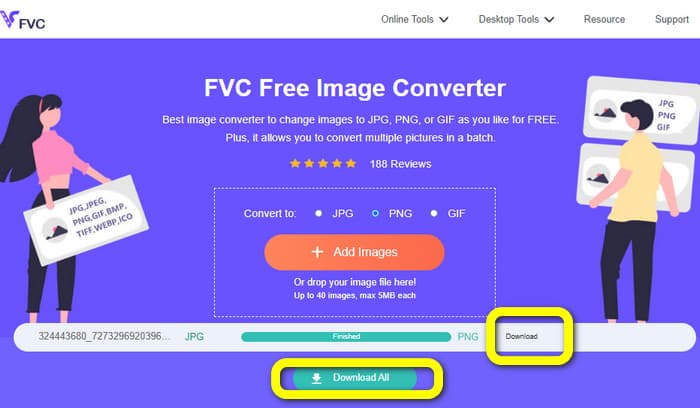
Bước 3: Sau khi quá trình chuyển đổi hoàn tất, nhấp nút Download để lưu ảnh cuối cùng của bạn. Sau đó, bạn có thể mở ảnh PNG trên máy tính.
Chuyển đổi hình ảnh sang PNG bằng Coolutils
Bạn có thể sử dụng trình chuyển đổi tệp ảnh trực tuyến Coolutils mà không cần tải bất cứ thứ gì về. Không cần chờ đường dẫn được gửi qua email vì trình chuyển đổi trực tuyến này thực hiện chuyển đổi ngay lập tức cho bạn. Công cụ trực tuyến này cho phép bạn chuyển đổi hình ảnh sang PNG một cách nhanh chóng. Một điểm mà chúng tôi thích ở dịch vụ này là khả năng xoay và thay đổi kích thước hình ảnh trước khi chuyển đổi. Tuy nhiên, nó không hiển thị bản xem trước hình ảnh sau khi xoay sẽ trông như thế nào sau khi chuyển đổi. Vì hoạt động qua trình duyệt web nên bạn có thể dùng phương pháp này với mọi hệ điều hành, bao gồm Windows, Linux và Mac. Chương trình này hỗ trợ nhiều định dạng đầu vào, bao gồm JPEG, PNG, GIF, BMP và TIFF.
Bước 1: Mở trình duyệt của bạn và tìm kiếm Coolutils. Sau đó, nhấp nút Upload File to Convert để thêm ảnh bạn muốn chuyển đổi.
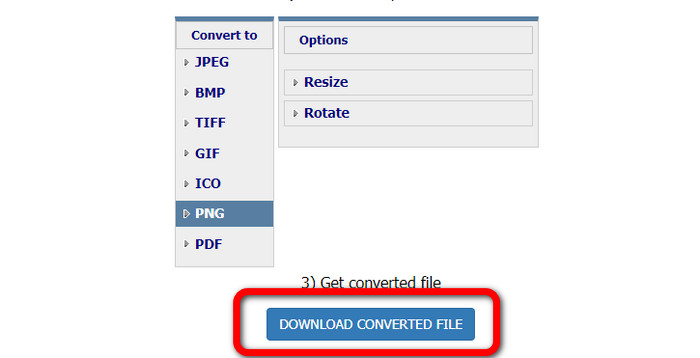
Bước 2: Chọn định dạng PNG trong các tùy chọn định dạng.
Bước 3: Nhấp nút Download tệp đã chuyển đổi để lưu ảnh vào máy tính của bạn. Bạn cũng có thể dùng công cụ này để chuyển đổi hình ảnh sang JPG.
Phần 4. Hỏi đáp về PNG File
1. Sự khác biệt giữa PNG và JPG là gì?
Sự khác biệt chính giữa định dạng tệp PNG và JPG là thuật toán nén của chúng. Định dạng tệp PNG sử dụng thuật toán không mất dữ liệu. Nó có nghĩa là nó có thể giữ tất cả thông tin từ hình ảnh. Định dạng JPG sử dụng thuật toán nén mất dữ liệu. Nó loại bỏ một số thông tin hình ảnh để giảm kích thước tệp.
2. Định dạng PNG hiển thị văn bản bằng văn bản hiệu quả như thế nào?
Nó có hiệu quả. Việc nén không mất dữ liệu của tệp này có thể hiển thị các ảnh có nhiều văn bản. Nó bao gồm bố cục trang và ảnh chụp màn hình. Bao gồm quét văn bản in như tài liệu viết tay và trang báo.
3. Cái nào tốt hơn, JPG hay PNG?
Nó phụ thuộc vào mục đích của bạn. Tệp JPG làm giảm chất lượng hình ảnh. Nó cũng hoạt động tốt hơn để giảm kích thước tệp của hình ảnh. PNG đã nén tệp trong khi vẫn giữ nguyên chất lượng hình ảnh. Thật tuyệt vời để lưu trữ các mục, chẳng hạn như văn bản, đồ họa mang tính biểu tượng và bản vẽ đường nét.
Phần kết luận
Tất cả thông tin ở trên cho bạn biết về định dạng tệp PNG. Bài viết thậm chí còn cung cấp cho bạn đủ dữ liệu về tệp PNG được dùng để làm gì. Hơn nữa, bài viết này hướng dẫn chi tiết cách chuyển đổi hình ảnh sang định dạng PNG bằng FVC Free Image Converter. Vì vậy, nếu bạn muốn chuyển đổi các tệp hình ảnh, hãy sử dụng trình chuyển đổi hình ảnh trực tuyến đáng tin cậy này.
-
 8 bộ chuyển đổi hình ảnh đáng kinh ngạc [Thông tin đầy đủ]
 Bài đánh giá này sẽ cho bạn biết về các trình chuyển đổi tệp hình ảnh tốt nhất mà bạn có thể sử dụng để chuyển đổi các tệp hình ảnh. Đọc bài đăng này để biết trình chuyển đổi hình ảnh tốt nhất cho bạn
-
 Chi tiết đầy đủ về sự khác biệt của JPEG so với JPG so với PNG
 Bài đăng này sẽ cung cấp cho bạn đầy đủ thông tin về sự khác biệt của JPEG so với JPG so với PNG. Ngoài ra, bạn sẽ học cách chuyển đổi hình ảnh sang các tệp này
-
 JPEG/JPG là gì: Chuyển đổi hình ảnh của bạn sang JPG một cách dễ dàng
 Bạn có tò mò về ý nghĩa của JPEG không? Chúng tôi có một câu trả lời cho bạn. Ngoài ra, bạn sẽ học cách chuyển đổi các định dạng hình ảnh khác nhau thành tệp JPG. Đọc bài viết bây giờ.
