


 Chuyển đổi video Ultimate
 Trình ghi màn hình
 Sửa chữa video
Thông tin chi tiết bạn cần biết khi chuyển đổi MPG sang AVI
Nói một cách tổng quát, tệp MPG là một tệp video điển hình sử dụng định dạng video kỹ thuật số đã được tiêu chuẩn hóa bởi Nhóm Chuyên Gia Hình Ảnh Động (MPEG). Nó lưu trữ video, âm thanh và siêu dữ liệu trong một tệp duy nhất ở dạng xen kẽ. Thông thường, người ta dùng tệp MPG để tạo các bộ phim được truyền qua Internet. Dạng định dạng video này không dễ chuyển đổi nếu bạn không có kiến thức hay kinh nghiệm về các trình chuyển đổi hỗ trợ hoặc chuyển đổi MPG sang AVI. Hãy tiếp tục đọc bài viết này để hiểu rõ hơn về các chi tiết và lựa chọn bạn nên cân nhắc để đạt được quá trình chuyển đổi như mong muốn.
Phần 1. MPG và AVI - Tổng quan
MPEG là một định dạng tệp video được phát triển bởi Nhóm Chuyên Gia Hình Ảnh Động, những người cũng đã tạo ra các định dạng như MP3 và MP4. Tùy vào mục đích sử dụng, MPEG sẽ dùng nén tệp MPEG-1 hoặc MPEG-2.
Để nén video thô chất lượng mức VHS và nhạc CD xuống còn 1,5 megabit mỗi giây mà không làm giảm quá nhiều chất lượng, MPEG-1 đã được tạo ra. Vì thế, nó đã trở thành một trong những định dạng video/âm thanh phổ biến và tương thích rộng rãi nhất trên thế giới. Dữ liệu video cho MPEG-1 thường được truyền ở tốc độ 30 khung hình mỗi giây, với độ phân giải khoảng 352×240 điểm ảnh.
Tuy nhiên, máy tính Windows lại sử dụng AVI làm định dạng video mặc định. Trong một định dạng vùng chứa đa phương tiện như DivX hoặc XviD, âm thanh và hình ảnh có thể được lưu trữ bằng nhiều codec khác nhau. Nhiều định dạng video khác, chẳng hạn như MPEG và MOV, sử dụng mức nén thấp hơn và chiếm nhiều dung lượng lưu trữ hơn so với tệp AVI. Cũng có thể tạo ra các tệp AVI không nén. Điều này dẫn đến kích thước tệp rất lớn — khoảng 2–3 GB cho mỗi phút video — vì các tệp này là dạng không mất dữ liệu. Bất kể bạn mở hay lưu tệp bao nhiêu lần, tệp không mất dữ liệu vẫn giữ nguyên chất lượng. Một lợi ích bổ sung nữa là có thể phát lại mà không cần cài thêm codec.
Phần 2. Phần mềm hiệu quả nhất để chuyển đổi MPG sang AVI
Nếu bạn từng thắc mắc làm thế nào để chuyển đổi miễn phí tệp video MPG sang AVI, thì phần mềm mới và tốt nhất này chính là thứ bài viết khuyên bạn nên dùng. Video Converter Ultimate là phần mềm miễn phí để tải về trên Windows và Mac, có thể chuyển đổi tệp MPG sang AVI nhanh hơn nhiều so với chuyển đổi trực tuyến. Ngoài hai định dạng video này, phần mềm còn hỗ trợ nhiều định dạng khác cho bạn lựa chọn. Nó được đánh giá cao nhờ chất lượng đầu ra mà bạn nhận được khi sử dụng. Giờ bạn đã có cái nhìn sơ bộ về những gì phần mềm này có thể làm, hãy sẵn sàng và cùng tìm hiểu cách phần mềm này hoạt động:
Bước 1. Để bắt đầu, chỉ cần nhấp vào nút Free Download được cung cấp bên dưới. Sau khi tải xuống hoàn tất, bạn có thể chọn cài đặt phần mềm trên Windows hoặc Mac. Khi phần mềm đã được cài trên màn hình desktop, bạn có thể bắt đầu sử dụng bằng cách nhấp vào nút Start Now.
Tải xuống miễn phí cho Windows 7 trở lên. Tải xuống an toàn.
Tải xuống miễn phí cho MacOS 10.7 trở lên. Tải xuống an toàn.
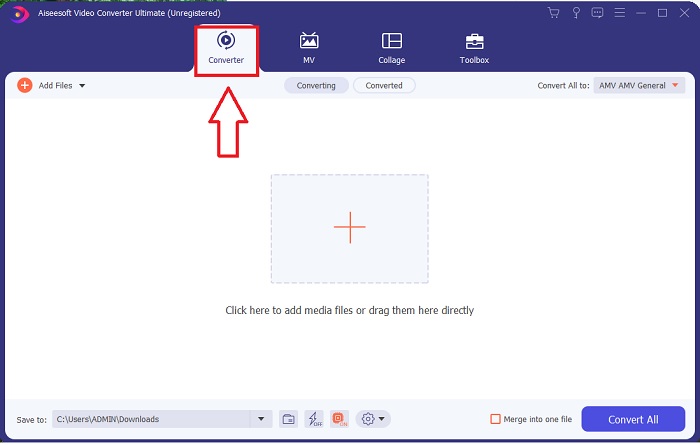
Bước 2. Mở phần mềm bạn vừa tải xuống. Khi mở lần đầu, bạn sẽ thấy một cửa sổ với giao diện Converter. Tại đây bạn sẽ bắt đầu quá trình chuyển mã video.
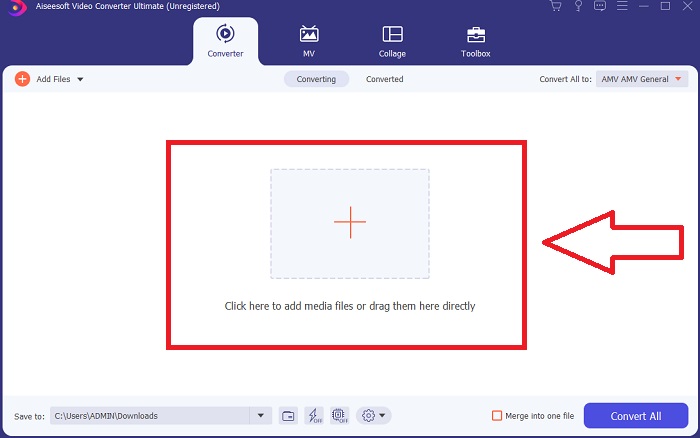
Bước 3. Bạn có thể bắt đầu quá trình chuyển đổi bằng cách nhập tệp vào phần mềm. Chuyển đổi video đơn giản chỉ bằng cách kéo nó vào biểu tượng Plus.
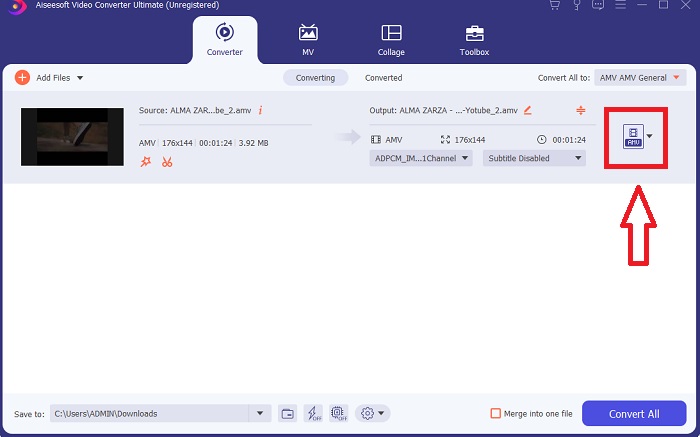
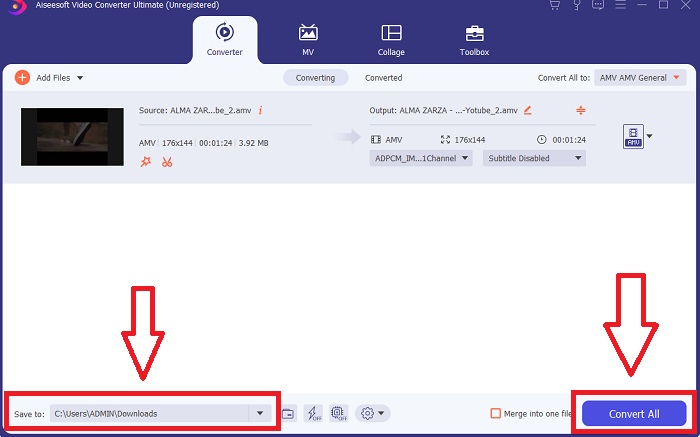
Bước 4. Nhấp chuột phải vào một định dạng video và chọn Save to hoặc Save to external storage. Tìm và chọn loại tệp AVI trong menu thả xuống. Sau khi chọn loại tệp video AVI, sẽ có rất nhiều thiết lập chất lượng video. Bạn có thể chỉnh sửa các thiết lập này nếu không thấy lựa chọn đầu ra phù hợp. Biểu tượng bánh răng cho phép bạn thay đổi độ phân giải, tốc độ khung hình và chất lượng âm thanh. Để lưu các chỉnh sửa, hãy nhấp nút Create New.
Bước 5. Nhấp Convert All khi bạn đã chỉnh sửa xong video được chọn và nó đã sẵn sàng để xuất về máy tính.
Phần 3. Mẹo nhanh: Các công cụ hiệu quả khác mà bạn nên xem xét
Phương pháp 1. Sử dụng CloudConvert
CloudConvert là một công cụ chuyển đổi video trực tuyến. Công cụ chuyển đổi trực tuyến này cũng hỗ trợ MP4, WEBM và AVI, trong số các định dạng khác. Bạn có thể chọn chất lượng, độ phân giải và kích thước tệp của video. Nếu bạn đang suy nghĩ về cách chuyển đổi MPG sang AVI trong công cụ trực tuyến này, đây là quy trình về cách sử dụng nó:
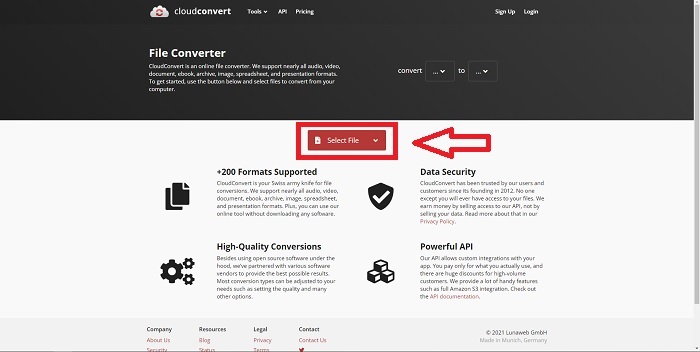
Bước 1. Tải tệp từ máy tính của bạn lên bằng cách nhấp vào Select the File.
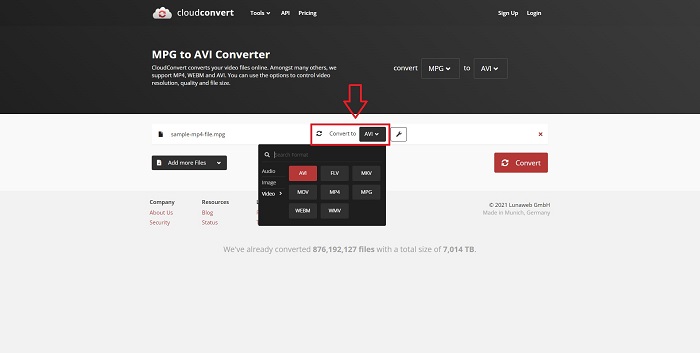
Bước 2. Sau đó, tiếp tục chọn định dạng bạn muốn chuyển đến bằng cách nhấp vào phần chọn định dạng bên cạnh biểu tượng cờ‑lê. Bạn cũng có thể thêm nhiều tệp khác để chuyển đổi.
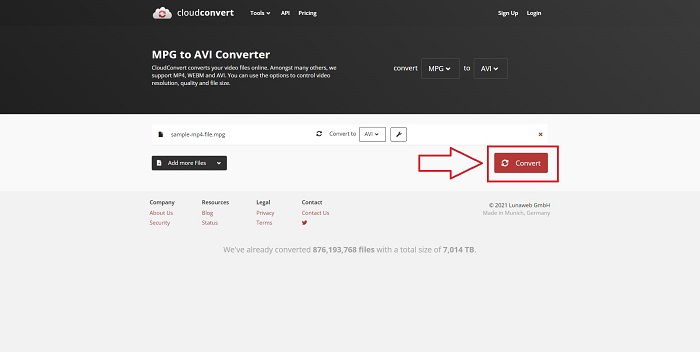
Bước 3. Nhấp Convert để chuyển đổi tất cả các tệp bạn đã tải lên.
Phương pháp 2. Sử dụng Zamzar
Zamzar là một công cụ dựa trên web để chuyển đổi tệp. Chuyển đổi có thể được thực hiện ở nhiều định dạng khác nhau mà không cần tải xuống bất kỳ phần mềm nào. Zamzar có thể chuyển đổi tệp từ định dạng này sang định dạng khác, chẳng hạn như Adobe PDF sang tài liệu Microsoft Word, bằng cách nhập URL hoặc tải lên một hoặc nhiều tệp (miễn là tất cả chúng đều ở cùng một định dạng). Để có được kiến thức về công cụ trực tuyến này, đây là các bước được cung cấp cho bạn:
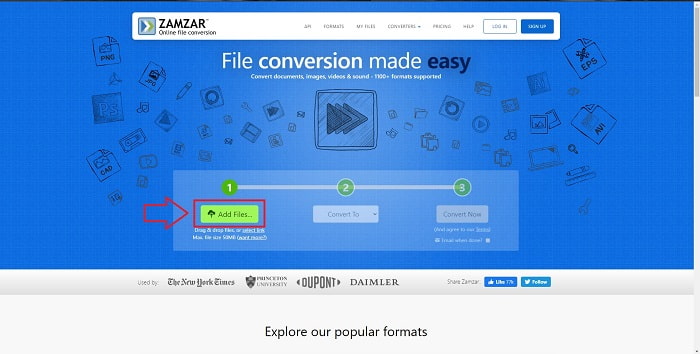
Bước 1. Tìm Zamzar trên bất kỳ công cụ tìm kiếm nào. Sau khi nhấp vào trang web, bạn có thể tải tệp lên trong giao diện của nó bằng cách nhấp vào Add Files.
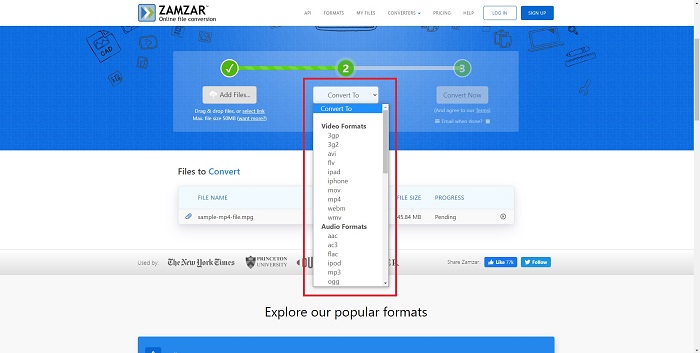
Bước 2. Tiếp theo, bạn có thể tiến hành chuyển đổi tệp bằng cách chọn tệp mong muốn. Nhấp Convert To để xem tất cả các định dạng được công cụ trực tuyến này hỗ trợ.
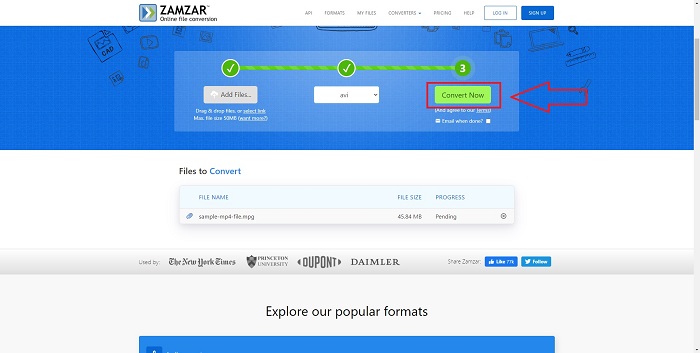
Bước 3. Để chuyển đổi tệp, hãy nhấp Convert Now.
Phần 4. Câu hỏi thường gặp về MPG và AVI
AVI hay MPG tốt hơn?
Có thể lưu trữ với các tệp AVI, trong khi quay video được thực hiện với các tệp MPEG. AVI vượt trội hơn một chút so với MPEG; tuy nhiên, nếu MPEG là định dạng để sử dụng, bạn muốn ghi video DVD. Microsoft Windows đã phát triển định dạng tệp AVI để đáp ứng với định dạng tệp MOV của Apple, trong khi Nhóm Ảnh Động đã phát triển định dạng MPG.
Ưu điểm và nhược điểm của AVI là gì?
So với các định dạng tệp khác, tệp AVI có thể rất lớn nếu không được nén. Bạn phải sẵn sàng từ bỏ một số dung lượng đĩa để đổi lấy những lợi ích của tệp AVI, vì bạn sẽ không thể lưu trữ nhiều tệp như cách khác. Nếu bạn nén tệp AVI trực tuyến vượt quá một điểm nhất định, kết quả là chất lượng video sẽ bị giảm.
AVI hoặc MPG kích thước nhỏ hơn là gì?
Trên Internet, tệp càng lớn thì thời gian tải xuống càng lâu. Vì vậy, việc mã hóa video ở kích thước tệp nhỏ hơn là điều hợp lý, dù có thể làm giảm đôi chút chất lượng. Về khả năng phát lại, AVI vẫn được ưa chuộng hơn MPG vì nhiều đầu phát đặt‑trên‑tivi hỗ trợ tệp AVI hơn tệp MPG. Nếu muốn phát tệp MPG trên máy tính, hãy nhấp vào đây để tìm hiểu thêm.
Phần kết luận
Để tổng kết lại tất cả những gì đã đề cập, Video Converter Ultimate là trình chuyển đổi tốt nhất mà bạn nên cân nhắc sử dụng so với tất cả các trình chuyển đổi MPG sang AVI trực tuyến kể trên. Phần mềm này miễn phí, có tốc độ chuyển đổi nhanh hơn công cụ trực tuyến. Nó cũng hỗ trợ rất nhiều định dạng và mang lại chất lượng cao cho video xuất ra. Ngoài ra, không có lý do gì để bạn không sử dụng phần mềm này.
-
 Cách chuyển đổi tệp MPEG sang MP4 miễn phí trên Windows, Mac, Trực tuyến
 Đọc và nhận 3 cách miễn phí để chuyển đổi tệp MPEG sang MP4 trên máy tính của bạn. Bạn có thể sử dụng bộ chuyển đổi video trực tuyến và máy tính để bàn để chuyển định dạng MPEG sang MP4 một cách dễ dàng.
-
 [2025] Các công cụ tốt nhất và cách dễ dàng để chuyển đổi MPEG sang MP3
 Bài viết này chủ yếu nói về cách bạn có thể chuyển đổi video MPEG sang MP3 bằng cách sử dụng các công cụ đáng tin cậy nhất trong danh sách.
-
 4 Cách Hiệu Quả Để Chuyển Đổi MOV Sang AVI Trên PC Và Mac [2025]
 Bạn có muốn biết công cụ chuyển đổi MOV sang AVI tốt nhất trên web là gì không? Và tại sao FVC Ultimate Video Converter có thể là thứ dành cho bạn.
