


 Chuyển đổi video Ultimate
 Trình ghi màn hình
 Sửa chữa video
Trong bài đánh giá chi tiết về 5 công cụ chuyển đổi hàng đầu để chuyển đổi OGV sang WMV
Bạn không biết cách chuyển OGV sang WMV và phát trên Windows Media Player? Hôm nay, bạn thật may mắn vì chúng tôi sẽ giới thiệu những công cụ khác nhau mà bạn có thể dùng để chuyển đổi file OGV. Bạn có muốn biết năm công cụ đó là gì không? Ở phần sau, bạn cũng sẽ học cách chuyển file OGV của mình sang WMV. Vậy nên tốt nhất là hãy sẵn sàng, vì chúng tôi không muốn để bạn chờ lâu hơn nữa, và hãy bắt đầu hành trình khám phá ngay bây giờ.

Phần 1. Top 5 Bộ chuyển đổi OGV sang WMV Trực tuyến và Ngoại tuyến
Top 1. FVC Video Converter Ultimate
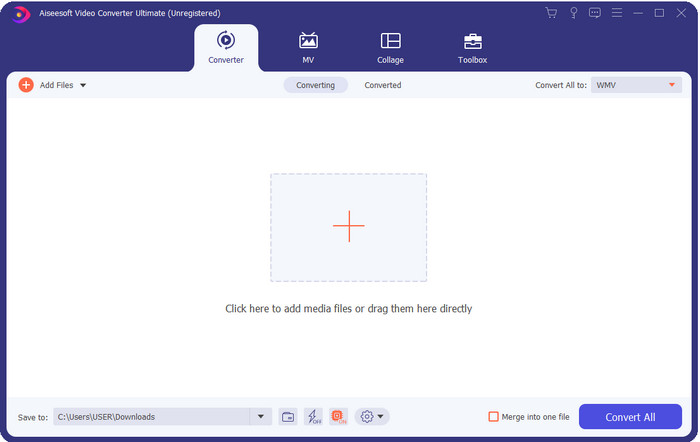
FVC Video Converter Ultimate là một trong những trình chuyển đổi OGV sang WMV tốt nhất mà bạn có thể tải về máy tính. Công cụ này cung cấp tốc độ chuyển đổi cực nhanh, điều đã khiến nhiều khách hàng ấn tượng. Hơn nữa, chuyển đổi không phải là điểm mạnh duy nhất của công cụ này. Bạn có thể sử dụng các tính năng chỉnh sửa nâng cao để làm video nổi bật hơn, giảm dung lượng, hoặc ghép các video lại với nhau. Nhìn chung, nếu bạn là người mới với việc chuyển đổi định dạng, đây là lựa chọn tốt nhất vì bạn có thể chuyển đổi dễ dàng như đếm một, hai, ba mà vẫn có được kết quả mang tính chuyên nghiệp sau khi hoàn tất.
Tải xuống miễn phí cho Windows 7 trở lên. Tải xuống an toàn.
Tải xuống miễn phí cho MacOS 10.7 trở lên. Tải xuống an toàn.
Ưu điểm
- Chuyển đổi OGV của bạn sang định dạng WMV, AVI, MOV, MP4 và hơn 200 định dạng có sẵn trong vòng chưa đầy một phút.
- Điểm mạnh của nó là chuyển đổi và các tính năng chỉnh sửa nâng cao mà bạn sẽ cần.
- Một công cụ chuyển đổi không thể tin được mà bất kỳ ai cũng có thể sử dụng ngay cả khi không có kinh nghiệm là dễ dàng và nhẹ.
- Có sẵn trong tất cả các hệ điều hành để tải xuống trên Windows và Mac.
Nhược điểm
- Để có được phần mềm này, trước tiên bạn cần phải mua nó.
- Tải xuống nó trên ổ đĩa máy tính của bạn.
Đầu 2. VLC Media Player
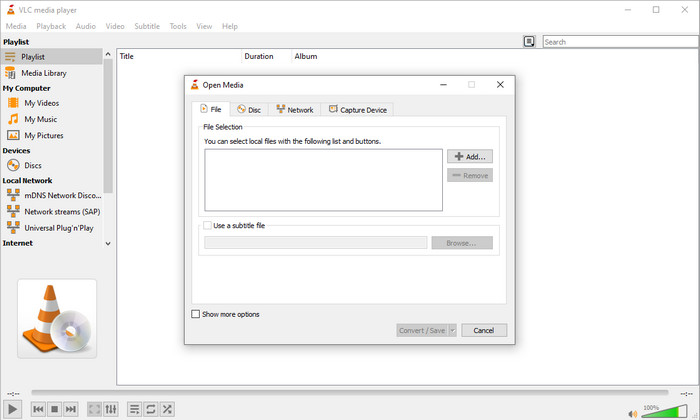
VLC Media Player là trình phát video được tải xuống nhiều nhất và dễ truy cập trên mọi thiết bị. Trình phát video này cũng có thể chuyển đổi OGV sang WMV hoặc các phiên bản định dạng mới mà bạn muốn. Tuy trình phát có thể chuyển đổi, nhưng nó vẫn thiếu nhiều định dạng được hỗ trợ, đặc biệt khi bạn cần chuyển sang một định dạng cụ thể. Tuy vậy, nếu bạn đã cài VLC trên máy tính, tại sao không thử dùng trình phát kiêm trình chuyển đổi này để đổi định dạng tệp của mình.
Ưu điểm
- Tải xuống miễn phí và nó hỗ trợ các định dạng khác nhau để chơi và chuyển đổi.
- Có sẵn trong tất cả các thiết bị để sử dụng.
- Quá trình chuyển đổi nhanh chóng.
Nhược điểm
- Nó hỗ trợ một định dạng giới hạn mà bạn có thể chọn.
- Không phải công cụ chuyển đổi điển hình của bạn.
- Bạn cần thực hiện nhiều bước trước khi có thể chuyển đổi.
Top 3. Aconvert
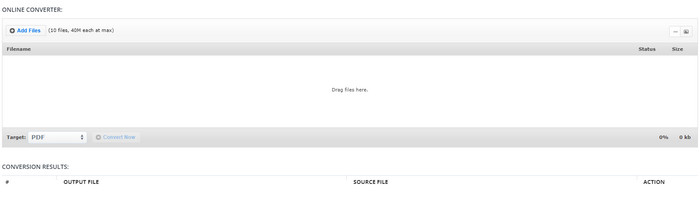
Aconvert sẽ hỗ trợ bạn trong việc chuyển đổi các tệp OGV. Công cụ chuyển đổi OGV sang WMV trực tuyến này mang lại quá trình chuyển đổi hiệu quả để bạn ít gặp phiền toái. Tuy nhiên, trình chuyển đổi này có rất nhiều quảng cáo trên giao diện web, điều có thể gây khó chịu theo nhiều cách. Ngoài ra, công cụ này giới hạn trải nghiệm chuyển đổi của bạn ở mức 10 lần và kích thước tối đa 40MB cho mỗi tệp. Nhưng bạn không cần lo lắng vì công cụ này hoàn toàn miễn phí cho tất cả người dùng internet muốn chuyển đổi tệp trực tuyến.
Ưu điểm
- Có sẵn trên web để sử dụng.
- Nó hỗ trợ một định dạng đã biết mà bạn có thể chèn.
- Thân thiện với người dùng.
Nhược điểm
- Định dạng tùy chọn cho đầu ra cuối cùng có rất nhiều thiếu sót.
- Có rất nhiều quảng cáo khó chịu trên trang web.
Đầu trang 4. Video2Edit.com
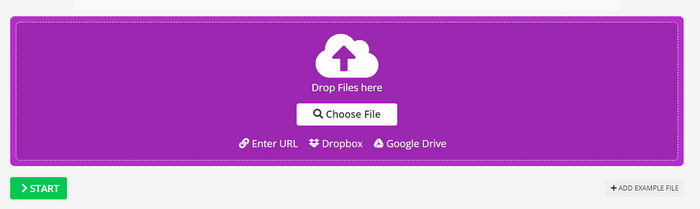
Video2Edit.com giống như Aconvert, nhưng công cụ này còn tốt hơn vì bạn có thể chỉnh sửa video trước khi chuyển OGV sang WMV. Bạn cũng có thể thay đổi codec âm thanh với ba tùy chọn. Hơn nữa, có rất nhiều việc bạn có thể làm với trình chuyển đổi này. Nhưng nhược điểm của webtool này là các định dạng hỗ trợ khá hạn chế. Nó cũng có quảng cáo, và quá trình chuyển đổi diễn ra chậm.
Ưu điểm
- Bộ chuyển đổi đa chức năng.
- Có sẵn trên tất cả các trang web để được truy cập bởi bất kỳ ai.
- Nó có thể sửa đổi codec video và âm thanh.
Nhược điểm
- Quảng cáo trên giao diện.
- Quá trình chuyển đổi mất nhiều thời gian.
Top 5. FVC Free Video Converter Online
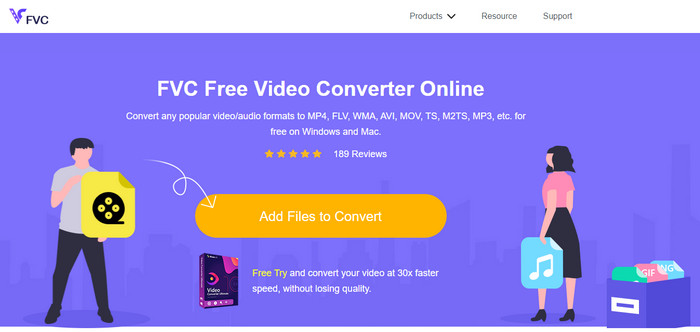
FVC Free Video Converter Online mang lại quá trình chuyển đổi OGV sang WMV tốt hơn so với VLC, Aconvert và Video2Edit.com. Bởi vì công cụ web này cung cấp chất lượng đầu ra chuyên nghiệp giống như FVC Video Converter Ultimate, nhưng không phải tất cả định dạng mà bản Ultimate hỗ trợ đều có ở đây. Ngoài ra, bạn có thể điều chỉnh chất lượng và đặt lên độ phân giải cao hơn để có kết quả tốt hơn. Một ưu điểm khác là bạn sẽ không bị làm phiền bởi quảng cáo trong khi chuyển đổi. Nhờ đó, bạn có thể thoải mái chuyển đổi mà không bị quảng cáo bật lên, và bạn có thể chuyển đổi không giới hạn tại đây, kể cả về dung lượng tệp.
Ưu điểm
- Nó hỗ trợ nhiều định dạng hơn VLC, Adconvert và Video2Edit.
- Nó có thể sửa đổi thông số kỹ thuật video và âm thanh của bạn.
- Dễ dàng truy cập trình chuyển đổi web bất cứ lúc nào và bất cứ nơi nào với kết nối internet.
- Không có quảng cáo trên giao diện và nó trông chuyên nghiệp hơn.
Nhược điểm
- Nếu bạn không có internet, bạn không thể sử dụng bộ chuyển đổi này giống như hai bộ chuyển đổi trực tuyến khác.
- Không có tính năng chỉnh sửa.
Phần 2. Làm thế nào để chuyển đổi OGV sang WMV với FVC Video Converter Ultimate
Vậy bây giờ, nếu bạn cảm thấy ấn tượng với những gì FVC Video Converter Ultimate có thể làm, bạn nhất định phải đọc phần này. Để nắm được cách chuyển OGV sang WMV với công cụ Ultimate, bạn cần làm theo các bước sau.
Các bước chuyển OGV sang WMV bằng FVC Video Converter Ultimate:
Bước 1. Tải phần mềm chuyển đổi về Windows hoặc Mac, làm theo hướng dẫn cài đặt và mở trình chuyển đổi.
Tải xuống miễn phí cho Windows 7 trở lên. Tải xuống an toàn.
Tải xuống miễn phí cho MacOS 10.7 trở lên. Tải xuống an toàn.
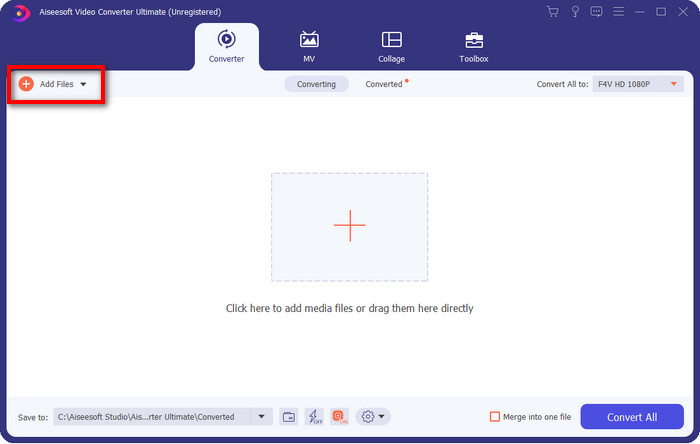
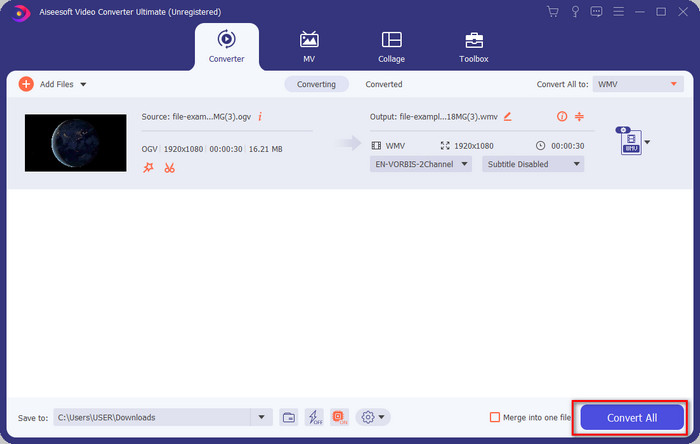
Bước 2. Sau khi mở phần mềm, bạn có thể tải file OGV lên bằng cách nhấp nút Add Files ở góc trên bên trái giao diện và chọn Open.
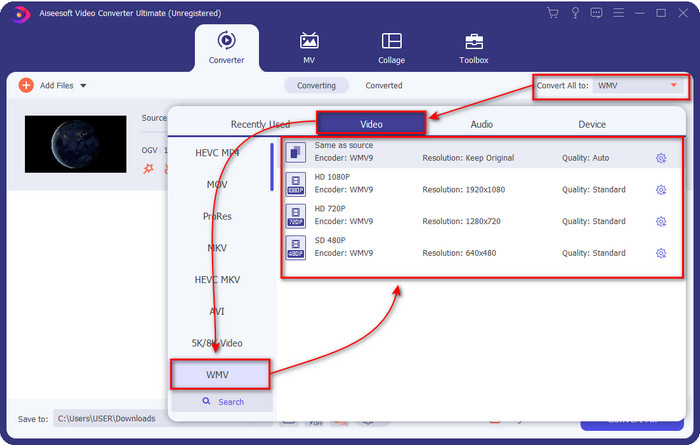
Bước 3. Khi đã tải file OGV lên, hãy chọn định dạng WMV bạn muốn trong mục Convert All to.
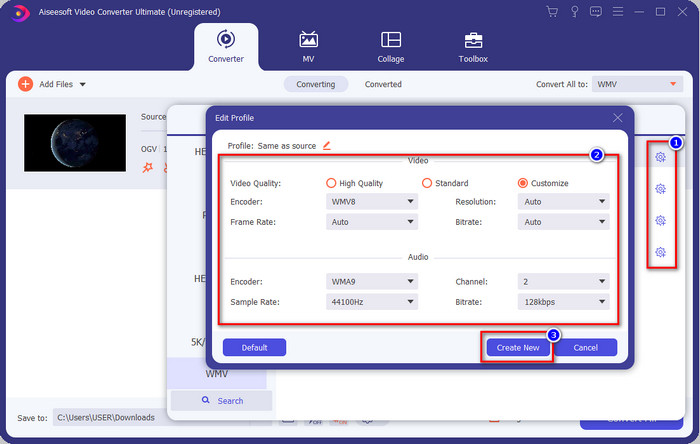
Tùy chọn: Muốn chỉnh sửa chi tiết cấu hình video? Hãy nhấp vào biểu tượng cog, điều chỉnh encoder, frame rate hoặc sample rate cho cả video và audio. Để lưu thay đổi, nhấn Create New. Sau khi điều chỉnh, bạn sẽ thấy biểu tượng bánh răng ở phía trên định dạng mà bạn đã chọn.
Bước 4. Nhấn Convert All để bắt đầu quá trình. Sau khi chuyển đổi xong, một thư mục trên máy tính sẽ mở ra cùng với file WMV.
Phần 3. Biểu đồ so sánh
| Các tính năng của Bộ chuyển đổi | FVC Video Converter Ultimate | VLC Media Player | Aconvert | Video2Edit.com | FVC Free Video Converter Online |
| Chuyển đổi định dạng |  | | | | |
| Các tính năng chỉnh sửa | |  | | | |
| Sửa đổi cài đặt video và âm thanh | | | | | |
| Phụ thuộc Internet | | | | | |
| Quảng cáo miễn phí | | | | | |
Phần 4. Câu hỏi thường gặp về Chuyển đổi OGV sang WMV
Tôi có thể sử dụng bộ chuyển đổi FFmpeg OGV sang WMV không?
Bạn có thể dùng FFmpeg để chuyển OGV sang WMV, nhưng trình chuyển đổi này không thân thiện với người dùng như những công cụ thường thấy. Nếu bạn muốn sử dụng công cụ này, hãy làm theo các bước sau: khởi chạy công cụ và chạy đường dẫn FFmpeg.exe trên hệ thống. Mở Command Prompt và điều hướng đến file OGV bạn muốn chuyển trên CMD. Tiếp theo, nhập lệnh ffmpeg -i input.ogv -vn -ar 44100 -ac 2 -b:a 192k output.wmv, rồi nhấn Enter để tiến hành xử lý.
OGV có chơi được trên Mac không?
Bạn không thể phát tệp OGV trên QuickTime vì bộ mã hóa định dạng này không được hỗ trợ. Tuy nhiên, vẫn có cách để làm cho nó tương thích trên Mac, đó là chuyển đổi sang định dạng MOV. Bạn muốn biết cách chuyển tệp OGV sang MOV? Hãy nhấp vào liên kết này.
OGV và OGG có cùng định dạng không?
OGV và OGG là những thùng chứa chính xác, nhưng chúng có sự khác biệt về những gì chúng chứa. Ví dụ: tệp OGG có thể lưu trữ âm thanh chất lượng cao nhưng không lưu trữ video. Ngược lại, OGV có thể giữ nội dung âm thanh và video chất lượng cao.
Phần kết luận
Và giờ khi đã biết các trình chuyển đổi OGV sang WMV mà bạn có thể sử dụng, đã đến lúc chọn công cụ phù hợp. Mặc dù tất cả công cụ được giới thiệu ở đây đều có thể giúp bạn, chúng tôi nhận thấy rằng FVC Video Converter Ultimate cam kết mang lại chất lượng xuất sắc cho người dùng. Thật khó tin những gì công cụ này có thể làm được. Bây giờ, quyền lựa chọn ở trong tay bạn, nhưng nếu vẫn chưa quyết định, chúng tôi gợi ý bạn nên chọn FVC Video Converter Ultimate. Muốn biết thêm về công cụ này? Hãy tải về và sử dụng mà không gặp bất kỳ giới hạn nào.
-
 2 Bộ chuyển đổi Chọn nhiều nhất Có thể truy cập để Chuyển đổi Tệp OGV sang AVI [2021]
 Bạn muốn chuyển đổi các tệp OGV sang AVI? Bài viết này cung cấp hai trong số các giải pháp tốt nhất mà bạn có thể sử dụng để thực hiện chuyển đổi của mình an toàn và nhanh chóng mà không làm mất uy tín của video & #039;
-
 Bộ chuyển đổi OGV sang FLV tuyệt vời mà bạn không nên bỏ lỡ [Đã được chứng minh]
 Nếu bạn & #039; đang tự hỏi làm cách nào để nhanh chóng chuyển đổi tệp OGV sang FLV, thì bài viết này sẽ chỉ cho bạn công cụ chuyển đổi duy nhất mà bạn & #039; sẽ cần.
-
 3 cách chuyển đổi tệp M2TS sang WMV miễn phí trên Windows / Mac / Trực tuyến
 Dưới đây là 3 cách dễ dàng để chuyển đổi video M2TS sang WMV. Bạn có thể thay đổi định dạng video từ M2TS sang WMV miễn phí trên Windows, Mac và trực tuyến một cách nhanh chóng. Chuyển đổi hàng loạt được hỗ trợ.
