


 Chuyển đổi video Ultimate
 Trình ghi màn hình
 Sửa chữa video
Tìm hiểu 2 công cụ chuyển đổi tốt nhất để chuyển đổi RMVB sang AVI miễn phí
Nếu bạn đang tìm kiếm khả năng nén hiệu quả hơn, hãy dùng định dạng RMVB vì định dạng này sử dụng tốc độ bit biến thiên để mã hóa âm thanh và hình ảnh. Đây là định dạng vùng chứa tốt nhất để lưu trữ nội dung phát trực tuyến được mã hóa ở tốc độ bit không đổi. Mặc dù định dạng này là lựa chọn tốt nhất cho phát trực tuyến trực tuyến, bạn vẫn cần dùng một trình phát media hoặc bộ giải mã media để xem video có phần mở rộng tệp .rmvb. Vậy nếu đúng như vậy, hãy cùng đơn giản hóa mọi thứ bằng cách tìm ra trình chuyển đổi tệp RMVB sang AVI mà bạn có thể dùng để chuyển đổi các tệp RMVB của mình.
Phần 1. Bộ chuyển đổi RMVB sang AVI ngoại tuyến tốt nhất cho Windows và Mac [Cách nhanh nhất & hiệu quả nhất]
Đứng đầu trong danh sách này là một trình chuyển đổi tuyệt vời mà bạn sẽ yêu thích; FVC Video Converter Ultimate cung cấp cách nhanh nhất và an toàn nhất để chuyển đổi RMVB sang AVI miễn phí. Tất cả các tính năng mà công cụ này cung cấp đều là những thứ cần có cho những ai thường xuyên chuyển đổi định dạng. Ngoài ra, nếu bạn muốn chỉnh sửa video, tăng âm lượng âm thanh, tạo GIF độc đáo và làm nhiều việc khác, thì công cụ này là lựa chọn tuyệt vời cho mọi người. Mặc dù bạn có thể chuyển đổi định dạng miễn phí tại đây, nhưng công cụ này không phải là miễn phí. Tuy nhiên, bạn sẽ không phải chi hàng trăm đô để tải xuống, truy cập và trải nghiệm toàn bộ khả năng của trình chuyển đổi này. Giả sử bạn đã mua và tải xuống công cụ này, thì bây giờ là lúc để phát huy trí tưởng tượng của bạn nhằm đạt được kết quả tốt nhất với sự trợ giúp của nó. Và bây giờ, các thông tin chi tiết dưới đây là những bước để chuyển đổi tệp RMVB của bạn sang một định dạng mới.
Các bước chuyển đổi RMVB sang AVI bằng FVC Video Converter Ultimate:
Bước 1. Tải trình chuyển đổi RMVB sang AVI này về PC hoặc Mac của bạn, cài đặt, thiết lập và nhấp vào Start Now.
Tải xuống miễn phí cho Windows 7 trở lên. Tải xuống an toàn.
Tải xuống miễn phí cho MacOS 10.7 trở lên. Tải xuống an toàn.
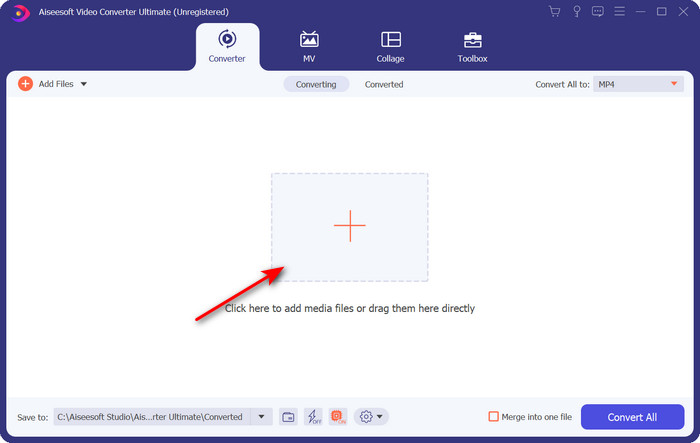
Bước 2. Chạy chương trình và tải tệp .rmvb lên giao diện bằng cách nhấp nút + ở giữa. Tìm tệp trong thư mục và nhấp Open.
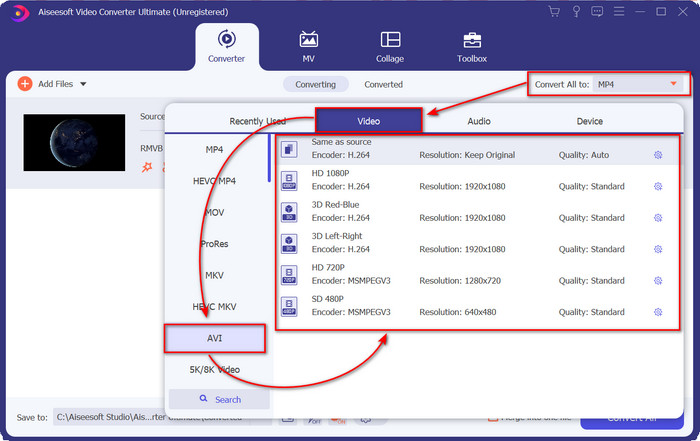
Bước 3. Vào mục Convert All to: và tìm định dạng AVI, sau đó nhấp vào đó.
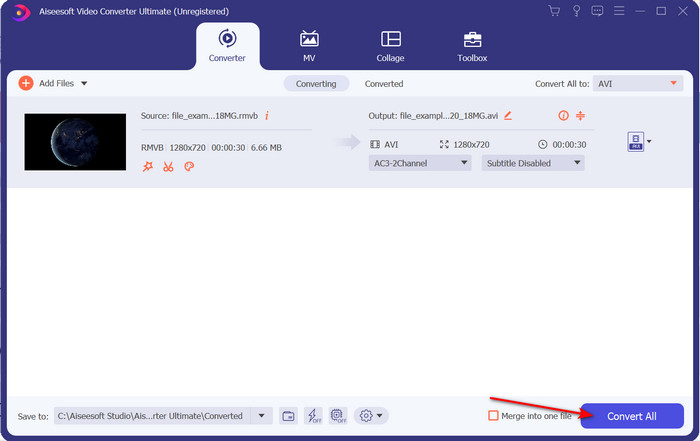
Bước 4. Sau khi chọn xong định dạng, hãy bắt đầu chuyển đổi tệp bằng cách nhấp Convert All.
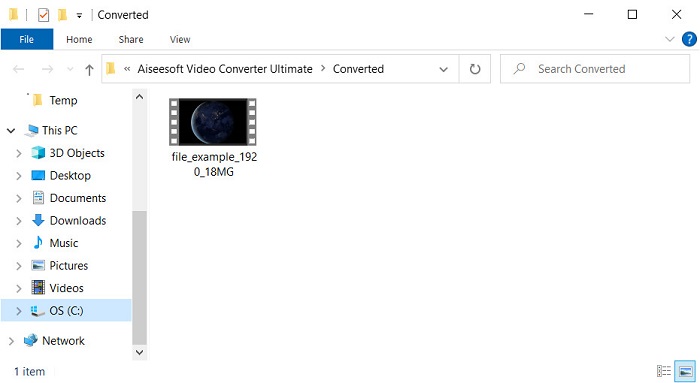
Bước 5. Một thư mục chứa tệp .rmvb mới sẽ hiện lên trên màn hình; hãy nhấp vào tệp để xem video và thưởng thức.
Ưu điểm
- Hộp công cụ cung cấp nhiều tiện ích phổ biến sẽ giúp bạn giải quyết các vấn đề khác nhau mà bạn sẽ gặp phải.
- Nó cung cấp tốc độ chuyển đổi tệp nhanh hơn 30 lần so với các trình chuyển đổi trực tuyến và ngoại tuyến khác.
- Điều tuyệt vời là bất kỳ ai có hoặc không có kinh nghiệm chuyển đổi đều có thể chuyển đổi dễ dàng.
- Chuyển đổi hàng loạt được thực hiện nhanh chóng với các định dạng khác nhau.
Nhược điểm
- Để truy cập công cụ, bạn sẽ cần phải trả tiền cho nó, nhưng nó không quá một trăm đô la.
- Cần tải xuống trên PC hoặc Mac của bạn.
Phần 2. Bộ chuyển đổi RMVB sang AVI trực tuyến tốt nhất cho trình duyệt web [Miễn phí]
Bạn đang tìm trình chuyển đổi RMVB sang AVI trực tuyến? Vậy thì FVC Free Video Converter Online là một trong những lựa chọn. Công cụ web này cho phép bạn chuyển đổi mà không cần tải phần mềm. Bất kỳ ai có kết nối internet đều có thể truy cập. Ngoài ra, nó miễn phí, an toàn và không có quảng cáo trên trang web trong khi chuyển đổi. Thêm vào đó, bạn có thể chuyển đổi tệp tại đây mà không bị giới hạn. Bạn có thể chọn trong số nhiều định dạng có sẵn. Tuy nhiên, công cụ web này không có những tính năng nâng cao giống như FVC Video Converter Ultimate cung cấp. Hơn nữa, bạn không thể truy cập công cụ này nếu không có kết nối internet, giống như các công cụ web khác. Vậy nên, nếu bạn muốn thử và chuyển đổi mà không tốn tiền, hãy làm theo các bước được nêu dưới đây.
Các bước chuyển đổi RMVB sang AVI trực tuyến bằng FVC Free Video Converter Online:
Bước 1. Để truy cập trình chuyển đổi RMVB sang AVI trực tuyến này, bạn cần nhấp vào liên kết này.
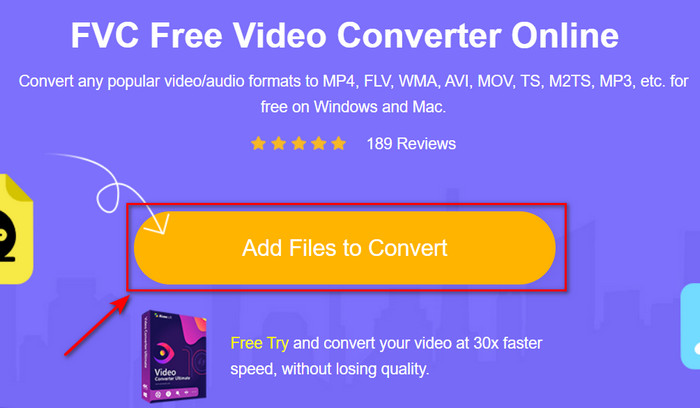
Bước 2. Nhấn Add Files to Convert, và nếu đây là lần đầu bạn dùng công cụ này, một trình khởi chạy sẽ tự động được tải xuống, sau đó nhấn lại Add Files to Convert và một thư mục sẽ xuất hiện. Tìm tệp .rmvb trong thư mục rồi nhấp Open.
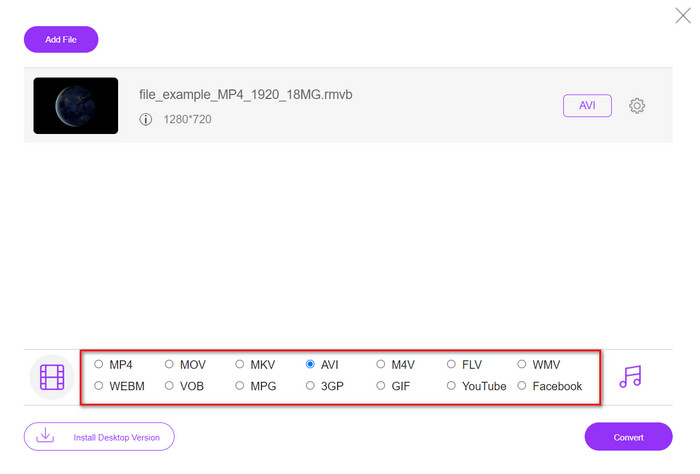
Bước 3. Khi tệp đã ở trên giao diện web, hãy nhấp AVI trong các lựa chọn bên dưới.
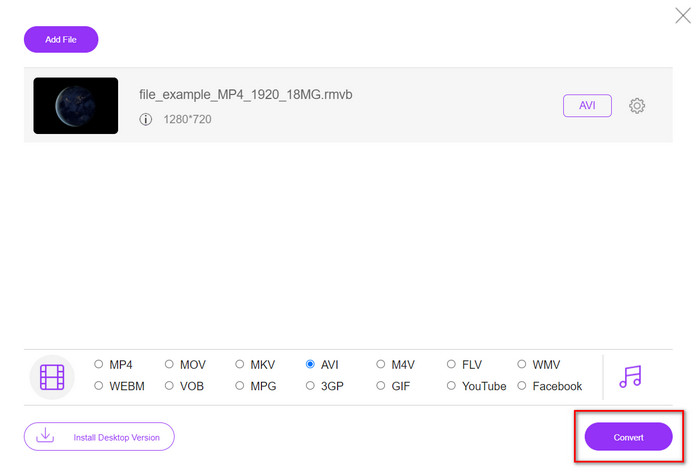
Bước 4. Sau khi bạn đã chọn AVI, hãy bắt đầu chuyển đổi bằng cách nhấn Convert.
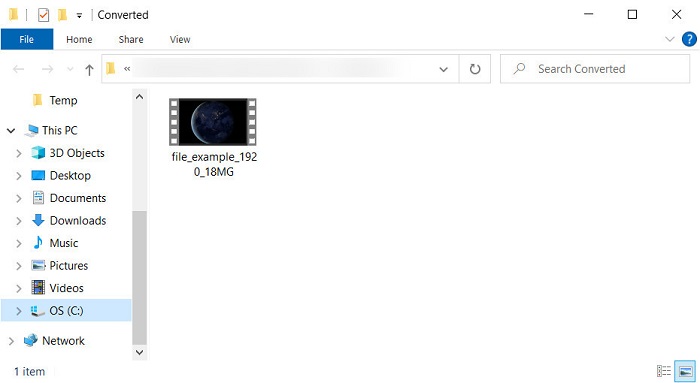
Bước 5. Khi việc chuyển đổi tệp hoàn tất, một thư mục chứa tệp sẽ hiện lên trên màn hình; nếu muốn xem tệp, hãy nhấp vào đó.
Ưu điểm
- Không cần tải xuống để truy cập nó ngoài trình cài đặt.
- Miễn phí và không có quảng cáo trên giao diện web.
- Mở công cụ web sang một trình duyệt khác vì nó có sẵn trong tất cả.
Nhược điểm
- Phụ thuộc vào Internet, có nghĩa là nếu bạn không có Internet, bạn không thể sử dụng nó.
- Nó không có tính năng chỉnh sửa như FVC Video Converter Ultimate.
Phần 3. Câu hỏi thường gặp về RMVB và AVI
Tôi có thể phát tệp RMVB trên Quicktime không?
Quicktime có thể phát nhiều định dạng khác nhau và trình phát media này hỗ trợ các codec khác nhau được mã hóa trong bản nhạc video hoặc âm thanh của bạn. Tuy nhiên, .rmvb không nằm trong số các định dạng được hỗ trợ, nên để phát tệp .rmvb trên Quicktime, bạn phải chuyển nó sang một định dạng được hỗ trợ như MOV, MPEG-4, AVI và các định dạng khác. Nhưng bạn có thể chuyển sang dùng các trình phát RMVB để thưởng thức trọn vẹn các video RMVB của mình.
Tại sao tôi không thể mở tệp .rmvb trên Windows Media Player?
Vì codec của các tệp .rmvb của bạn không được hỗ trợ trong trình phát đa phương tiện này, giả sử bạn muốn xem video dưới phần mở rộng tệp là .rmvb. Trong trường hợp đó, bạn phải cài đặt codec video trên máy tính của mình trước khi phát. Nhưng để tránh rắc rối này, hãy cố gắng chuyển đổi định dạng thành một định dạng hợp lý mà trình phát đa phương tiện này hỗ trợ.
Tôi có thể lưu video dưới định dạng RMVB trên điện thoại của mình không?
Có, bạn có thể lưu nó, nhưng bạn không thể phát nó trên trình phát video mặc định của mình và để phát tệp, bạn phải tải xuống trình phát video của bên thứ ba hỗ trợ định dạng này.
Phần kết luận
Tóm lại, giờ đây chúng ta đã hiểu định dạng RMVB là gì và kiểu mã hóa mà định dạng này hỗ trợ. Mặc dù định dạng này rất tốt để truyền tệp trực tuyến, một số trình phát media vẫn không hỗ trợ nó vì cấu trúc quá phức tạp. Vì vậy, chúng tôi đã giới thiệu hai giải pháp mà bạn có thể chọn để học cách chuyển đổi tệp RMVB sang AVI; một công cụ có thể được truy cập trực tuyến miễn phí trong khi sử dụng. Công cụ còn lại là trình chuyển đổi tuyệt vời có thể hoàn thành mọi tác vụ trong nháy mắt. Giả sử bạn chọn FVC Free Video Converter Online thì hãy kỳ vọng chất lượng chuyển đổi trực tuyến tốt nhất. Tuy nhiên, nếu bạn quyết định tải về một phiên bản tốt hơn nhiều, hãy kỳ vọng hiệu năng tối ưu.
-
 Hướng dẫn cách chuyển đổi RMVB sang MP4 trên Windows / Mac (3 cách miễn phí)
 Bạn muốn chuyển đổi RMVB sang MP4 để dễ dàng phát lại trên máy tính hoặc điện thoại di động? Bạn sẽ tìm thấy các cách đơn giản để chuyển đổi các tệp RMVB của mình sang MP4 trong hướng dẫn này.
-
 Top 4 ứng dụng chuyển đổi RMVB sang FLV miễn phí trên máy tính để bàn hoặc trực tuyến
 Bài viết này sẽ cho bạn biết phần mềm chuyển đổi RMVB sang FLV tốt nhất và các ứng dụng web có thể chuyển đổi tệp RMVB (RealMedia Variable Bitrate) sang video FLV.
-
 Phương pháp tốt nhất để sử dụng trong việc chuyển đổi AMV sang AVI [Đã được phê duyệt]
 Bạn đang gặp khó khăn khi chuyển đổi tệp video định dạng AMV của mình sang AVI? Dưới đây là một số mẹo được cung cấp mà bạn chỉ có thể tìm thấy trong bài viết này.
