


 Chuyển đổi video Ultimate
 Trình ghi màn hình
 Sửa chữa video
Cách dễ dàng chuyển đổi tệp WebM sang WMV
WebM is a media file format supported by most web browsers like Google Chrome, Mozilla Firefox, Microsoft Edge, Opera, and more. It is being used on HTML5 videos and HTML5 audios for streaming purposes. However, WebM files do not support Mac and iOS devices without using other tools. Therefore, if you want to open WebM files on any device, we recommend converting it to a WMV file widely supported by almost all devices and players. In this article, we listed the best WebM to WMV Converters for you to try.

Phần 1. 3 công cụ hàng đầu để chuyển đổi tệp WebM sang WMV một cách dễ dàng
FVC Video Converter Ultimate
FVC Video Converter Ultimate is widely popular on the entire web when talking about file converters. This file converter allows you to convert your WebM file to a WMV file easily. It also has unique features in which you can edit your file, enhance, and even compress your file without the quality being ruined. In addition to that, this tool supports varieties of conversion that you need, including WMV files. Therefore, if you want to convert a WebM file to WMV efficiently, this is the app for you.
Ưu điểm
- Cho phép bạn chỉnh sửa, nâng cao và nén tệp của mình.
- Có thể chuyển đổi các định dạng tệp khác nhau bao gồm WebM, WMV, MP4, M4V, MOV, AVI, v.v.
- Giao diện dễ sử dụng.
Nhược điểm
- Trước tiên, bạn cần tải ứng dụng xuống trước khi có thể sử dụng.
FVC Free Video Converter
FVC Free Video Converter is a free online converter that allows you to convert various file formats, including WebM to WMV, MP4, FLV, MOV, and more. This converter is also easy-to-use, because of its simple interface. Moreover, this converter does not need to be downloaded because it is web-based. However, since it is an online converter, you may experience slow conversion because it is an internet-dependent converter. Nevertheless, many have used this converter and approved it as one of the best online converters to convert your WebM to WMV free online.
Ưu điểm
- Không chứa các quảng cáo làm phiền.
- Cho phép bạn chuyển đổi nhiều định dạng tệp bao gồm WebM, WMV, MP4, FLV, WMA, v.v.
- Bạn không cần tải xuống ứng dụng.
Nhược điểm
- Nó có thể chậm để chuyển đổi.
- Chỉ có các tính năng hạn chế để sử dụng.
SavetheVideo.com
SavetheVideo.com is a free online converter that converts major video file formats. With this converter, you can convert videos from famous social media applications like Facebook, Twitter, Instagram, TikTok, and more. Despite that, you may encounter converting files, mainly if the file is not supported.
Ưu điểm
- Nó có thể chuyển đổi video lên đến hơn 420 định dạng trên mọi thiết bị.
- Bạn có thể chuyển đổi từ các thiết bị android và iphone.
Nhược điểm
- Nó có một giao diện khó theo dõi.
- Bạn có thể gặp phải tình trạng chuyển đổi chậm.
Phần 2. Cách chuyển đổi WebM sang WMV bằng FVC Video Converter Ultimate
This part of the article will show you how to convert WebM files to WMV file format using the FVC Video Converter Ultimate. Because this converter is what we think is the best among the converters that trend in the market nowadays. Among other WebM to WMV converters available today, this online free converter shows promising performance, especially with its great features.

FVC Video Converter Ultimate
5.689.200+ lượt tải xuống- Nó hỗ trợ chuyển đổi WebM sang WMV, MP4, MOV, MKV hoặc thành hơn 200 định dạng trong vòng vài cú nhấp chuột.
- Nó cung cấp chuyển đổi hàng loạt để chuyển đổi nhiều tệp WebM cùng một lúc.
- Chuyển đổi cực nhanh cho phép bạn có quá trình chuyển đổi nhanh như chớp trong vòng vài giây.
- Nó có các tính năng chỉnh sửa, nơi bạn có thể xoay, cắt, hợp nhất và hơn thế nữa.
Tải xuống miễn phí cho Windows 7 trở lên. Tải xuống an toàn.
Tải xuống miễn phí cho MacOS 10.7 trở lên. Tải xuống an toàn.
Steps in converting WebM to WMV using FVC Video Converter Ultimate:
Step 1. For you to download this converter, click the download button below. Follow the installation process, then open the app.
Tải xuống miễn phí cho Windows 7 trở lên. Tải xuống an toàn.
Tải xuống miễn phí cho MacOS 10.7 trở lên. Tải xuống an toàn.
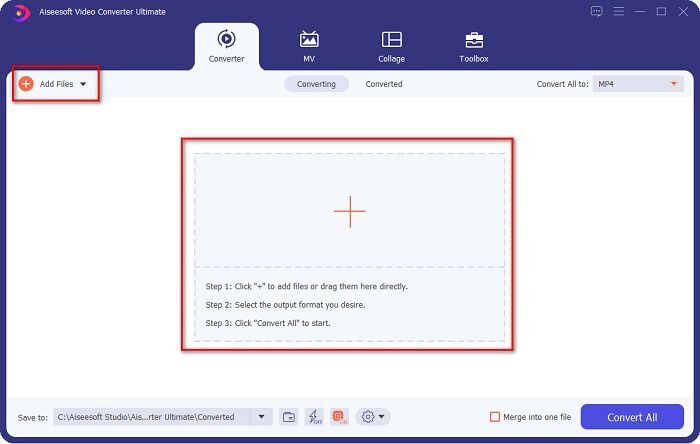
Step 2. After opening the application, click the Add Files button, or you may also click the + button to upload your WebM file in the tool's main interface. And a computer folder will appear, where you will locate your WebM file. Then press the Open button to upload your file. Additionally, you can add more WebM files because this tool supports batch conversion.
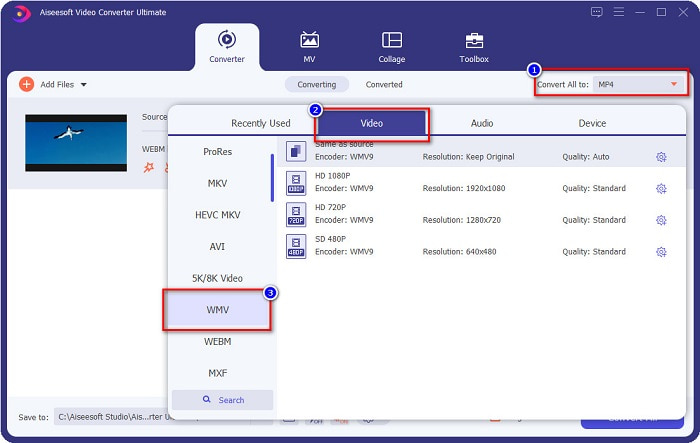
Step 3. In the upper right corner of the software, you will see the Convert All to button, click it, then select the WMV format on the list to change the file format from WebM to WMV format.
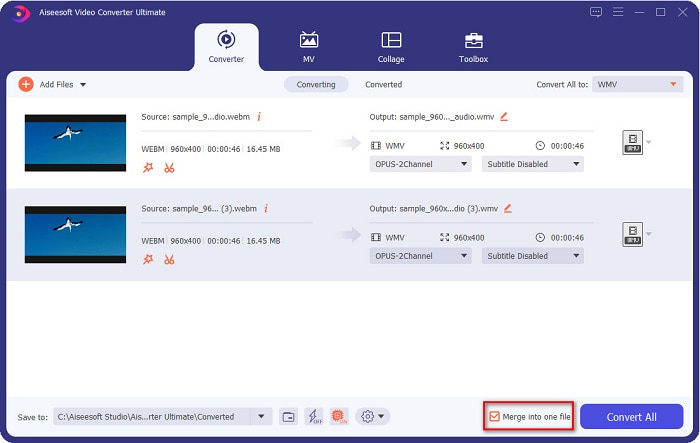
Optional. Do you want to know how to merge multiple WebM files into one? This ultimate tool has a compelling feature to merge them into one file. To do this, tick the box located in the bottom right corner of your software. In doing so, when you convert your files, they will automatically merge into one file. But if you do not wish to merge your files, you can skip this part and proceed to the next step.
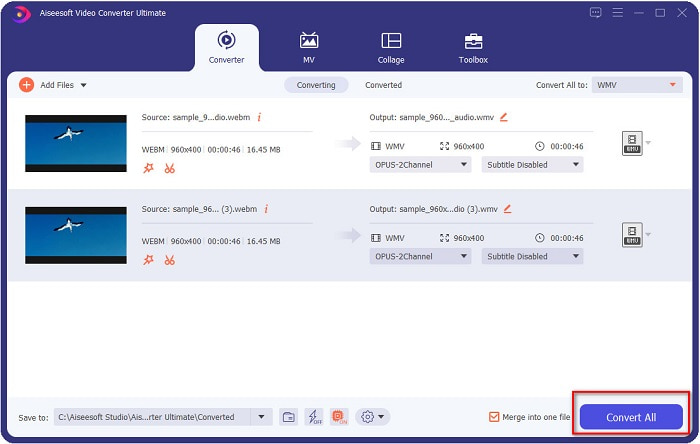
Step 4. When you select the file format that you want, click the Convert All button to start converting your WebM file to WMV. And voila! Your WebM file is now converted to a WMV file!
Bạn có thể dễ dàng chuyển đổi tệp WebM của mình sang tệp WMV với các bước đơn giản.
Phần 3. Kiến thức mở rộng về WebM và WMV
Để hiểu thêm về hai tệp này, chúng tôi sẽ giải quyết chúng trong phần này của bài viết.
WebM file is a video file format that widely supports web browsers. HTML5 websites use this format for video streaming purposes. Moreover, this type of file contains video streams compressed with VP8 or VP9 codecs. While on the other hand, Windows develops WMV or Windows Media Video; therefore, Windows System usually plays this type of file. Many encoders also support this type of file. In addition to that, this file format uses a compressor that helps your file make it smaller in size without ruining the quality.
Phần 4. Câu hỏi thường gặp về Chuyển đổi WebM sang WMV
Trình chuyển đổi video cuối cùng có thể chuyển đổi tệp WebM sang định dạng tệp MP4 không?
Certainly. Using FVC Video Converter Ultimate can convert your WebM file into MP4. You can click this link and read thoroughly for more information about converting your WebM file to MP4 file format.
QuickTime có hỗ trợ tệp WebM không?
QuickTime does not support WebM file formats. Because QuickTime does not contain many codecs like other media players, you can convert your WebM file to file formats like MOV, which is supported by the codecs of QuickTime. To have more Infos about converting WebM to MOV, click this link.
Internet Explorer có hỗ trợ tệp WebM không?
Đúng. Internet Explorer hỗ trợ các tệp WebM. Mặc dù vậy, Internet Explorer đã bị loại bỏ dần.
Phần kết luận
To sum it all up, the WebM to WMV converters presented above will help you convert your WebM files to WMV files easily. Moreover, the tools shown above have different features which allow you to do more when converting. But we believe that FVC Video Converter Ultimate is the best tool that helps you meet your needs. Still can't decide which converter to use? Download it now, and try it!
-
 3 cách để chuyển đổi WebM sang MP3 mà không làm giảm chất lượng âm thanh
 Bạn gặp sự cố vì không thể sử dụng tệp WebM để phát âm thanh bạn lưu? Sau đó, hãy đọc bài viết này khi chúng tôi cung cấp một trợ giúp hiệu quả bằng cách chuyển đổi WebM sang MP3.
-
 3 Phần mềm tuyệt đẹp được sử dụng để chuyển đổi tệp WebM thành định dạng AVI
 Không có bất kỳ ý tưởng làm thế nào để chuyển đổi WebM thành AVI? Sau đó, chúng ta hãy bắt đầu đọc bài viết này. Vì chúng tôi chỉ định tất cả các chi tiết trên WebM và ba trình chuyển đổi mà bạn có thể sử dụng để chuyển đổi.
-
 Bộ chuyển đổi WebM sang FLV được lựa chọn nhiều nhất miễn phí trên Web & Máy tính để bàn
 Bạn có gặp vấn đề tương tự khi phát các tệp WebM trên điện thoại thông minh của mình không? Sau đó dành 5 phút đọc bài viết này để biết cách chuyển đổi WebM sang FLV.
