


 Chuyển đổi video Ultimate
 Trình ghi màn hình
 Sửa chữa video
 Tải xuống an toàn
Cách kết hợp các tệp video MPEG thành một - 2 phương pháp cuối cùng mà bạn nên biết
How to join MPEG files? You just downloaded an old TV series in the MPEG format, such as 8 short episodes and each of them has a redundant opening and ending. How to merge these MPEG files into one like a movie? Whether you simply need to combine the videos into one, or merge the MPEG files with advanced features, here are 2 efficient methods you should never miss.

Phần 1: Cách kết hợp các tệp MPEG trực tuyến miễn phí
FVC Free Online Video Merger is a free online MPEG combiner that enables you to merge MPEG, MP4, AVI, and more video files without size limitations. It allows you to combine multiple MPEG files to impressive videos with no watermark added. Moreover, the uploaded files will be deleted within 24 hours to protect your privacy.
Step 1: Go to the FVC Free Online Video Merger with any web browser. Click the Upload Videos to Merge button in the middle webpage to get the installer. After that, you can click the button again to upload the MPEG files you want to combine into the online program.

Step 2: When you get into the Merging videos interface, you can arrange the sequence of the MPEG videos you want to merge. It enables you to manage the position of the video, delete the file, or add more MPEG files by clicking the insert new button in the proper place.
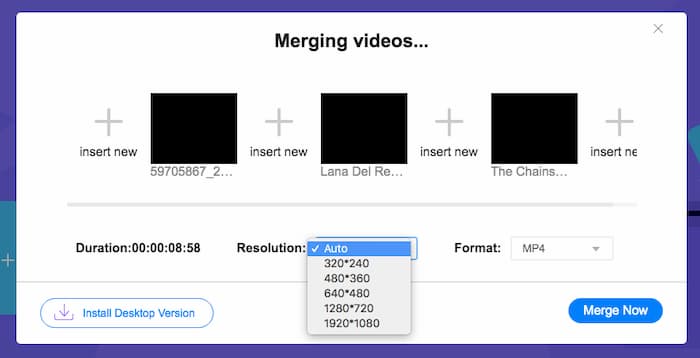
Step 3: After that, you can decide the resolution and format of the output video. You can combine the MPEG files into an MP4 file before clicking the Merge now button to start the process. It enables you to get the desired video within a short period.

Trình kết hợp video trực tuyến rất dễ sử dụng. Tuy nhiên, nếu bạn muốn cắt bỏ những mở đầu thừa và những kết thúc của các tập phim, nó không thể giúp bạn thêm nữa. Bạn cần sử dụng hợp nhất MPEG mạnh mẽ hơn.
Đọc thêm:
Phần 2: Phương pháp Đa năng để Hợp nhất Video MPEG
Aiseesoft Video Converter Ultimate is a professional MPEG joiner that enables you to combine the desired parts of MPEG files into one movie. It enables you to trim the desired part of the MPEG files, adjust the video quality, customize the watermark, or even make a movie with different themes.
- 1. Kết hợp các tệp MPEG thành MPEG, MP4 và hơn 300 định dạng video.
- 2. Tinh chỉnh độ phân giải video, hoặc thậm chí nâng cao chất lượng video để hợp nhất tệp.
- 3. Cắt các phần mong muốn của tệp MPEG và kết hợp chúng thành một video.
- 4. Thêm hiệu ứng và bộ lọc và tùy chỉnh hình mờ vào video MPEG.
Tải xuống miễn phí cho Windows 7 trở lên. Tải xuống an toàn.
Tải xuống miễn phí cho MacOS 10.7 trở lên. Tải xuống an toàn.
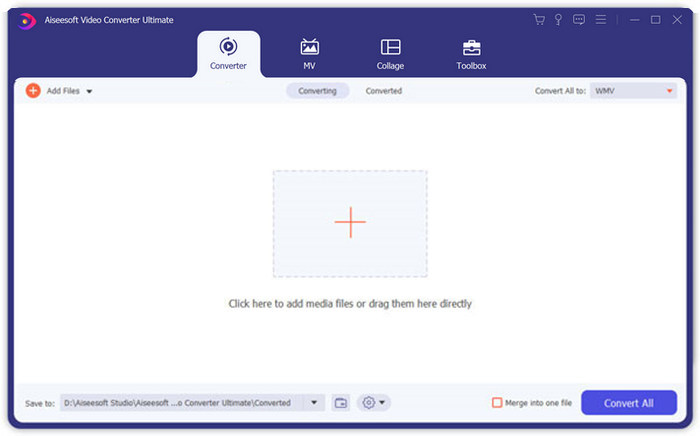
Step 1: Launch the Aiseesoft Video Converter Ultimate on your computer. Go to the Converter menu and click the big “+” button in the middle of the main interface to add the MPEG files you want to merge. Click the Add Files button to import all the files you want to combine.
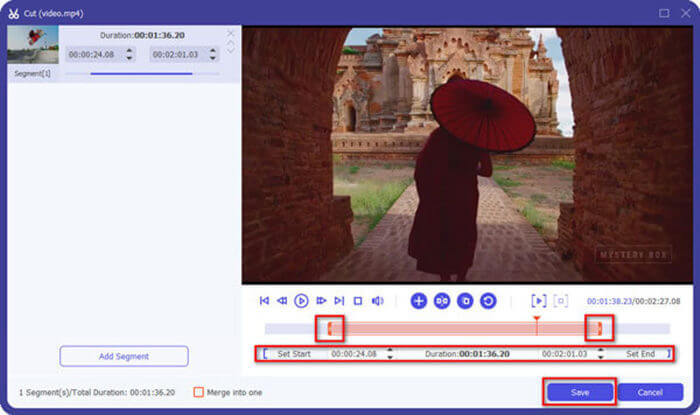
Step 2: For the MPEG clips that need to be trimmed, click the Cut button next to the video. You can set up the start and end points to delete the openings and endings of your MPEG videos. After that, you can click the Save button at the bottom to save the file.
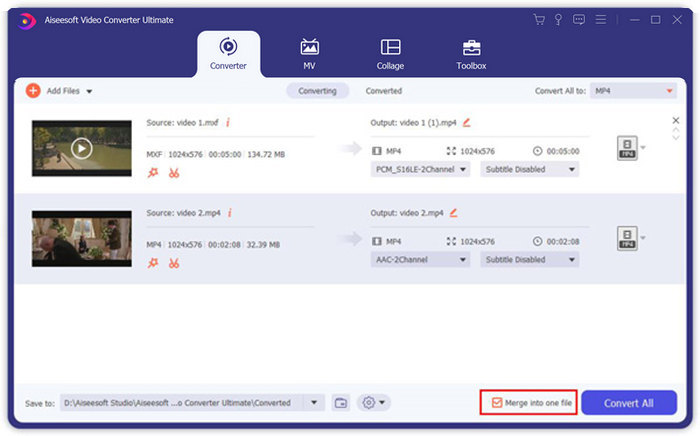
Step 3: After that, you can drag the trimmed video into the program. Adjust the sequence of the MPEG videos. When everything is ready, you need to check the Merge into one file box beside the Convert All. Click the Convert All button to start merging the MPEG files.
Phần 3: Câu hỏi thường gặp về tham gia tệp MPEG
Làm thế nào để hợp nhất các tệp MPEG với chất lượng tốt nhất?
Khi muốn ghép các tệp MPEG với chất lượng tương tự, bạn có thể chọn các thông số như video gốc. Nhưng nếu các tệp MPEG có chất lượng video khác nhau, bạn phải nâng cấp một số tệp MPEG có chất lượng thấp trước đó bằng trình kết hợp video chuyên nghiệp.
Tôi có thể kết hợp các tệp MPEG với điện thoại iPhone hoặc Android không?
Đúng. Trước khi tải xuống ứng dụng kết hợp video để kết hợp các tệp MPEG, bạn nên đảm bảo rằng ứng dụng tương thích với MPEG hoặc các video khác mà bạn muốn kết hợp. Adobe Premiere Clip, Viva Video và Splice Video là những phần mềm được đề xuất mà bạn có thể cân nhắc.
Định dạng tệp MPEG là gì?
MPEG là định dạng tệp video sử dụng nén tệp MPEG-1 hoặc MPEG-2. Đây là một định dạng phổ biến cho các bộ phim được phân phối trên Internet giúp truyền và tải xuống nhanh hơn nhiều so với các định dạng video phổ biến khác.
Phần kết luận
Bài viết này giới thiệu 2 cách hiệu quả để hợp nhất các tệp video MPEG, đặc biệt khi bạn cần cắt các phần thừa. FVC Free Online Video Merger là một phương pháp dễ dàng để hợp nhất các tệp MPEG trực tuyến, nhưng bạn không thể chỉnh sửa các video clip. Vì vậy, nếu bạn muốn cắt và chỉnh sửa video MPEG, Aiseesoft Video Converter Ultimate sẽ là giải pháp tối ưu.
-
 Top 6 trình ghép video MP4 tốt nhất để kết hợp video MP4 miễn phí
 Có nhiều bộ nối MP4 có sẵn để tạo các đoạn MP4 khác nhau được kết nối. Trong bài viết này, chúng tôi đã chọn một số bộ nối MP4 miễn phí cho Windows 10/8/7 và Mac.
-
 Làm thế nào để hợp nhất các tập tin M4V? Đây là 2 giải pháp nhanh nhất
 Nếu bạn đang tìm kiếm một giải pháp để kết hợp các tệp video M4V thành một, đừng bao giờ bỏ lỡ đoạn văn này. Ở đây chúng tôi sẽ nói về hai phương pháp tốt nhất để kết hợp các tệp video M4V.
-
 Cách hợp nhất video 3GP từ điện thoại di động thành một tệp
 Khi bạn muốn kết hợp một số video 3GP từ BlackBerry của mình thành một video, bạn có thể tìm hiểu thêm về 2 phương pháp hiệu quả để hợp nhất các tệp 3GP từ bài viết.
