


 Chuyển đổi video Ultimate
 Trình ghi màn hình
 Sửa chữa video
Trình chỉnh sửa siêu dữ liệu MKV tốt nhất để thêm / thay đổi / xóa siêu dữ liệu trên MKV
There isn't a wide variety of MKV metadata editors on the market because the MKV isn't much supported. But it doesn't mean that we can't edit the tags on our MKV files, so don't look gloomy. So for you to find out what is the best metadata editor that supports MKV, you can read the full scope of this article as we review different tools. What are you waiting for? Keep the ball on a roll because this won't last more than 7 minutes to have a tag editor.

Phần 1. Trình chỉnh sửa thẻ MKV tốt nhất được đề xuất cho Windows và Mac: FVC Video Converter Ultimate
FVC Video Converter Ultimate is the most popular MKV metadata editor on Windows and Mac. This tool lives up to its name and expectation, so downloading the software to edit the metadata is the best choice you will make. Its powerful features and functions will easily handle the job as if it is a piece of cake. Furthermore, this tool supports other formats to upload, such as MP4, AVI, MOV, FLV, WMV, and the 1000+ media formats without re-encoding the file for a less hassle experience.
Còn gì nữa? Giả sử bạn tải xuống công cụ. Bạn sẽ có công cụ nhanh nhất để thêm siêu dữ liệu trên MKV và GUI đẹp nhất của trình chỉnh sửa siêu dữ liệu mà công cụ khác không thể cung cấp. Nếu bạn quan tâm đến việc sử dụng trình chỉnh sửa, hãy tiếp tục đọc phần 2 khi chúng tôi giải thích cách chỉnh sửa dữ liệu của tệp MKV.
Phần 2. Cách chỉnh sửa siêu dữ liệu MKV với Trình chỉnh sửa siêu dữ liệu MKV được đề xuất
Thực hiện theo các bước tương ứng, bắt đầu từ việc tải xuống công cụ, v.v. Vì vậy, hãy bắt đầu sử dụng trình chỉnh sửa siêu dữ liệu MKV tốt nhất mà bạn có thể tải xuống trên Windows hoặc macOS của mình.
Step 1. Tick the download button we present below; select which operating systems you are currently using. Install it immediately after you've downloaded the file, follow the installation process, and we promise that you wouldn't get wrong, then open it to proceed. Before we start, you'll need to get familiarized with the tool to have a smooth sailing process using the MKV tag editor.
Tải xuống miễn phí cho Windows 7 trở lên. Tải xuống an toàn.
Tải xuống miễn phí cho MacOS 10.7 trở lên. Tải xuống an toàn.
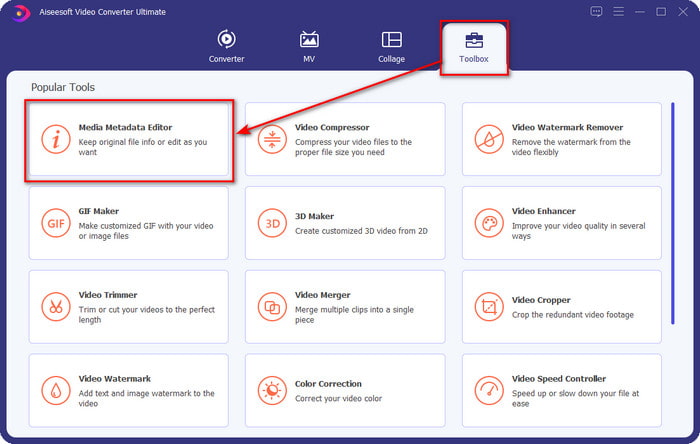
Step 2. Open the Toolbox, look for the Media Metadata Editor, and tap it to open.
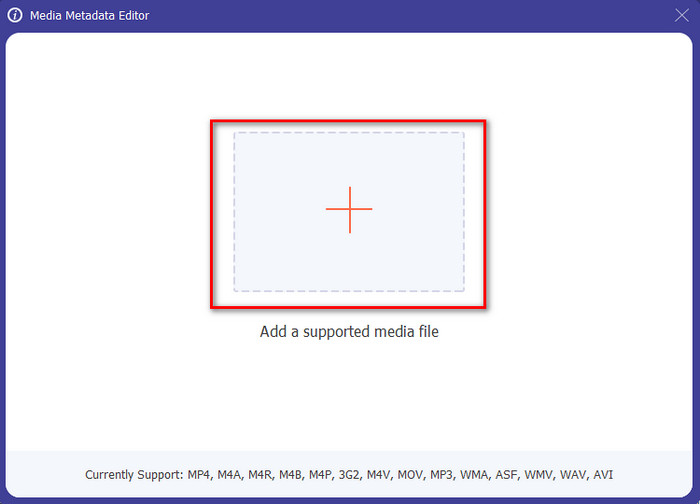
Step 3. Upload your MKV file by clicking the + icon, and a file folder will show, select the MKV file and press Open.
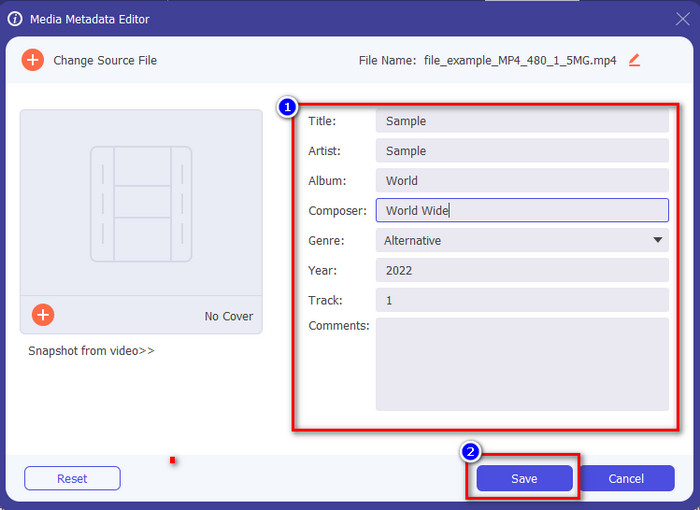
Step 4. Edit the metadata textbox; you can either fill them or remove them, do what you want to do with the metadata. After all of that, click Save to apply the change you've made earlier. With that, you have now edited the MKV tags.
Phần 3. 3 Trình chỉnh sửa thẻ MKV miễn phí mà bạn nên biết có sẵn trên Windows, Mac và Trực tuyến
GROUPDOCS.Metadata [Miễn phí trên Web]
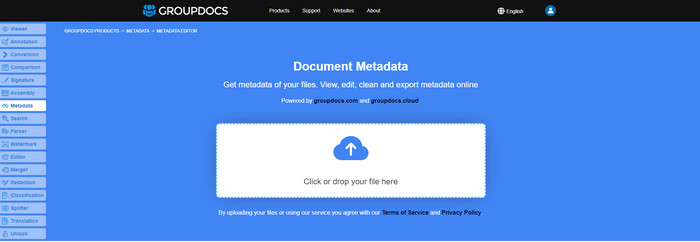
If you want to use an MKV metadata editor for free on the web, we highly suggest you try the GROUPDOCS.Metadata. It is the best choice to view and edit the metadata on your MKV as it works on all platforms, which means it is flexible and adaptable in any case. Moreover, it can easily manipulate the search and update of the tag according to the properties you will need, and if it needs to be removed, it will automatically do it. However, the tool can be challenging to handle on specific tasks, like updating the file's tags. So to get the hang of using the web tool, you will need to use it most of the time to improve your knowledge about the website functions and make it easier to handle.
Thuộc tính trên Windows [Trình chỉnh sửa tích hợp trên Windows]
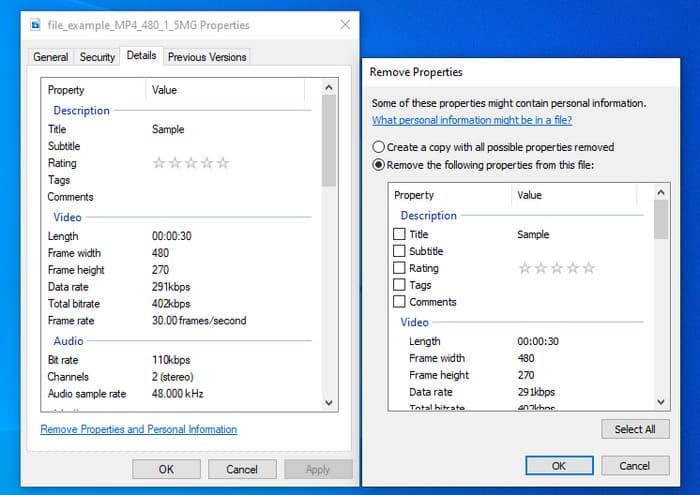
Bạn không muốn tải xuống một công cụ để thay đổi siêu dữ liệu MKV và muốn sử dụng chức năng tích hợp sẵn trên Windows để chỉnh sửa siêu dữ liệu? Sau đó, sẽ là tốt nhất nếu bạn sử dụng Thuộc tính trên Windows. Chức năng này có sẵn trên tất cả các PC chạy Windows và bạn sẽ không cần tải xuống bất kỳ công cụ hoặc internet nào để sử dụng nó. Bạn có thể nhanh chóng xem siêu dữ liệu và chỉnh sửa thành công với tính năng miễn phí này. Tuy nhiên, có một số báo cáo về các thẻ bị thiếu sau khi họ thử sử dụng tính năng này. Theo người dùng, nó có thể tự động xóa các thẻ trên tệp của bạn. Thay vì sử dụng tính năng này, họ có ý định tải xuống công cụ phù hợp để lãng phí công sức vào các thẻ mà họ đưa vào MKV hoặc tệp phương tiện của họ. Nhưng nếu bạn muốn xem tính năng này ở đâu, chỉ cần nhấn chuột phải vào tệp, chủ yếu ở phần dưới cùng.
iFlicks [Dành cho Mac]
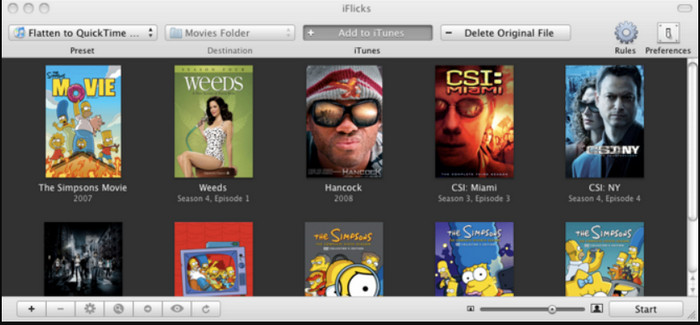
iFlicks có thể giúp bạn chuyển đổi MKV thành định dạng có thể phát được hoặc hướng dẫn bạn cách chỉnh sửa siêu dữ liệu MKV trên Mac. Công cụ này tương tác tốt với iTunes vì nó cung cấp siêu dữ liệu chi tiết trên mọi tệp phương tiện. Với phần mềm này, bạn có thể thêm các thông tin khác nhau về tệp của mình, chẳng hạn như dòng giới thiệu, thể loại, ngày tháng. xếp hạng, độ phân giải và những thứ khác được tìm nạp trên cơ sở dữ liệu trực tuyến. Hơn nữa, phần mềm này biên dịch siêu dữ liệu tại nơi bạn có thể tải chúng xuống và tự động áp dụng chúng vào các tệp. Tuy nhiên, bản dùng thử miễn phí chỉ có thể kéo dài trong bảy ngày, vì vậy nếu bạn muốn sử dụng lại công cụ này, bạn sẽ cần phải trả phí đăng ký của nó.
Phần 4. Câu hỏi thường gặp về Trình chỉnh sửa siêu dữ liệu MKV
MKV có chơi được trên Mac không?
MKV is playable on Mac if you use a third-party tool, such as the Blu-ray Player. But if you intentionally play the video on Quicktime, it won't work because it is unsupported. So, if you want to watch your MKV files on Mac, we highly recommend that you use a third-party Blu-ray Player, or you can convert the MKV format into MOV with the help of FVC Video Converter Ultimate.
Tôi có cần chuyển đổi MKV trước khi chỉnh sửa siêu dữ liệu không?
Nếu công cụ bạn muốn sử dụng không hỗ trợ tải lên định dạng MKV, chúng tôi khuyên bạn nên chuyển định dạng trước sang định dạng tương thích. Nhưng với số phí mà chúng tôi đã đề cập ở trên, bạn sẽ không cần phải chuyển đổi tệp sang định dạng được hỗ trợ. Tuy nhiên, không có nhiều tùy chọn hoặc công cụ để chỉnh sửa thẻ MKV vì định dạng không xác định. Mặc dù rất khó tìm kiếm nhưng chúng tôi đã cố gắng hết sức để tìm kiếm tất cả các trình chỉnh sửa mà bạn có thể sử dụng để cập nhật hoặc thay đổi siêu dữ liệu hỗ trợ định dạng MKV.
Tại sao các tệp MKV có kích thước quá lớn?
The main reason why MKV files are big is that they can contain multiple contents of a video, audio, and subtitle with different codecs and elements. And you've added metadata on that file, and the file size will become even enormous. So, the best way to save space while having an MKV file on your drive is to compress it without destroying the quality or losing the information on the file. Click this link to learn more about compressing video files.
Phần kết luận
Even though there is a limited MKV metadata editor on the market, there are still powerful tools you can depend on available on different platforms. As we reviewed different software you can use, it is always still on your hands; which do you prefer to use on changing the metadata of your MKV file. Indeed, it is a tough decision because all of the tools are awesome to use. If you haven't decided which you prefer, we suggest you use the FVC Video Converter Ultimate because it is the most flexible software and has more advanced features that anyone can use. By pressing the download button, you will attain the best tag editor you can have on Windows and Mac!
-
 5 cách dễ nhất để xóa siêu dữ liệu trong bất kỳ tệp phương tiện nào
 Làm cách nào để xóa siêu dữ liệu? Làm nó có khó không? Tôi có cần mua hoặc sử dụng công cụ miễn phí để xóa thẻ không? Tất cả những câu hỏi này đều có câu trả lời trong bài viết này.
-
 5 trình chỉnh sửa siêu dữ liệu MP4 cao nhất [Cập nhật năm 2022]
 Làm cách nào để thay đổi siêu dữ liệu MP4 của tôi? Cách tốt nhất để thay đổi siêu dữ liệu MP4 của bạn là sử dụng trình chỉnh sửa thẻ hỗ trợ định dạng MP4 như ví dụ mà chúng tôi liệt kê bên dưới.
-
 5 trình chỉnh sửa thẻ video AVI được người dùng lựa chọn hàng đầu cho năm 2022
 Trình chỉnh sửa thẻ AVI tốt nhất mà tôi có thể sử dụng là gì? Thị trường của trình chỉnh sửa thẻ cho các tệp AVI quá rộng. Vì vậy, hôm nay chúng tôi sẽ giới thiệu 5 biên tập viên được chọn nhiều nhất trong năm 2022.
