


 Chuyển đổi video Ultimate
 Trình ghi màn hình
 Sửa chữa video
4 trong số những công cụ tạo ảnh động tốt nhất mà bạn có thể sử dụng để tạo ảnh động
Ngày nay, hầu hết các trang mạng xã hội đều đã dùng GIF thay cho ảnh tĩnh cũ. Bởi vì GIF thu hút người xem hơn và truyền tải thông điệp tốt hơn nhiều so với ảnh thông thường. Vì vậy, nếu bạn muốn biết những trình tạo ảnh động nào dễ dùng mà bạn có thể sử dụng, hãy xem danh sách dưới đây. Chúng tôi đã tìm kiếm những công cụ tốt nhất để bạn có thể thêm hiệu ứng chuyển động vào hình ảnh của mình.

Phần 1. Phần mềm tạo ảnh động tốt nhất
Trong danh sách này, chúng tôi đặt công cụ này lên đầu vì đây là trình chỉnh sửa tuyệt vời mà bạn có thể dùng, đó là Video Converter Ultimate. Nếu bạn muốn tạo ảnh động từ ảnh tĩnh, bạn có thể dễ dàng thực hiện tại đây. Hơn nữa, phần mềm máy tính này có thể thổi hồn vào bất kỳ bức ảnh nào với các tính năng nâng cao mà bạn có thể dùng cho dù bạn là dân chuyên hay không. Trải nghiệm tổng thể khi chúng tôi dùng phần mềm này cho đến nay là tốt nhất so với các công cụ online hay offline khác. Vậy nên, nếu bạn muốn biết cách làm cho những bức ảnh đơn giản trở nên sống động, hãy làm theo các bước dưới đây và tiếp tục.
5 bước đơn giản để thổi hồn vào ảnh với Video Converter Ultimate:
Bước 1. Trước tiên, nhấp nút Tải xuống bên dưới và chọn hệ điều hành bạn đang dùng. Sau đó cài đặt phần mềm, thiết lập nhanh và nhấp Start Now để tiếp tục.
Tải xuống miễn phí cho Windows 7 trở lên. Tải xuống an toàn.
Tải xuống miễn phí cho MacOS 10.7 trở lên. Tải xuống an toàn.
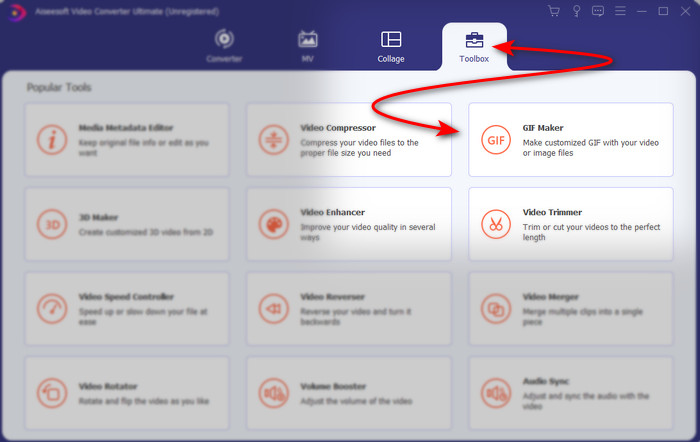
Bước 2. Mở phần mềm và vào mục Toolbox để tìm GIF Maker.
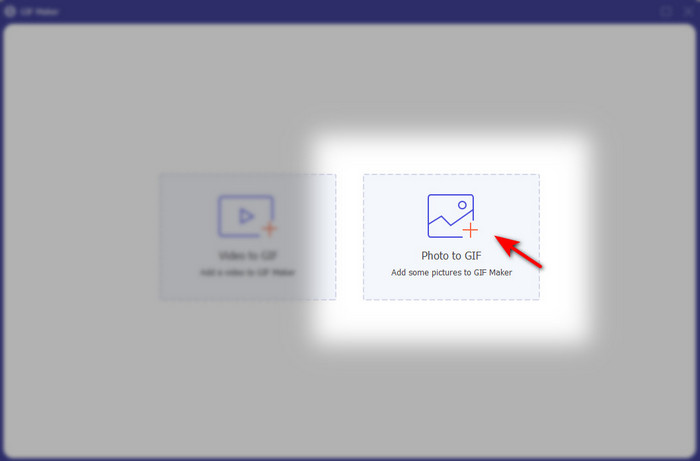
Bước 3. Nhấp vào tùy chọn Photo to GIF, sau đó một cửa sổ thư mục sẽ xuất hiện trên màn hình. Chọn tệp và nhấp Open để chèn ảnh.
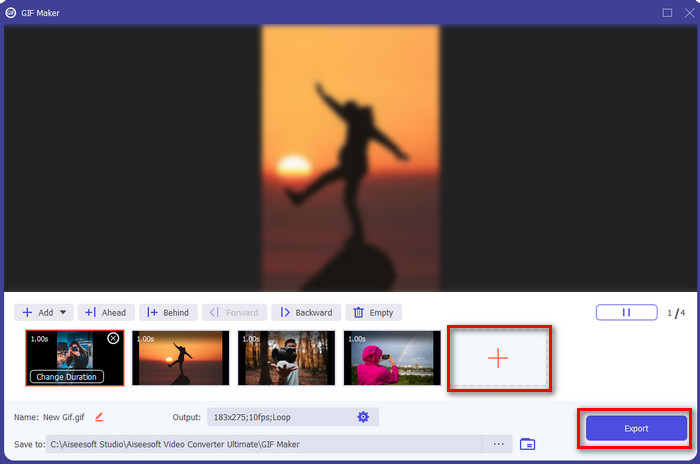
Bước 4. Nhấp nút + để chèn thêm ảnh, tạo ảnh động từ nhiều ảnh. Sau đó đặt thời lượng bằng cách nhấp vào từng ảnh rồi nhấp nút Change Duration. Tiếp theo, nhấn Apply để lưu thay đổi. Để tải ảnh động về, nhấp Generate GIF.
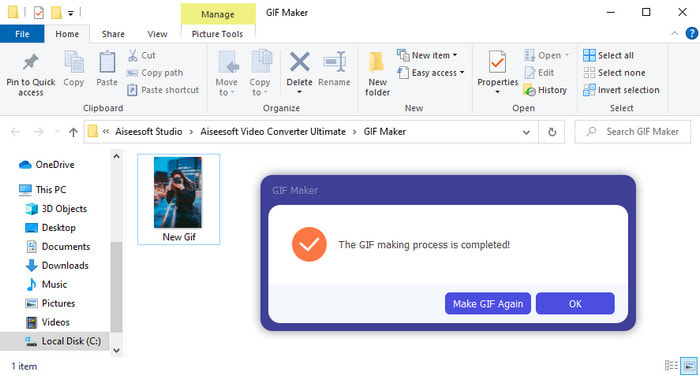
Bước 5. Sau khi tạo xong GIF, một thư mục chứa tệp GIF động sẽ hiện trên màn hình. Nhấp vào tệp để xem lại ảnh động bạn đã tạo trước đó.
Phần 2. Top 3 Trình tạo ảnh hoạt hình trực tuyến miễn phí
Top 1. Ezgif
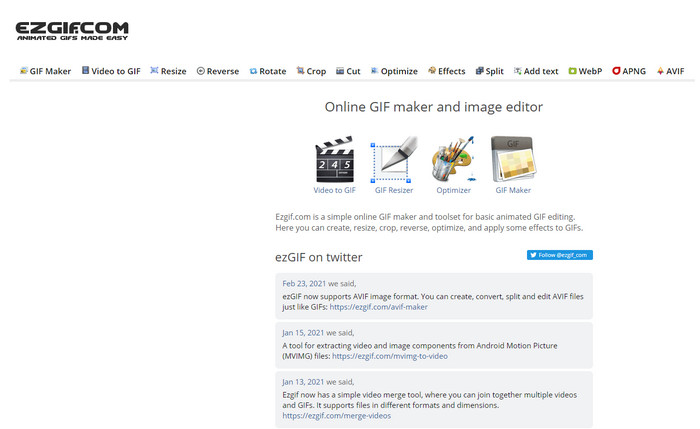
Nếu bạn đang tìm một trình tạo ảnh động online miễn phí thì Ezgif chính là lựa chọn phù hợp. Công cụ web này thuộc hàng tốt nhất khi nói đến việc tạo ảnh động ấn tượng. Nếu bạn thích tạo GIF thì rất có thể bạn đã từng dùng qua công cụ online này; còn nếu chưa, bạn nên thử. Tuy nhiên, một số người dùng cho rằng công cụ này thiếu một số tính năng chỉnh sửa hiện đại mà họ muốn có. Vì vậy, nếu bạn đang hạn chế về ngân sách thì đây là lựa chọn ổn, nhưng hãy nhớ rằng công cụ này không phải là tốt nhất cho dân chuyên; còn với người mới bắt đầu thì lại khá phù hợp.
Ưu điểm
- Dễ dàng truy cập và nó là an toàn.
- Công cụ hoàn hảo cho người mới bắt đầu muốn thử tạo ảnh GIF đơn giản.
- Công cụ trực tuyến trình chỉnh sửa bán chuyên nghiệp.
Nhược điểm
- Nó giới hạn người dùng trải nghiệm sự tuyệt vời.
- Công cụ phụ thuộc Internet. Vì vậy, nếu bạn không có internet thì bạn không thể sử dụng công cụ trực tuyến này.
Đầu 2. Kapwing
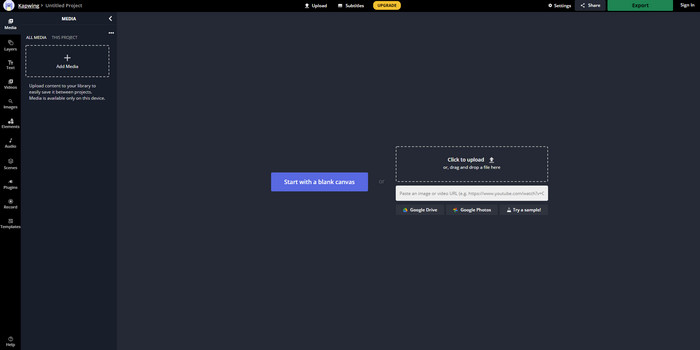
Khác với Ezgif, Kapwing rất mạnh trong việc cải thiện phần nhìn của hình ảnh. Nếu bạn định dùng công cụ online này thì việc tìm hiểu cách tạo GIF động từ ảnh chắc chắn sẽ giúp ích cho bạn. Hiệu năng, tính dễ dùng và linh hoạt của công cụ online này đủ tốt cho bất kỳ ai có chút hiểu biết cơ bản về chỉnh sửa. Tuy nhiên, việc tải lên và tải xuống ảnh ở đây sẽ mất nhiều thời gian hơn so với các công cụ web khác. Ngoài ra, sản phẩm cuối cùng sẽ có watermark, dù bạn có thể xóa nó bằng cách đăng nhập vào công cụ.
Ưu điểm
- Nó có rất nhiều tính năng chỉnh sửa lớn so với Ezgif.
- Công cụ trực tuyến miễn phí có thể được truy cập bởi bất kỳ ai có internet.
- Giao diện của công cụ trực tuyến trông thanh lịch và gọn gàng.
Nhược điểm
- Đầu ra cuối cùng sẽ luôn có hình mờ ở phía dưới bên trái.
- Không phải là lựa chọn tốt nhất cho những người mới bắt đầu chỉnh sửa ảnh GIF.
Top 3. GIFMaker.me
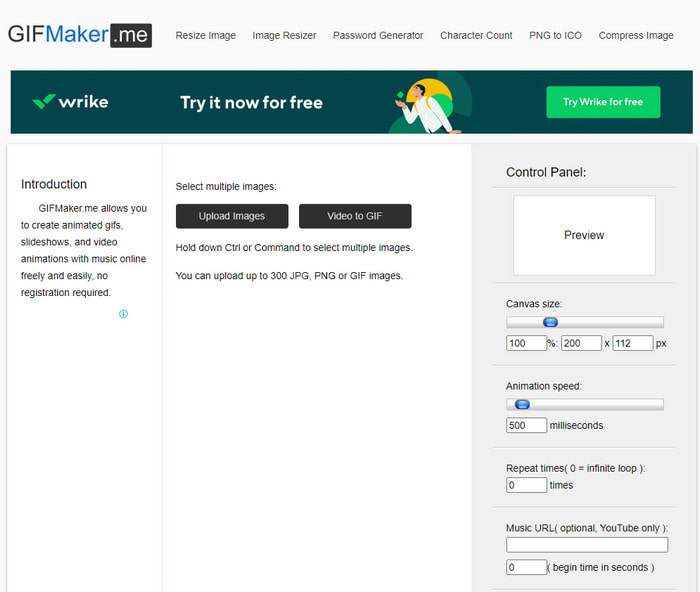
Một trình tạo ảnh động online miễn phí khác là GIFMaker.me. Công cụ web này rất tiện cho những ai chưa có kinh nghiệm tạo GIF. Vì ở đây, bạn chỉ cần chèn một loạt ảnh là nó sẽ tự động tạo thành một GIF chuyển cảnh. Tuy nhiên, đây là công cụ ít được ưu tiên nhất trong bài viết này vì thiếu các tính năng chỉnh sửa để tạo GIF ấn tượng. Dù vậy, nếu bạn chỉ muốn tạo một slideshow ảnh đơn giản thì đây lại là lựa chọn khá phù hợp.
Ưu điểm
- Bạn có thể sử dụng trình tạo GIF miễn phí trên web.
- Giao diện của nhà sản xuất đơn giản và dễ hiểu.
- Bảng điều khiển đơn giản có sẵn ở phía bên phải của công cụ trực tuyến.
Nhược điểm
- Quảng cáo Pesky có trên giao diện web.
- Nó thiếu hầu hết các tính năng chỉnh sửa mà bạn muốn sử dụng.
Phần 3. Câu hỏi thường gặp về Photo Animation Maker
Tôi có thể sử dụng GIF động làm hình nền không?
Bạn không thể sử dụng GIF động thô và sử dụng nó làm nền trên điện thoại hoặc máy tính của mình. Tuy nhiên, bạn có thể sử dụng công cụ của bên thứ ba để làm cho nó hoạt động. Vì vậy, nếu bạn muốn biết cách thực hiện thì hãy nhấp vào liên kết này để tiếp tục.
Tại sao tôi không thể chia sẻ ảnh GIF trên Instagram?
Mặc dù GIF là định dạng được dùng nhiều nhất trên toàn bộ web, nhưng vẫn có một số nền tảng không hỗ trợ GIF. Ví dụ, Instagram chỉ hỗ trợ định dạng PNG và MP4. Vì thế có hai cách khác nhau để chia sẻ GIF lên Instagram, cách đầu tiên là chuyển GIF sang MP4. Mặt khác, bạn có thể tìm hiểu nhiều cách khác nhau về cách đăng GIF lên Instagram bằng cách nhấp vào các liên kết được cung cấp này.
Mục đích của GIF là gì?
GIF được tạo ra để dùng cho việc làm ảnh động nhưng với dung lượng tệp nhỏ hơn so với các định dạng video khác. Mặc dù có chuyển động, GIF hay Graphic Interchange Format vẫn không được xem là một định dạng video. Trong trường hợp đó, bạn có thể tìm hiểu rất nhiều về GIF nếu bạn nhấp vào và đọc kỹ bài viết này.
Phần kết luận
Tóm lại tất cả những thông tin ở trên, giờ đây cả bạn và chúng tôi đều dễ dàng biết được những trình tạo ảnh động hiện có để tạo ảnh động từ ảnh đã được tổng hợp. Dù các công cụ được giới thiệu phía trên đều rất hữu ích, Video Converter Ultimate vẫn là trình chỉnh sửa GIF nổi trội mà bạn sẽ muốn sử dụng. Bởi vì nó rất dễ dùng, giao diện đẹp, có đầy đủ các tính năng nâng cao và nhiều hơn thế nữa. Nếu bạn vẫn còn băn khoăn về công cụ này thì hãy tự mình trải nghiệm bằng cách tải về trước rồi làm theo các bước đã nêu ở trên.
Tải xuống miễn phí cho Windows 7 trở lên. Tải xuống an toàn.
Tải xuống miễn phí cho MacOS 10.7 trở lên. Tải xuống an toàn.
-
 Ứng dụng GIF to video tuyệt vời cho thiết bị Android và iOS
 Bạn có biết rằng bạn có thể chuyển đổi GIF thành bất kỳ định dạng video nào mà bạn thích bằng điện thoại của mình không? Chọn các ứng dụng tốt nhất trên Android hoặc iOS của bạn.
-
 Hướng dẫn đơn giản về cách chuyển GIF của bạn thành WMV trên Windows / Mac
 Bạn có muốn biết cách chuyển đổi GIF sang định dạng WMV không? Sau đó, hãy làm theo bài viết này vì nó giới thiệu các giải pháp khác nhau mà bạn có thể chọn.
-
 TS thành GIF: Cách biến tệp TS thành GIF động
 Tìm hiểu cách thay đổi tệp TS thành định dạng GIF với sự trợ giúp của tính năng này. Danh sách dưới đây chỉ ra các ý tưởng khác nhau về TS và GIF và cách chuyển TS sang GIF.
