


 Chuyển đổi video Ultimate
 Trình ghi màn hình
 Sửa chữa video
Đánh giá toàn diện về Trình chỉnh sửa siêu dữ liệu WAV trên Window, Mac và Trực tuyến
Tôi gặp sự cố với tệp WAV của mình; Tôi thấy rằng các thẻ sai. Tôi đã thử sử dụng các trình chỉnh sửa siêu dữ liệu WAV khác nhau để khắc phục sự cố nhưng rất tiếc, nó không khắc phục được. Bạn có bất kỳ ý tưởng làm thế nào để sửa chữa nó? Nó sẽ là một sự giúp đỡ tuyệt vời. Cảm ơn.
Have the same problem? It is natural to have this problem because the demand for the best WAV metadata editor on Windows and Mac on the market is too much. Although there are many options, it is still a pain in the butt to know if they perform well regarding this problem. So, please take a deep breath because we can solve this problem quickly with the tools we picked carefully to help you edit the tags on your WAV files. With the help of deep research and this article, we rounded them up into three different choices, and we will help you pick the best WAV editor available online and offline.

Phần 1. Trình chỉnh sửa siêu dữ liệu WAV tốt nhất cho Windows và Mac [Lựa chọn của người dùng]
FVC Video Converter Ultimate is one of the WAV tag editors that will surely help you in this task and finish it with a few clicks. With millions of downloads, this tool has already fulfilled its job of editing the users' metadata and other purposes such as converting, editing, etc. It became popular with the users. Unlike other tag editors that you can find on the market, this tool is far different regarding editing and many more aspects because it is a professional yet easy-to-handle tool—still wondering if it is the best choice to pick this metadata editor? In that case, we will list the features you can have if you attain this converter on your desktop.

FVC Video Converter Ultimate
5.689.200+ lượt tải xuống- Đây là công cụ nhanh nhất để thêm siêu dữ liệu vào tệp phương tiện của bạn trong vòng vài cú nhấp chuột.
- Nó hỗ trợ một loạt các định dạng âm thanh bắt đầu từ WAV, WMV, MP3 và hơn 1000 định dạng có sẵn.
- Đây là sự lựa chọn tốt nhất cho mọi người mới bắt đầu cần một trình chỉnh sửa siêu dữ liệu trên máy tính để bàn.
- Nó không có giới hạn về kích thước tệp và cung cấp quá trình chuyển đổi hàng loạt cho nhiều tệp.
- Hộp công cụ của nó có nhiều tính năng nâng cao mà bạn muốn sử dụng.
Tải xuống miễn phí cho Windows 7 trở lên. Tải xuống an toàn.
Tải xuống miễn phí cho MacOS 10.7 trở lên. Tải xuống an toàn.
Bạn có ngạc nhiên về các chức năng của công cụ và khả năng của nó không? Nếu vậy, hãy đọc chi tiết sau khi chúng tôi hướng dẫn bạn cách chỉnh sửa thẻ WAV bằng công cụ tối ưu. Trước bất kỳ điều gì khác, bạn phải tải xuống phần mềm trên hệ thống của mình và chọn hệ điều hành bạn đang sử dụng. Làm theo quy trình cài đặt và nhấp vào Bắt đầu ngay để bắt đầu.
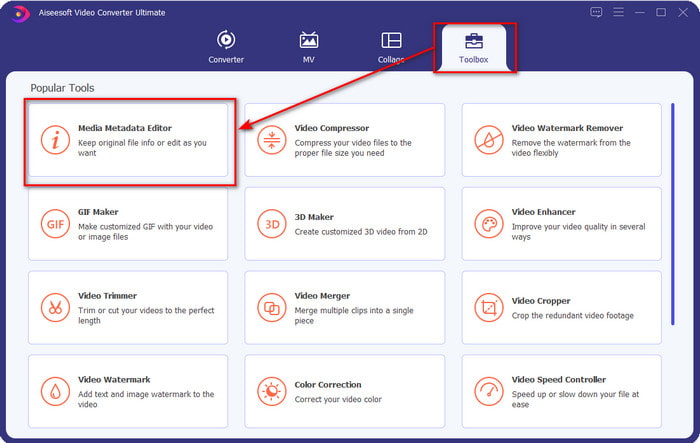
Step 1. After you've downloaded the software, you must click the Toolbox and locate the Media Metadata Editor.
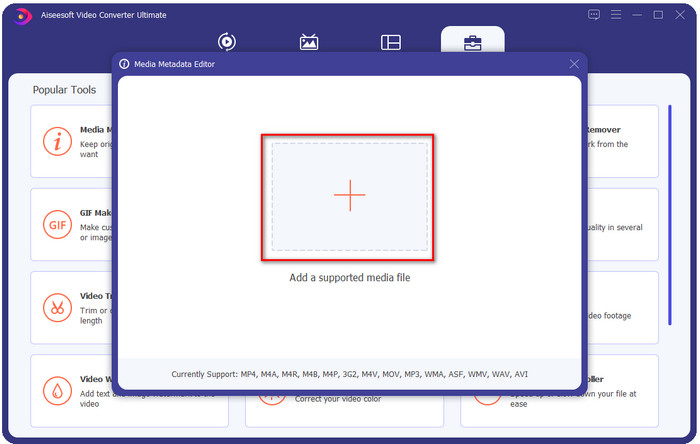
Step 2. Add the WMA file by pressing the + button, find the WMA file on your desktop folder, after you've found it click Open.
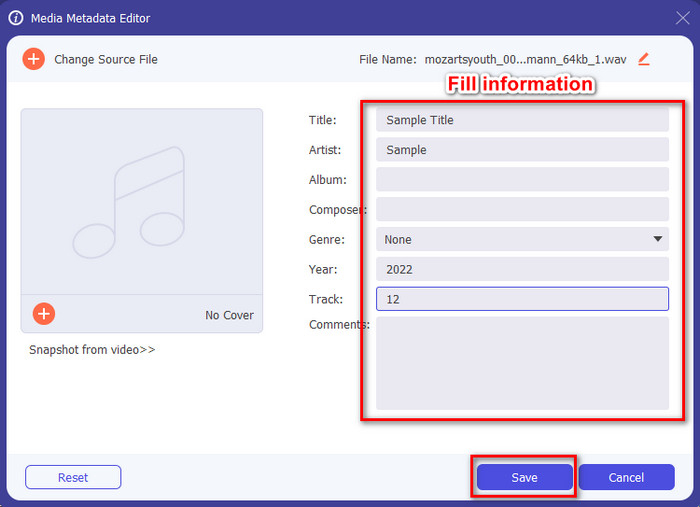
Step 3. Add the information you want to add, fill up the textboxes available and press the Save button if you've done. Easy isn't it? Well, success is the last name of our converter.
Có liên quan:
Phần 2. 2 trình xem siêu dữ liệu WAV hàng đầu có sẵn trên web
Giả sử bạn không thể xem toàn bộ các thẻ trên WAV; những gì bạn nên làm? Trong trường hợp này, lý tưởng nhất là sử dụng trình xem thẻ trên WAV. Nếu bạn không muốn tải xuống một công cụ, bạn có thể sử dụng trình xem meta này có sẵn trên web. Tuy nhiên, hai công cụ này không thể chỉnh sửa siêu dữ liệu tệp WAV vì chúng có ý định xem siêu dữ liệu.
EXIF & Trình xem siêu dữ liệu trực tuyến miễn phí
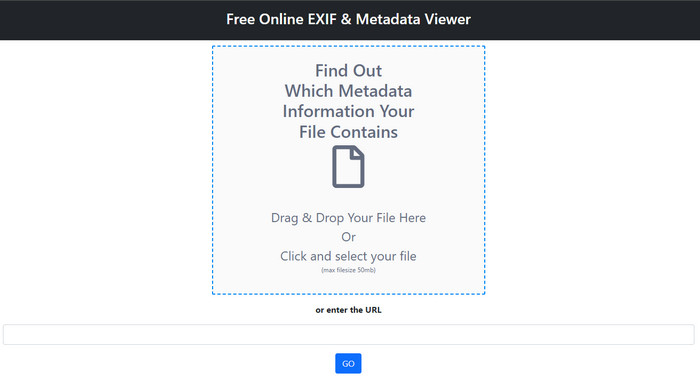
Free online EXIF & Metadata Viewer is a free online metadata viewer you can use to view the tags of the media file. With this web tool, you can see the different structures of the file you've uploaded, such as the RAW, FILE, RIFF, and COMPOSITE. This tool is one of the metadata viewers you can access that supports this much detail for free. Some tag viewers need to be purchased if you want to see so much detail on file. Although editing is impossible in the tool, it is still the best in-detailed meta viewer you can use and later add, remove or change WAV metadata with the ultimate tool we present above.
Metadata2Go
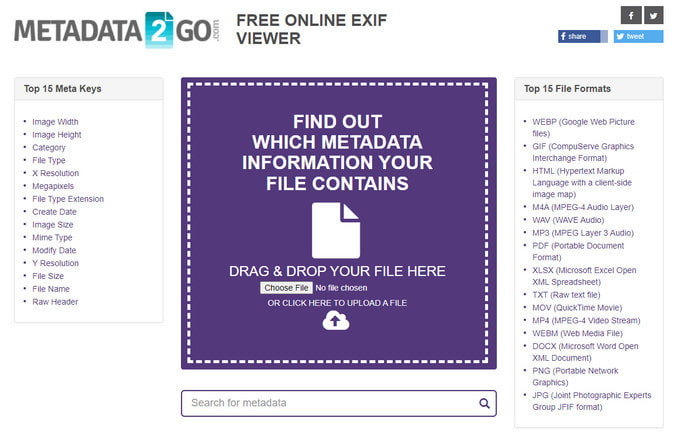
Like the first one, Metadata2Go is a free tag viewer and extractor for your files that you can access freely on the web. This tool allows you to see the hidden metadata you have never seen on your file. If you need to view the metadata on your media file, then this is your one-stop viewer available on the web. Unlike the first tool, this tool supports even image metadata for you to view, and it can extract the data from that file if needed. Depending on the file, it can showcase your file's information. Same as the first meta viewer above, it cannot edit the tags on your media file, even on WAV. So, if you feel that the first tag viewer doesn't supply your needs, then try to use this tool. Next, use the ultimate tool and learn how to add id3 tags to WAV files if you need to correct them.
Phần 3. Câu hỏi thường gặp về Trình chỉnh sửa siêu dữ liệu WAV
Tại sao tôi không thể truy cập siêu dữ liệu trên WAV?
Có nhiều lý do khiến bạn không thể truy cập chúng, nhưng có hai lý do chính mà chúng tôi gặp phải khiến bạn không thể truy cập. Lý do đầu tiên là tệp bị hỏng; rõ ràng, siêu dữ liệu trên WAV cũng sẽ biến mất nếu tệp bị hỏng. Thứ hai là tệp không có siêu dữ liệu ngay từ đầu. Không phải tất cả các tệp phương tiện như WAV đều có siêu dữ liệu. Nếu bạn đã tải xuống tệp trên web, thì có khả năng tác giả hoặc nhà sản xuất sẽ xóa siêu dữ liệu đó không để lộ thông tin.
Siêu dữ liệu WAV có giống với MP3 không?
Có, ở định dạng âm thanh này, bạn sẽ thấy tên tác giả, tiêu đề, ca khúc album, thể loại, xếp hạng và nhiều hơn nữa. Nhưng bạn cũng có thể thêm chúng bằng cách sử dụng trình chỉnh sửa siêu dữ liệu có sẵn trên MP3 hoặc WAV, như FVC Video Converter Ultimate.
Có thể tải lên WAV trên web không?
Đó không phải là do định dạng không được nén, và sẽ mất rất nhiều thời gian khi tải tệp lên web. Mặc dù bạn có thể chuyển đổi định dạng này thành định dạng chia sẻ thân thiện với internet, nhưng chất lượng của nó sẽ không bằng WAV, đặc biệt nếu nó được nén.
Phần kết luận
Finally, we have found the best WAV metadata editor you can download for free, and that is the FVC Video Converter Ultimate. With this tool, you can finish this task at any time, and even your file format is different; here, all of the 1000+ formats are supported. Want to download a tool on your Mac? Well, you shouldn't turn your back and look for it because you can use the ultimate tool even if you are a Mac user.
-
 Dữ liệu siêu dữ liệu là gì: Tìm hiểu thông tin cơ bản về siêu dữ liệu
 Siêu dữ liệu là gì? Điều này có quan trọng không? Các phần của siêu dữ liệu là gì? Bạn có cùng một câu hỏi? Trong bài viết này, bạn sẽ tìm hiểu các thông tin cơ bản về siêu dữ liệu.
-
 4 trong số những trình xem siêu dữ liệu trực tuyến và ngoại tuyến tốt nhất [Cập nhật năm 2022]
 Tôi có thể kiểm tra siêu dữ liệu của tệp của mình không? Có, bạn có thể, với sự trợ giúp của bài đăng này, chúng tôi sẽ giới thiệu cho bạn những người xem siêu dữ liệu khác nhau mà bạn có thể sử dụng.
-
 6 Bộ lọc Snapchat Hoạt hình Snapchat được yêu thích nhất trên Snapchat
 Bạn muốn biết những cách tốt nhất để thêm bộ lọc trên video Snapchat? Chà, bạn có thể nhấp vào đây và tìm hiểu các bộ lọc khác nhau mà bạn có thể sử dụng để áp dụng cho video Snapchat.
