


 محول الفيديو النهائي
 مسجل الشاشة
 إصلاح الفيديو
 تنزيل آمن
كيفية تحويل MKV إلى MP4 على نظامي التشغيل Windows / Mac
عند تشغيل فيلم ، تجد أنه لا يمكن فتحه لأن بعض البرامج لا تدعم تنسيق MKV. ثم قد تتساءل لماذا يحدث هذا وكيف يتم حله.
يمكن أن يكون سبب عدم إمكانية تشغيل MKV هو عدم وجود بعض برامج الترميز على جهازك. لهذا السبب ، على الرغم من أنه يمكنك رؤية MKV في كل مكان في الوقت الحاضر ، إلا أن بعض الأجهزة أو البرامج لا تزال لا تدعم تنسيق MKV. لذلك ، تحتاج إلى تحويله إلى تنسيق أكثر شيوعًا ، مثل MP4 ، وهو تنسيق أكثر قابلية للاستخدام ويمكن تحميله بشكل صحيح على كل جهاز تقريبًا.
اليوم سنقدّم لك محوّلين مجانيين لمساعدتك على تحويل ملفات MKV إلى MP4.

الجزء 1. كيفية تغيير MKV إلى MP4 عبر الإنترنت ومجاني
إذا كنت لا تستطيع تحمل تثبيت الكثير من البرامج على جهاز الكمبيوتر الخاص بك مثلي تمامًا ، أقترح عليك تجربة محول عبر الإنترنت قائم على الويب.
هناك الكثير من محولات الفيديو المجانية عبر الإنترنت في السوق ، ولكن لكي نكون صادقين ، فإن معظم هذه المحولات المزعومة لها حدود لا تعد ولا تحصى. عليك أن تدفع لهم للحصول على خطة أفضل. بهذه الطريقة فقط يمكنك تحويل الملفات الكبيرة بسرعة على دفعات بدون علامة مائية.
لذا ، هل يوجد محول فيديو مجاني وسريع وقوي حقًا؟ الجواب نعم.
FVC Free Online Video Converter هو محوّل فيديو فعّال من MKV إلى MP4 يمكنه مساعدتك على تحويل مقاطع الفيديو دون أي قيود. فهو يدعم تحويل تقريبًا جميع صيغ الفيديو الشائعة إلى تنسيقات رائجة مثل MP4 وMOV وWMV وAVI وFLV خلال ثوانٍ. كما يدعم التحويل الدفعي، ما يعني أنه يمكنك تحويل مجموعة من مقاطع الفيديو مع الحفاظ على جودتها الأصلية في الوقت نفسه.
نظرًا لأن FVC Free Online Video Converter أداة مستندة إلى الويب، فيمكنك استخدامه بسهولة على كلٍّ من ويندوز وماك، ما دمت تملك اتصالًا مستقرًا بالإنترنت ومتصفحًا. أما من حيث طريقة الاستخدام، فيمكنك إتقان هذا محوّل MKV إلى MP4 عبر بضع خطوات فقط.
الخطوة 1. انتقل إلى موقع FVC Free Online Video Converter على متصفحك. ثم انقر زر Add Files to Convert. إذا لم تكن قد حمّلت FVC Launcher إلى جهازك من قبل، فسوف يذكّرك أولًا بتحميل المشغّل. فقط اتبع التعليمات وقم بتثبيت المشغّل.
قم بتنزيل إصدار سطح المكتب لتحويل الملفات دفعة واحدة.

الخطوة 2. بعد التثبيت، ستظهر نافذة Open File تلقائيًا. والآن اختر ملف MKV الذي تريد تحويله. وبالمناسبة، إذا كنت تريد تحويل عدّة مقاطع فيديو بصيغة MKV دفعة واحدة، فحدّد جميع ملفات MKV التي تحتاج إليها.
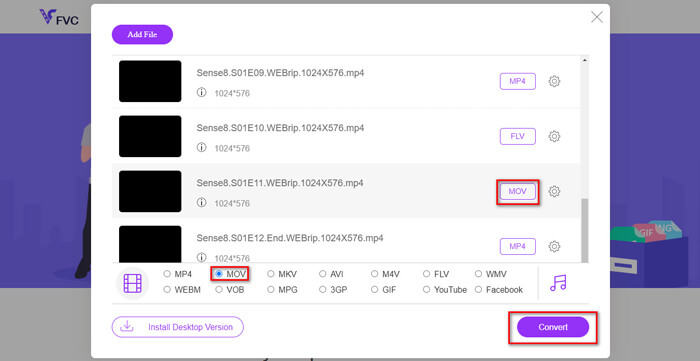
الخطوة 3. بعد ذلك، انقر Open وسترى قائمة بالملفات التي تم اختيارها. اختر صيغة الإخراج MP4 أسفل تلك القائمة.
يمكنك أيضًا اختيار صيغ مختلفة لملفات مختلفة بشكل منفصل من خلال النقر على الصيغة بجانب أيقونة Setting وتغيير صيغة الإخراج في الأسفل. لكن يمكنك تجاوز ذلك مباشرةً والنقر على زر Convert. بعد ذلك، حدّد مجلد الحفظ للفيديوهات المحوّلة.
الجزء 2. كيفية تحويل MKV إلى MP4 باستخدام VLC Media Player
ربما تعرف VLC باعتباره مشغّل وسائط متعددة متاحًا لمعظم أنظمة تشغيل أجهزة الكمبيوتر. لكنه في الواقع محوّل فيديو مخفي أيضًا؛ إذ يسمح لك بتحويل ملفات MKV إلى صيغة MP4. إذا كان VLC مثبتًا بالفعل على جهازك، يمكنك تجربته.
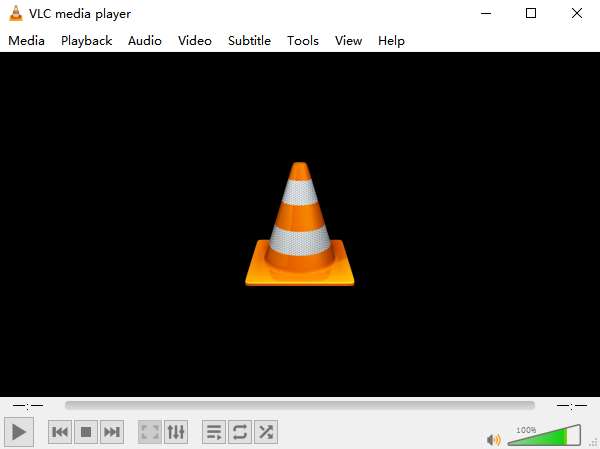
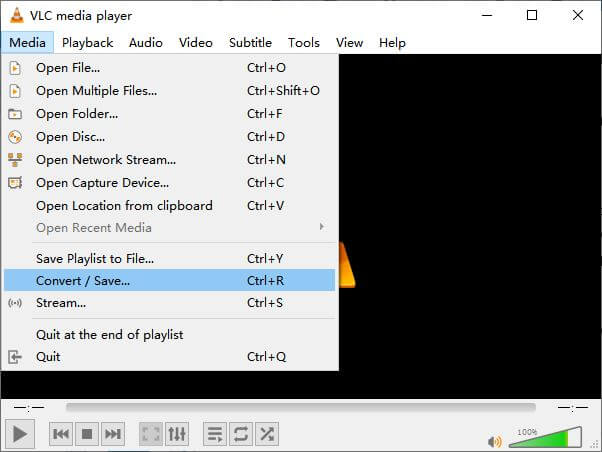
الخطوة 1. أولًا شغّل برنامج VLC Media Player على جهازك. انقر قائمة Media. ثم ابحث عن خيار Convert / Save في القائمة المنسدلة.
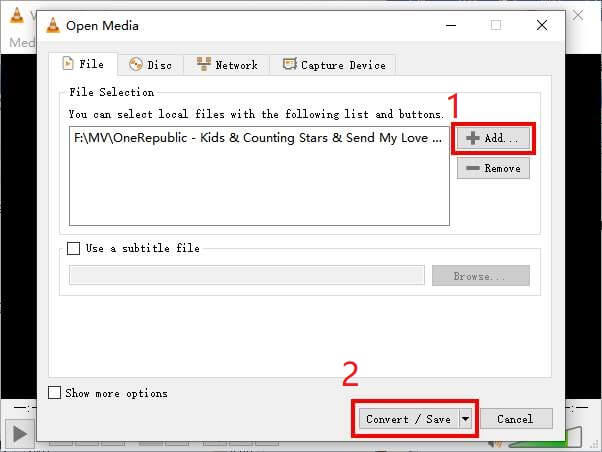
الخطوة 2. انقر + Add وابحث عن فيديو MKV الذي تريد تحويله. ثم انقر زر Convert / Save في الأسفل.
الخطوة 3. اختر صيغة MP4 في نافذة Convert.
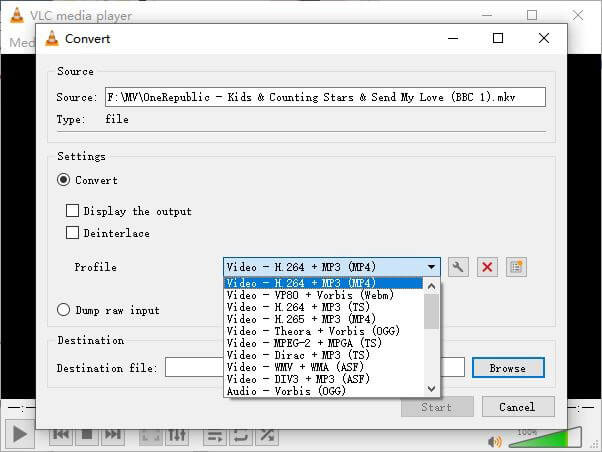
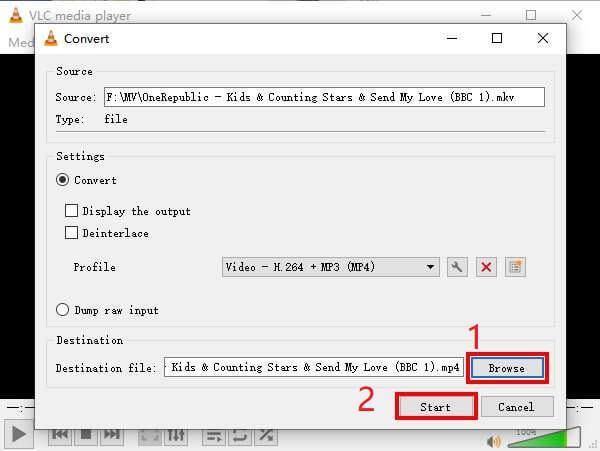
الخطوة 4. انقر زر Browse لتأكيد مجلد الحفظ. وأخيرًا انقر Start لبدء عملية التحويل وانتظر حتى تحصل على ملف الفيديو بصيغة MP4.
MKV مقابل MP4
تنسيق حاوية الوسائط المتعددة Matroska ، الذي تم إصداره في عام 2002 ، هو تنسيق مفتوح المصدر يمكن أن يتضمن عددًا من مسارات الفيديو والصوت والصورة والترجمة. لذلك ، يمكنك استخدامه لتخزين مقاطع الفيديو القصيرة والبرامج التلفزيونية والأفلام بسهولة. أنها تحظى بشعبية كبيرة بالنسبة للمروحة الفرعية.
تم إصداره بواسطة Moving Picture Experts Group (MPEG) في عام 2001 ، يمكن أن يساعدك تنسيق MP4 في حفظ بيانات الفيديو والصوت والترجمة والصور في مسارات منفصلة. إنه اختصار MPEG-4 Part 14. بالإضافة إلى أنه أحد أكثر التنسيقات شيوعًا المستخدمة لدفق مقاطع الفيديو ومشاركتها.
الجزء 3. أسئلة وأجوبة حول تحويل MKV إلى MP4
1. هل تستطيع ffmpeg تحويل MKV إلى MP4؟
نعم، يمكنك تحويل MKV إلى MP4 باستخدام ffmpeg. ولكن قد يكون من الصعب قليلًا فهم كيفية عمله، رغم أن الخطوة الأكثر فاعلية لا تتعدى أن تكون سطرًا من المحارف: ffmpeg -i my_movie.mkv -vcodec copy -acodec copy my_movie.mp4
2. هل تستطيع فرملة اليد تصدير MP4 من MKV؟
إذا كنت تريد فقط ملف MP4 بعد التحويل، يمكن لبرنامج HandBrake أن يساعدك بالفعل في ذلك. ومع ذلك، لا يمكنه تحويل ملفاتك إلى صيغ أخرى مثل WMV أو MOV أو FLV. يدعم HandBrake معظم ملفات الوسائط المتعددة الشائعة، لكن ذلك يقتصر على مصادر الإدخال التي يدعمها. أما بالنسبة لصيغ الإخراج، فخياراتك هي MP4(.M4V) وMKV فقط.
3. هل يؤدي تحويل MKV إلى MP4 إلى فقدان الجودة؟
تفقد معظم محولات الفيديو الجودة عند تحويل ملفات MKV إلى MP4 ، ربما 1% أو 5%. أثناء إعادة تشفير ملفات MKV إلى MP4 ، من الصعب تجنب فقد البيانات تمامًا. ولكن يمكنك زيادة دقة الصور لجعل جودة مقاطع الفيديو MP4 المصدرة قريبة من الفيديو الأصلي.
خاتمة
هناك عدد لا يحصى من محولات الفيديو لتختار. من الصعب أن تجد محولًا مجانيًا وفعالًا بنفسك. قدم لك هذا المنشور طريقتين لتحويل MKV إلى MP4. أحدهما هو VLC Media Player والآخر هو FVC Free Online Video Converter.
إذا كنت تريد ملف MP4 فقط ، فإن VLC يكفي. ومع ذلك ، يدعم VLC عددًا محدودًا من التنسيقات. لذلك ، إذا كنت تريد محولًا أكثر احترافًا ، يبدو أن FVC Free Online Video Converter هو الخيار الأفضل.
آمل أن تجد هذا المنشور مفيدًا. ولا تتردد في إخبارنا برأيك.
-
 كيفية تحويل ملفات الفيديو MP4 إلى صور GIF متحركة دون فقدان الجودة
 هل تبحث عن أفضل طريقة لتحويل فيديو MP4 الخاص بك إلى صور GIF متحركة؟ فيما يلي دليل مفصل للقيام بذلك في Photoshop و Windows Movie Maker ومحول الفيديو عبر الإنترنت والمزيد.
-
 كيفية تحويل MOV إلى MP4 دون فقدان الجودة
 هل تريد تحويل ملفات MOV (Apple QuickTime Movie) إلى MP4؟ يشارك هذا المنشور 4 طرق مجانية لتحويل ملفات فيديو MOV إلى تنسيق MP4 على نظام التشغيل Windows 10/8/7 / XP و Mac OS X.
-
 4 طرق سهلة لتحويل WMV إلى MP4 على نظامي التشغيل Mac و Windows
 كيفية تحويل ملفات WMV إلى MP4؟ فيما يلي 4 طرق سهلة لتحويل WMV إلى MP4 على نظامي التشغيل Mac و Windows بخطوات بسيطة.

