


 محول الفيديو النهائي
 مسجل الشاشة
 إصلاح الفيديو
تعرف على المزيد حول أفضل 5 محرر فيديو للكمبيوتر الشخصي وقارن
في الوقت الحاضر، يحب كثير من الأشخاص تصوير مقاطع الفيديو للاحتفاظ باللحظات التي لا تُنسى، ومعظمهم يستخدمها لكسب المال. مثل المدوّنين بالفيديو والمؤثرين، فهم دائمًا يصوّرون أنفسهم وهم يقومون بما يفعلونه من أجل معجبيهم، وكذلك من أجل الحصول على شهرة أكبر من باقي المؤثرين أو المدوّنين بالفيديو. لذلك، إن كنت مدوّن فيديو أو مؤثرًا طموحًا تحب تصوير نفسك، فعليك أن تفكّر في امتلاك أفضل برنامج لتحرير الفيديو على ويندوز 10 لتحسين مقاطعك وصنع فيديو مذهل، والحصول على المزيد من الإعجابات والمشاهدات والمشتركين، وتحقيق الأرباح على المدى الطويل. وقبل أن نبدأ، نود أن نهنئك لأنك اتخذت بالفعل أول خطوة نحو أن تصبح مدوّن فيديو أو مؤثرًا ناجحًا. لكن اختيار الأداة المناسبة التي يُفترض أن تستخدمها هو أحد الأجزاء الحاسمة التي ستواجهها. لذلك، جمعنا لك الآن مجموعة من برامج تحرير الفيديو الفعّالة لتختار من بينها أدناه.

الجزء 1. أفضل 5 برامج تحرير فيديو لـ Windows عبر الإنترنت وغير متصل
أعلى الصفحة 1. محول الفيديو النهائي
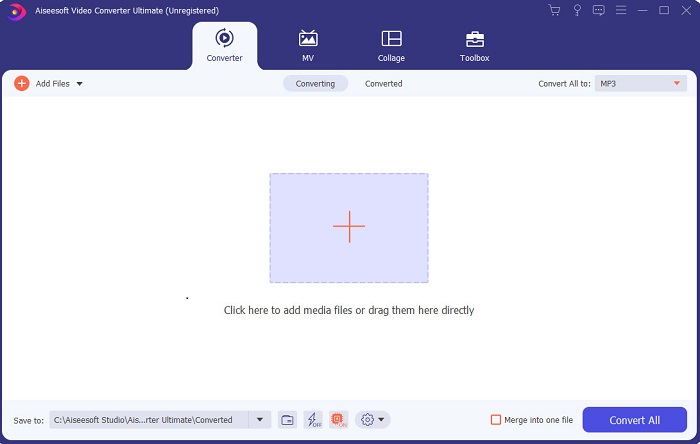
إذا كنت تريد أن تكون لك الأفضلية وأن تمتلك مقاطع فيديو رائعة مثل مقاطع نجومك المفضلين، فاستعمل FVC Video Converter Ultimate. فهذا المحوّل ومحرّر الفيديو لنظام ويندوز ساعد بالفعل الكثير من عملائه على أن يصبحوا مشهورين على مستوى العالم، وربما تكون أنت التالي. معظم المؤثرين المعروفين، ومدوّني الفيديو، ومحرّري الفيديو يستخدمونه كمحرّر ومحسّن ومُعزِّز وغير ذلك. لذا، إن كنت تريد مخرجات احترافية مثل مخرجات نجومك المفضلين وأن تجني أموالًا حقيقية من ذلك، فعليك تنزيل هذا البرنامج فورًا لتصبح نجم الإنترنت الجديد وأفضل نسخة من نفسك. كما أننا قدّمنا لك الإيجابيات والسلبيات كي تفهم هذه الأداة أكثر.
تحميل مجانيلنظام Windows 7 أو أحدثتنزيل آمن
تحميل مجانيلنظام MacOS 10.7 أو أحدثتنزيل آمن
الايجابيات
- للمبتدئين ، هذه الأداة هي الاختيار الصحيح لهم. حيث أنه يوفر تعليمات بسيطة لك لاتباعها وأسهل في الفهم. في الأساس ، هو على النقطة.
- للمحترفين ، على عكس أي شخص آخر محرر فيديو للكمبيوتر الشخصي تحتوي هذه الأداة على الكثير من الميزات المستقبلية. على سبيل المثال ، إذا كنت ترغب في تعزيز جودة الصوت وتحسين الفيديو ، فيمكنك استخدام هذه الأداة. أيضًا ، إذا لم تتم مزامنة الصوت الخاص بك مع الفيديو ، فإنه يحتوي على ميزة مزامنة الصوت لإصلاحه.
- بشكل عام ، هذا هو المحول الهائل والمحرر الذي يمكنك الاعتماد عليه. خاصة إذا كنت ترغب في الدخول بشكل مفاجئ إلى عالم مدوني الفيديو والمؤثرين.
- برنامج المحرر قابل للتنزيل ولا توجد أدوات محرر لها نفس الميزات مثل هذه.
سلبيات
- هذه الأداة ليست مجانية ولكنها منخفضة السعر. بمعنى آخر ، إنها رخيصة وتنتج مخرجات عالية الجودة.
أعلى 2. Windows Movie Maker
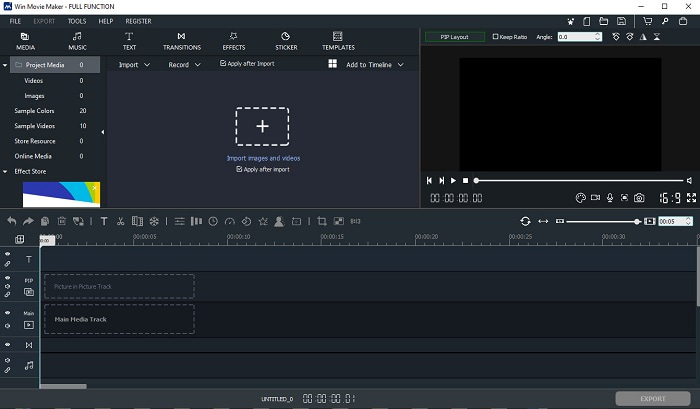
يُعَد هذا محرّر فيديو لويندوز 7 و8 و10 وXP من أفضل البرامج في مجال إنشاء الفيديوهات وتحريرها. فقد تم تنزيل Windows Movie Maker من قِبل عدد كبير من المستخدمين لتحرير مقاطعهم الخاصة، لأنه يوفّر ميزات تحرير متقدّمة. لكن الأداة قد تكون مُربِكة جدًّا للمبتدئين في صناعة الفيديو والتحرير. أمّا إذا كنت محترفًا أو لديك خبرة سابقة في التحرير، فيُنصح بأن تجرب هذا البرنامج. لهذا البرنامج نسخة مدفوعة تشبه كثيرًا النسخة المجانية، لكن ميزة النسخة المدفوعة أنّ الفيديو المُصدَّر لا يحتوي على علامة مائية.
الايجابيات
- بالنسبة للمبتدئين ، هذه الأداة ليست مثالية ولكن من الرائع إجراء عمليات تحرير معقدة.
- بالنسبة للمحترفين ، فإن الميزات المعروضة هنا قابلة للتنفيذ إذا كانت لديك خبرة.
- يوفر الانتقال والتأثيرات والملصقات وما إلى ذلك.
سلبيات
- الأداة مزعجة بعض الشيء بسبب وظائف الأداة التي يمكنك القيام بها هنا. أيضًا ، إنه ساحق وليس لديه تعليمات حول كيفية تشغيله.
- إذا كنت تستخدم الإصدار المجاني من هذه الأداة ، فتوقع أن يكون لديك علامة مائية على الفيديو نفسه بعد تصديره.
أعلى 3. OpenShot
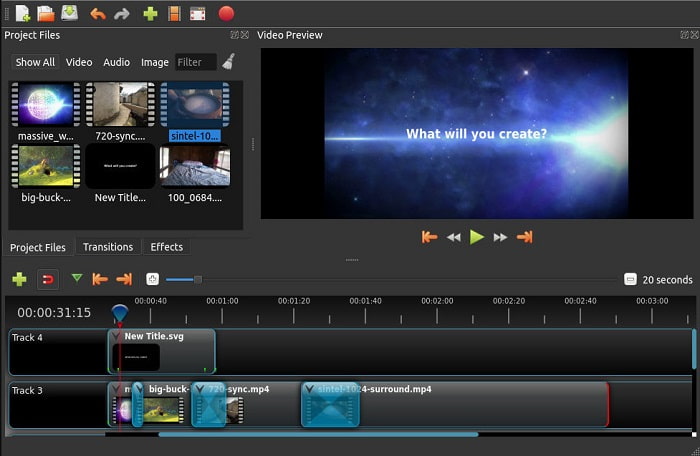
برنامج آخر من برامج تعديل الفيديو المجانية بدون علامة مائية هو Openshot. فهو يوفّر وظائف أبسط وأسهل فهمًا من Windows Movie Maker. علاوة على ذلك، بعد تثبيت البرنامج ستحصل على جولة سريعة تشرح وظائفه، لكن الشرح يقتصر على الميزات الأساسية فقط. هذا البرنامج لا يوفّر سوى خصائص التحرير الأساسية، ما يعني أنّ مساحة الإبداع محدودة. كما أنّ واجهته ذات لون أحادي تقريبًا، الأمر الذي قد يجعل استخدامه مملًا بعض الشيء من ناحية المظهر.
الايجابيات
- بالنسبة للمبتدئين ، يعد هذا إصدارًا أبسط من Windows Movie Maker. يمكنك إضافة تأثيرات وانتقالات والمزيد.
- بالنسبة للمهنيين ، لا بأس في استخدامه ولكنه ليس الأفضل.
- البرنامج على ما يرام إذا كان يأتي مع تحرير بسيط.
سلبيات
- لا يمكن تغيير الواجهة المملة منه وهي أقل تفاعلية.
- لا تزال بعض الأخطاء الرئيسية والثانوية موجودة هنا حتى بعد التحديث.
أعلى 4. Lightworks
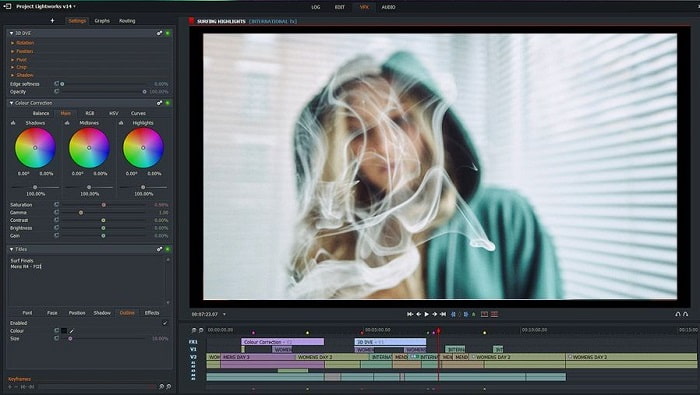
يُعَد Lightworks محرّر فيديو مجانيًّا لويندوز مع توفر نسخة مدفوعة أيضًا. لكن عندما حاولنا تنزيل البرنامج ظهرت رسالة تفيد بأن ملف .exe قد يضرّ بالكمبيوتر، لذا لم نُكمل عملية التثبيت وقمنا بإجراء بحث معمّق حوله. عند تثبيت البرنامج على جهازك ستحتاج إلى التسجيل أولًا قبل استخدامه. ميزات التحرير التي يوفّرها كثيرة وقد تكون صعبة الاستيعاب إن كنت مبتدئًا، بل وحتى للمحترفين قد تكون معقدة بعض الشيء. ومع ذلك، لا داعي للقلق، يمكنك تعلّم استخدامه بالتجربة والممارسة.
الايجابيات
- بالنسبة للمبتدئين ، الأداة معقدة للغاية ويمكن أن يكون التعامل معها أكثر من اللازم. خاصة إذا كنت تريد المحاولة والقيام فقط بالتحرير البسيط.
- للمحترفين ، يمكنك استخدام ميزات التحرير في الوقت الفعلي التي توفرها هذه الأداة. على الرغم من أن بعض الميزات جديدة ومعظمها مستحق الدفع.
- يتم تصنيف الأداء العام للأداة على أنه من الفئة A في تحرير مقاطع الفيديو وصنعها.
سلبيات
- إذا كنت تريد الحصول على إخراج بدقة 1080 بكسل ، فيجب عليك شراء الأداة. وحتى قبل أن تتمكن من استخدامه ، ستحتاج إلى التسجيل.
- يحتوي البرنامج على ملف. exe ضار ، لذا قم بتنزيله على مسؤوليتك الخاصة.
أعلى 5. ClipChamp
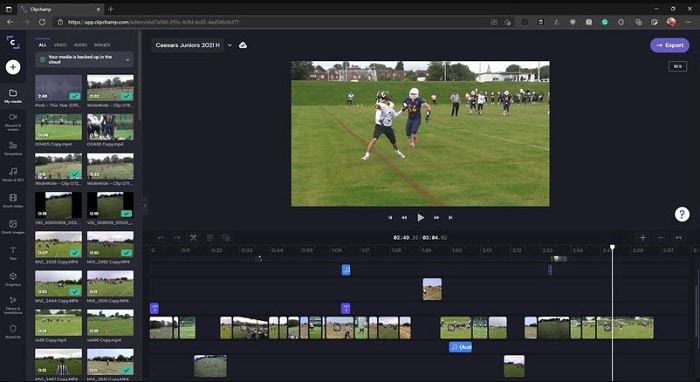
يوفّر هذا البرنامج ميزات إضافية إذا قمت بترقية الخطة. كما أنه واحد من أسهل الأدوات التي يمكنك الوصول إليها لاستخدامها في تحرير الفيديوهات دون الحاجة إلى تنزيل برنامج منفصل. يُعَد Clipchamp أداة رائعة، لكنك ستحتاج إلى التسجيل قبل الوصول إليه. هذا محرّر فيديو لويندوز 10 يعمل عبر الإنترنت ويقدّم ميزات تشبه ميزات Lightworks، لكنه أونلاين. ومع ذلك، إذا قمت باستيراد ملفات الفيديو إليه لتحريرها، فعليك أن تتوقع بطئًا في عملية الاستيراد. لكن من ميزاته أنك لن تحتاج إلى تثبيت أي برنامج على جهازك ليعمل.
الايجابيات
- بالنسبة للمبتدئين ، هذه الأداة لا بد من تجربتها ولكن عملية تحرير الفيديو وإدخاله هنا أبطأ قليلاً.
- بالنسبة للمحترفين ، من المقبول استخدام مقاطع فيديو بسيطة وتعديلها بموارد محدودة.
- بشكل عام ، الأداة أسهل في الفهم من Windows Movie Maker.
سلبيات
- تعتمد على الإنترنت مما يعني أنه إذا كان لديك إنترنت بطيء فتوقع عملية غير مستقرة.
- تحتاج إلى نموذج تسجيل قبل أن تتمكن حتى من استخدام أداة الويب.
الجزء 2. مخطط المقارنة لخمسة برامج تحرير فيديو لنظام التشغيل Windows
| سمات | محول الفيديو النهائي | ويندوز موفي ميكر | أوبن شوت | Lightworks | ClipChamp |
| تحرير الفيديو مثل التشذيب والقص والدمج وما إلى ذلك. |  | | | | |
| محسن الفيديو | |  | | | |
| علامة مائية | | | | | |
| البرنامج المدعوم | أداة قائمة على سطح المكتب | أداة قائمة على سطح المكتب | أداة قائمة على سطح المكتب | أداة على شبكة الإنترنت | أداة على شبكة الإنترنت |
| نطاق السعر | لمدة شهر واحد: $25.00 لمدة عام: $31.20 | $39.95 الدفع لمرة واحدة | مجانا ولكن يمكنك التبرع | QScan Pro QScan Pro - عمليات الاشتراك الشهرية $59.99 | منشئ- $9 / شهريًا الأعمال- $19 / شهريًا |
| للحصول على ترخيص مدى الحياة: $55.20 | QScan ماكس QScan Max - الاشتراكات الشهرية $119.99 | الأعمال البلاتينية - $39 / شهريًا |
الجزء 3. أسئلة وأجوبة حول محرر فيديو Windows
ما هو أفضل محرر فيديو Mac يمكنني استخدامه؟
مع أنّ الأدوات المعروضة هنا كلها مُحرّرات تعمل على ويندوز ما عدا Video Converter Ultimate، فإنه إذا أردت أن تتعرّف على برامج تحرير الفيديو الأخرى الخاصة بنظام ماك، فعليك الضغط على هذا الرابط واختيار ما يناسبك من القائمة.
لماذا لا يمكن تشغيل مقاطع الفيديو الخاصة بي على Android؟
هناك العديد من الأسباب التي قد تجعل مقاطع الفيديو لا تُشغَّل على هاتف الأندرويد لديك. لذلك، لمعرفة هذه الأسباب، من الضروري التعرّف عليها بسرعة وإصلاح المشكلة من خلال قراءة مقال كيفية إصلاح مشكلة عدم تشغيل الفيديوهات على هواتف الأندرويد.
كيف أقوم بضغط مقاطع الفيديو الطويلة الخاصة بي ومشاركتها على موقع يوتيوب؟
حاليًا يمكنك رفع ملفات بحجم أقصى 256، لذا فإن أفضل طريقة لحل هذه المشكلة هي ضغط الفيديو. وإذا كنت تريد مشاركة مقاطعك على يوتيوب، فلنتعلّم كيفية تقليل حجم الملف ونشره على يوتيوب.
خاتمة
قبل أن تصبح واحدًا من المدوّنين بالفيديو أو المؤثرين الذين تنظر إليهم بإعجاب، ستحتاج إلى امتلاك القدرة على تحرير مقاطعك بنفسك. واليوم، هذه فرصتك لاستعمال محرّر استثنائي يوفّر ميزات تحرير بجودة تشبه جودة هوليوود. وبهذه الطريقة ستبهر المشاهدين والمتابعين، بل وحتى نفسك. لذلك، تألّق كالألماس ودَع خيوط الضوء تصنع لك طريق النجاح بمساعدة FVC Video Converter Ultimate.
-
 أفضل محرر MP4 لنظامي التشغيل Windows وMac في عام 2025
 سواء كنت تستخدم جهاز الكمبيوتر الخاص بك لتحرير الفيديو بتنسيق MP4 أو تعمل فقط على هاتفك ، فستتمكن من العثور على بعض الخيارات الرائعة هنا ، بما في ذلك أفضل محرر MP4 لنظامي التشغيل Windows و Mac.
-
 كيفية إضافة الصوت والموسيقى إلى الفيديو مجانًا على جهاز الكمبيوتر / الهاتف
 توضح هذه المقالة 4 طرق سهلة لإضافة الصوت إلى الفيديو مجانًا. بغض النظر عن المسار الصوتي الذي تريد إضافته إلى الفيديو الخاص بك ، يمكنك الحصول على نتائج مرضية هنا.
-
 كيفية قص ودمج الأغاني عبر الإنترنت - أفضل 4 طرق يجب أن تعرفها
 عندما تريد قص الأغاني ودمجها عبر الإنترنت لإنشاء مقطوعة موسيقية ، يمكنك معرفة المزيد حول أفضل 4 أدوات عبر الإنترنت لقص الأغاني ودمج الملفات من المقالة.
