


 محول الفيديو النهائي
 مسجل الشاشة
 إصلاح الفيديو
 تنزيل آمن
كيفية تحويل MP4 إلى M4A على Windows / Mac (مجاني وعلى الإنترنت)
MP4 هو تنسيق ملف واسع الانتشار يستخدم مع العديد من المحطات ومشغلات الفيديو. يمكن لملفات MP4 تخزين الفيديو والصوت والمحتويات الأخرى. الآن ، يفضل العديد من الأشخاص الاستماع إلى المسار الصوتي لفيديو MP4. للحفاظ على الجودة ، يعد تحويل MP4 إلى M4A فكرة رائعة. يرمز M4A إلى MPEG 4 Audio. يمكن لمعظم البرامج تشغيل ملفات M4A ، بما في ذلك iTunes و QuickTime و Windows Media Player والمزيد.

قد تتساءل عن كيفية استخراج الصوت من ملف MP4. هناك العديد من الطرق لتحويل ملف MP4 إلى ملف M4A. اطّلع على هذه المقالة لتتعرف على كيفية تحويل MP4 إلى M4A للاستماع إليه لاحقًا على أجهزتك المحمولة.
الجزء 1. أفضل طريقة مجانية على الإنترنت لتحويل MP4 إلى M4A دون فقدان الجودة
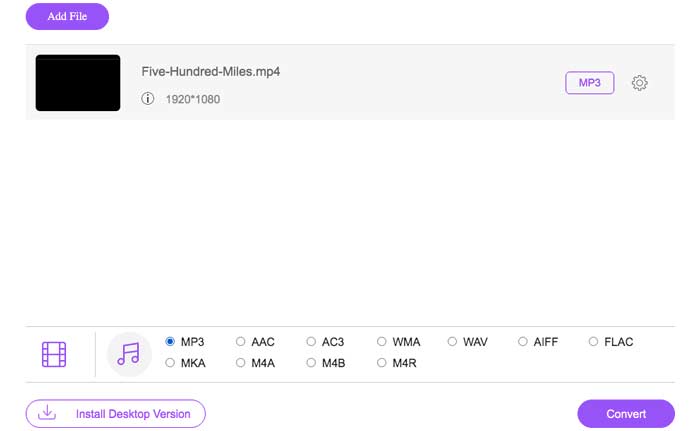
FVC Free Online Video Converter هو محوِّل مجاني من MP4 إلى M4A يمكنه تحويل تنسيق MP4 ليس فقط إلى M4A بل أيضًا إلى تنسيقات أخرى مثل MP3 وWAV وM4R وWMA وAIFF وAC3 وغيرها. يتيح لك إجراء تحويل دفعي بحيث يمكنك تحويل عدة مقاطع فيديو MP4 إلى M4A فورًا. كذلك يتيح لك هذا البرنامج المجاني عبر الإنترنت أيضًا تحويل فيديو MP4 إلى MOV وAVI وFLV وغيرها من صيغ الفيديو.
الخطوة 1. افتح https://www.free-videoconverter.net/free-online-video-converter/ في متصفحك. انقر فوق زر Add Files to Convert ثم تحتاج إلى تنزيل المشغّل وتثبيته.

الخطوة 2. حمِّل فيديو MP4 الذي تريد تحويله، ثم انقر فوق Open للمتابعة.
الخطوة 3. بعد تحميل ملفات الفيديو إلى هذا التطبيق، انقر فوق أيقونة Audio واختر تنسيق M4A كصيغة إخراج.
الخطوة 4. في النهاية، انقر فوق زر Convert في الزاوية السفلية اليمنى. انتظر قليلًا، وستحصل على ملف الصوت M4A من ملف MP4.
الجزء 2. كيفية تحويل MP4 إلى M4A مع محول صوت مجاني
FVC Free Audio Converter هو البرنامج المجاني الذي يسمح لك بتحويل ملفات MP4 إلى M4A دون عناء. إنه قادر على تغيير أي ملف فيديو أو صوت إلى M4A ، MP3 ، WAV ، إلخ. يمكنك تنزيله وتثبيته على جهاز كمبيوتر يعمل بنظام Windows لبدء التحويل.
تنزيل مجانيلنظام Windows 7 أو الأحدثتنزيل آمن
الخطوة 1. شغِّل برنامج تحويل الصوت هذا على جهاز الكمبيوتر. انقر فوق زر Add File(s) لتحميل ملفات MP4 إلى هذا البرنامج.

الخطوة 2. ابحث عن خيار Output formats واختر M4A كصيغة إخراج من القائمة المنسدلة.
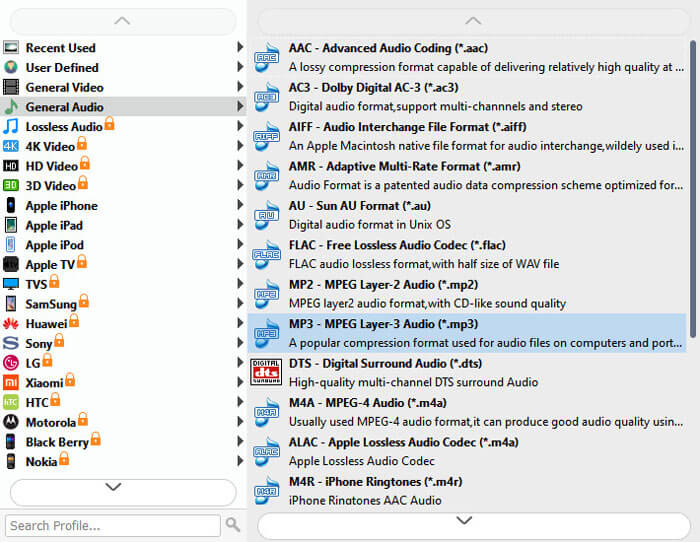
الخطوة 3. انقر فوق زر Convert لبدء تحويل ملفات MP4 إلى M4A.
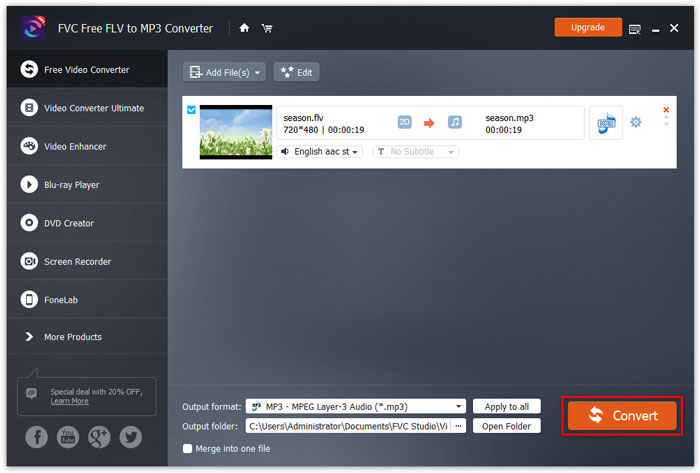
بالإضافة إلى M4A، يمكنك استخدامه أيضًا في تحويل MP4 إلى MP3 أو AAC أو غيرها من صيغ الصوت.
الجزء 3. كيفية تحويل MP4 إلى M4A باستخدام iTunes
لتحويل MP4 إلى M4A باستخدام iTunes لنظام التشغيل Windows أو Mac ، تحتاج إلى تغيير إعدادات استيراد iTunes ثم استخدام خيار قائمة التحويل لعمل نسخة M4A.
الخطوة 1. افتح iTunes على جهاز كمبيوتر يعمل بنظام Windows أو على جهاز Mac.
الخطوة 2. اختر Edit ثم انقر على Preferences في شريط القوائم. بعد ذلك، انتقل إلى علامة التبويب General ثم انقر على Import Settings.
الخطوة 3. ابحث عن القائمة بجوار Import Using وانقر عليها، ثم اختر ترميز الصوت الذي تريد تحويل الفيديو إليه. بعد ذلك، انقر فوق OK.
الخطوة 4. اختر الأغاني في مكتبتك التي تريد تحويلها. بعد ذلك، اختر File ثم انقر على Create New Version ثم أنشئ إصدار M4A.
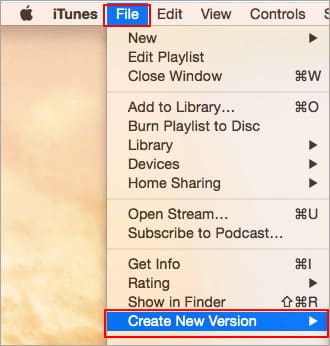
ستظهر ملفات الصوت المحولة في مكتبتك بجانب الملفات الأصلية.
الجزء 4. الأسئلة الشائعة حول تحويل MP4 إلى M4A
1. ما هو ملف M4A؟
الملف ذو امتداد الملف M4A هو ملف صوتي MPEG-4. يمكن العثور على M4A غالبًا في iTunes Store من Apple كتنسيق لتنزيل الأغاني.
2. كيفية فتح ملفات M4A؟
تتضمن البرامج التي تفتح ملفات M4A iTunes و QuickTime و Windows Media Player وما إلى ذلك. كما تدعم الأجهزة اللوحية والهواتف التي تعمل بنظام Android و iPhone و iPad و iPod touch تشغيل ملفات M4A.
3. كيفية دمج ملفات MP4 على الإنترنت؟
يمكن لـ FVC Free Online Video Merger مساعدتك على دمج أو جمع عدة ملفات MP4 أو غيرها من صيغ الفيديو مثل MOV وAVI وFLV وغيرها عبر الإنترنت.
4. هل يستطيع Windows Media Player تحويل MP4 إلى M4A؟
لا ، يدعم Windows Media Player فقط تحويل ملفات الفيديو إلى MP3 أو WAV.
خاتمة
يمكن أن تساعدك الطرق الثلاث المذكورة أعلاه في تحويل MP4 إلى M4A مجانًا دون بذل الكثير من الجهد. إذا كنت تفضل إجراء التحويل عبر الإنترنت ، فيجب أن يكون FVC Free Online Video Converter خيارًا رائعًا. إذا كانت ملفات MP4 كبيرة الحجم ، فإن FVC Free Audio Converter أو iTunes سيكونان أكثر موثوقية لتحويل ملفات MP4 إلى M4A.
-
 كيفية تحويل MP4 إلى WMV لنظام التشغيل Mac / Windows
 يشارك هذا المنشور كيفية تحويل فيديو MP4 إلى تنسيق WMV على نظام Mac أو Windows. سوف نقدم لك أيضًا العديد من الخيارات ، بما في ذلك كل من برامج سطح المكتب والمحولات عبر الإنترنت القائمة على الويب. هل أنت مستعد لمعرفة أفضل أدوات تحويل MP4 إلى WMV؟
-
 كيفية تحويل WMV إلى MP3 على سطح المكتب وعلى الإنترنت
 يمكنك العثور على أي برنامج محول فيديو مجاني من FVC studio. يتم دعم أي تنسيق فيديو / صوت ، بما في ذلك MP4 ، MOV ، TS ، AVI ، WMV ، FLAC ، MP3 ، إلخ.
-
 كيفية تحويل مقاطع فيديو AVCHD إلى MP4 مجانًا على Windows / Mac / Online
 هناك 5 طرق سهلة لتحويل مقاطع فيديو AVCHD إلى MP4 على جهاز الكمبيوتر الخاص بك. يمكنك تحويل مقاطع فيديو AVCHD إلى MP4 دون فقدان الجودة باستخدام أي محول هنا.
