


 محول الفيديو النهائي
 مسجل الشاشة
 إصلاح الفيديو
أفضل محرر بيانات وصفية لـ MKV لإضافة / تغيير / إزالة البيانات الوصفية على MKV
لا توجد مجموعة واسعة من برامج تحرير بيانات MKV الوصفية في السوق لأن تنسيق MKV ليس مدعومًا بشكل كبير. لكن هذا لا يعني أننا لا نستطيع تعديل الوسوم (Tags) في ملفات MKV الخاصة بنا، لذا لا داعي للتجهم. ولمعرفة ما هو أفضل محرر لبيانات التعريف يدعم MKV، يمكنك قراءة هذه المقالة بالكامل حيث نستعرض أدوات مختلفة. فماذا تنتظر؟ استمر في المتابعة، فلن يستغرق الأمر أكثر من 7 دقائق لتحصل على محرر وسوم جاهز للاستخدام.

الجزء 1. أفضل محرر علامات MKV يوصى به لنظامي التشغيل Windows و Mac: FVC Video Converter Ultimate
يُعد FVC Video Converter Ultimate أشهر محرر لبيانات MKV الوصفية على نظامي ويندوز وماك. يرقى هذا البرنامج إلى اسمه والتوقعات منه، لذا فإن تنزيله لاستخدامه في تحرير بيانات التعريف هو أفضل خيار يمكنك اتخاذه. ستتعامل ميزاته ووظائفه القوية مع المهمة بسهولة وكأنها أمر بسيط. بالإضافة إلى ذلك، يدعم هذا البرنامج صيغًا أخرى للرفع مثل MP4 وAVI وMOV وFLV وWMV وأكثر من 1000 صيغة وسائط دون إعادة ترميز الملف، لتجربة أقل إزعاجًا.
ماذا بعد؟ افترض أنك قمت بتنزيل الأداة. سيكون لديك أسرع أداة لإضافة البيانات الوصفية على MKV وأجمل واجهة مستخدم رسومية لمحرر البيانات الوصفية التي لا تستطيع الأداة الأخرى تقديمها. إذا كنت مهتمًا باستخدام المحرر ، فتابع قراءة الجزء الثاني حيث نشرح كيفية تحرير بيانات ملفات MKV.
الجزء 2. كيفية تحرير البيانات الوصفية لـ MKV باستخدام محرر البيانات الوصفية MKV الموصى به
اتبع الخطوات وفقًا لذلك ، بدءًا من تنزيل الأداة وما إلى ذلك. لذلك لنبدأ في استخدام أفضل محرر بيانات وصفية MKV يمكنك تنزيله على نظام Windows أو macOS.
الخطوة 1. انقر على زر التنزيل الذي نقدمه أدناه، واختر نظام التشغيل الذي تستخدمه حاليًا. ثبِّته مباشرة بعد تنزيل الملف، واتبع عملية التثبيت، ونضمن لك أنك لن تخطئ، ثم افتحه للمتابعة. قبل أن نبدأ، ستحتاج إلى التعرف على الأداة لتجربة استخدام سلسلة عند العمل بمحرر وسوم MKV.
تحميل مجانيلنظام Windows 7 أو أحدثتنزيل آمن
تحميل مجانيلنظام MacOS 10.7 أو أحدثتنزيل آمن
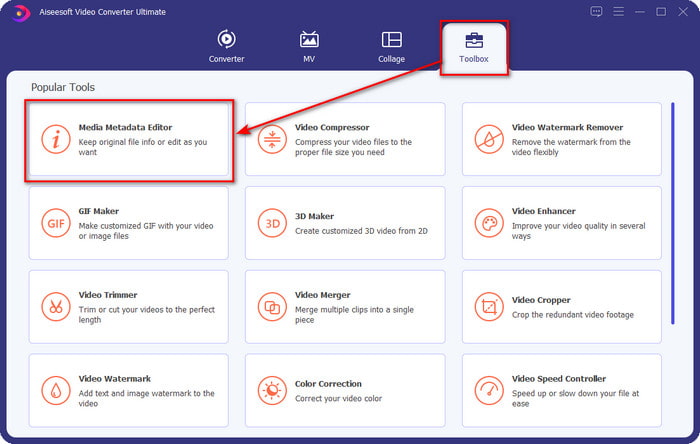
الخطوة 2. افتح قسم Toolbox، وابحث عن Media Metadata Editor، ثم اضغط عليه لفتحه.
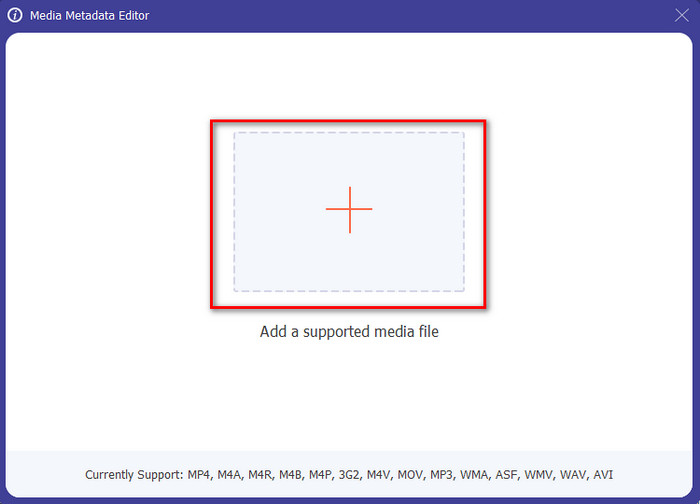
الخطوة 3. حمِّل ملف MKV الخاص بك بالنقر على أيقونة +، وستظهر لك نافذة لاختيار الملفات، حدد ملف MKV ثم اضغط على Open.
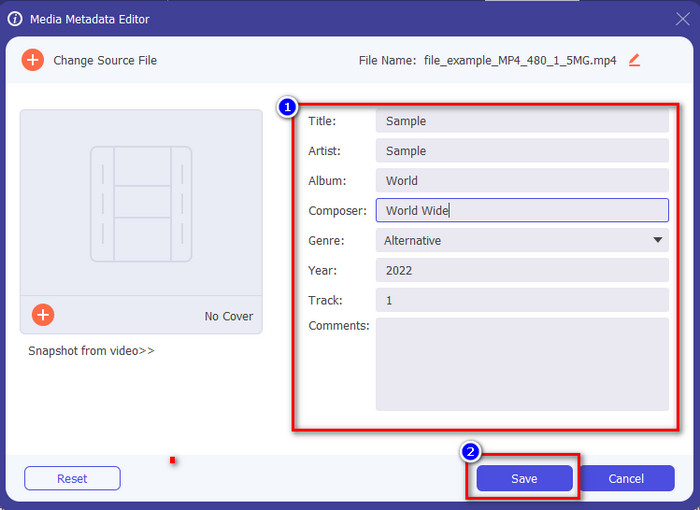
الخطوة 4. حرِّر بيانات التعريف في مربع النص؛ يمكنك إما تعبئتها أو حذفها، وافعل ما تريد ببيانات التعريف. بعد الانتهاء من ذلك، انقر على حفظ (Save) لتطبيق التغييرات التي أجريتها سابقًا. وبهذا تكون قد عدلت وسوم ملف MKV.
الجزء 3. 3 محررات مجانية لعلامات MKV يجب أن تعرفها متوفرة على أنظمة تشغيل Windows و Mac وعلى الإنترنت
GROUPDOCS.Metadata [مجاني على الويب]
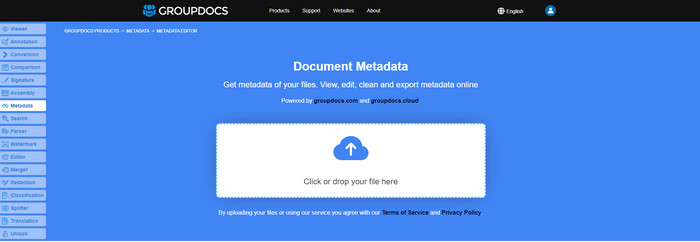
إذا كنت ترغب في استخدام محرر بيانات MKV الوصفية مجانًا على الويب، فنحن نوصي بشدة بتجربة GROUPDOCS.Metadata. إنه أفضل خيار لعرض بيانات التعريف وتحريرها في ملف MKV، لأنه يعمل على جميع المنصات، ما يعني أنه مرن وقابل للتكيّف في مختلف الحالات. بالإضافة إلى ذلك، يمكنه بسهولة إدارة عملية البحث عن الوسوم وتحديثها وفقًا للخصائص التي تحتاجها، وإذا كان يجب حذفها فسيقوم بذلك تلقائيًا. ومع ذلك، يمكن أن يكون التعامل مع الأداة صعبًا في بعض المهام المحددة، مثل تحديث وسوم الملف. لذا، حتى تتقن استخدام الأداة عبر الويب، ستحتاج إلى استخدامها كثيرًا لتحسين معرفتك بوظائف الموقع وجعل التعامل معها أسهل.
الخصائص على Windows [محرر مضمن في Windows]
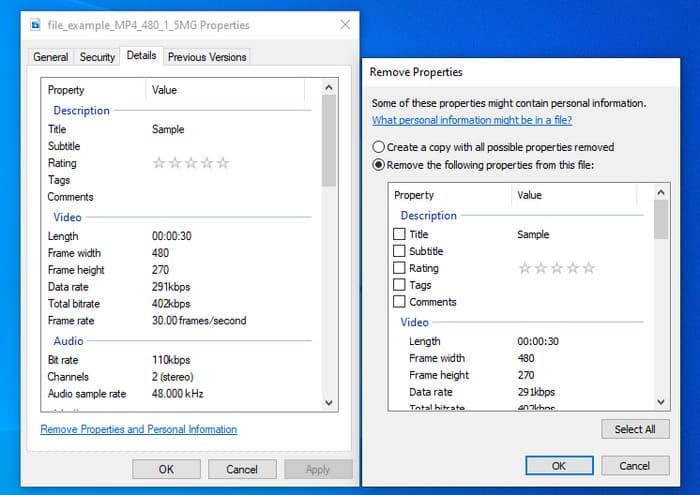
لا ترغب في تنزيل أداة لتغيير البيانات الوصفية لـ MKV وترغب في استخدام الوظيفة المضمنة في Windows لتحرير البيانات الوصفية؟ ثم سيكون من الأفضل إذا استخدمت الخصائص على Windows. هذه الوظيفة متاحة على جميع أجهزة الكمبيوتر التي تعمل بنظام Windows ، ولن تحتاج إلى تنزيل أي أداة أو الإنترنت لاستخدامها. يمكنك عرض البيانات الوصفية بسرعة وتحريرها بنجاح باستخدام هذه الميزة المجانية. ومع ذلك ، هناك بعض التقارير عن العلامات المفقودة بعد محاولتهم استخدام هذه الميزة. وفقًا للمستخدمين ، يمكنه إزالة العلامات تلقائيًا من ملفك. بدلاً من استخدام هذه الميزة ، فإنهم يعتزمون تنزيل الأداة المناسبة لإضاعة الجهد على العلامات التي يتضمنونها في ملف MKV أو الوسائط. ولكن إذا كنت تريد معرفة مكان هذه الميزة ، فما عليك سوى النقر بزر الماوس الأيمن فوق الملف ، بشكل أساسي في الجزء السفلي.
iFlicks [لنظام التشغيل Mac]
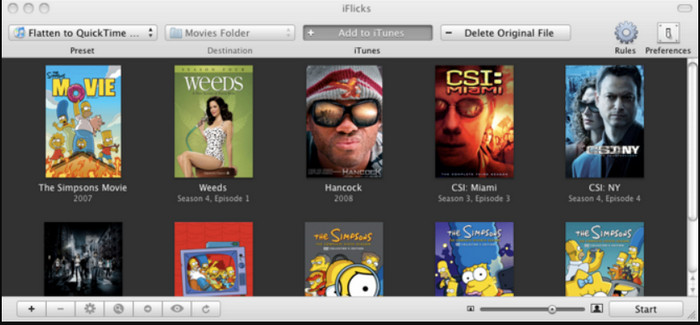
يمكن أن يساعدك iFlicks في تحويل MKV إلى تنسيق قابل للتشغيل أو يعلمك كيفية تحرير بيانات MKV الوصفية على Mac. تتفاعل هذه الأداة جيدًا مع iTunes لأنها توفر بيانات وصفية مفصلة في كل ملف وسائط. باستخدام هذا البرنامج ، يمكنك إضافة معلومات مختلفة حول ملفك ، مثل سطر الوصف والنوع والتاريخ. يتم جلب التقييمات والقرارات وغيرها في قواعد البيانات عبر الإنترنت. علاوة على ذلك ، يقوم هذا البرنامج بتجميع البيانات الوصفية حيث يمكنك تنزيلها وتطبيقها تلقائيًا على الملفات. ومع ذلك ، يمكن أن تستمر الإصدارات التجريبية المجانية لمدة سبعة أيام فقط ، لذلك إذا كنت تريد استخدام الأداة مرة أخرى ، فستحتاج إلى دفع رسوم اشتراكها.
الجزء 4. أسئلة وأجوبة حول محرر البيانات الوصفية MKV
هل يمكن تشغيل MKV على نظام Mac؟
يمكن تشغيل ملفات MKV على أجهزة ماك إذا استخدمت أداة طرف ثالث مثل مشغّل Blu-ray. ولكن إذا حاولت تشغيل الفيديو عمدًا على برنامج QuickTime فلن يعمل لأنه غير مدعوم. لذلك، إذا أردت مشاهدة ملفات MKV على ماك، فنحن نوصي بشدة باستخدام مشغّل Blu-ray من جهة خارجية، أو يمكنك تحويل صيغة MKV إلى MOV بمساعدة برنامج FVC Video Converter Ultimate.
هل أحتاج إلى تحويل MKV قبل تحرير البيانات الوصفية؟
إذا كانت الأداة التي تريد استخدامها لا تدعم تحميل تنسيق MKV ، فننصحك بتحويل التنسيق أولاً إلى تنسيق متوافق. ولكن مع التكلفة التي ذكرناها في الأعلى ، لن تحتاج إلى تحويل الملف إلى تنسيق مدعوم. ومع ذلك ، لا توجد العديد من الخيارات أو الأدوات لتحرير علامات MKV لأن التنسيق غير معروف. على الرغم من صعوبة البحث عنه ، فقد بذلنا قصارى جهدنا للبحث في جميع المحررين الذين يمكنك استخدامها لتحديث أو تغيير البيانات الوصفية التي تدعم تنسيق MKV.
لماذا ملفات MKV كبيرة جدًا في الحجم؟
السبب الرئيسي في كِبر حجم ملفات MKV هو أنها يمكن أن تحتوي على محتويات متعددة من فيديو وصوت وترجمة مع برامج ترميز (codecs) وعناصر مختلفة. وإذا أضفت بيانات تعريف إلى هذا الملف، سيصبح حجمه أكبر بكثير. لذا، فإن أفضل طريقة لتوفير المساحة مع الاحتفاظ بملفات MKV على قرصك هي ضغطها دون الإضرار بالجودة أو فقدان معلومات الملف. انقر على هذا الرابط لمعرفة المزيد عن ضغط ملفات الفيديو.
خاتمة
على الرغم من قلة عدد برامج تحرير بيانات MKV الوصفية في السوق، لا يزال هناك عدد من الأدوات القوية التي يمكنك الاعتماد عليها والمتاحة على منصات مختلفة. وبعد أن راجعنا برمجيات متنوّعة يمكنك استخدامها، يبقى القرار بين يديك دائمًا: أيها تفضّل لاستخدامه في تغيير بيانات التعريف لملف MKV الخاص بك؟ لا شك أنه قرار صعب لأن جميع هذه الأدوات رائعة في الاستخدام. إذا لم تكن قد حسمت أمرك بعد، فنحن نقترح عليك استخدام FVC Video Converter Ultimate لأنه الأكثر مرونة ويمتلك مزايا متقدمة أكثر يمكن لأي شخص الاستفادة منها. وبالضغط على زر التنزيل، ستحصل على أفضل محرر وسوم يمكنك امتلاكه على ويندوز وماك!
-
 5 أسهل طرق لإزالة البيانات الوصفية في أي ملفات وسائط
 كيفية إزالة البيانات الوصفية؟ هل من الصعب القيام بذلك؟ هل أحتاج إلى شراء أو استخدام أداة مجانية لإزالة العلامات؟ كل هذه الأسئلة لديها إجابات في هذه المقالة.
-
 5 من أفضل برامج تحرير البيانات الوصفية MP4 [مُحدَّثة في 2022]
 كيف يمكنني تغيير بيانات MP4 الوصفية؟ أفضل طريقة لتغيير البيانات الوصفية الخاصة بـ MP4 هي استخدام محرر العلامات الذي يدعم تنسيق MP4 مثل النموذج الذي ندرجه أدناه.
-
 أفضل 5 مستخدمين يختارون محرري علامات الفيديو AVI لعام 2022
 ما هو أفضل محرر علامات AVI يمكنني استخدامه؟ إن سوق برامج تحرير العلامات لملفات AVI واسع جدًا. لذلك سنقدم اليوم أفضل خمسة محررين تم اختيارهم في عام 2022.
