


 محول الفيديو النهائي
 مسجل الشاشة
 إصلاح الفيديو
كيفية تحرير علامات MP3 باستخدام أفضل محرر علامات MP3 [سهل وفعال]
When facing a task like editing MP3 tags, you can easily edit the song information with your built-in music tag editor, but they do have limits on what they can offer. Same as when dealing with multiple MP3 or audio files, choosing your built-in might not be the best move you will make. In this type of case, we need to use an assigned audio tag editor you can download or use on the web to work our way out on this problem. To save you time searching over the web and have a more productive day, below are the top picks you can surely depend on, for these are the available MP3 tag editor choices on the market today.

الجزء 1. أفضل محرر علامات MP3 لتحرير علامات MP3 سهل وبدون مجهود [مقترح بشدة]
Video Converter Ultimate is a multi-functional MP3 metadata editor you can download on Windows or Mac. This tool can treat this problem without exerting too much effort on the user. Efficient right? That is what you will get if you have the best tag editor on the market. With this tool, you can upload different audio, and video formats then change their metadata according to your needs.
بخلاف برامج تحرير العلامات الأخرى التي يمكنك تنزيلها أو استخدامها على الويب ، يمكن لهذه الأداة معالجة المشكلات المختلفة المتعلقة بالفيديو والصوت. هل تواجه مشكلة لأن الصوت يبدو منخفضًا بعض الشيء ، أو متزامنًا مع الفيديو ، أو صوت وفيديو منخفض الجودة ، أو تنسيقات غير قابلة للتشغيل؟ بشكل مثير للدهشة ، تم حل جميع المشكلات بمساعدة هذه الأداة المتكاملة. هل تريد معرفة كيفية استخدام أفضل محرر علامات MP3؟ إذا كان الأمر كذلك ، فاتبع الخطوات أدناه لتحقيق النجاح في غضون دقائق.
- 1. إنه محرر البيانات الوصفية الأكثر موثوقية الذي يمكنك استخدامه والذي أثبت قيمته مع أكثر من ملايين المستخدمين حول العالم.
- 2. يحتوي على العديد من الميزات المتقدمة التي يمكنك العثور عليها في Toolbox ، مثل تسريع الفيديو ، والعكس ، والتحسين ، وتصحيح الألوان ، وغير ذلك الكثير.
- 3. إنه اختيار مثالي للمبتدئين والخبراء فيما يتعلق بالمهمة المذكورة.
- 4. يعمل على نظامي التشغيل ، Windows و Mac ، بنفس الوظائف والميزات المتقدمة.
Step 1. You can download the software by clicking the download button hit the appropriate button. Follow the installation process, and click Start Now to edit the MP3 tags.
تحميل مجانيلنظام Windows 7 أو أحدثتنزيل آمن
تحميل مجانيلنظام MacOS 10.7 أو أحدثتنزيل آمن
Step 2. Open the Toolbox and locate the Media Metadata Editor on the setlist of editing functions available. There is no need to worry because this function is already installed on the tool, so there is no need for additional resources.
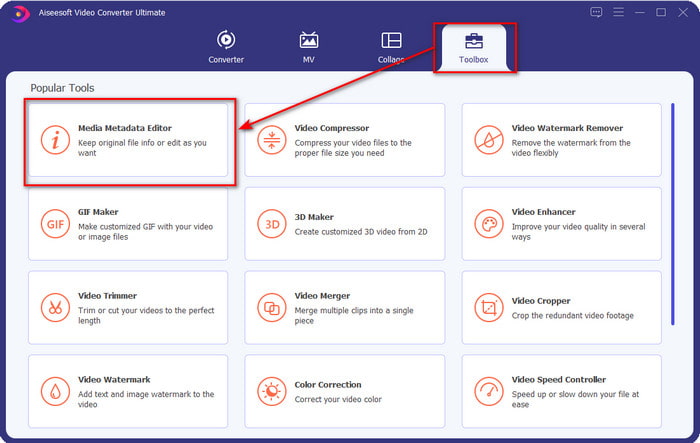
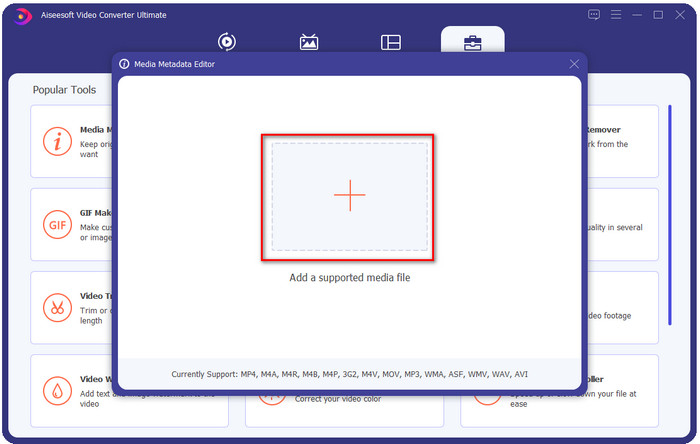
Step 3. Click + and find the MP3 audio file on the folder that will show on your display, select the file, and click Open to proceed.
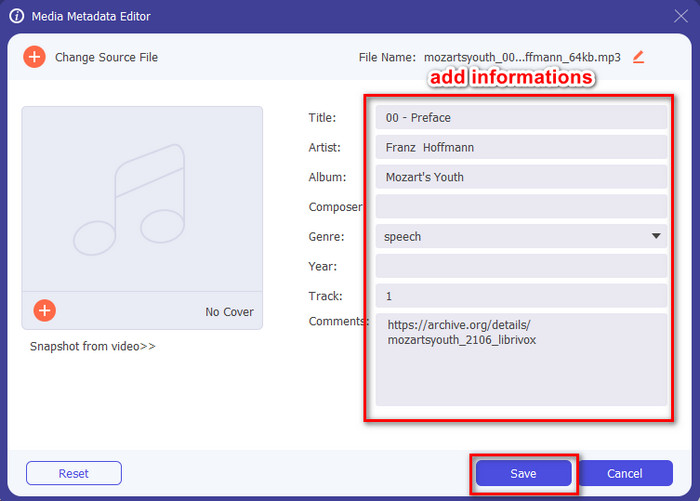
Step 4. After that, change or remove your file tags on the textboxes. If you are satisfied with the tags, finally click Save. This tool won't create a duplicate of your MP3 file with the metadata, and it will apply the metadata on the original file like that.
ذات صلة:
الجزء 2. 4 محررات اختيارية لعلامات MP3 يجب أن تعرف أنها متوفرة على أنظمة التشغيل Windows و Mac وعلى الإنترنت
علامة MP3
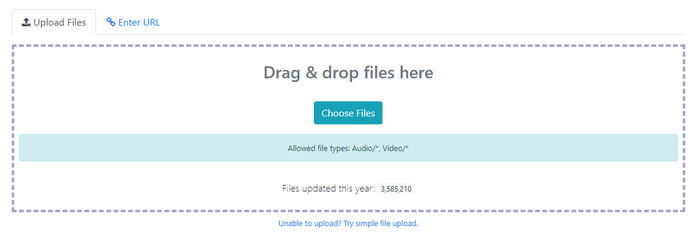
TagMP3 is a known online MP3 tag editor you can freely access on the web anytime. With this online tool, you won't need to download additional resources to use it because it is web-based. Also, it can detect the id3v1 and id3v2 of your MP3 and update it later in id3v2 even though the id3v1 is outdated. Although it has incredible functions, some users find it unreliable because it adds information unrelated to the audio file; it is still rumored. But most of the users are satisfied with what the tool is capable of, and it is safe and easy to use.
Step 1. Search the TagMP3 on your browser and open it.
Step 2. Upload the MP# file by clicking Choose Now!
Step 3. Add the information that is needed, and click Done! Generate New Files.
ميتابليس
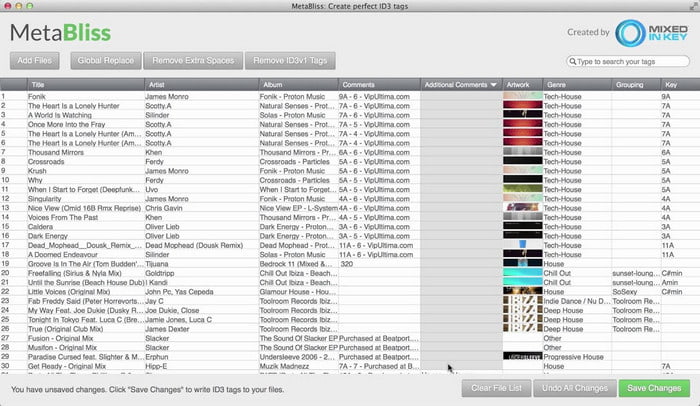
MetaBliss is a spreadsheet-like MP3 tag editor available on Mac. This tool can fulfill the task on any given day; no matter how many files you've inserted, it can handle it easily. Using this tool, you can remove or edit the tags on your MP3 files by selecting them all to save a lot of time. Although the tool can perform batch editing, its interface is a bit outdated, which means its GUI is not as good as you think. But setting this aside, it is still doable to use this if you don't mind working with a spreadsheet-like interface.
Step 1. Download the tag editor on Mac and open it.
Step 2. Click Add Files and look for the MP3 file.
Step 3. Replace the information per column, and click Save Changes to save the tags.
ميتاتوغر
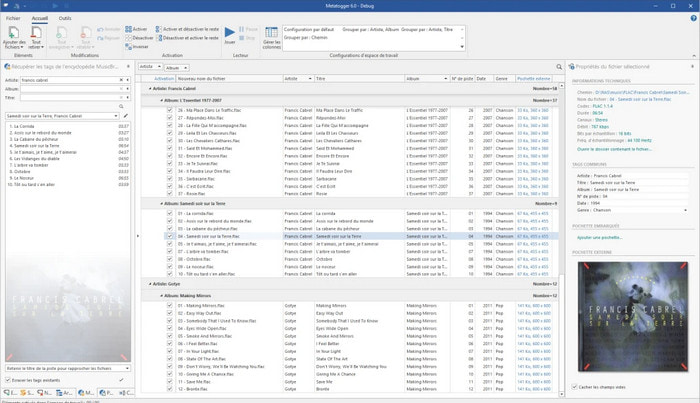
MetaTOGGer is a Speex, OGG, FLAC, and MP3 tag editor on Windows 10. With the help of this tool, you can automatically add metadata based on the online databases available, but you can also do it manually if you want. Expect a similar GUI vibe on Microsoft Office if you want to use the tool. Even though its GUI has alike, learning how to use it will take time, and you will need to download additional resources to use it, specifically, Microsoft .Net .3.5 framework.
Step 1. After you install the framework, next is to download the tool.
Step 2. Drag and drop the files on the tool, then edit the available tags on the list.
Step 3. Go to File and click Save.
طفل 3
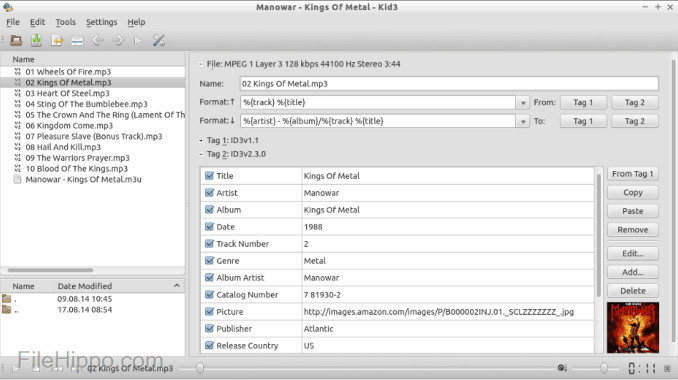
Last on our list to help you edit MP3 metadata on Linux and other devices is the Kid3. With this tool, you can easily manipulate the tags on your different media files. Same as the Metabliss, this tool supports mass tagging, which means you can insert multiple files simultaneously and edit them. Although the tool is good on this task, it still works the best on Linux compared to the other devices it supports. Also, you will need to go into many functions before you can change or manipulate the metadata of the file.
Step 1. Download the software on your desktop, and click Add Files.
Step 2. Click the MP3 file you've added and click Edit to change the audio file's metadata.
Step 3. Press Save to download the file with the metadata.
الجزء 3. أسئلة وأجوبة حول محرري البيانات الوصفية MP3
هل من الآمن تنزيل محرر بيانات وصفية بتنسيق MP3؟
تأكد من أن الوصول إلى موقع الويب الذي جاء منه البرنامج آمن. يمكنك التحقق من المعلومات المتعلقة بهذا الموقع عن طريق النقر فوق رمز القفل في متصفح الويب. بهذه الطريقة ، يمكنك التحقق مما إذا كانت شبكتك آمنة وما إذا كانت البيانات بعيدة عن المتسللين. إذا لم تكن متأكدًا من البرنامج ، فيجب عليك الخروج على الفور وتجنب النقر فوق أي شيء على هذا الموقع لتجنب حدوث ضرر لا يمكن تصوره لجهازك.
ما هو الغرض من تحرير العلامات على MP3؟
ضعها بهذه الطريقة؛ إذا كانت لديك علامة مناسبة ، فلا داعي للقلق بشأن ترتيب الملف في المكتبة وفقًا للعلامات المرتبطة بملفات MP3 الخاصة بك. أن يكون لديك مكتبة منظمة هو أحد الأسباب التي تجعلك تحتاج إلى تحرير العلامات ؛ قد يكون الآخر هو أن المعلومات الصوتية قد تلقت تحديثًا ، لذلك ستحتاج إلى تحديثها وغيرها الكثير.
لماذا لا يحتوي ملف MP3 الخاص بي على علامات؟
هناك العديد من الأسباب التي تجعل ملف الصوت الخاص بك لا يحتوي على علامات. إذا تم تنزيله على الويب ، فتوقع من المؤلف إزالته لأسباب تتعلق بالخصوصية. باستخدام البيانات الوصفية ، يمكنك استغلال المعلومات الخاصة بك إذا كنت المؤلف ، لذا فإن إزالتها يعد خيارًا رائعًا. على الرغم من وجود العديد من الأسباب ، فإننا نحتاج إلى العلامات لجعل ملفات MP3 الخاصة بنا منظمة.
خاتمة
في الواقع ، مع أفضل برامج تحرير علامات MP3 هذه ، يمكنك بسهولة ضبط العلامات على ملفات MP3 الخاصة بك بسهولة وفعالية لا يستطيع المحرر الآخر في السوق تقديمها. أيضًا ، يمكن أن تضمن لك خطوات كل أداة نجاح أداء المهمة في أسرع وقت ممكن. ومع ذلك ، إذا قارنا كل واحد منهم ، يمكننا أن نرى أن الأداة النهائية أكثر موثوقية وأفضل من الأدوات الموجودة في القائمة. لم يتم اقتراحه بشدة بدون سبب. لذلك ، إذا كنت تريد استخدام الأداة ، فيجب عليك اتباع الخطوات وفقًا لذلك ، وقراءتها بحذر ، وإنهاء المهمة في غمضة عين.
-
 أفضل 5 برامج لاستخراج البيانات الوصفية متوفرة على الإنترنت وغير متصل [2022]
 يمكنك العثور على العديد من أدوات استخراج البيانات الوصفية في السوق ، ولكننا اليوم نختار فقط أكثر خمسة أدوات لاستخراج العلامات وفقًا للجمهور.
-
 أهم 5 محررين للبيانات الوصفية للفيديو لعام 2022 [مراجعة غير متحيزة]
 هل تريد عرض البيانات الوصفية للفيديو الخاص بك؟ إذا كان الأمر كذلك ، فاقرأ التفاصيل أدناه لفهم الموضوع بالكامل ومعرفة الأداة التي تناسبك بشكل أفضل.
-
 7 برامج تحرير علامات موسيقية شهيرة على أجهزة Windows و Mac والأجهزة المحمولة
 تعد علامات الموسيقى شائعة الاستخدام لترتيب الموسيقى في مكتبتك وفقًا للبيانات الموجودة بالداخل. ماذا لو كنت تريد تغييره؟ اقرأ التفاصيل أدناه لمعرفة المزيد.
