


 محول الفيديو النهائي
 مسجل الشاشة
 إصلاح الفيديو
مراجعة أهمية محرر علامات ID3 في عام 2022
Songs that you've downloaded on music websites do have metadata or known as ID3 tags. Usually, all the information you need about that song is in the tag information. On some occasions, the music doesn't come with tags or has wrong information. In this type of situation, you will need to use software that can help you easily handle the task. In this situation, we are gladly present to you the best ID3 tag editor you can download on your Windows, Mac, iOS, and Android to edit the tags on your songs.

الجزء 1. ما هي علامة ID3
ID3 tags are essential for every user who want to know more about the song in-detailed information. A great example of tags that you can see without viewing the exact tags is the name of the artist and the title of the song. Although we didn't add it to the audio file, it is still embedded to help us know if we play the correct music accordingly.
ومع ذلك ، إذا لم يكن لديك علامة على الأغاني أو البودكاست الخاص بك ، فهناك احتمال أن يتم تجميع الملفات في جميع أنحاء المكتبة أو المجلد بأكمله حيث يتم تخزينها. يمكن أن تساعدك إضافة العلامات في ملفك في تحديد الملف وترتيبه ليبدو منظمًا. إذا لم يكن ملفك يحتوي على واحد ، فيجب عليك إضافة البيانات. استمر في تدحرج الكرة لمساعدتك في البحث عن محرر علامات ID3 الذي يجب عليك استخدامه والذي يناسب احتياجاتك.
لكن قبل أن نبدأ ، يرجى تحضير البيانات الوصفية التي تريد إضافتها إلى ملفك الصوتي ؛ وتشمل هذه العنوان ، المؤلف ، الفصل ، الصفحات ، التعليقات ، كلمات الأغاني ، وما إلى ذلك. بعد قراءة هذا ، ستندهش من مراجعتنا لأفضل برامج تحرير العلامات التي يمكنك استخدامها على جميع الأجهزة.
الجزء 2. أفضل محرر علامات ID3 على نظامي التشغيل Windows / Mac لتغيير البيانات الوصفية بسهولة
FVC Video Converter Ultimate - أفضل محرر علامات ID3
One of the common knowledge you should know on selecting an ID3 tag editor on Mac or Windows is that it should be on-point, user-friendly, and accessible; all of these can be found on FVC Video Converter Ultimate. It is known as the first-class metadata editor that is easy to handle even the users don't know how to adjust them correctly. Unlike any other tag editor, you wouldn't need to do many complicated things to add or fix your audio or video tags. So, if you are new in this area of editing or fixing the ID3 tags, then without a doubt that this is your one-stop software.
علاوة على ذلك ، لم نسميها محررًا شاملاً بدون سبب ؛ ربما تعتقد لماذا. إذا اكتشفنا المزيد عن الأداة ، فسترى أنه يمكنك إجراء تحرير أساسي وأساسي للفيديو هنا لجعل الفيديو الخاص بك يبدو رائعًا عن طريق إضافة تأثيرات وفلاتر. لا يزال هناك الكثير من الميزات غير المذكورة والتي يمكنك كشف النقاب عنها إذا قمت بتنزيل الأداة. ولكن اليوم ، سنركز على استخدام برنامج تحرير علامات ID3 هذا لمساعدتك في تعديل علامات أغانيك وإصلاحها بسرعة.
Step 1. First, download the software on your selected operating system; there are two options available Windows and Mac. Next is to install it correctly, follow the set-up process, then open the tool once you've done all of this.
تحميل مجانيلنظام Windows 7 أو أحدثتنزيل آمن
تحميل مجانيلنظام MacOS 10.7 أو أحدثتنزيل آمن
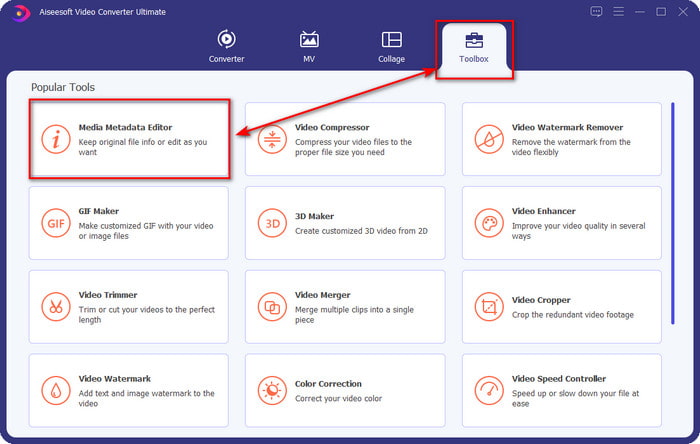
Step 2. Once you've opened the tool, you must proceed to the Toolbox section and open the Media Metadata Editor by clicking it.
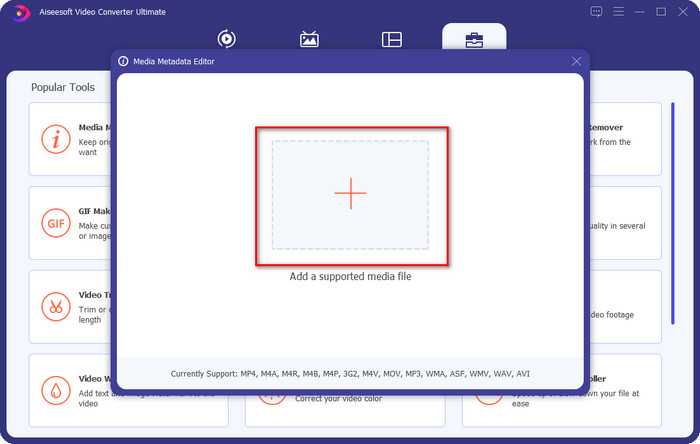
Step 3. Press the + icon on the new window that will show on your screen, select the audio file you want to change the ID3 tags, press Open to upload it.
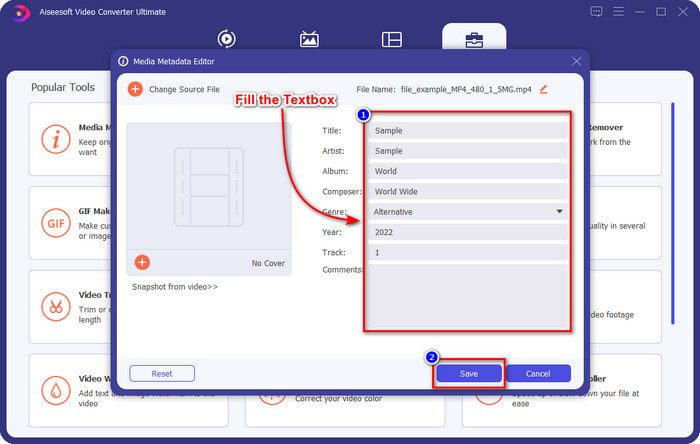
Step 4. You can now type the information you want to add to your audio file and click Save if you are done on each textbox. As easy as that, you have now added tags on the audio file with the assistance of this software.
الايجابيات
- وهو يدعم تغيير بيانات التعريف بتنسيق MP3 و WMA و WAV و 1000+ بسهولة.
- يتم دعم التحويل السريع للغاية وتسريع الأجهزة لعملية سرعة البرق.
- تتوفر ميزات تحرير الفيديو الأساسية حتى المتقدمة في Toolbox.
- إنه الخيار الأول لملايين المستخدمين حول العالم لتولي هذه المهمة.
سلبيات
- يلزم شراء الأداة للحصول على جميع ميزات التحرير الرائعة.
- غير متوفر على Android و iOS.
مشغل الميديا VLC
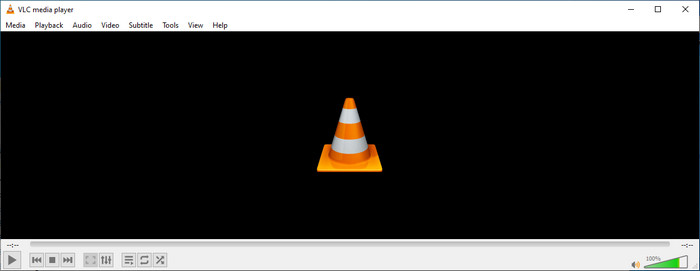
VLC Media Player is a top-notch media player you can download on Windows and Mac. This tool can help you play the video without downloading any codecs on your system, but you can use this as well to edit the ID3 tags of your audio file. Although the tool isn't a dedicated metadata editor, it can still fix the incorrect tags. So, if you have this tool, you can easily adjust the metadata of your song, but don't expect too much on the tool because it is not as good as the first-class iD3 tag editor on a desktop.
الايجابيات
- مشغل وسائط ومحرر بيانات وصفية يمكنك استخدامه على أي جهاز.
- وهو يدعم تنسيق وسائط متوسط لتغيير العلامات.
- واجهة المستخدم الرسومية بسيطة وبسيطة.
سلبيات
- إنه ليس محرر بيانات وصفية محترف.
- يدعم وظائف محدودة فيما يتعلق بتحرير العلامات.
الجزء 3. أعلى 3 محرر علامات ID3 على الأجهزة المحمولة التي تعمل بنظام iOS / Android
ستار ميوزيك تاغ محرر
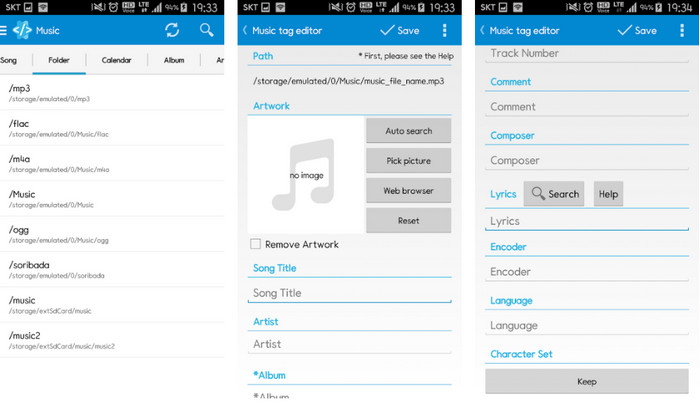
Star Music Tag Editor is one of the most used iD3 tag editors on Android. This app can show you different information on your music, and you can change them if you need to. Its GUI is straightforward, so you can easily learn how to use it even if you aren't familiar with using a tool for editing tags. Even though the app is excellent, it still has some flaws in adding metadata, especially on the album cover. Although problems may occur, it is still a dependable tag editor you can download on your Android phone.
الايجابيات
- تنزيل محرر البيانات الوصفية مجانًا على Android.
- واجهة المستخدم الرسومية بسيطة وسهلة الفهم.
- أضف العلامات على الملف الصوتي بسهولة.
سلبيات
- لديها مشكلة في إضافة غلاف صورة على ملف الصوت.
- في بعض الأحيان البق لا يزال يحدث.
مشغل موسيقى الغيوم للسحب
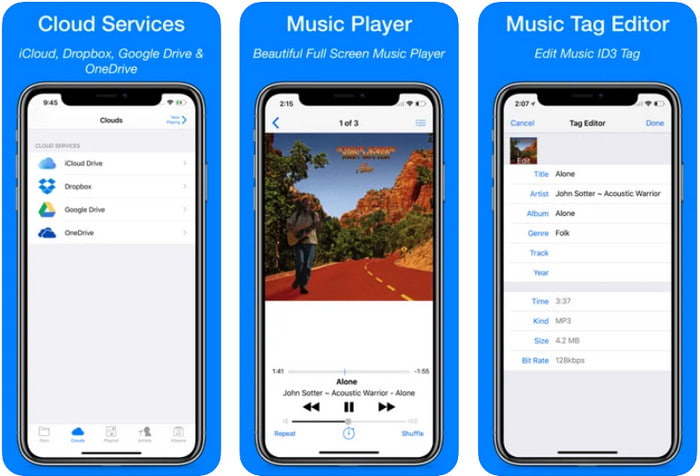
Clouds Music Player for Clouds is a multipurpose app you can download on your iOS devices. It can edit id3 tags on iPhone, play music, and create a ringtone out of the music. With its features, its GUI is plain and simple, and you can access your cloud service through the app. Even with its user-friendly interface, some information you can add as metadata on your audio file is insufficient, which means only the basic tags are available to edit. Nevertheless, it is excellent to download if you are an iOS user.
الايجابيات
- متاح على أي جهاز iOS للتنزيل.
- محرر الموسيقى متعدد الوظائف ومحرر العلامات.
- محرر بيانات وصفية سهل الاستخدام على iOS.
سلبيات
- لا يدعم إضافة المزيد من البيانات الوصفية.
- يتم تغيير أخطاء البيانات الوصفية والمشكلات ولكن ليس كثيرًا.
داش- تطبيق المعلومات والترفيه
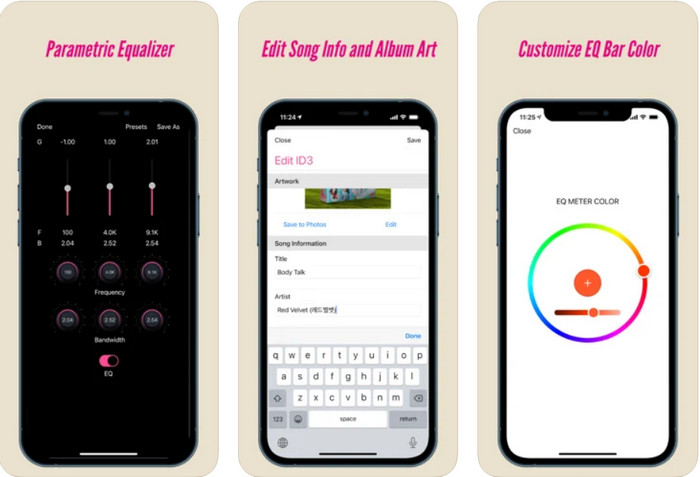
Dash- Infotainment App is another tool you can download and edit ID3 tags on iPhone whether you need one. There isn't much learning you'll need before using the app with its simple and streamlined user interface. You can use this tool to change the parameters of your FLAC and ALAC easily with its easy-to-use equalizer. Also, you can see the speed and compass of the song you upload here. Same as the first iPhone tag editor, you can only add title, artist, and album art here, but remember that your format must be FLAC or ALAC only; if it isn't in this format, then you can't upload it.
الايجابيات
- منحنى التعلم ليس بهذه الصعوبة.
- يتوفر معادل صوت متعدد اللغات.
- واجهة المستخدم الرسومية ليست كثيرة وليست أقل.
سلبيات
- يدعم فقط تنسيق FLAC و ALAC.
- لا يوجد الكثير لتقدمه فيما يتعلق بتحرير البيانات الوصفية.
الجزء 4. أسئلة وأجوبة حول محرر علامات ID3
ما هو أفضل محرر علامات ID3 لسطر الأوامر يمكنني استخدامه؟
If you are looking for a command-line ID3 tag editor, you must know that FFmpeg is a command-line editor. With this tool, you can convert, rotate, cut, trim, and edit your metadata tags. If you want to know more about FFmpeg, you might want to read how to use it by clicking the link to edit FFmpeg metadata easily.
ما هي الأنواع الأخرى من البيانات الوصفية؟
There are six metadata types: descriptive, administrative, reference or explanatory, statistical, legal, and structural metadata. If you want to know more about these types and their information, you can click this link and read more about them.
هل من الممكن عرض العلامات بدون تطبيق؟
Yes, instead of downloading software, you can use an online tool to view your file's tags. Click on this link to view metadata on your desktop online, but we will also introduce some tools that you would love to download.
خاتمة
باستخدام المعلومات التي قمنا بإدراجها أعلاه ، أصبح من الممكن تحرير علامات ID3 باستخدام المحررين الذين قدمناهم أعلاه ، بغض النظر عن الجهاز الذي تستخدمه حاليًا. علاوة على ذلك ، يعد التطبيق والبرنامج مثاليين للمستخدمين الذين يحتاجون إلى تعديل البيانات الوصفية الخاصة بهم. على الرغم من أن الأدوات تتيح فرصة ممتازة للمستخدمين لتحرير البيانات الوصفية ، فلا شك أن الأداة النهائية تقدم طريقة فعالة لتحرير علامات ID3 على أي ملف موسيقى. إذا كنت ترغب في الحصول على أفضل محرر علامات ID3 على نظامي التشغيل Windows و Mac ، فيمكنك تنزيله على الفور بالنقر فوق زر التنزيل الموضح أعلاه ، ثم الاستمتاع بعظمته.
-
 أفضل طريقتين لتحرير بيانات OGG الوصفية التي يجب أن تجربها مجانًا
 هل تحتاج إلى تحرير بيانات OGG الوصفية؟ حسنًا ، يمكنك بسهولة التعامل مع تحرير العلامات باستخدام البرنامج الصحيح. إذا لم يكن لديك & #039 ؛ ر لديك واحد يقرأ هذه المقالة أمر لا بد منه.
-
 نظرة عامة مطلقة حول محرر البيانات الوصفية Pentaho [مُحدَّث 2022]
 لا تجد مقالة موثوقة حول محرر البيانات الوصفية Pentaho؟ لحسن الحظ ، قمنا بمراجعة الأداة بأنفسنا لتقديم الحقائق التي ستعرفها عن الأداة.
-
 نصائح وحيل حول محرر البيانات الوصفية VLC يجب أن تعرفه في عام 2022
 هل تريد استخدام VLC كمحرر للبيانات الوصفية؟ في هذه الحالة ، يمكنك قراءة هذه المقالة حيث نقدم مراجعة غير متحيزة لمحرر البيانات الوصفية لـ VLC.
