


 محول الفيديو النهائي
 مسجل الشاشة
 إصلاح الفيديو
 تنزيل آمن
مراجعة حول Pitch Changer على أنظمة التشغيل Windows و Mac والإنترنت والهواتف
غالبًا ما يمكننا باستخدام مغيّر طبقة الصوت (Pitch Changer) رفع الطبقة الأصلية أو خفضها بسرعة. يستخدم معظم المنتجين أداة تغيير الطبقة لإضافة تأثيرات لحنية تجعل الأغنية أفضل من النسخة الخام الأصلية. لكن من ناحية أخرى، فإن شراء حزمة أدوات لتغيير الطبقة سيكلفك الكثير من المال وسيستغرق وقتًا لتتعلم كيفية استخدامها؛ باهظة الثمن وصعبة الفهم. بدلًا من إنفاق أموالك على مجموعات ستستخدمها فقط لتغيير الطبقة، لماذا لا تجرّب برامج يمكنها مساعدتك على تغيير طبقة الصوت في الفيديو أو ملف الصوت الذي تملكه؟.
من خلال هذا الاستعراض ، جمعنا أربعة من أفضل التطبيقات والبرامج التي يمكنك استخدامها لتغيير طبقة الصوت دون إنفاق أموال طائلة. استمر في قراءة هذا المقال لمعرفة ما الذي نتحدث عنه.

الجزء 1. أفضل 4 برامج لتغيير درجة الصوت متوفرة على أجهزة سطح المكتب وعبر الإنترنت والأجهزة المحمولة
Video Converter Ultimate - أفضل مبدل لجدار الفيديو على نظامي التشغيل Windows و Mac
تحميل مجانيلنظام Windows 7 أو أحدثتنزيل آمن
تحميل مجانيلنظام MacOS 10.7 أو أحدثتنزيل آمن
البرنامج المتاح: ويندوز وماك
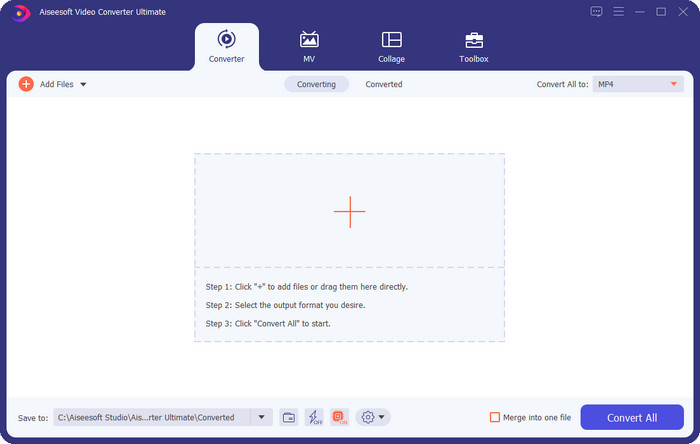
أول أداة في قائمتنا هي أفضل برنامج لتغيير طبقة الفيديو على نظامي التشغيل ويندوز وماك. يُعد Video Converter Ultimate أداة قوية يمكنك استخدامها للتحكم في طبقة الصوت في ملفك الصوتي عن طريق زيادة أو خفض سرعة الفيديو الذي لديك. بخلاف البرامج الأخرى التي يمكنك تنزيلها على سطح المكتب والتي تؤدي الوظيفة نفسها، لن يستهلك هذا البرنامج الكثير من وقتك في التعلم، لأنه أداة بسيطة وسهلة الاستخدام. يمكنك تحسين طبقة الصوت في أقل من دقيقة لتجعلها تبدو أفضل من النسخة الأصلية التي سجّلتها.
إلى جانب القدرة على تغيير درجة الصوت ، يمكنك أيضًا زيادة حجم الصوت إلى أقصى إمكاناته باستخدام Volume Booster ضمن Toolbox. في هذه الميزة ، يمكنك زيادة أو تقليل السعة أو زيادة الصوت في الفيديو الخاص بك بسرعة باستخدام أشرطة التمرير. على الرغم من أنك لست منتجًا يرغب في القيام بهذا النوع من الأشياء ، إلا أنه لا يزال ممتعًا ويتم تنفيذه بسرعة بمساعدة هذه الأداة النهائية المتوفرة على نظامي التشغيل Windows و macOS. لذلك ، إذا كنت ترغب في استخدام هذه الأداة النهائية ، فإننا نعرض في الجزء الثاني كيفية استخدام هذه الأداة بخطوات مفصلة يمكنك اتباعها لإنهائها في أقل من دقيقة.
Vocal Remover.org
البرنامج المتاح: عبر الإنترنت
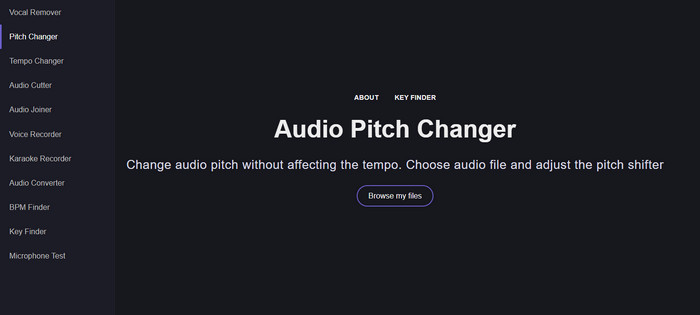
إذا كنت بحاجة إلى مُغيّر طبقة صوت عبر الإنترنت، فبدون شك يُعد Vocal Remover.org الأداة المثالية لإنجاز هذه المهمة. بخلاف الأداة الأولى، يعمل هذا الموقع بشكل أفضل في تحسين الصوت. باستخدام هذه الأداة، يمكنك بسهولة تغيير طبقة الصوت وتحديد ما هي النغمة (Key) التي تُستخدم في الأغنية. كما يوجد مؤشر يساعدك على اختيار نصف الدرجة (Semitone) للصوت. يمكنك ضبطها يدويًا خطوة بخطوة أو عبر تحريك شريط التمرير دفعة واحدة. معظم المستخدمين الذين جربوه يستمتعون باستخدامه وهم راضون عن نتيجة تأثير تغيير الطبقة التي يحصلون عليها.
تعمل الأداة بشكل جيد في هذا الأمر ، ولكن يمكنك فقط تحميل ملف تنسيق صوتي محدود هنا ، وتنسيق الفيديو غير مدعوم. قد يكون تحميل الملف صعبًا بعض الشيء بالنسبة للأداة ، لأنه لا يدعم سوى عدد قليل من تنسيقات الصوت. على الرغم من أن هذا قد يمثل مشكلة للجميع ، ما زلنا نعتبر هذا أحد أفضل الأدوات عبر الإنترنت التي يمكنك الوصول إليها على الويب. لكن تأكد من وصولك إلى موقع الويب الصحيح لتجنب المضاعفات والمشاكل الأخرى. تذكر أيضًا أن يكون لديك اتصال إنترنت مستقر لأن الأداة تعمل بشكل أفضل إذا كان الإنترنت لديك قويًا.
سرعة الإيقاع: الملعب ، مغير السرعة
البرنامج المتاح: أندرويد
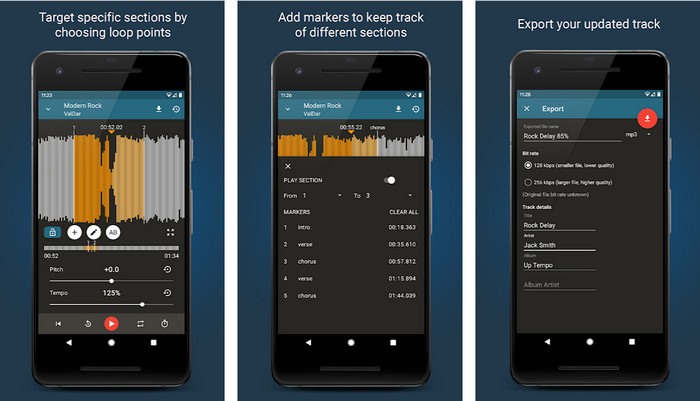
يمكنك تنزيل هذا التطبيق لتغيير طبقة الصوت على أجهزة أندرويد لتنفيذ المهمة حتى لو لم يكن لديك جهاز كمبيوتر في متناول اليد. مع تطبيق Up Tempo: Pitch, Speed Changer أصبح تغيير سرعة التشغيل والطبقة أمرًا سريعًا ومتاحًا للجميع. تدعم واجهة المستخدم فيه عرض شكل الموجة (Waveform)، مما يساعدك على تحديد الجزء الذي تريد تحسينه أو تغييره. وكما هو الحال مع الأداة على الإنترنت، يمكن لهذا التطبيق التعامل مع المقاطع الموسيقية، وسيكون مفيدًا عندما تحتاج إليه.
على الرغم من أن التطبيق مجاني للتنزيل ، إلا أن هناك أشياء يجب مراعاتها إذا كنت تريد استخدام هذا التطبيق. يشعر معظم المستخدمين أن التطبيق لا يمكنه اكتشاف الملفات الصوتية الجديدة التي تم تنزيلها على هاتفك. إذا واجهت هذه المشكلة ، فقد لا يدعم الملف الصوتي في هذا التطبيق ، أو قد يحدث خطأ. ومع ذلك ، إذا كان لديك هاتف Android في متناول يدك ، فقم بتنزيل هذا التطبيق لمحاولة معرفة ما إذا كان التطبيق هو حل المشكلة.
TimePitch-Pitch و Speed Changer 4+
البرنامج المتاح: iOS
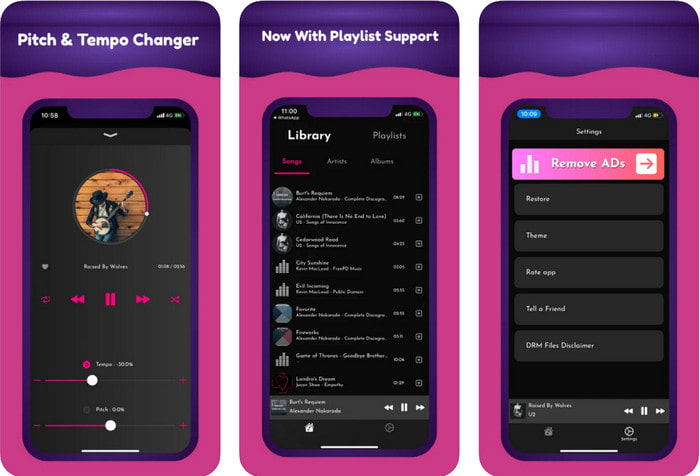
إذا كنت من مستخدمي iOS فيجب أن تعرف أن تطبيق تغيير طبقة الصوت هذا يمكن أن يقدّم لك حلًا لهذه المشكلة. يُعد TimePitch-Pitch, Speed Changer 4+ مشغّل موسيقى ومكتبة وأداة تغيير طبقة في آن واحد يمكنك استخدامها على جهاز iOS الخاص بك عند الحاجة. يعمل هذا التطبيق بطريقة مختلفة عن غيره، إذ يمكنك تغيير طبقة الصوت الذي تستمع إليه في الوقت الفعلي؛ أي إن التعديل لا يُحفَّظ عند تغييره. لكن هذا قد يكون نقطة قوة في التطبيق، فلن تحتاج إلى انتظار المعالجة؛ فبمجرد التحريك والتعديل يمكنك تغيير الطبقة بسهولة كما تريد.
ومع ذلك ، قد يكون هذا هو ضعفها أيضًا ؛ إذا قمت بنقل الملف على أجهزة أخرى ، فلن تنطبق درجة الصوت التي قمت بتغييرها باستخدام هذا التطبيق على جهاز الاستقبال. أيضًا ، ستحتاج إلى تذكر أنه إذا قمت بشراء الموسيقى على iTunes أو Apple Music ، فلا يمكنك استخدام هذا التطبيق لتغيير الملعب. لماذا ا؟ لأن الملفات المحمية لن تسمح لأي تطبيق تابع لجهة خارجية مثل هذا بالوصول إلى الملف. بغض النظر عن تحميل ملف الموسيقى ، ما زلنا ندرج هذا التطبيق في هذه المقالة لأنه يعمل بشكل أفضل على كل جهاز iOS.
الجزء 2. كيفية تغيير درجة حرارة مقطع فيديو باستخدام برنامج Ultimate Pitch Changer
اتبع الخطوات أدناه لمعرفة كيفية استخدام الملعب الموسيقي ومغير السرعة الذي يمكنك الحصول عليه على سطح المكتب. لذا ، استمر في قراءة التفاصيل التالية إذا كنت بحاجة إلى برنامج تعليمي بسيط ولكنه فعال حول استخدام البرنامج النهائي.
الخطوة 1. اضغط على زر التنزيل للحصول على البرنامج الشامل على جهاز الكمبيوتر، ثم اختر ما إذا كنت تستخدم نظام ويندوز أو ماك. انتظر حتى يكتمل التحميل، ثم انقر على الملف الذي قمت بتنزيله وقم بتثبيته. بعد إتمام جميع خطوات الإعداد والتثبيت، شغّل البرنامج لبدء استخدام هذه الأداة القوية.
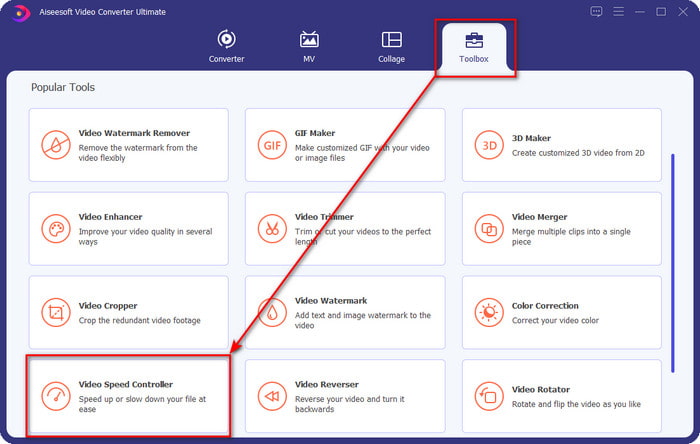
الخطوة 2. افتح قائمة Toolbox، وتحتها ابحث عن أداة Video Speed Controller ثم انقر عليها لفتحها. مرّر للأسفل للوصول إلى هذه الأداة الموجودة بالقرب من أسفل القائمة.
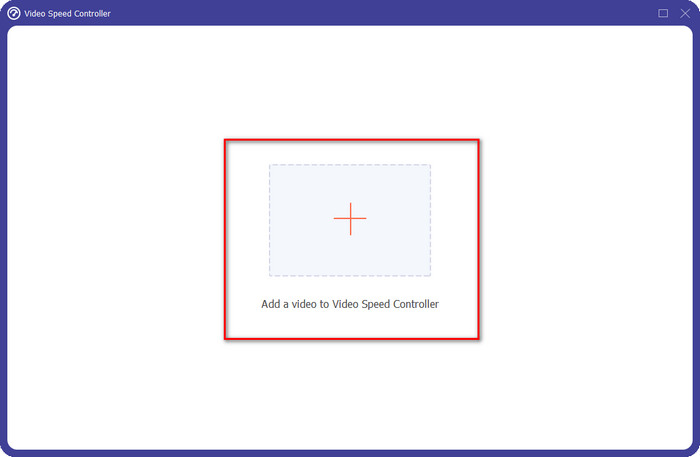
الخطوة 3. ستظهر نافذة صغيرة جديدة على شاشتك، انقر على زر + ثم حدّد ملف الفيديو الذي تريد تغيير طبقته، وبعدها انقر على Open لرفع ملف الفيديو.
الخطوة 4. في هذه المرحلة يُسمح لك الآن بتغيير سرعة الصوت؛ وستلاحظ أن طبقة الصوت ستتغيّر أيضًا عند تغيير السرعة. يمكنك الاستماع إلى المعاينة ورؤيتها تلقائيًا في شاشة المعاينة.
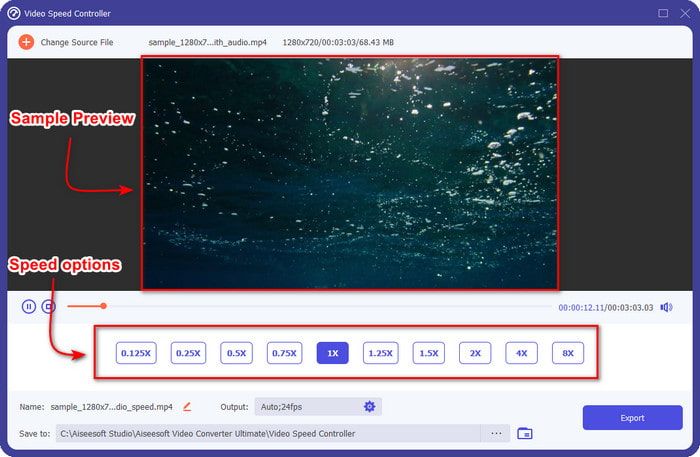
يمكنك فقط تشغيل معاينة الفيديو بسرعة 2x ؛ ستلاحظ أن 4x و 8x لن يسمحوا لك بمعاينة الفيديو لتجنب التعارض ، لكنه لن يقلل من جودة الفيديو والصوت.
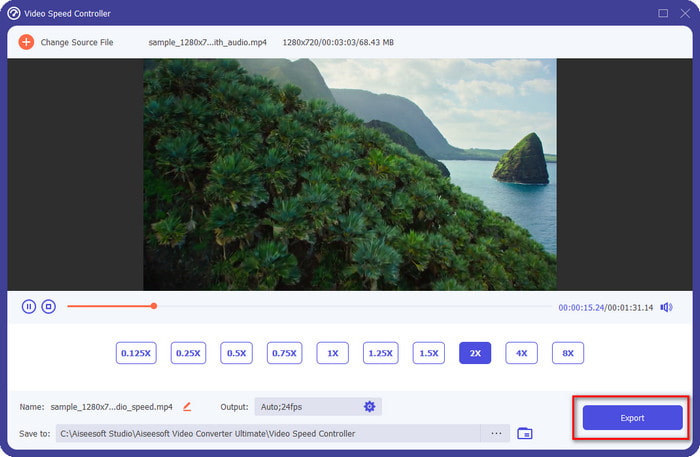
الخطوة 5. إذا كنت راضيًا عن الطبقة التي حصلت عليها، فانقر الآن على زر Export. أليس الأمر سهلًا؟ بفضل برنامج مثل هذا يمكنك التعامل بسهولة مع مختلف مشكلات الفيديو والصوت خلال دقائق.
ذات صلة:
الجزء 3. أسئلة وأجوبة حول مغير الملعب
ما هو الملعب؟
يقوم بتقييم الجودة التي يتردد صداها مع صوتك عن طريق قياسها في النطاق ، سواء كانت أعلى أو أقل. إنها موجة صوتية شبيهة بالتردد ، لكنها ليست متماثلة.
إلى أي ارتفاع يمكن أن تسمع طبقة الصوت البشرية؟
كلما انخفض التردد ، لا يزال بإمكانك سماعه بوعي ، لكن قلة من الناس يسمعونه فقط عندما ترتفع هرتز. وفقًا للباحثين ، يمكن للجميع الاستماع إلى 8000 هرتز ، وإذا كان بإمكانك سماع 12000 هرتز ، فستكون أذنيك جيدة مثل الأشخاص الذين تقل أعمارهم عن 50 عامًا. ولا يزال بإمكانك سماع 15000 هرتز ، ولكن أقل من 30 عامًا تحت سن 40 سنة ، 16000 هرتز ، لا يزال بإمكانك الاستماع إليها. لكل 25 عامًا أو أقل ، لا يزال بإمكانك سماع 17000 هرتز ، وبالنسبة لأقل من 20 عامًا ، يمكنك سماع 20000 هرتز. كلما تقدمنا في السن ، تصبح طبقة الصوت التي نسمعها أقل فاعلية من وقت لآخر. لذلك ، إذا لم تتمكن من سماع التردد الذي نذكره ، فيجب عليك مراجعة الطبيب للتحقق مما إذا كانت هناك مشكلة.
كيف يمكننا حساب مدى الملعب؟
يستخدم نطاق طبقة الصوت أوكتافات للحساب ، مما يسمح للمغني والأداة بتحديد ما إذا كان هذا هو الملعب الصحيح للأغنية. مع الاهتزاز ، يمكنك ملاحظة التردد العالي والمنخفض الذي تتراكم فيه الموجات الصوتية.
خاتمة
باستخدام برامج تغيير طبقة الفيديو والصوت المذكورة أعلاه يمكننا الآن ضبط طبقة الصوت الذي بين أيدينا بسهولة. بدلًا من شراء أجهزة مخصّصة للقيام بهذه المهمة، يمكنك استخدام البرامج السابقة. رغم اختلافها في المزايا والوظائف، فإننا نستطيع أن نرى نقاط تميز كلٍ منها عن الآخر. ولكن إذا كنت تستخدم الكمبيوتر فيُنصح بتنزيل Video Converter Ultimate على سطح المكتب، لأن هذه الأداة لا تساعدك فقط في تغيير الطبقة، بل تقوم أيضًا بالعديد من الأمور المدهشة الأخرى لتحسين الفيديو والصوت لديك. هل ترغب في معرفة ما هي هذه “السحرية” التي يمكن أن يقوم بها البرنامج؟ حمّله الآن فورًا عبر النقر على زر التنزيل أعلاه.
-
 3 طرق لتسريع الفيديو على iPhone [مثبت]
 هل تواجه مشكلة في ضبط سرعة تشغيل الفيديو الخاص بك لأنك تستخدم جهاز iPhone؟ هذه مقالة ممتازة لمساعدتك في حل مشكلتك.
-
 ويندوز ميديا بلاير | تعرف على كيفية تسريع مقاطع الفيديو [مثبت]
 هل تريد إبطاء مقطع الفيديو الخاص بك باستخدام Windows Media Player ، لكنك تواجه مشكلة في كيفية القيام بذلك؟ هذه المقالة مثالية للقراءة ويمكنها توضيح وجهة نظرك حول كيفية تسريع مقاطع الفيديو باستخدام Windows Media Player.
-
 كيفية تغيير فيديو الحركة البطيئة إلى السرعة العادية [خطوات سهلة]
 هل تريد معرفة كيفية إرجاع مقطع فيديو بطيء الحركة قمت بتنزيله من الإنترنت أو تم تسجيله بطريق الخطأ بالحركة البطيئة؟ تعرف على كيفية تحويل الفيديو بطيء الحركة إلى السرعة العادية على أجهزة Mac و Windows و iOS و Android.
