


 محول الفيديو النهائي
 مسجل الشاشة
 إصلاح الفيديو
 تنزيل آمن
3 طرق فعالة لتحويل MP4 إلى AMV على نظام Windows و Mac بسهولة
عندما تريد إرسال بعض مقاطع فيديو MP4 الكبيرة إلى هاتفك الذكي ، مثل فيلم كبير ، فقد لا تكون هناك مساحة تخزين كافية. لتحويل ملف MP4 إلى AMV ، يمكنك استخدام خوارزمية الضغط المتقدمة للحصول على فيديو أصغر بكثير. سواء كنت بحاجة إلى تحويل مقاطع الفيديو عبر الإنترنت ، أو تعديل مقاطع الفيديو وتعديلها بحجم معين ، يمكنك معرفة المزيد حول أكثر 3 محولات MP4 إلى AMV كفاءة من المقالة.

الجزء 1: كيفية تحويل MP4 إلى AMV عبر الإنترنت
إذا كنت تحتاج فقط إلى تحويل ملف MP4 بسيط إلى AMV بسهولة، فإن FVC Free Online Video Converter هو محوّل فيديو عبر الإنترنت متعدد الاستخدامات، ويتوافق مع ملفات MP4 وAMV وAVI وغير ذلك الكثير. كما يتيح لك ضبط إعدادات الفيديو والصوت، بل ويسمح لك أيضًا بتحويل الملفات بدون علامة مائية أو قيود أخرى.
- 1. تحويل MP4 إلى AMV ، AVI, مكف والمزيد من مقاطع الفيديو الأخرى بجودة أصلية.
- 2. قم بتعديل معدل الإطارات وجودة الفيديو وترميز الفيديو وجودة الصوت والمزيد.
- 3. توفير واجهة مستخدم سهلة لتحويل ملفات AMV في 3 خطوات فقط.
- 4. إنها طريقة آمنة ومستقرة لتحويل الملفات بدون علامة مائية.
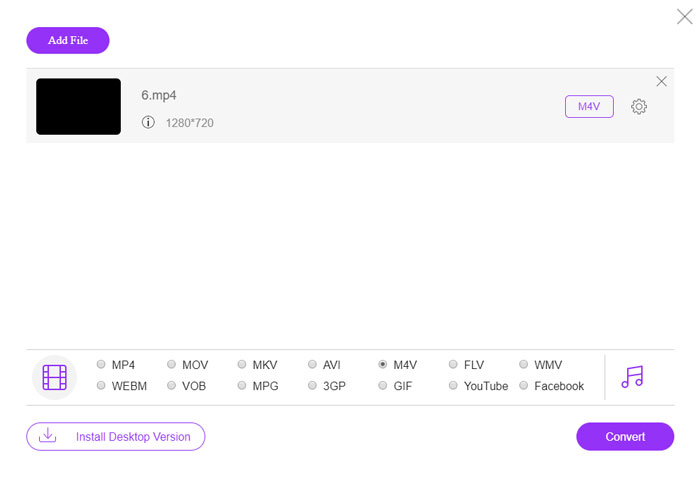
الخطوة 1. انتقل إلى محوّل MP4 إلى AMV عبر الإنترنت من خلال أي متصفح، ويمكنك النقر على زر Add File to Convert لتثبيت محوّل الفيديو لأول مرة. يمكنك أيضًا تحميل ملفات MP4 إلى البرنامج.

الخطوة 2. اختر AMV كصيغة للإخراج من الجزء السفلي. وبالطبع، يمكنك أيضًا ضبط إعدادات الفيديو والصوت، مثل برنامج ترميز الفيديو، ودقة الفيديو، ومعدل البت للفيديو، ومعدل الإطارات وغير ذلك للحصول على الفيديو المطلوب.

الخطوة 3. بعد ذلك، يمكنك النقر على زر Convert لبدء تحويل MP4 إلى AMV وفقًا لذلك. سيستغرق الأمر بضع ثوانٍ للحصول على الملف المطلوب، ثم يمكنك نقل الفيديو إلى هاتفك الذكي وفقًا لذلك.
الجزء 2: كيفية تحويل MP4 إلى AMV باستخدام VLC Media Player
يعد VLC Media Player أحد أشهر محولات MP4 إلى AMV. كما يوفر بعض ميزات تحويل وتحرير الفيديو الأساسية. علاوة على ذلك ، يمكنك أيضًا معاينة إخراج فيديو AMV بعد التحويل. فقط تحقق من العملية التفصيلية على النحو التالي.
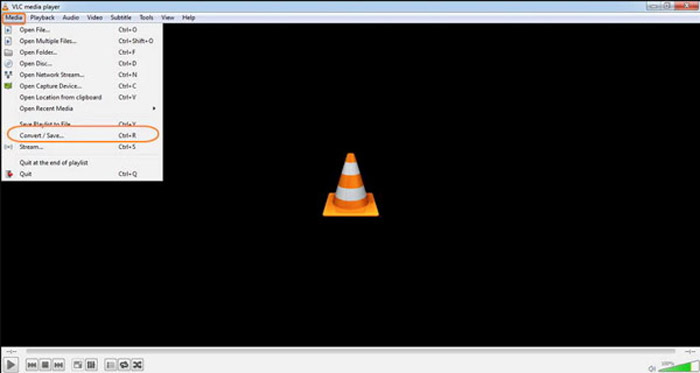
الخطوة 1. افتح مشغّل الوسائط VLC على جهاز الكمبيوتر، وانتقل إلى قائمة Media ثم اختر خيار Convert/Save. انقر على خيار Add الموجود على يمين قائمة File Selection في علامة التبويب File ثم استعرض ملفات MP4.
الخطوة 2. انقر على زر Convert/Save للمتابعة. في نافذة Convert يمكنك اختيار AMV كصيغة للإخراج. انقر على زر Edit Selected Profile لضبط إعدادات الفيديو والصوت.
الخطوة 3. انقر على خيار Browse واختر موقعًا واسم ملف لملف الإخراج. بعد ذلك، يمكنك النقر على زر Start لتحويل ملفات MP4 إلى AMV على جهاز الكمبيوتر الخاص بك.
الجزء 3: أفضل طريقة لتحويل MP4 إلى AMV بسهولة
يُعد FVC Video Converter Ultimate محوّل MP4 إلى AMV متكاملاً على كلٍّ من ويندوز وMac. فهو لا يقتصر على تحويل صيغ الفيديو فحسب، بل يتيح لك أيضًا ضبط مختلف معاملات الفيديو والصوت، وإضافة الترجمات/المسارات الصوتية، وحتى تحرير ملفات الفيديو المحوّلة بسهولة.
- 1. تحويل MP4 إلى AMV والمزيد من تنسيقات الفيديو الأخرى بجودة أصلية.
- 2. قم بتعديل معدل الإطارات وجودة الفيديو ومعدل البت وترميز الفيديو والمزيد.
- 3. توفير ميزات تحرير فيديو متعددة للتدوير ، والقص ، وضبط المرشحات ، إلخ.
- 4. تسريع الأجهزة المتقدمة لتحويل الفيديو بسرعة 70x أسرع.
تحميل مجانيلنظام Windows 7 أو أحدثتنزيل آمن
تحميل مجانيلنظام MacOS 10.7 أو أحدثتنزيل آمن
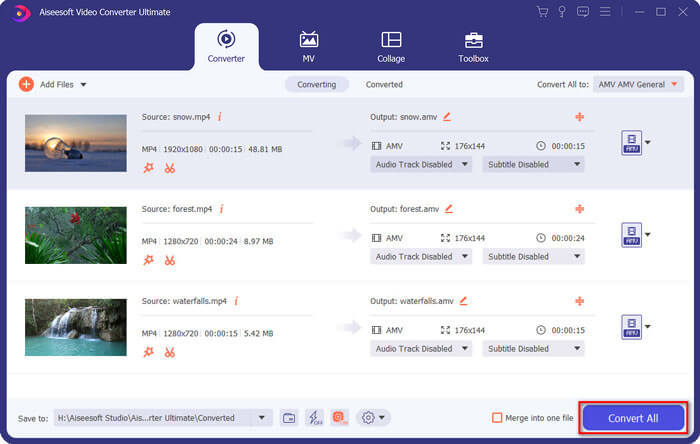
الخطوة 1. نزّل وثبّت محوّل MP4 إلى AMV، ثم شغّل البرنامج على جهاز الكمبيوتر. اختر زر Convert وانقر على خيار Add File لتحميل ملفات MP4، أو اسحب مباشرةً عدة ملفات MP4 إلى هذا البرنامج.

الخطوة 2. انقر على أيقونة الصيغة الموجودة على يمين ملف الفيديو واختر AMV كصيغة للإخراج. يمكنك أيضًا النقر على أيقونة Gear لضبط إعدادات الفيديو والصوت، أو حتى تحرير الفيديو/ضبط الفلاتر بسهولة.

الخطوة 3. بمجرد أن تكون راضيًا عن ملف AMV الناتج، مثل حجم الفيديو، يمكنك النقر على زر Convert All لبدء عملية تحويل MP4 إلى AMV. بعد ذلك، يمكنك نقل ملفات AMV إلى جهاز آخر.
الجزء 4: الأسئلة الشائعة حول تحويل MP4 إلى ملفات AMV
1. ما هو تنسيق ملف AMV؟
يُعرف ملف AMV باسم ملف Anime Music Video. يتم استخدامه عادةً بواسطة أجهزة تشغيل الوسائط المحمولة من الصين وفيها. يتميز تنسيق الفيديو AMV بدقة منخفضة ، حيث تبلغ دقة الفيديو بين 94 × 64 و 160 × 120. عندما تقوم بتحويل MP4 إلى AMV ، يمكنك إرسال المزيد من مقاطع الفيديو إلى هاتفك الذكي بسهولة.
2. كيف تلعب ملفات AMV على الهاتف الذكي والكمبيوتر؟
عندما تقوم بتحويل ملفات MP4 إلى AMV ، كيف تقوم بتشغيل ملفات الفيديو على هاتفك الذكي أو جهاز الكمبيوتر الخاص بك؟ في الواقع ، يمكنك ببساطة استخدام AMV كمتغير لتنسيق AVI ، وهو قابل للتطبيق على معظم مشغلات الوسائط. إذا كنت بحاجة إلى تشغيل ملفات AMV على أجهزة iOS الخاصة بك ، فيمكنك استخدام VLC Media Player أو مشغل وسائط آخر بدلاً من ذلك.
3. ما هي الاختلافات بين AMV و MP4؟
MP4 هو أحد تنسيقات الفيديو الأكثر استخدامًا والتي يمكن استخدامها لخدمة وجهاز البث عبر الإنترنت. AMV هو نوع مختلف من Motion JPEG ، مع جداول تكميم ثابتة وليست متغيرة. عندما تقوم بتحويل MP4 إلى AMV ، يمكنك ضغط الفيديو وتوفير مساحة تخزين أكبر ، خاصة لنقل مقاطع الفيديو إلى الأجهزة.
خاتمة
ما هو أفضل خيار لتحويل MP4 إلى AMV؟ فقط تعرف على مزيد من التفاصيل حول أفضل الطرق من المقالة. إذا كنت بحاجة إلى تحويل مقاطع الفيديو وضغطها عبر الإنترنت بدون برامج إضافية ، فإن FVC Free Online Video Converter هو الحل النهائي الذي يمكنك أخذه في الاعتبار.
-
 AVI VS MP4 - أيهما أفضل (الجودة / الضغط / حجم الملف ...)
 ما هو تنسيق الفيديو الأفضل ، AVI أم MP4؟ إذا كنت ترغب في الحصول على مقارنة مفصلة ، يمكنك التحقق من هذه المقالة AVI VS MP4. يمكنك معرفة الاختلافات والتشابهات بين AVI و MP4 في العديد من الجوانب.
-
 أفضل 10 برامج مشغل MP4 لنظامي التشغيل Windows و Mac (مجاني ومدفوع)
 اقرأ واحصل على أفضل مشغل MP4 من توصيات أحدث 10 برامج لمشغل الفيديو MP4. يمكنك تشغيل ملفات الفيديو MP4 على نظامي التشغيل Windows و Mac بسلاسة دون تأخير.
-
 كيفية تحويل MP4 إلى WMV لنظام التشغيل Mac / Windows
 يشارك هذا المنشور كيفية تحويل فيديو MP4 إلى تنسيق WMV على نظام Mac أو Windows. سوف نقدم لك أيضًا العديد من الخيارات ، بما في ذلك كل من برامج سطح المكتب والمحولات عبر الإنترنت القائمة على الويب. هل أنت مستعد لمعرفة أفضل أدوات تحويل MP4 إلى WMV؟
