


 محول الفيديو النهائي
 مسجل الشاشة
 إصلاح الفيديو
 تنزيل آمن
الطرق النهائية لتحويل PNG إلى JPG باستخدام محولات رائعة
يكون حجم ملف PNG عادةً أكبر من باقي الصيغ. من مساوئ ذلك رفع الملفات أو تنزيلها أو مشاركتها على المواقع، إذ تكون عملية التحميل بطيئة للغاية وتستغرق وقتًا طويلاً. في المقابل، يكون حجم ملف JPG أصغر مقارنةً بـ PNG، مما يجعل حفظ الصور ورفعها على الويب أسرع. كما يصبح فتحها أسهل على التطبيقات والأجهزة الأخرى. لحسن الحظ، ستمنحك هذه المقالة معلومات كافية حول كيفية تحويل PNG إلى JPG. ولإجراء التحويل، ستحتاج إلى الاستعانة بمحولات صور موثوقة. بالإضافة إلى ذلك، ستتعرّف على تعريف هذين التنسيقين. اقرأ هذا المقال إذا كنت تريد تغيير صور PNG لديك إلى تنسيق JPG.

الجزء 1. مقدمة إلى PNG و JPG
ما هو PNG
PNG ، أو Portable Network Graphics ، هو تنسيق نقطي بدون فقد. إنه تباين تنسيق GIF جديد تمامًا. تتوفر أعماق لونية أعلى ، تعرض ملايين من درجات الألوان. يعد PNG أحد تنسيقات الصور السائدة اليوم. يعد حفظ تنسيقات صور RGBA و RGB بناءً على اللوحة أحد خصائص PNG. بالإضافة إلى ذلك ، يحاول نقل الصور عبر الإنترنت. غالبًا ما تستخدم PNG للطباعة. معظم الناس يستخدمون هذا الملف بالذات. علاوة على ذلك ، يتم استخدام تنسيق الصورة هذا بشكل شائع من قبل الخبراء في رسومات الويب. بالنسبة للخلفيات ذات الألوان الشفافة ، فإنها تستخدم أيضًا تنسيق PNG. يعد تقليل حجم الملف لهذا التنسيق ميزة أخرى. حتى الآن ، بالكاد يوجد أي تدهور في الجودة البصرية. يمكن أن تنتج نفس الجودة مثل الأصل. يوفر PNG العديد من المزايا. بفضل الضغط ، يتم ضمان جودة صورة ممتازة.
ما هو JPG
تقوم شركة Joint Photographic Experts Group بإنشاء تنسيق ملف JPEG. إنه أحد تنسيقات ملفات الصور القياسية على الإنترنت والأجهزة الأخرى. 10: 1 إلى 20.1 هي نسبة الضغط. يتم التمديد مع فقدان البيانات مع الامتداد. لكن نسبة الضغط قابلة للتعديل. سيحقق هذا توازنًا بين جودة الصورة ومساحة التخزين. تستخدم منصات مشاركة الصور الفوتوغرافية والكاميرات الرقمية امتداد JPEG. تتمتع JPEG بالعديد من المزايا. يمكنك استخدامه لكل من الأعمال الفنية والصور الفوتوغرافية. إنه بسبب القدرة على التكيف في تحرير البيانات النقطية. يمكن طباعة الأعمال الفنية والصور الفوتوغرافية بدقة عالية وضغط منخفض.
الجزء 2. كيفية تحويل PNG إلى JPG عبر الإنترنت
تحويل PNG إلى JPG باستخدام FVC Free Image Converter
يُعد FVC Free Image Converter واحدًا من أفضل الأدوات التي يمكنك استخدامها، إذ يمكنه تحويل PNG إلى JPG بسهولة تامة. يوفّر واجهة وخطوات مفهومة، مما يجعله مناسبًا للمستخدمين. وإذا أردت تحويل عدة ملفات PNG إلى JPG في وقت واحد، فهذا ممكن أيضًا، لأن هذا المحول يدعم التحويل الدفعي. يمكنك كذلك حفظ ملفات متعددة محوَّلة بنقرة واحدة. إضافةً إلى ذلك، يدعم صيغ إدخال أخرى، مثل PNG وBMP وTIFF وGIF وغيرها. ومن الجوانب الجيدة في هذه الأداة أنها خالية من الإعلانات المزعجة، كما أن واجهتها نظيفة بحيث يمكنك التركيز على عملية التحويل. ولا تحتاج إلى تثبيت هذا المحول، إذ يمكنك تشغيله مباشرة من المتصفح. كذلك ستبقى جودة الصورة مثل الملف الأصلي بعد التحويل، وبذلك تضمن أن النتيجة النهائية مُرضية في العرض والاستخدام. كما أن FVC Free Image Converter يحمي خصوصيتك، فهو لا يحفظ بياناتك بعد إتمام عملية التحويل.
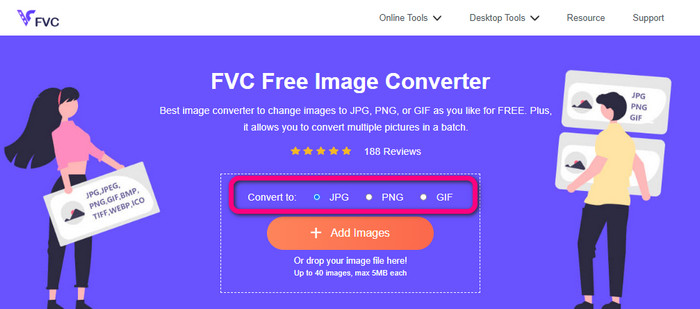
الخطوة 1: زُر موقع FVC Free Image Converter على متصفحك. ثم انقر على تنسيق الملف JPG من خيار الصيغ.
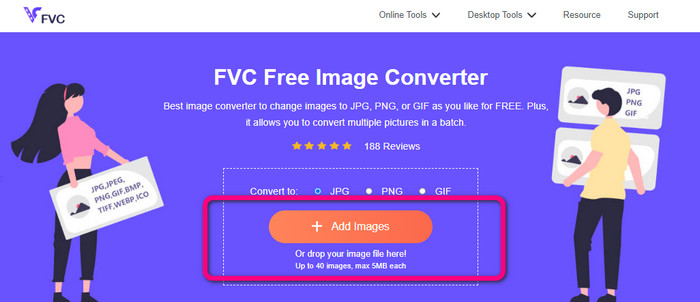
الخطوة 2: انقر على أيقونة Plus أو زر Add Images لإضافة صورة PNG. يمكنك أيضًا إفلات ملف الصورة في المربّع. بعد ذلك، سيجري تحويل الصورة تلقائيًا.
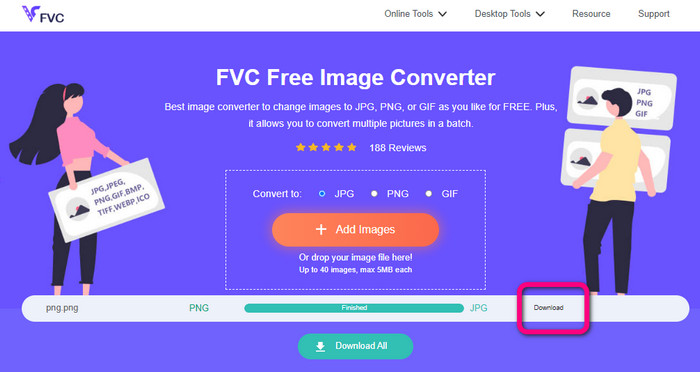
الخطوة 3: في الخطوة الأخيرة، انقر على زر Download لحفظ الصورة النهائية على جهاز الكمبيوتر.
قم بتحويل PNG إلى JPG باستخدام Canva
طريقة أخرى عبر الإنترنت لتحويل PNG إلى JPG هي استخدام Canva. تتميز هذه الأداة الإلكترونية بواجهة استخدام ودّية يسهل فهمها. كما أن عملية التحويل بسيطة ويمكن اتباعها بسهولة، مما يجعلها مناسبة للمبتدئين. يمكنها توفير عملية تحويل سريعة، مع إمكانية تحويل عدد كبير من الملفات كما تشاء. يمكن الوصول إلى Canva من جميع المتصفحات مثل Google وFirefox وEdge وغيرها. بالإضافة إلى ذلك، يمكنك أثناء تحويل الصور القيام بالمزيد؛ مثل قص الصورة وتغيير حجمها، وكذلك إضافة الأيقونات والملصقات وغير ذلك. وبهذه الطريقة يمكنك تحسين صورك أثناء تغيير تنسيق الملف. ومع ذلك، ورغم أن Canva أداة رائعة، إلا أن لها بعض العيوب؛ فاستخدام النسخة المجانية يتضمن العديد من القيود، مثل محدودية الخصائص ومساحة التخزين السحابي وأدوات التحرير وغيرها. تحتاج إلى شراء خطة اشتراك للاستفادة من مزايا غير محدودة وأكثر تقدّمًا. وكذلك، بما أنها أداة تحويل صور عبر الإنترنت، فأنت بحاجة إلى اتصال بالإنترنت.
الخطوة 1: افتح Canva على متصفح الويب أو التطبيق للوصول إلى محوِّل PNG إلى JPG. استخدم قالبًا جاهزًا أو تخطيطًا فارغًا لبدء مشروع التصميم.
الخطوة 2: اسحب وأفلِت ملف PNG الذي تريد استخدامه إلى الصفحة، أو اختره من جهازك.
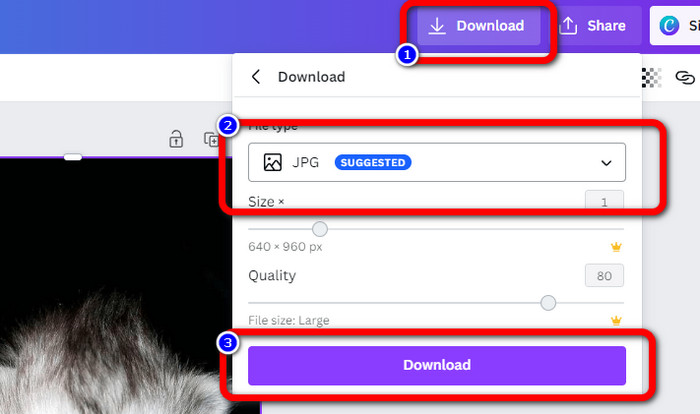
الخطوة 3: انتقل إلى الزاوية العلوية اليمنى من لوحة التحكم وانقر على زر Download. ثم اختر تنسيق JPG كصيغة الإخراج المطلوبة. بعد ذلك انقر مرة أخرى على زر Download لحفظ الصورة على سطح المكتب.
تحويل PNG إلى JPG باستخدام Convertio
يستطيع Convertio أيضًا تحويل PNG إلى JPG. بمساعدة هذه الأداة الإلكترونية لتحويل الصور، يمكنك بسرعة تحويل ملفات PNG إلى JPG. يوفّر Convertio طريقة بسيطة لتحويل الصور، وتجعله واجهته سهلة الاستخدام أكثر وضوحًا لجميع المستخدمين، وخصوصًا المبتدئين. بالإضافة إلى ذلك، يدعم صيغ صور متعددة، مثل PNG وGIF وBMP وSVG وغيرها. كما يدعم هذا المحوِّل عملية التحويل الدفعي، ما يتيح لك تحويل عدة صور في وقت واحد على الفور. علاوة على ذلك، يمكنك بجانب الصور تحويل ملفات الفيديو والصوت والمستندات أيضًا، وبالتالي لن تحتاج إلى البحث عن أداة أخرى عبر الإنترنت. إلا أن النسخة المجانية تتيح رفع ملفات بحجم يصل إلى 100 ميجابايت فقط، وستحتاج إلى شراء خطة اشتراك لزيادة الحجم الأقصى للملف، كما يمكنك شراء الخطة الأغلى للحصول على استخدام غير محدود.
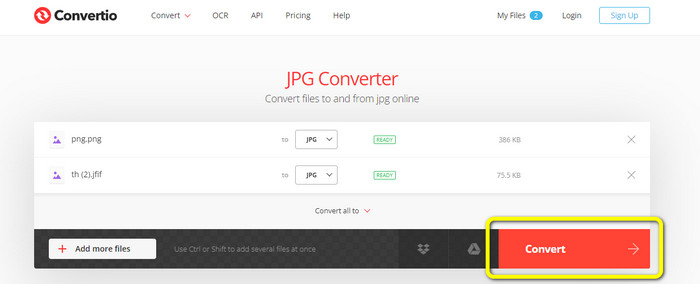
الخطوة 1: افتح المتصفح وابحث عن Convertio. عند الدخول إلى الصفحة الرئيسية، انقر على زر Choose Files. ثم افتح صورة PNG من ملفات جهازك لرفعها.
الخطوة 2: إذا أردت إجراء عملية تحويل دفعي، فانقر على زر Add more files لرفع المزيد من ملفات الصور. بعد ذلك، من خيارات الصيغ، اختر ملف JPG كصيغة إخراج.
الخطوة 3: بعد رفع الملفات وتحديد صيغة الإخراج، انقر على زر Convert. ستبدأ عملية التحويل فورًا. بعد الانتهاء، انقر على زر Download لحفظها في موقع الحفظ الذي حددته.
الجزء 3. كيفية تحويل PNG إلى JPG دون اتصال
تحويل PNG إلى JPG باستخدام Video Converter Ultimate
يُعد Video Converter Ultimate واحدًا من أفضل محوِّلات الصور للعمل دون اتصال بالإنترنت. يتيح لك هذا البرنامج القابل للتنزيل تحويل PNG إلى JPG بسرعة. يوفّر سرعة تحويل عالية، بحيث يمكنك تحويل عدد كبير من الملفات في فترة زمنية قصيرة. بالإضافة إلى ذلك، يمكنك تحويل ملفات متعددة في آن واحد لأنه يدعم التحويل الدفعي. كما يدعم Video Converter Ultimate صيغ صور مختلفة، بما في ذلك PNG وBMP وWEBP وTIF وغيرها. يتمتع هذا المحوِّل غير المتصل بواجهة بديهية وخطوات بسيطة للتحويل، بحيث يتمكن المستخدمون المحترفون وغير المحترفين من تحويل الصور بسهولة. علاوة على ذلك، يمكنك استخدامه على كل من أجهزة Mac وWindows. اتبع الخطوات البسيطة أدناه لتحويل PNG إلى JPG على نظامي Mac أو Windows باستخدام Video Converter Ultimate.
الخطوة 1: نزّل برنامج Video Converter Ultimate على نظام Windows أو Mac. شغّل البرنامج بعد إتمام التثبيت. يمكنك النقر على زر التنزيل أدناه للوصول إلى المحوِّل.
تحميل مجانيلنظام Windows 7 أو أحدثتنزيل آمن
تحميل مجانيلنظام MacOS 10.7 أو أحدثتنزيل آمن
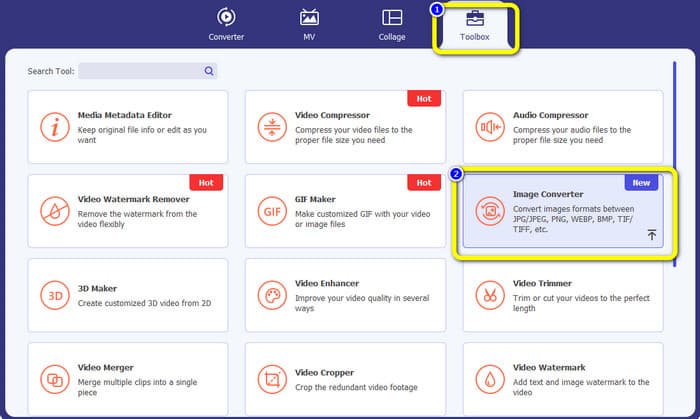
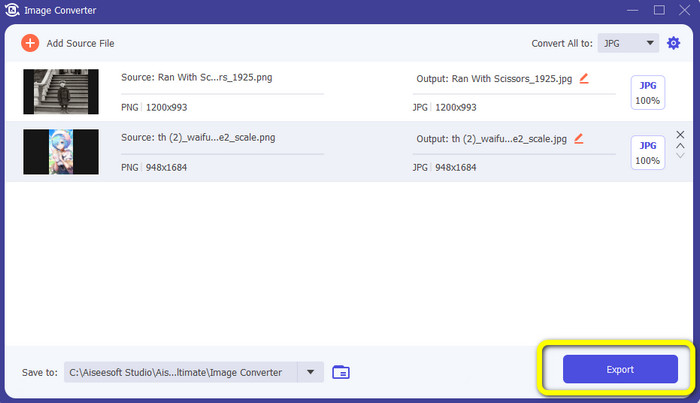
الخطوة 2: عند ظهور الواجهة على الشاشة، اختر لوحة Toolbox. ثم حدد أداة Image Converter. بعد النقر عليها ستظهر واجهة أخرى.
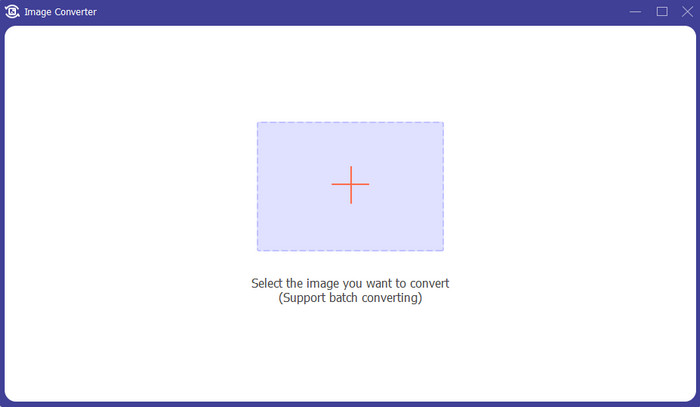
الخطوة 3: انقر على أيقونة +. ثم اختر صورة PNG عندما تظهر لك نافذة مجلدات جهازك على الشاشة.
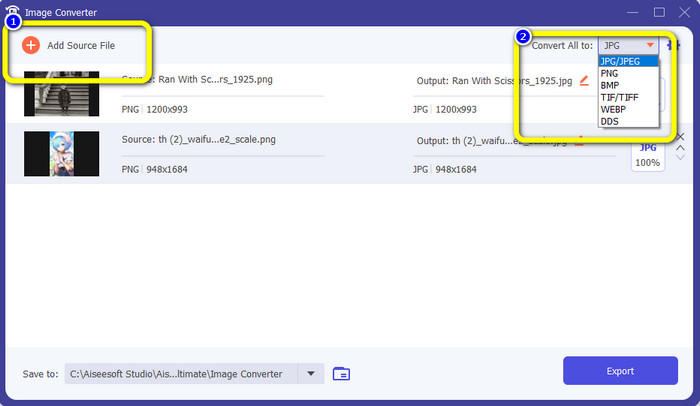
الخطوة 4: إذا أردت إجراء تحويل دفعي، فانقر على زر Add Source File. ثم انتقل إلى خيار Convert All to واختر تنسيق ملف JPG.
الخطوة 5: انقر على زر Export لحفظ الصورة النهائية بعد التحويل. بعد ذلك يمكنك فتح صورة JPG من مجلد الملفات لديك.
الجزء 4. تحويل PNG إلى JPG باستخدام الجهاز المحمول
قم بتحويل PNG إلى JPG باستخدام PNGtoJPG
إذا كنت تريد معرفة كيفية تحويل PNG إلى JPG باستخدام iPhone و Android ، فاستخدم تطبيق PNGtoJPG. هذا تطبيق تنزيل مجاني مناسب لأجهزة iPhone و Android. يمكّنك من تحويل ملفات الصور الخاصة بك بسهولة وعلى الفور. كما أن لديها إجراء أساسي للتحويل. بهذه الطريقة ، يمكن لجميع المستخدمين استخدام هذا التطبيق ، بشكل أساسي المستخدمين غير المحترفين. بالإضافة إلى ذلك ، يوفر تطبيق PNGtoJPG عملية تحويل سريعة ، مما يجعلها مريحة. لسوء الحظ ، على عكس محولات الصور الأخرى ، فإنه لا يدعم عملية تحويل الدُفعات. لذلك ، يجب عليك تحويل الصور يدويًا ، وهو ما يستغرق وقتًا طويلاً.
الخطوة 1: ثبّت تطبيق PNGtoJPG من متجر Apple أو Play Store، ثم شغّله.
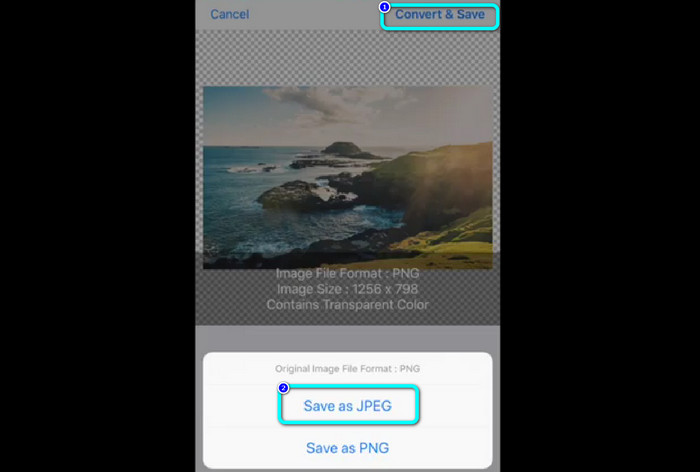
الخطوة 2: اضغط على خيار Load a photo من منتصف الواجهة بعد تشغيل التطبيق. ستظهر صورك على الشاشة، ثم اختر صورة PNG التي تريد تحويلها.
الخطوة 3: انتقل إلى الزاوية العلوية اليمنى من الشاشة وانقر على زر Convert & Save. وعند ظهور خيار آخر على الشاشة، اختر Save as JPEG. بهذه الطريقة يمكنك تحويل ملف PNG إلى تنسيق JPG. انقر هنا لمعرفة كيفية تحويل JPG إلى PNG.
الجزء 5. أسئلة وأجوبة حول تحويل PNG إلى JPG
1. كيف تحول ملف PDF إلى JPEG؟
أفضل طريقة لتحويل PDF إلى JPG هي استخدام البرنامج الإلكتروني PDF Simpli. انقر على زر Upload PDF to Upload ثم اختر ملف PDF من مجلدك. انتقل إلى الجزء العلوي الأيمن من الواجهة وانقر على زر Convert. وأخيرًا، اختر تنسيق JPG من خيار الصيغ.
2. كيف أقوم بفتح ملفات PNG على Windows 11/10؟
أفضل طريقة هي فتح مجلد جهاز الكمبيوتر. انتقل إلى المجلد الذي توجد فيه صورة PNG. ثم انقر بزر الفأرة الأيمن على الصورة واختر خيار Open.
3. كيف يمكنني تحويل ملفات JPG مجانًا؟
يمكنك استخدام FVC Free Image Converter لتحويل ملفات JPG مجانًا. وبغضّ النظر عن عدد الصور التي تحتاج إلى تحويلها، لن تدفع أي رسوم.
خاتمة
هذه هي أفضل الطرق لتحويل PNG إلى JPG باستخدام محوِّلات الصور عبر الإنترنت وبدون اتصال. ولكن إذا كنت تفضّل محوِّل صور يسهل الوصول إليه، فاستخدم FVC Free Image Converter.
-
 تحويل JPEG إلى JPG بكفاءة [خمسة طرق مدرجة]
 تعال واحصل على أكثر البرامج التعليمية مباشرة حول تحويل JPEG إلى تنسيق ملف صورة JPG. انقر فوق هذا الدليل الإرشادي وابدأ في تعلم الأساليب المفضلة لديك.
-
 تفاصيل كاملة حول الاختلافات بين JPEG و JPG مقابل PNG
 ستمنحك هذه المشاركة معلومات كافية حول الاختلافات بين JPEG و JPG مقابل PNG. بالإضافة إلى ذلك ، ستتعلم كيفية تحويل الصور إلى هذه الملفات.
-
 8 محولات صور مذهلة [معلومات كاملة]
 ستخبرك هذه المراجعة عن أفضل محولات ملفات الصور التي يمكنك استخدامها لتحويل ملفات الصور. اقرأ هذا المنشور لمعرفة أفضل محول صور لك
