


 محول الفيديو النهائي
 مسجل الشاشة
 إصلاح الفيديو
 تنزيل آمن
تعرف على معايير طول فيديو Twitter و Instagram و TikTok
Do you want to know the video length standard of each platform, like TikTok, Twitter, and Instagram? Then the best you can do is to read this informative post. We will provide all the details you can discover regarding the maximum video length for each platform. In addition, this post will provide the methods to cut the video length using video editing software. This way, you will know how to cut your videos before posting them on various social media platforms. To learn all the details, read this post from start to end.

الجزء 1. معيار طول الفيديو لـ Instagram
يعد Instagram أحد أكثر منصات الوسائط الاجتماعية شيوعًا في الوقت الحاضر. إنه مناسب لنشر الصور والقصص والمزيد. إنها أيضًا منصة اتصال تتيح لك التواصل مع مستخدمين آخرين. في هذا الجزء ، ستتعرف على كل التفاصيل حول معيار طول فيديو Instagram. انظر المعلومات الإضافية أدناه.
IG Post Video Length
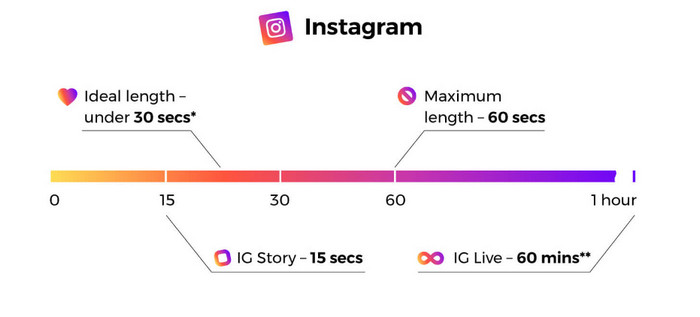
عندما نتحدث عن منشور الفيديو داخل الخلاصة ، فهذه هي مقاطع الفيديو التي يمكنك مواجهتها أثناء التمرير. يصل طول فيديو instagram إلى 60 ثانية أو دقيقة واحدة.
Instagram Stories
إذا كنت ترغب في تحميل أو نشر مقطع فيديو على قصة Instagram الخاصة بك ، فيمكنك تحميله بطول فيديو بحد أقصى 15 ثانية. إذا كنت ترغب في نشر مقاطع فيديو أطول على قصة Instagram الخاصة بك ، فيمكنك تحميل 15 ثانية من مقاطع الفيديو. يمكنك أيضًا نشر إعلانات متنوعة على قصص IG ، لكن طول الفيديو لا يزال 15 ثانية.
Instagram Live Videos
يمكنك أيضًا مشاركة مقاطع الفيديو الحية على Instagram. يصل طول الفيديو المباشر على Instagram إلى ساعة واحدة.
Instagram TV
يمكنك الآن استخدام أحدث وظيفة في Instagram ، وهي. Instagram TV ، أو IGTV ، عبارة عن منصة لتحل محل التلفزيون التقليدي. لذلك يمكنك إرسال مقاطع فيديو طويلة تصل مدتها إلى 60 دقيقة. يمكن للمستخدمين البدء في مشاهدة مقاطع الفيديو بمجرد تشغيل التطبيق الفرعي. أيضًا ، جميع مقاطع الفيديو على IGTV عمودية لأن هذا التنسيق هو الأكثر فاعلية لمنصة الأجهزة المحمولة فقط.
هذه هي أقصى طول لفيديو Instagram على القصص ومنشورات الفيديو أثناء التغذية ومقاطع الفيديو و IGTV.
الجزء 2. معيار طول الفيديو لـ TikTok
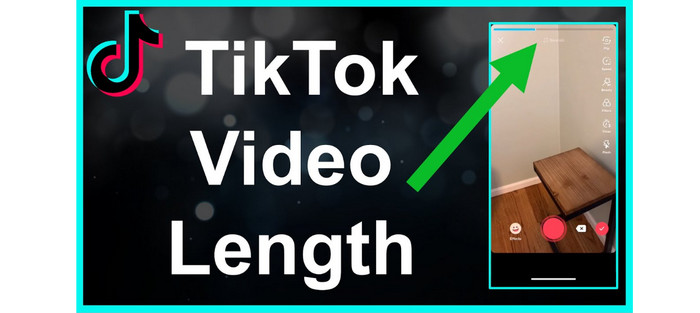
في السابق ، كان متوسط طول مقطع فيديو TikTok 15 ثانية فقط. تضمنت النداء المبكر للتطبيق مقطع فيديو قصيرًا. استمروا في التمرير للحصول على المزيد لأنه قدم مقاطع فيديو سريعة وجذابة. ومع ذلك ، فإن المهلة الزمنية البالغة 15 ثانية كانت سارية لمدة عام تقريبًا. زاد التطبيق المملوك لشركة ByteDance مدة الفيديو القصوى إلى دقيقة واحدة في عام 2017 وثلاث دقائق في عام 2021.
الآن ، يبلغ الحد الأقصى لطول الفيديو في TikTok 10 دقائق. بهذه الطريقة ، يمكن للمستخدمين تحميل مقطع فيديو أطول. ومع ذلك ، هناك العديد من الأشياء التي تحتاج إلى أخذها في الاعتبار. تذكر دائمًا أن المستخدمين يفضلون المحتوى ذي الحجم الصغير. هذا يعني أن نشر مقطع فيديو قصير أفضل من نشر مقطع فيديو أطول.
الجزء 3. معيار طول الفيديو لتويتر
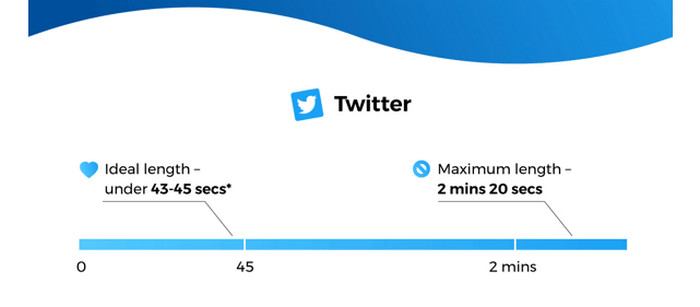
The Twitter application is the perfect platform if you prefer posting shorter videos. The maximum video length it can provide is up to 140 seconds or 2 minutes, and 20 seconds long. Posting video ads have the same duration. For additional information, the video will automatically loop when posting a video with less than 7 seconds. It means that your video will turn into GIF. One of the keys to audience minds and hearts is GIFs. Furthermore, the best video length for Twitter is around 44 seconds. It is enough time to grab viewers’ attention.
الجزء 4. كيفية قص طول الفيديو لهذه المنصات
After knowing the maximum length of each social media platform, you can already know the length requirement when posting a video. But the question is, how to cut a video to the desired length? We will introduce you to the Video Converter Ultimate if that concerns you. Video Converter Ultimate is a program to shorten a video for TikTok, Twitter, Instagram, and other platforms. It lets you cut or trim your video to your desired length. Also, the program allows you to cut videos with straightforward methods during the cutting process. This way, skilled and non-professional users can operate this video editing software. It also has an easy-to-understand interface, which is easier to comprehend.
علاوة على ذلك ، يتوفر Video Converter Ultimate على أي جهاز ، وخاصة أجهزة الكمبيوتر التي تعمل بنظام Windows و Mac. لذلك ، سواء كنت من مستخدمي Mac أو Windows ، يمكنك بسهولة تنزيله واستخدامه لقطع مقاطع الفيديو. علاوة على ذلك ، يدعم البرنامج تنسيقات الإخراج المختلفة. يمكنك حفظ مخرجاتك النهائية على MP4 و MKV و AVI و MOV والمزيد. يمكنك أيضًا ضبط دقة الفيديو وجودته لجعله أكثر جاذبية. بصرف النظر عن ذلك ، عند حفظ الفيديو المحرر ، لن يضع البرنامج عناصر مزعجة على الفيديو الخاص بك مثل العلامات المائية والشعارات والملصقات والمزيد.
Step 1. Click the Download button below to access the Video Converter Ultimate on your Mac or Windows computers. After that, run the program when the installation process is done.
تحميل مجانيلنظام Windows 7 أو أحدثتنزيل آمن
تحميل مجانيلنظام MacOS 10.7 أو أحدثتنزيل آمن
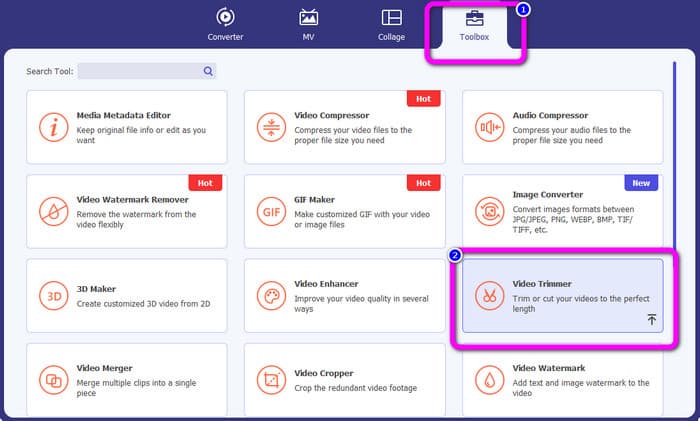
Step 2. Afterward, the main interface will pop up on the computer screen. Click the Toolbox option on the top part interface. Then, various tools will show up and select the Video Trimmer tool.
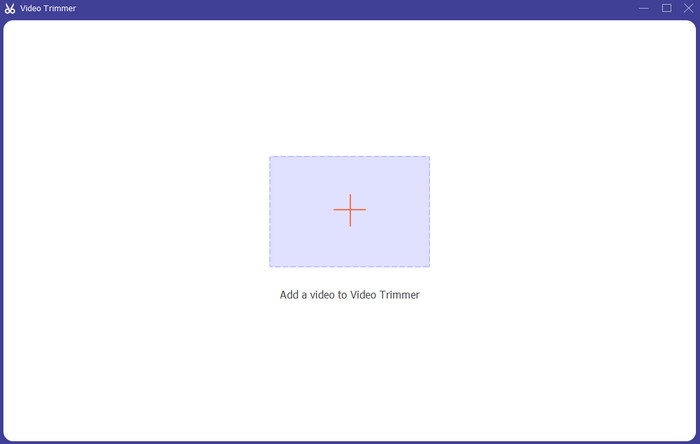
Step 3. Then, another interface will appear on the computer screen. To add the video you want to shorten, click the + icon. This way, the file folder will appear and select the video.
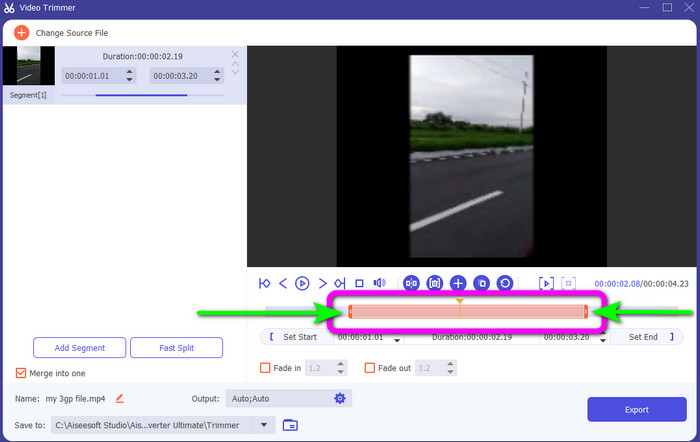
Step 4. You can freely cut your video by adjusting or dragging the video play head. Adjust the edge of the video based on your preference.
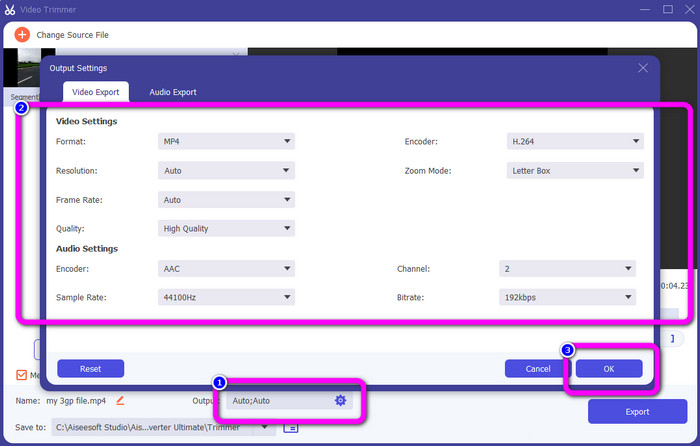
Step 5. To make other changes to the video, go to Output Settings. This setting allows you to change the video’s resolution, quality, frame rate, output formats, and other parameters. Then, click OK.
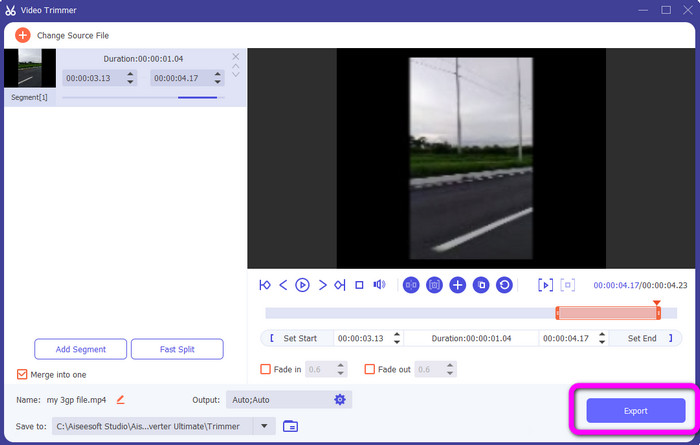
Step 6. When you are satisfied with your video, click the Export button. After the exporting process, you can save the video from this video trimmer on your computer. Then, you can use the video to post on various social media platforms.
الجزء 5. أسئلة وأجوبة حول طول الفيديو لمنصات خدمة الشبكات الاجتماعية
1. ما هي المدة التي يجب أن يستغرقها فيديو Snapchat؟
إذا كنت تشير إلى المنشور العادي ، فإن 10 ثوانٍ هي الحد الأقصى لطول الفيديو. ولكن إذا كنت ترغب في شراء إعلان ، فإن الفيديو الأكثر امتدادًا هو 3 دقائق.
2. ما هو الحد الأقصى لطول الفيديو على Facebook؟
الحد الأقصى لطول الفيديو على Facebook ، بما في ذلك الإعلانات ، هو 240 دقيقة (4 ساعات). من حيث طول الفيديو الأمثل ، تتراوح مدته من 15 ثانية إلى 3+ دقائق.
3. ما هو أفضل طول لفيديو TikTok؟
الطول المثالي لمقطع فيديو TikTok هو من 10 إلى 15 ثانية. يكفي لجذب انتباه المشاهدين.
خاتمة
With the help of this article, you have discovered the video length standard for each social network service platform. It includes TikTok, Twitter, and Instagram. In addition, the article taught you how to cut video length using Video Converter Ultimate. So, if you want to shorten the length of your video for social media, use this offline program. Its simple interface and steps will help you cut your videos easily and quickly.
-
 كيفية اقتطاع مقطع فيديو باستخدام TikTok [إرشادات مفصلة]
 هل تريد معرفة كيفية تقصير الفيديو باستخدام TikTok؟ بعد ذلك ، سوف نقدم طرقًا سهلة. ستتعلم أيضًا طرقًا أخرى باستخدام التطبيقات / البرامج غير المتصلة بالإنترنت.
-
 كيفية اقتطاع مقاطع الفيديو باستخدام Snapchat ولصالحها [خطوة بخطوة]
 سيقدم هذا المنشور الإعلامي طرقًا لقص مقطع فيديو باستخدام Snapchat. أيضًا ، سنقدم تطبيقات رائعة لقص مقاطع الفيديو لـ Snapchat. أقرأ أكثر لتكتشف.
-
 طرق رائعة حول كيفية تقسيم مقاطع الفيديو بشكل فعال
 تشرح هذه المقالة كيفية تقسيم الفيديو إلى أجزاء. لذلك ، إذا كنت مهتمًا ، فانقر فوق هذا المنشور لأننا نقدم لك أكثر الطرق مباشرة للمحاولة.
