


 محول الفيديو النهائي
 مسجل الشاشة
 إصلاح الفيديو
 تنزيل آمن
DVR إلى MP4: اجعل حياة الوسائط الخاصة بك نسيمًا مع التحويل السهل
ادخل عالماً من السهولة والحرية باستخدام أفضل حلول تحويل DVR إلى MP4. ودّع التعقيدات واستقبل التحويل السلس لتسجيلات DVR الخاصة بك إلى تنسيق MP4 متعدد الاستخدامات. استمتع بسهولة الوصول من دون عناء وافتح آفاقاً واسعة لمحتوى DVR لديك. ابدأ الآن في التحويل إلى MP4 واكشف الإمكانات الحقيقية لمجموعتك الإعلامية بابتسامة. سواء أردت مشاركة اللحظات الثمينة أو الاستمتاع ببرامجك المفضلة أثناء التنقل، فإن نهجنا سهل الاستخدام يجعل الأمر في غاية البساطة.

الجزء 1. أفضل طريقة لتحويل DVR إلى MP4
يُعد FVC Video Converter Ultimate برنامجاً متعدد الاستخدامات وسهل الاستخدام لتحويل الفيديوهات، يتيح لك تحويل فيديوهاتك بكل سلاسة. فهو يوفر سرعات تحويل عالية، وإمكانية التحويل بالدفعات، وإعدادات مخرجات قابلة للتخصيص، بل وحتى القدرة على استخراج الصوت من الفيديوهات. تعرّف أكثر إلى هذا الأداة من خلال إلقاء نظرة على ميزاتها الرئيسية.
الميزات الرئيسية
◆ أدوات التحرير: يوفر البرنامج أدوات تحرير أساسية ، مما يسمح لك بقص أو اقتصاص أو إضافة علامات مائية أو تطبيق تأثيرات الفيديو لتحسين مقاطع الفيديو الخاصة بك قبل التحويل.
◆ إخراج عالي الجودة: حافظ على الجودة الأصلية لمقاطع الفيديو الخاصة بك أو اختر مجموعة متنوعة من خيارات التشفير لضمان جودة الإخراج المثلى للمحتوى المحول.
◆ دعم متعدد اللغات: يدعم البرنامج لغات مختلفة ، مما يجعله في متناول المستخدمين في جميع أنحاء العالم.
الخطوة 1. الحصول على مثبت البرنامج المناسب
بادئ ذي بدء ، يجب أن تحصل على المثبت الصحيح. فيما يلي أدوات التثبيت لأجهزة كمبيوتر Windows و Mac. بمجرد الحصول على الأداة ، قم بتثبيتها على جهاز الكمبيوتر الخاص بك. ثم قم بتشغيله على جهاز الكمبيوتر الخاص بك.
تحميل مجانيلنظام Windows 7 أو أحدثتنزيل آمن
تحميل مجانيلنظام MacOS 10.7 أو أحدثتنزيل آمن
الخطوة 2. رفع ملف DVR
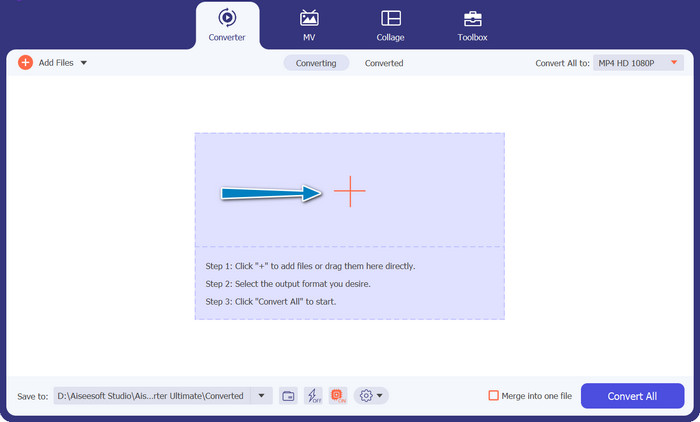
الآن، انقر على زر علامة الزائد الموجود في الواجهة الرئيسية، ثم اختر ملف DVR الهدف من مجلد الكمبيوتر لديك. بعد ذلك، ينبغي أن ترى صورته المصغّرة.
الخطوة 3. اختر صيغة الإخراج
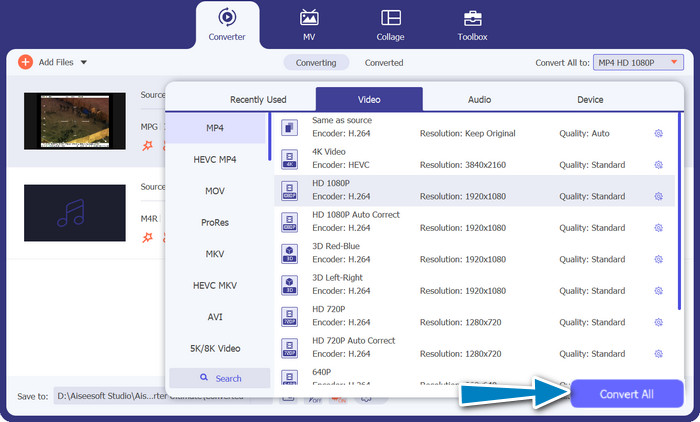
بعدها، افتح قائمة القائمة المنسدلة للاطلاع على جميع الصيغ المتاحة. انتقل إلى علامة تبويب الفيديو وابحث عن تنسيق MP4. بعد ذلك، يمكنك اختيار الجودة المفضلة لديك لتحويل الفيديو.
الخطوة 4. بدء عملية التحويل
بعد رفع الملف واختيار صيغة الإخراج، انقر على زر Convert All أسفل واجهة البرنامج لبدء عملية التحويل.
الجزء 2. أفضل طريقة لتحويل DVR إلى MP4 عبر الإنترنت مجانًا
هل سمعت عن Free MP4 Video Converter Online؟ إنّه أداة رائعة تساعدك على تحويل فيديوهاتك إلى تنسيق MP4 الشائع. وبهذه الطريقة، يمكنك التأكد من أنّ فيديوهاتك ستعمل على أي جهاز أو منصة. والأفضل من ذلك؟ أنّه في غاية السهولة في الاستخدام! اتبع الخطوات التالية لمعرفة كيفية استعمال هذا المحوِّل الإلكتروني من DVR إلى MP4، واكتشف المزيد من ميزاته.
الميزات الرئيسية
◆ مجانًا: يتوفر محول FVC Free MP4 عبر الإنترنت مجانًا ، مما يجعله خيارًا اقتصاديًا لتحويل مقاطع الفيديو الخاصة بك إلى تنسيق MP4.
◆ استخدام غير محدود: لا توجد قيود على عدد مقاطع الفيديو التي يمكنك تحويلها باستخدام FVC Free MP4 Converter Online ، مما يسمح لك بتحويل أكبر عدد تريده من مقاطع الفيديو دون أي قيود.
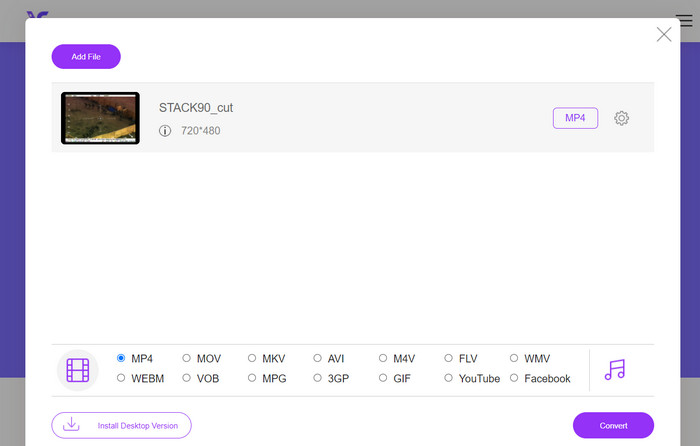
الخطوة 1. أولاً وقبل كل شيء، تحتاج إلى زيارة موقع البرنامج عبر النقر على الرابط المرفق في وصف الأداة أعلاه. ثم انقر على زر Add Files to Convert في الصفحة الرئيسية لرفع ملفات DVR.
الخطوة 2. بعد ذلك، اختر الملف الذي تريد تحويله من جهاز الكمبيوتر. بعد انتهاء عملية الرفع، سيقوم البرنامج تلقائياً بتعيين صيغة الإخراج كـMP4.
الخطوة 3. أخيراً، اضغط على زر Convert لبدء عملية التحويل، ثم انتظر حتى تكتمل العملية.
الجزء 3. تحويل DVR إلى MP4 باستخدام طريقة أخرى
FFmpeg هي أداة سطر أوامر قوية يمكنها تحويل DVR إلى MP4 والقيام بمهام وسائط متعددة أخرى. يحتاج إلى بعض الفهم الفني لاستخدامه ، ولكن قد يتم تخصيصه بعدة طرق وغالبًا ما يستخدم لمعالجة الوسائط المتعددة.
الميزات الرئيسية
◆ واجهة سطر الأوامر: تعمل FFmpeg من خلال أوامر سطر الأوامر ، مما يمنح المستخدمين المتقدمين المرونة لتنفيذ عمليات التحويل المعقدة.
◆ المعالجة المتقدمة: توفر ميزات متقدمة مثل تصفية الفيديو ، والقياس ، والاقتصاص ، ومعالجة الصوت ، مما يتيح للمستخدمين ضبط تحويلاتهم بدقة.
الخطوة 1. قم بتحميل وتثبيت FFmpeg من موقعه الرسمي (https://ffmpeg.org/) وفقاً لنظام التشغيل لديك.
الخطوة 2. بعد ذلك، افتح موجّه الأوامر (Command Prompt) أو نافذة الطرفية (Terminal) على جهاز الكمبيوتر.
الخطوة 3. بعدها، انتقل إلى الدليل الذي تم تثبيت FFmpeg فيه، أو اكتب المسار الكامل لملف FFmpeg التنفيذي داخل الأمر.
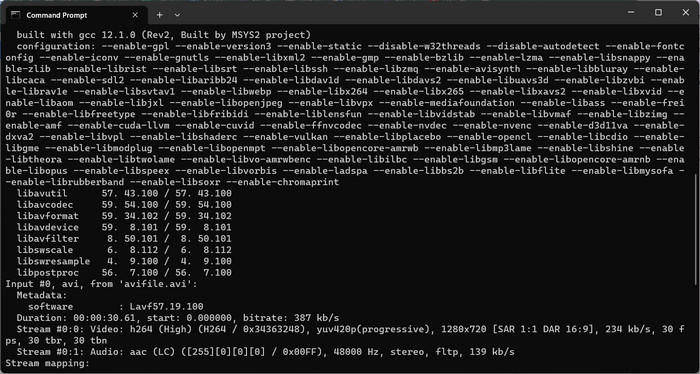
الخطوة 4. استخدم صيغة أوامر FFmpeg لتحديد ملف DVR كمدخل وصيغة الملف الناتج المطلوبة (MP4). على سبيل المثال: ffmpeg -i input.dvr output.mp4.
الخطوة 5. وأخيراً، اضغط على زر Enter لتنفيذ الأمر. سيبدأ FFmpeg عملية التحويل ويعرض التقدّم في نافذة موجّه الأوامر.
قراءة إضافية:
طرق نهائية ومجانية لتحويل DV إلى WMV [أونلاين وغير متصل]
أساليب سهلة لتحويل ملفات MTV إلى MP4
الجزء 4. مقارنة بين 3 طرق
لمساعدتك في الاختيار بين FVC Video Converter Ultimate و Free MP4 Video Converter Online و FFmpeg كمحول DVR إلى MP4 ، قمنا بتجميع الجدول التالي.
| محول الفيديو النهائي | MP4 محول فيديو مجاني على الإنترنت | FFmpeg | |
| دعم التنسيق | مجموعة واسعة من الأشكال | تنسيقات محدودة | مجموعة واسعة من الأشكال |
| التخصيص | إعدادات الإخراج المتقدمة | إعدادات الإخراج الأساسية | تخصيص واسع النطاق |
| واجهة المستخدم | برنامج سطح المكتب | واجهة قائمة على الويب | أداة سطر الأوامر |
| أداء | كفاءة وسرعة | يعتمد على سرعة الإنترنت | حسب مواصفات النظام |
| خصوصية | تحويل الملف المحلي | تحويل الملف عبر الإنترنت | تحويل الملف المحلي |
الجزء 5. أسئلة وأجوبة حول تحويل DVR إلى MP4
كيف أقوم بفتح ملف DVR؟
يمكن لـ Windows Media Center التقاط وتشغيل ملفات DVR المحفوظة بتنسيق DVR-MS على الكمبيوتر الشخصي.
هل يمكن لـ VLC تشغيل ملفات DVR؟
قد يكون VLC قادرًا على تشغيل ملفات DVR ، ولكن فقط إذا كان يحتوي على وحدات فك ترميز الصوت والفيديو المناسبة المضمنة. قد تقوم ملفات DVR بتشغيل الصوت والفيديو بتنسيقات MPEG-2 و AAC ، على التوالي. يتطلب VLC وحدة فك ترميز الفيديو MPEG-2 ووحدة فك ترميز الصوت AAC لتشغيل ملفات DVR بشكل فعال.
هل يمكنني تحويل ملفات DVR إلى تنسيقات فيديو أخرى إلى جانب MP4؟
نعم ، بناءً على البرنامج الذي تستخدمه ، يمكنك غالبًا تحويل ملفات DVR إلى تنسيقات فيديو أخرى متنوعة ، بما في ذلك AVI أو MKV أو MOV أو WMV. تتيح لك هذه المرونة اختيار التنسيق الذي يناسب احتياجات التشغيل أو المشاركة.
هل هناك خطر فقدان البيانات أو تدهور الجودة أثناء عملية التحويل؟
عند استخدام برامج موثوقة وذات سمعة طيبة ، يكون خطر فقدان البيانات أو تدهور الجودة ضئيلاً. ومع ذلك ، يوصى دائمًا بعمل نسخة احتياطية من ملفات DVR الأصلية الخاصة بك قبل إجراء أي تحويلات ، فقط لتكون بأمان.
هل يمكن لبرنامج FFmpeg تحويل ملفات DVR إلى تنسيقات أخرى غير MP4؟
نعم ، FFmpeg هي أداة سطر أوامر قوية تدعم تنسيقات الفيديو والصوت المختلفة. باستخدام الأوامر المناسبة ، يمكنك تحويل ملفات DVR إلى تنسيقات مثل AVI أو MKV أو MOV وغيرها.
خاتمة
من خلال اختيار الأداة المناسبة لاحتياجاتك، يمكنك بكل كفاءة تحويل ملفات DVR إلى MP4 مع الحفاظ على جودة الفيديو. سواء فضّلت برنامجاً على سطح المكتب أو محوِّلاً عبر الإنترنت، فإن هذه الخيارات توفّر لك المرونة لتحويل ملفات DVR وتحسين تجربتك مع الوسائط المتعددة.
-
 كيفية ضغط ملف DV دون فقدان الجودة على نظامي التشغيل Windows / Mac
 عندما تريد مشاركة مقاطع فيديو DV التي تم التقاطها باستخدام كاميرا Sony ، يمكنك معرفة المزيد حول طريقة ضغط DV إلى البريد الإلكتروني أو SNS دون فقدان الجودة مجانًا.
-
 أفضل طريقتين لتحويل ملفات DV إلى MOV مجانًا على سطح المكتب وعلى الإنترنت
 هل لديك مشكلة في تحويل ملفات DV إلى MOV على جهاز Mac الخاص بك؟ إذا كانت هذه هي مشكلتك ، فيمكننا حلها معًا إذا قرأنا هذه المقالة.
-
 كيفية تحويل DV إلى تنسيق ملف MP4 [حل المشكلة]
 هل أنت مهتم بتحويل DV إلى MP4 باستخدام محولات غير متصلة بالإنترنت وعبر الإنترنت؟ فأنت على الطريق الصحيح. سنقدم لك أفضل الحلول التي تريدها.
