


 محول الفيديو النهائي
 مسجل الشاشة
 إصلاح الفيديو
اختر أفضل مسجل شاشة بتنسيق GIF لتسجيل GIF [متصل وغير متصل]
إنها حقيقة أن صور GIF بسيطة ولكنها سهلة الوصول إلى تنسيق الملفات عبر الويب. حجم ملف GIF صغير جدًا لدرجة أنه أصبح أحد أكثر الطرق فعالية لإرسال الفيديو أو الصور المتحركة عبر الإنترنت. أثناء مشاهدة فيلم ، وجدت مشهدًا رائعًا عن الفيلم الذي تشاهده وتريد مشاركته مع أصدقائك أو أحبائك أو عائلتك. لكن معظم مسجلات الشاشة بصيغة MP4 و MOV والتي تعد واحدة من أكبر تنسيقات حجم الملفات. ليس جديدًا بالنسبة لنا أن نقل هذا النوع من تنسيقات الملفات سيستغرق ساعة أو أكثر ويفشل في معظم الأحيان بسبب انقطاع الإنترنت أو في حالات أخرى ، يصبح التنسيق غير متاح لأن ليس كل مشغل الوسائط المحلي يدعم كل التنسيقات.
أثناء التصفح على الويب والبحث عن حل، قد تصادف صور GIF. هذا النوع من الملفات يكون أصغر بكثير من حيث الحجم ويسهل مشاركته. لذلك قد تفكر: ما هو أفضل «مسجّل GIF» ينبغي أن أستخدمه لتسجيل مشهد من الفيلم الذي أشاهده؟ القائمة أدناه تتناول بعض أدوات تسجيل الـ GIF الشائعة التي ربما صادفتها على الويب أو لم تصادفها بعد. تابع القراءة لمعرفة ما هي هذه الأدوات وكيف تستخدمها لالتقاط مشاهد بصيغة GIF متحركة.

الجزء 1. أفضل الخصائص التي يجب أن يتمتع بها مسجل GIF
قبل أي شيء، من الضروري اختيار أفضل مسجّل شاشة. لكن ربما تتساءل ما الذي يجب أن تعطيه الأولوية عند اختيار «مسجّل GIF»؟ القائمة أدناه تعطيك فكرة عن أهم الخصائص التي يجب أن يتصف بها المسجّل الجيد.
● يجب أن يكون سهل الاستخدام – اختر منتجًا لا يسبب لك أي متاعب أثناء التسجيل.
● صديق للميزانية – ينطبق هذا فقط إذا كانت الأداة مدفوعة الاستخدام. لا بأس أن تكون الأداة منخفضة التكلفة بدلًا من إنفاق أموالك على شيء يمكن لنسخة مدفوعة رخيصة أن توفره. من المؤكد أن الأداة المميزة تعطي أفضل نتيجة، لكن هذا يهم فقط في الأدوات المدفوعة. لذا، الأدوات المجانية سواء أونلاين أو أوفلاين لا ينبغي أن تقلقك من هذه الناحية.
● توافر البرنامج – في حالة تغييرك من حاسوب يعمل بنظام ويندوز إلى ماك أو العكس، لن تحتاج إلى التعود على مسجّل جديد. لذا من الضروري اختيار «مسجّل شاشة GIF» متوفر على جميع المنصات. ولتقليل الإزعاج، إذا تم إجراء تغييرات على الأداة لاحقًا فالأفضل أن تكون بسيطة، مثل تغيّر الاسم فقط وليس واجهة الاستخدام بالكامل.
● خالٍ من البرمجيات الخبيثة أو الفيروسات – هذا ينطبق على الأدوات أونلاين وأوفلاين. على كل برنامج أن يوفّر لك أفضل تسجيل مع أعلى درجات الأمان، لتجنّب فقدان البيانات أو تسربها.
على الرغم من أن هذه هي الخصائص البسيطة التي يجب أن يوفرها المُسجل ، إلا أن تفرد الأداة التي قد تختارها موجود في القائمة أدناه. ابحث عن الفرق بين كل أداة واختر أفضل مسجل GIF من القائمة للتسجيل الخاص بك.
الجزء 2. أفضل مسجلات GIF عبر الويب
1. FVC مسجل شاشة مجاني
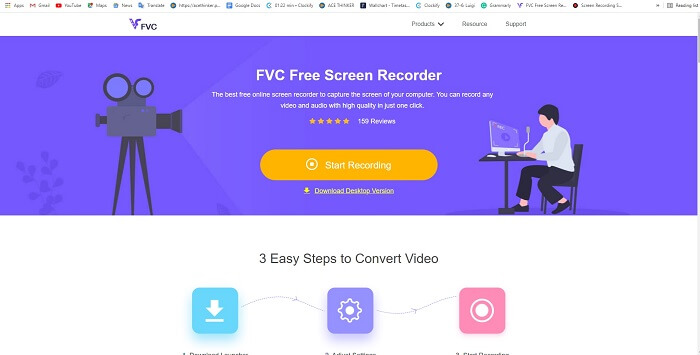
أفضل طريقة لمشاركة اللحظة هي تسجيلها، وأفضل طريقة لتسجيل مشهد أو حركة على شاشتك هي استخدام 'FVC Free Screen Recorder'. هذه الأداة مفتوحة المصدر تتيح للمستخدم التسجيل بالاستعانة بالإنترنت. إذا توفّر اتصال بالإنترنت يمكنك استخدام هذه الأداة. كما أنها تدعم صيغ ملفات أساسية، وبرامج ترميز (codecs)، وغيرها. وعلى الرغم من أنها «مسجّل GIF» خفيف يعمل أونلاين على كل من أجهزة الكمبيوتر بنظامي ويندوز وماك، إلا أنها توفر لك فرصة ممتازة لتسجيل ما تشاء دون حدود أو علامة مائية. لشرح كيفية استخدام الأداة اتبع الخطوات التالية.
الخطوة 1. انقر على هذا الرابط المرفق للانتقال إلى صفحة الويب الرئيسية.
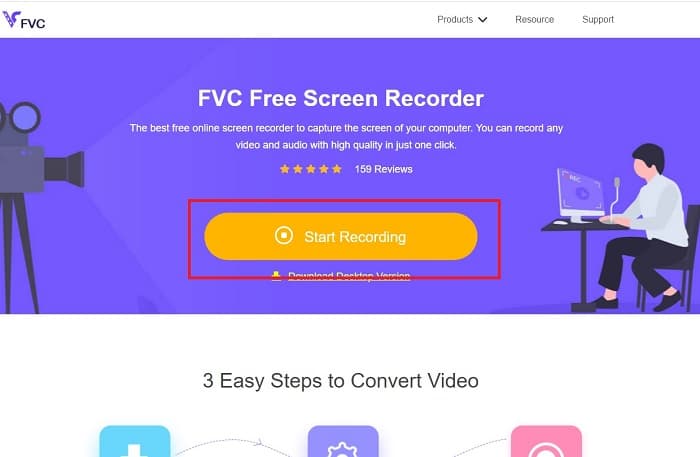
الخطوة 2. ستظهر لك صفحة مشابهة لهذا الشكل على الشاشة. انقر على «Start Recording» ثم «Allow» لتشغيل الأداة عبر الإنترنت.
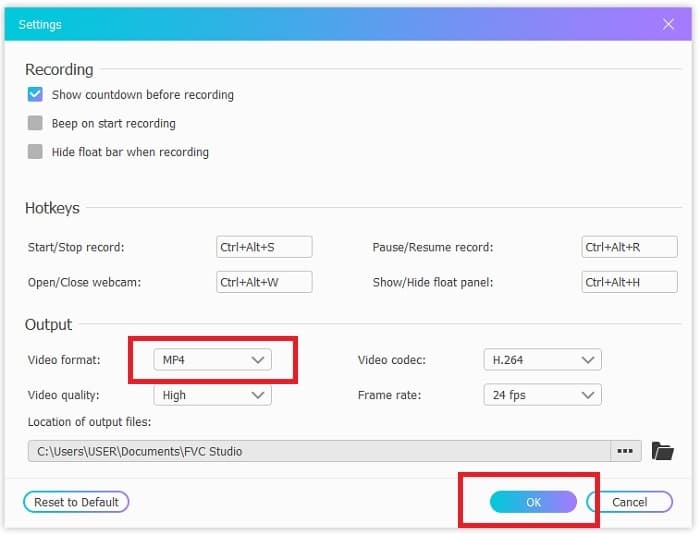
الخطوة 3. ستظهر على شاشتك شريط أدوات عائم. اضغط على أيقونة الترس للانتقال إلى الإعدادات، وقم بتغيير صيغة الفيديو وباقي الإعدادات إذا لزم الأمر. انقر على «OK» لحفظ التعديلات.
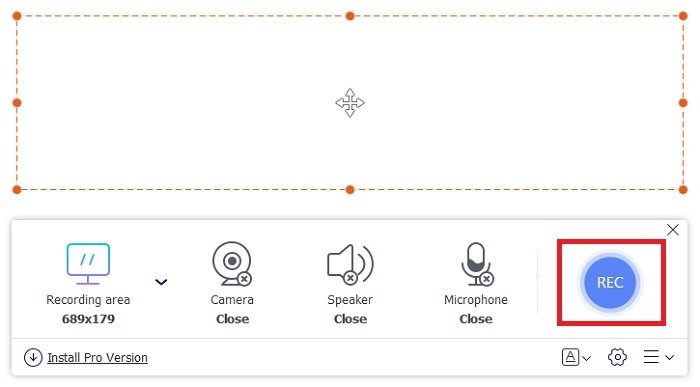
الخطوة 4. عدّل منطقة التسجيل أو انقر على «Full screen» لالتقاط الشاشة بالكامل. مكبر الصوت والميكروفون لا يتم تضمينهما عند إنشاء ملفات GIF لأنه لا يوجد صوت في GIF. لكن يمكنك إضافة صورتك بفتح «Webcam». عندما تصبح مستعدًا لبدء التسجيل اضغط على زر «REC».
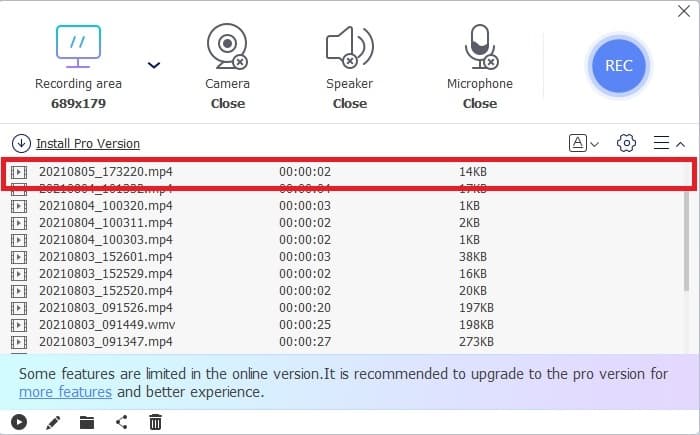
الخطوة 5. لإنهاء التسجيل اضغط على زر «المربع» للإيقاف. ويمكنك أيضًا مراجعة التسجيلات التي أنجزتها في «قائمة السجل» (history list).
2. FVC شاشة مسجل
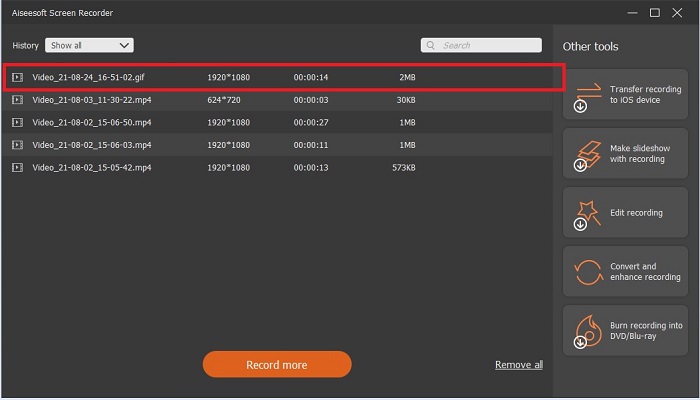
إذا كانت الأداة المجانية عبر الإنترنت من FVC سببت لك الإعجاب والدهشة، فإن تثبيت هذا «أفضل مسجّل GIF» – FVC Screen Recorder – سيمنحك عامل الانبهار الذي تبحث عنه. ما الذي يقدمه هذا البرنامج ليمنحك هذا الانطباع؟ ليس مخصصًا لتسجيل ملفات GIF فقط، بل يوفّر أيضًا تسجيل الفيديو والصوت وتسجيل ألعاب مميز. ولكن هذه مجرد ميزات فرعية؛ فهو كذلك ينتج صيغ إخراج مختلفة مثل MP4 وGIF وMOV وغيرها الكثير.
ميزة أخرى لها هي ميزة قفل الشاشة ، هذه هي الميزة الفريدة لهذه الأداة حتى أن المسجل ذو الوزن الثقيل مثل Bandicam لا يمكنه توفير هذه الميزة. قم بالتسجيل ولقطات الشاشة بتنسيق GIF دون إظهار الأداة نفسها. يوفر FVC Screen Recorder الجنيه لملك الجنيه في التسجيل. لذلك ، بغض النظر عما تقوم بتسجيله ، يمكن لهذا المسجل تسجيله. لمعرفة كيفية استخدام هذه الأداة ، اتبع هذه الخطوات البسيطة حول طريقة نجاح تسجيل GIF.
الخطوة 1. تم توفير ملف التثبيت الخاص بالأداة هنا. اختر بين نظامي التشغيل المتاحين. قم بتثبيت الأداة على القرص الصلب، وغيّر الإعدادات بما يناسب احتياجاتك، ثم انقر على «finish» للحفظ.
تنزيل مجانيلـ Windows 7 أو أحدثتنزيل آمن
تنزيل مجانيلـ MacOS 10.7 أو أحدثتنزيل آمن
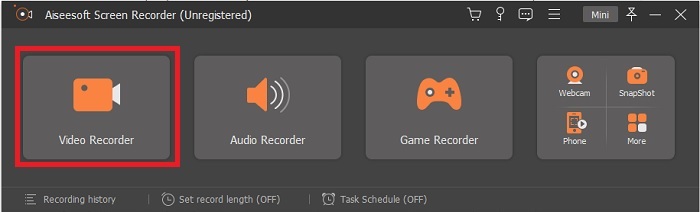
الخطوة 2. اختر «Video Recorder» لتسجيل ما يظهر على الشاشة. الخيارات المتاحة مثل مسجّل الصوت ومسجّل اللعبات ستكون مفيدة للاستخدام لاحقًا.
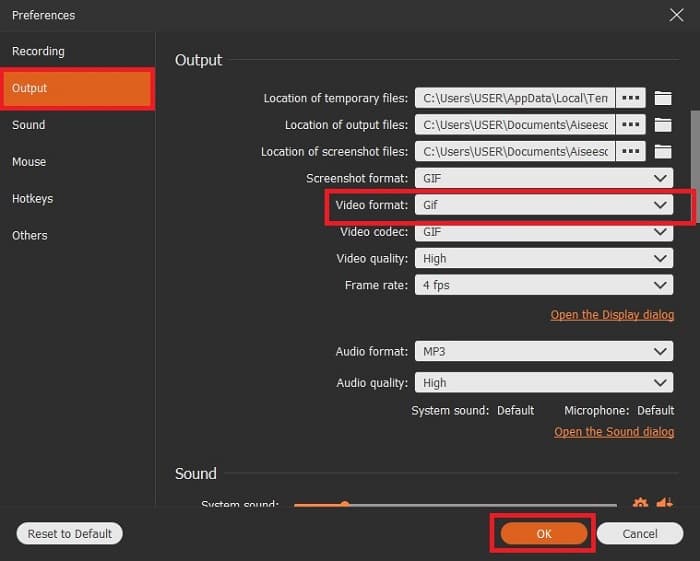
الخطوة 3. سيظهر شريط أدوات عائم على شاشتك. انقر على زر الترس للانتقال إلى الإعدادات، وفي قسم «Output» غيّر الصيغة إلى GIF أو أي صيغة أخرى تريد استخدامها. لحفظ التغييرات انقر على «OK» للمتابعة.
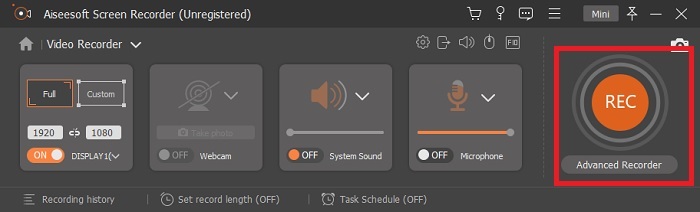
الخطوة 4. في شريط الأدوات الرئيسي، عدّل نسبة عرض الشاشة أو إذا رغبت بعرض كامل انقر على «full screen». عند تسجيل بصيغة GIF لن يهم الصوت أو الميكروفون، لكن يمكنك إضافة «Webcam» لإظهار ردّة فعلك. عندما تصبح جاهزًا اضغط على الزر «الدائري» لبدء التسجيل.
الخطوة 5. عندما ينتهي التسجيل يمكنك الآن النقر على زر المكعب لإيقافه. اضغط على «Save» ثم «Next» لحفظ التقدم. لمراجعة ملف GIF الذي سجلته مسبقًا، انقر على أيقونة «الخطوط الثلاثة» وستظهر أمامك سجلات التسجيل.
3. ScreenToGif
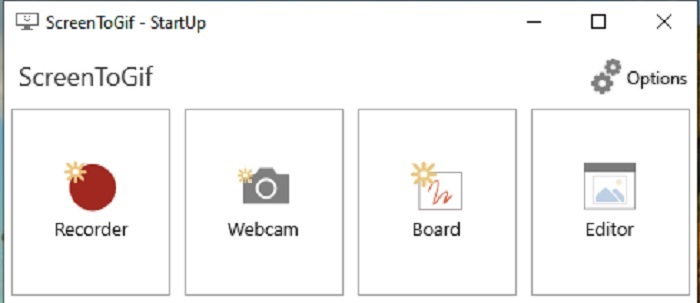
هذه الأداة القابلة للتنزيل كـ «مسجّل GIF للماك والكمبيوتر» لها نسختان: نسخة تثبيت (Installer) ونسخة محمولة (Portable). اختر بينهما ما يناسبك للتحميل. لكن أحيانًا، أثناء عمل الأداة، قد تواجه بعض الأخطاء البسيطة. كما أن الصيغة الوحيدة المتاحة في هذه الأداة للإخراج النهائي هي .gif، لذا إذا رغبت في صيغة أخرى فلن تستطيع الحصول عليها من هذا البرنامج. ومع ذلك فهو مجاني الاستخدام، لذا إن أردت تسجيل ملفات GIF يمكنك الاعتماد عليه. إلا أن واجهته وأدواته تبدو بسيطة إلى حد الملل بسبب الخلفية البيضاء بالكامل، تبدو مملة لكنها تقوم بالمطلوب.
4. جيازو
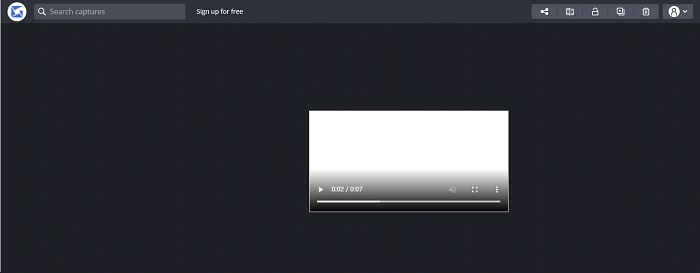
هذا واحد من أفضل «مسجّلات GIF لويندوز». Gyazo برنامج مخصص لتسجيل ملفات GIF. لكن بعد تثبيته سيتم تنزيل 3 أدوات تلقائيًا على جهازك، وهي جزء من البرنامج لكنها تختلف عن بعضها من حيث الوظيفة. هذه الأدوات الثلاث هي: Gyazo وGyazo GIF وGyazo Replay. تسجيل ملف GIF عبر Gyazo GIF محدود بمدة 7 ثوانٍ فقط، لذلك إذا كان تسجيلك أطول من 7 ثوانٍ فلن يكون هذا الخيار الأفضل. كذلك، الفيديو المحفوظ لن يتم تحميله تلقائيًا على جهازك؛ بل سيتم فتح تبويب جديد في متصفحك، وستحتاج إلى تنزيله يدويًا. كما أن سرعة تنزيل النتيجة النهائية تعتمد على اتصالك بالإنترنت، لذا انتبه لذلك.
5. التسجيل!
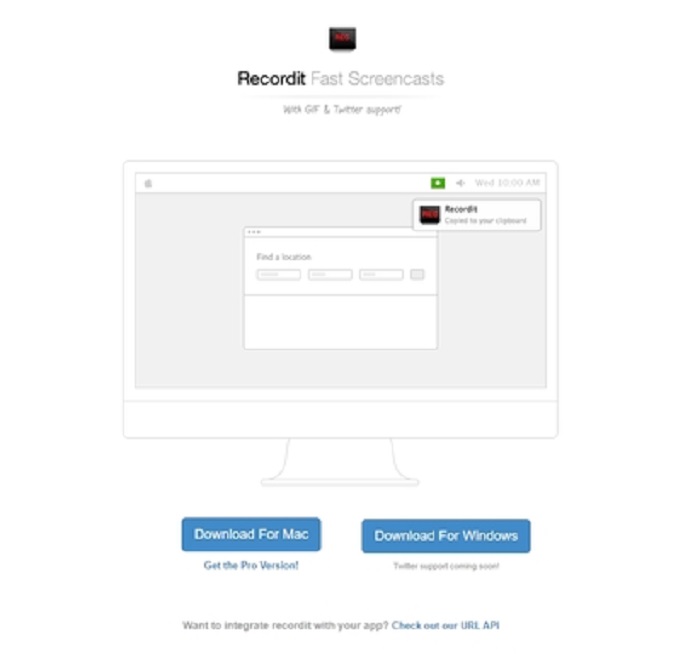
أداة أخرى تُستخدم لإنشاء GIF هي RecordIt!، وتعد من أفضل «مسجّلات GIF للماك». هذه الأداة لها أيضًا نسخة لنظام ويندوز. لكن المشكلة معها في عملية التثبيت؛ فبعد إكمال الإعداد قد تواجه صعوبات في تثبيتها على نظامك. هذا أمر شائع، لأنك إذا لم تُجرِ تحديثات للتطبيقات ضمن إعدادات النظام فلن يتم تنزيل الأداة. يوجد خيار بديل لكنه قد يشكّل خطرًا على جهازك؛ يمكنك النقر على «تجاهل» لتنزيل الأداة وتجاهل كل التحذيرات. لذا قم بالتنزيل على مسؤوليتك الخاصة، علمًا أن الأداة تحتوي على إعلانات، ويجب الحذر منها لأن بعضها غير مقيّد. إضافة إلى ذلك، تتوفر نسخة احترافية (Pro) تزيل الإعلانات وتضيف ميزات أخرى.
الجزء 3. أسئلة وأجوبة حول مسجل GIF
هل يمكنني تحويل GIF إلى تنسيق MOV؟
نعم ، يمكنك تحويل GIF إلى تنسيق MOV بمساعدة محول الفيديو عبر الإنترنت مثل FVC Free Online Video Converter.
ما هي الأنواع المختلفة من صور GIF؟
هناك 5 صور GIF: إعادة تشغيل GIFs ، و Reaction GIF ، و Cinema Graph ، و Perfect loop ، و Technical GIF. كل هذه يمكن أن تكون قائمة على الرسوم المتحركة ، والفيديو ، والملصقات.
ما هي البدائل الأخرى لصور GIF؟
على الرغم من إنشاء صور GIF لأكثر من 30 عامًا. هناك بعض المنافسين على الويب ينتجون صورًا متحركة بالإضافة إلى صور GIF. هذه هي أفضل البدائل لصور GIF المتحركة: APNG و WebP و AVIF و MNG و FLIF.
خاتمة
ها قد وصلنا إلى النهاية؛ يقال إن كل قصة رائعة تنتهي بخاتمة رائعة. وخلاصة ما سبق أن ملفات الـ 'GIF' تعبّر عن مشاعر قوية تجاه المتلقي. لكن ليس كل مقطع فيديو تريده يكون متاحًا بصيغة GIF. بدلًا من انتظار شخص ما ليحوّل الفيديو إلى GIF، لماذا لا تقوم أنت بذلك؟ بمساعدة أفضل «مسجّل GIF» وهو FVC Screen Recorder. هذه الأداة تتيح لك تسجيل ملف GIF وإضافة لمستك الشخصية عليه. وإذا كنت لا تزال مترددًا بشأن الأداة التي يجب استخدامها، فمن الضروري إعادة قراءة أفضل الخصائص، وستجد أن كل هذه الخصائص تنطبق على الأداة المختارة، وهي FVC Screen Recorder.
-
 [2 الحلول] كيفية تحويل SWF إلى ملفات GIF بسهولة مجانًا
 عندما تفشل في تصدير تنسيق GIF من خلال برنامج Flash ، يمكنك محاولة حفظ الملفات بتنسيق SWF في البداية. ثم يمكنك تعلم طريقتين سهلتين لتحويل ملفات SWF إلى GIF من هذه المقالة.
-
 4 طرق لدمج مقاطع الفيديو معًا مجانًا على Windows / Mac / Online
 إليك 4 طرق سريعة لدمج مقاطع الفيديو معًا في فيديو جديد. لا يوجد حد لحجم ملف الفيديو أو تنسيقه. يمكنك الانضمام إلى 2 و 3 و 4 والمزيد من مقاطع الفيديو بتنسيقات ودقة مختلفة بنجاح.
-
 (حلان) كيفية تحويل مقاطع فيديو WMV إلى ملفات GIF مجانًا
 إذا كنت ترغب في قص الأجزاء الرائعة من مقاطع فيديو WMV وإنشاء صور GIF منها ، فيمكنك التعرف على طريقتين سهلتين لنقل مقاطع فيديو WMV إلى ملفات GIF في هذه المقالة.
