


 محول الفيديو النهائي
 مسجل الشاشة
 إصلاح الفيديو
 تنزيل آمن
3 طرق مجانية لتحويل FLV للتشغيل على Xbox
يُستخدم FLV على نطاق واسع في مواقع الأخبار ومشاركة الفيديو. عند تنزيل بعض مقاطع الفيديو عبر الإنترنت من YouTube أو Hulu أو Facebook، فمن المرجح أن تحصل على ملفات بصيغة FLV. يمكن تشغيل تنسيق FLV بواسطة العديد من المشغلات والأجهزة والمنصات والمتصفحات، لكنه لا يمكن تشغيله على جهاز Xbox.
لا يقتصر Xbox على كونه جهاز ألعاب فقط، بل يسمح لك أيضًا بتشغيل مقاطع الفيديو والموسيقى من خلال محرك أقراص USB أو قرص خارجي. يدعم Xbox العديد من ملفات الوسائط الشائعة، ولكن كما ذُكر أعلاه، لا يمكنك تشغيل ملفات FLV مباشرة على Xbox. عندما تريد مشاهدة ملفات FLV على Xbox، يجب عليك تحويل FLV إلى صيغة مدعومة من Xbox.

يقدّم هذا المقال 3 طرق مجانية لتحويل FLV إلى Xbox. عندما تريد مشاهدة ملفات FLV على جهاز Xbox One أو Xbox 360 أو جهاز Xbox Series X الجديد أو Xbox Series S، يمكنك الاعتماد على هذه الطرق لتحويل FLV إلى ملف مدعوم من Xbox.
الجزء 1. كيفية تحويل FLV إلى Xbox عبر الإنترنت مجانًا
يمكن أن تساعدك العديد من محولات الفيديو في تحويل FLV إلى تنسيق مدعوم من Xbox مثل AVI أو MP4. إذا كنت تتعامل مع بعض مقاطع فيديو FLV الصغيرة ، فيجب عليك أولاً تجربة محول FLV المجاني عبر الإنترنت إلى Xbox.
يُعد محول الفيديو المجاني عبر الإنترنت أداة سهلة الاستخدام تتيح لك تحويل FLV إلى MP4 أو AVI أو WMV أو MOV أو أي تنسيق آخر مدعوم من أجهزة Xbox. مقارنةً بالمحوّلات الأخرى عبر الإنترنت، لا يتطلّب هذا المحوّل إنشاء حساب أو تسجيل الدخول، كما أنه لا يفرض أي حدّ لحجم ملف FLV الذي تريد تحويله. يوضّح الدليل التالي كيفية استخدامه.
الخطوة 1: هذا المحول عبر الإنترنت من FLV إلى Xbox متوافق مع أي متصفح ويب مثل Chrome وSafari وIE وFirefox. يمكنك فتح المتصفح والانتقال إلى موقع محول FLV إلى Xbox عبر الإنترنت.
الخطوة 2: عند الوصول إلى الصفحة، انقر على زر Add Files to Convert ثم زر Download لتثبيت أداة التشغيل الخاصة بتحويل ملفات FLV. بعد جاهزية أداة التشغيل، سيظهر لك نافذة منبثقة لإضافة ملف FLV الخاص بك.

الخطوة 3: سترى بعض صيغ الفيديو الشائعة مثل MP4 وAVI وMOV وFLV وWMV وMKV وغيرها مدرجة أسفل ملف FLV الذي تم تحميله. يمكنك اختيار تنسيق مدعوم من Xbox مثل MP4 أو AVI.
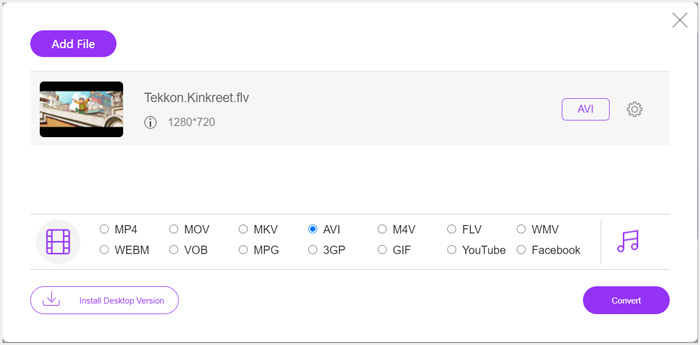
الخطوة 4: إذا كنت تريد تخصيص إعدادات الفيديو والصوت للإخراج بشكل أكبر، يمكنك النقر على أيقونة Settings الموجودة بجانب تنسيق الإخراج. بعد ذلك، انقر على زر Convert لبدء تحويل FLV إلى Xbox. سيتم حفظ ملف الفيديو الناتج تلقائيًا على جهاز الكمبيوتر بمجرد انتهاء عملية التحويل.
الجزء 2. كيفية تحويل FLV إلى Xbox Online باستخدام FreeConvert
يُعد FreeConvert محوِّل فيديو وصوت شهيرًا آخر يمكنه مساعدتك في تحويل FLV إلى MP4 أو AVI أو WMV مدعومة من Xbox. يحتوي على محول فيديو من FLV إلى Xbox مخصص يمكنك من خلاله تحويل ملفات FLV مباشرة إلى Xbox.
الخطوة 1: افتح المتصفح وانتقل إلى صفحة محول فيديو FLV إلى Xbox.
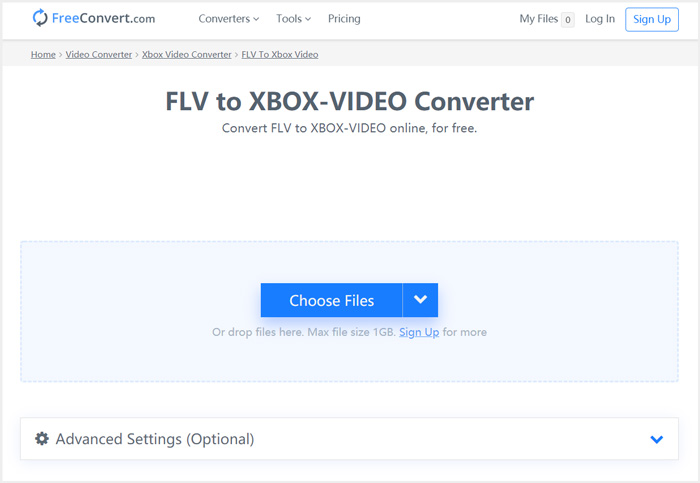
الخطوة 2: انقر على زر Choose Files لتصفح جهازك ورفع ملف FLV. يُسمح لك أيضًا بإضافة ملف من خلال عنوان URL أو Google Drive أو Dropbox.
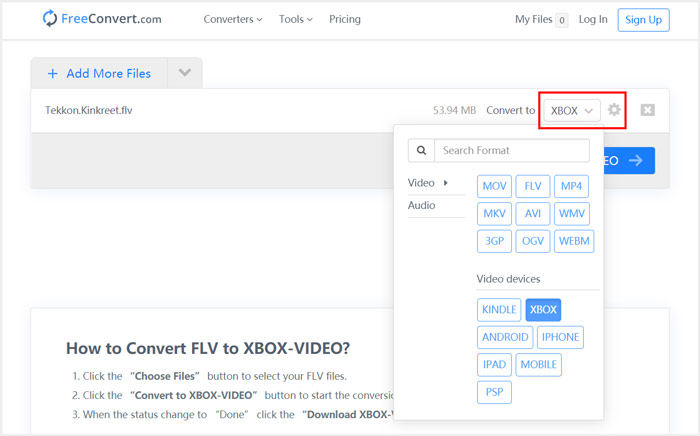
الخطوة 3: يمكنك النقر على Add More Files لرفع ملفات FLV أخرى تريد تحويلها. سيتم تعيين تنسيق الإخراج إلى XBOX بشكل افتراضي. يمكنك ببساطة النقر على زر Convert to Xbox Video لبدء تحويل FLV إلى Xbox.
باتّباع خطوات مشابهة، يمكنك تشغيل أي موسيقى على Xbox بعد تحويلها إلى صيغ متوافقة مع Xbox.
سيبدأ محوِّل فيديو FLV إلى Xbox هذا في رفع الفيديو وتحويله. بعد الانتهاء من التحويل، يمكنك النقر على زر Download لحفظه على جهاز Mac أو الكمبيوتر الذي يعمل بنظام Windows. أو يمكنك اختيار حفظه على Google Drive أو Dropbox. ستظهر بعض الإعلانات أثناء استخدامك لهذا المحوّل المجاني من FLV إلى Xbox.
الجزء 3. طريقة أفضل لتحرير تحويل FLV إلى Xbox على أجهزة كمبيوتر Mac و Windows
إلى جانب محوّلات FLV عبر الإنترنت، يمكنك أيضًا الاعتماد على محوّلات فيديو مجانية أخرى لتحويل ملفات FLV وتشغيلها على جهاز ألعاب Xbox. نعرّفك هنا على أداة قوية وهي محول FLV المجاني، والتي صُممت خصيصًا لإجراء تحويلات FLV المتنوعة.

- قم بتحويل أي تنسيق يدعم FLV إلى Xbox مثل MP4 و AVI و WMV و MOV والمزيد.
- قدم سلسلة من السمات لتحرير ملف FLV وتخصيصه.
- وحدات المعالجة المركزية المتقدمة متعددة النواة وتسريع GPU لتحويل FLV إلى Xbox بسرعة عالية.
- قم بتحويل ملف FLV أو أكثر إلى Xbox دون فقدان جودة الصوت أو الصورة.
تنزيل مجانيلنظام Windows 7 أو الأحدثتنزيل آمن
الخطوة 1: أولًا، يمكنك النقر المزدوج على زر التنزيل لتثبيته مجانًا على جهاز الكمبيوتر. افتحه ثم انقر على Add Files لاستيراد ملف (أو ملفات) FLV.

الخطوة 2: اختر MP4 أو AVI كصيغة الهدف من القائمة المنسدلة Output format. للمزيد من الإعدادات، يمكنك النقر على أيقونة Settings بجانب تنسيق الإخراج للدخول إلى نافذة Profile Settings.
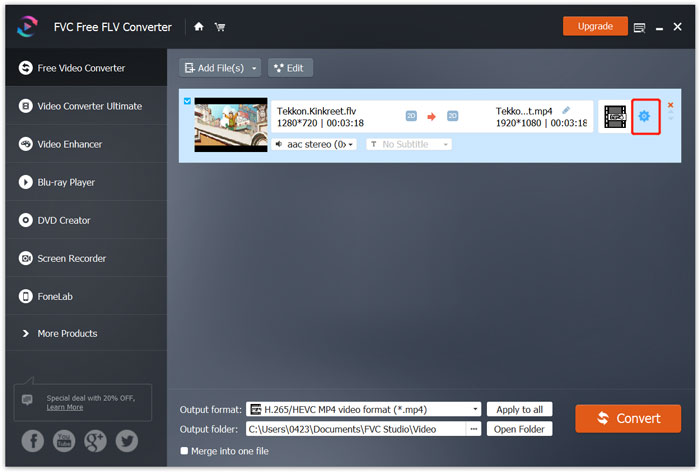
كما يعرض فئة Xbox محددة في قائمة تنسيق الإخراج لتتمكن من تحويل FLV مباشرة إلى ملف مدعوم من Xbox One أو Xbox 360، لكنك تحتاج إلى الترقية إلى النسخة المدفوعة.
الخطوة 3: انقر على زر Convert لبدء تحويل الفيديو من FLV إلى MP4 أو إلى أي تنسيق فيديو آخر مدعوم من Xbox.
الجزء 4. الأسئلة الشائعة حول تشغيل FLV على Xbox
السؤال 1. ما هي التنسيقات التي يمكن أن يدعمها Xbox One؟
كواحد من أكثر أجهزة الألعاب شيوعًا ، يتوافق XBox مع العديد من تنسيقات الفيديو والصوت المستخدمة بشكل متكرر بما في ذلك MP4 و AVI و M4V و MOV و WMV و MKV و H.264 AVCHD و WAV و WMA و 3GP video و 3GP audio و AAC و MP3 والمزيد.
السؤال 2. كيف تلعب مقاطع الفيديو على Xbox؟
إذا كان لديك تطبيق Movies & TV على Xbox One أو Xbox 360 ، عند إرسال الفيديو إلى Xbox ، أو توصيل محرك الأقراص الخارجي بـ Xbox ، يمكنك استخدامه لمشاهدة مقاطع الفيديو بسهولة.
السؤال 3. ما هو اللاعب الذي يمكنه تشغيل ملفات FLV؟
عندما تريد تشغيل ملفات FLV على جهاز Mac أو Windows PC أو جهاز iOS / Android المحمول ، فإن VLC Media Player يعد دائمًا خيارًا جيدًا للقيام بذلك. يوفر لك تطبيقات سطح المكتب والجوال لتشغيل ملفات FLV على جهاز الكمبيوتر أو الهاتف.
خاتمة
لا يمكنك تشغيل ملفات FLV على وحدة تحكم ألعاب Xbox الخاصة بك؟ للقيام بذلك ، يجب عليك تحويل FLV إلى ملف مدعوم من Xbox أولاً. يمكنك العثور على 3 طرق مجانية لتحويل وتشغيل FLV على Xbox من هذا المنشور.
-
 أفضل 10 مشغلات FLV لأنظمة Windows و Mac و iOS و Android في عام 2021
 يساعدك مشغل FLV في الوصول بسهولة إلى ملفات FLV على جهاز Windows و Mac و Android و iOS. تحقق من أفضل مشغلات ملفات FLV التي يمكنك تنزيلها الآن.
-
 برنامج تعليمي لضغط GIF وتقليل حجم ملفه بجودة عالية
 فيما يلي طريقتان سهلتان لضغط GIF على جهاز الكمبيوتر أو الهاتف المحمول. يمكنك استخدام FVC Free Online Video Compressor و Photoshop لتقليل حجم ملف GIF في جوانب مختلفة.
-
 أفضل 4 طرق مجانية لتحويل مقاطع فيديو FLV إلى MP4 على سطح المكتب وعلى الإنترنت
 يشارك هذا الدليل أربع طرق مجانية لتحويل ملفات فيديو FLV إلى تنسيق MP4 على أنظمة التشغيل Windows 10/8/7 / XP و Mac OS X ، حتى تتمكن من الاستمتاع بمقاطع الفيديو على أي جهاز.
