


 محول الفيديو النهائي
 مسجل الشاشة
 إصلاح الفيديو
 تنزيل آمن
مراجعات صادقة لـ 8 محولات مفيدة للصور يمكنك استخدامها في وضع عدم الاتصال وعبر الإنترنت
يحوِّل محوِّل الملفات المسمى محوِّل الصور نوعًا واحدًا من ملفات الصور، مثل JPG أو BMP أو TIF، إلى نوع آخر. ستجد في هذه المقالة أفضل ثمانية محوِّلات لملفات الصور. يعمل بعضها حتى كخدمات عبر الإنترنت، مما يتيح لك تحويل الصور من المتصفح دون الحاجة إلى تنزيل أي برنامج. كما أن بعض الأدوات متوفرة كتطبيقات على جهاز الكمبيوتر. إذا كنت تخطط لتحويل ملف صورتك إلى صيغ صور أخرى، فأفضل ما يمكنك فعله هو قراءة هذه المقالة. ستكتشف أفضل محوِّل صور مناسب لك وتتعرّف إلى وظائفه.

الجزء 1: أفضل 8 محولات لملفات الصور عبر الإنترنت وغير متصل
1. FVC محول الصور الحرة
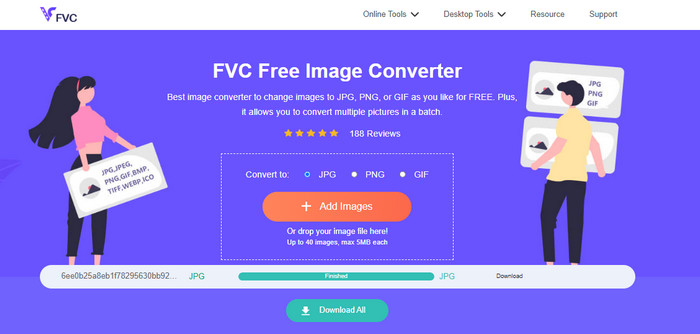
هناك أفضل خيار لتحويل الصور إلى صيغ مختلفة، وهو الأداة المميزة FVC Free Image Converter. إنه محوِّل صور مجاني يدعم الملفات القياسية بما في ذلك JPG وJPEG وPNG وGIF وBMP وTIFF وWEBP وICO وSVG. هكذا لن تقلق بعد الآن إذا كانت بعض الأدوات أو الأجهزة غير قادرة على فتح ملفات صورك. كما يمكنه الحفاظ على الجودة الممتازة للصور الأصلية؛ فلن يكون هناك أي فرق ملحوظ بين الملف الأصلي والملف الناتج بعد التحويل. بالإضافة إلى ذلك، يدعم FVC Free Image Converter التحويل الدفعي، ما يتيح لك تحويل عدة صور دفعة واحدة، وهو أكثر فعالية بكثير من كثير من محوِّلات صيغ الصور الأخرى في السوق. يمكن لـ FVC Free Image Converter معالجة ما يصل إلى 40 صورة، وبعد تحويل عدة ملفات في الوقت نفسه يمكنك حفظها بنقرة واحدة؛ إذ يمكنه ضغط جميع الملفات في أرشيف واحد وحفظها مرة واحدة.
2. صورة حلوى
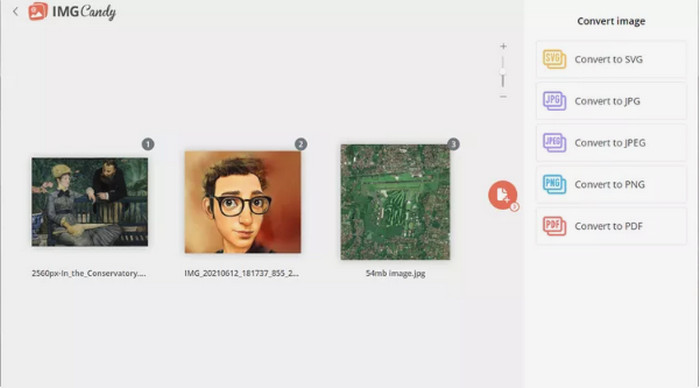
محوِّل صور مفيد آخر عبر الإنترنت يمكنك تجربته هو Image Candy. فهو يدعم العديد من صيغ الصور ويمكنه تحويل صور يصل حجمها إلى 2 جيجابايت. استخدام هذا المحوِّل في غاية البساطة: ما عليك إلا رفع الصور إلى الموقع ثم اختيار صيغة الإخراج المدعومة، مع إمكانية تدوير أي صورة عند الحاجة. وبما أنه محوِّل عبر الإنترنت، فإنه يعمل على أي نظام تشغيل. يمكنك حفظ كل ملف محوَّل على حدة أو جميعها داخل أرشيف واحد. كما أن هذا المحوِّل يحمي خصوصيتك؛ إذ يقوم بحذف صورك بعد ساعتين من تحويلها. ومع ذلك، فهو لا يقبل سوى الرفع من الأجهزة مباشرة، كما أن صيغ الإخراج المتاحة قليلة.
3. Coolutils
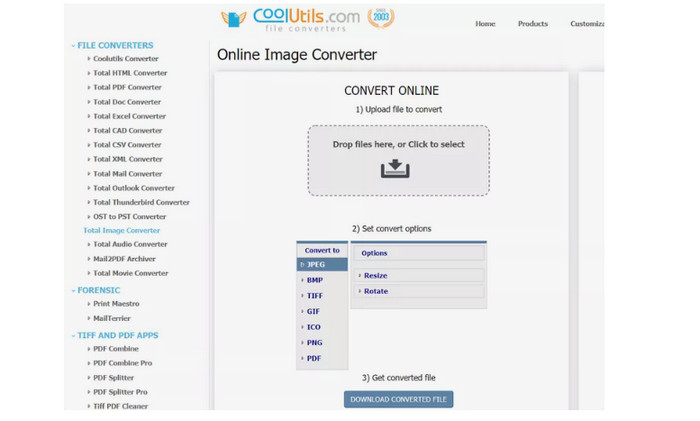
يُعد Coolutils محوِّل ملفات صور يمكنك استخدامه عبر الإنترنت دون تنزيل أي شيء. يجعل هذا المحوِّل عبر الإنترنت عملية التحويل سهلة للغاية؛ فهو يبدأ تحويل الصور تلقائيًا بعد رفعها. يمكن لهذا المحوِّل تدوير الصورة وتغيير حجمها قبل التحويل، لكنه لا يدعم معاينة الصورة بعد تدويرها والتحويل. يمكنك استخدام هذه الأداة تقريبًا مع أي نظام تشغيل، بما في ذلك ويندوز ولينكس وماك. يدعم هذا المحوِّل عددًا كبيرًا من صيغ الصور، بما في ذلك JPEG وPNG وGIF وBMP وTIF وBMP وPDF وPNG وJPEG وغيرها. لكن الملف الأصلي الذي ترفعه يخضع لقيود على الحجم؛ فالحد الأقصى لحجم الملف يتراوح بين 35 و40 ميجابايت.
4. زمزم
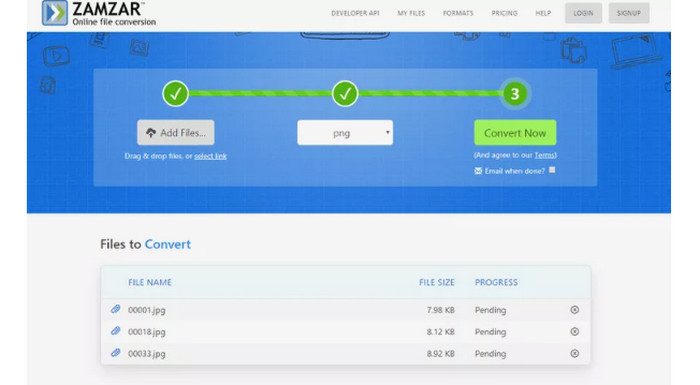
محوِّل صور فعّال آخر عبر الإنترنت هو Zamzar. من الجيد أنه يتيح لك رفع صور يصل حجمها إلى 50 ميجابايت. كما يمكنك رفع ملف الصورة من الكمبيوتر أو من Dropbox أو Google Drive أو من موقع ويب آخر عبر إدخال رابط الصورة. توفر هذه الأداة واجهة بسيطة، ما يجعلها في متناول جميع المستخدمين. باستخدام هذا البرنامج يمكنك رفع الصور بصيغ CR2 وARW وPNG و3FR وJPG وGIF وERF وTIFF وغيرها، كما يمكنك تحويل ملف الصورة إلى صيغ متعددة لتسهيل استخدامها من قِبل الجميع، مثل BMP وEPS وPDF وPNG وJPG وWBMP. إلا أن عملية التحويل تستغرق وقتًا طويلًا، كما أنك لا تستطيع حفظ الصور المحوَّلة، ولا يمكنك تحويل أكثر من صورتين في كل جلسة.
5. محول
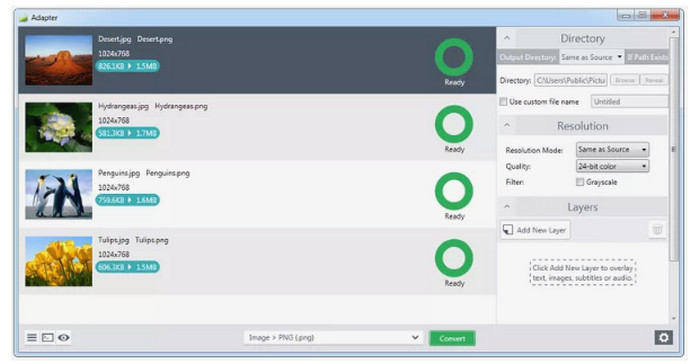
يُعد Adapter محوِّل صيغ صور بسيطًا يمتلك كثيرًا من المزايا المفيدة. في وضعه الأساسي يتيح لك اختيار صيغة الإخراج وسحب الصور وإفلاتها في قائمة الانتظار، مع إمكانية رؤية حجم ملفات الصور قبل التحويل وبعده. وإذا رغبت في خيارات أكثر تقدّمًا فستجد إعدادات مثل الطبقات (overlays) الخاصة بالصور، وتحديد مجلد الإخراج، وضبط الدقة والجودة وغير ذلك. يدعم هذا البرنامج أنواعًا مختلفة من صيغ الإدخال والإخراج، بما في ذلك JPG وBMP وTIFF وGIF وPNG، مما يتيح لك رفع الصور بغض النظر عن صيغة الصورة تقريبًا. كما أن واجهته البديهية تسهِّل تحويل الصور فورًا، بحيث يمكن للمحترفين وغير المحترفين استخدام هذا المحوِّل المكتبي. لكن إذا رغبت في تحويل الصور على شكل دفعات، فيجب التأكد من أن تكون جميعها من الصيغة نفسها، كما أن تثبيته يستغرق وقتًا أطول من المعتاد، وبما أنه برنامج يعمل دون اتصال فيجب أن تضع في اعتبارك سعة التخزين على جهازك.
6. DVDVideoSoft
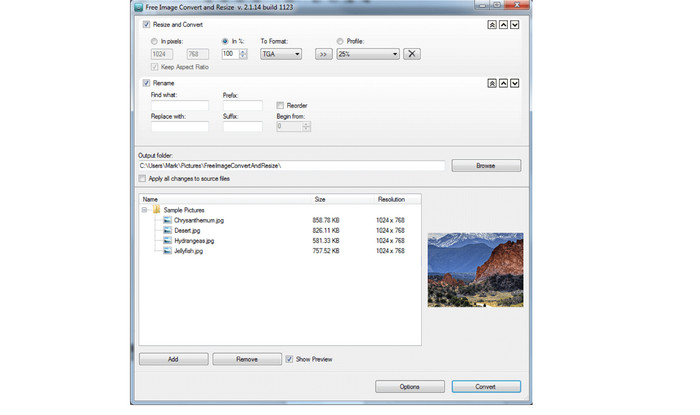
برنامج سطح مكتب لتحويل الصور يسمى DVDVideoSoft يمكنه إجراء تحويل الصور، كما يغيّر حجم الصور ويرتّب الصور المفردة والمجلدات أثناء عملية التحويل. يعمل هذا المحوِّل على نظام ويندوز ويدعم صيغ الصور المعروفة، ويقدّم أداءً جيدًا عند استيراد عدد كبير من الصور. يمكنك أيضًا تغيير خصائص الصورة في الإعدادات وفصلها عن الملفات الأخرى الموجودة في المجلد من خلال المحوِّل. تتمثل أفضل ميزاته في قدرته على تحويل العديد من الملفات دفعة واحدة، بحيث يمكنك تحويل ملفات الصور في وقت واحد. مع ذلك، من الصعب استخدام هذا البرنامج المكتبي؛ فهو يحتاج إلى مستخدم متمرس، لذلك إذا كنت مبتدئًا فمن الأفضل طلب المساعدة أو استخدام محوِّل صور أبسط. كما أن التحويل الدفعي لا يسمح إلا بصيغة واحدة لجميع الملفات، لذا يجب عليك تحويل كل ملف على حدة إذا أردت استخدام صيغ مختلفة لعدة ملفات، وهي عملية مرهقة وتستغرق وقتًا طويلاً.
7. SendTo-Convert
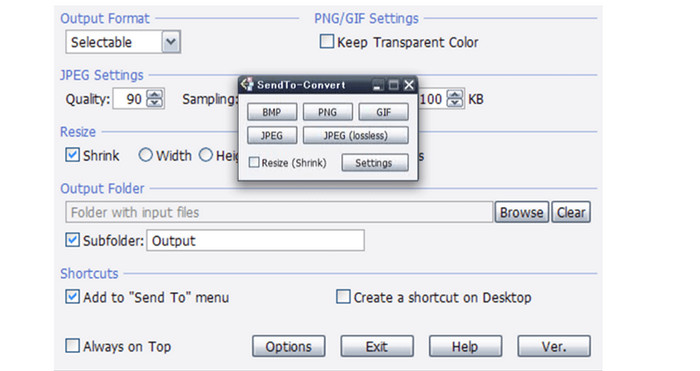
محوِّل صور آخر يعمل دون اتصال هو SendTo-Convert. لتحويل الصور يجب عليك أولًا الدخول إلى الإعدادات وضبط صيغة التصدير وحدود الجودة والحجم ومجلد الحفظ. إضافة إلى ذلك يمكنك تحويل الملفات حتى قبل تشغيل التطبيق؛ فقط اسحب الملف إلى أيقونة البرنامج. كما يتيح SendTo-Convert تنفيذ عمليات دفعية تُمكِّنك من معالجة عدة صور في الوقت نفسه. هذا البرنامج القابل للتنزيل مفيد لجميع المستخدمين؛ فواجهة التطبيق وتعليماته البسيطة تجعله مناسبًا للمحترفين والمبتدئين على حد سواء. يمكنك تحويل الصور بسرعة بفضل عملية التحويل السريعة، مما يوفر وقتك. على الرغم من مزاياه هذه فإنه لا يدعم سوى أكثر خمس صيغ شيوعًا للصور، لكن يمكنك توسيع وظائفه عبر تثبيت الإضافات (plug-ins). عليك الانتظار قليلًا قبل استخدام البرنامج لأن عملية تثبيته تستغرق وقتًا طويلًا، كما أنه لم يُحدَّث منذ عام 2015، ما يجعله قديمًا، لذا توقّع أن يكون أداؤه أقل من أداء محوِّلات الملفات الأخرى.
8. PixConverter
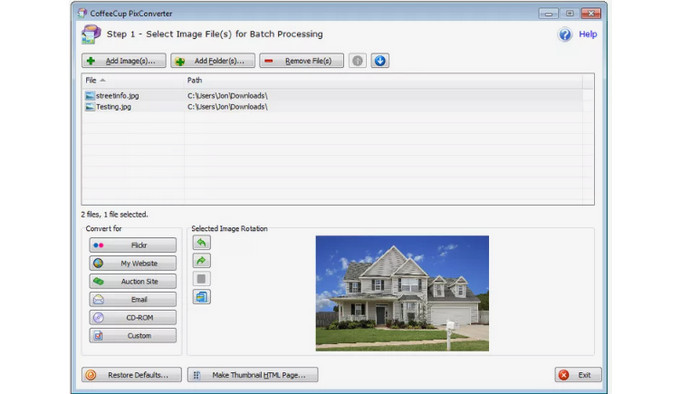
محوِّل صور آخر هو PixConverter. وعلى الرغم من امتلاكه العديد من المزايا المفيدة فإنه لا يزال سهل الاستخدام. يتوافق البرنامج مع مجموعة متنوعة من الصيغ، مثل PCX وJPG وJPEG وPNG وTIFF وBMP، بحيث يمكنك تحويل صورتك إلى صيغة أخرى. لكنه لا يدعم إلا أنظمة Windows 8 وWindows 7 وWindows Vista وWindows 10. كما يدعم التحويلات الدفعية وإمكانية استيراد الصور من مجلد كامل في الوقت نفسه، ويقدم أيضًا خصائص تدوير الصور وتغيير حجمها وضبط الألوان.
متعلق ب:
Joyoshare HEIC Converter | مراجعة للتطبيق ووظائف يجب أن تعرفها
أحدث مراجعة لبرنامج iMyFone Free HEIC Converter يجب أن تعرفها [2023]
الجزء 2: أسئلة وأجوبة حول Image File Converter
1. ما هي أداة تحويل تنسيق الصور؟
تعد أداة تحويل تنسيق الصور أداة فعالة لتغيير تنسيق الصورة إلى نوع تنسيق آخر. يتضمن JPG و JFIF و PNG و BMP و GIF و TIFF و EMF و WMF و PSD و WebP و SVG و DICOM و DNG والمزيد. لذلك ، إذا كنت تريد تحويل ملف صورتك إلى تنسيق مختلف ، فأنت بحاجة إلى البحث عن محول تنسيق الصورة.
2. كيفية تحويل الصورة إلى حجم أصغر؟
نظرًا لأن ملفات JPG أصغر حجمًا من الصيغ الأخرى مثل PNG، يمكنك تحويل الصور إلى صيغة JPG. لاستخدام التحويل، استعن بـFVC Free Image Converter. ما عليك سوى اختيار الصيغة المطلوبة، وهي هنا JPG، ثم رفع الصورة التي تريد تحويلها والنقر على زر التنزيل Download. بهذه الطريقة يمكنك تحويل الصور إلى JPG بحجم ملف أصغر.
3. هل JPEG هو نفسه JPG؟
نعم ، تنسيقات الصور JPG و JPEG هي نفسها. هم متطابقون. وبالتالي ، ليست هناك حاجة لتغيير أحدهما إلى الآخر. إذا كنت ترغب في تغيير JPEG إلى JPG أو العكس ، فإن أفضل طريقة هي إعادة تسمية الصورة.
خاتمة
الأدوات المذكورة أعلاه هي أفضل محوِّلات صور عالية الجودة لتحويل ملفات الصور. إذا كنت تبحث عن أداة ذات واجهة بسيطة وطريقة استخدام سهلة، فاستعن بـFVC Free Image Converter.
-
 قم بتحويل HEIC إلى JPG باستخدام 6 طرق فعالة على الإنترنت ودون الاتصال بالإنترنت
 هل تريد أن تعرف كيفية تحويل HEIC إلى JPG؟ في هذه الحالة ، نضيف 6 طرق عبر الإنترنت وغير متصلة بالإنترنت يمكنك استخدامها لإنهاء هذه المهمة والتعامل معها تمامًا.
-
 أفضل محول HEIC مجاني ومدفوع يجب أن تعرفه [مُحدَّث 2023]
 هل تريد أن تعرف ما هو محول HEIC؟ إذا كان الأمر كذلك ، فإننا نقوم بتضمين أفضل 5 محولات HEIC المجانية والمدفوعة التي يمكنك استخدامها لتغيير تنسيق HEIC.
-
 كيفية تحويل دفعة HEIC إلى PNG على أجهزة Mac و iPhone وعلى الإنترنت
 هل تبحث عن طرق كيفية تحويل HEIC إلى PNG؟ تمنحك هذه المقالة أفضل الطرق لتغيير HEIC بسهولة إلى PNG عبر الإنترنت وغير متصل
