


 محول الفيديو النهائي
 مسجل الشاشة
 إصلاح الفيديو
 تنزيل آمن
تعرف على الطرق المثالية حول كيفية إنشاء عنوان URL من صورة
في الوقت الحاضر أصبحت صيغ ملفات الصور شائعة جدًا. تُعَدّ هذه الصيغ من أفضل الطرق لمشاركة الصور وفتحها في متصفحات وبرامج مختلفة. ومع ذلك، توجد بعض الحالات التي لا يمكنك فيها مشاركة صورك مهما كانت اللاحقة التي تستخدمها، وقد يسبب ذلك إزعاجًا للآخرين. لكن ما لم نكن نعرفه هو أن هناك حلاً لمثل هذا النوع من المشكلات. إذا كنت تريد مشاركة صورك في كل مكان، فأفضل طريقة هي تحويل الصورة إلى رابط URL. بهذه الطريقة يمكنك مشاركة الصورة مع الآخرين من دون الحاجة إلى أي ملحقات. ولحسن الحظ، تحتوي هذه المقالة على حل مميز لك. يُرجى متابعة قراءة هذا المنشور حيث سنقدم لك أفضل الشروحات حول كيفية تحويل الصور إلى رابط.

الجزء 1. طرق فعالة لتحويل الصورة إلى رابط
تحويل الصورة إلى ارتباط باستخدام i-Converter
بعض محوّلات الصور إلى رابط المتوفرة على الإنترنت لا تعمل بشكل جيد، لذلك نود أن نعرّفك على أداة i-Converter. إنها أداة تحويل عبر الإنترنت يمكن الاعتماد عليها لتحويل ملفات الصور إلى رابط URL. يمكنك الوصول إلى هذه الأداة من متصفحات مختلفة، بما في ذلك Firefox وChrome وEdge وExplorer وغيرها. كما أنّها تعتمد عملية بسيطة في تحويل الملفات، مما يجعلها مناسبة لك سواءً كنت مستخدمًا متمرّسًا أو مبتدئًا. بالإضافة إلى ذلك، فهي تدعم مختلف صيغ ملفات الصور؛ إذ يمكنك تحويل صورك إلى JPEG وBMP وTIFF وPNG وGIF وDOC وغيرها. علاوة على ذلك، فإن i-Converter متاحة مجانًا، ما يعني أنه يمكنك تحويل صورك دون شراء خطة اشتراك. ومع ذلك، فإن i-Converter مخصّصة فقط لملفات الصور ذات صيغة JPG؛ فإذا لم تكن صورتك بامتداد .jpg فلن تتمكن من رفعها إلى هذه الأداة على الإنترنت. كذلك، في بعض الأحيان لا تعمل الأداة بأفضل أداء. وبما أنها أداة على الإنترنت، فمن الضروري توفّر اتصال جيد بالإنترنت.
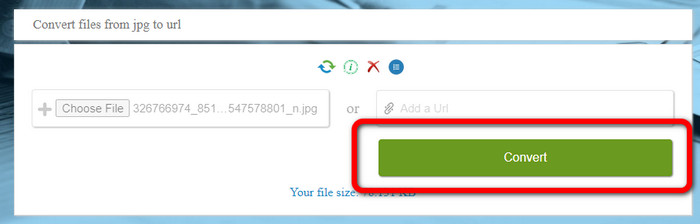
الخطوة 1. افتح أي متصفح على جهاز الكمبيوتر لديك ثم انتقل إلى موقع i-Converter. عند الوصول إلى الصفحة الرئيسية، انقر زر Choose File. وعندما تظهر نافذة ملفات الكمبيوتر على الشاشة، افتح الصورة التي تريد تحويلها إلى رابط URL.
الخطوة 2. بعد رفع ملف الصورة الذي تريد تحويله، انقر زر Convert، ثم انتظر عملية التحويل. بعد بضع ثوانٍ ستمنحك الأداة الرابط. يمكنك نسخ الرابط إلى المتصفح لفتح الصورة من خلال النقر على زر Copy Code.
كيفية جعل صورة ارتباطًا باستخدام صورة للربط
أداة أخرى على الإنترنت يمكنك استخدامها لتحويل الصور إلى HTML هي Image to Link. مقارنةً بالأداة الأولى أعلاه، فإن هذه الأداة تدعم صيغ إدخال متعددة مثل JPG وPNG وGIF. كما أنها توفر طرق استخدام بسيطة؛ فبعد رفع الصورة تقوم الأداة بتحويلها تلقائيًا. وتُعَدّ عملية التحويل سريعة، وبالتالي يمكنك الحصول على الرابط بسرعة. بالإضافة إلى ذلك، فإن Image to Link متاحة على مختلف متصفحات الويب؛ يمكنك استخدامها على Google وMozilla وExplorer وغيرها. جميع المستخدمين قادرون على تشغيل هذه الأداة بسبب خياراتها الواضحة. وأفضل ما في الأمر أنك تستطيع تحويل عدة صور دفعة واحدة، مما يجعلها مثالية عند الحاجة إلى تحويل عدد كبير من الملفات. ولكن عند استخدام المحوّل، قد تظهر إعلانات على الشاشة، وهذا قد يكون مزعجًا لبعض المستخدمين. كما أنه عند تحويل ملفات متعددة لا يمكنك رفع أكثر من خمس صور في المرة الواحدة. وتحتاج أيضًا إلى اتصال بالإنترنت لاستخدام محوّل الصور عبر الإنترنت.
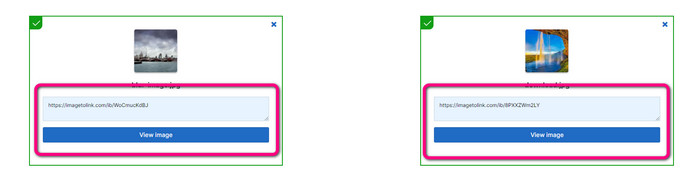
الخطوة 1. انتقل إلى موقع Image to Link من خلال المتصفح. على صفحة الويب انقر زر Start Uploading، ثم افتح ملف الصورة الذي تريد تحويله من ملفات جهاز الكمبيوتر. يمكنك رفع ما يصل إلى خمس صور عند إجراء عملية التحويل الدفعي.
الخطوة 2. بعد الرفع، ستعمل الأداة تلقائيًا على تحويل الصورة إلى رابط. بعد ذلك، ستوفر لك الأداة رابطًا يمكنك استخدامه لفتح الصورة. لفتح الصورة، انسخ الرابط المقدم والصقه في متصفحك.
الجزء 2. كيفية تغيير الصور إلى JPG و PNG و GIF
تحويل الصور إلى JPG و PNG و GIF على FVC Free Image Converter
إحدى أبرز أدوات تحويل الصور عبر الإنترنت التي يمكنك استخدامها هي FVC Free Image Converter. يمكن للأداة تحويل صورك إلى صيغ مختلفة مثل JPG وPNG وGIF. كما أنها تدعم صيغ إدخال متعددة، بما في ذلك BMP وSVG وICO وWebP وغيرها. يمكنك تحويل الصور من خلال طريقة بسيطة، وهو ما يناسب جميع المستخدمين. بالإضافة إلى ذلك، يحتوي محوّل الصور على ميزات رائعة يمكنك الاستفادة منها، وأهمها ميزة التحويل الدفعي؛ إذ تتيح لك رفع عدة صور وتحويلها بنقرة واحدة، مع العلم أنك تستطيع تحويل ما يصل إلى 40 ملف صورة. كما يوفر المحوّل عملية تحويل سريعة بحيث يمكنك تحويل الصور في غضون بضع ثوانٍ.
علاوة على ذلك ، FVC Free Image Converter في جميع المتصفحات ، بحيث يمكنك تشغيله في كل مكان طالما لديك اتصال بالإنترنت. تضمن الأداة أيضًا خصوصيتك. أثناء عملية التحويل ، لن تصادف أبدًا أي إعلانات مزعجة على شاشتك. بعد حفظ الصور المحولة ، ستحذف الأداة بياناتك ، لذلك لا يمكن لأحد رؤية صورك التي تم تحميلها وتحويلها. استخدم الطرق المدرجة أدناه لتحويل الصور بسهولة إلى تنسيق JPG أو PNG أو GIF.
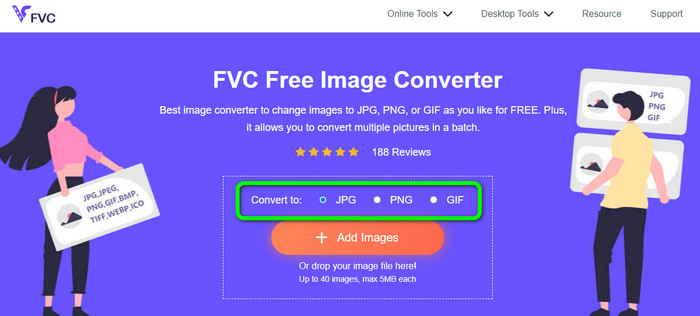
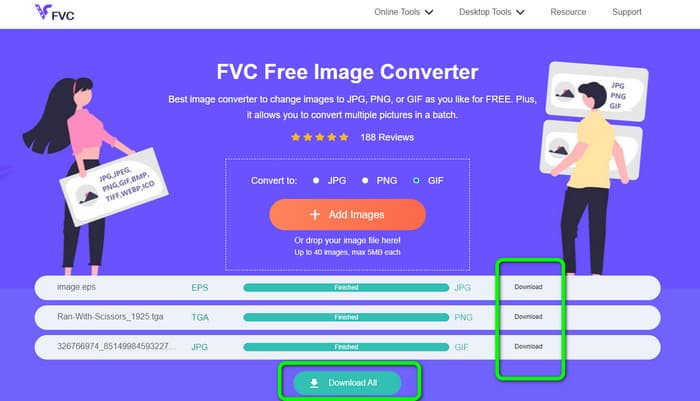
الخطوة 1. انتقل إلى الموقع الرسمي لـ FVC Free Image Converter. يمكنك الوصول إلى هذا المحوّل عبر الإنترنت من جميع المتصفحات. بعد ذلك، يمكنك النقر على صيغة JPG أو PNG أو GIF من خيارات الصيغ المتاحة.
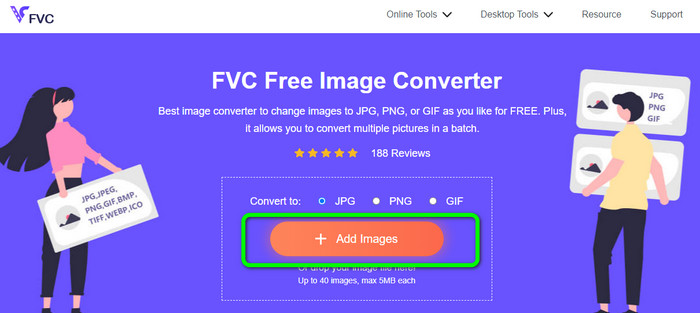
الخطوة 2. انقر زر Add Images لرفع ملف الصورة من جهاز الكمبيوتر. يمكنك أيضًا سحب الملف وإفلاته داخل المربع. وبما أن الأداة توفر عملية تحويل دفعي، يمكنك رفع عدة ملفات في الوقت نفسه.
الخطوة 3. ستلاحظ أن محوّل الصور سيحوّل الصور تلقائيًا بعد انتهاء عملية الرفع. عند اكتمال عملية التحويل، انقر زر Download All لحفظها جميعًا بنقرة واحدة. ولكن إذا فضّلت حفظ كل صورة يدويًا، فانقر زر Download الموجود على اليمين.
الجزء 3. أسئلة وأجوبة حول تحويل الصور إلى ارتباط
1. لماذا تحويل الصورة إلى ارتباط؟
يمكنك استخدام صورة كزر إذا كان لديك موقع ويب أو مدونة. بهذه الطريقة ، يمكن للمستخدمين الوصول إلى صفحتك الرئيسية أو صفحة معينة. بالإضافة إلى ذلك ، من الممكن ربط الصور في منشورات وسائل التواصل الاجتماعي أو توقيعات البريد الإلكتروني. أيضًا ، إنها طريقة رائعة للإعلان عن موقع الويب الخاص بك أو مدونتك وزيادة حركة المرور. فيما يلي بعض من أهم المبررات لتحويل URL من صورة.
2. ما هي فوائد تحويل الصورة إلى رابط؟
قد يكون من الأسهل بالنسبة للمستخدمين النقر فوق الارتباط الخاص بك إذا قمت بتحويل صورة إلى ارتباط. إذا كنت تريد أن ينقر الزوار على صورة صغيرة ، فإن تحويل الصورة إلى عنوان URL سيعطيهم مساحة أكبر للنقر عليها. قد تجعل مشاركة المواد الخاصة بك مع الآخرين من الأسهل بكثير اكتشاف سلع أو خدمات جديدة.
3. كيف يمكنني العثور على عنوان URL لصورة على موقع ويب؟
انقر بزر الماوس الأيمن فوق الصورة واختر نسخ رابط الصورة للحصول على عنوان URL لصورة على موقع ويب. يمكنك بعد ذلك فتح عنوان URL في علامة تبويب جديدة لحفظ الصورة أو مشاركة عنوان URL عبر البريد الإلكتروني ووسائل التواصل الاجتماعي والقنوات الأخرى.
خاتمة
هكذا إذن! لقد تعلّمت الآن أفضل الطرق لتحويل الصور إلى روابط. بالإضافة إلى ذلك، اكتشفت أبسط الطرق لتحويل الصور إلى صيغ JPG وPNG وGIF. لذلك، إذا أردت تغيير صورك إلى روابط URL، فارجع إلى الطرق الفعّالة المذكورة أعلاه. ومن ناحية أخرى، إذا كنت تحتاج إلى محوّل صور متميز لتحويل الصور إلى صيغ أخرى، فاستخدم أداة FVC Free Image Converter.
-
 طرق حول كيفية تحويل الصور إلى JPG عبر الإنترنت وغير متصل
 هل تريد تحويل الملف إلى تنسيق JPG لسبب ما؟ ثم هذه المقالة لك. سنعلمك أفضل طريقة لتحويل صورتك إلى JPG
-
 طرق مفيدة لتحويل الصور بسهولة إلى تنسيق PNG
 هل تبحث عن أفضل طريقة لحفظ صورتك بصيغة PNG؟ تقدم هذه الإرشادات حلولًا ممتازة لتحويل الصور إلى PNG عبر الإنترنت وغير متصل
-
 ما هو JPEG / JPG: قم بتحويل صورك إلى JPG دون عناء
 هل تشعر بالفضول بشأن معنى JPEG؟ لدينا إجابة لك. ستتعلم أيضًا كيفية تحويل تنسيقات الصور المختلفة إلى ملفات JPG. اقرأ المنشور الآن.
