


 محول الفيديو النهائي
 مسجل الشاشة
 إصلاح الفيديو
 تنزيل آمن
طرق خالية من المتاعب لتغيير JPG إلى PNG لا يمكنك تفويتها
الملفات التي تحمل الامتدادَين .png و .jpg هي ملفات صور. تحتوي هذه الصيغ على الصور الفوتوغرافية والرسومات ولقطات الشاشة والمعلومات المرئية. وتشمل أيضًا أنواعًا أخرى من الوسائط. ونظرًا لكونهما صيغة ملفين مختلفتين، فلكل واحدةٍ منهما قدراتها الخاصة. أنت محظوظ إذا كنت تريد تعلُّم بياناتٍ مفصَّلة عن هذين النوعين من الملفات. سيوفِّر لك هذا الدليل معلوماتٍ كافية عن صيغتي JPG وPNG. بالإضافة إلى ذلك، ستتعرّف أيضًا على أفضل الطرق لتحويل صورة JPG إلى صيغة PNG. سنقدِّم لك أدواتٍ مفيدة عبر الإنترنت وغير متصلة بالإنترنت يمكنك استخدامها. كذلك ستتعرّف على مزاياها وعيوبها. وبهذه الطريقة ستحصل على فكرة عن مُحوِّل الصور الأنسب لك والأكثر فاعلية. اقرأ هذا الدليل واطَّلع على كل ما يمكنك تعلُّمه حول كيفية تحويل JPG إلى PNG.

الجزء 1. تفاصيل كاملة حول تنسيقات الملفات JPG و PNG
ما هو تنسيق JPG؟
مجموعة خبراء التصوير المشتركة ، JPG ، هو تنسيق شائع يستخدم خوارزمية. يقوم بضغط الرسومات والصور. يوفر تنسيق الملف هذا ضغطًا كبيرًا ، مما يجعله مفيدًا على نطاق واسع. حجم JPG صغير ، وهو أمر ممتاز. إنه مثالي للمشاركة عبر الإنترنت واستخدام مواقع الويب. يدعم ملف JPG الضغط المفقود ولون 24 بت. بالإضافة إلى ذلك ، يمكنها عرض 16.8 مليون لون مع الحفاظ على حجم صغير. كما أنها مثالية لعرض الصور الفوتوغرافية. يستخدم المصورون تنسيق ملف JPG. إنه مخصص للتصوير بتنسيق خام لضمان الالتقاط الدقيق للصورة. نظرًا لصغر حجمها ، يمكن للمستخدمين فتح الصورة بشكل أسرع على معظم المتصفحات. بصرف النظر عن عرض الصور ، هذا التنسيق مناسب أيضًا للنشر على الويب. ملف JPG مفيد للمدونين والناشرين. يوفر وقت تحميل أسرع للصفحة حتى يتمكن المشاهدون من الوصول إلى المحتوى على الفور.
الايجابيات
- يسمح حجم الملف الصغير بالنقل الفوري.
- يتم تعيين التشبع وتوازن اللون الأبيض في JPG.
- يمكن التعرف على تنسيق الملف هذا في جميع المتصفحات.
- يمكن أن تقدم دقة صورة من الدرجة الأولى.
سلبيات
- يؤدي الضغط إلى تدهور جودة الصورة.
- تنسيق الملف هذا غير مناسب للصور ذات النص أو الحواف الحادة.
- لا يدعم JPG الصور ذات الطبقات.
ما هو تنسيق PNG؟
رسم الشبكة المحمول ، PNG ، هو نوع ملف صورة نقطية. هذا التنسيق هو تطور تنسيق GIF. في عام 1995 ، أنشأ أوليفر فروم تنسيق PNG للقيام بما لا تستطيع GIF فعله. تنسيق PNG خالي من براءات الاختراع وله لوحة ألوان أكثر شمولاً ، على عكس GIF. يعد PNG أحد أكثر ملفات الصور شيوعًا في هذا العصر. إنها بلا شك تحظى بشعبية لدى مصممي الويب. يمكنه التعامل مع الخلفيات شبه الشفافة والشفافة. يمكنك عمل رسوم توضيحية وتصميم موقع ويب وإنشاء صور فوتوغرافية والمزيد. على سبيل المثال ، إذا كنت ترغب في وضع صورة فوق الشعار ، فكل ما يمكنك فعله هو قص الشعار. نظرًا لأن الملف غير مسجل ببراءة اختراع ، يمكنك أيضًا فتح PNG بدون ترخيص في أي برنامج لتحرير الصور. أيضًا ، يستخدم هذا التنسيق ضغطًا بدون فقدان البيانات. هذا يعني أن الضغط لا يؤثر على جودة الصورة.
الايجابيات
- يمكن أن يتعامل تنسيق ملف PNG مع صور أكثر تفصيلاً.
- لا توجد براءة اختراع ، لذا يمكنك فتح صور PNG في جميع البرامج.
- بعد الضغط ، لن تفقد صورة PNG أي بيانات.
سلبيات
- حجم PNG أكبر من حجم JPG و GIF.
- هذا الملف لا يدعم صيغ ألوان CMYK.
- لديها استجابة أبطأ وأوقات تحميل الصفحة.
الجزء 2. طرق فعالة لتحويل JPG إلى PNG
الطريقة 1. كيفية تحويل JPG إلى PNG باستخدام FVC Free Image Converter
يصبح تحويل JPG إلى PNG أمرًا سهلًا عند استخدام أداة FVC Free Image Converter. يقدِّم هذا المحوِّل المعتمد على الويب عملية تحويل بسيطة. يمكنك تحويل ملف JPG إلى صيغة PNG في بضع خطوات فقط. يمكن للمستخدمين، خصوصًا المبتدئين، استخدام هذه الأداة بسهولة بفضل واجهتها البديهية. كما تتمتّع بسرعة في عملية التحويل، ما يجعلها مريحة لجميع المستخدمين. علاوة على ذلك، يمكنك تنفيذ عملية تحويل دفعية، أي يمكنك تحويل عدّة ملفات صور دفعةً واحدة. ويمكنك أيضًا الوصول إلى هذا البرنامج عبر جميع المتصفحات، بما في ذلك Google وExplorer وSafari وEdge وغيرها. البرنامج مجاني وآمن للاستخدام كذلك، إذ يقوم بحذف بياناتك تلقائيًا بعد الانتهاء من التحويل وحفظ الصور.
الايجابيات
- مناسب للمبتدئين.
- يوفر واجهة سهلة الفهم.
- يمكن الوصول إليها في جميع المتصفحات.
- 100% مجاني.
- يوفر عملية تحويل دفعة.
سلبيات
- يتطلب اتصالاً بالإنترنت لاستخدام محول الصور.
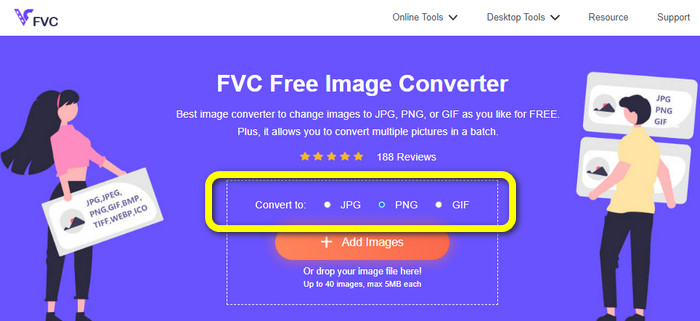
الخطوة 1: زُر موقع FVC Free Image Converter. انتقل إلى خيارات الصيغ واختر صيغة PNG.
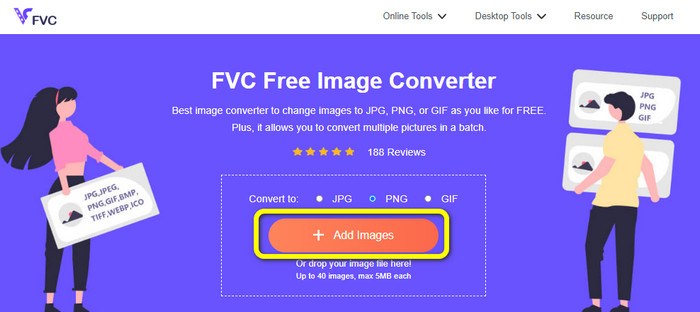
الخطوة 2: انقر زر Add Images لإضافة صورة JPG التي تريد تحويلها.
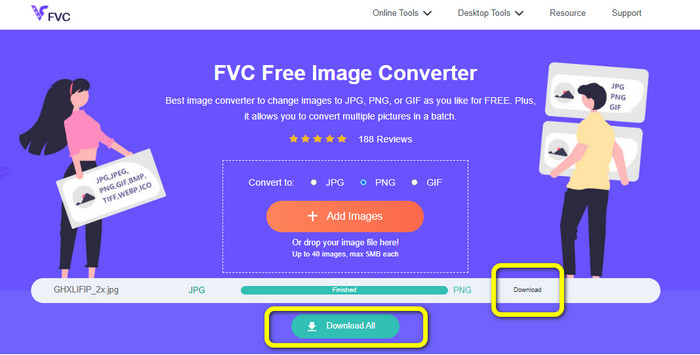
الخطوة 3: بعد رفع صورة JPG ستنتقل مباشرةً إلى عملية التحويل. انتظر لحظات ثم انقر زر Download لحفظ الصورة.
الطريقة 2. كيفية تحويل JPG إلى PNG باستخدام FreeConvert
يُعد FreeConvert محوِّل صور آخر يمكنك استخدامه عبر الإنترنت. يمكنه مساعدتك على تحويل JPG إلى PNG أونلاين. ومع إجراءاته السهلة الاتّباع تصبح عملية التحويل بسيطة. وهو مناسب لجميع المستخدمين، وخصوصًا المبتدئين. علاوة على ذلك، تتوفّر في هذا البرنامج إمكانية التحويل الدفعي، بحيث يمكنك تحويل العديد من الملفات في الوقت نفسه لتوفير المزيد من الوقت. إلى جانب صيغة PNG، يدعم البرنامج أيضًا BMP وTIFF وGIF وغيرها. لكن النسخة المجانية لها قيود؛ إذ إن الحجم الأقصى للملف هو 1 غيغابايت، ويجب عليك شراء خطة اشتراك للحصول على حدٍّ أكبر لحجم الملفات. كما أن الإعلانات المزعجة تظهر باستمرار على الشاشة.
الايجابيات
- عملية تحويل الدُفعات متاحة.
- سهل تنفيذه.
سلبيات
- يحتاج إلى اتصال بالإنترنت لاستخدام البرنامج.
- الإعلانات المزعجة تظهر دائمًا على الشاشة.
- احصل على النسخة المدفوعة للاستمتاع بمزيد من الميزات الرائعة.
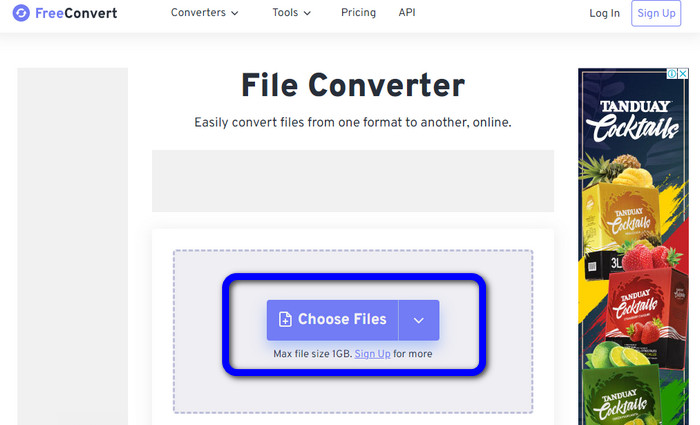
الخطوة 1: انتقل إلى موقع FreeConvert. انقر زر Choose Files لرفع صورة JPG.
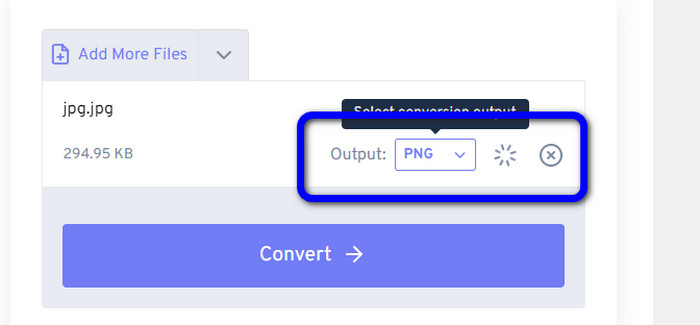
الخطوة 2: انتقل إلى خيار Output واختر صيغة ملف PNG.
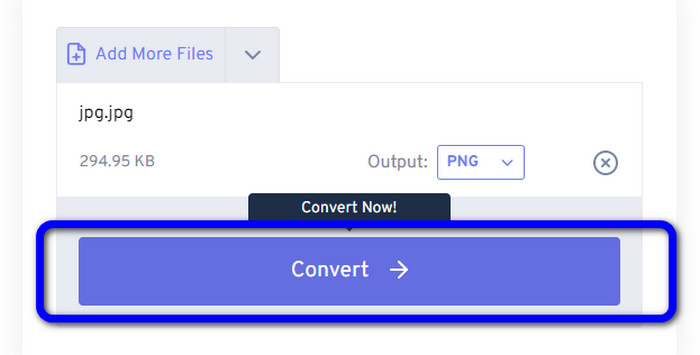
الخطوة 3: انقر زر Convert للمتابعة في عملية التحويل. بعد انتهاء التحويل، احفظ الصورة لتخزينها على حاسوبك.
الطريقة 3. كيفية تحويل JPG إلى PNG باستخدام JPG إلى PNG
أداة أخرى عبر الإنترنت يمكنك استخدامها لتحويل JPG إلى PNG هي JPG to PNG. تتيح لك هذه الأداة رفع صور يصل حجمها حتى 50 ميغابايت. بالإضافة إلى ذلك، يمكنك تحويل حتى 20 صورة JPG دفعةً واحدة حسب رغبتك. كما أن هذا البرنامج المعتمد على الويب سهل الاستخدام، وبذلك يستطيع المستخدمون المحترفون وغير المحترفين تحويل الصور من خلاله. ويدعم صيغًا عديدة لملفات الصور، مثل HEIC وWebP وJPG وغيرها. مع ذلك، هناك حالات لا يعمل فيها هذا المحوِّل بالشكل المطلوب، كما تظهر بعض الإعلانات المزعجة أثناء التحويل. وتحتاج أيضًا إلى اتصال بالإنترنت لتحويل ملفات الصور.
الايجابيات
- مثالي للمستخدمين غير المحترفين.
- يمكنه تحويل 20 صورة دفعة واحدة.
سلبيات
- الإعلانات مزعجة.
- في بعض الأحيان ، لا يعمل المحول بشكل جيد لسبب ما.
- تحتاج إلى اتصال بالإنترنت لاستخدام الأداة.
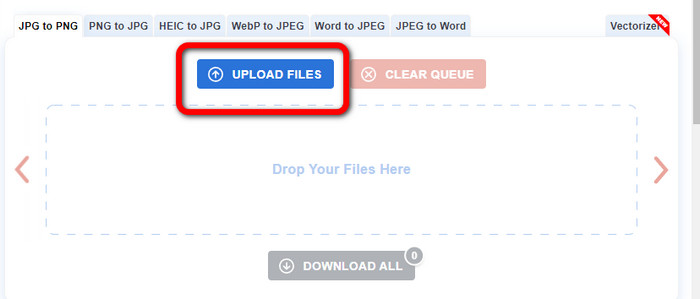
الخطوة 1: زُر الموقع الرسمي لأداة JPG to PNG. انقر زر Upload Files لإدراج صورة JPG.
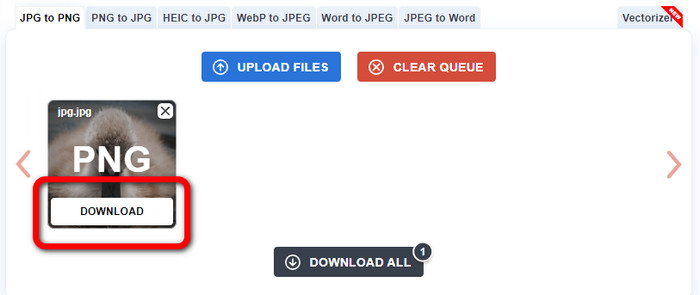
الخطوة 2: بعد رفع صورة JPG ستُحوَّل تلقائيًا إلى PNG. انقر زر Download بعد اكتمال عملية التحويل.
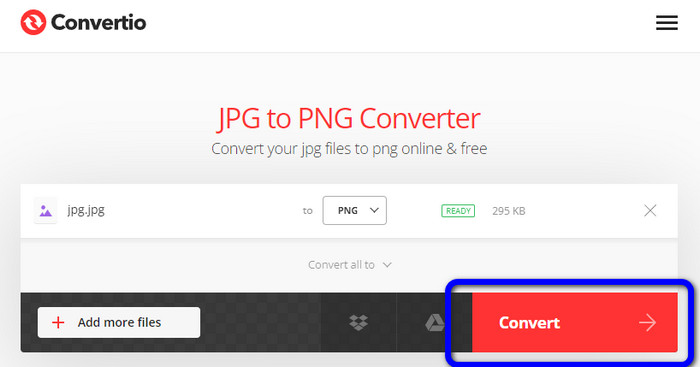
الطريقة 4. كيفية تحويل JPG إلى PNG باستخدام برنامج Convertio
يُعد Convertio أيضًا محوِّل صور يمكنك استخدامه عبر الإنترنت. يتيح لك هذا المحوِّل تحويل JPG إلى PNG بسهولة ودون تعقيد. يمكنك تحويل ملفات الصور في بضع نقرات. وبفضل واجهته البديهية يمكنك اتِّباع التعليمات بسهولة. ويدعم كذلك صيغ صور أخرى إلى جانب PNG، مثل JPG وSVG وGIF وTIFF وBMP وغيرها. غير أنه في النسخة المجانية لا يمكنك رفع صورة يزيد حجمها على 100 ميغابايت، لذا إن أردت تحويل مزيد من ملفات الصور، فعليك شراء خطة اشتراك.
الايجابيات
- عملية التحويل سهلة ومناسبة للمبتدئين.
- وهو يدعم تنسيقات الصور المختلفة ، مثل PNG و JPG و TIFF و BMP و SVG والمزيد.
سلبيات
- الحد الأقصى لحجم الملف المراد تحميله على الإصدار المجاني هو 100 ميغا بايت فقط.
- مطلوب اتصال بالإنترنت.
الخطوة 1: انتقل إلى موقع Convertio. انقر زر Choose Files لرفع الصورة.
الخطوة 2: اختر صيغة PNG من خيارات الصيغ.
الخطوة 3: اضغط زر Convert لتحويل صورة JPG إلى PNG.
الطريقة 5. كيفية تحويل JPG إلى PNG باستخدام Canva
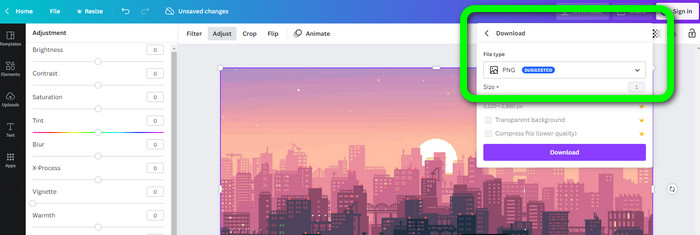
يُعد Canva محوِّلًا عبر الإنترنت يمكنك استخدامه لتحويل JPG إلى PNG. يمكنك هنا تحويل ملفاتك دون فقدان للجودة. تستطيع الوصول إلى هذا المحوِّل من جميع المتصفحات، مما يجعله مريحًا للجميع. لكن إن لم تكن لديك خطة اشتراك فستكون الميزات المتاحة لك محدودة؛ لذا فإن شراء الأداة هو أفضل طريقة للاستفادة من كامل وظائفها.
الايجابيات
- متاح لجميع المتصفحات.
- تحويل الملفات دون فقدان الجودة.
سلبيات
- يحتاج إلى اتصال بالإنترنت لتحويل ملفات الصور.
- قم بشراء الأداة للاستمتاع بمزيد من الميزات الرائعة.
الخطوة 1: افتح المتصفح وانتقل إلى موقع Canva. انقر زر Upload your image في منتصف الواجهة.
الخطوة 2: بعد رفع الصورة، انتقل إلى زر Download، ثم اختر صيغة PNG من خيار File type.
الطريقة 6. كيفية تحويل JPG إلى PNG باستخدام محول JPG إلى PNG
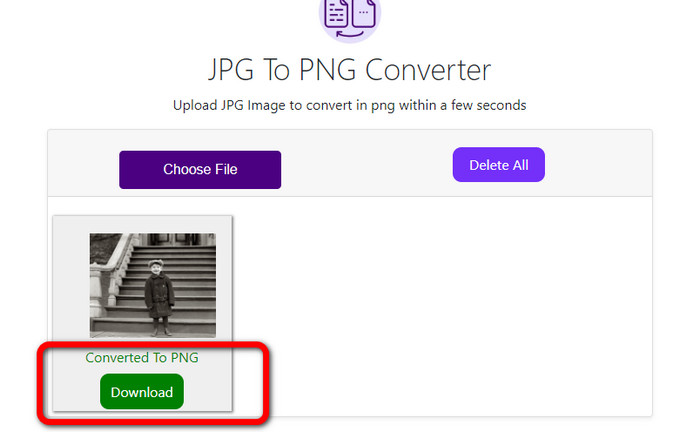
يُعد تطبيق JPG to PNG Converter أيضًا أداة قائمة على الويب. هذا البرنامج جيد لتحويل الصور بكفاءة، إذ يمكنك تحويل الملفات في ثوانٍ معدودة نظرًا لسرعة عملية التحويل. كما أن هذا المحوِّل متاح في جميع المتصفحات. للأسف، هناك أوقات لا يعمل فيها المحوِّل بشكلٍ صحيح، كما أن جودة الصورة قد تتغيّر بعد عملية التحويل.
الايجابيات
- الأداة سهلة الاستخدام.
- يوفر عملية تحويل سريعة.
سلبيات
- في بعض الأحيان ، لا يعمل البرنامج بشكل جيد.
- بعد عملية التحويل ، تتغير جودة الصورة.
الخطوة 1: انقر زر Choose Files لإضافة صورة JPG.
الخطوة 2: انقر زر Download لحفظ الصورة على جهازك.
الطريقة 7. كيفية تحويل JPG إلى PNG باستخدام Video Converter Ultimate
إذا كنت تبحث عن محوِّل من JPEG إلى PNG فاستخدم Video Converter Ultimate. إنه برنامج مجاني التحميل. يقدِّم هذا المحوِّل واجهة بديهية مع خطوات أساسية لتحويل JPG إلى PNG، وبذلك يمكن للمستخدمين المحترفين وذوي المهارات المتوسطة استخدامه بسهولة. بالإضافة إلى ذلك، يوفِّر سرعة عالية في عملية التحويل؛ إذ يمكنك تحويل ملفات الصور في ثوانٍ فقط. وأفضل ما في هذا البرنامج أنك تستطيع تحويل عدة صور في الوقت نفسه، مما يوفِّر الوقت ويتيح لك تحويل عدد أكبر من الصور. كما يدعم عددًا كبيرًا من صيغ الصور مثل TIFF وWebP وBMP وJPG وغيرها.
الايجابيات
- يوفر واجهة سهلة الاستخدام بخطوات بسيطة ، مما يجعلها مناسبة لجميع المستخدمين.
- مجاني للتنزيل.
- عملية تحويل الدُفعات متاحة.
- يمكن الوصول إليها على كل من أجهزة الكمبيوتر التي تعمل بنظام Windows و Mac.
سلبيات
- احصل على النسخة المدفوعة لتجربة المزيد من الميزات الرائعة.
الخطوة 1: حمِّل برنامج Video Converter Ultimate على نظامي Mac أو Windows، ثم شغِّل البرنامج.
تحميل مجانيلنظام Windows 7 أو أحدثتنزيل آمن
تحميل مجانيلنظام MacOS 10.7 أو أحدثتنزيل آمن
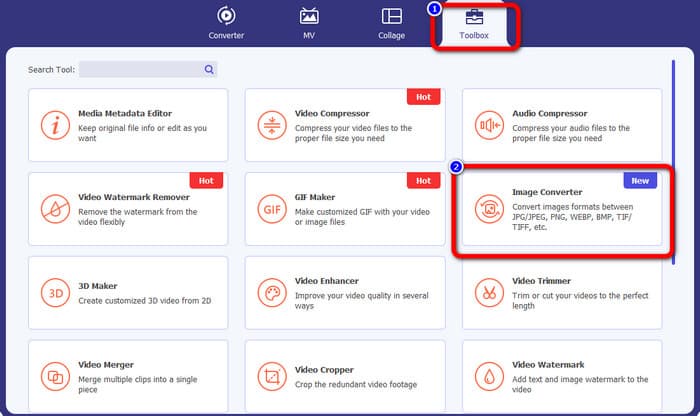
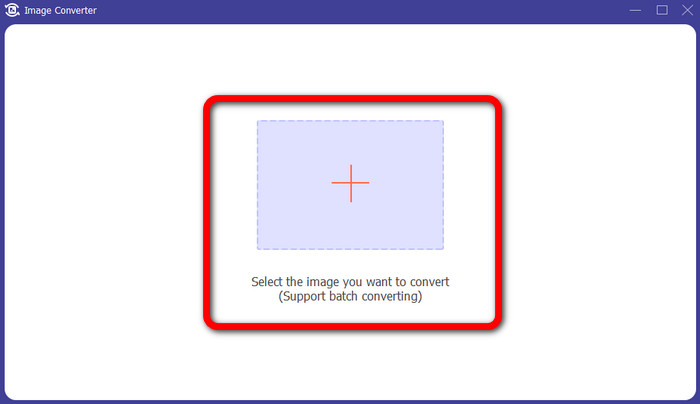
الخطوة 2: انتقل إلى لوحة Toolbox واختر وظيفة Image Converter.
الخطوة 3: انقر أيقونة Plus لإضافة صورة JPG.
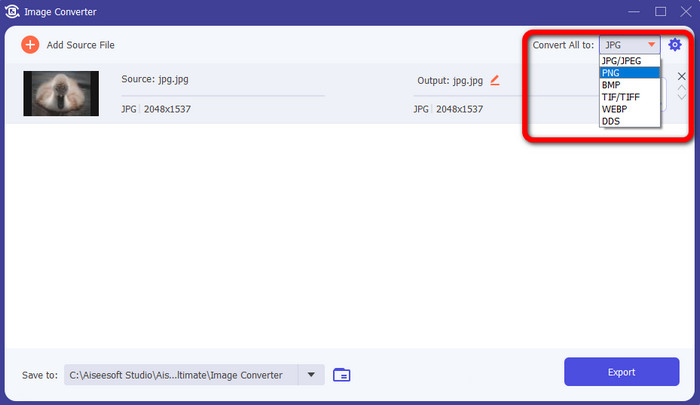
الخطوة 4: اختر صيغة PNG من خيارات الصيغ في الزاوية العلوية اليمنى من الواجهة.
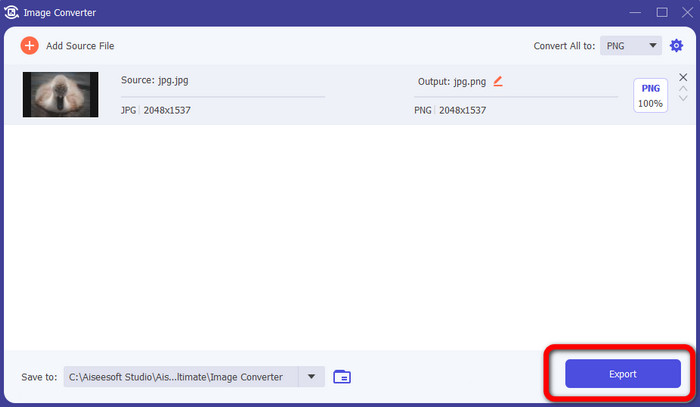
الخطوة 5: بعد ذلك، انقر زر Export. انتظر عملية التحويل، ثم يمكنك فتح ملفك من المجلد.
الطريقة 8. كيفية تحويل JPG إلى PNG باستخدام معالج محول BitRecover JPG
أداة أخرى غير متصلة بالإنترنت لتحويل JPG إلى PNG هي BitRecover JPG Converter Wizard. هذا البرنامج مناسب لأنظمة Windows، وهو مجاني التحميل أيضًا. بمساعدة هذا البرنامج يمكنك تحويل صورة JPG إلى PNG بدقة. لكن هذا البرنامج صعب الاستخدام؛ فإجراءاته مربكة، ما يجعله معقّدًا على المبتدئين. كما أن عملية التثبيت بطيئة للغاية وتستغرق وقتًا طويلًا.
الايجابيات
- مجاني للتنزيل.
- التطبيق مناسب لنظام التشغيل Windows.
سلبيات
- غير مناسب للمستخدمين غير المحترفين.
- عملية التثبيت معقدة.
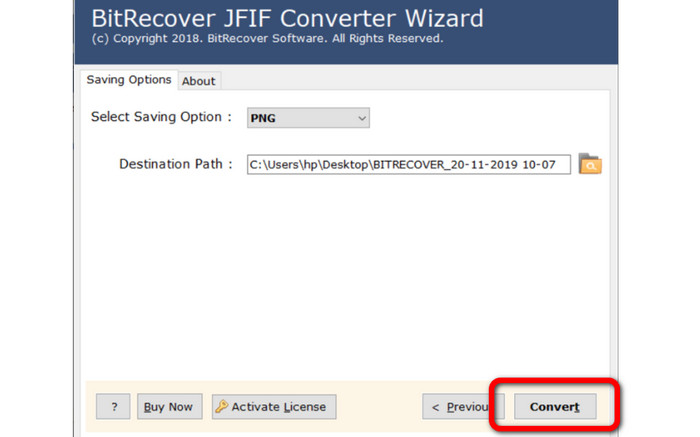
الخطوة 1: ثبِّت الأداة على حاسوبك. انقر زر Select Files أو Select Folders لإرفاق صورة JPG.
الخطوة 2: ثم انقر زر Next. بعد ذلك، انتقل إلى خيارات الصيغ واختر صيغة ملف PNG.
الخطوة 3: انقر زر Convert لبدء عملية التحويل.
الجزء 3. أسئلة وأجوبة حول كيفية تحويل JPG إلى PNG
1. لماذا يجب عليك تحويل JPG إلى PNG؟
إذا كنت تريد إنشاء دعم للشفافية ، فإن تحويل JPG إلى PNG هو الخيار الأفضل. أيضًا ، إذا كنت تريد تحرير الصور أو إضافة طبقات ، فستكون صورة PNG مناسبة.
2. ما هي أسهل طريقة لتحويل صور JPG إلى PNG؟
استخدم أداة FVC Free Image Converter. فهي توفِّر طريقة بسيطة لتحويل JPG إلى صيغة PNG، وبذلك يمكن حتى لغير المحترفين استخدام هذا المحوِّل عبر الإنترنت.
3. هل PNG أفضل من JPG؟
إذا كنت تخطط لتعديل صورك باستخدام برنامج تحرير الصور ، فإن تنسيق PNG يكون أفضل. ولكن ، إذا كنت تريد ملف صورة صغيرًا ، فيمكنك استخدام تنسيق JPG.
خاتمة
ها قد وصلنا للنهاية! هذه هي أكثر الطرق فاعليةً لمعرفة كيفية تحويل JPG إلى PNG. قد عرضت لك هذه المقالة أيضًا مزايا وعيوب كل طريقة، بحيث تحصل على معلوماتٍ أخرى مهمّة عن كل محوِّل صور. لكن إذا كنت تفضِّل برنامجًا بأسلوب بسيط، ويسهل الوصول إليه، وآمنًا في الاستخدام، فاستعن بأداة FVC Free Image Converter. أما إذا أردت تحويل ملفات الصور باستخدام حاسوبك فاستعمل برنامج Video Converter Ultimate؛ إذ يقدِّم واجهة بديهية تناسب الجميع.
-
 طرق حول كيفية تحويل الصور إلى JPG عبر الإنترنت وغير متصل
 هل تريد تحويل الملف إلى تنسيق JPG لسبب ما؟ ثم هذه المقالة لك. سنعلمك أفضل طريقة لتحويل صورتك إلى JPG
-
 طرق مفيدة لتحويل الصور بسهولة إلى تنسيق PNG
 هل تبحث عن أفضل طريقة لحفظ صورتك بصيغة PNG؟ تقدم هذه الإرشادات حلولًا ممتازة لتحويل الصور إلى PNG عبر الإنترنت وغير متصل
-
 تفاصيل كاملة حول الاختلافات بين JPEG و JPG مقابل PNG
 ستمنحك هذه المشاركة معلومات كافية حول الاختلافات بين JPEG و JPG مقابل PNG. بالإضافة إلى ذلك ، ستتعلم كيفية تحويل الصور إلى هذه الملفات.
