


 محول الفيديو النهائي
 مسجل الشاشة
 إصلاح الفيديو
 تنزيل آمن
كيفية تحويل SVG إلى JPG بسرعة [Super Easy Ways]
قد ترغب أحيانًا في تحويل صورة بصيغة SVG إلى JPG لعدة أسباب. أحد الاحتمالات هو تسهيل عملية التحرير؛ إذ يتطلّب تحرير ملفات SVG استخدام محرّر صور قائم على الرسوم المتجهة، بينما يُعدّ محرّرو الصور النقطية (raster) أكثر شيوعًا بين المستخدمين، مثل Microsoft Paint وAdobe Lightroom. قد يكون استخدام Lightroom لتحرير SVG ممكنًا إذا قمت أولًا بتحويله إلى JPG. سبب آخر لتحويل SVG إلى JPG هو تسهيل المشاركة عبر الإنترنت؛ فملفات JPG مقبولة تقريبًا دائمًا في المواقع والتطبيقات التي تتيح رفع الصور، بينما من غير المرجّح أن تقبل SVG. على سبيل المثال، إنستغرام يقبل ملفات JPG لكنه لا يقبل SVG. ستعرض لك هذه المقالة طرقًا عملية لتحويل SVG إلى JPG، كما ستتعرّف على أفضل محوّلات الصور التي يمكنك استخدامها أونلاين أو بدون اتصال بالإنترنت.

الجزء 1. قارن SVG و JPG
| تنسيق الملف | SVG | JPG |
| ملحق اسم الملف | .svg | .jng |
| طورت بواسطة | اتحاد شبكة ويب العالمية | لجنة JPEG |
| طورت بواسطة | SVG هو تنسيق ملف صورة متجه للرسومات ثنائية الأبعاد على أساس XML. الرسوم المتحركة والتفاعلية مدعومة. في ملفات XML النصية ، يتم تعريف صور SVG وسلوكها. نظرًا لأن ملفات SVG هي مجرد ملفات XML ، فيمكن تحريرها باستخدام أي محرر نصوص. | JPG تُستخدم لمواقع الويب والبريد الإلكتروني لأنها خفضت أحجام الملفات. ومع ذلك ، نظرًا لأن JPG يتم فقده ، فإنه سيؤثر على جودة الصورة بعد الضغط. يشير الملف "الضياع" الناتج إلى فقد الجودة. تستخدم بطاقات الذاكرة الخاصة بالكاميرات الرقمية تنسيق JPG. |
| تفاصيل تقنية | SVG هو تنسيق يستخدم لتعريف رسومات المتجهات المستندة إلى XML للويب. لن يفقد هذا الملف جودة الصورة حتى عند تكبيرها أو تغيير حجمها. يمكن تحريك جميع عناصر وسمات ملف SVG. | JPG هو تنسيق ملف صورة لتحرير الصور الثابتة. يوفر تقنية ضغط متناظرة كثيفة المعالج. كما أنها تستغرق وقتًا طويلاً في كل من الضغط وإلغاء الضغط. JPEG هو معيار شائع في الاتحاد الدولي للاتصالات. كما تضم المنظمة الدولية للتوحيد القياسي. |
| البرامج المرتبطة | أدوبي فوتوشوب معاينة Adobe كوريل بينت شوب برو كوريل SVG عارض | عارض معرض صور Microsoft Windows أدوبي فوتوشوب معاينة Adobe كوريل بينت شوب برو |
الجزء 2. أفضل طريقة لتحويل SVG إلى JPG عبر الإنترنت
أفضل أداة يمكنك استخدامها هي FVC Free Image Converter. فهي قادرة على تحويل SVG إلى JPG بسهولة. بالإضافة إلى ذلك، يمكنك تحويل عدة ملفات SVG إلى JPG في الوقت نفسه. كما توفّر واجهة وتعليمات سهلة المتابعة، وهو ما يناسب جميع المستخدمين. يوفّر محوّل الصور هذا ميزة التحويل الدفعي، ويمكنك تنزيل العديد من الملفات المحوّلة بنقرة واحدة فقط. ومن الجوانب الإيجابية في هذه الأداة خلوّها من الإعلانات المزعجة، ما يتيح لك التركيز على عملية التحويل دون مواجهة أي إعلانات. إضافة إلى ذلك، يقبل الموقع ملفات إدخال بصيغ مختلفة، مثل PNG وBMP وTIFF وGIF وغيرها. ولا تحتاج إلى تثبيت هذا المحوّل؛ إذ يمكنك التحكم به مباشرة من خلال المتصفح. علاوة على ذلك، ستبقى جودة الصورة بعد التحويل مماثلة للأصل، مما يضمن لك الحفاظ على مظهر ممتاز للصورة. كما أن معلوماتك تظل آمنة على هذا الموقع؛ فبعد تحويل الصور وحفظها، يقوم النظام بحذف جميع بياناتك تلقائيًا.
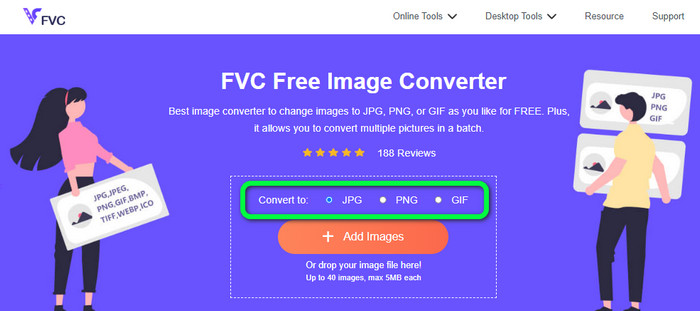
الخطوة 1: انتقل إلى الموقع الرئيسي لـFVC Free Image Converter. قبل إضافة ملف صورة SVG، اختر صيغة الإخراج المطلوبة، ثم انقر على صيغة JPG من خيارات الصيغ.
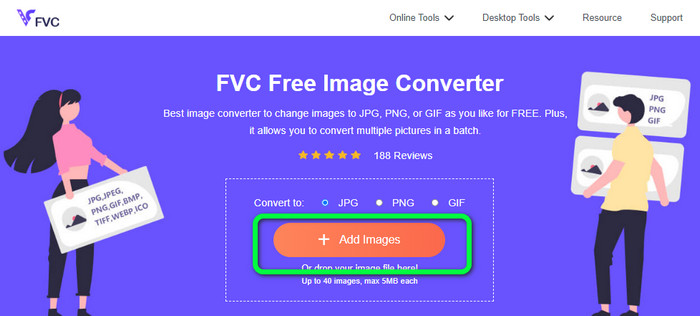
الخطوة 2: انقر على زر Add Images الموجود في وسط الواجهة. بعد ذلك ستظهر لك نافذة مجلد الملفات على شاشتك. اختر صورة SVG التي تريد تحويلها وافتحها. يمكنك أيضًا سحب ملف SVG وإفلاته مباشرة في الصندوق. انقر مرة أخرى على زر Add Images لإجراء عملية تحويل دفعي.
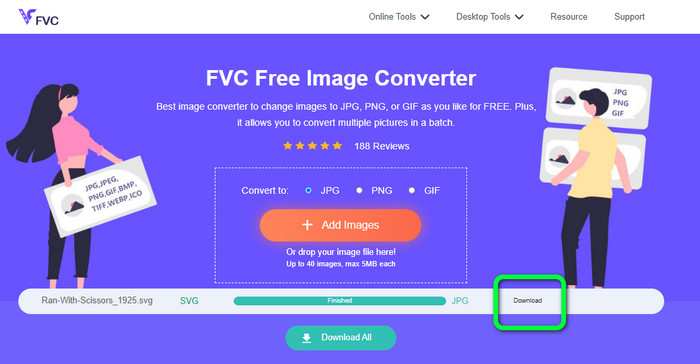
الخطوة 3: أثناء رفع الملف، سيقوم الموقع بتحويل الصورة تلقائيًا. وفي الخطوة الأخيرة، انقر على زر Download الموجود في الجهة اليمنى من الواجهة. بعد إتمام عملية الحفظ، افتح الصورة المحوّلة على جهاز الكمبيوتر.
الجزء 3. طريقة سهلة لتحويل SVG إلى JPG على Windows
في هذا القسم ستتعرّف على أفضل طريقة لتحويل SVG إلى JPG دون اتصال بالإنترنت على أجهزة ويندوز. من أكثر الطرق فعالية استخدام HitPaw Video Converter. إذ تجعل ميزة تحويل الصور (Image Convert) في HitPaw Video Converter عملية تحويل الصور الد batch سهلة. يمكنك استيراد الصور والرسومات بمختلف الصيغ وتحويلها إلى الصيغة التي تريدها، سواء للتحويل الفردي أو الجماعي لصيغ الصور، مما يجعلها خيارًا ممتازًا. كما يدعم البرنامج جميع صيغ الصور الشائعة، مثل PNG وJPG وHEIC وRAW وBMP وغيرها، وبالتالي يمكنك أيضًا استخدام هذه الأداة لـتحويل BMP إلى JPG أو PNG. بالإضافة إلى التحويل، يقدّم هذا البرنامج القابل للتنزيل مزايا أخرى؛ إذ يمكنك من خلاله تنزيل ملفات الموسيقى والفيديو، وكذلك تحرير الفيديوهات عن طريق التدوير والقص وإضافة الفلاتر. ومع ذلك، فإن HitPaw Video Converter ليس سهل الاستخدام، خصوصًا للمبتدئين، إذ إن واجهته مربكة ويصعب فهمها، كما أن عملية التثبيت تستغرق وقتًا طويلًا.
الخطوة 1: ثبّت برنامج HitPaw Video Converter على جهاز ويندوز لديك، ثم بعد الانتهاء من التثبيت، شغّل التطبيق.
الخطوة 2: انتقل إلى لوحة Toolbox واختر أداة Image Converter. بعد ذلك، حدد ملف صورة SVG الذي تريد تحويله من مجلدات جهاز الكمبيوتر.
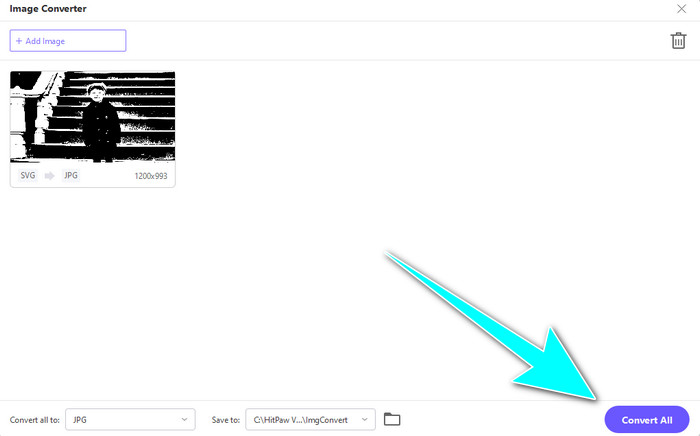
الخطوة 3: انقر على خيار Convert All to في الزاوية السفلية اليسرى من الواجهة، ثم اختر صيغة JPG كصيغة الإخراج.
الخطوة 4: أخيرًا، انقر على زر Convert All في الزاوية السفلية اليمنى من الواجهة، وانتظر انتهاء عملية التحويل. بعد ذلك يمكنك فتح صورتك بصيغة PNG على جهازك.
الجزء 4. كيفية تحويل SVG إلى JPG على نظام Mac
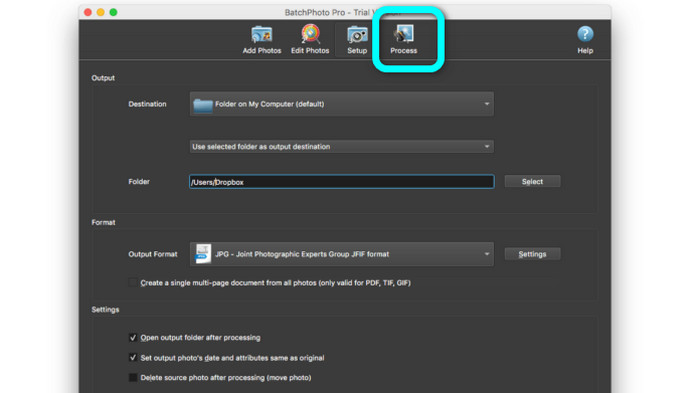
إذا كنت ترغب في تحويل SVG إلى JPG على جهاز Mac، فاستخدم BatchPhoto Pro. فهو يدعم العديد من صيغ الصور، بما في ذلك JPG وPNG وICO وSVG وEPS وأكثر من 170 صيغة أخرى، كما يمكنك حفظ الصور بصيغة PDF. ويتيح لك أيضًا إجراء تحويل دفعي، وبالتالي يمكنك تحويل عدة ملفات في الوقت نفسه. بالإضافة إلى ذلك، لا يقتصر عمله على التحويل فقط؛ إذ يمكنك تعديل صورك عن طريق تغيير الحجم، والتدوير، وضبط إعدادات الألوان. لكن يجب عليك شراء البرنامج إذا أردت الاستمرار في استخدامه؛ فهو يقدّم نسخة تجريبية لعدة أيام فقط. كما أن عملية التحويل فيه معقدة، وقد يجد المستخدمون غير المتخصصين صعوبة في فهم كيفية تحويل الصور.
الخطوة 1: قم بتنزيل وتثبيت BatchPhoto Pro، ويمكنك الحصول على النسخة التجريبية المجانية. بعد تثبيت التطبيق، قم بتشغيله.
الخطوة 2: من الجزء العلوي للواجهة، اختر خيار Add Photos. بعد النقر، أضف صور SVG التي تريد تحويلها إلى صيغة JPG. يمكنك إضافة عدة ملفات دفعة واحدة.
الخطوة 3: انتقل إلى خيار Set Up في الجزء العلوي من الواجهة، ثم توجّه إلى خيارات Output Format واختر صيغة JPG.
الخطوة 4: انقر على خيار Process لبدء عملية التحويل. بعد الانتهاء، انتقل إلى مجلد الإخراج وتحقق من الصورة المحوّلة.
الجزء 5. أسئلة وأجوبة حول تحويل SVG إلى JPG
1. لماذا يجب عليك تحويل SVG إلى JPG؟
مقارنةً بـ SVG ، تعد JPG أكثر ملاءمة لوسائل التواصل الاجتماعي والأجهزة الأخرى. إنه أحد تنسيقات الصور الشائعة التي يمكنك استخدامها في الوقت الحاضر. في SVG ، يمكنك فقط فتح هذا الملف على متصفحات الويب. لذلك ، يعد تحويل SVG إلى JPG ضروريًا لاستخدام المزيد من التوافق.
2. ما هي مزايا وعيوب ملفات SVG؟
يمكنك توسيع أو تقليص ملف SVG إلى أي حجم دون فقدان الجودة. لا تهتم SVGs بنوع العرض أو حجم الصورة. الطريقة التي يبدون بها ثابتة. تمنح SVGs أيضًا المصممين والمطورين قدرًا كبيرًا من التحكم في مظهرهم. إنه أفضل من تحريرها في محرر نصوص. حتى العناصر المرئية الأخرى مثل الظلال وتدرجات الألوان قابلة للتعديل. ومع ذلك ، هناك تنسيقات أفضل من SVG للحصول على صورة مفصلة وعالية الجودة. ينشئ المستخدمون رسومات متجهة باستخدام النقاط والمسارات بدلاً من البكسل. الكود ضروري أيضا.
3. كيف أقوم بفتح ملف SVG؟
أفضل طريقة لفتح ملف SVG هي استخدام المتصفح. اضغط على Ctrl+O في لوحة المفاتيح، ثم اختر ملف SVG الذي تريد عرضه وانقر على Open.
خاتمة
هذا كل شيء! المعلومات أعلاه تشرح طرق تحويل SVG إلى JPG على ويندوز وMac وعبر الإنترنت. لكن تحميل برنامج لتحويل الصور قد يكون مزعجًا، لذا إذا كنت تريد طريقة أبسط لتحويل الصور، فاستخدم FVC Free Image Converter. يتيح لك هذا المحوّل أونلاين تحويل الصور مباشرة من خلال المتصفح.
-
 طرق مفيدة حول كيفية تحويل TIFF إلى JPG / PNG بسهولة
 لا تفوت هذه الطرق الممتازة لتحويل TIF إلى تنسيقات JPG / PNG. سيقدم هذا المنشور المعلومات الضرورية التي تحتاج إلى معرفتها. يتضمن اختلافاتهم.
-
 تحويل JPEG إلى JPG بكفاءة [خمسة طرق مدرجة]
 تعال واحصل على أكثر البرامج التعليمية مباشرة حول تحويل JPEG إلى تنسيق ملف صورة JPG. انقر فوق هذا الدليل الإرشادي وابدأ في تعلم طرقك المفضلة
-
 أفضل 5 برامج تعليمية رائدة لتحويل PNG إلى JPG بسرعة
 إذا كنت بحاجة إلى تحويل ملف PNG إلى تنسيق JPG ، فيمكنك معرفة أفضل الطرق هنا. سوف تتعلم أيضًا الفرق بين تنسيقات ملفات PNG و JPG
