


 محول الفيديو النهائي
 مسجل الشاشة
 إصلاح الفيديو
 تنزيل آمن
قم بتحويل 3GP إلى MP4 باستخدام محولات فعالة وسهلة الاستخدام
نمت الحاجة إلى تحويل تنسيقات الملفات بشكل ملحوظ. تحويل واحد خاص له أهمية كبيرة هو تحويل ملفات 3GP إلى تنسيق MP4. بينما كانت ملفات 3GP شائعة في الماضي ، فإنها غالبًا ما تطرح مشكلات توافق على الأجهزة والأنظمة الأساسية الحديثة. في المقابل ، يوفر تنسيق MP4 توافقًا شاملاً وتشغيلًا عالي الجودة ودعمًا أوسع عبر الأجهزة والأنظمة الأساسية المختلفة.
لتلبية الحاجة إلى تحويل ملفات 3GP إلى MP4 بسلاسة، قمنا بمراجعة واختيار قائمة من أدوات التحويل القوية بعناية. توفر هذه الأدوات حلولاً فعّالة وموثوقة لتحويل مقاطع فيديو 3GP الخاصة بك بسهولة إلى صيغة MP4 واسعة التوافق. انضم إلينا بينما نستكشف أفضل أدوات التحويل هذه، ونكتشف كيف يمكنها تحسين تجربتك في مشاهدة الفيديو من خلال ضمان جودة تشغيل مثالية وتوافق عبر منصات وأجهزة متعددة.

الجزء 1. أفضل محولات 3GP إلى MP4
1. محول الفيديو النهائي
يُعَدُّ Video Converter Ultimate برنامجًا ممتازًا لتحويل مقاطع الفيديو إلى 3GP وMP4 وغيرها من صيغ الصوت. يوفّر هذا البرنامج وظيفة التحويل الدفعي التي تتيح لك تحويل عدة ملفات صوتية دفعة واحدة. بالإضافة إلى ذلك، يتيح التطبيق للمستخدمين تحسين جودة الملف الناتج من خلال تغيير معلمات مثل معدّل الإطارات، ومعدّل البت، والدقة. اقرأ الدليل القصير الذي أعددناه أدناه إذا كنت ترغب في تعلّم كيفية تحويل 3GP إلى MP4.
الميزات الرئيسية
◆ تم تصميم برنامج FVC Video Converter Ultimate لإنتاج مقاطع فيديو وملفات صوتية فائقة ، مع التركيز على الحفاظ على الجودة الأصلية للملفات المحولة إلى أقصى حد ممكن.
◆ تم تصميم واجهة التطبيق لتكون سهلة الاستخدام وبديهية ، مما يسهل التنقل لكل من المستخدمين المبتدئين والمتقدمين.
◆ يعد FVC Video Converter Ultimate أداة برمجية تعرض سرعة وفعالية عالية ، مما يسهل التحويل الفوري لتنسيقات الملفات المختلفة.
الخطوة 1. الحصول على تطبيق مُحوِّل 3GP إلى MP4
أولاً، انقر على خيار التنزيل المجاني المناسب أدناه لبدء تنزيل البرنامج على جهازك. بعد ذلك، عليك اتباع التعليمات الظاهرة على الشاشة من أجل تفعيل البرنامج. بمجرد تثبيته، يمكنك طلب المساعدة بخصوص واجهة المستخدم.
تنزيل مجانيلنظام Windows 7 أو أحدثتنزيل آمن
تنزيل مجانيلنظام MacOS 10.7 أو أحدثتنزيل آمن
الخطوة 2. تحميل ملفات فيديو 3GP
في الخطوة الثانية، قم باستيراد ملف الفيديو الذي تريد تعديله بالضغط على أيقونة إضافة في الشاشة الرئيسية. بعد ذلك سيتم تحميل معاينة للملف المستورد. إذا كنت ترغب في تحويل عدة ملفات في آن واحد، ما عليك سوى رفع المجلّد بالكامل. اختر المجلّد الذي يحتوي على جميع ملفاتك الصوتية.
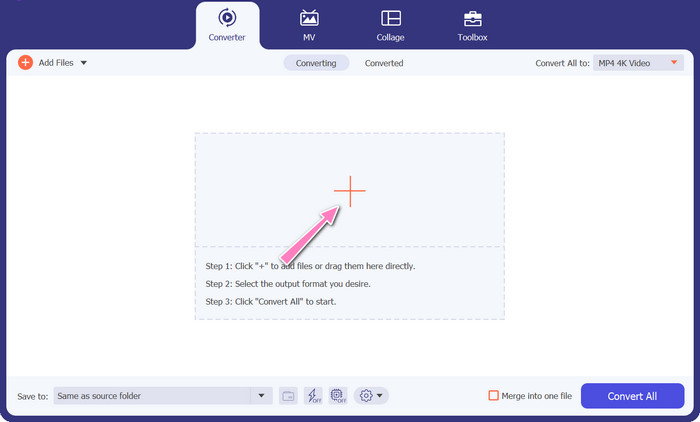
الخطوة 3. اختيار صيغة الإخراج
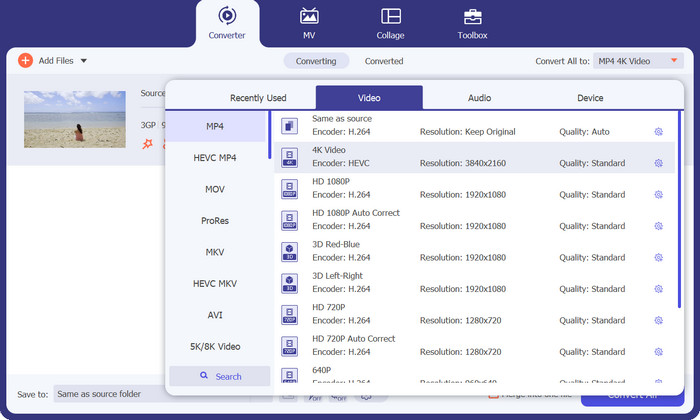
ثالثًا، اضغط على زر تحويل الكل إلى في أعلى واجهة البرنامج لاختيار صيغة جديدة للمنتج النهائي. اختر MP4 من قائمة إخراج الفيديو المنسدلة. يمكنك التحكم في جودة ملف الإخراج من خلال تعديل معدل العيّنة ومعدل البت.
الخطوة 4. بدء عملية التحويل
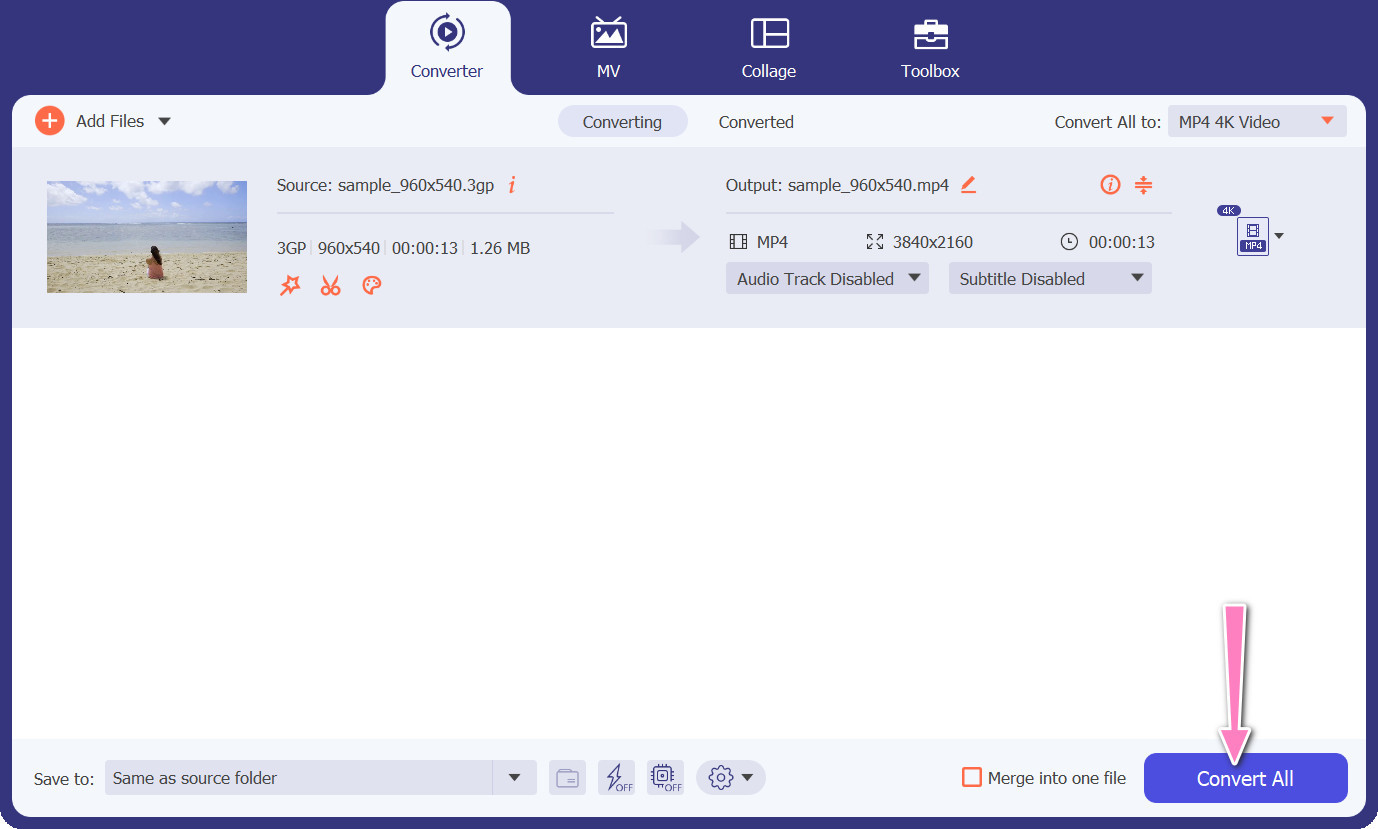
رابعًا، ابدأ عملية التحويل بالضغط على زر تحويل الكل في الأسفل. بعد ذلك سيفتح مجلد الإخراج لكي تتمكن من التحقق من الملف المحوّل.
2. MP4 محول مجاني على الإنترنت
يُعتَبَر استخدام محول MP4 المجاني عبر الإنترنت بديلاً مناسبًا لتثبيت برنامج على سطح المكتب، مما يوفّر حلاً مريحًا. يعمل هذا المحوّل الإلكتروني من 3GP إلى MP4 بكفاءة وسلاسة، مع ضمان حماية وسرية البيانات الشخصية أثناء عملية التحويل. بالإضافة إلى ذلك، يمكن استخدام ميزة التحويل الدفعي في هذا البرنامج عبر الإنترنت بطريقة مشابهة لبرنامج سطح المكتب.
الميزات الرئيسية
◆ يتيح لك محول MP4 المجاني عبر الإنترنت تخصيص إعدادات الإخراج وفقًا لتفضيلاتك. يمكنك ضبط المعلمات مثل برنامج ترميز الفيديو والدقة ومعدل البت ومعدل الإطارات لتحقيق الجودة وحجم الملف المطلوبين.
يدعم Free MP4 Converter Online تحويل الدُفعات ، مما يتيح لك تحميل وتحويل ملفات 3GP متعددة إلى MP4 في وقت واحد. هذا يوفر الوقت والجهد عند التعامل مع ملفات متعددة.
◆ يقدّر محول MP4 المجاني عبر الإنترنت خصوصية المستخدم ويستخدم تدابير لحماية الملفات التي تم تحميلها. غالبًا ما يوفرون خيارات لحذف الملفات بعد التحويل أو تخزينها بشكل آمن لفترة محدودة.
الخطوة 1. في البداية، انتقل إلى الموقع الرئيسي لمحوّل MP4 المجاني عبر الإنترنت من خلال النقر على الرابط المرفق. ثم انتقل إلى خيار إضافة ملفات للتحويل الموجود في الواجهة الرئيسية، وقم برفع ملفك الصوتي.

الخطوة 2. بعد التنفيذ، سيتم عرض المستند الأول على الواجهة. اختر صيغة الإخراج المفضّلة لديك من خلال النزول في القائمة نفسها.
الخطوة 3. بعد ذلك، اضغط على زر تحويل لتغيير 3GP إلى MP4. لتحويل ملفات إضافية، يجب تكرار التعليمات المذكورة أعلاه من البداية.

3. أي محول فيديو
يحتوي برنامج سطح المكتب Any Video Converter المستخدم على نطاق واسع على نظير مجاني على شبكة الإنترنت. من الممكن تحويل 3GP إلى MP4 ، ولديه الكثير من الإعدادات المعقدة ومعالجة الدُفعات. يعد تحرير الفيديو ونسخ أقراص DVD مجرد اثنين من الإضافات المتوفرة في إصدار البرنامج.
الميزات الرئيسية
◆ يتيح لك أي محول فيديو تخصيص دقة الفيديو ومعدل البت ومعدل الإطارات وجودة الصوت. يحسن إخراج الفيديو حسب المواصفات الخاصة بك.
◆ يتيح لك أي محول فيديو قص مقاطع الفيديو واقتصاصها ودمجها وإضافة تأثيرات إلى مقاطع الفيديو. ترجمات وعلامات مائية تخصيص مقاطع الفيديو.
◆ يدعم Any Video Converter استيراد ودمج الترجمات في مقاطع الفيديو الخاصة بك. يمكنك إضافة ملفات ترجمة خارجية أو إدخال ترجمات يدويًا لجعل مقاطع الفيديو الخاصة بك أكثر سهولة أو متعددة اللغات.
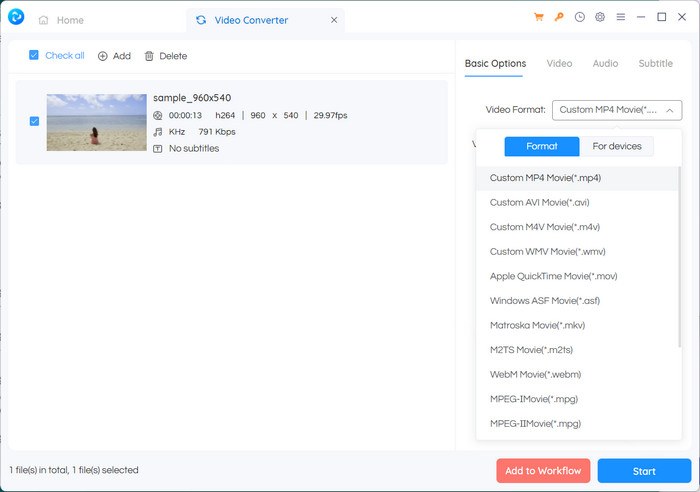
الخطوة 1. أولاً، قُم بتثبيت Any Video Converter. قم بتنزيل Any Video Converter من موقعه الإلكتروني وثبّته على جهاز الكمبيوتر باتباع التعليمات الظاهرة على الشاشة. بعد الانتهاء، شغِّل Any Video Converter.
الخطوة 2. انقر على زر إضافة فيديو(هات) داخل البرنامج. تصفّح وحدد ملفات 3GP التي تريد تحويلها إلى MP4. بعد ذلك، انقر على فتح لإضافة الملفات المحددة إلى قائمة التحويل.
الخطوة 3. في قسم الملف الشخصي (Profile)، اختر MP4 كصيغة الإخراج المطلوبة. قد تظهر لك خيارات متعددة لصيغة MP4 حسب تفضيلاتك واحتياجاتك. اختر الخيار الأنسب لك.
الخطوة 4. انقر على زر بدء لبدء عملية التحويل.
قراءة إضافية:
دمج ملفات 3GP – كيفية جمع مقاطع فيديو مختلفة من هاتفك الذكي
كيفية تحويل 3GP إلى MOV باستخدام طرق مختلفة [2023]
الجزء 2. أسئلة وأجوبة حول محولات 3GP إلى MP4
ما هي الاختلافات بين 3GP و MP4؟
يدعم MP4 عددًا من الأجهزة والأنظمة الأساسية أكثر من 3GP. برامج الترميز: يدعم MP4 المزيد من برامج ترميز الصوت والفيديو لزيادة مرونة وجودة التشفير. الميزات: 3GP لا يدعم الترجمة أو الفصول أو المسارات الصوتية المتعددة ، بينما يدعم MP4. نظرًا لخوارزميات الضغط الأكثر كفاءة ، تكون ملفات MP4 أصغر من ملفات 3GP ولكنها ذات جودة مكافئة أو متفوقة.
هل هناك أي مزايا محددة لاستخدام MP4 على 3GP للبث عبر الإنترنت؟
جودة الفيديو الأفضل لـ MP4 وتقنيات الضغط المتقدمة والتوافق الأوسع تجعله الخيار المفضل لمنصات البث عبر الإنترنت ، مما يوفر تجربة مشاهدة أفضل للمستخدمين.
هل يمكنني تحويل مقاطع فيديو MP4 إلى تنسيق 3GP إذا لزم الأمر؟
نعم ، هناك محولات فيديو متاحة تسمح لك بتحويل مقاطع فيديو MP4 إلى تنسيق 3GP إذا لزم الأمر ، على الرغم من أنه قد يؤدي إلى انخفاض الجودة وقدرات الوسائط المتعددة المحدودة.
خاتمة
بينما كان تنسيق 3GP شائعًا في الماضي، خاصة على الأجهزة المحمولة، إلا أن دعمه للميزات المتقدمة محدود وقد لا يكون متوافقًا بما يكفي مع المنصات الحديثة. أما MP4، من ناحية أخرى، فيدعم نطاقًا أوسع من مرمِّزات الفيديو والصوت والترجمات، وميزات متقدمة مثل الفصول والقوائم ومسارات الصوت المتعددة. ولحسن الحظ، لديك العديد من الخيارات لاختيار أفضل محوّل من 3GP إلى MP4 وفقًا لاحتياجاتك. وبشكل عام، إذا كان لديك الخيار بين 3GP وMP4 لملفات الفيديو، يُنصَح باختيار MP4 نظرًا لجودته الأعلى وتوافقه الأفضل ونطاق ميزاته ووظائفه الأوسع.
-
 كيفية ضغط مقاطع فيديو 3GP إلى حجم أصغر باستخدام عملية مجمعة
 لإجراء نسخ احتياطي لمقاطع الفيديو 3GP على هاتفك الذكي ، إليك الطريقتان الأكثر استخدامًا لضغط ملفات 3GP إلى حجم صغير جدًا من خلال عملية مجمعة من المقالة.
-
 حلول جديرة بالملاحظة لتحويل 3GP إلى MKV بلا خسارة
 شاهد البرامج التعليمية خطوة بخطوة حول كيفية تحويل 3GP إلى MKV دون فقدان الجودة. إذا كنت ترغب في تحويل الملفات ، فاستعد لمواجهة هذه الأساليب المذهلة.
-
 3 أفضل مشغلات 3GP مجانية لأجهزة الكمبيوتر والجوال يجب أن تعرفها
 عندما تريد تشغيل فيلم 3GP الخاص بك بسهولة دون تثبيت أو تحويل برنامج ترميز الفيديو ، يمكنك معرفة المزيد حول أفضل 3 مشغلات 3GP على أنظمة التشغيل Windows و Mac و Android و iPhone في هذه المقالة.
