


 محول الفيديو النهائي
 مسجل الشاشة
 إصلاح الفيديو
 تنزيل آمن
كيفية تحويل MP4 إلى 3GP عبر الإنترنت وغير متصل
MP4 هو تنسيق فيديو شائع يمكن تشغيله على مشغلات MP4 والهواتف المحمولة والأجهزة اللوحية. عادةً ما تظل الأفلام التي نقوم بتنزيلها من موقع الويب بتنسيق MP4. لكن بعض الهواتف المحمولة تدعم فقط تشغيل مقاطع فيديو 3GP. ستعرض لك هذه المقالة 3 محولات مجانية من MP4 إلى 3GP ويمكنك تحويل MP4 إلى 3GP دون متاعب.

الجزء 1. كيفية تحويل MP4 إلى 3GP على نظامي التشغيل Windows و Mac
إذا كنت تريد تحويل ملف MP4 إلى 3GP بدون اتصال بالإنترنت، فيمكنك استخدام محوّل MP4 إلى 3GP لسطح المكتب. يعتبر FVC Free FLV to 3GP Converter برنامجًا مجانيًا وسهل الاستخدام لتحويل الفيديو لأنظمة Windows وMac. يمكنه تحويل صيغ فيديو مختلفة مثل FLV وMP4 وMOV وMKV وMTS وM2TS وغيرها إلى 3GP بسهولة. علاوة على ذلك، فإنه يقدّم ميزات تحرير لإضافة القوالب، وضبط اسم المؤلف والوقت والمزوّد في بداية الفيديو ونهايته.

- قم بتحويل مقاطع الفيديو بتنسيق MP4 و MKV و AVI و MOV و MP3 و AAC و AIFF وما إلى ذلك إلى 3GP.
- قم بتصدير مقاطع فيديو 3GP وملف صوتي بدون فقدان من ملف MP4 بنقرة واحدة.
- اسمح للمستخدمين بتعديل الموفر والعنوان والمؤلف والوقت وإضافة المظهر.
- دفعة تحويل MP4 إلى 3GP للعب على بعض الهواتف المحمولة.
تنزيل مجانيلنظام Windows 7 أو الأحدثتنزيل آمن
الخطوة 1: قم بتنزيل وتثبيت وتشغيل FVC Free FLV to 3GP Converter مجانًا على نظام Windows أو Mac. انقر على زر Add Files لتحميل ملفات MP4 من جهازك. يمكنك تحويل أكثر من ملف MP4 في الوقت نفسه.
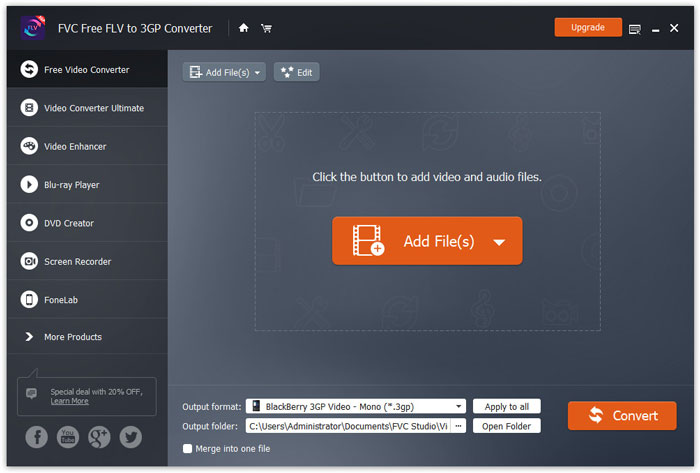
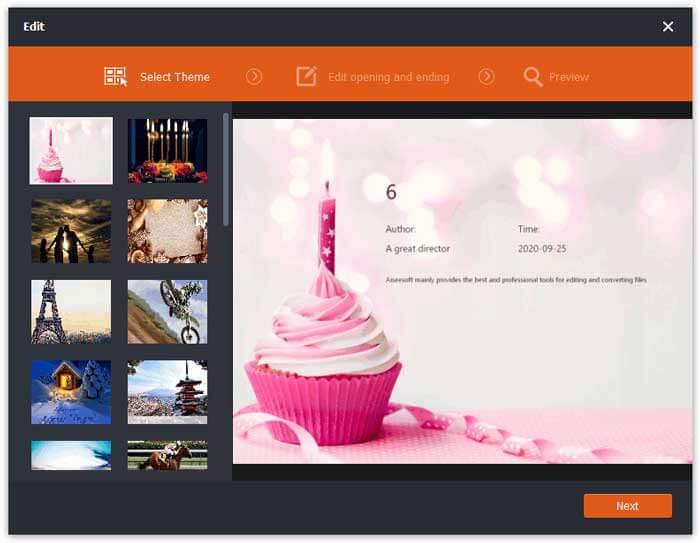
الخطوة 2: انقر على ملف MP4 الخاص بك ثم انقر على زر Edit. يمكنك إضافة قالب (Theme) إلى ملف MP4 وتحرير محتوى الافتتاحية والنهاية. بعد ذلك انقر على Next لمعاينة التعديلات وحفظها.
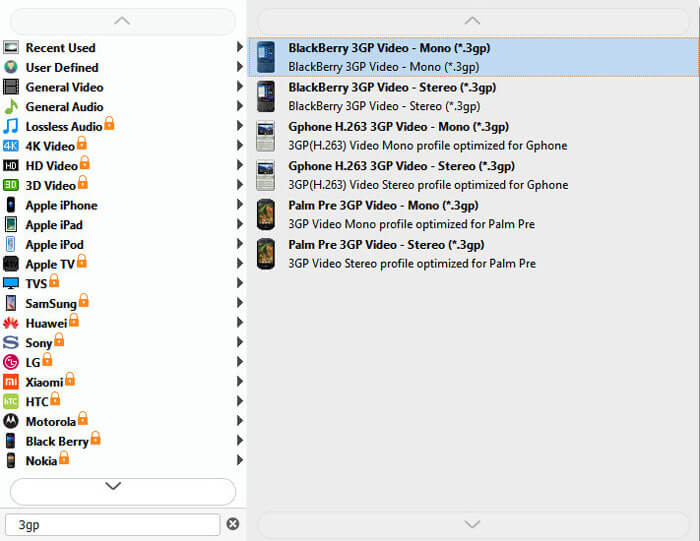
الخطوة 3: اختر صيغة 3GP من القائمة المنسدلة Output format في الأسفل. يمكنك اختيار BlackBerry 3GP Video - Mono (*.3gp) أو أي خيار آخر تريده.
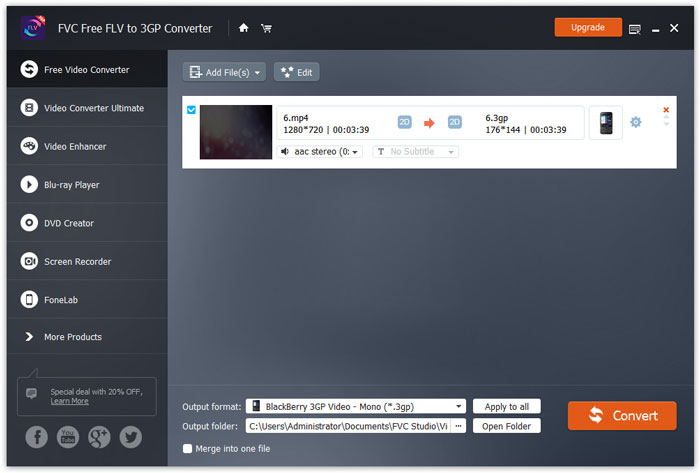
الخطوة 4: أخيرًا، اختر مجلد الإخراج على جهازك ثم انقر على زر Convert لبدء تحويل MP4 إلى 3GP.
الجزء 2. تصدير 3GP من MP4 مع 2 محولات 3GP عبر الإنترنت
بالمقارنة مع تثبيت محول 3GP لسطح المكتب ، فإن استخدام محول على شبكة الإنترنت هو أبسط وأسهل بكثير لتحويل MP4 إلى 3GP. في هذا الجزء ، سنشارك محولين 3GP عبر الإنترنت لمساعدتك في تحويل MP4 إلى 3GP دون صعوبة.
1. FVC Free Online Video Converter
يُعد FVC Free Online Video Converter منصة معروفة لتحويل الفيديو، حيث يمكنك تحويل صيغ الفيديو والصوت الشائعة إلى 3GP وMKV وMOV وWMV وAVI وMP3 وغير ذلك.
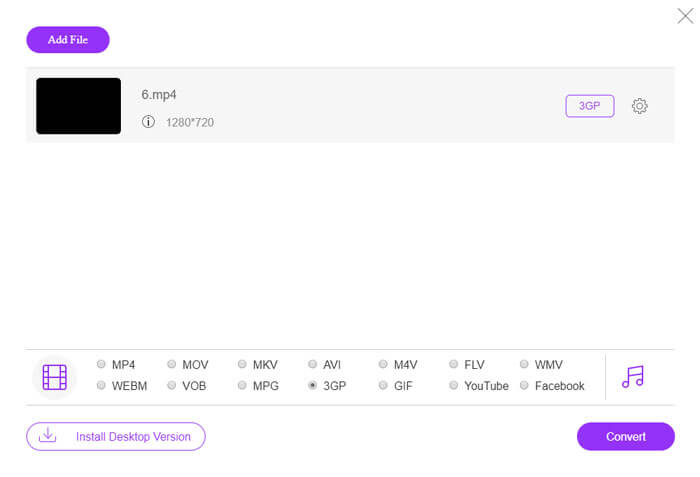
الخطوة 1: انتقل إلى الموقع الرسمي لـ FVC Free Video Converter. انقر على زر Add Files to Convert لتنزيل مُشغِّل التحويل (Launcher) وتثبيته.
قم بتنزيل إصدار سطح المكتب لتحويل الملفات دفعة واحدة.

الخطوة 2: اختر ملفات MP4 من جهاز الكمبيوتر المحلي. يمكنك النقر على أيقونة الترس لضبط معدل البت للفيديو، ومعدل العيّنة، ومعدل الإطارات، والدقة، ومستوى الصوت.

الخطوة 3: اضبط صيغة الإخراج على 3GP في الجزء السفلي. ثم انقر على زر Convert لبدء تحويل MP4 إلى 3GP. يمكنك تحويل عدة ملفات MP4 دفعة واحدة إلى 3GP في نفس الوقت.
2. زمزم
Zamzar هو محول فيديو عبر الإنترنت ومحول صوت ومحول صور ومحول كتاب إلكتروني. من الملائم تحويل MP4 إلى مجموعة متنوعة من التنسيقات الأخرى باستخدام Zamzar. فيما يلي خطوات بسيطة لتحويل MP4 إلى 3GP.
الخطوة 1: انتقل إلى zamzar.com/convert/mp4-to-3gp/، ثم انقر على زر Add Files لرفع ملفات MP4 الخاصة بك.
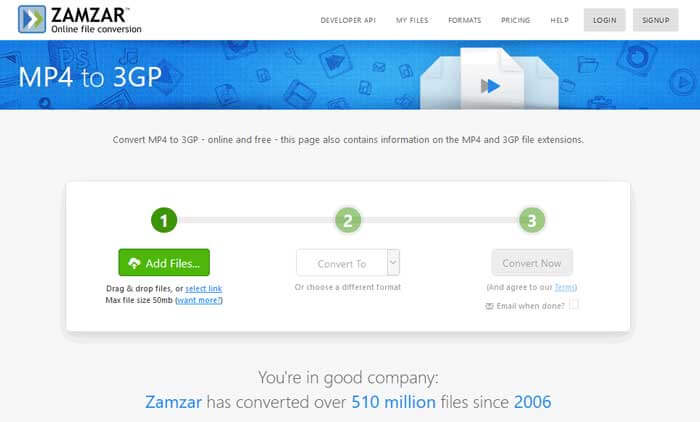
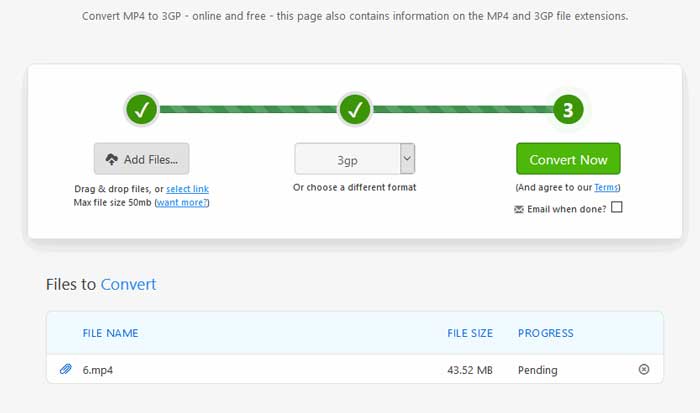
الخطوة 2: يمكنك اختيار صيغة إخراج مختلفة. عادةً ما يتم تعيين 3gp كصيغة الإخراج الافتراضية. انقر على زر Convert Now لبدء تحويل MP4 إلى 3GP.
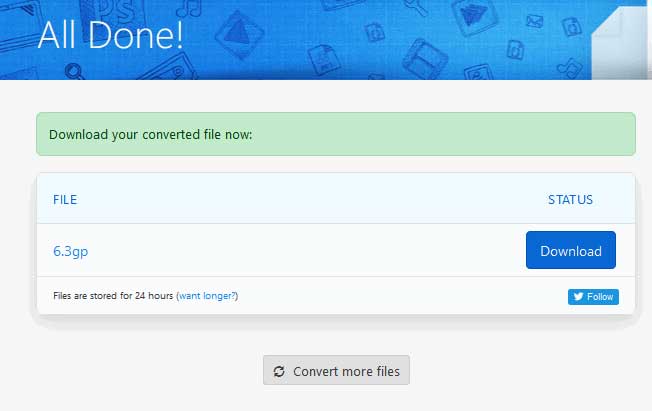
الخطوة 3: بعد ذلك سيتم نقلك إلى صفحة أخرى. يمكنك النقر على زر Download لحفظ ملف 3GP المحوَّل على جهاز الكمبيوتر.
ماذا لو كان ملف MP4 لديك كبير الحجم؟ اطّلع على كيفية ضغط ملفات MP4 من هنا.
MP4 مقابل 3GP
تم إصداره بواسطة Moving Picture Experts Group (MPEG) في عام 2001 ، يمكن أن يساعدك تنسيق MP4 في حفظ بيانات الفيديو والصوت والترجمة والصور في مسارات منفصلة. إنه اختصار MPEG-4 Part 14. بالإضافة إلى أنه أحد أكثر التنسيقات شيوعًا المستخدمة لدفق مقاطع الفيديو ومشاركتها.
أنتج مشروع شراكة الجيل الثالث (3GPP) تنسيق 3GP / 3GPP كتنسيق حاوية وسائط متعددة. يعتمد في الواقع على تنسيق ملف وسائط ISO. غالبًا ما نستخدمه لحفظ تدفقات الفيديو / الصوت التي يتم نقلها بين هواتف 3G المحمولة وعبر الإنترنت.
الجزء 3. الأسئلة الشائعة حول تحويل MP4 إلى 3GP
1. هل 3GP أفضل من MP4؟
تم تصميم صيغة 3GP لهواتف الجيل الثالث (3G). يمكنك تشغيل ملفات 3GP في مشغلات مثل QuickTime وVLC وRealPlayer. أما MP4 فهو أكثر توافقًا من 3GP، إذ تدعمه بشكل واسع العديد من مشغلات الوسائط المحمولة والهواتف الذكية.
2. ما هو 3GP؟
3GP هو تنسيق حاوية وسائط متعددة حدده الجيل الثالث. يمكنه تخزين مقاطع الفيديو وتدفقات الصوت التي يتم تشغيلها على هواتف 3G المحمولة ، ولكن يمكن أيضًا تشغيلها على بعض هواتف 2G أو 4G.
3. كيف يمكنني تحويل MP4 إلى FLV؟
بمساعدة FVC Free Online Video Converter يمكنك بسهولة تحويل MP4 إلى FLV عبر الإنترنت. انتقل إلى هذا الموقع الإلكتروني وانقر على زر Add Files to Convert لتثبيت أداة التشغيل (Launcher). ثم اختر ملفات MP4 من الكمبيوتر، وحدِّد FLV كصيغة إخراج. انقر على زر Convert لتحويل MP4 إلى FLV.
خاتمة
تحدثنا بشكل أساسي عن 3 طرق لتحويل MP4 إلى 3GP على نظامي التشغيل Windows و Mac. إذا كنت تفضل حلاً عبر الإنترنت ، فيمكنك تجربة FVC Free Online Video Converter أو Zamzar عبر الإنترنت. إذا كنت ترغب في تحرير ملف MP4 الخاص بك لمزيد من الكمال ، يمكنك استخدام Free FLV to 3GP Converter بدلاً من ذلك. إذا كان لديك أي حلول أفضل ، فلا تتردد في ترك تعليق.
-
 أفضل 3 طرق مجانية لتحويل MP4 إلى VOB بسرعة
 كيفية تحويل MP4 إلى VOB على Windows PC و Mac؟ لحل هذه المشكلة ، ستشارك هذه المشاركة أفضل 3 طرق لمساعدتك في تحويل MP4 إلى VOB مجانًا.
-
 مجاني | أفضل 3 طرق لتحويل MP4 إلى WMV دون فقدان الجودة
 يشارك هذا المنشور كيفية تحويل فيديو MP4 إلى تنسيق WMV على نظام Mac أو Windows. سوف نقدم لك أيضًا العديد من الخيارات ، بما في ذلك كل من برامج سطح المكتب والمحولات عبر الإنترنت القائمة على الويب. هل أنت مستعد لمعرفة أفضل أدوات تحويل MP4 إلى WMV؟
-
 3 طرق لتحويل MP3 إلى MP4 بالصور
 كيفية تحويل MP3 إلى MP4 بجودة عالية؟ يعرض هذا المنشور 3 طرق فعالة ومجانية لتغيير MP3 إلى MP4 بالصور على Windows و Mac.

