


 محول الفيديو النهائي
 مسجل الشاشة
 إصلاح الفيديو
 تنزيل آمن
دليل حول كيفية تحويل MP4 إلى VOB على جهاز الكمبيوتر الخاص بك
MP4 هو تنسيق وسائط متعددة لتخزين ملفات الصوت والفيديو، ويُستخدم على نطاق واسع لتحميل الفيديوهات وبثّها. قد يرغب الكثير منا في مشاهدة مقاطع فيديو MP4 على أقراص DVD. ومع ذلك، لا يمكن تشغيل ملفات MP4 مباشرة على مشغل DVD. لذلك تحتاج إلى تحويل فيديو MP4 إلى VOB، وهو تنسيق فيديو أقراص DVD، من أجل حرق قرص DVD قابل للتشغيل. وعليه فأنت بحاجة إلى برنامج لتحويل MP4 إلى VOB. سيشرح هذا المقال ما هو ملف فيديو MP4 أو VOB، وكيفية تحويل MP4 إلى VOB للحصول على تشغيل أفضل على أجهزتك.

الجزء 1. ما هو MP4 و VOB
الملف بامتداد الملف mp4. هو اختصار لملف فيديو MPEG-4. تم تطوير MPEG-4 الجزء 12 مبدئيًا في عام 2001 ، وكان يعتمد على تنسيق ملف QuickTime (.MOV). تم إصدار الإصدار الحالي - MPEG-4 الجزء 14 - في عام 2003. MP4 هو تنسيق حاوية وسائط متعددة رقمية يمكن أن تحتوي على مجموعة من البيانات بما في ذلك الفيديو والصوت والترجمة.
تُعرف VOB بملفات كائن الفيديو المستخدمة لتشغيل الفيديو من قرص DVD. غالبًا ما يتم العثور عليه في مجلد VIDEO_TS بامتداد .vob. تنسيق VOB هو تنسيق الحاوية في وسائط DVD-Video ، والذي يمكنه تخزين الفيديو الرقمي والصوت والترجمات وقوائم DVD ومحتويات التنقل الأخرى معًا في شكل دفق.
الجزء 2. استخدم تطبيقًا مجانيًا عبر الإنترنت
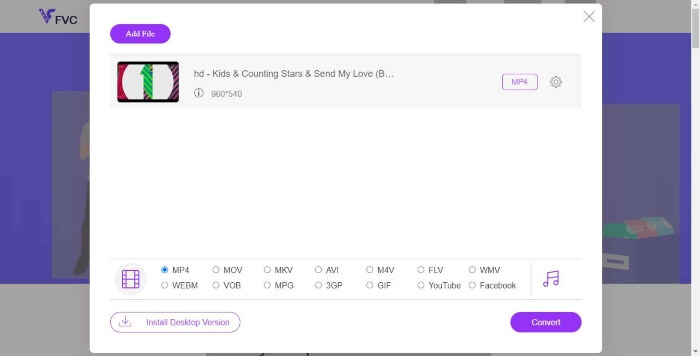
يُعد FVC Free Online Video Converter برنامجًا عمليًا للغاية يمكنك استخدامه لتحويل ملفات MP4 الخاصة بك إلى VOB، بالإضافة إلى تحويلها إلى مجموعة متنوعة من التنسيقات الأخرى بجودة عالية مجانًا عبر الإنترنت. كما أنه يوفر خيارات متعددة لتخصيص ملف الفيديو قبل التحويل؛ فيمكنك ضبط معدل البِت للفيديو، واختيار معدل الإطارات، وكذلك ترقية دقة العرض بسهولة تامة.
الخطوة 1. قم بزيارة https://www.free-videoconverter.net/free-online-video-converter/. انقر زر Add Files to Convert لتنزيل المُشغِّل وتثبيته. بعد تفعيل المُشغِّل، قم برفع ملفات MP4 التي تريد تحويلها.
قم بتنزيل إصدار سطح المكتب لتحويل الملفات دفعة واحدة.

الخطوة 2. بعد إضافة مقاطع فيديو MP4 إلى البرنامج، اختر تنسيق VOB من قسم تنسيقات إخراج الفيديو.
الخطوة 3. بعد ذلك، انقر زر Convert لتحويل ملفات MP4 إلى تنسيق VOB.
الجزء 3. استخدام محول سطح المكتب المجاني والمهني
هناك شيء آخر يمكنك القيام به وهو تحويل ملف MP4 إلى VOB باستخدام محول سطح المكتب الذي سيجعل التحويل أكثر سلاسة دون القلق بشأن مشكلات الاتصال بالإنترنت. هنا نود أن نشاركك محولين مجانيين للفيديو لمساعدتك على تحويل ملفات MP4 إلى VOB بكفاءة.
الخيار 1. تحويل MP4 إلى VOB مع محول الفيديو المجاني
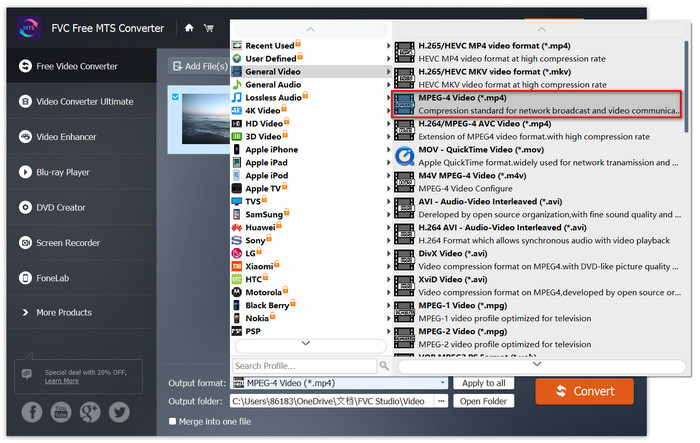
يعمل Free Video Converter كأفضل محول مجاني من MP4 إلى VOB يمكنك من تحويل MP4 إلى VOB بخطوات بسيطة. يدعم تحويل الدُفعات لتوفير وقتك ، ويمكنك أيضًا استخدامه لتحرير مقاطع الفيديو قبل التحويل بسهولة. دعنا نتبع الخطوة أدناه لتحويل MP4 إلى VOB.
تنزيل مجانيلنظام Windows 7 أو الأحدثتنزيل آمن
الخطوة 1. انقر زر التنزيل أعلاه لتثبيت هذا المحوّل المجاني من MP4 إلى VOB بسرعة وتشغيله على جهاز الكمبيوتر بنظام ويندوز. في الواجهة الرئيسية، انقر زر Add File من شريط القوائم لتحميل ملف MP4. يُسمح لك بتحويل عدة ملفات MP4 في الوقت نفسه.

الخطوة 2. بعد التحميل، انقر Profile واختر VOB كصيغة الإخراج الهدف. ثم اختر مجلد الحفظ بالنقر على Browse.
الخطوة 3. أخيرًا، انقر زر Convert لتحويل ملف MP4 إلى ملف DVD VOB.
الخيار 2. تحويل MP4 إلى VOB مع HandBrake
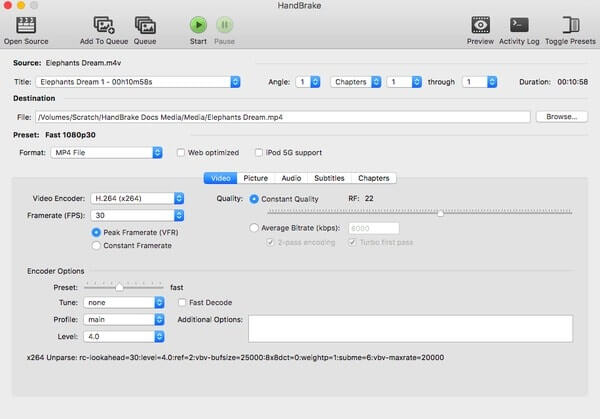
HandBrake هي أداة مجانية لتحويل الفيديو من أي تنسيق تقريبًا إلى مجموعة متنوعة من تنسيقات الفيديو أو الصوت الشائعة. لديه القدرة على تحويل MP4 إلى DVD VOB بسهولة. يمكنك اتباع الخطوات التالية لتغيير MP4 إلى VOB.
الخطوة 1. قم بتنزيل HandBrake مجانًا وتثبيته على نظام ويندوز أو ماك، ثم شغِّله.
الخطوة 2. بعد تشغيل البرنامج، انقر Open Source في الزاوية العلوية اليسرى ثم اختر ملف MP4 من جهاز الكمبيوتر الخاص بك.
الخطوة 3. انتقل إلى خيار Format، واختر VOB كتنسيق للإخراج. يمكنك أيضًا ضبط جودة فيديو الإخراج، ومعدل الإطارات، وترميز الفيديو، وغير ذلك من الخيارات.
الخطوة 4. بعد ذلك، انقر زر Start لتحويل فيديو MP4 إلى VOB مجانًا.
MP4 مقابل VOB
تم إصداره بواسطة Moving Picture Experts Group (MPEG) في عام 2001 ، يمكن أن يساعدك تنسيق MP4 في حفظ بيانات الفيديو والصوت والترجمة والصور في مسارات منفصلة. إنه اختصار MPEG-4 Part 14. بالإضافة إلى أنه أحد أكثر التنسيقات شيوعًا المستخدمة لدفق مقاطع الفيديو ومشاركتها.
غالبًا ما يتم استخدام تنسيق VOB لتخزين بيانات الفيلم على قرص DVD ، والذي يتضمن الفيديو والصوت والعناوين الفرعية وقوائم DVD وبعض المحتويات الأخرى. عادة ما يتم تنسيقه كتدفقات نظام MPEG-2. يمكنك فتح ملفات VOB على أدوات تشغيل الفيديو المختلفة.
الجزء 4. الأسئلة الشائعة حول تحويل MP4 إلى VOB
ما الذي يشغل ملفات VOB على Windows؟
يمكن فتح ملف VOB على الكمبيوتر من خلال تشغيله مع معظم مشغلات الوسائط الحديثة. على سبيل المثال ، يمكن لـ VLC Media Player و Windows Media Player 12 أو أعلى تشغيل ملفات VOB.
كيف أقوم بفتح ملف MP4؟
نظرًا لأن MP4 هو تنسيق ملف قياسي للفيديو ، فإن جميع مشغلات الفيديو تقريبًا تدعم تشغيل ملفات MP4. يدعم Android و iPhone و Windows و Mac تشغيل MP4 دون تثبيت أي برنامج تابع لجهة خارجية.
ما هو أفضل مشغل MP4؟
إليك مراجعة لأفضل البرامج لتشغيل فيديوهات MP4: أفضل برامج تشغيل ملفات MP4
كيف أقوم باستخراج الصوت من ملف MP4؟
يمكنك استخدام Free MP3 Converter لمساعدتك في استخلاص المسار الصوتي من فيديو MP4. هذه الأداة مجانية تمامًا، ولا تحتاج حتى إلى تنزيل أي برنامج على جهاز الكمبيوتر.
خاتمة
لتحويل ملفات MP4 إلى تنسيق VOB ، فإن المحول عبر الإنترنت يجعل التحويل سهلاً. ومع ذلك ، قد تكون هناك بعض القيود على سرعة التحويل بسبب مشكلات الإنترنت. لذلك إذا كنت ستقوم بتحويل ملفات MP4 كبيرة الحجم بسرعة عالية ، فسيكون محول فيديو سطح المكتب الأكثر استقرارًا هو خيارك المثالي.
-
 3 طرق مجانية لتحويل ملفات VOB إلى MP4 على Windows / Mac / Online
 تقدم هذه المقالة 3 محولات مجانية من VOB إلى MP4 والبرامج التعليمية ذات الصلة. يمكنك تحويل ملفات VOB إلى MP4 مجانًا على Windows / Mac / عبر الإنترنت بسهولة.
-
 كيفية تحويل مقاطع فيديو AVCHD إلى MP4 مجانًا على Windows / Mac / Online
 هناك 5 طرق سهلة لتحويل مقاطع فيديو AVCHD إلى MP4 على جهاز الكمبيوتر الخاص بك. يمكنك تحويل مقاطع فيديو AVCHD إلى MP4 دون فقدان الجودة باستخدام أي محول هنا.
-
 3 طرق لتحويل MPEG 1/2/4 إلى تنسيق MP4 على Windows / Mac / عبر الإنترنت
 اقرأ واحصل على 3 طرق مجانية لتحويل ملفات MPEG إلى MP4 على جهاز الكمبيوتر الخاص بك. يمكنك استخدام محولات الفيديو عبر الإنترنت وسطح المكتب لتحويل تنسيق MPEG إلى MP4 بسهولة.

