


 محول الفيديو النهائي
 مسجل الشاشة
 إصلاح الفيديو
 تنزيل آمن
كيفية تحويل MP4 إلى WMV لنظام التشغيل Mac / Windows
قبل تقديم قائمة مقترحة من محوّلات MP4 إلى WMV، دعني أسألك شيئًا عن صيغ الفيديو.
لحفظ بيانات الفيديو الرقمية على نظام الكمبيوتر، نحتاج إلى استخدام تنسيق ملف مصمم للفيديو. إذًا ما أنواع صيغ الفيديو التي تعرفها؟ MP4؟ WMV؟ FLV؟ AVI؟ بالفعل، هذه صيغ فيديو شائعة الاستخدام عند تخزين بيانات الفيديو الرقمية. ولكن هل تساءلت يومًا لماذا توجد كل هذه الأنواع من صيغ ملفات الفيديو؟ وما الفرق بين MP4 وWMV؟
بشكل عام ، يتوافق MP4 مع كل أنواع الأجهزة الموجودة في السوق تقريبًا ، مما يعني أنه يمكنك تشغيل MP4 في كل مكان ، حتى على مشغل الفيديو الافتراضي في الكمبيوتر أو الهاتف. ومع ذلك ، إذا كنت تستخدم أجهزة Windows ، فأعتقد أن WMV يمكنها خدمتك بشكل أفضل. ليس فقط لأنه تم تطويره بواسطة Microsoft ، ولكن لأنه يمكنه حفظ فيديو HQ في مساحة قرص صغيرة.
إذًا اليوم ستتعلّم كيف تغيّر ملف MP4 إلى WMV باستخدام أفضل محوّلات الفيديو التي نوصي بها.

الجزء 1. كيفية تحويل MP4 إلى WMV عبر الإنترنت مجانًا
بصرف النظر عن تثبيت برامج سطح المكتب الكلاسيكية ، فإن استخدام محولات قائمة على الويب يعد أيضًا خيارًا في الوقت الحاضر. على الرغم من بساطتها ، فإن العديد من المحولات عبر الإنترنت تكون بطيئة بعض الشيء أثناء التحويل. حتى أن البعض يحدد حجم وكمية الملفات التي تقوم بتحميلها ولا يمكنه ضمان جودة مقاطع الفيديو الناتجة.
لذلك، نقدّم لك هنا FVC Free Online Video Converter، وهو محوّل فيديو مجاني وسريع وفعّال يمكنه مساعدتك في تحويل عدد كبير من ملفات الفيديو أو الصوت بدون فقدان للجودة.
بصفته محوّل MP4 إلى WMV مجاني عبر الإنترنت متعدّد الوظائف، يدعم FVC Video Converter تقريبًا كل أنواع صيغ الفيديو. يمكنك تحويل ملفات MP4 كبيرة من/إلى MKV وMOV وWMV وAVI وTS وغيرها. كما يمكنك تعديل الفيديو وفقًا لاحتياجاتك. من السهل جدًا ضبط معدل البت للفيديو، ومعدل العيّنة، ومعدل الإطار، والدقة، ومستوى الصوت في FVC. ولن يكون هناك علامة مائية على الفيديو بعد التحويل.
الآن قد تقلق من أنه مع كل هذه الميزات ، قد يكون من الصعب فهم كيفية تشغيل هذا المحول. في الحقيقة الحقيقة مناقضة تماما. يستغرق الأمر بضع خطوات فقط لإتقان محول MP4 إلى WMV.
الخطوة 1. انقر هنا للانتقال إلى FVC Free Online Video Converter. ثم انقر على Add Files to Convert لتنزيل FVC Launcher أولًا.
قم بتنزيل إصدار سطح المكتب لتحويل الملفات دفعة واحدة.
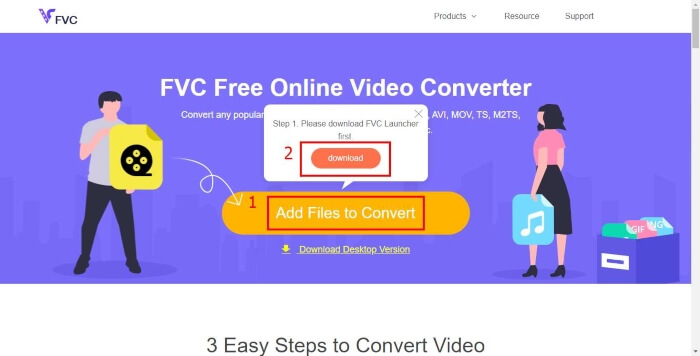
الخطوة 2. بعد تثبيت المشغّل، ستنبثق نافذة Open File. فقط ابحث عن ملف MP4 الذي تريد تحويله.
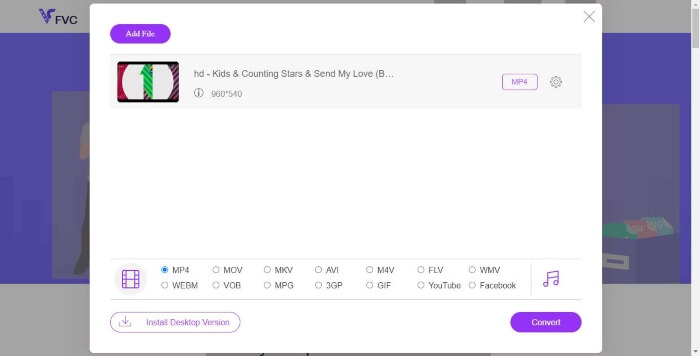
الخطوة 3. في صفحة التحويل، اختر صيغة الإخراج WMV. بالمناسبة، إذا أردت تغيير إعدادات الفيديو، افتح نافذة الإعدادات بالنقر على أيقونة Setting. انقر زر Convert واختر مكانًا لحفظ ملف الفيديو المحوَّل.
الجزء 2. تحويل MP4 إلى WMV باستخدام برنامج سطح المكتب
1. RealPlayer
أصبح RealPlayer واحدًا من أشهر مشغلات الوسائط منذ عام 1995. فهو لا يساعدك فقط على إدارة مقاطع الفيديو والموسيقى والصور بسهولة، بل يتيح لك أيضًا تحويل الفيديوهات إلى صيغ متعددة ونقلها إلى أجهزة محمولة أخرى.
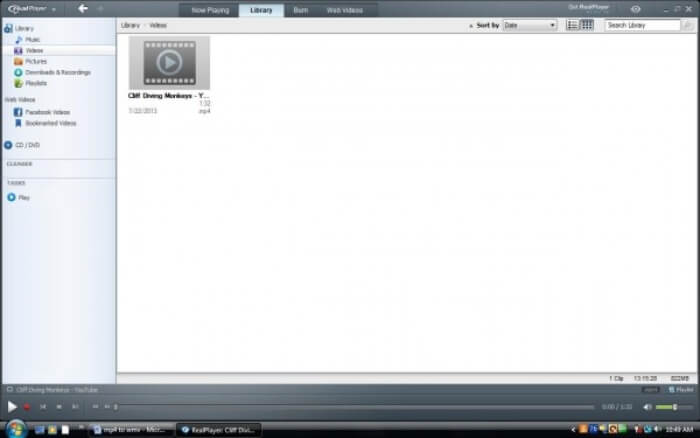
الخطوة 1. إذا كان RealPlayer مثبتًا على جهاز الكمبيوتر لديك، احفظ ملف MP4 في المكتبة الخاصة بـ RealPlayer. بعد تشغيل RealPlayer، اختر Library. ثم ابحث عن ملفك في قائمة Video.
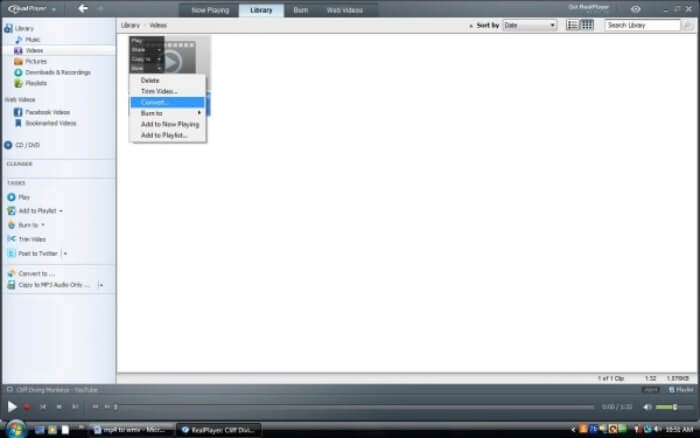
الخطوة 2. انقر على الملف واختر خيار More من القائمة المنبثقة. ثم اختر خيار Convert.
الخطوة 3. اختر WMV من قائمة Select a Device ثم انقر على OK. الآن انقر زر Start. خلال بضع ثوانٍ، سيكون الفيديو الخاص بك في مكتبة RealPlayer.
2. مشغل الميديا VLC
يُعد VLC مشغلًا مفتوح المصدر يعمل عبر أنظمة تشغيل مختلفة ويمكنه تشغيل الفيديوهات بصيغ متعددة. كما يدعم تحويل الملفات إلى العديد من الصيغ الشائعة. اتبع الخطوات التالية لتصدير ملف WMV من MP4.
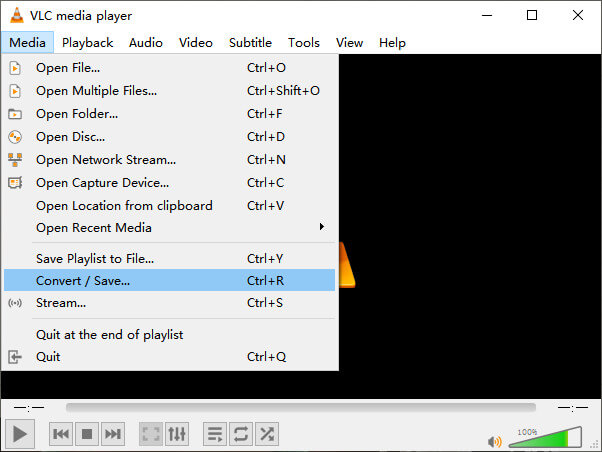
الخطوة 1. افتح VLC Media Player وانقر على Convert / Save في قائمة Media.
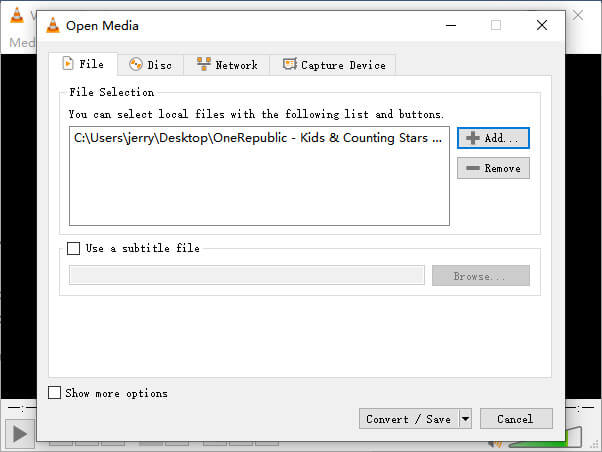
الخطوة 2. أضف الملف إلى VLC. ثم انقر زر Convert / Save.
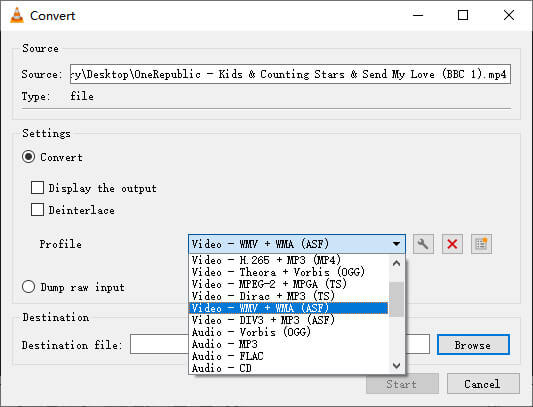
الخطوة 3. ابحث عن WMV في Profile واختر مجلدًا ليكون مكان حفظ ملف الإخراج. ثم انقر على Start.
MP4 مقابل WMV
تم إصداره بواسطة Moving Picture Experts Group (MPEG) في عام 2001 ، يمكن أن يساعدك تنسيق MP4 في حفظ بيانات الفيديو والصوت والترجمة والصور في مسارات منفصلة. إنه اختصار MPEG-4 Part 14. بالإضافة إلى أنه أحد أكثر التنسيقات شيوعًا المستخدمة لدفق مقاطع الفيديو ومشاركتها.
من إنتاج Microsoft ، كان WMV أحد أكثر تنسيقات الفيديو شيوعًا في العقد الأول من القرن الحادي والعشرين. يمكن رؤيتها عبر الويب وتشغيلها بواسطة مشغلات وسائط مختلفة على Windows. وهو أيضًا تنسيق ملف الفيديو الافتراضي لبرنامج Windows Media Player. ولكن تم الاستيلاء عليها من قبل تنسيقات أخرى مؤخرًا.
الجزء 3. الأسئلة الشائعة حول تحويل MP4 إلى WMV
1. هل تستطيع فرملة اليد تحويل MP4 إلى WMV؟
بعد إجراء بحث، تبيّن للأسف أن أحدث إصدار من Handbrake لا يمكنه تحويل MP4 إلى WMV. صحيح أن Handbrake يدعم معظم ملفات الوسائط المتعددة الشائعة، لكن ذلك ينطبق على مصادر الإدخال فقط. أما خيارات صيغ الإخراج فهي MP4(.M4V) وMKV.
2. هل يمكنني تحويل ملف MP4 يزيد حجمه عن 100 ميجابايت إلى WMV عبر الإنترنت مجانًا؟
ذلك يعتمد. فمحوّلات الفيديو المجانية عبر الإنترنت تختلف في القيود التي تفرضها. بعض المحوّلات مثل FVC Free Online Video Converter تتيح لك التحويل لأكثر من 100 ميجابايت، بينما قد تفرض محوّلات أخرى رسومًا على ذلك.
3. هل يستطيع Windows Media Player تحويل MP4 إلى WMV؟
لا يمكنك تحويل ملف MP4 إلى WMV باستخدام Windows Media Player، لأنه مجرد مشغّل وليس محوِّلًا. إذا أردت تحويل MP4 إلى WMV، فعليك استخدام محوّل فيديو فعّال.
4. هل يمكنني تشغيل ملف WMV على نظام Mac؟
أدوات الفيديو المدمجة في نظام ماك لا يمكنها تشغيل ملفات WMV. لكن لديك طرق أخرى لتشغيل فيديوهات WMV على نظام macOS. يمكنك تحويل WMV إلى صيغة أخرى يدعمها ماك، أو تثبيت Windows Media Player for Mac لتشغيل ملفات WMV.
خاتمة
على الرغم من أن MP4 وWMV لهما أوجه تشابه، فإن لكلٍ منهما خصائصه. لذا يجب أن تتخذ قراراتك وفقًا للظروف المحددة. نرجو أنه بعد قراءة هذا المقال لن تبقى لديك مشكلة في تحويل MP4 إلى WMV. في المرة القادمة التي تحتاج فيها إلى ملف WMV، ما عليك إلا اتباع الدليل أعلاه وتحويل الملف بسهولة.
-
 كيفية تحويل ملفات الفيديو MP4 إلى صور GIF متحركة دون فقدان الجودة
 هل تبحث عن أفضل طريقة لتحويل فيديو MP4 الخاص بك إلى صور GIF متحركة؟ فيما يلي دليل مفصل للقيام بذلك في Photoshop و Windows Movie Maker ومحول الفيديو عبر الإنترنت والمزيد.
-
 كيفية تحويل ملفات فيديو FLV إلى MP4 دون دفع بنس واحد
 يشارك هذا الدليل أربع طرق مجانية لتحويل ملفات فيديو FLV إلى تنسيق MP4 على أنظمة التشغيل Windows 10/8/7 / XP و Mac OS X ، حتى تتمكن من الاستمتاع بمقاطع الفيديو على أي جهاز.
-
 كيفية تحويل MOV إلى MP4 دون فقدان الجودة
 هل تريد تحويل ملفات MOV (Apple QuickTime Movie) إلى MP4؟ يشارك هذا المنشور 4 طرق مجانية لتحويل ملفات فيديو MOV إلى تنسيق MP4 على نظام التشغيل Windows 10/8/7 / XP و Mac OS X.

