


 محول الفيديو النهائي
 مسجل الشاشة
 إصلاح الفيديو
3 محولات MPG إلى MP4 عبر الإنترنت وغير متصل ، يجب أن تحاول تحويل ملفات MPG
يُعدّ MP4 أحد أكثر صيغ الملفات شيوعًا التي ستصادفها على الإنترنت هذه الأيام. ورغم أن صيغة MPG وMP4 تتشاركان في الكثير من أوجه الشبه، فإن بينهما أيضًا فروقًا. وإذا كنت تريد تحويل ملف MPG إلى صيغة MP4، فقد قمنا باختبار العديد من محوّلات الفيديو الشائعة حاليًا. وعلاوة على ذلك، اخترنا لك أفضل محوِّلات MPG إلى MP4 لتطّلع عليها!

الجزء 1. لماذا تحتاج إلى تحويل MPG إلى MP4
ما أهمية تحويل MPG إلى MP4؟ تُستخدَم صيغة MPG وMP4 كثيرًا في مقاطع الفيديو المنتشرة على الإنترنت. لكن ما الفارق بينهما؟ إن MPG أو MPEG هي الصيغة الأصلية التي تستخدم ترميز MPEG. وهو مُشفِّر يوفّر مخرجات فيديو عالية الجودة.
من ناحية أخرى ، يعد MP4 أحد أكثر تنسيقات ملفات الفيديو شيوعًا ويستخدم ضغط الفيديو الحديث. إذن أيهما أفضل؟ تسمح قدرة الضغط العالية لـ MP4 بضغط الملفات بأحجام أصغر من أي تنسيق ملف فيديو آخر مثل MPG.
الجزء 2. 3 طرق لتحويل MPG إلى MP4
فيما يلي محولات الفيديو الممتازة التي يمكنك استخدامها عبر الإنترنت وغير متصل وتعلم كيفية تغيير MPG إلى MP4.
1. استخدام محول الفيديو في نهاية المطاف
يُعد Video Converter Ultimate برنامجًا لتحويل ملفات الوسائط يتيح لك تحويل ملف MPG إلى صيغة MP4 بسهولة. يتميّز هذا المحوِّل بواجهة سهلة الاستخدام مع تقديم نتائج مذهلة. كما يحتوي على أدوات لتحرير ملف MPG الخاص بك وتحسينه وضغطه. إضافةً إلى ذلك، يمكنك إجراء تحويل دفعي لملفات MPG إلى MP4 من خلاله.
يحتوي Video Converter Ultimate أيضًا على خيار يمكنك من خلاله تجميع الصور ومقاطع الفيديو. أيضًا ، إذا كنت تريد إنشاء ملف GIF ، فإن هذا المحول يحتوي على هذه الميزة. بالإضافة إلى ذلك ، عند استخدام هذا المحول ، يمكنك تحويل الملفات الكبيرة دون الإضرار بجودتها. على الرغم من أن ميزاته تبدو احترافية ، إلا أنه يمكنك استخدامها بسرعة لأنها سهلة الاستخدام فقط.
الخطوة 1. لتنزيل هذا المحوِّل، انقر زر التحميل أدناه. اتبع خطوات التثبيت ثم افتح التطبيق.
تحميل مجانيلنظام Windows 7 أو أحدثتنزيل آمن
تحميل مجانيلنظام MacOS 10.7 أو أحدثتنزيل آمن
الخطوة 2. بعد تشغيل المحوِّل، انقر زر Add Files أو زر + لتحميل ملف MPG. ستظهر لك ملفات جهاز الكمبيوتر، حيث يمكنك تحديد ملفك من المجلدات. ثم انقر Open لإضافة الملف إلى قائمة الانتظار.
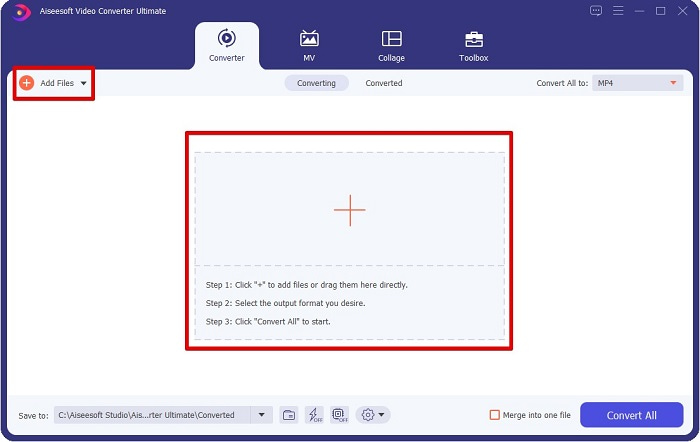
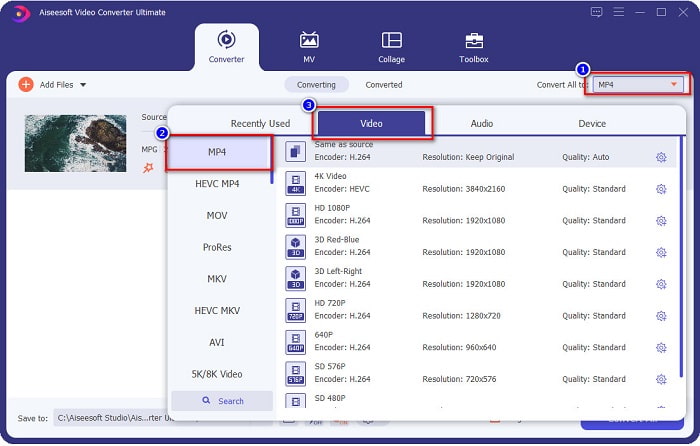
الخطوة 3. لتغيير صيغة ملف MPG، انقر Convert All to في الزاوية العلوية اليمنى من الشاشة. بعد ظهور قائمة صيغ الملفات، اختر صيغة MP4.
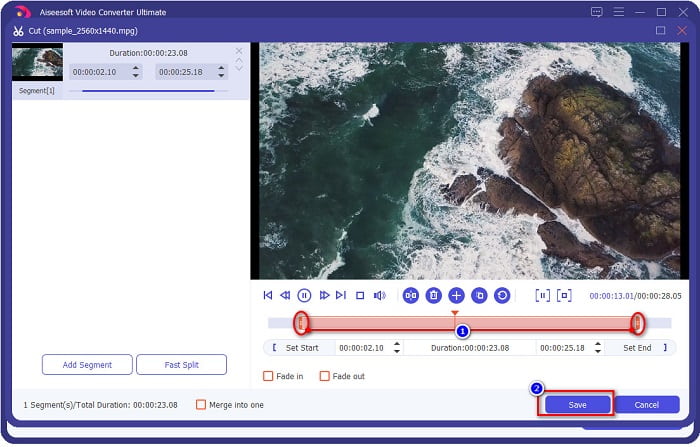
إذا أردت قص مدة الفيديو، انقر زر scissor لقص الفيديو. عن طريق سحب أزرار play head يمكنك ضبط طول الفيديو. لإنهاء العملية، انقر Save.
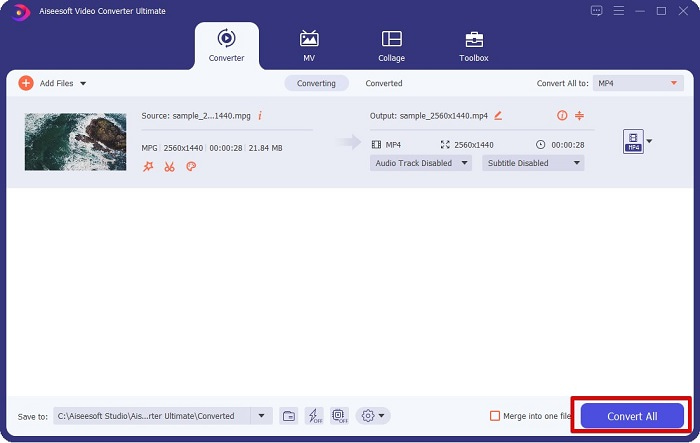
الخطوة 4. بعد اختيار الصيغة التي تريدها، انقر Convert All لتحويل ملف MPG إلى ملف MP4. انتظر قليلًا حتى يكتمل التحويل، وسيتم تحويل ملف MPG إلى ملف MP4. بهذه الخطوات البسيطة تكون قد حوّلت ملف MPG إلى MP4 بسهولة.
2. استخدام محول مجاني على الإنترنت
يتيح لك FVC Free Online Video Converter تحويل ملف MPG إلى صيغة MP4 مجانًا بدون تسجيل. إنه محوِّل فيديو عبر الإنترنت مجاني يتيح لك التحويل دون قيود. كما يمكنك من خلاله تحويل الملفات الكبيرة أونلاين. ولا تحتاج إلى تنزيل أي شيء لأنك تستطيع استخدامه مباشرة من المتصفح. لكن من سلبياته أنه يعتمد على اتصال الإنترنت، أي أن سرعة التحويل تتوقف على سرعة الإنترنت لديك. ومع ذلك، استخدم العديد من المستخدمين هذا المحوِّل، وثبت أنه أداة رائعة لتحويل الفيديو.
فيما يلي قائمة الخطوات للتحويل في FVC Free Online Video Converter:
الخطوة 1. افتح المتصفح وابحث عن FVC Free Online Video Converter.
الخطوة 2. بعد الدخول إلى صفحة الموقع، انقر Add Files to Convert. ستظهر نافذة صغيرة تحتاج فيها أولًا إلى تنزيل أداة الإطلاق (اللانشر). بعد تنزيلها سيتم توجيهك إلى ملفاتك؛ اختر ملف MPG الذي تريد تحويله.
قم بتنزيل إصدار سطح المكتب لتحويل الملفات دفعة واحدة.
الخطوة 3. بعد اختيار ملف MPG، سترى الواجهة الأولى حيث تظهر قائمة صيغ الفيديو المتاحة. اختر MP4 قبل البدء في تحويل ملف MPG إلى MP4 عبر الإنترنت.
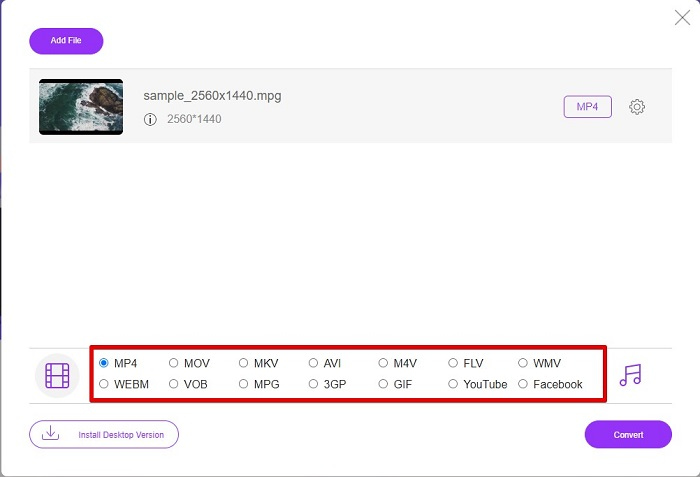
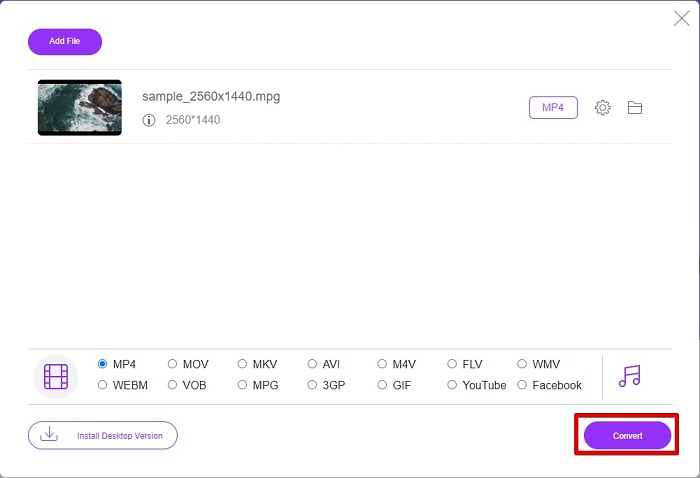
الخطوة 4. انقر زر Convert لبدء التحويل. ستُفتح علامة تبويب جديدة تختار فيها المكان الذي تريد حفظ الملف المحوّل فيه على جهازك، ثم انقر select folder.
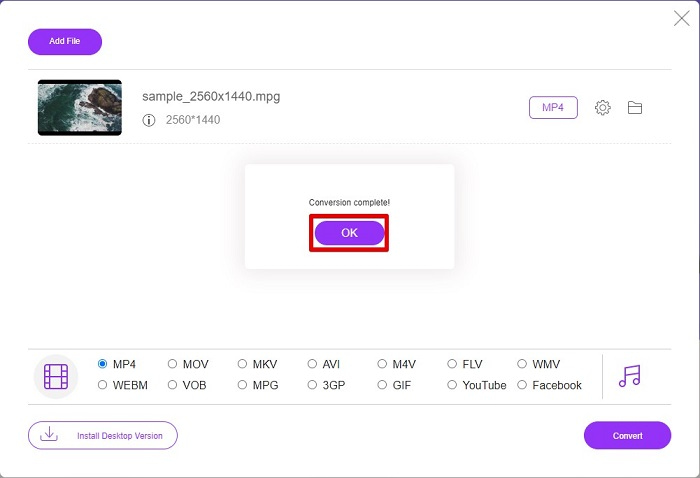
الخطوة 5. أخيرًا، سيبدأ الملف في التحويل، وعند الانتهاء انقر OK لإنهاء العملية. وهكذا تكون قد أنجزت التحويل بسهولة وكأنه 1-2-3!
3. استخدم ConvertFiles.com
ConvertFiles.com هو تطبيق محول مجاني عبر الإنترنت لتحويل ملف MPG إلى MP4. يسمح لك بتحويل تنسيقات الملفات ، حتى 300 نوع من تنسيقات الملفات. وإذا كنت تبحث عن محول MPG إلى MP4 عبر الإنترنت والذي سيمكنك من تحويل المستندات والرسومات ومقاطع الفيديو والعروض التقديمية والمزيد. ومع ذلك ، عند استخدام هذا المحول عبر الإنترنت ، ستواجه الكثير من الإعلانات المزعجة. ومع ذلك ، لا يزال هذا المحول عبر الإنترنت يستحق المحاولة وأثبت أنه واعد.
إليك كيفية تحويل ملف MPG إلى تنسيق ملف MP4:
الخطوة 1. من خلال المتصفح، ابحث عن ConvertFiles.com للوصول مباشرةً إلى صفحة الموقع.
الخطوة 2. اختر ملف MPG بالنقر على الزر المستطيل أو زر Browse بجوار خيار Choose a local file. حدّد ملف MPG الذي تريده ثم اختره.
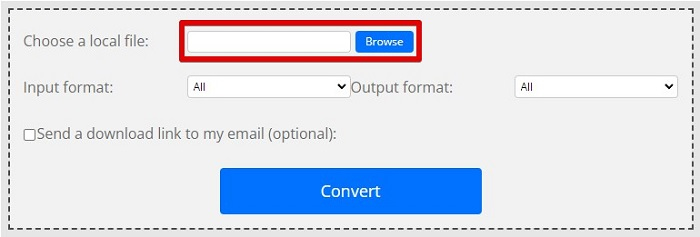
الخطوة 3. بعد اختيار ملف MPG الذي تريد تحويله، انتقل إلى خيار صيغة الإخراج، ثم اختر صيغة .mp4 من خلال النقر على زر drop-down.
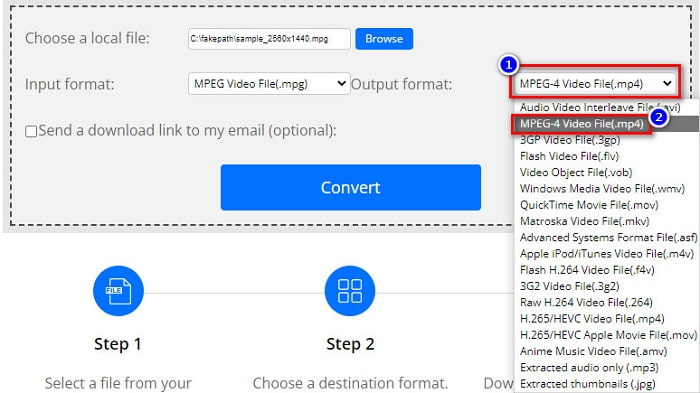
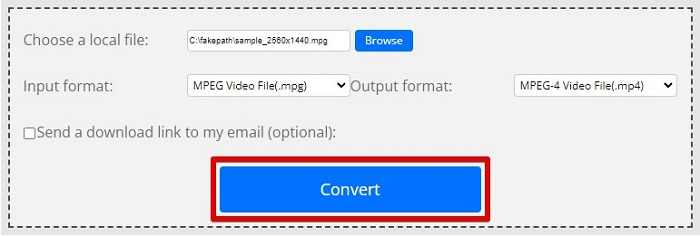
الخطوة 4. بعد تحديد الصيغة التي تريدها، يمكنك الآن تحويل الملف بالنقر على Convert.
MPG مقابل MP4
تم إعداد MPG بواسطة مجموعة Moving Picture Experts Group (MPEG) ، وهو تنسيق فيديو رقمي شائع لتخزين معلومات الفيديو والصوت والبيانات الوصفية. إنه مفيد جدًا عند إنشاء أفلام لمشاركتها على الإنترنت. عادةً ما تحتوي تلك الملفات في MPG على ضغط فيديو / صوت MPEG-1 أو MPEG-2.
تم إصداره بواسطة Moving Picture Experts Group (MPEG) في عام 2001 ، يمكن أن يساعدك تنسيق MP4 في حفظ بيانات الفيديو والصوت والترجمة والصور في مسارات منفصلة. إنه اختصار MPEG-4 Part 14. بالإضافة إلى أنه أحد أكثر التنسيقات شيوعًا المستخدمة لدفق مقاطع الفيديو ومشاركتها.
الجزء 3. أسئلة وأجوبة حول تنسيق MPG و MP4
هل يمكنني تحويل ملفات MPG إلى MP4 دون فقدان جودتها؟
نعم. يسمح لك Video Converter Ultimate بتحويل MPG إلى تنسيق MP4 ، دون فقد جودته ، على الرغم من حجم ملفه.
أين يمكنني تشغيل ملفات MPG؟
تتمتع ملفات MPG بدعم واسع؛ لذلك يمكن للعديد من مشغلات الوسائط فتح هذه الصيغة، بما في ذلك Microsoft Windows Media Player وVideoLAN VLC Media Player. يمكنك الاطلاع على هذه المقالة لمزيد من المعلومات: أفضل 4 مشغلات MPG/MPEG لنظامَي Windows وMac وهواتف Android وiPhone [2021]
هل يمكنني تحويل MP4 إلى MPG؟
نعم. يمكنك تحويل MPG إلى تنسيق ملف MP4 باستخدام محولات الملفات التي ذكرناها أعلاه.
خاتمة
المحوِّلات التي ذكرناها أعلاه ثبت أنها أدوات موثوقة. فهي سهلة الاستخدام ومجانية! ولكن إذا أردت برنامج تحويل ملفات يمكنه تحويل ملف MPG إلى صيغة MP4 ويقدّم ميزات رائعة لتحسين ملفك، فإن Video Converter Ultimate هو الخيار الأفضل. علاوة على ذلك، إذا كنت تفضّل محوِّلًا عبر الإنترنت خاليًا من الإعلانات ويمكنه أيضًا تحويل الملفات الكبيرة بسهولة، فجرّب FVC Free Online Converter.
-
 3 طرق سهلة حول كيفية تحويل MPG إلى MOV على جهاز Mac / Windows / Online
 هل تريد تحويل ملفات MPG الخاصة بك ونقلها لاحقًا على iOS أو iPod أو iPad أو Mac؟ ستساعد هذه المقالة في معرفة كيفية تحويل MPG إلى MOV بخطوات.
-
 كيفية تحويل MPG إلى FLV دون فقدان الجودة [مثبت]
 يجب أن تشاهد فيلمك المفضل على مشغل الوسائط هذا ، لكنه لا يدعم MPG. حاول تحويل ملف MPG إلى FLV باستخدام هذه المحولات التي يقدمها هذا المقال.
-
 2 محولات MPG Ultimate لتحويل MPG إلى WMV مجانًا
 هل تريد تحويل MPG إلى WMV مجانًا؟ في هذه الحالة ، أنت محظوظ لأننا اكتشفنا أن هناك أداتين يمكنك استخدامهما لتحويل ملفات MPG.

