


 محول الفيديو النهائي
 مسجل الشاشة
 إصلاح الفيديو
 تنزيل آمن
كيفية تحويل QuickTime إلى MP4 على Windows / Mac / Online / iOS / Android
في معظم الحالات ، يشير تنسيق ملف QuickTime إلى MOV. يحفظ QuickTime مقاطع الفيديو بتنسيق MOV افتراضيًا. ومع ذلك ، فإن ملفات QuickTime MOV غير متوافقة مع جميع مشغلات الوسائط. بالمقارنة مع MOV ، يعد MP4 خيارًا أفضل. يمكنك الحصول على نفس محتوى الفيديو بحجم ملف أصغر وتوافق أفضل. لهذا السبب يقوم العديد من الأشخاص بتحويل QuickTime إلى تنسيق MP4. ثم هنا يأتي السؤال ، كيفية تحويل فيديو QuickTime إلى MP4 على جهاز الكمبيوتر الخاص بك؟ إليك 3 حلول يمكنك استخدامها.

الجزء 1: كيفية تحويل QuickTime إلى MP4 عبر الإنترنت مجانًا
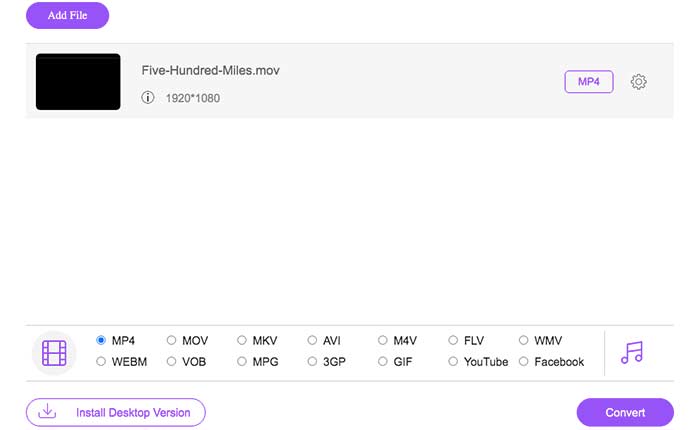
FVC Free Online Video Converter هو محول فيديو مجاني إلى MP4 لمستخدمي ويندوز وماك. يمكنك تحويل ملفات QuickTime MOV والملفات الأخرى إلى MP4 مجانًا عبر الإنترنت. وعلى عكس محولات الفيديو الشائعة على الإنترنت، لا يوجد حد أقصى لحجم الملف. يمكنك تحويل ملفات MOV كبيرة دفعة واحدة إلى MP4 بدون فقدان للجودة. لن تتم إضافة أي علامة مائية إلى ملفات الإخراج، لذلك يمكنك تصدير أفلام QuickTime إلى MP4 عبر الإنترنت بكل حرية.
الخطوة 1: افتح الموقع الرسمي لـ FVC Free Online Video Converter. انقر على خيار Add Files to Convert. عند تحويل الفيديو إلى MP4 عبر الإنترنت للمرة الأولى، تحتاج إلى تنزيل مشغّل FVC.
الخطوة 2: تصفّح واستورد فيديو QuickTime الخاص بك في النافذة المنبثقة.
الخطوة 3: يكون MP4 هو تنسيق الفيديو الافتراضي للإخراج. إذا لم يكن كذلك، يمكنك تغيير تنسيق الإخراج إلى MP4 يدويًا في الأسفل.
الخطوة 4: انقر على Convert لتحويل QuickTime إلى MP4 مجانًا عبر الإنترنت.
الجزء 2: كيفية تحويل QuickTime MOV إلى MP4 على Windows
إذا كنت تريد تحويل فيديو MOV إلى MP4 بسرعة على جهاز الحاسوب، فيمكنك تغيير امتداد الملف مباشرة. QuickTime MOV هو تنسيق حاوية فيديو MPEG-4، بينما MP4 هو أيضًا تنسيق ملف فيديو MPEG-4. يعتبر MP4 مجموعة فرعية من تنسيق QuickTime MOV. لذلك يمكنك تحويل MOV إلى MP4 على ويندوز بمجرد تغيير الامتداد.
الخطوة 1: افتح المجلد الذي يحتوي على ملف MOV الخاص بك.
الخطوة 2: تأكد من أن امتداد الملف ظاهر. بمعنى آخر، يجب أن ترى امتداد الملف .mov. إذا لم يكن ظاهرًا، فأنت بحاجة إلى إظهار امتدادات أسماء الملفات يدويًا.
الخطوة 3: اختر Rename من قائمة النقر بزر الماوس الأيمن.
الخطوة 4: غيّر امتداد الملف من .mov إلى .mp4.
الخطوة 5: اضغط على مفتاح Enter في لوحة المفاتيح. بعد ذلك يمكنك تغيير فيديو QuickTime إلى MP4 على ويندوز.
الجزء 3: كيفية تحويل فيلم QuickTime إلى MP4 على Mac
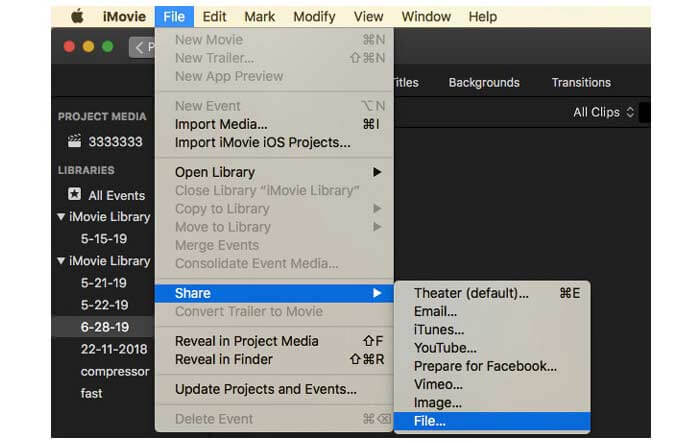
بالنسبة لمستخدمي Mac ، يمكنك استخدام iMovie كمحول مجاني من MOV إلى MP4. iMovie متاح لأجهزة macOS و iOS. يمكنك تحويل وتحرير ملفات QuickTime MOV على جهاز كمبيوتر Mac الخاص بك بسهولة. سيوضح لك هذا القسم كيفية تحويل QuickTime إلى MP4 على نظام Mac.
الخطوة 1: قم بتنزيل وتثبيت وفتح iMovie على جهاز ماك. اختر New Movie من قائمة File المنسدلة.
الخطوة 2: انقر على Import Media لإضافة فيلم QuickTime إلى iMovie.
الخطوة 3: اختر فيديو QuickTime MOV الذي قمت باستيراده. ثم حدد Share من قائمة File المنسدلة. اختر File من القائمة الفرعية.
الخطوة 4: اضبط إعدادات فيديو الإخراج من حيث الوجهة والدقة والجودة وغير ذلك. انقر على Next للمتابعة.
الخطوة 5: عيّن اسمًا للملف ومجلدًا للإخراج. أخيرًا، انقر على Save لتحويل QuickTime إلى MP4 على ماك باستخدام iMovie.
الجزء 4: كيفية تحويل فيديو من MOV إلى MP4 باستخدام VLC
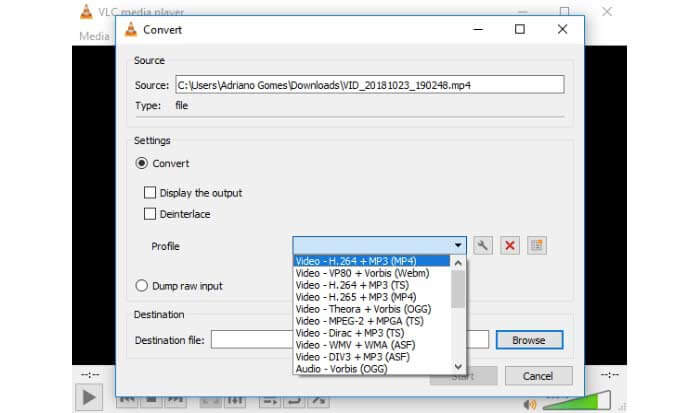
VLC هو محول ومشغل ومحرر مجاني ومفتوح المصدر للفيديو متعدد المنصات. يمكن لمستخدمي الأجهزة المحمولة وسطح المكتب تحويل ملفات MOV إلى MP4 مجانًا باستخدام VLC. وبالتالي ، يمكنك تحويل QuickTime إلى MP4 على iPhone و Android باستخدام VLC أيضًا. VLC مجاني وآمن للتنزيل. يمكنك التوجه إلى موقعه الرسمي للحصول على حزمة التنزيل النظيفة.
الخطوة 1: شغّل VLC. اختر Convert/Save من قائمة Media.
الخطوة 2: في نافذة Open Media، انقر على Add لاستيراد فيديو QuickTime MOV. ثم انقر على Convert/Save للمتابعة.
الخطوة 3: افتح قائمة Profile. اختر Video – H.264 + MP3 (MP4).
الخطوة 4: انقر على Start لبدء تحويل QuickTime إلى MP4 باستخدام VLC.
الجزء 5: الأسئلة الشائعة حول تحويل QuickTime إلى MP4
هل يمكنك تحويل MOV إلى MP4 باستخدام QuickTime؟
لا. يمكنك فتح مقاطع فيديو MOV باستخدام QuickTime Player. لكن لا يتم دعم تحويل فيديو MOV إلى MP4 باستخدام QuickTime.
هل برنامج QuickTime Pro متاح؟
نعم. أحدث إصدار هو QuickTime Player 7. لم تعد Apple تقدم ترقية QuickTime Pro. لا يزال بإمكانك استخدام برنامج QuickTime Player Pro على كمبيوتر يعمل بنظام Windows أو Mac. لكن شركة آبل زادت من دعمك لبرنامج QuickTime.
ما هي البرامج التي يمكنها فتح مقاطع فيديو MOV؟
يمكنك تشغيل ملفات MOV باستخدام QuickTime Player و iTunes و VLC و Windows Media Player و Adobe Flash والمزيد.
باستخدام محولات الفيديو السابقة عبر الإنترنت وعلى سطح المكتب، يمكنك تحويل QuickTime إلى MOV مجانًا على هاتفك وجهاز الكمبيوتر. يمكنك استخدام محول MOV إلى MP4 عبر الإنترنت، أو تغيير امتداد الملف، أو استخدام iMovie وVLC لتحويل تنسيق الفيديو من QuickTime MOV إلى MP4. إذا كنت تريد تحويل ملفات QuickTime إلى MP4 دفعة واحدة بدون برامج خارجية، يمكن أن يكون FVC Free Online Video Converter خيارك الأول. فهو آمن تمامًا ومجاني للاستخدام. يمكنك تحويل فيديو QuickTime إلى MP4 وغيرها من الصيغ دفعة واحدة بجودة عالية.
-
 MOV مقابل MP4 - أيهما أفضل
 MOV مقابل MP4 ، أيهما أفضل؟ يوضح هذا المنشور الفرق بين MP4 و MOV ، بحيث يمكنك الحصول على أفضل خيار لاستخدامه لملفات الفيديو الخاصة بك.
-
 أفضل 4 طرق مجانية لتحويل MTS إلى MOV
 لا يمكنك تشغيل ملف MTS على جهاز الكمبيوتر الخاص بك أو هاتف iPhone / Android؟ ما هو ملف MTS وكيف يتم تشغيله؟ ما هو أفضل محول فيديو MTS؟ يشارك هذا المنشور 4 طرق بسيطة ومجانية لمساعدتك على تحويل MTS إلى MOV لتشغيل أفضل.
-
 6 طرق سهلة لتحويل TS إلى AVI / MKV / MOV / WMV على نظامي التشغيل Windows / Mac
 هل تريد تحويل ملفات TS إلى AVI / MKV / MOV / WMV بسرعة؟ تعرض هذه المقالة محولات الفيديو عبر الإنترنت وغير المتصلة مع دليل كامل. ربما يمكنك الحصول على أفضل محول TS مجاني هنا.
